RoboICL: Embodied In-Context Learning with GPT-6 Astra
Multimodal Models as Few-Shot Robot Learners



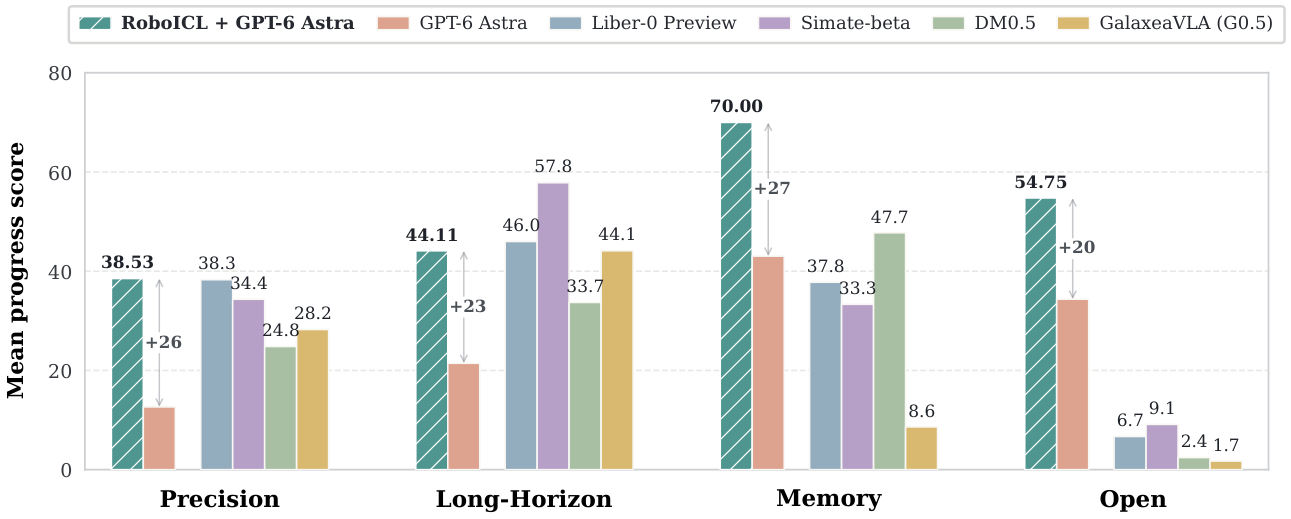
RoboICL uses interaction memory alone on Open and one demonstration on the other categories.
News
- 2026-09-29 Paper released on arXiv, together with the code and 800+ interactive evaluation rollouts.
- 2026-09-19 Research Preview launched.
Overview
RoboICL is an in-context robot-control framework that adapts a frozen
general-purpose vision-language model from demonstrations and its own execution
history. It requires no robot-specific parameter update and no learned
vision-language-action model.
RoboICL separates context into two complementary sources:
- Demonstration context provides recorded robot trajectories as executable
few-shot examples.
- Interaction memory retains the model's own actions, controller feedback,
and resulting observations during the current rollout.
- A shared interaction grammar presents both sources as
observation -> action -> receipt -> observation records.
- Bounded anchored memory preserves selected early and intermediate
interactions while retaining the latest result for immediate correction.
The released runner connects GPT-6 Astra to RoboDojo through one validated
action interface. At each request, the model observes a triptych of the left
wrist, head, and right wrist cameras together with robot proprioception, then
predicts a bounded sequence of dual-arm Cartesian actions for closed-loop
execution.
Installation
Prerequisites
- Linux with an NVIDIA GPU and a working Vulkan/CUDA stack
- Git and Git LFS
- an Isaac Sim 5.1-compatible simulator environment
- a separate Python environment for the multimodal policy process
The simulator and policy processes intentionally use separate interpreters
because their websockets and simulator dependency constraints differ.
Clone the repository
git clone --recurse-submodules https://github.com/Mosi-AI/RoboICL.git
cd RoboICL
For an existing clone:
git submodule update --init --recursive
The exact supported commits of RoboDojo, XPolicyLab, IsaacLab, and cuRobo are
recorded in configs/upstream.lock.json and verified before launch.
Point RoboICL at the interpreters that contain your simulator and policy
dependencies:
export ROBOICL_SIM_PYTHON=/path/to/sim/bin/python
export ROBOICL_POLICY_PYTHON=/path/to/policy/bin/python
export ROBOICL_DATA_ROOT="$PWD/data"
export ROBOICL_RESULTS_ROOT="$PWD/results"
source setup/paths.sh
Install the direct RoboICL dependencies into those environments after the
Isaac Sim environment itself is available:
"$ROBOICL_POLICY_PYTHON" -m pip install -r setup/requirements-policy.txt
"$ROBOICL_SIM_PYTHON" -m pip install \
  -r setup/requirements-sim.txt \
  -c setup/constraints-sim.txt
If the simulator environment provides a newer libstdc++ than the host:
SIM_PREFIX="$(dirname -- "$(dirname -- "$ROBOICL_SIM_PYTHON")")"
export ROBOICL_SIM_LD_PRELOAD="$SIM_PREFIX/lib/libstdc++.so.6"
Data preparation
RoboDojo assets
Fetch the complete frozen RoboDojo asset tree into an external Git/LFS cache.
The script checks out the revision in configs/data.lock.json, verifies the
download, and links data/Assets to the cache.
"$ROBOICL_POLICY_PYTHON" setup/fetch_assets.py \
  --data-root "$ROBOICL_DATA_ROOT" \
  --cache /path/to/robodojo-data-cache
One-shot references
The paper benchmark contains exactly 8 Open tasks evaluated zero-shot and 22
non-Open tasks supplied with one demonstration. The complete source-episode
identity, HDF5 SHA256, prediction horizon, and all 12 selected action-window
starts are archived in
configs/references/one_shot_j12_b12.json.
Fetch and deterministically build any archived one-shot reference, for example:
"$ROBOICL_POLICY_PYTHON" setup/fetch_reference.py deposit_coin \
  --data-root "$ROBOICL_DATA_ROOT"

"$ROBOICL_POLICY_PYTHON" setup/fetch_reference.py fill_pen_holder \
  --data-root "$ROBOICL_DATA_ROOT"
The source is checked by SHA256, and the builder uses the exact archived starts
rather than silently re-running a heuristic. The generated bundle contains 12
non-overlapping action blocks and their starting/result observations.
TRAIN and LIVE use different selectors. TRAIN uses the exact action-window
starts recorded in the setting manifest. LIVE does not sample video frames:
eleven uniformly spaced time anchors retain the first complete executed
interaction that crosses each anchor, while the twelfth slot retains the latest
complete interaction.
To build a reference for another task from a local HDF5 episode:
"$ROBOICL_POLICY_PYTHON" -m roboicl.reference build \
  --task "$TASK" \
  --source "$ROBOICL_DATA_ROOT/runtime-data/$TASK/train/episode_0000000.hdf5" \
  --source-id "runtime-data/$TASK/train/episode_0000000.hdf5" \
  --source-sha256 "$SOURCE_SHA256" \
  --output "$ROBOICL_DATA_ROOT/runtime-data/$TASK/reference_1shot_train12_endpoint_h$H" \
  --horizon "$H" \
  --chunks 12 \
  --selected-starts "$START_0,$START_1,...,$START_11"
Run RoboICL
The release provides two main protocols:
| Protocol |
Demonstrations |
TRAIN blocks J |
LIVE memory blocks B |
configs/protocols/zero_shot_b25.json |
0 |
0 |
25 |
configs/protocols/one_shot_j12_b12.json |
1 |
12 |
12 |
Both use the task-adaptive action horizons in
configs/adaptive_horizons.json.
1. Preflight without an API request
"$ROBOICL_POLICY_PYTHON" -m roboicl.run deposit_coin \
  --shots 0 \
  --seed 0 \
  --layout 0 \
  --profile configs/protocols/zero_shot_b25.json \
  --dry-run
This validates the task, layout, assets, profile, interpreters, and pinned
submodules without starting the simulator or calling the model API.
2. Validate the simulator and cameras
"$ROBOICL_POLICY_PYTHON" -m roboicl.run deposit_coin \
  --shots 0 \
  --seed 0 \
  --layout 0 \
  --gpu 0 \
  --profile configs/protocols/zero_shot_b25.json \
  --capture-only
--capture-only launches the scene and verifies the three RGB streams without
making a model request or executing an action.
3. Run a scored zero-shot rollout
export ASTRA_API_KEY=...

"$ROBOICL_POLICY_PYTHON" -m roboicl.run deposit_coin \
  --shots 0 \
  --seed 0 \
  --layout 0 \
  --gpu 0 \
  --profile configs/protocols/zero_shot_b25.json
4. Run a scored one-shot rollout
export ASTRA_API_KEY=...

"$ROBOICL_POLICY_PYTHON" -m roboicl.run deposit_coin \
  --shots 1 \
  --seed 0 \
  --layout 0 \
  --gpu 0 \
  --profile configs/protocols/one_shot_j12_b12.json
Replace the task, seed, and layout as needed. Use --reference /path/to/bundle
for a one-shot task without a published reference path. A process exit code of
zero means evaluation completed; task success and progress are reported by the
native RoboDojo evaluator in the generated result.json.
Repository layout
roboicl/
├── run.py                 preflight and process orchestration
├── robodojo.py            single-layout RoboDojo adapter
├── rollout.py             observation/action execution loop
├── policy_server.py       XPolicyLab WebSocket policy entrypoint
├── reference.py           reference builder and verifier
└── policy/                prompting, memory, validation, and transport
configs/
├── protocols/             zero-shot and one-shot protocol profiles
├── tasks/                 official documentation for 42 tasks
├── adaptive_horizons.json task-specific action horizons
├── data.lock.json         frozen asset revision
├── references/             setting-level source episodes and exact TRAIN windows
└── upstream.lock.json     pinned submodule commits
setup/
├── fetch_assets.py
├── fetch_reference.py
├── requirements-policy.txt
├── requirements-sim.txt
└── paths.sh
third_party/
├── RoboDojo/
├── XPolicyLab/
├── IsaacLab/
└── curobo/


Citation
@article{liu2026roboicl,
  title   = {RoboICL: Embodied In-Context Learning with GPT-6 Astra},
  author  = {Liu, Fangcheng and Shen, Yeqing and Cheng, Anda and Mi, Weishi and
             Tang, Chao and Liu, Chenyuan and Xiang, Yushun and Li, Tingguang and
             Li, Yong-Lu and Tang, Yehui},
  journal = {arXiv preprint arXiv:2609.34261},
  year    = {2026},
  eprint  = {2609.34261},
  archivePrefix = {arXiv},
  url     = {https://arxiv.org/abs/2609.34261}
}
License
RoboICL's project-owned code is released under the MIT License.
Third-party submodules and benchmark assets retain their original licenses and
terms.

 RoboICL 是一个研究框架,让冻结的通用视觉语言模型(GPT-6 Astra)纯粹通过上下文学习在仿真中控制机器人,无需训练专门的机器人策略。