LeWorldModel
Stable End-to-End Joint-Embedding Predictive Architecture from Pixels
Lucas Maes*, Quentin Le Lidec*, Damien Scieur, Yann LeCun and Randall Balestriero
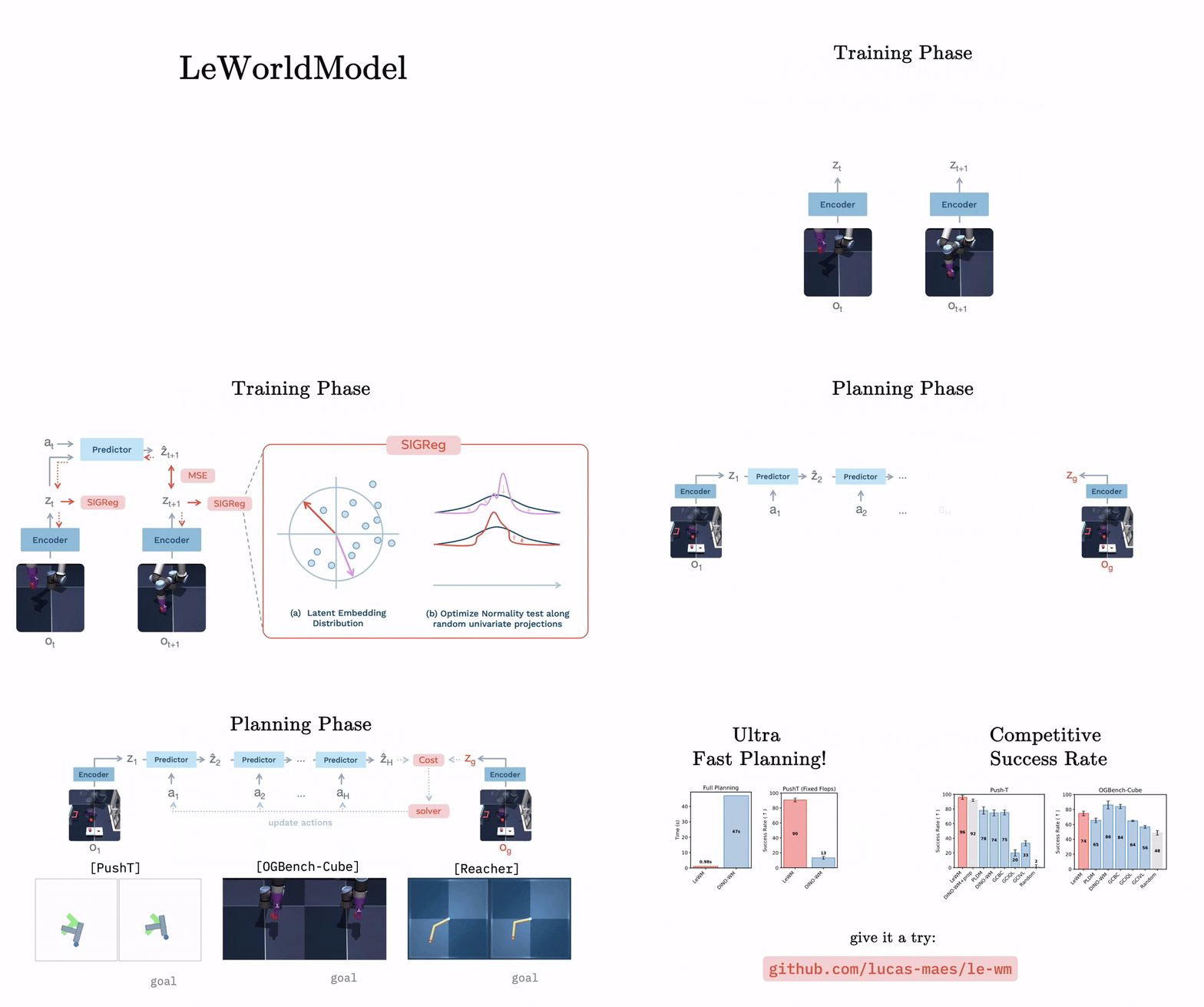
Abstract: Joint Embedding Predictive Architectures (JEPAs) offer a compelling framework for learning world models in compact latent spaces, yet existing methods remain fragile, relying on complex multi-term losses, exponential moving averages, pretrained encoders, or auxiliary supervision to avoid representation collapse. In this work, we introduce LeWorldModel (LeWM), the first JEPA that trains stably end-to-end from raw pixels using only two loss terms: a next-embedding prediction loss and a regularizer enforcing Gaussian-distributed latent embeddings. This reduces tunable loss hyperparameters from six to one compared to the only existing end-to-end alternative. With ~15M parameters trainable on a single GPU in a few hours, LeWM plans up to 48× faster than foundation-model-based world models while remaining competitive across diverse 2D and 3D control tasks. Beyond control, we show that LeWM's latent space encodes meaningful physical structure through probing of physical quantities. Surprise evaluation confirms that the model reliably detects physically implausible events.
[ Paper | Checkpoints & Data | Website ]
If you find this code useful, please reference it in your paper:
@article{maes_lelidec2026lewm,
  title={LeWorldModel: Stable End-to-End Joint-Embedding Predictive Architecture from Pixels},
  author={Maes, Lucas and Le Lidec, Quentin and Scieur, Damien and LeCun, Yann and Balestriero, Randall},
  journal={arXiv preprint},
  year={2026}
}
Using the code
This codebase builds on stable-worldmodel for environment management, planning, and evaluation, and stable-pretraining for training. Together they reduce this repository to its core contribution: the model architecture and training objective.
Installation:
uv venv --python=3.10
source .venv/bin/activate
uv pip install stable-worldmodel[train,env]
Data
Datasets use the HDF5 format for fast loading. Download the data from HuggingFace and decompress with:
tar --zstd -xvf archive.tar.zst
Place the extracted .h5 files under $STABLEWM_HOME (defaults to ~/.stable-wm/). You can override this path:
export STABLEWM_HOME=/path/to/your/storage
Dataset names are specified without the .h5 extension. For example, config/train/data/pusht.yaml references pusht_expert_train, which resolves to $STABLEWM_HOME/pusht_expert_train.h5.
Training
jepa.py contains the PyTorch implementation of LeWM. Training is configured via Hydra config files under config/train/.
Before training, set your WandB entity and project in config/train/lewm.yaml:
wandb:
  config:
    entity: your_entity
    project: your_project
To launch training:
python train.py data=pusht
Checkpoints are saved to $STABLEWM_HOME upon completion.
For baseline scripts, see the stable-worldmodel scripts folder.
Planning
Evaluation configs live under config/eval/. Set the policy field to the checkpoint path relative to $STABLEWM_HOME, without the _object.ckpt suffix:
# ✓ correct
python eval.py --config-name=pusht.yaml policy=pusht/lewm

# ✗ incorrect
python eval.py --config-name=pusht.yaml policy=pusht/lewm_object.ckpt
Pretrained Checkpoints
Pretrained LeWM checkpoints for each environment are mirrored on the Hugging Face
Hub (model repos), alongside the datasets (dataset repos) in the same collection:
The full baseline checkpoint suite (PLDM, LeJEPA, IVL, IQL, GCBC, DINO-WM, DINO-WM-noprop)
is available on Google Drive:
| Method |
two-room |
pusht |
cube |
reacher |
| pldm |
✓ |
✓ |
✓ |
✓ |
| lejepa |
✓ |
✓ |
✓ |
✓ |
| ivl |
✓ |
✓ |
✓ |
— |
| iql |
✓ |
✓ |
✓ |
— |
| gcbc |
✓ |
✓ |
✓ |
— |
| dinowm |
✓ |
✓ |
— |
— |
| dinowm_noprop |
✓ |
✓ |
✓ |
✓ |
Loading a checkpoint
From the Drive archive
Each tar archive contains two files per checkpoint:
<name>_object.ckpt — a serialized Python object for convenient loading; this is what eval.py and the stable_worldmodel API use<name>_weight.ckpt — a weights-only checkpoint (state_dict) for cases where you want to load weights into your own model instance
Place the extracted files under $STABLEWM_HOME/ and load via:
import stable_worldmodel as swm

# Load the cost model (for MPC)
cost = swm.policy.AutoCostModel('pusht/lewm')
AutoCostModel accepts:
run_name — checkpoint path relative to $STABLEWM_HOME, without the _object.ckpt suffixcache_dir — optional override for the checkpoint root (defaults to $STABLEWM_HOME)
The returned module is in eval mode with its PyTorch weights accessible via .state_dict().
From the Hugging Face mirror
The HF model repos ship the LeWM checkpoint as a weights.pt (state dict) plus a
config.json describing the model. Convert once to produce the _object.ckpt
that eval.py expects:
# download weights.pt + config.json
hf download quentinll/lewm-pusht --local-dir $STABLEWM_HOME/hf_pusht

# convert to object checkpoint under $STABLEWM_HOME/pusht/lewm_object.ckpt
python - <<'PY'
import json, torch, stable_pretraining as spt
from pathlib import Path
from jepa import JEPA
from module import ARPredictor, Embedder, MLP
import stable_worldmodel as swm

src = Path(swm.data.utils.get_cache_dir(), "hf_pusht")
out = Path(swm.data.utils.get_cache_dir(), "pusht", "lewm_object.ckpt")

cfg = json.loads((src / "config.json").read_text())
encoder = spt.backbone.utils.vit_hf(
    cfg["encoder"]["size"],
    patch_size=cfg["encoder"]["patch_size"],
    image_size=cfg["encoder"]["image_size"],
    pretrained=False, use_mask_token=False,
)
mlp = lambda k: MLP(input_dim=cfg[k]["input_dim"], output_dim=cfg[k]["output_dim"],
                    hidden_dim=cfg[k]["hidden_dim"], norm_fn=torch.nn.BatchNorm1d)
model = JEPA(
    encoder=encoder,
    predictor=ARPredictor(**cfg["predictor"]),
    action_encoder=Embedder(**cfg["action_encoder"]),
    projector=mlp("projector"),
    pred_proj=mlp("pred_proj"),
)
sd = torch.load(src / "weights.pt", map_location="cpu", weights_only=False)
model.load_state_dict(sd, strict=True)
out.parent.mkdir(parents=True, exist_ok=True)
torch.save(model, out)
PY
After conversion, load via swm.policy.AutoCostModel('pusht/lewm') as usual.
Feel free to open issues! For questions or collaborations, please contact [email protected]

 这是 LeWorldModel(LeWM)的官方代码库。它是一种联合嵌入预测架构(JEPA),仅用两个损失项就能直接从像素学习世界模型,避开了 EMA、预训练编码器或辅助监督等常见技巧。