Unified Motion Retargeting for Humanoids with Learned Point Cloud Correspondence
Hanyang Cao1,2,*,
Yuetong Fang1,2,*,
Taesoo Kwon3,*,
Runyi Yu2,4,
Ji Ma5,
Jing Tan1,2,
Yangchen Zhou1,
Baoze Du2,
Yi Gu1,
Yukang Gao1,2,
Ruoli Dai2,
Lei Han2,†,
Renjing Xu1,†
1HKUST (Guangzhou)
2Noitom Robotics
3Hanyang University
4HKUST
5HKU
*Equal contribution
†Corresponding authors


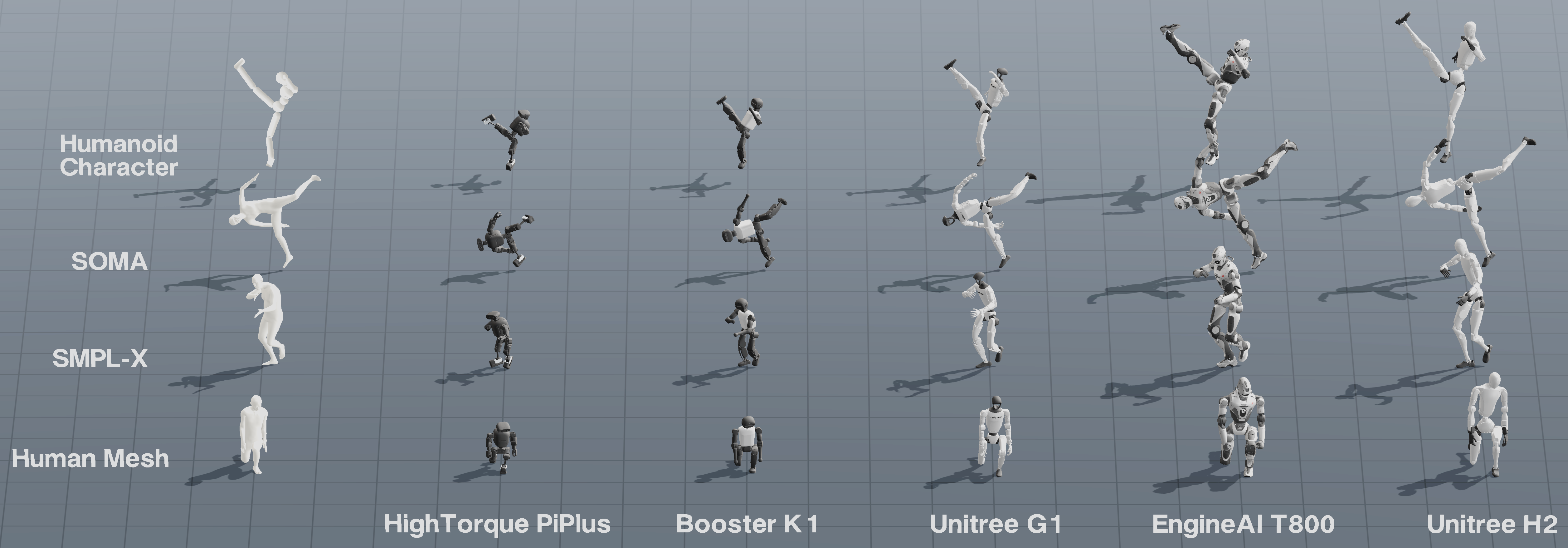
UMR treats the moving exterior body surface as a shared interface between human
motion and humanoid robots. It has two main stages:
- Point Cloud Correspondence Learning learns ordered source-robot surface
correspondence in aligned canonical poses.
- Correspondence-Guided Retargeting optimizes robot motion using matched
surface positions, orientations, contacts, and kinematic constraints.
A learned correspondence is reused by motions with the same source template
and target robot.
Supported Motion Sources
UMR samples the moving exterior surface, so any source with surface-level motion
information can be integrated through the same formulation.
OmniContact support. An internal development version of UMR was used to produce the Unitree G1 retargeting data released by OmniContact. OmniContact provides the source motions as BVH, while UMR uses SMPL-X inputs. The internal BVH-to-SMPL-X converter is not included in this repository, so the current release does not directly support these BVH files.
For LAFAN1, use lafan_to_smplx
to convert BVH motion to SMPL-X before retargeting. Each adapter guide documents
the expected local layout.
Installation
conda create -n umr python=3.12 pip -y
conda activate umr
python -m pip install --index-url https://download.pytorch.org/whl/cu121 torch==2.4.1
python -m pip install -r requirements-umr.txt
SMPL-X Body Models
SMPL-X body-model files are not distributed with this repository. Download
them from the official SMPL-X provider after accepting its terms. Both .pkl
and .npz models are supported; place at least the neutral model at:
smpl/SMPLX_NEUTRAL.pkl
# or
smpl/SMPLX_NEUTRAL.npz
Add SMPLX_MALE and SMPLX_FEMALE in either format when a sequence requires
those genders. The NPZ path has been tested with both neutral SMPL-X motion and
female OMOMO motion.
The GRAIL example applies its bundled G1-SMPL-X template and pose-corrective
overlay to the user-provided neutral SMPL-X model at runtime; the derived baked
SMPL-X weights are not distributed.
Quick Start
Retarget the included LAFAN1-derived SMPL-X motion:
python scripts/humanoid_retarget_pipeline.py \
  --config robot_configs/humanoid_retarget_unitree_g1_example.json
The default configuration uses the included LAFAN1-derived SMPL-X sequence
sample_data/lafan1_smplx/dance1_subject2.npz. It builds or reuses the learned
point-cloud correspondence, runs correspondence-guided retargeting, and opens
the MuJoCo viewer.
To use another robot, copy the example config in robot_configs/ and update
its name and MJCF path. Prepare the robot T-pose in
UMR Studio: load the robot
asset folder, select its MJCF, adjust it into a T-pose, and click Copy T-pose
Config. Paste the copied tpose_qpos into the new robot config, then run the
pipeline with that config. No manual human-robot mapping is required.
The same surface-based formulation is exposed for other motion representations
and interaction settings:
# BONES-SEED SOMA motion
python scripts/humanoid_retarget_pipeline.py \
  --config robot_configs/humanoid_retarget_unitree_g1_example.json \
  --defaults humanoid_retarget_defaults_bones_seed.json

# Humanoid Character spin-kick
python scripts/humanoid_retarget_pipeline_character.py \
  --config robot_configs/humanoid_retarget_unitree_g1_example.json

# GRAIL human-scene interaction
python scripts/humanoid_retarget_pipeline_hsi_hoi.py \
  --config robot_configs/humanoid_retarget_unitree_g1_example.json \
  --defaults humanoid_retarget_defaults_hsi_hoi_grail.json

# OmniContact human-object interaction (pre-converted SMPL-X input)
python scripts/humanoid_retarget_pipeline_hsi_hoi.py \
  --config robot_configs/humanoid_retarget_unitree_g1_example.json \
  --defaults humanoid_retarget_defaults_hsi_hoi_standard.json

# OMOMO human-object interaction
python scripts/humanoid_retarget_pipeline_hsi_hoi.py \
  --config robot_configs/humanoid_retarget_unitree_g1_example.json \
  --defaults humanoid_retarget_defaults_hsi_hoi_standard.json \
  --data sample_data/omomo \
  --seq-key sub1_plasticbox_015

# NR FBX/BVH human motion
python scripts/humanoid_retarget_pipeline_nr.py \
  --config robot_configs/humanoid_retarget_unitree_g1_example.json

# AdaPT body+racket correspondence and retargeting
python scripts/humanoid_retarget_pipeline_adapt.py
Visualize a Result
Results contain the final robot qpos and the metadata required by the GLFW
MuJoCo viewer:
python scripts/visualize_robot_retarget_result.py \
  --result output/unitree_g1_retarget/dance1_subject2_smplx_unitree_g1.npz \
  --play
Batch Retargeting
Run the SMPL-X/LAFAN batch pipeline with:
python scripts/humanoid_retarget_pipeline_batch.py \
  --config robot_configs/humanoid_retarget_unitree_g1_example.json \
  --batch-config humanoid_retarget_defaults_batch.json
BONES-SEED uses its own batch defaults:
python scripts/humanoid_retarget_pipeline_batch.py \
  --config robot_configs/humanoid_retarget_unitree_g1_example.json \
  --batch-config humanoid_retarget_defaults_batch_bones_seed.json
Add --motion-folder sample_data/bones-seed/motions_proportional/bvh for the
actor-proportional subset. BONES-SEED associates each Axxx motion with its
matching shape and reuses one correspondence per source-template/robot pair.
Batch defaults use bidirectional warm start with dynamic programming to
reduce sensitivity to occasional singularities. This mode is recommended for
large-scale retargeting.
| Option |
Meaning |
--motion-folder PATH |
Select the input directory. |
--recursive / --pattern GLOB |
Control motion discovery. |
--workers N |
Set parallel retargeting jobs. |
--correspondence-workers N |
Set parallel correspondence preparation jobs. |
--retarget-gpus |
Control GPU assignment. |
--force-retarget |
Rebuild existing results. |
Results are saved under output/batch_retarget/<robot-name>/;
batch_summary.json records each clip status.
Configuration
--config selects the target robot. Robot-specific tpose_qpos, joint limits,
and model paths belong in this file. --defaults selects source- and
task-specific settings.
| Defaults |
Source |
humanoid_retarget_defaults.json |
SMPL/SMPL-X |
humanoid_retarget_defaults_bones_seed.json |
BONES-SEED / SOMA |
humanoid_retarget_defaults_humanoid_character.json |
Humanoid Character |
humanoid_retarget_defaults_hsi_hoi_grail.json |
GRAIL |
humanoid_retarget_defaults_hsi_hoi_standard.json |
OmniContact / OMOMO |
humanoid_retarget_defaults_nr.json |
NR FBX/BVH |
robot_configs/humanoid_retarget_defaults_adapt.json |
AdaPT SMPL-X+racket |
Surface Objective Weights
Surface weights are defined on the motion source, not per robot:
Each segment specifies sample_slots, point_cost, and normal_cost. Robots
sharing the same source/task use the same values; only the robot config changes.
Interaction defaults give more weight to end-effector preservation. These
settings work well for G1 and generally transfer to other robots, but may not be
optimal for every embodiment.
Data Preparation Notes
- For HSI/HOI, convex-decompose concave objects with
CoACD before retargeting. MuJoCo treats
a single mesh collision geom as its convex hull.
- BONES-SEED motion and SOMA-X asset placement is documented in the
BONES-SEED guide;
py-soma-x is included
in the requirements.
- NR FBX/BVH input requires Node.js 18 or newer. The bundled minimal Three.js
code is used only for FBX mesh parsing, not visualization.
Citation
If you find UMR useful in your research, please cite the paper:
@misc{cao2026unifiedmotionretargetinghumanoids,
  title={Unified Motion Retargeting for Humanoids with Learned Point Cloud Correspondence},
  author={Hanyang Cao and Yuetong Fang and Taesoo Kwon and Runyi Yu and Ji Ma and Jing Tan and Yangchen Zhou and Baoze Du and Yi Gu and Yukang Gao and Ruoli Dai and Lei Han and Renjing Xu},
  year={2026},
  eprint={2609.02134},
  archivePrefix={arXiv},
  primaryClass={cs.RO},
  url={https://arxiv.org/abs/2609.02134},
}

 UMR(Unified Motion Retargeting)是一个研究性代码库,它把人体运动重定向到人形机器人上,做法是把运动中的外部人体表面当作源动作与机器人之间的共享接口。