

Что это?
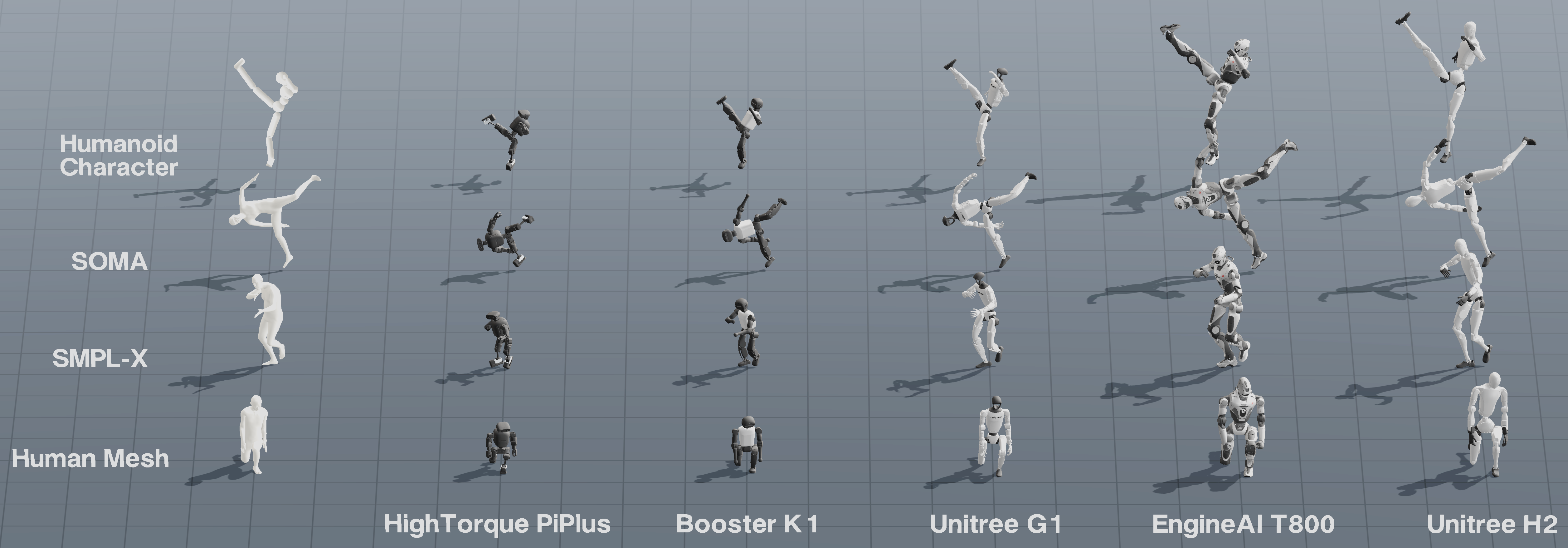
 UMR (Unified Motion Retargeting) — исследовательская кодовая база, которая переносит человеческие движения на гуманоидных роботов, рассматривая движущуюся внешнюю поверхность тела как общий интерфейс между исходным движением и роботом.
UMR (Unified Motion Retargeting) — исследовательская кодовая база, которая переносит человеческие движения на гуманоидных роботов, рассматривая движущуюся внешнюю поверхность тела как общий интерфейс между исходным движением и роботом.Это библиотека для импорта или конвейер, который я запускаю напрямую?Это автономный двухэтапный конвейер, который вы запускаете из конфигурационных файлов: сначала он выучивает соответствие облаков точек между поверхностью тела-источника и роботом, затем использует это соответствие для оптимизации движения робота.
Это автономный двухэтапный конвейер, который вы запускаете из конфигурационных файлов: сначала он выучивает соответствие облаков точек между поверхностью тела-источника и роботом, затем использует это соответствие для оптимизации движения робота.Как запустить свой первый ретаргетинг?Стандартный quick-start конфиг выполняет ретаргетинг входящего в комплект клипа SMPL-X на основе LAFAN1 (sampledata/lafan1smplx/dance1subject2.npz): он строит или переиспользует выученное соответствие и открывает просмотрщик MuJoCo. Чтобы добавить нового робота, скопируйте пример конфига в robotconfigs/ и сгенерируйте его T-pose настройки инструментом 'Copy T-pose Config' в UMR Studio.
Стандартный quick-start конфиг выполняет ретаргетинг входящего в комплект клипа SMPL-X на основе LAFAN1 (sampledata/lafan1smplx/dance1subject2.npz): он строит или переиспользует выученное соответствие и открывает просмотрщик MuJoCo. Чтобы добавить нового робота, скопируйте пример конфига в robotconfigs/ и сгенерируйте его T-pose настройки инструментом 'Copy T-pose Config' в UMR Studio.Что нужно скачать, чтобы всё заработало?Файлы модели тела SMPL-X нужно вручную скачать у официального поставщика SMPL-X (в комплект они не входят), а для входных движений NR FBX/BVH нужен Node.js 18 или новее из-за входящего в комплект кода разбора мешей.
Файлы модели тела SMPL-X нужно вручную скачать у официального поставщика SMPL-X (в комплект они не входят), а для входных движений NR FBX/BVH нужен Node.js 18 или новее из-за входящего в комплект кода разбора мешей.Может ли он ретаргетить BVH-файлы движений OmniContact напрямую?Нет. OmniContact поставляет исходные движения в BVH, но UMR ожидает входы SMPL-X, а внутренний конвертер BVH в SMPL-X, с помощью которого были получены опубликованные результаты, в комплект не входит, так что эти конкретные BVH-файлы пока напрямую не поддерживаются; LAFAN1 BVH можно предварительно конвертировать внешним инструментом lafantosmplx.
Нет. OmniContact поставляет исходные движения в BVH, но UMR ожидает входы SMPL-X, а внутренний конвертер BVH в SMPL-X, с помощью которого были получены опубликованные результаты, в комплект не входит, так что эти конкретные BVH-файлы пока напрямую не поддерживаются; LAFAN1 BVH можно предварительно конвертировать внешним инструментом lafantosmplx.Какие источники движений поддерживает UMR?BONES-SEED/SOMA, NVIDIA GRAIL, OmniContact, LAFAN1/SMPL-X, OMOMO, Humanoid Character из MimicKit, тело с ракеткой из AdaPT и обычные движения FBX/BVH — каждый описан собственным руководством по адаптеру в sampledata/.
BONES-SEED/SOMA, NVIDIA GRAIL, OmniContact, LAFAN1/SMPL-X, OMOMO, Humanoid Character из MimicKit, тело с ракеткой из AdaPT и обычные движения FBX/BVH — каждый описан собственным руководством по адаптеру в sampledata/.Как настроить совершенно нового робота?В UMR Studio загрузите папку с ассетом робота, выберите его MJCF, приведите его в T-pose и нажмите 'Copy T-pose Config'; вставьте результат в новый конфиг робота и запустите с ним конвейер — ручное сопоставление суставов человека и робота не требуется.
В UMR Studio загрузите папку с ассетом робота, выберите его MJCF, приведите его в T-pose и нажмите 'Copy T-pose Config'; вставьте результат в новый конфиг робота и запустите с ним конвейер — ручное сопоставление суставов человека и робота не требуется.Зачем выучивать соответствие облаков точек вместо ручного сопоставления суставов?Выученное соответствие между шаблоном-источником и целевым роботом вычисляется один раз и затем автоматически переиспользуется для каждого клипа движения с той же парой источник—робот, избавляя от ручной разметки для каждого движения.
Выученное соответствие между шаблоном-источником и целевым роботом вычисляется один раз и затем автоматически переиспользуется для каждого клипа движения с той же парой источник—робот, избавляя от ручной разметки для каждого движения.Можно ли ретаргетить много файлов движений за один раз?Да, батч-конвейер обрабатывает целые папки движений параллельно с опциями числа воркеров, распределения GPU и рекурсивного поиска файлов, сохраняя результаты и журнал статусов batchsummary.json в output/batchretarget/.
Да, батч-конвейер обрабатывает целые папки движений параллельно с опциями числа воркеров, распределения GPU и рекурсивного поиска файлов, сохраняя результаты и журнал статусов batchsummary.json в output/batchretarget/.What are similar projects?RoboICL, Zero-WAM, flex-pi, RoboHarness, kimodo, dreamforge, lerobot, Zetta-Embodiment
RoboICL, Zero-WAM, flex-pi, RoboHarness, kimodo, dreamforge, lerobot, Zetta-EmbodimentWhich topics is it in?motion-capture, robot, embodied-ai, robotics, simulation, 3d, academic-research, computer-vision, deep-learning, research, gpu, machine-learning
motion-capture, robot, embodied-ai, robotics, simulation, 3d, academic-research, computer-vision, deep-learning, research, gpu, machine-learning