Openlambda for Generalist Humanoid Learning








Highlights ·
Overview ·
Results ·
Get started ·
Hardware ·
Alignment ·
TODO ·
Citation
$\lambda_{\mathit{0}}$ learns whole-body humanoid loco-manipulation from everyday human experience.
News
Highlights
- 🌍 HumanVerse: 500 hours of robot-free capture across open-world scenes and tasks, pairing egocentric video with synchronized whole-body and hand motion.
- 🔗 Robot-aligned data pipeline: human video and motion are aligned to the robot's camera view and action space (details).
- ⚡ Cheaper data: about 3.4× collection throughput compared with robot teleoperation across representative task families (≈29 s vs. ≈100 s per demonstration).
- 🤖 Strong transfer on Unitree G1: 62.5% real-world success and 80.4% task progress over four tasks, +22.5 and +25.8 points over the strongest external baseline.
Overview
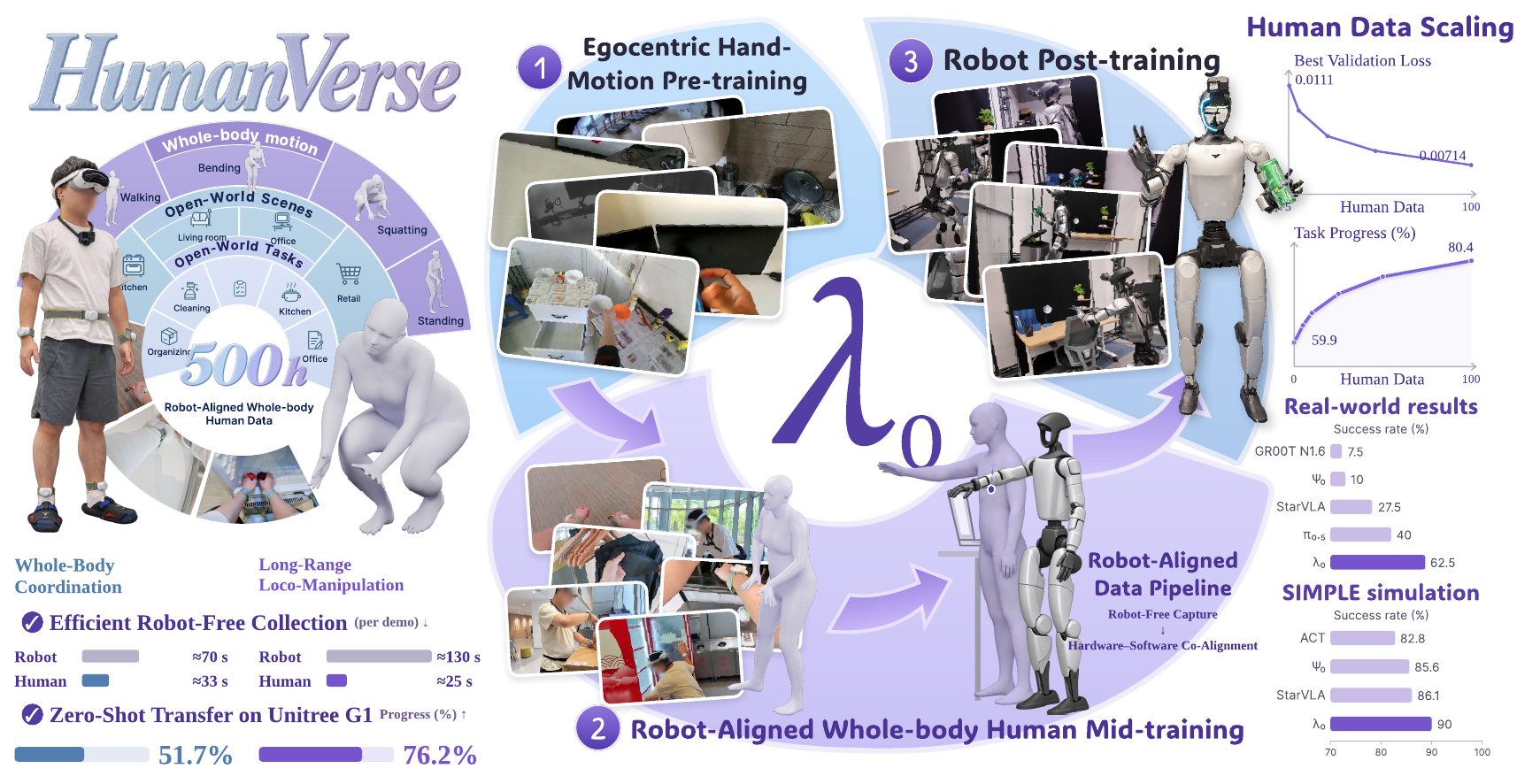
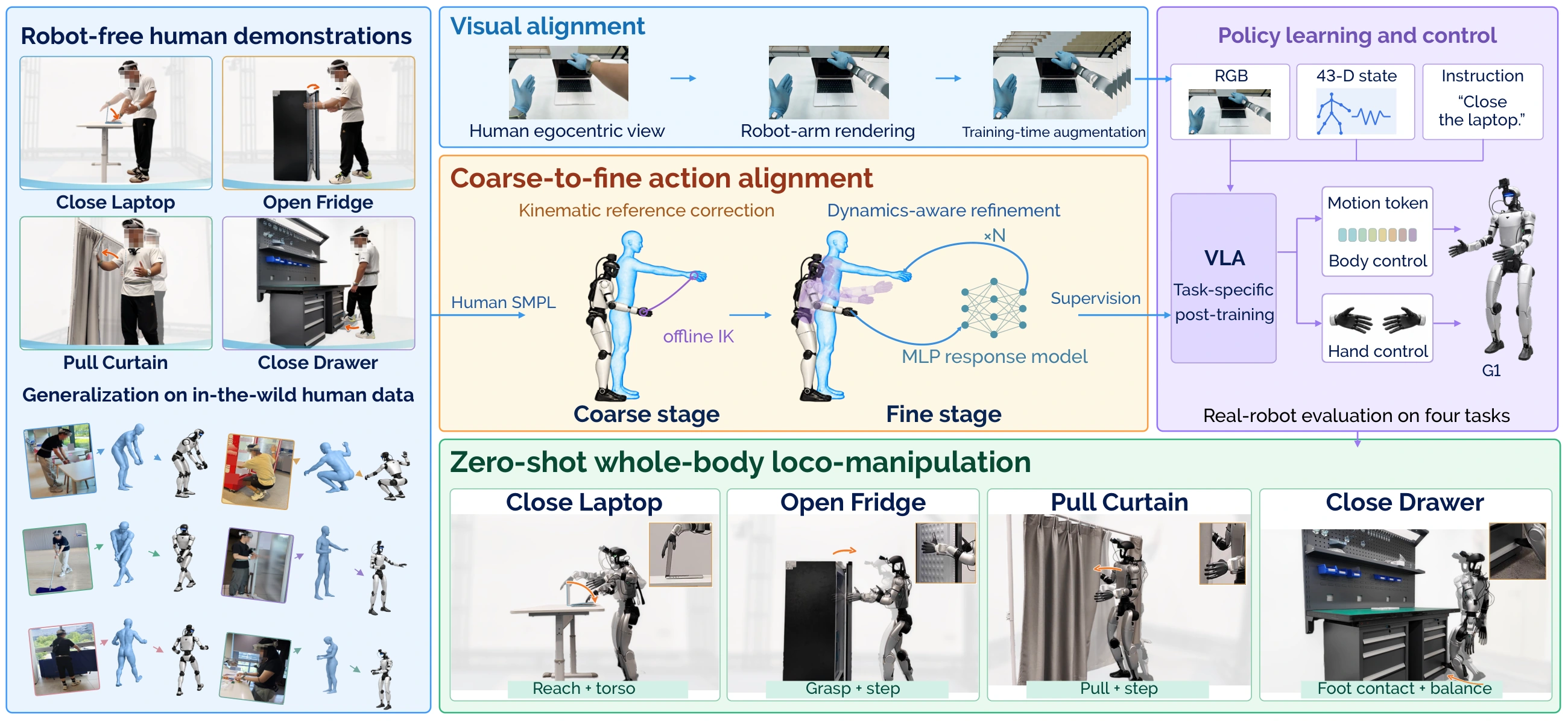
λ₀ couples a shared vision–language backbone with an action expert. It takes a robot camera image, a language instruction and proprioception, and outputs whole-body motion tokens executed by SONIC together with hand commands. Training runs in three stages:
| Stage |
Data |
Purpose |
| I · Egocentric hand-motion pretraining |
Seven existing egocentric human datasets |
Learn object interaction and articulated hand motion |
| II · Robot-aligned whole-body human mid-training |
HumanVerse, aligned to the G1 observation and action spaces |
Learn whole-body coordination from human experience |
| III · Robot post-training |
600 task-aligned human demonstrations (150 per task, held out from HumanVerse) plus native robot demonstrations |
Ground the model in executable robot actions |
Full pipeline figure
Results
Real-world evaluation on Unitree G1 across four tasks (Close Laptop, Open Fridge, Pull Curtain, Close Drawer), 40 trials per method.
| Method |
Success (%) |
Progress (%) |
| GR00T N1.6 |
7.5 |
21.3 |
| Ψ₀ |
10.0 |
31.8 |
| StarVLA |
27.5 |
54.6 |
| π₀.₅ |
40.0 |
54.0 |
| λ₀ (ours) |
62.5 |
80.4 |
|
| Training recipe |
Success (%) |
Progress (%) |
| No Stage I or II |
15.0 |
54.0 |
| Stages I + III |
22.5 |
59.9 |
| Stages II + III |
50.0 |
75.9 |
| Full recipe (I + II + III) |
62.5 |
80.4 |
|
- Simulation: 90.0% success on SIMPLE (six core tasks, three difficulty levels, 180 trials).
- Zero-shot transfer: 76.2% progress on long-range loco-manipulation (EgoAlign) and 51.7% on whole-body loco-manipulation (EgoHumanoid-V2).
- Data scaling: with a fixed 2B model, going from 5% to 100% of the human data lowers the minimum validation loss by 35.5% on the representative holdout and 40.6% on the clean holdout.
See the project page and the report for the full evaluation.
Releases
| Resource |
Description |
Link |
| Stage II checkpoint |
λ₀ after 100k mid-training updates, used to initialize the Stage III example |
🤗 lambda0-midtrain-100k |
| HumanVerse viewer |
Browse 20 HumanVerse excerpts with egocentric RGB video and SMPL body and hand motion |
🤗 HumanVerse-500-Viewer |
| Alignment examples |
Four trajectories with data, reports and replay videos |
examples · v0.1.1 release |
| Visual alignment examples |
Three recordings with four-stage previews and synchronized motion |
Examples |
| Hardware mounts |
STL files for the G1–Revo2 adapters and the head-mounted GoPro bracket |
hardware/assets |
Get started
git clone https://github.com/LambdaHumanoid/openlambda.git
cd openlambda
λ₀ foundation model
Install and run λ₀
Requires Python 3.11 or 3.12. From the repository root:
PYTHON=python3.11 bash scripts/install.sh
source .venv/bin/activate
python scripts/test.py -v
scripts/test.py checks package installation and CLI compatibility.
Optional extras: bash scripts/install.sh serve,tracking enables HTTP inference and WandB; fast adds platform-dependent GPU kernels. Existing environments can still use python -m pip install -e . (or .[serve], .[tracking], .[fast]) from the repository root.
Training
| Stage |
Data selection |
Training config |
| I · Pretraining |
configs/lambda0/pretrain/data.json |
configs/lambda0/pretrain/train.json |
| II · Mid-training |
configs/lambda0/midtrain/data.example.json |
configs/lambda0/midtrain/train.json |
| III · Post-training |
configs/lambda0/posttrain/data.example.json |
configs/lambda0/posttrain/train.json |
The Stage III example initializes from the raw weights in the Stage II checkpoint. Set STAGE2_CHECKPOINT_DIR to its downloaded directory.
From the repository root, set the paths required by the selected config, then prepare data and validate it (Stage I example). Relative paths in JSON configs resolve from the config file; command-line paths resolve from the current working directory:
python scripts/prepare.py --source-config configs/lambda0/pretrain/data.json \
  --data-root "$DATA_ROOT" --output "$BUNDLE_DIR"
python scripts/train.py --config configs/lambda0/pretrain/train.json --check-only
Training data format
Stage I expects first-person video and Parquet observation.state and observation.valid_mask fields, each with 138 coordinates per frame. Stage II and III examples expect canonical observation.state, observation.valid_mask, action, and action.valid_mask fields plus aligned video and metadata; the action and state dimensions follow the selected contract in src/openlambda/models/action_specs.py. Defaults are in src/openlambda/recipes/; editable examples are in configs/lambda0/.
Human collection outputs (observation.pico.*, observation.images.gopro) and alignment outputs (64-dimensional action.motion_token) require conversion before training. Stage II uses a 76-dimensional SONIC/Revo2 action contract, including hand commands. Conversion must supply aligned video, actions, proprioception, timestamps, task text, and validity masks. lambda0 prepare only bundles episodes already in the canonical format.
Hardware setup
Human Hardware
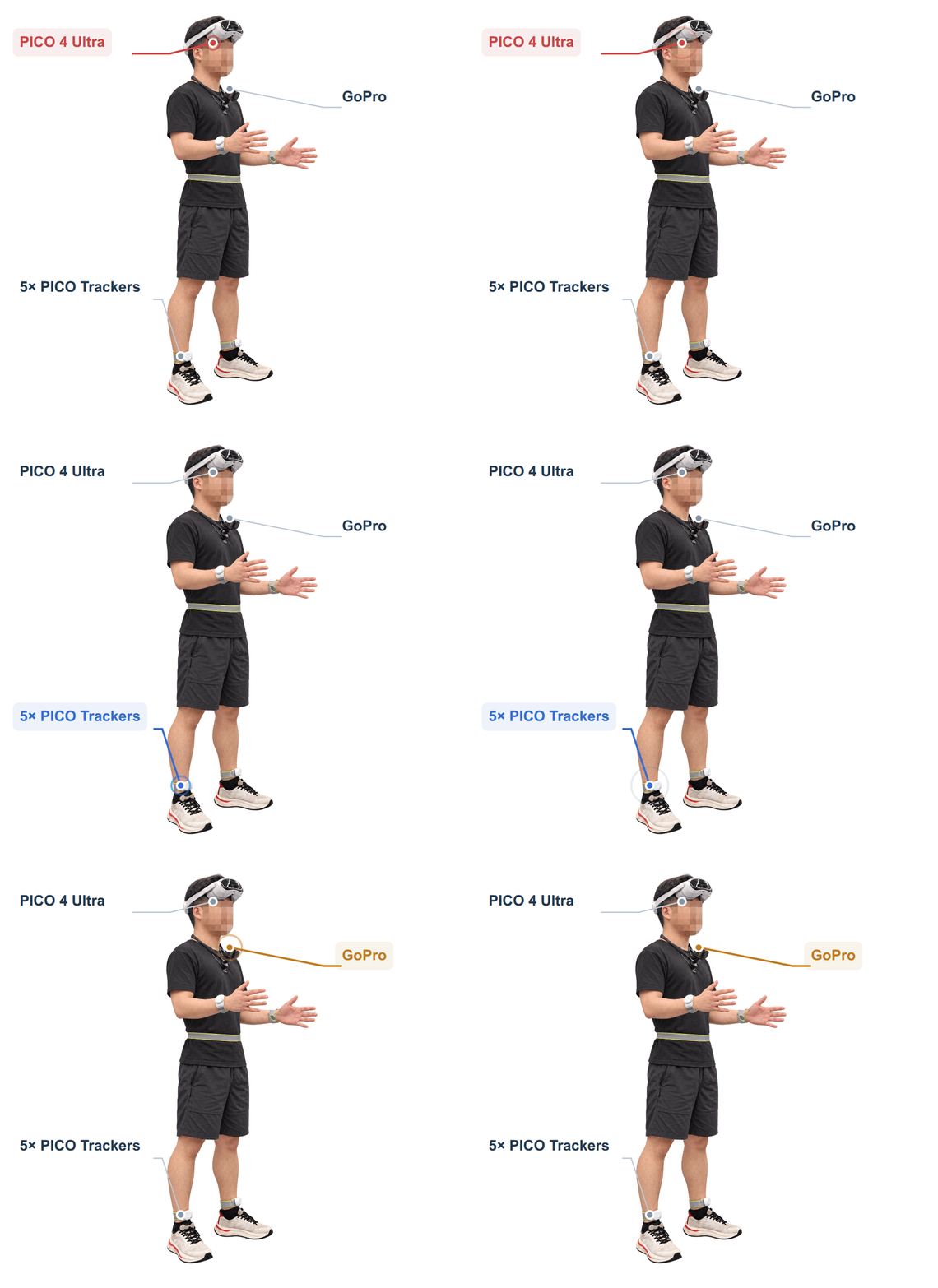
🔴 PICO 4 Ultra
- Tracking: PICO 4 Ultra + trackers
for whole-body and hand tracking
- Software: XRoboToolkit
Setup guide · Python SDK
- Connection: same LAN as the PC
enable Head, Hand and Send
🔵 5× PICO Trackers
- Placement: five trackers
both wrists, waist and both ankles
- Calibration: PICO Motion Tracker
pair and calibrate in the app (guide)
- Mode: Full Body in XRoboToolkit
enable Hand tracking (setup guide)
🟠 GoPro
- Mount: neck-mounted bracket
Example: JD listing
- Alignment: match height, pitch and framing to the robot camera
- Connection: Bluetooth pairing and WiFi setup;
WiFi / COHN recording and download (API)
|
Robot Hardware
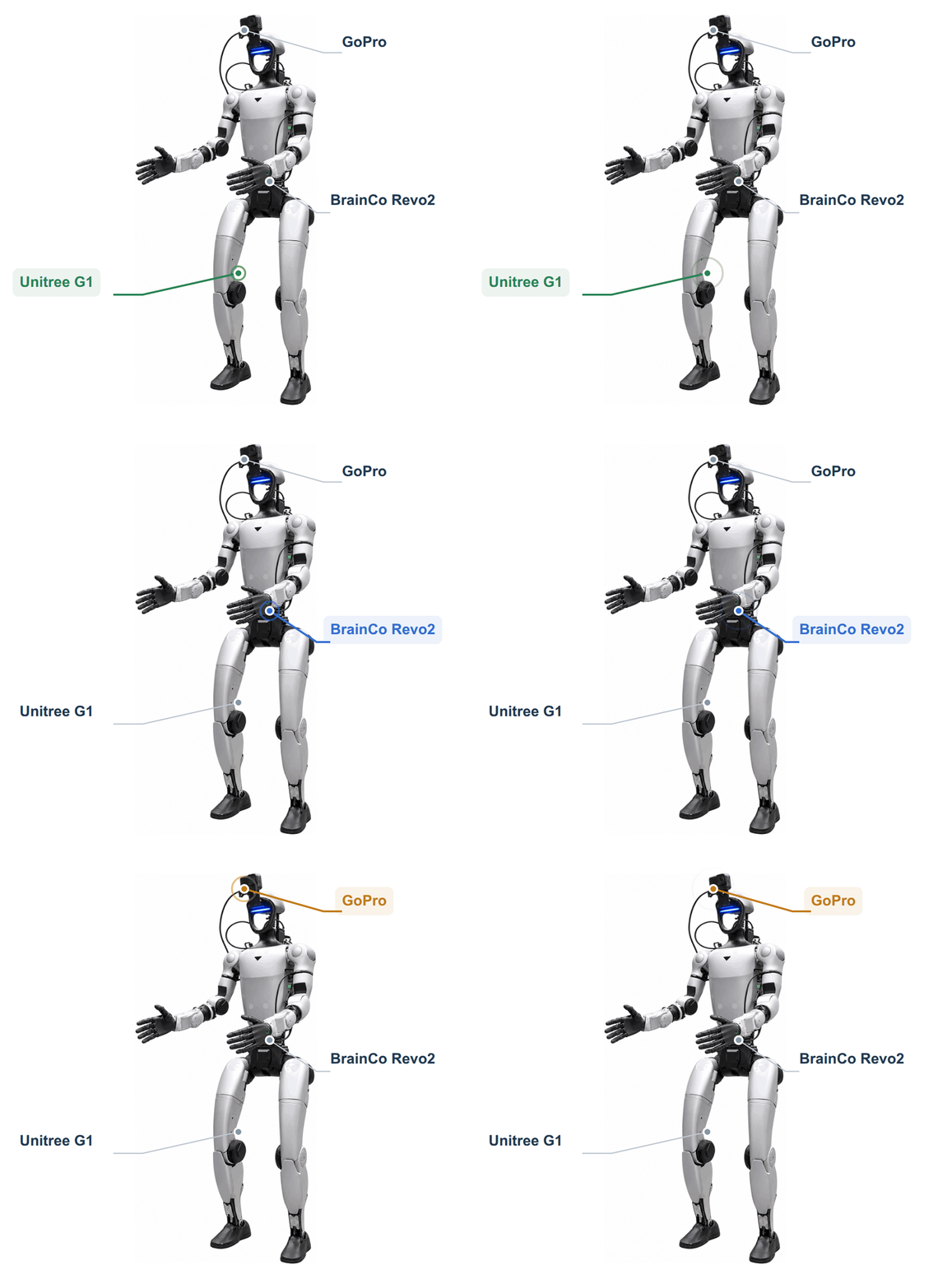
🟢 Unitree G1
🔵 BrainCo Revo2
- Hand: 6 active DOF per hand
11 including passive joints (specs)
- Software: official SDK
hand control and state feedback
- Mount: custom G1–Revo2 adapters
STL: part 1 · part 2
🟠 GoPro
- Mount: head-mounted bracket
STL: part 1 · part 2
- Alignment: match height, pitch and framing to the human camera
- Connection: USB control and video to robot;
wired / WiFi forwarding to host (API)
|
Environment setup
Use separate environments for robot control, human collection, visual alignment, and model training.
🤖 Robot Control & Data Collection
Host
Ubuntu 22.04 · NVIDIA driver 580+.
1. Install dependencies.
sudo apt-get update
sudo apt-get install -y --no-install-recommends ca-certificates curl build-essential cmake git git-lfs libgl1 libegl1 libegl-mesa0 libglib2.0-0 ffmpeg libyaml-cpp-dev libeigen3-dev libmsgpack-dev libzmq3-dev nlohmann-json3-dev libssl-dev zlib1g-dev
curl -LsSf https://astral.sh/uv/0.11.14/install.sh | sh
source "$HOME/.local/bin/env"
curl -fL https://developer.download.nvidia.com/compute/cuda/repos/ubuntu2204/x86_64/cuda-keyring_1.1-1_all.deb -o /tmp/cuda-keyring.deb
sudo dpkg -i /tmp/cuda-keyring.deb
sudo apt-get update
sudo apt-get install -y --no-install-recommends cuda-minimal-build-12-4
2. Install TensorRT and ONNX Runtime. Download TensorRT-10.13.3.9.Linux.x86_64-gnu.cuda-13.0.tar.gz from NVIDIA to the repository root, then run:
sudo tar -xzf TensorRT-10.13.3.9.Linux.x86_64-gnu.cuda-13.0.tar.gz -C /opt
curl -fL https://github.com/microsoft/onnxruntime/releases/download/v1.16.3/onnxruntime-linux-x64-1.16.3.tgz -o /tmp/onnxruntime.tgz
sudo tar -xzf /tmp/onnxruntime.tgz -C /opt
3. Install environment. Repeat the exports when opening a new terminal.
export TensorRT_ROOT=/opt/TensorRT-10.13.3.9
export onnxruntime_ROOT=/opt/onnxruntime-linux-x64-1.16.3
export CUDAToolkit_ROOT=/usr/local/cuda-12.4
export LD_LIBRARY_PATH="$TensorRT_ROOT/lib:$onnxruntime_ROOT/lib:$CUDAToolkit_ROOT/lib64${LD_LIBRARY_PATH:+:$LD_LIBRARY_PATH}"
bash data_collection/robot/setup/install_host.sh
4. Activate environment.
source sonic/.venv/bin/activate
Robot
ARM64 · Ubuntu 20.04 · ROS 2 Foxy · Python 3.8.
1. Install environment.
sudo apt-get update
sudo apt-get install -y python3-dev python3-venv build-essential cmake git python3-colcon-common-extensions ros-foxy-rmw-cyclonedds-cpp ros-foxy-rosidl-generator-dds-idl libyaml-cpp-dev libssl-dev libgl1 libglib2.0-0
bash data_collection/robot/setup/install_robot.sh
2. Activate environment.
source /opt/ros/foxy/setup.bash
source .venv-robot/ros_ws/install/setup.bash
source .venv-robot/bin/activate
👤 Human Data Collection
Ubuntu 22.04 · Python 3.10.
1. Install environment.
sudo apt-get update
sudo apt-get install -y ca-certificates python3.10-dev python3.10-venv build-essential cmake git ffmpeg bluez network-manager
bash data_collection/human/setup/install.sh
2. Activate environment.
source .venv-human/bin/activate
🎨 Vision Alignment
Tested on Linux with a 48 GB NVIDIA GPU. Allow about 35 GB of disk space. Requires uv, FFmpeg, and an NVIDIA driver compatible with CUDA 13.0; reuse these if already installed.
1. Obtain model access. Request access to SAM 3.1, then authenticate:
uvx --from huggingface_hub hf auth login
2. Install the environments and models.
bash data_collection/human/vision_alignment/setup/install.sh
The installer creates two isolated environments under runtime/vision: Python 3.12 for segmentation/rendering and Python 3.10 for inpainting. It downloads pinned models and verifies their checksums. The alignment command calls both environments automatically; no manual switching is needed.
Installation scripts, dependency pins, model manifests, and the SAM compatibility patch are in data_collection/human/vision_alignment/setup/. Processing code, tests, and example motion files are in data_collection/human/vision_alignment/.
Human data collection
1. Prepare devices.
Connect the host and PICO headset to the same network. Start the XRoboToolkit PC service on the host and the XRoboToolkit app on the headset, then enable body and hand tracking. Turn on the GoPro, enable Bluetooth pairing and select Video mode; the collector connects it to the host's WiFi network in the next step.
2. Start recording.
lambda-collect-human --task-name "{task_name}" --task "{task_instruction}"
Open http://127.0.0.1:8080. Enter the host's WiFi credentials if needed, then click Prepare collection → Start recording → Save episode / Discard episode. Wait for saving before recording again. Episodes are saved in LeRobot format to data/{task_name}/; new recordings append to the dataset.
3. Check and synchronize data.
lambda-sync-human --root "data/{task_name}"
Synchronizes motion and video at 50 Hz. Output: data/{task_name}_synced/; synchronization and quality reports: meta/.
Real-robot data collection
Record G1/SONIC/Revo2 demonstrations with a wired GoPro. Video, robot states
and hand targets are saved on G1 during teleoperation, then aligned and exported
as Parquet and MP4 on the workstation.
Follow the collection guide or
中文教程 to record your first episode.
The data format reference covers the
44D state and 76D action layout for training adapters.
Data alignment
Action alignment
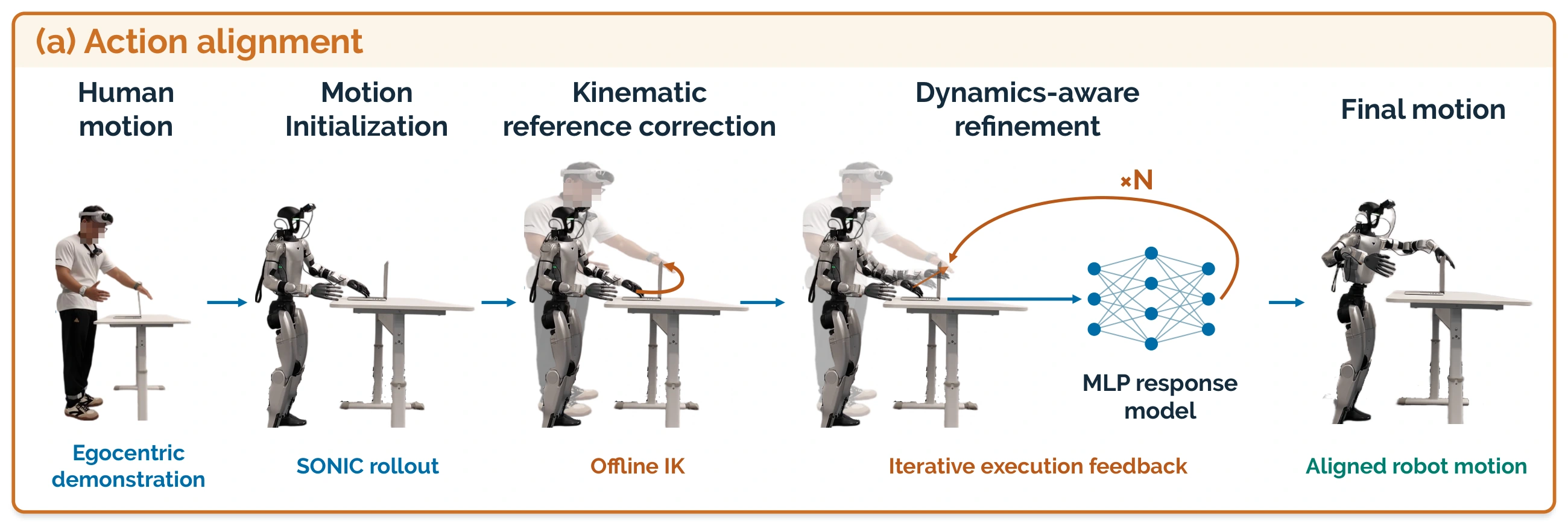
Four example trajectories and their data, reports, and videos are available. Each replay compares motion before (left) and after (right) alignment.
1. Align motion.
The pipeline performs human-reference alignment, robot-reference alignment, and dynamics-aware optimization. For hand tasks, H first corrects SMPL collar, shoulder, and elbow poses using a uniformly scaled virtual body while preserving the original end-effector targets. Foot tasks encode the input SMPL directly without this correction; K and D retain their joint-space and motion-token optimization.
Place the input recording at {task_name}/input.parquet. Set {endpoints} to hands for hand alignment or feet for foot alignment.
lambda-align \
  --input "{task_name}/input.parquet" \
  --endpoints {endpoints} \
  --output "results/{task_name}"
Results are saved under results/{task_name}/: data.parquet contains the original human SMPL motion and aligned tokens; run.json records per-round metrics and the selected round.
2. Replay motion.
SMPL replay: encode the original human motion online, without human-reference correction, to simulate before alignment.
lambda-replay \
  --input "{task_name}/data.parquet" \
  --mode smpl \
  --output "results/{task_name}/before"
Token replay: replay the aligned motion tokens to simulate after alignment.
lambda-replay \
  --input "{task_name}/data.parquet" \
  --mode token \
  --output "results/{task_name}/after"
Each command saves replay.mp4 in its output directory. Results may vary slightly between runs.
Visual alignment
The pipeline replaces human arms with rendered G1 arms while preserving the original gloves and hand–object contact. SAM 3.1 segments human arms and wrist trackers. DiffuEraser reconstructs the background.
Synchronized joint trajectories drive the G1 model through an approximate virtual camera. Wrist locations and segmentation masks then refine the rendered arms' placement in the image without changing the joint angles.
The examples below demonstrate visual alignment for closing a laptop, opening a fridge, and pulling a curtain. Each row shows RGB → Mask → Inpainting → Robot-arm rendering. Download the video and motion files to reproduce the results.
Close Laptop · Video · Motion
| Human RGB |
SAM 3.1 Mask |
Inpainting |
Robot-arm Rendering |
|
|
|
|
Open Fridge · Video · Motion
| Human RGB |
SAM 3.1 Mask |
Inpainting |
Robot-arm Rendering |
|
|
|
|
Pull Curtain · Video · Motion
| Human RGB |
SAM 3.1 Mask |
Inpainting |
Robot-arm Rendering |
|
|
|
|
Align a recording.
Save the video as {task_name}/rgb.mp4 and its synchronized motion as {task_name}/motion.npz. The NPZ contains body_q (29 G1 joint angles in radians per frame), joint_names, and fps matching the video.
runtime/vision/.venv-sam/bin/lambda-visual-align \
  --video "{task_name}/rgb.mp4" \
  --motion "{task_name}/motion.npz" \
  --runtime "runtime/vision" \
  --output "results/{task_name}"
Results are saved under results/{task_name}/: aligned.mp4 contains the aligned video; run.json records settings and completed stages.
Inference
python scripts/serve.py (also lambda0 serve) takes camera observations, language instructions, and proprioceptive state, and returns actions for the checkpoint's configured action space. It does not send actuator commands. Motion-level simulation replay is available under Action alignment.
For the six original AMO-based SIMPLE core tasks, use scripts/eval_simple.py in the simulation environment with the existing HTTP server. The SIMPLE evaluation guide covers checkpoint requirements, task-specific normalization, the AMO adapter, evaluation settings and result validation.
TODO
- Human data collection, synchronization and motion alignment
- Real-robot demonstration recording on G1
- Stage II checkpoint on Hugging Face
- HumanVerse sample data on Hugging Face
- Hardware guides: assembly, calibration, connectivity checks and troubleshooting for the human and robot setups
- Visual alignment with SAM 3.1, background inpainting and G1 arm rendering
- Data conversion: episode validation and converters from human and robot recordings to the canonical training format
- Post-training: complete Stage III post-training and policy evaluation workflows
- SIMPLE evaluation interface: six-task AMO launcher, policy adapter and usage guide
- SIMPLE benchmark reproduction: validate and publish full six-task results under a pinned simulation protocol
- Deployment: connect policy outputs to the robot controller with runtime monitoring and safety checks
- Beginner tutorial: setup, a sample recording, data preparation and local inference with expected outputs
[!NOTE]
Due to data licensing, privacy and institutional policy constraints, the full pretraining and HumanVerse mid-training datasets are not publicly released at this time. The Stage I and II code and configurations are provided as a reference for the training recipe.
|
Join our WeChat community to discuss humanoid intelligence, human data, and λ₀.
For bug reports and feature requests, please open a GitHub issue.
|
微信扫码加入 Lambda0 交流群
|
Citation
If you find λ₀ or openlambda useful in your research, please cite our report:
@misc{lambdahumanoidteam2026lambda0scalingopenworldegocentric,
  title         = {$\lambda_0$: Scaling Open-World Egocentric Human Data for Humanoid Loco-Manipulation},
  author        = {{Lambda-humanoid Team}},
  year          = {2026},
  eprint        = {2610.18950},
  archivePrefix = {arXiv},
  primaryClass  = {cs.RO},
  url           = {https://arxiv.org/abs/2610.18950},
}
| Paper |
arXiv |
| Towards a General Humanoid Loco-Manipulation Model via Egocentric Whole-Body Human Data Pretraining |
2610.00438 |
| EgoHumanoid-V2: Human-to-Humanoid Transfer of Coordinated Whole-Body Skills for Loco-Manipulation |
2609.37181 |
| EgoAlign: Bridging the Human-Humanoid Gap for Long-Range Loco-Manipulation |
2609.38046 |
@article{xu2026generalhumanoidlocomanipulationmodel,
  title   = {Towards a General Humanoid Loco-Manipulation Model via Egocentric Whole-Body Human Data Pretraining},
  author  = {Xu, Chongyang and Wu, Zhao and Chen, Jin and Jiang, Yiming and Ye, Jinhui and Jiang, Yuming and Zhang, Shifeng and Feng, Ziliang and Xu, Mu and Chen, Yilun and Lu, Li and Hoi, Steven C. H.},
  journal = {arXiv preprint arXiv:2610.00438},
  year    = {2026}
}

@article{chen2026egohumanoidv2,
  title   = {{EgoHumanoid-V2}: Human-to-Humanoid Transfer of Coordinated Whole-Body Skills for Loco-Manipulation},
  author  = {Chen, Jin and Jiang, Yiming and Xu, Chongyang and Shi, Modi and Peng, Shijia and Chen, Li and Li, Tianyu and Xu, Mu and Chen, Yilun and Hoi, Steven and Li, Hongyang},
  journal = {arXiv preprint arXiv:2609.37181},
  year    = {2026}
}

@article{jiang2026egoalign,
  title   = {{EgoAlign}: Bridging the Human-Humanoid Gap for Long-Range Loco-Manipulation},
  author  = {Jiang, Yiming and Chen, Jin and Xu, Chongyang and Chen, Yilun and Hao, Aimin and He, Yisheng},
  journal = {arXiv preprint arXiv:2609.38046},
  year    = {2026}
}
Acknowledgments
openlambda builds on the following open-source projects and prior work. We thank their authors for making them available.
See NOTICE for detailed source and asset attributions.
License
openlambda is released under the Apache License 2.0.
Third-party components keep their original licenses:

 λ0 — это человекоподобная модель «зрение–язык–действие», которая учится совмещённым перемещениям и манипуляциям всем телом на основе повседневных видео от первого лица, снятых с человека, а затем переносит это умение на робота Unitree G1.