ROCm Hyperloom


ROCm™ Hyperloom is a multi-agent harness that autonomously optimizes inference
on AMD Instinct™ GPUs. It profiles each workload, searches framework and kernel
optimizations, validates every candidate end to end, and carries proven results
into a recipe knowledge base — without per-model human tuning.
It supports text generation, image generation, and custom pipelines on vLLM,
SGLang, and xDiT.
Why Hyperloom
Serving efficiency determines hardware capacity, latency, and operating cost.
Tuning a workload across serving configuration, framework source, and GPU kernels
has traditionally taken weeks from a scarce specialist pool, and that work
repeats for every new model, framework release, and accelerator generation.
Handing the same loop to an LLM is not enough. A real session runs for hundreds
of turns, starts and stops many inference servers, and edits a serving
framework's source tree. Left as the only source of truth, the model drifts from
the original goal, rediscovers the same dead ends on every run, and can apply
unsafe patches. Hyperloom is the harness around that loop: it keeps the mission
grounded, reuses what earlier sessions already learned, and bounds what an agent
is allowed to change.
How it works
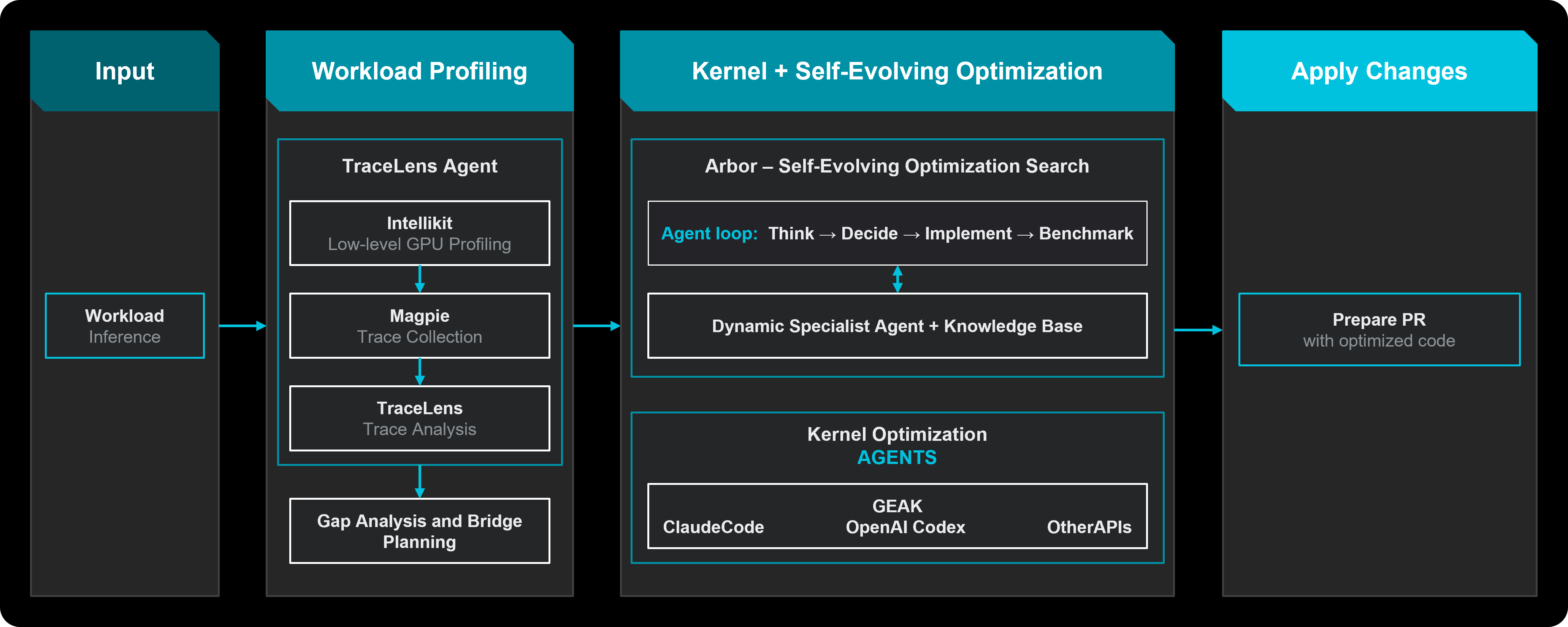
A session is a closed loop: input → optimize → validate → learn.
PRELUDE → ENABLEMENT → FRAMEWORK_AGENT → KERNEL_AGENT → SWEEP → CLOSE
After Sweep, the coordinator either closes or starts another cycle when budget
remains, the run has not converged, and roofline analysis still shows headroom.
A hard cycle ceiling prevents unbounded looping. A new cycle resumes at the
framework layer from the established baseline, rather than starting over.
| Phase |
What it does |
| Prelude |
Measures a stock baseline (the anchor for every later comparison), optionally replays the closest recipe from the knowledge base, then profiles and builds a roofline so later phases know where the headroom is. |
| Enablement |
Makes the model run at all (serving flags through targeted rebuilds), graded on runnability and accuracy. Only entered when a baseline fails; skipped on healthy runs. |
| Framework optimization |
Searches serving flags, precision, attention, batching, and ranked upstream diffs. |
| Kernel optimization |
Delegates hot kernels to one AMD backend — GEAK or KernelForge — then re-measures every accepted change end to end. Only one backend runs per phase. |
| Sweep |
Re-measures the accumulated stack across concurrency and sequence-length operating points. Skips itself when the validated gain has not moved. |
| Close |
Records why the run stopped, writes the recipe knowledge base, final report, and machine-readable session artifacts. |
Benchmarks are run by the coordinator, not by the model. A gain an agent predicts
is logged for calibration and never decides a keep. A kernel backend's claimed
speedup is held as unverified until Hyperloom re-measures it under the session
protocol. Changes that fail validation are reverted; successful changes become
the new baseline.
See the optimization loop for the runtime
contracts, enablement ladder, and phase allowlists.
Multi-agent harness
The Coordinator runs Orchestration and Critic turns and dispatches specialists
when needed. Each turn is grounded in persisted session state rather than an
automatic supervision or recovery loop:
| Role |
When it runs |
How it keeps the run on-goal |
| Orchestration |
Every tick |
Continuous planner; mission and progress are re-seeded from the state file, not from the transcript |
| Critic |
Every keep-or-revert |
Rules on whether a change served the mission; the learning record is written from that verdict |
| Specialist |
Authoring only |
Ephemeral. Returns a reviewed diff, not a decision |
Risky source edits go through an isolated worktree, a unified-diff gate, a
policy check, a Critic sign-off, and a coordinator benchmark. A rejection names
the rule it broke so the next attempt is a fix, not a repeat.
Recipe knowledge base
Every session reads the recipe knowledge base (Recipe KB) before it starts and
writes back when it finishes. A row stores the winning configuration, measured
throughput, useful lessons, and failures worth remembering. Lookup relaxes one
field at a time (model, hardware, framework, model type, architecture, framework
version, precision) so a close match can warm-start the next run. Past failures
are evidence in prompt context, not hard disqualifiers; what enters the KB is
strict, because a bad entry outlives the run that created it.
Profiling and bottleneck analysis are backed by
TraceLens, with trace collection from
Magpie and low-level GPU tooling from
IntelliKit. Long-horizon search and
the knowledge base are described further in
Arbor.
Supported features
| Feature |
Options |
| Workload |
Text generation, image generation, and custom / scriptable pipelines |
| Platform |
MI300X, MI325X, MI355X |
| Framework |
SGLang, vLLM, xDiT |
| Kernel language |
HIP, Triton, FlyDSL |
| Kernel backends |
GEAK, KernelForge |
| LLM backend |
Claude |
Get started
python -m hyperloom.inference_optimizer.cli optimize
Documentation
File issues and feedback
If you encounter problems or bugs while running Hyperloom, open an
issue, or send
feedback through the
beta survey.
Developer entry points
- Runtime package:
src/hyperloom/
- Contributor & AI authoring contract:
AGENTS.md
- Main agent instructions:
src/hyperloom/inference_optimizer/SKILL.md
- CLI entry point:
python -m hyperloom.inference_optimizer.cli optimize
- Operator tools:
python -m hyperloom.inference_optimizer.tools.*
- Compute-partition sweep:
python3 scripts/partition_mode_sweep.py — sets each
AMD partition mode (SPX/DPX/QPX/CPX) on one card in turn, runs the same
benchmark on every partition that mode creates, sums the throughput and restores
the entry mode. Answers which shape a workload wants before a session commits to
one; optimize itself only ever reads the mode. Needs privilege for the set, so
it is a script rather than part of the loop.
- Platform tuning audit:
python3 scripts/platform_audit.py — checks the host CPU
tuning that silently changes benchmark results. Judges Core Performance Boost and
the cpufreq governor against AMD's BIOS & Workload Tuning Guide for EPYC 9004;
records determinism, SMT and NPS without a verdict, because chapter 5 varies those
by workload or the OS layer can only infer them. Reads /sys, /proc and — as
root — the HWCR MSR; no credentials, nothing written. Exit 0 on target, 1 a
knob is wrong, 2 unresolved, which CI should treat as missing coverage rather
than as a failure. The BIOS-only knobs are not reachable this way; see below.
- BIOS audit over the BMC:
sudo python3 scripts/platform_audit_bmc.py --bmc-user <ro>
— covers the three knobs the OS cannot see (High Performance profile, APBDIS, DF
C-states), targeted per 58011 §4.2.1, §4.4.3 and §4.4.4. Without
--bmc-user it refuses to run unless --allow-account-creation is passed, because
that path mints a temporary ADMINISTRATOR account on the BMC; exit 3 means
such an account was left enabled or could not be confirmed revoked, and should page
someone. The script's docstring has the account lifecycle and the rest of the exit
codes.
- Documentation source:
docs/
For contribution workflow, testing, and linting, see
CONTRIBUTING.md.
Licensing
Hyperloom is released under the MIT License. The full license text
is in LICENSE.
You may use Hyperloom commercially, modify it, and distribute it under
the terms of the MIT license, provided the copyright notice and the
permission notice are retained in all copies or substantial portions of
the software.
Third-party tools and agents (Cursor, Visual Studio, and Claude Code)
that Hyperloom invokes are governed by their own separate license terms
and are NOT covered by the MIT license above — see the "Third-Party
Tools and Agents" section in LICENSE. You are responsible
for reviewing and complying with each tool's individual license.
A few files distributed inside Hyperloom are also third-party — reference
kernels and a Triton oracle carried in forge's knowledge base and examples.
They keep their own licences; THIRD_PARTY.md lists them and
REUSE.toml carries the machine-readable form.
For security-relevant issues, see SECURITY.md. For
contribution conventions, see CONTRIBUTING.md.

 一个多智能体框架,能在 AMD Instinct GPU 上自主优化大语言模型的推理:它会分析你的工作负载,搜索框架和 GPU 内核层面的优化,对每个候选方案做端到端验证,并把验证过的结果存进一个配方知识库。