


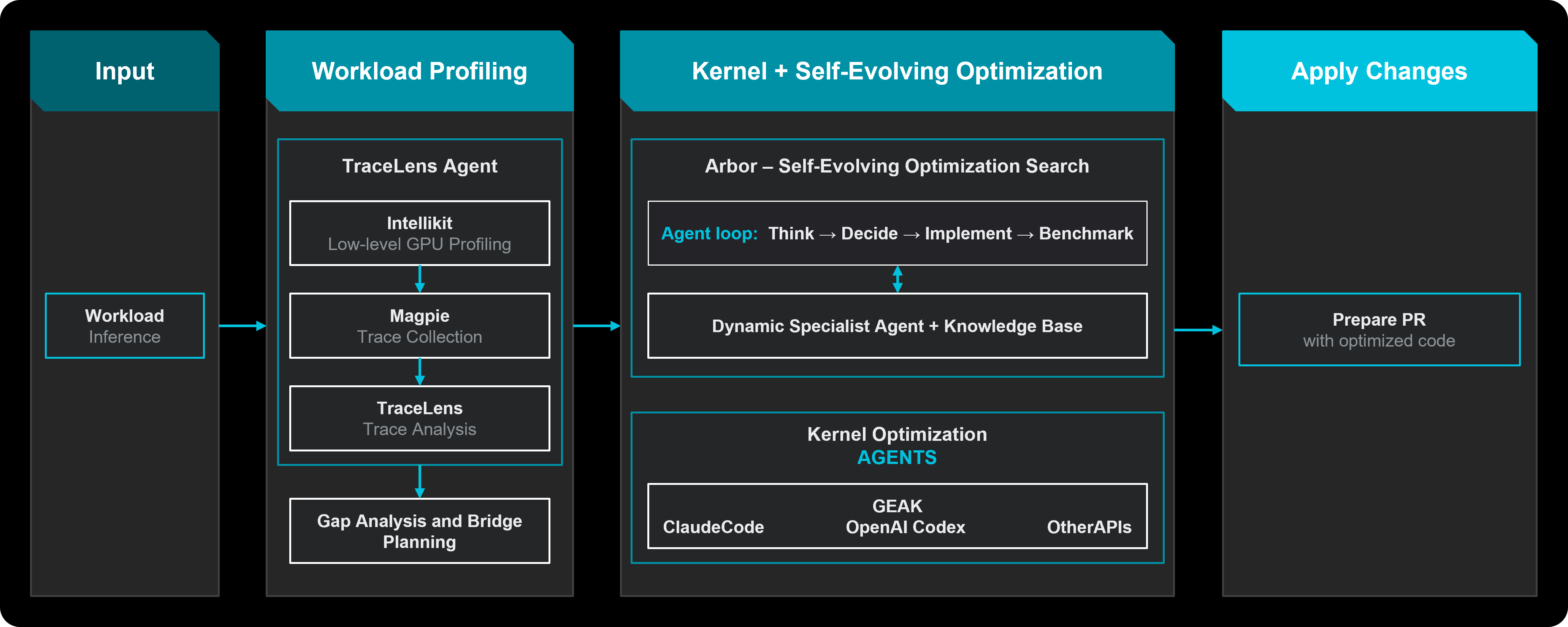
Что это такое?
 Мультиагентный каркас, который автономно оптимизирует инференс LLM на GPU AMD Instinct: он профилирует вашу нагрузку, ищет оптимизации на уровне фреймворков и GPU-ядер, сквозь проверяет каждого кандидата и сохраняет подтверждённые результаты в базу знаний рецептов.
Мультиагентный каркас, который автономно оптимизирует инференс LLM на GPU AMD Instinct: он профилирует вашу нагрузку, ищет оптимизации на уровне фреймворков и GPU-ядер, сквозь проверяет каждого кандидата и сохраняет подтверждённые результаты в базу знаний рецептов.Это библиотека, которую я импортирую, или инструмент, который я запускаю для своего сервера инференса?Это Python CLI-каркас, который вы запускаете для своего сервера инференса — python -m hyperloom.inferenceoptimizer.cli optimize — плюс скрипты для операторов в scripts/ для проверки платформы.
Это Python CLI-каркас, который вы запускаете для своего сервера инференса — python -m hyperloom.inferenceoptimizer.cli optimize — плюс скрипты для операторов в scripts/ для проверки платформы.Как его запустить?Начните с руководства Quickstart — там описаны установка Hyperloom и запуск демо; второе руководство рассказывает, как запустить оптимизацию и следить за ней, а полная документация находится в документации ROCm.
Начните с руководства Quickstart — там описаны установка Hyperloom и запуск демо; второе руководство рассказывает, как запустить оптимизацию и следить за ней, а полная документация находится в документации ROCm.Оптимизацию делает AI-модель, и какая именно?Да, в качестве LLM-бэкенда используется Claude, так что нужен доступ к ней. Hyperloom также вызывает сторонние инструменты вроде Cursor, Visual Studio и Claude Code, у которых свои отдельные лицензии.
Да, в качестве LLM-бэкенда используется Claude, так что нужен доступ к ней. Hyperloom также вызывает сторонние инструменты вроде Cursor, Visual Studio и Claude Code, у которых свои отдельные лицензии.Агенты могут править исходники серверного фреймворка — как убедиться, что ничего не сломается?Рискованные правки проходят через изолированный worktree, проверку unified-diff, проверку политик, одобрение Критика и запуск бенчмарка, который выполняет координатор, а не сама модель. Всё, что не проходит валидацию, откатывается.
Рискованные правки проходят через изолированный worktree, проверку unified-diff, проверку политик, одобрение Критика и запуск бенчмарка, который выполняет координатор, а не сама модель. Всё, что не проходит валидацию, откатывается.Можно ли свободно использовать в коммерческих целях?Да — лицензия MIT, так что коммерческое использование, изменение и распространение разрешены. Вызываемые инструменты вроде Cursor и Claude Code, а также несколько сторонних файлов ядер в комплекте, имеют собственные лицензии, которые нужно соблюдать отдельно.
Да — лицензия MIT, так что коммерческое использование, изменение и распространение разрешены. Вызываемые инструменты вроде Cursor и Claude Code, а также несколько сторонних файлов ядер в комплекте, имеют собственные лицензии, которые нужно соблюдать отдельно.Нужно ли для этого специальное железо?Да — GPU AMD Instinct: MI300X, MI325X или MI355X. Нагрузки на NVIDIA и других ускорителях он не оптимизирует.
Да — GPU AMD Instinct: MI300X, MI325X или MI355X. Нагрузки на NVIDIA и других ускорителях он не оптимизирует.Что именно происходит за одну сессию оптимизации?Сессия — это замкнутый цикл «вход, оптимизация, проверка, обучение» из шести фаз: Prelude (базовые замеры, профилирование, roofline-анализ), Enablement, оптимизация фреймворка, оптимизация ядер, Sweep по точкам конкурентности и Close, с жёстким лимитом циклов, чтобы процесс не зацикливался навсегда.
Сессия — это замкнутый цикл «вход, оптимизация, проверка, обучение» из шести фаз: Prelude (базовые замеры, профилирование, roofline-анализ), Enablement, оптимизация фреймворка, оптимизация ядер, Sweep по точкам конкурентности и Close, с жёстким лимитом циклов, чтобы процесс не зацикливался навсегда.Какие фреймворки и нагрузки он поддерживает?Он оптимизирует генерацию текста, генерацию изображений и свои или скриптуемые пайплайны, обслуживаемые на vLLM, SGLang или xDiT. Работа с ядрами делегируется бэкендам GEAK или KernelForge и ведётся на HIP, Triton или FlyDSL.
Он оптимизирует генерацию текста, генерацию изображений и свои или скриптуемые пайплайны, обслуживаемые на vLLM, SGLang или xDiT. Работа с ядрами делегируется бэкендам GEAK или KernelForge и ведётся на HIP, Triton или FlyDSL.Что такое база знаний рецептов?Каждая сессия читает её перед запуском и дописывает по завершении. Строка хранит победившую конфигурацию, измеренную пропускную способность, выводы и запомнившиеся неудачи; поиск ослабляет совпадение по одному полю за раз, чтобы близкий рецепт мог «прогреть» следующий запуск.
Каждая сессия читает её перед запуском и дописывает по завершении. Строка хранит победившую конфигурацию, измеренную пропускную способность, выводы и запомнившиеся неудачи; поиск ослабляет совпадение по одному полю за раз, чтобы близкий рецепт мог «прогреть» следующий запуск.Почему лучше отдать это каркасу, а не позволить LLM тюнить свободно?Реальный запуск — это сотни шагов, многократные перезапуски серверов инференса и правки исходников фреймворка — без контроля модель уходит в сторону, заново наступает на те же грабли и может применить небезопасные патчи. Hyperloom удерживает задачу на основе сохранённого состояния и ограничивает, что агенты могут менять.
Реальный запуск — это сотни шагов, многократные перезапуски серверов инференса и правки исходников фреймворка — без контроля модель уходит в сторону, заново наступает на те же грабли и может применить небезопасные патчи. Hyperloom удерживает задачу на основе сохранённого состояния и ограничивает, что агенты могут менять.Почему без него тюнинг обычно занимает недели?Потому что тюнинг затрагивает конфигурацию сервера инференса, исходники фреймворка и GPU-ядра, а традиционно требует времени дефицитных специалистов — причём заново для каждой новой модели, релиза фреймворка и поколения ускорителей. Hyperloom автоматизирует этот цикл без ручной подстройки под каждую модель.
Потому что тюнинг затрагивает конфигурацию сервера инференса, исходники фреймворка и GPU-ядра, а традиционно требует времени дефицитных специалистов — причём заново для каждой новой модели, релиза фреймворка и поколения ускорителей. Hyperloom автоматизирует этот цикл без ручной подстройки под каждую модель.Что делают операторские скрипты в scripts/?partitionmodesweep.py бенчмаркаит каждый режим партиций AMD (SPX/DPX/QPX/CPX), чтобы понять, какая конфигурация подходит нагрузке; platformaudit.py проверяет тюнинг CPU EPYC по руководству AMD; platformauditbmc.py проверяет параметры, доступные только через BIOS, по BMC.
partitionmodesweep.py бенчмаркаит каждый режим партиций AMD (SPX/DPX/QPX/CPX), чтобы понять, какая конфигурация подходит нагрузке; platformaudit.py проверяет тюнинг CPU EPYC по руководству AMD; platformauditbmc.py проверяет параметры, доступные только через BIOS, по BMC.What are similar projects?LMCache, ktransformers, llm-inference-engineering, lectures, verl, CUDA-for-AMD-Windows, ds4, qwen3.8-Flash-DGX
LMCache, ktransformers, llm-inference-engineering, lectures, verl, CUDA-for-AMD-Windows, ds4, qwen3.8-Flash-DGXWhich topics is it in?hip, inference-optimization, benchmarks, triton, sglang, llm-serving, amd-gpu, rocm, amd, kernel, optimization, llm-inference
hip, inference-optimization, benchmarks, triton, sglang, llm-serving, amd-gpu, rocm, amd, kernel, optimization, llm-inference