


What is this?
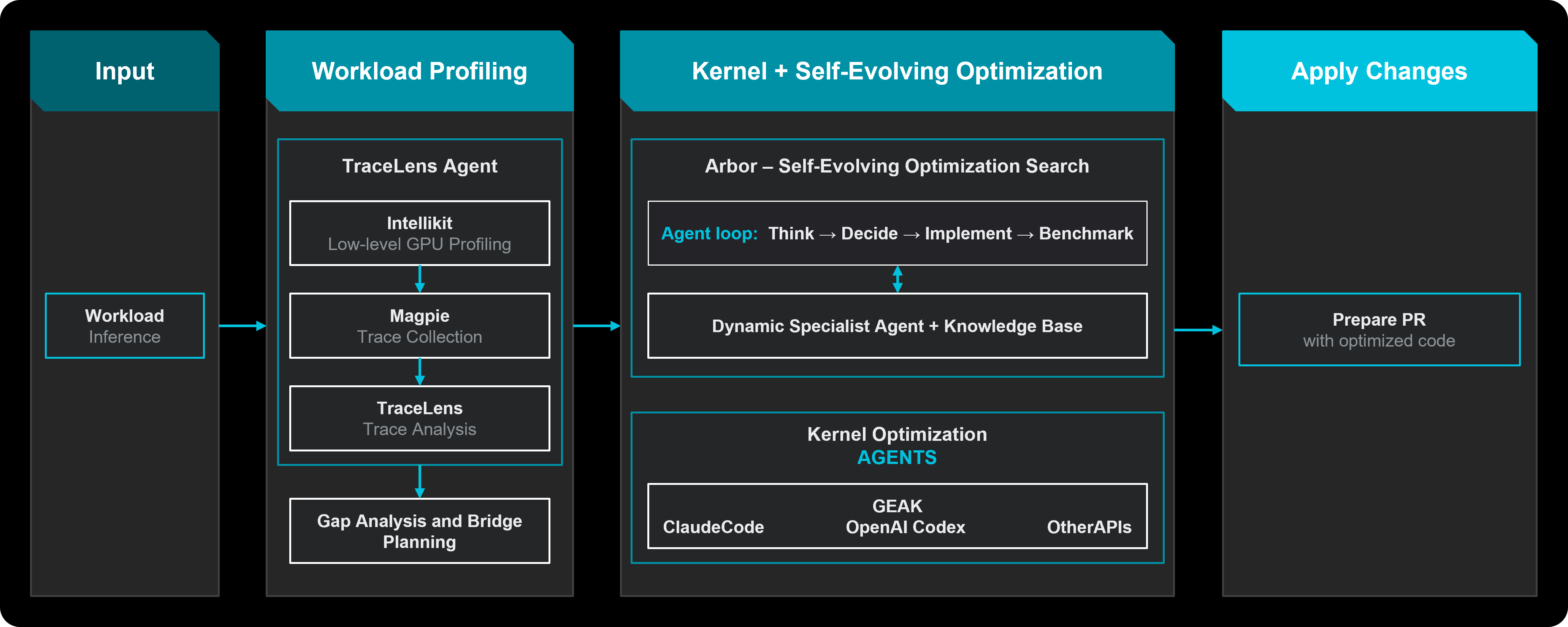
 A multi-agent harness that autonomously optimizes LLM inference on AMD Instinct GPUs: it profiles your workload, searches framework and GPU-kernel optimizations, validates every candidate end to end, and saves proven results into a recipe knowledge base.
A multi-agent harness that autonomously optimizes LLM inference on AMD Instinct GPUs: it profiles your workload, searches framework and GPU-kernel optimizations, validates every candidate end to end, and saves proven results into a recipe knowledge base.Is it a library I import, or a tool I run against my serving stack?It's a Python CLI harness you run against your serving stack — python -m hyperloom.inferenceoptimizer.cli optimize — plus operator scripts under scripts/ for platform checks.
It's a Python CLI harness you run against your serving stack — python -m hyperloom.inferenceoptimizer.cli optimize — plus operator scripts under scripts/ for platform checks.How do I get it running?Start with the Quickstart guide, which covers setting Hyperloom up and running a demo; a second guide covers launching and monitoring an optimization, and the full docs live in the ROCm documentation.
Start with the Quickstart guide, which covers setting Hyperloom up and running a demo; a second guide covers launching and monitoring an optimization, and the full docs live in the ROCm documentation.Does it use an AI model to do the optimizing, and which one?Yes, the LLM backend is Claude, so you need access to it. Hyperloom also invokes third-party tools like Cursor, Visual Studio, and Claude Code, which keep their own separate licenses.
Yes, the LLM backend is Claude, so you need access to it. Hyperloom also invokes third-party tools like Cursor, Visual Studio, and Claude Code, which keep their own separate licenses.It lets agents edit serving-framework source — how do I know it won't break my setup?Risky edits pass through an isolated worktree, a unified-diff gate, a policy check, a Critic sign-off, and a benchmark run by the coordinator rather than the model. Anything that fails validation is reverted.
Risky edits pass through an isolated worktree, a unified-diff gate, a policy check, a Critic sign-off, and a benchmark run by the coordinator rather than the model. Anything that fails validation is reverted.Is it free to use commercially?Yes — MIT licensed, so commercial use, modification, and distribution are fine. Invoked tools like Cursor and Claude Code, plus a few bundled third-party kernel files, carry their own licenses you must comply with separately.
Yes — MIT licensed, so commercial use, modification, and distribution are fine. Invoked tools like Cursor and Claude Code, plus a few bundled third-party kernel files, carry their own licenses you must comply with separately.Do I need special hardware for this?Yes — an AMD Instinct GPU: MI300X, MI325X, or MI355X. It does not optimize workloads on NVIDIA or other accelerators.
Yes — an AMD Instinct GPU: MI300X, MI325X, or MI355X. It does not optimize workloads on NVIDIA or other accelerators.What does one optimization session actually do?A session is a closed loop — input, optimize, validate, learn — over six phases: Prelude (stock baseline, profiling, roofline), Enablement, framework optimization, kernel optimization, Sweep across concurrency points, and Close, with a hard cycle ceiling so it never loops forever.
A session is a closed loop — input, optimize, validate, learn — over six phases: Prelude (stock baseline, profiling, roofline), Enablement, framework optimization, kernel optimization, Sweep across concurrency points, and Close, with a hard cycle ceiling so it never loops forever.What frameworks and workloads does it support?It optimizes text generation, image generation, and custom or scriptable pipelines served on vLLM, SGLang, or xDiT. Kernel work is delegated to the GEAK or KernelForge backends and written in HIP, Triton, or FlyDSL.
It optimizes text generation, image generation, and custom or scriptable pipelines served on vLLM, SGLang, or xDiT. Kernel work is delegated to the GEAK or KernelForge backends and written in HIP, Triton, or FlyDSL.What is the recipe knowledge base?Every session reads it before starting and writes back when it finishes. A row stores the winning configuration, measured throughput, lessons, and failures worth remembering; lookup relaxes one field at a time so a close match can warm-start the next run.
Every session reads it before starting and writes back when it finishes. A row stores the winning configuration, measured throughput, lessons, and failures worth remembering; lookup relaxes one field at a time so a close match can warm-start the next run.Why hand this to a harness instead of letting the LLM tune freely?A real run spans hundreds of turns, restarts many inference servers, and edits framework source — left alone the model drifts, rediscovers dead ends, and can apply unsafe patches. Hyperloom keeps the mission grounded in persisted state and bounds what agents may change.
A real run spans hundreds of turns, restarts many inference servers, and edits framework source — left alone the model drifts, rediscovers dead ends, and can apply unsafe patches. Hyperloom keeps the mission grounded in persisted state and bounds what agents may change.Why does tuning usually take weeks without it?Because tuning spans serving configuration, framework source, and GPU kernels, and traditionally needs scarce specialist time — repeated for every new model, framework release, and accelerator generation. Hyperloom automates that loop without per-model human tuning.
Because tuning spans serving configuration, framework source, and GPU kernels, and traditionally needs scarce specialist time — repeated for every new model, framework release, and accelerator generation. Hyperloom automates that loop without per-model human tuning.What do the operator scripts in scripts/ do?partitionmodesweep.py benchmarks each AMD partition mode (SPX/DPX/QPX/CPX) to find which shape a workload wants; platformaudit.py checks EPYC CPU tuning against AMD's guide; platformauditbmc.py audits BIOS-only knobs over the BMC.
partitionmodesweep.py benchmarks each AMD partition mode (SPX/DPX/QPX/CPX) to find which shape a workload wants; platformaudit.py checks EPYC CPU tuning against AMD's guide; platformauditbmc.py audits BIOS-only knobs over the BMC.What are similar projects?LMCache, ktransformers, llm-inference-engineering, lectures, verl, CUDA-for-AMD-Windows, ds4, qwen3.8-Flash-DGX
LMCache, ktransformers, llm-inference-engineering, lectures, verl, CUDA-for-AMD-Windows, ds4, qwen3.8-Flash-DGXWhich topics is it in?hip, inference-optimization, benchmarks, triton, sglang, llm-serving, amd-gpu, rocm, amd, kernel, optimization, llm-inference
hip, inference-optimization, benchmarks, triton, sglang, llm-serving, amd-gpu, rocm, amd, kernel, optimization, llm-inference