unsloth README

The project's README from github.com/unslothai/unsloth. As one markdown file: README.md.

Unsloth logo

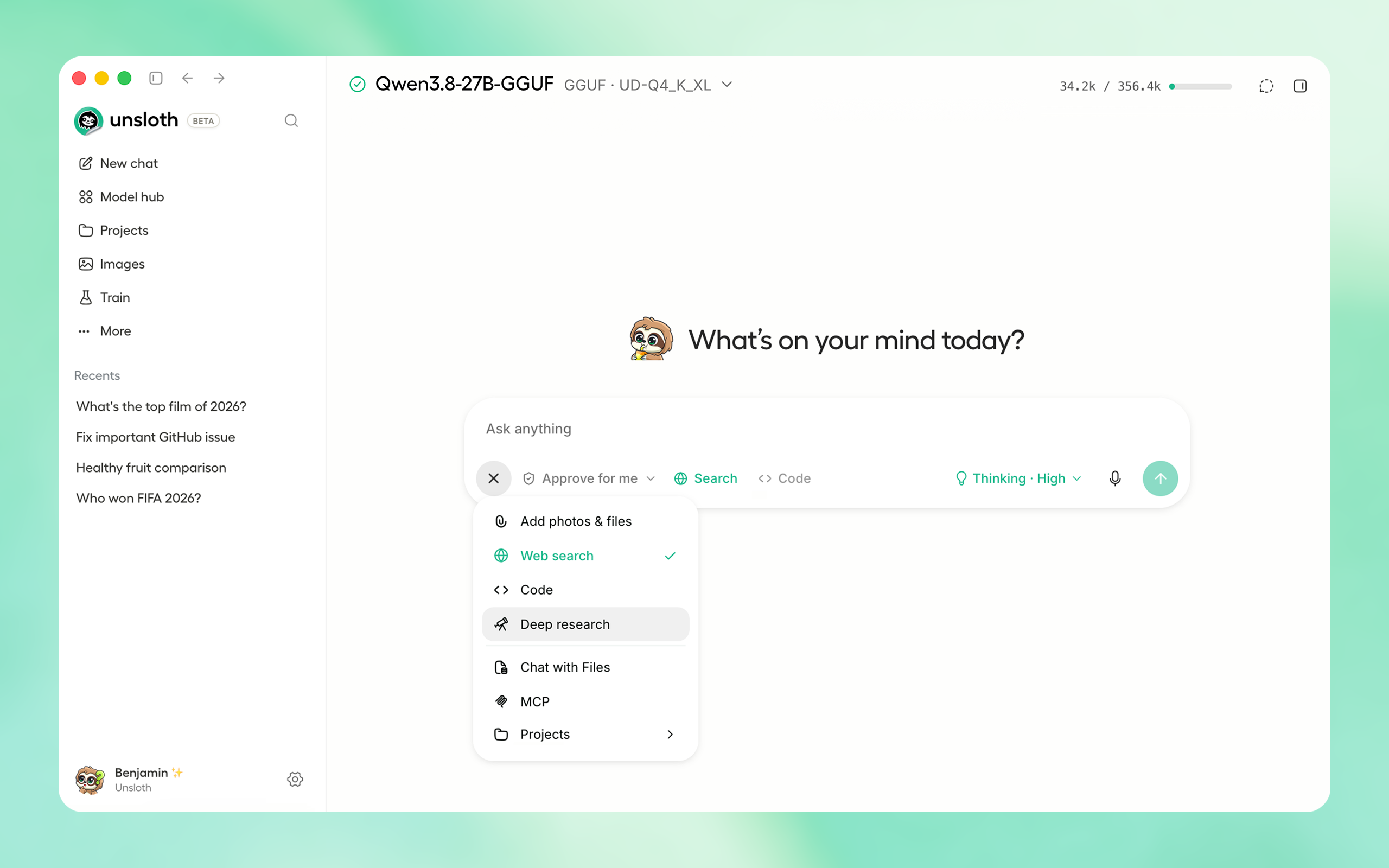
Unsloth is the first desktop app to run and train models.

Features • Quickstart • Notebooks • Documentation

unsloth desktop

⚡ Get started

Download the native Unsloth Desktop app for your operating system:

Platform Link
Windows Download
macOS Download
Linux / Ubuntu (deb) Download
Linux (AppImage) Download

Download from Unsloth or GitHub Releases.

Or if you prefer to install manually:

macOS, Linux, WSL:

curl -fsSL https://unsloth.ai/install.sh | sh

Windows:

irm https://unsloth.ai/install.ps1 | iex

Community:

⭐ Features

Unsloth works on Windows, Linux, WSL and macOS. We support Multi GPU setups, NVIDIA, AMD, Intel GPUs, CPUs and the Vulkan backend.

Run & Build with AI

Train & Deploy

🚀 Unsloth Start

Unsloth Start connects Claude Code, Codex and other agents to local models with one command.

unsloth start claude --model unsloth/Qwen3.8-27B-GGUF:UD-Q4_K_XL
Agent Command
Claude Code unsloth start claude
OpenAI Codex unsloth start codex
Hermes Agent unsloth start hermes
OpenClaw unsloth start openclaw
OpenCode unsloth start opencode
DeepSeek Harness unsloth start dsh

📥 Install

Unsloth can be used in three ways: Unsloth Desktop, the desktop app; Unsloth Studio, the web UI; or Unsloth Core, the code based version.

Platform Link
Windows Download
macOS Download
Linux / Ubuntu (deb) Download
Linux (AppImage) Download

Unsloth Studio (web UI)

macOS, Linux, WSL:

curl -fsSL https://unsloth.ai/install.sh | sh

Windows:

irm https://unsloth.ai/install.ps1 | iex

Launch

unsloth studio

HTTP Secure Deployment

unsloth studio --secure

Docker

Use our Docker image unsloth/unsloth. On Linux, set up GPU access once with curl -fsSL https://raw.githubusercontent.com/unslothai/unsloth/main/docker/install_nvidia_toolkit.sh -o install_nvidia_toolkit.sh && sudo -E bash install_nvidia_toolkit.sh (Windows: Docker Desktop with WSL 2). Run:

docker run -d --gpus all --ipc=host \
  -p 8000:8000 -p 8888:8888 \
  -e UNSLOTH_STUDIO_PASSWORD="mypassword" -e JUPYTER_PASSWORD="mypassword" \
  -v "$PWD":/workspace/host \
  unsloth/unsloth

Follow startup with docker logs -f. Studio is at http://localhost:8000 (user unsloth), JupyterLab at http://localhost:8888. Tags (unsloth/unsloth:core for notebooks only), GPU support and options: Docker Hub.

Remote HTTPS & LAN Access

Server-side tools are on by default - so be careful! Keep your password safe, or use --disable-tools when exposing Unsloth.

Global HTTPS Access: Creates a free Cloudflare link that serves Unsloth - you can access the link globally (even on your phone!)

unsloth studio --secure

-H 0.0.0.0 and different ports also work:

unsloth studio -H 0.0.0.0 -p 8888

LAN Access (home network): Settings > API keys > LAN access

Password management & headless starts

Headless starts:

UNSLOTH_STUDIO_PASSWORD='your-strong-password' unsloth studio --secure   # via env var

Reset your password:

unsloth studio reset-password

Developer, Nightly, Uninstall

To see developer, nightly and uninstallation etc. instructions, see advanced installation.

Unsloth Core (code-based)

Linux, WSL:

curl -LsSf https://astral.sh/uv/install.sh | sh
uv venv unsloth_env --python 3.13
source unsloth_env/bin/activate
uv pip install unsloth --torch-backend=auto

Windows:

winget install -e --id Python.Python.3.13
winget install --id=astral-sh.uv  -e
uv venv unsloth_env --python 3.13
.\unsloth_env\Scripts\activate
uv pip install unsloth --torch-backend=auto

AMD, Intel, DGX Spark, Blackwell:

See our Blackwell guide and DGX Spark guide.
To install Unsloth on AMD and Intel GPUs, follow our AMD Guide and Intel Guide.

📒 Free Notebooks

Train for free with our notebooks. Read our guide. Add dataset, run, then deploy your trained model.

Model Free Notebooks Performance Memory use
Unsloth Studio ▶️ Start for free
Gemma 4 (E2B) ▶️ Start for free 1.5x faster 50% less
Qwen3.5 (4B) ▶️ Start for free 1.5x faster 60% less
gpt-oss (20B) ▶️ Start for free 2x faster 70% less
Qwen3.5 GSPO ▶️ Start for free 2x faster 70% less
gpt-oss (20B): GRPO ▶️ Start for free 2x faster 80% less
Qwen3: Advanced GRPO ▶️ Start for free 2x faster 70% less
embeddinggemma (300M) ▶️ Start for free 2x faster 20% less
Llama 3.1 (8B) Alpaca ▶️ Start for free 2x faster 70% less
Llama 3.2 Conversational ▶️ Start for free 2x faster 70% less
Orpheus-TTS (3B) ▶️ Start for free 1.5x faster 50% less

🦥 Unsloth News

More News
  • Connections: Mix local models with API providers (OpenAI, Anthropic) or servers (vLLM, Ollama) in the same interface. Guide
  • Introducing Unsloth Studio: our new web UI for running and training LLMs. Blog
  • DiffusionGemma: Run and fine-tune Google's diffusion language model with 1.8x faster inference in Unsloth Studio. Guide
  • Qwen3.6: Run and train Qwen3.6 with MTP for 1.4-2.2x faster inference and NVFP4 quants for supported GPUs. Guide
  • Train MoE LLMs 12x faster with 35% less VRAM - DeepSeek, GLM, Qwen and gpt-oss. Blog
  • Embedding models: Unsloth now supports ~1.8-3.3x faster embedding fine-tuning. Blog • Notebooks
  • New 7x longer context RL vs. all other setups, via our new batching algorithms. Blog
  • New RoPE & MLP Triton Kernels & Padding Free + Packing: 3x faster training & 30% less VRAM. Blog
  • 500K Context: Training a 20B model with >500K context is now possible on an 80GB GPU. Blog
  • FP8 & Vision RL: You can now do FP8 & VLM GRPO on consumer GPUs. FP8 Blog • Vision RL

📥 Advanced Installation

The below advanced instructions are for Unsloth Studio. For Unsloth Core advanced installation, view our docs.

Developer / Nightly / Experimental installs: macOS, Linux, WSL:

The developer install builds from the main branch, which is the latest (nightly) source.

git clone https://github.com/unslothai/unsloth
cd unsloth
./install.sh --local
unsloth studio -p 8888

To install into an isolated location, set UNSLOTH_STUDIO_HOME:

UNSLOTH_STUDIO_HOME="$PWD/.studio" ./install.sh --local
UNSLOTH_STUDIO_HOME="$PWD/.studio" unsloth studio -p 8888

Then to update:

cd unsloth && git pull
./install.sh --local
unsloth studio -p 8888

Developer / Nightly / Experimental installs: Windows PowerShell:

The developer install builds from the main branch, which is the latest (nightly) source.

git clone https://github.com/unslothai/unsloth.git
cd unsloth
Set-ExecutionPolicy -Scope Process -ExecutionPolicy Bypass
.\install.ps1 --local
unsloth studio -p 8888

To install into an isolated location, set UNSLOTH_STUDIO_HOME:

$env:UNSLOTH_STUDIO_HOME="$PWD\.studio"; .\install.ps1 --local
$env:UNSLOTH_STUDIO_HOME="$PWD\.studio"; unsloth studio -p 8888

Then to update:

cd unsloth; git pull
.\install.ps1 --local
unsloth studio -p 8888

Advanced launch options

Skip PyTorch (GGUF-only mode):

curl -fsSL https://unsloth.ai/install.sh | UNSLOTH_NO_TORCH=1 sh
$env:UNSLOTH_NO_TORCH=1; irm https://unsloth.ai/install.ps1 | iex

Skip the post-install prompt that starts Unsloth (useful for automated installs):

curl -fsSL https://unsloth.ai/install.sh | UNSLOTH_SKIP_AUTOSTART=1 sh
$env:UNSLOTH_SKIP_AUTOSTART=1; irm https://unsloth.ai/install.ps1 | iex

Keep the install-time package cache under the Studio directory instead of reusing an existing uv cache. Downloads are slower the first time, and an explicit UV_CACHE_DIR still wins over this:

curl -fsSL https://unsloth.ai/install.sh | UNSLOTH_ISOLATE_UV_CACHE=1 sh
$env:UNSLOTH_ISOLATE_UV_CACHE=1; irm https://unsloth.ai/install.ps1 | iex

For a local run the flag is --isolated-uv-cache:

./install.sh --local --isolated-uv-cache
.\install.ps1 --local --isolated-uv-cache

Pinning the Python version:

curl -fsSL https://unsloth.ai/install.sh | UNSLOTH_PYTHON=3.12 sh
$env:UNSLOTH_PYTHON='3.12'; irm https://unsloth.ai/install.ps1 | iex

Install to a custom location with UNSLOTH_STUDIO_HOME:

curl -fsSL https://unsloth.ai/install.sh | UNSLOTH_STUDIO_HOME=/abs/path sh
$env:UNSLOTH_STUDIO_HOME='C:\path'; irm https://unsloth.ai/install.ps1 | iex

Point the frontend build at a corporate npm mirror/proxy with UNSLOTH_NPM_REGISTRY:

UNSLOTH_NPM_REGISTRY=https://artifactory.example.com/api/npm/npm/ ./install.sh --local
$env:UNSLOTH_NPM_REGISTRY='https://artifactory.example.com/api/npm/npm/'; .\install.ps1 --local

Cap Unsloth's native CPU thread pools on high-core hosts: UNSLOTH_CPU_THREADS=8 unsloth studio -p 8888.

Vulkan, custom llama.cpp backends:

You can force the backend during installation:

export UNSLOTH_LLAMA_CPP_BACKEND=vulkan   # or cpu, cuda, rocm, auto
curl -fsSL https://unsloth.ai/install.sh | sh
$env:UNSLOTH_LLAMA_CPP_BACKEND="vulkan"   # or cpu, cuda, rocm, auto
irm https://unsloth.ai/install.ps1 | iex

Uninstall

MacOS, WSL, Linux: curl -fsSL https://raw.githubusercontent.com/unslothai/unsloth/main/scripts/uninstall.sh | sh

Windows (PowerShell): irm https://raw.githubusercontent.com/unslothai/unsloth/main/scripts/uninstall.ps1 | iex

For more info, see our docs.

Deleting model files

You can delete old model files either from the bin icon in model search or by removing the relevant cached model folder from the default Hugging Face cache directory. By default, HF uses:

MacOS, Linux, WSL: ~/.cache/huggingface/hub/

Windows: %USERPROFILE%\.cache\huggingface\hub\

| Type |

unsloth (unslothai/unsloth)

Searching Database…

78.2K ·GitHub
这是什么?Unsloth 是一款本地优先的应用,可在你自己的电脑上运行和训练大语言模型、扩散模型、TTS 和嵌入模型,支持 Qwen3.8、DeepSeek-V4、MiniMax-H3、Gemma 4 和 FLUX 等模型。
这是桌面应用、网页界面还是代码库?它包含三部分:Unsloth Desktop,原生桌面应用;Unsloth Studio,可自行部署的网页界面;以及 Unsloth Core,用于脚本化训练的 Python 代码库。
使用它一定需要特定品牌的显卡吗?不需要指定某一厂商:Unsloth 支持 NVIDIA、AMD 和 Intel 显卡的多卡配置,也支持普通 CPU 和 Vulkan 后端,并为 AMD、Intel、DGX Spark 和 Blackwell 硬件提供专门的指南。
默认情况下,把 Unsloth Studio 暴露到互联网上安全吗?开箱即用并不安全:远程暴露 Studio 时,服务端工具默认是开启的,因此你需要妥善保管密码,或使用 --disable-tools 参数启动。
什么是 Unsloth Start?Unsloth Start 是一个单命令桥接工具,可将 Claude Code、Codex、Hermes Agent、OpenClaw、OpenCode 和 DeepSeek Harness 等编程智能体连接到你的本地模型,例如 'unsloth start claude'。
使用 Unsloth 微调模型能快多少?Unsloth 微调模型的速度快 2 倍,显存占用最多减少 70%,且不损失精度;训练 DeepSeek、GLM 和 Qwen 等 MoE 大语言模型时,速度可快 12 倍,显存减少 35%。
我能把本地模型和云端 API 服务混合使用吗?可以,Unsloth 允许你在同一个界面中混合使用本地模型与 OpenAI、Anthropic 等云服务商,或 vLLM、Ollama 等服务器。
除了基础微调,它还支持哪些训练方法?支持 LoRA、QLoRA、全量微调、预训练、强化学习、GRPO、DPO 和 FP8 训练,并可导出为 GGUF、NVFP4 等格式。
What are similar projects?MoE4All, Soup, halo, verl, airllm, Qwen3.8-Flash-Next, ART, LocalAI
Creator
unslothai
Size
533.2 MB
Stars
78.2K
Age
2y
Commits · 90 Days