Installation & Setup
Cybermes can be used directly through your AI assistant via Model Context Protocol (MCP) or executed as a standalone CLI / pipeline.
1. MCP Server Installation (Recommended for AI Workflows)
Cybermes includes a high-performance native Go MCP server (cybermes-mcp) that exposes 10+ security tools and context providers directly to AI coding environments (Google Antigravity / Gemini, Kilo Code, Cursor, Claude Desktop, Windsurf, Cline, Roo Code, OpenCode, Claude Code CLI, Continue.dev, Zed, Hermes, and Codex).
Universal Auto-Installer (1-Click)
# Auto-detect and configure all installed AI clients
npx -y cybermes-mcp install

# Install ONLY to specific AI providers:
npx -y cybermes-mcp install --kilo
npx -y cybermes-mcp install --gemini --cursor
Global Installation (No NPX Startup Latency)
npm install -g cybermes-mcp
cybermes-mcp install --global
Local Interactive MCP Manager & Optimizer
# Windows
.\mcp.bat            # or .\mcp.ps1

# Linux / macOS
./mcp.sh             # or python3 scripts/mcp.py
Manual Client Configuration
To manually register the MCP server in your client configuration (mcpServers section):
{
  "mcpServers": {
    "cybermes": {
      "command": "npx",
      "args": ["-y", "cybermes-mcp"]
    }
  }
}
For client-specific paths, direct flags (--kilo, --gemini, --global, --dry-run), and native binary setup, see the MCP Integration Guide.
2. Standalone CLI Installation
If you plan to run Cybermes directly from the terminal or in headless CI/CD pipelines:
Windows (Native PowerShell)
# Clone repository and execute installer
git clone https://github.com/Zyrexnn/Cybermes.git
cd Cybermes
.\setup_windows.ps1

# Configure environment variables and API keys
notepad .env
(For WSL2 or manual setups, refer to the Windows Installation Guide)
Linux / macOS
# Clone repository and execute installer
git clone https://github.com/Zyrexnn/Cybermes.git
cd Cybermes
./setup.sh

# Configure environment variables and API keys
nano .env
Docker Container
git clone https://github.com/Zyrexnn/Cybermes.git && cd Cybermes
cp .env.example .env && nano .env
docker compose up -d
3. Environment Health Check
Verify system dependencies, path bindings, and tool integrity:
# Run environment diagnostics
python tools/doctor.py

# Automatically resolve and repair missing components
python tools/doctor.py --fix
4. Running an Assessment
# Linux / macOS
./cybermes "Assess https://example.com"

# Windows
.\cybermes.bat "Assess https://example.com"

# Docker
docker compose exec cybermes cybermes "Assess https://example.com"
Local Testing: Run the included mock vulnerable application in examples/:
python examples/mock_vulnerable_app.py   # Starts mock app on http://127.0.0.1:8888
./cybermes "Assess http://127.0.0.1:8888"
Architecture & Operational Pipeline
Cybermes provides two distinct operational workflows tailored to different execution environments:
- Autonomous Hermes CLI Workflow: Fully autonomous terminal/headless execution where the local Hermes engine reasons, spawns subprocesses, filters streaming outputs via
smart_pipe, and executes validation loops directly on the OS.
- Model Context Protocol (MCP) Server Workflow: Client-Server architecture exposing 10+ high-performance native Go tools and 200+ security SOPs over JSON-RPC 2.0 stdio to external AI coding assistants and IDEs (Gemini/Antigravity, Claude Desktop, Cursor, Windsurf, Cline, Roo Code).
1. 🤖 Autonomous Hermes CLI Workflow
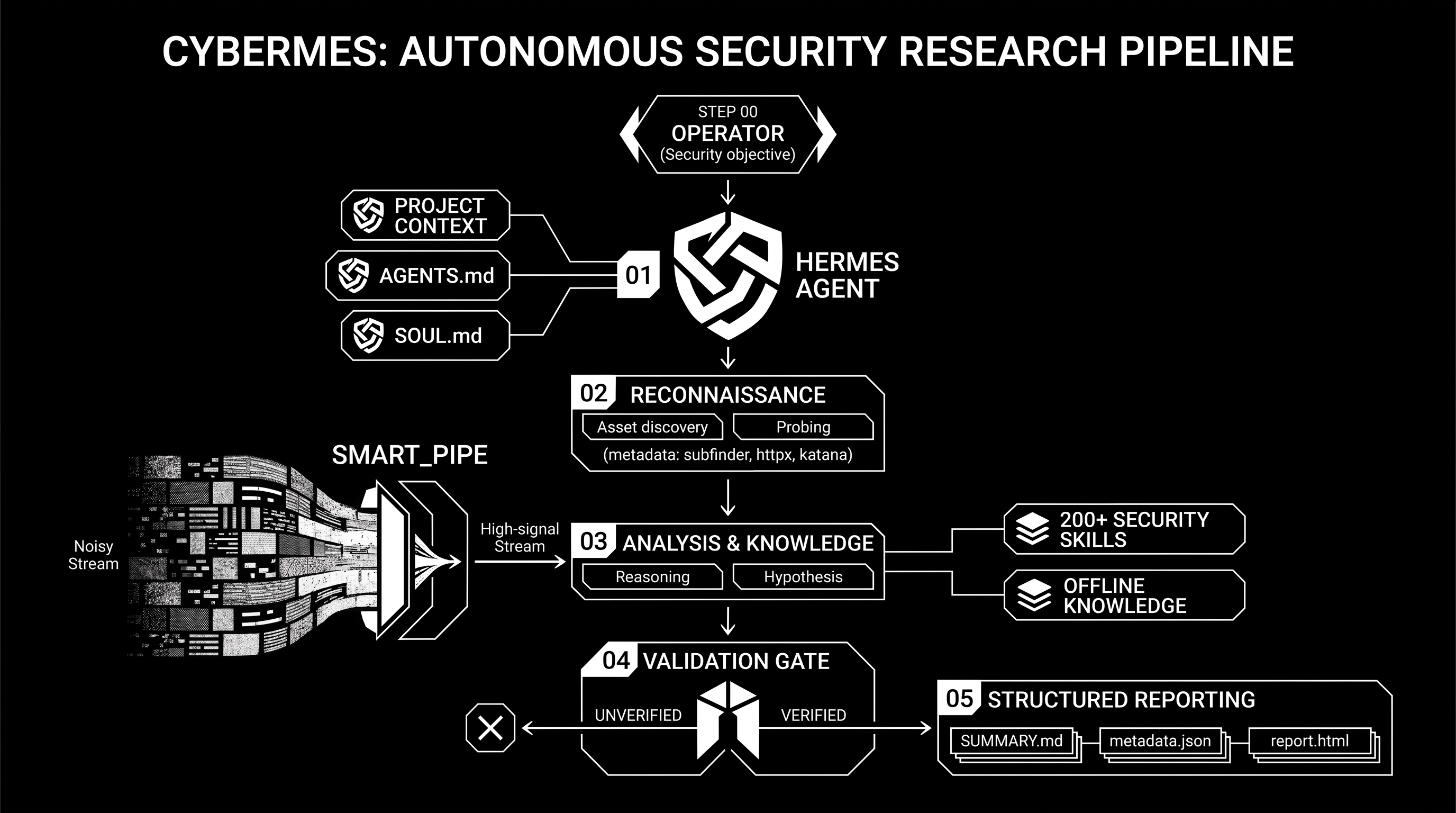
The standalone CLI mode utilizes the built-in Hermes Agent engine (hermes.exe / cybermes) as an autonomous reasoning brain. The operator provides a target prompt, and Hermes autonomously maps the attack surface, invokes CLI binaries, filters outputs through smart_pipe to prevent LLM context saturation, verifies hypotheses with standalone PoC scripts, and produces executive reports.
Hermes CLI Execution Flow:
flowchart LR
    subgraph P1["1. Scope & Recon"]
        direction TB
        A([CLI Input]) --> B[Hermes Agent]
        B --> C[Recon Tools]
        C --> D[smart_pipe Filter]
    end

    subgraph P2["2. Skill & Validation Gate"]
        direction TB
        D --> E[Knowledge & SOPs]
        E --> F[Validation Gate]
        F --> G[Run PoC Script]
    end

    subgraph P3["3. Deliverables"]
        direction TB
        G --> H[reports/ Workspace]
        H --> I([Executive Reports])
    end

    P1 ==> P2 ==> P3
Hermes Pipeline Stages:
- Target Ingestion & Scope Validation: Operator issues a single CLI prompt. Hermes resolves domain boundaries and initializes target workspace directories (
recon/<TARGET_SLUG>/ and reports/<TARGET_SLUG>/).
- Autonomous Toolchain Orchestration: Hermes spawns external reconnaissance tools (
subfinder, httpx, katana, ffuf) in sequence.
- High-Speed Stream Filtering (
smart_pipe): Raw outputs are archived to disk in recon/ while smart_pipe streams only relevant endpoints, HTTP status codes, and leaked secrets into Hermes' context window.
- Hypothesis & Skill Retrieval: Hermes queries the offline database (
search_knowledge) and loads relevant offensive playbooks from skills/.
- Deterministic PoC Validation Gate: Hermes writes and executes a non-destructive script (
pocs/poc_<vuln>.py), capturing raw HTTP request/response evidence.
- Report Compilation: Calls native Go
aggregate_reports and generate_pdf.py to compile SUMMARY.md, metadata.json, interactive report.html, and REPORT_<target>.pdf.
2. 🔌 Cybermes MCP Server Workflow
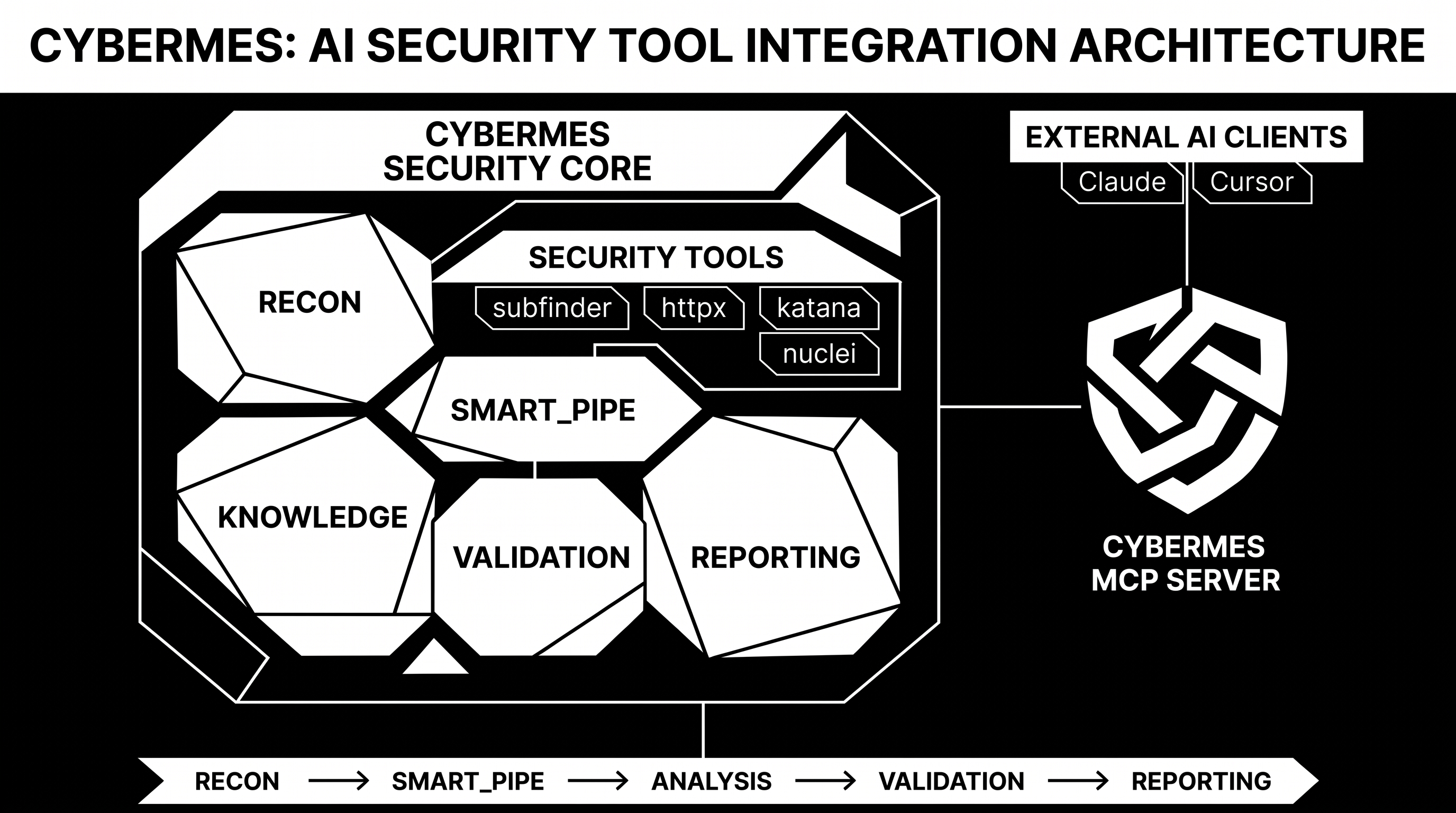
In the MCP workflow, Cybermes operates as a native JSON-RPC 2.0 server (cybermes-mcp) providing specialized security tools, prompts, and context providers directly to external AI assistants and IDEs (Cursor, Antigravity / Gemini, Claude, Windsurf, VS Code / Cline). The external model acts as the reasoning engine while Cybermes handles high-speed tool execution, local knowledge lookups, and reporting.
MCP Protocol Execution Flow:
flowchart LR
    Client([AI Editor / IDE]) <-->|JSON-RPC 2.0 stdio| MCP[Cybermes MCP: cybermes-mcp]

    subgraph Tools["Modular Capabilities"]
        direction TB
        T1[Recon & Probing]
        T2[200+ SOPs & Knowledge]
        T3[Secrets & Nuclei Scan]
        T4[Findings & Evidence]
    end

    MCP <--> Tools
    Tools --> Out[(reports/SLUG/ Deliverables)]
- Handshake & Discovery: AI Client starts
cybermes-mcp via stdio and discovers exposed tools, schemas, and resource templates.
- Environment & Scope Assessment: The AI invokes
cybermes_validate_scope and cybermes_check_environment to inspect target authorization and system tool health.
- Structured Recon & Secret Mining: AI executes
cybermes_recon_crawl, cybermes_http_probe, or cybermes_scan_secrets. The MCP server executes compiled routines and returns clean, structured JSON results without context bloat.
- On-Demand Playbook & Exploit Lookup: When a vulnerability vector is identified, the AI calls
cybermes_search_knowledge and cybermes_get_skill to retrieve targeted exploitation steps in sub-50ms.
- Deterministic Evidence Recording & Aggregation: AI logs verified findings with
cybermes_record_finding / cybermes_record_evidence and compiles target deliverables via cybermes_aggregate_report.
3. ⚖️ Hermes CLI vs. Cybermes MCP Comparison
| Feature / Dimension |
🤖 Hermes CLI Workflow |
🔌 Cybermes MCP Workflow |
| Primary Interface |
Terminal / PowerShell / Docker CLI |
AI Coding Editors / IDEs / Web Chat (JSON-RPC) |
| Reasoning Engine |
Built-in Hermes Autonomous Agent (hermes.exe) |
Host AI Client (Gemini, Claude 3.7, GPT-4o, etc.) |
| Execution Model |
Autonomous sub-process loop from CLI prompt |
Modular Tool & Context calls requested by the AI |
| Token Optimization |
OS pipe streaming via Go smart_pipe |
Native JSON-RPC schema with compact response filters |
| Knowledge Access |
CLI binary execution (search_knowledge) |
In-memory MCP tools (cybermes_search_knowledge, cybermes_get_skill) |
| Deliverables Output |
Direct filesystem generation in reports/<TARGET_SLUG>/ |
Programmatic management via cybermes_aggregate_report |
Why Cybermes?
| Challenge |
Traditional Approach |
Cybermes Solution |
| AI Assistant Integration |
Manual copy-pasting of terminal outputs or fragile custom wrappers. |
Native Go MCP Server (cybermes-mcp): Standardized JSON-RPC 2.0 integration exposing 10+ security tools directly to AI clients. |
| LLM Token & Context Noise |
Fuzzer/crawler outputs flood context with thousands of lines of 404s and static assets. |
High-Speed Stream Filter (smart_pipe): Pure Go filter that archives raw logs to disk while streaming only high-signal endpoints, status codes, and secrets. |
| Exploit Verification |
Speculative or pattern-matched alerts without reproducible verification. |
Zero-False-Positive PoC Gate: Requires standalone, non-destructive Python scripts (pocs/poc_<name>.py) and raw HTTP traces before logging findings. |
| Payload & Methodology Retrieval |
Manually searching external wikis, repositories, and cheat sheets online. |
Sub-50ms Local Knowledge Base (search_knowledge): Instant offline query engine across 200+ SOP playbooks, PayloadsAllTheThings, and HackTricks datasets. |
| Structured Deliverables |
Unorganized text dumps requiring tedious manual report compilation. |
Multi-Format Report Aggregator: Automated generation of SUMMARY.md, metadata.json, standalone interactive HTML, and print-ready REPORT_<target>.pdf. |
| OS & Environment Portability |
Most offensive tools assume Kali/Linux, complicating Windows setups. |
Native Multi-Platform Support: Automated native installers for Windows (PowerShell), Linux, macOS, and Docker with a built-in health check and repair tool (doctor.py). |
Core Features
- Native Go Toolchain: Zero-overhead compiled utilities for output stream filtering (
smart_pipe), credential scanning (secret_scan), offline knowledge retrieval (search_knowledge), and report aggregation (aggregate_reports).
- Model Context Protocol (MCP): Native Go MCP server (
cybermes-mcp) exposing security tools and context providers to AI assistants like Claude Desktop, Cursor, Windsurf, and VS Code / Cline.
- 200+ Offensive Playbooks: Standard operating procedures in
skills/ covering API security (IDOR/BOLA, JWT, BPLA), web vulnerabilities (SSRF, XSS, SQLi, Race Conditions), and cloud misconfigurations.
- Integrated Reconnaissance: Pre-configured pipelines for
subfinder, httpx, katana, ffuf, nuclei, and sqlmap.
- Target Workspace Isolation: Strict target-scoped evidence tracking, preventing context contamination across engagements.
- Multi-Format Reporting: Automated output generation in Markdown (
SUMMARY.md), JSON metrics (metadata.json), standalone HTML dashboards, and PDF reports (REPORT_<target>.pdf).
- Cross-Platform Compatibility: Fully supported on Windows (native PowerShell), Linux, macOS, and Docker.
Target Workspace & Deliverables
Every target assessment creates a dedicated directory structure under reports/ and recon/:
Cybermes/
├── reports/<TARGET_SLUG>/        # Verified findings & deliverables
│   ├── SUMMARY.md                # Consolidated executive findings matrix
│   ├── metadata.json             # Structured JSON metrics & counters
│   ├── report.html               # Standalone interactive HTML report
│   ├── REPORT_<target>.pdf       # Print-ready PDF report (named per assessed target)
│   ├── findings/                 # Confirmed vulnerability writeups (low, medium, high, critical)
│   │   └── high_idor_orders.md
│   ├── pocs/                     # Standalone Python proof-of-concept scripts
│   │   └── poc_idor_orders.py
│   └── evidence/                 # Raw logs, screenshots, recon notes
│       └── recon_notes.md
└── recon/<TARGET_SLUG>/          # Raw tool outputs & streaming dumps
    ├── subdomains.txt
    └── endpoints.txt
| Tool |
Type |
Purpose |
Standard Syntax |
smart_pipe |
Go Binary |
Stream output filter & context token optimizer |
katana -u <url> | smart_pipe --target <slug> --tool katana |
secret_scan |
Go Binary |
Multi-pattern credential leak scanner |
secret_scan recon/<slug>/ |
search_knowledge |
Go Binary |
Sub-50ms offline exploit & payload search |
search_knowledge "jwt algorithm confusion" |
aggregate_reports |
Go Binary |
Markdown findings indexer & report compiler |
aggregate_reports <slug> |
cybermes-mcp |
Go Binary / NPX |
Native MCP Server for AI assistants |
npx -y cybermes-mcp |
subfinder |
External |
Passive subdomain discovery |
subfinder -d <target> -silent |
httpx |
External |
Web probing & technology fingerprinting |
httpx -u <url> -tech-detect |
katana |
External |
Web crawler & SPA endpoint miner |
katana -u <url> -depth 3 |
ffuf |
External |
High-speed web fuzzer |
ffuf -u <url>/FUZZ -w <wordlist> |
nuclei |
External |
Template-based vulnerability scanner |
nuclei -u <url> -tags cve |
sqlmap |
Python |
Automated SQL injection auditor |
sqlmap -u "<url>?id=1" --batch |
doctor.py |
Python |
Environment health check & auto-repair |
python tools/doctor.py --fix |
generate_pdf.py |
Python |
PDF and HTML executive report generator |
python tools/generate_pdf.py <slug> |
Documentation
Detailed guides and references are available in the docs/ directory:
Acknowledgments & Upstream Credits
Cybermes integrates and builds upon foundational work from the open-source and offensive security research communities:
(See ATTRIBUTION.md for full license notices and upstream details)
Contributors
Thank you to everyone who helps build, maintain, and research Cybermes:






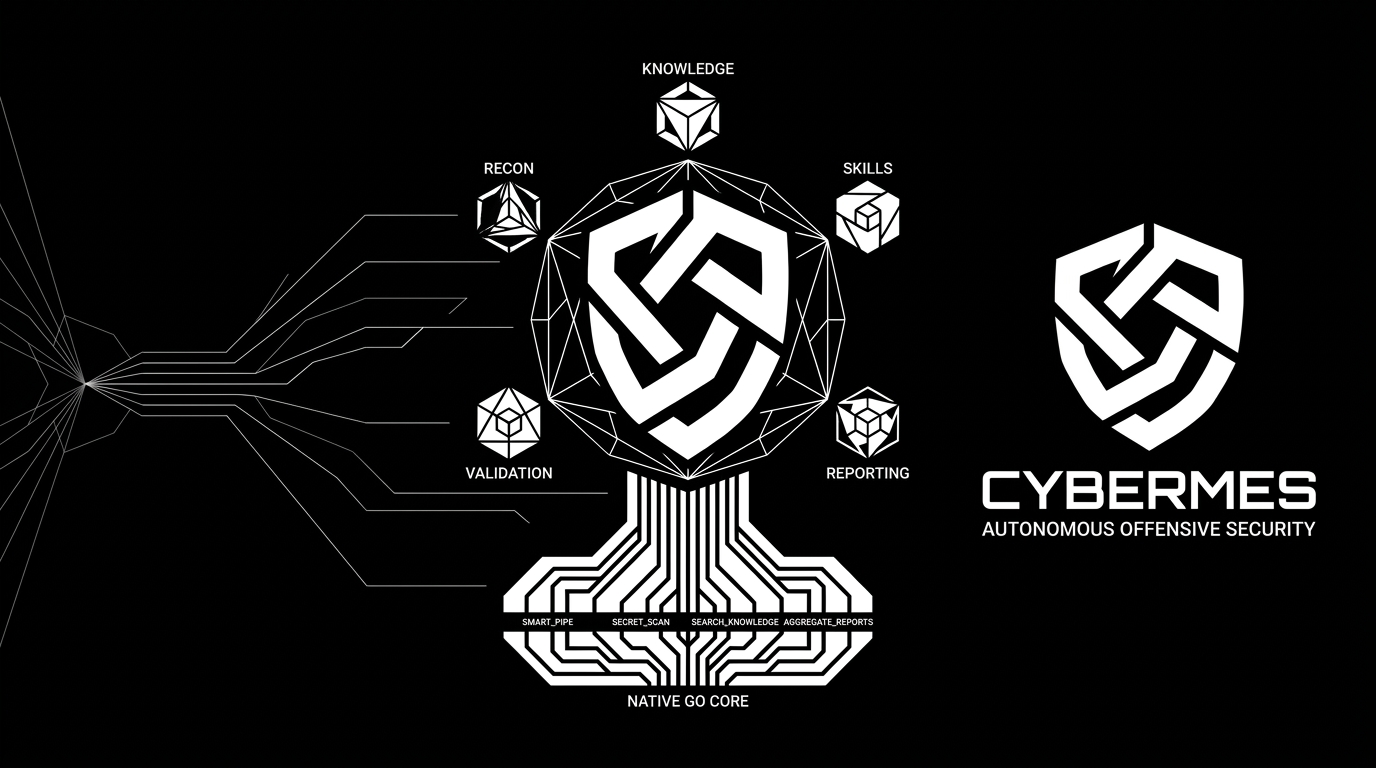





 Cybermes 是一个进攻性安全助手和自动化框架,面向已授权的漏洞赏金挖掘、信息收集、漏洞研究和结构化报告,由 AI 智能体和 200 多个实战手册(playbook)库驱动。