Qwen3-VL
💜 Qwen Chat | 🤗 Hugging Face | 🤖 ModelScope | 📑 Blog | 📚 Cookbooks | 📑 Paper
🖥️ Demo | 💬 WeChat (微信) | 🫨 Discord | 📑 API | 🖥️ PAI-DSW
Introduction
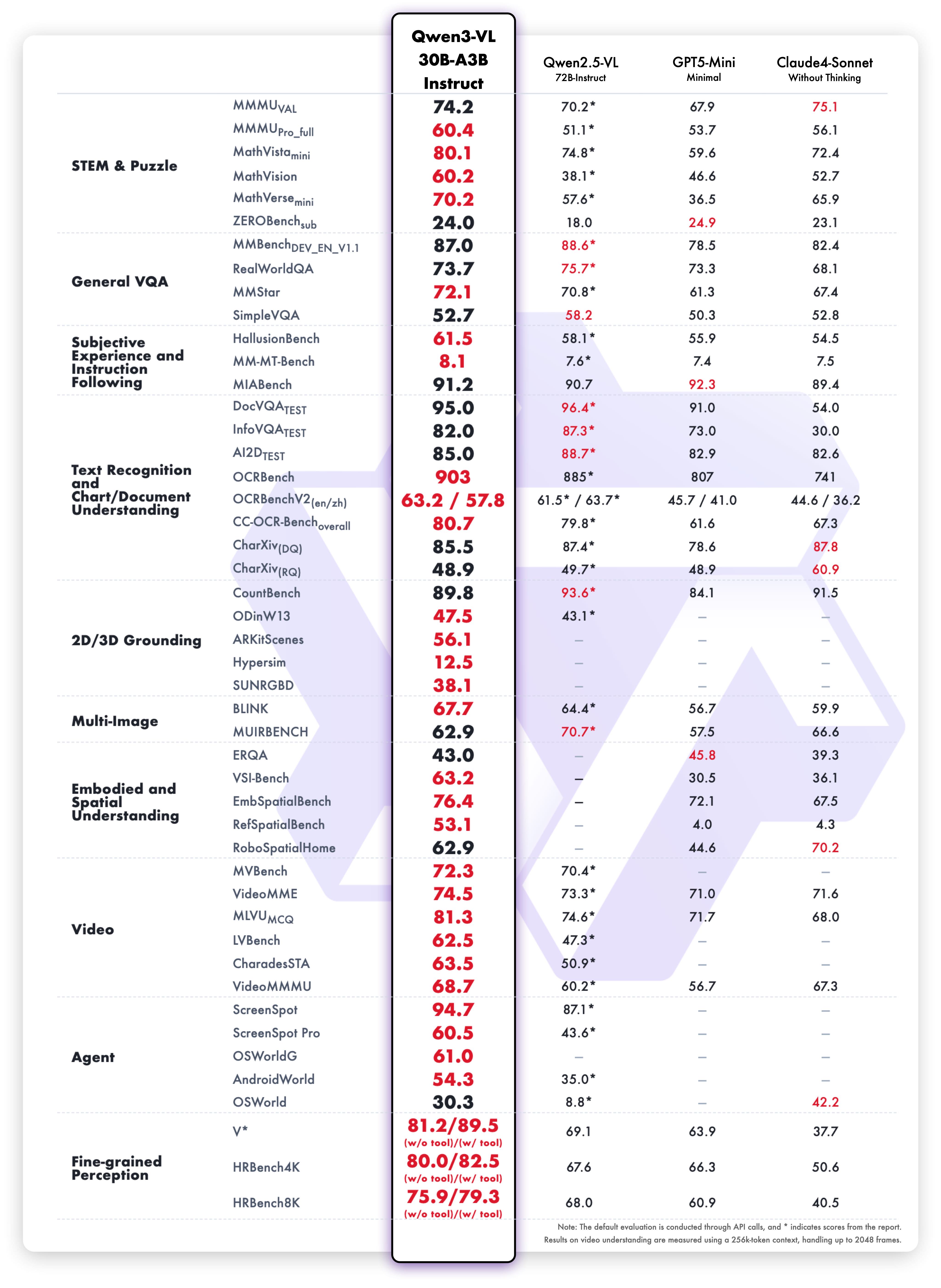
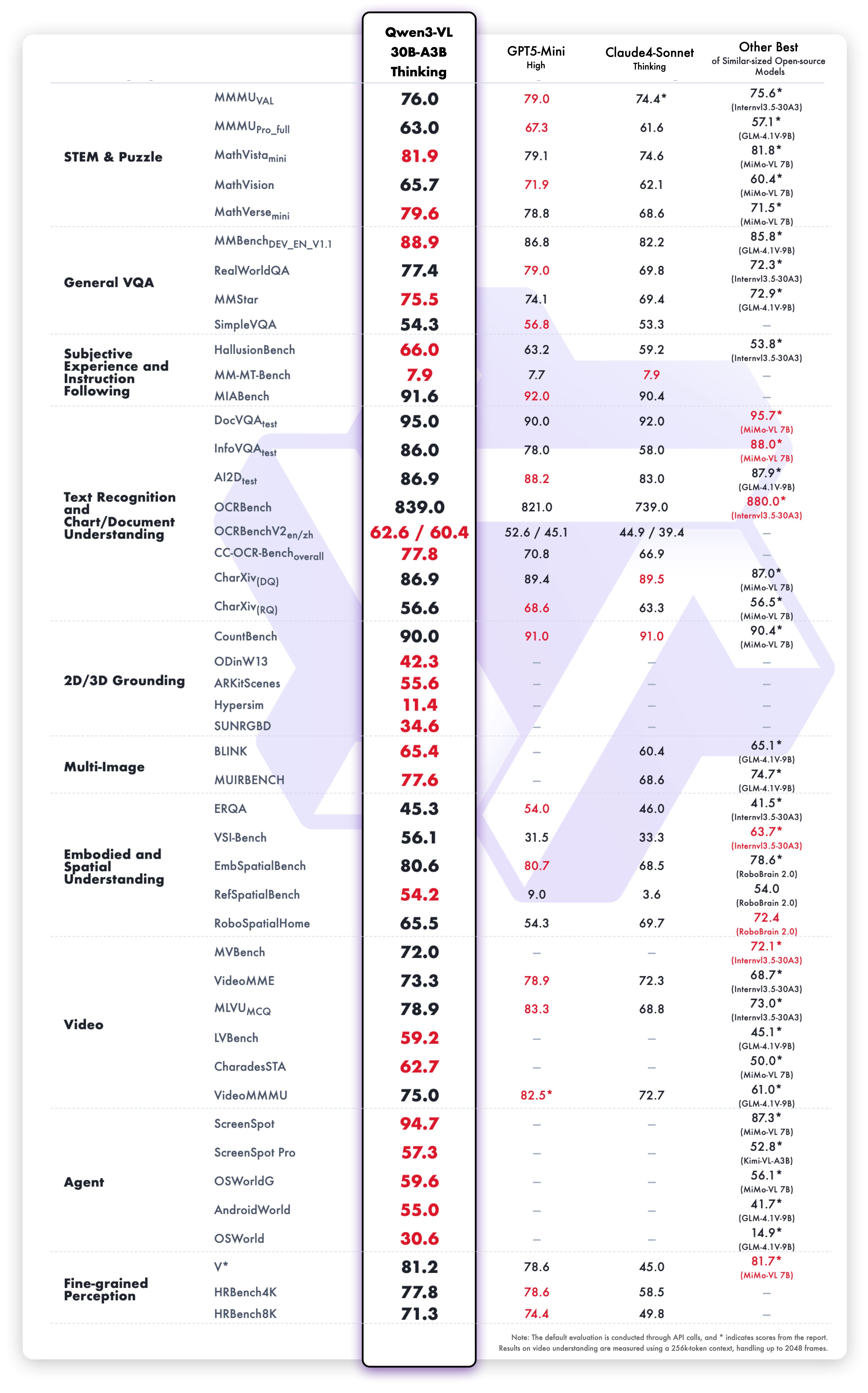
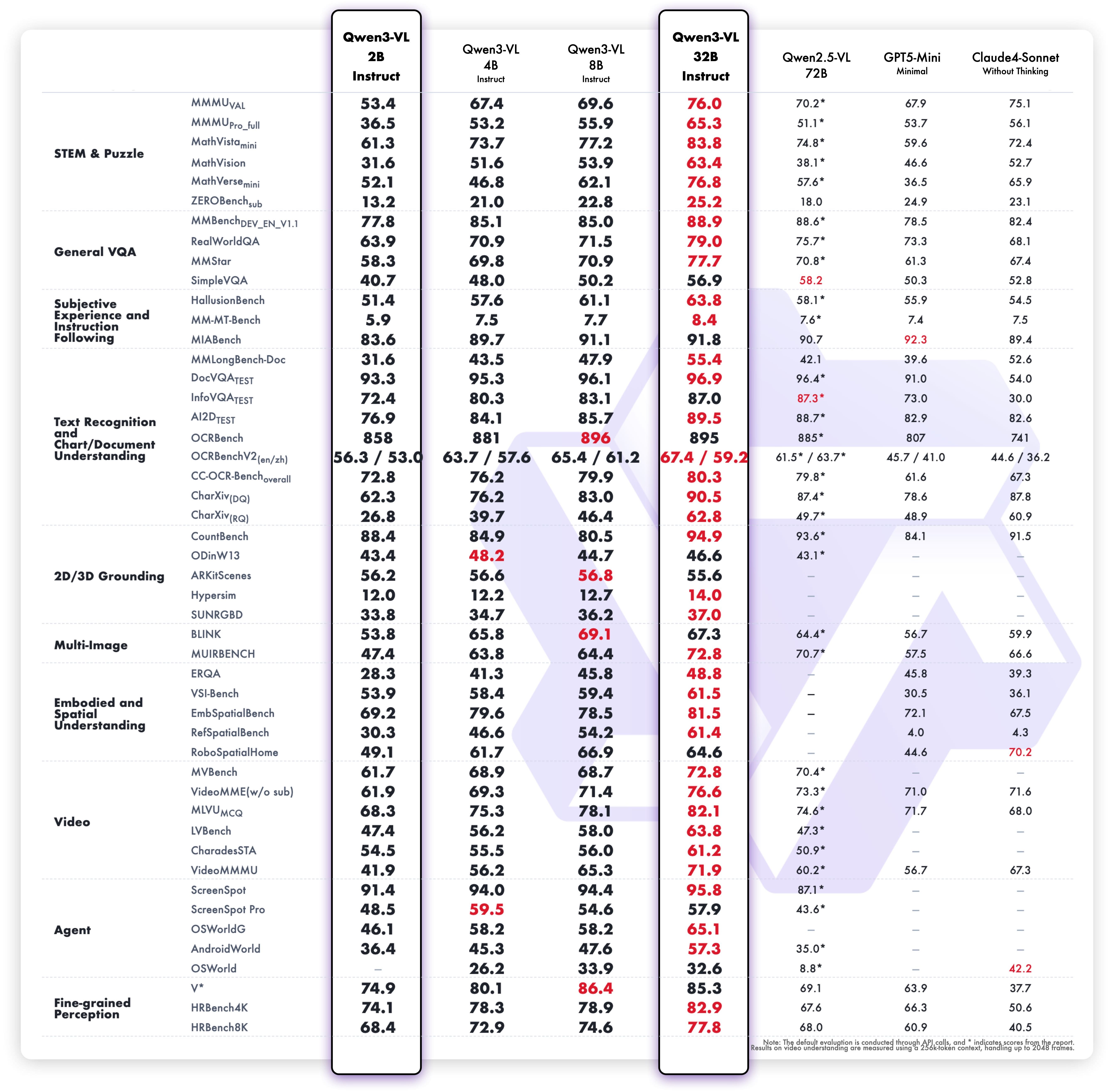
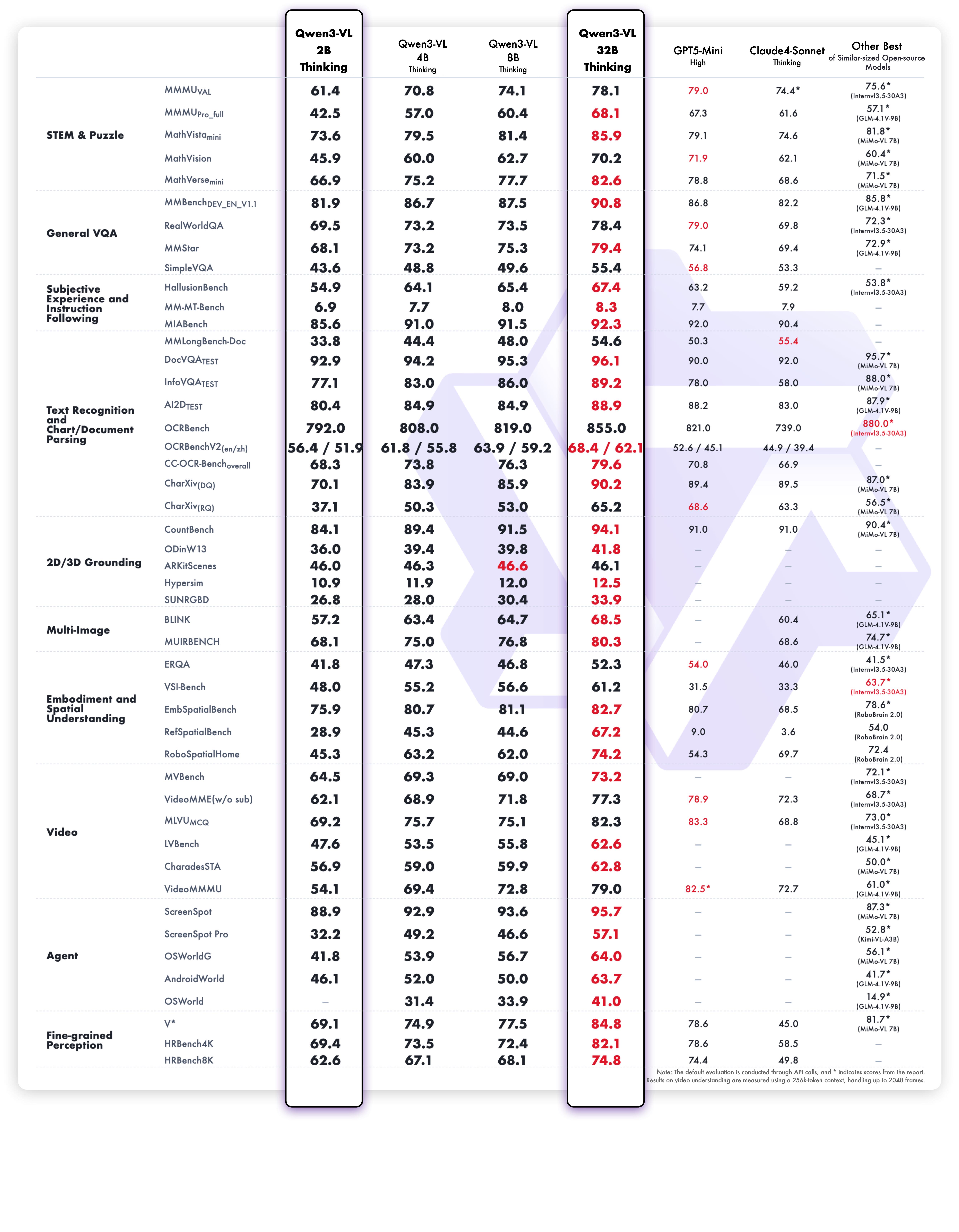
Meet Qwen3-VL — the most powerful vision-language model in the Qwen series to date.
This generation delivers comprehensive upgrades across the board: superior text understanding & generation, deeper visual perception & reasoning, extended context length, enhanced spatial and video dynamics comprehension, and stronger agent interaction capabilities.
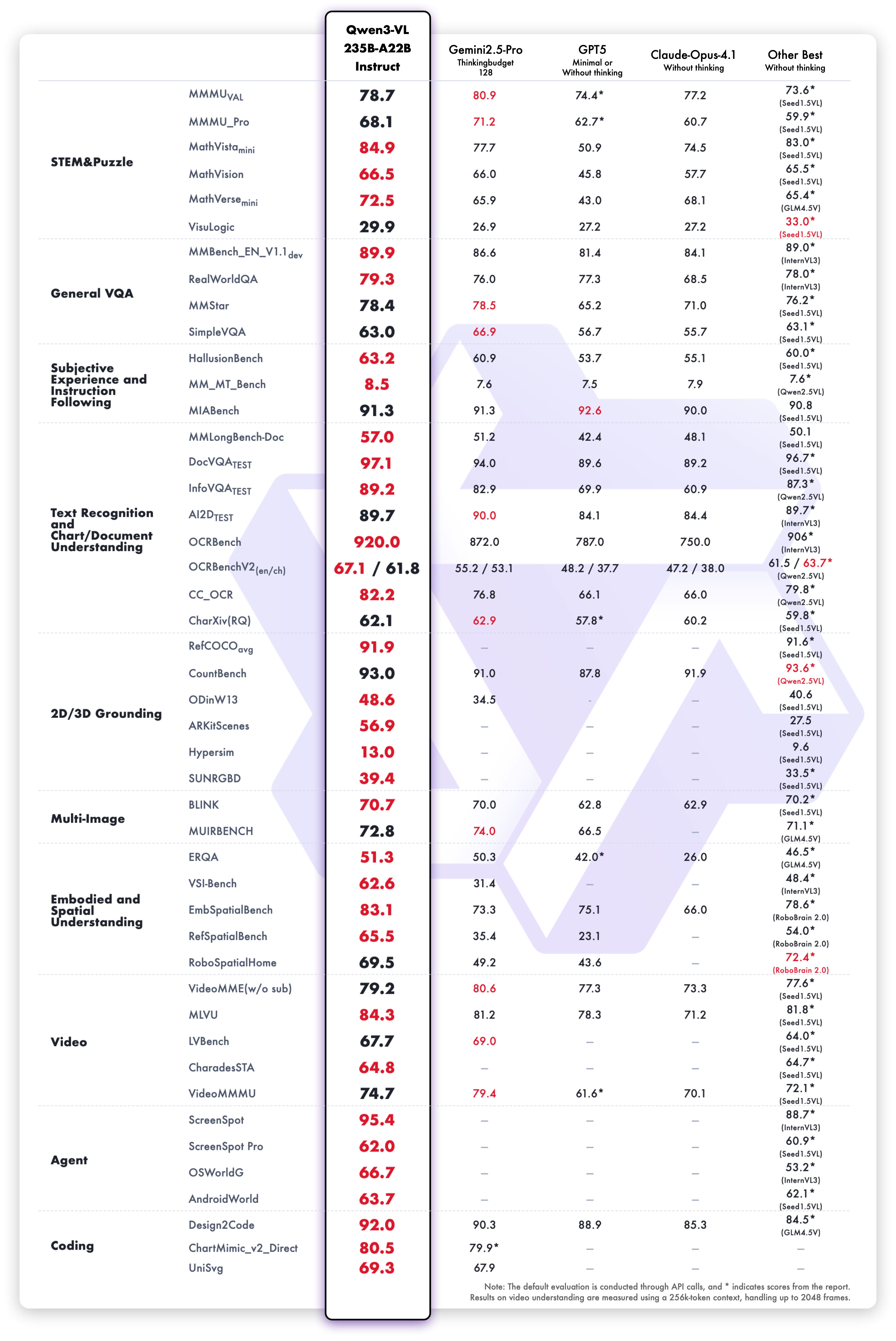
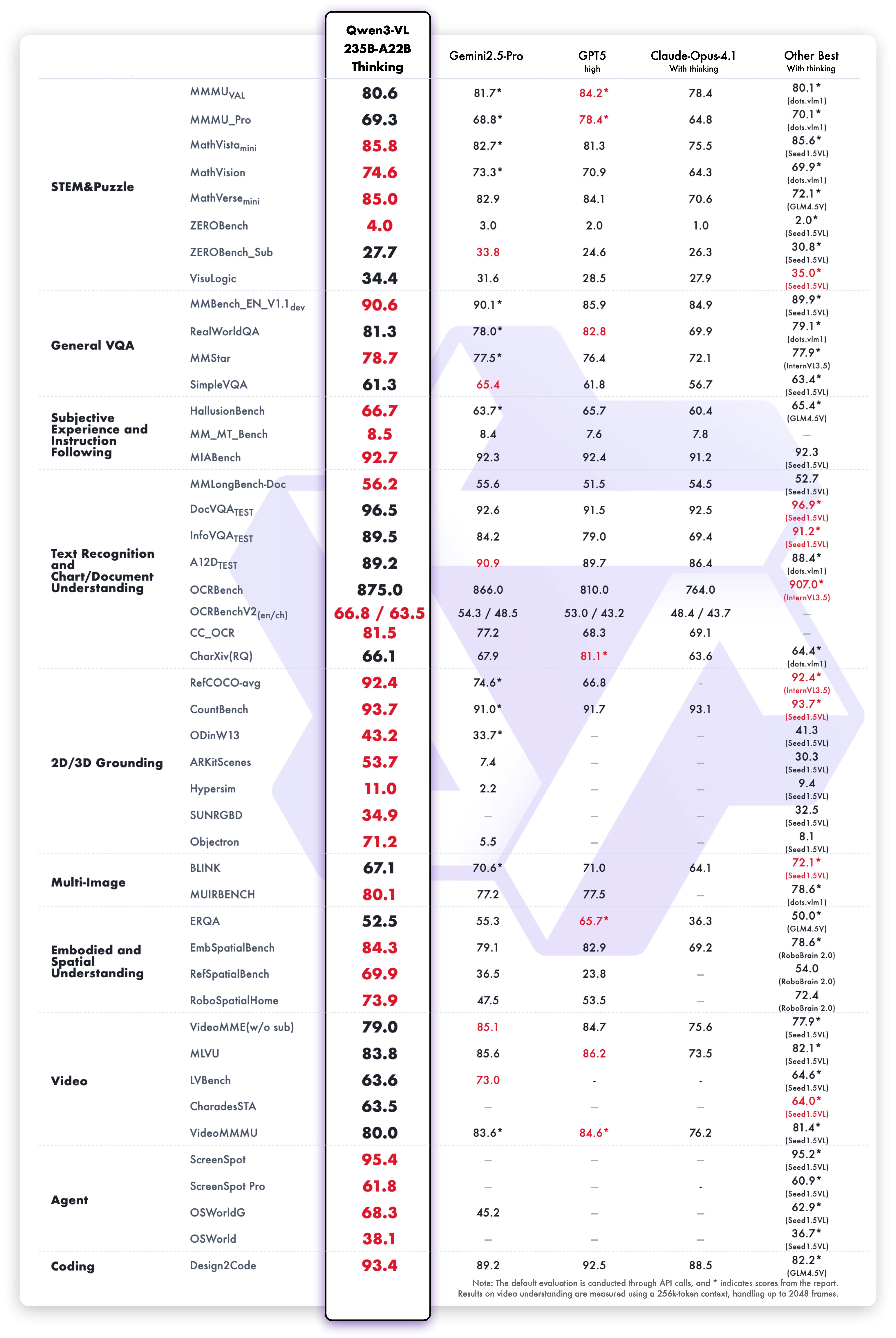
Available in Dense and MoE architectures that scale from edge to cloud, with Instruct and reasoning‑enhanced Thinking editions for flexible, on‑demand deployment.
Key Enhancements:
Visual Agent: Operates PC/mobile GUIs—recognizes elements, understands functions, invokes tools, completes tasks.
Visual Coding Boost: Generates Draw.io/HTML/CSS/JS from images/videos.
Advanced Spatial Perception: Judges object positions, viewpoints, and occlusions; provides stronger 2D grounding and enables 3D grounding for spatial reasoning and embodied AI.
Long Context & Video Understanding: Native 256K context, expandable to 1M; handles books and hours-long video with full recall and second-level indexing.
Enhanced Multimodal Reasoning: Excels in STEM/Math—causal analysis and logical, evidence-based answers.
Upgraded Visual Recognition: Broader, higher-quality pretraining is able to “recognize everything”—celebrities, anime, products, landmarks, flora/fauna, etc.
Expanded OCR: Supports 32 languages (up from 10); robust in low light, blur, and tilt; better with rare/ancient characters and jargon; improved long-document structure parsing.
Text Understanding on par with pure LLMs: Seamless text–vision fusion for lossless, unified comprehension.
Model Architecture Updates:
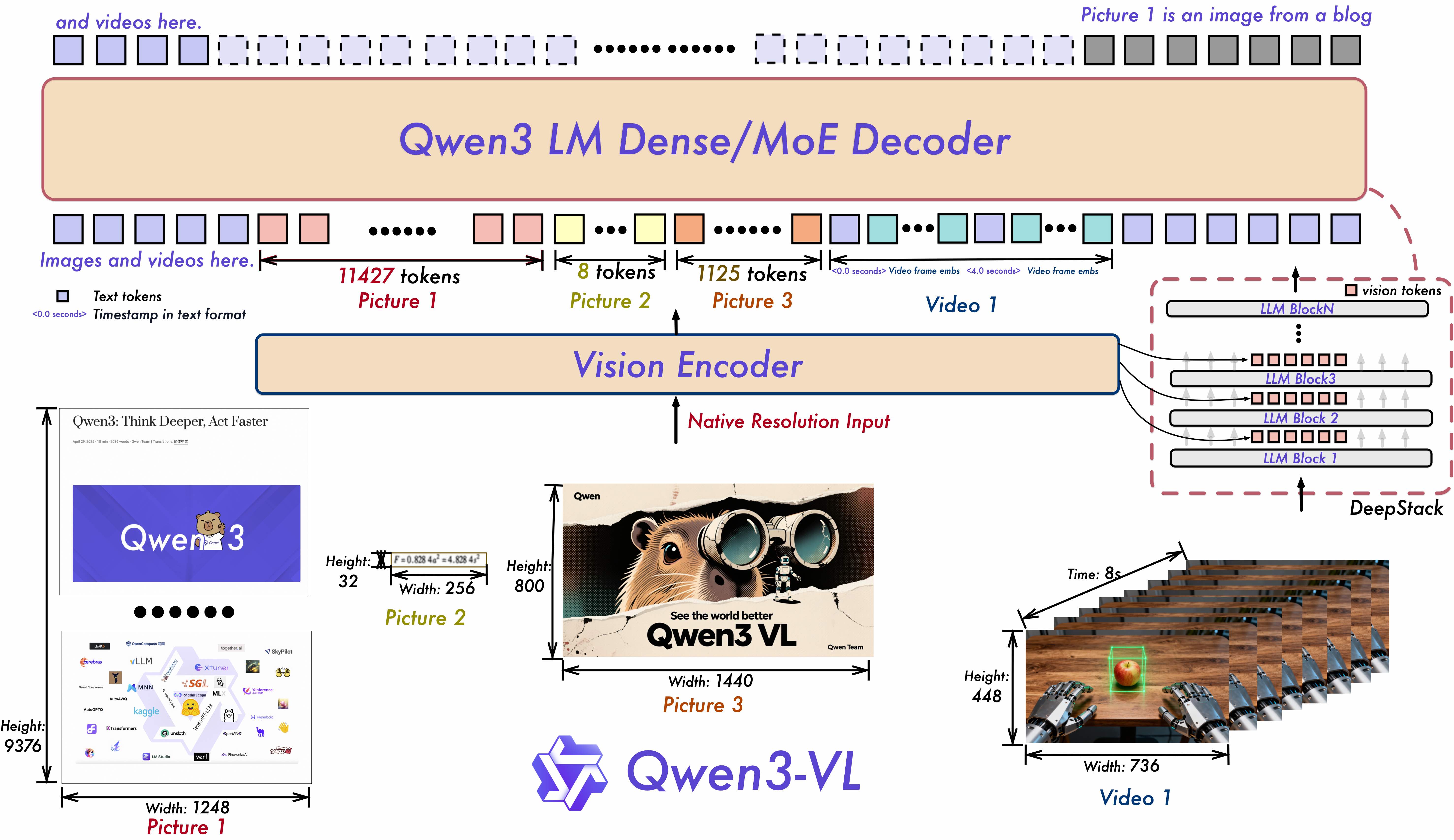
Interleaved-MRoPE: Full‑frequency allocation over time, width, and height via robust positional embeddings, enhancing long‑horizon video reasoning.
DeepStack: Fuses multi‑level ViT features to capture fine‑grained details and sharpen image–text alignment.
Text–Timestamp Alignment: Moves beyond T‑RoPE to precise, timestamp‑grounded event localization for stronger video temporal modeling.
News
- 2025.11.27: We have released the Qwen3-VL paper, which introduces many technical details about Qwen3-VL, and we hope it will be helpful to everyone.
- 2025.10.21: We have released the Qwen3-VL-2B (Instruct/Thinking) and Qwen3-VL-32B (Instruct/Thinking). Enjoy it!
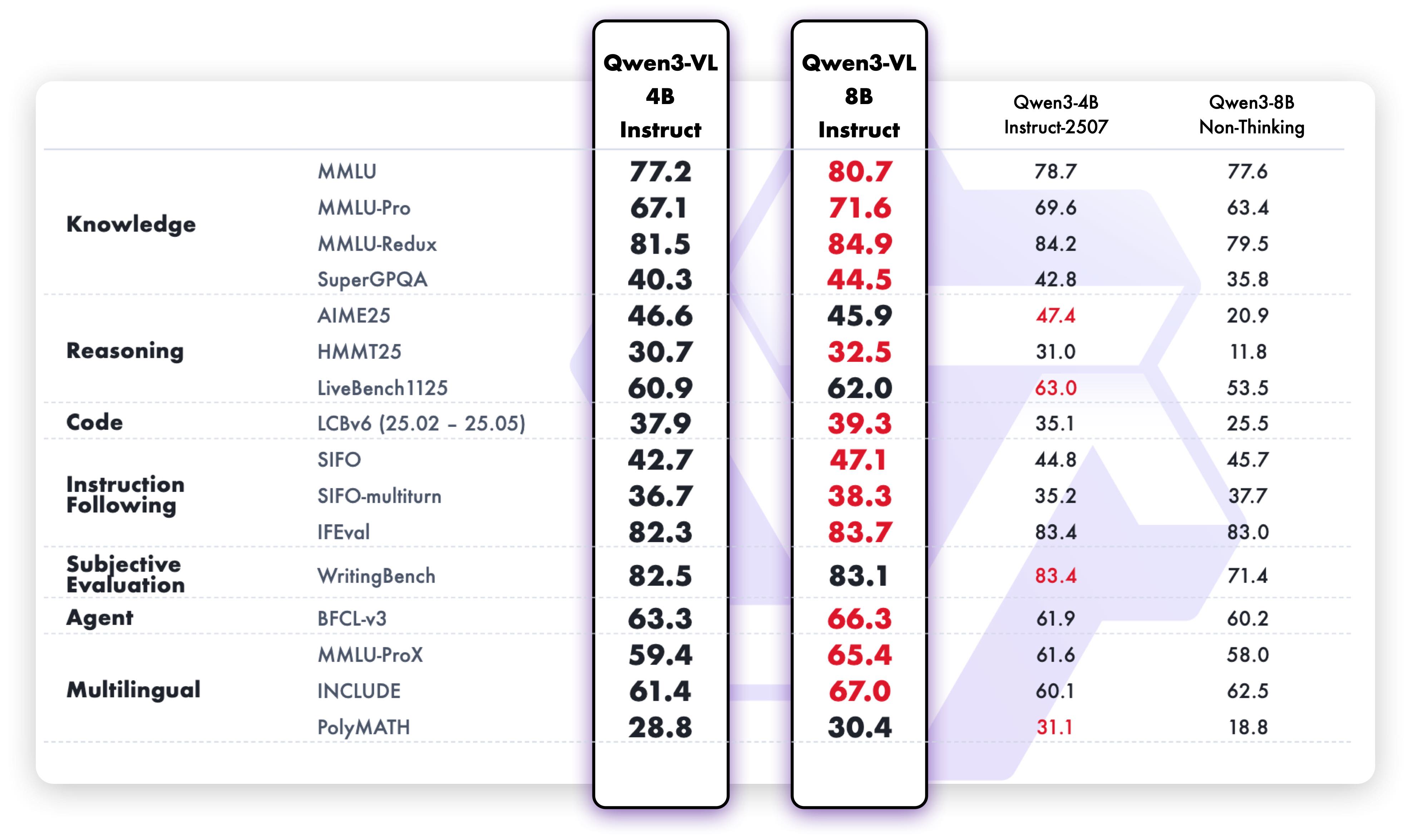
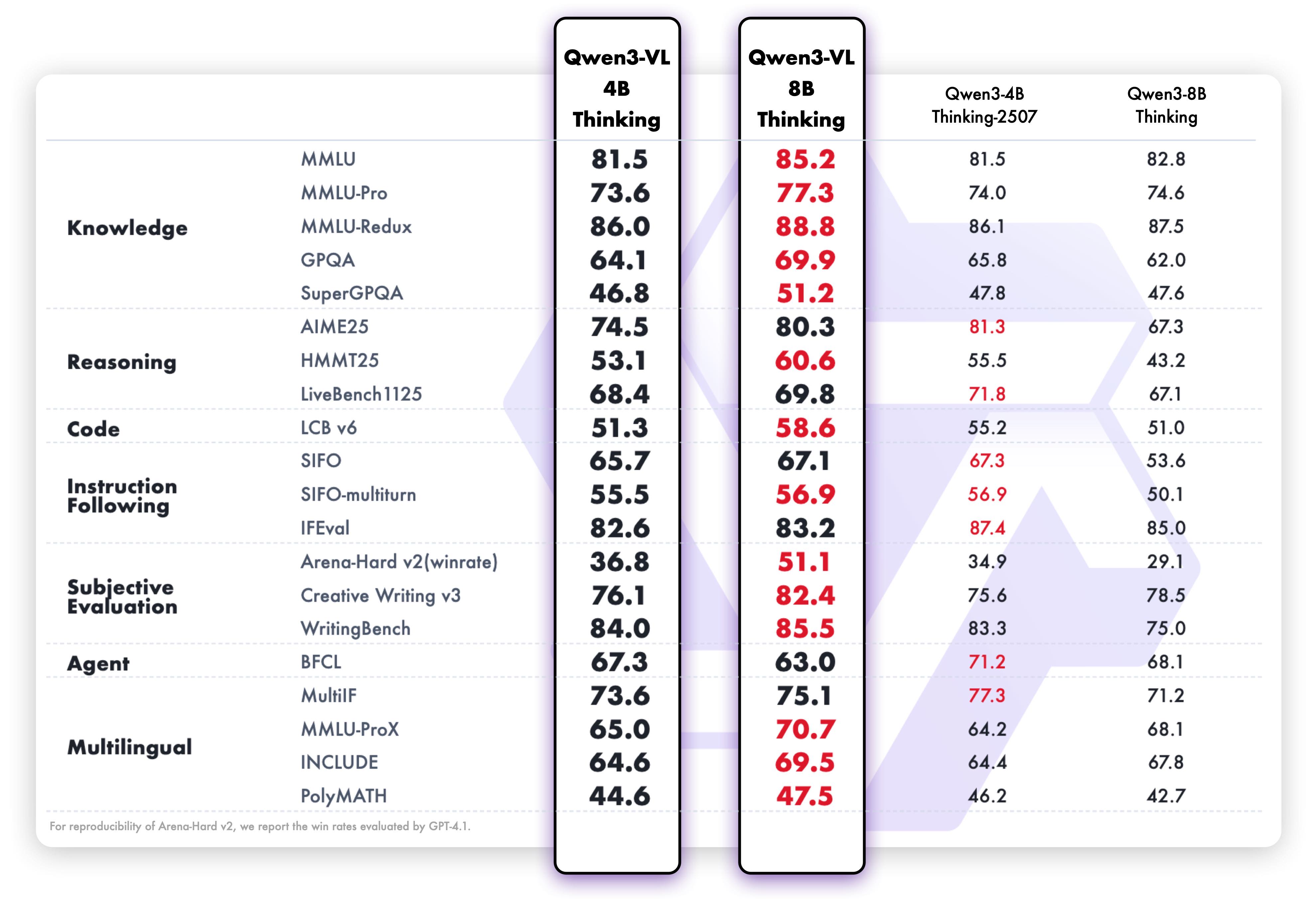
- 2025.10.15: We have released the Qwen3-VL-4B (Instruct/Thinking) and Qwen3-VL-8B (Instruct/Thinking). Enjoy it!
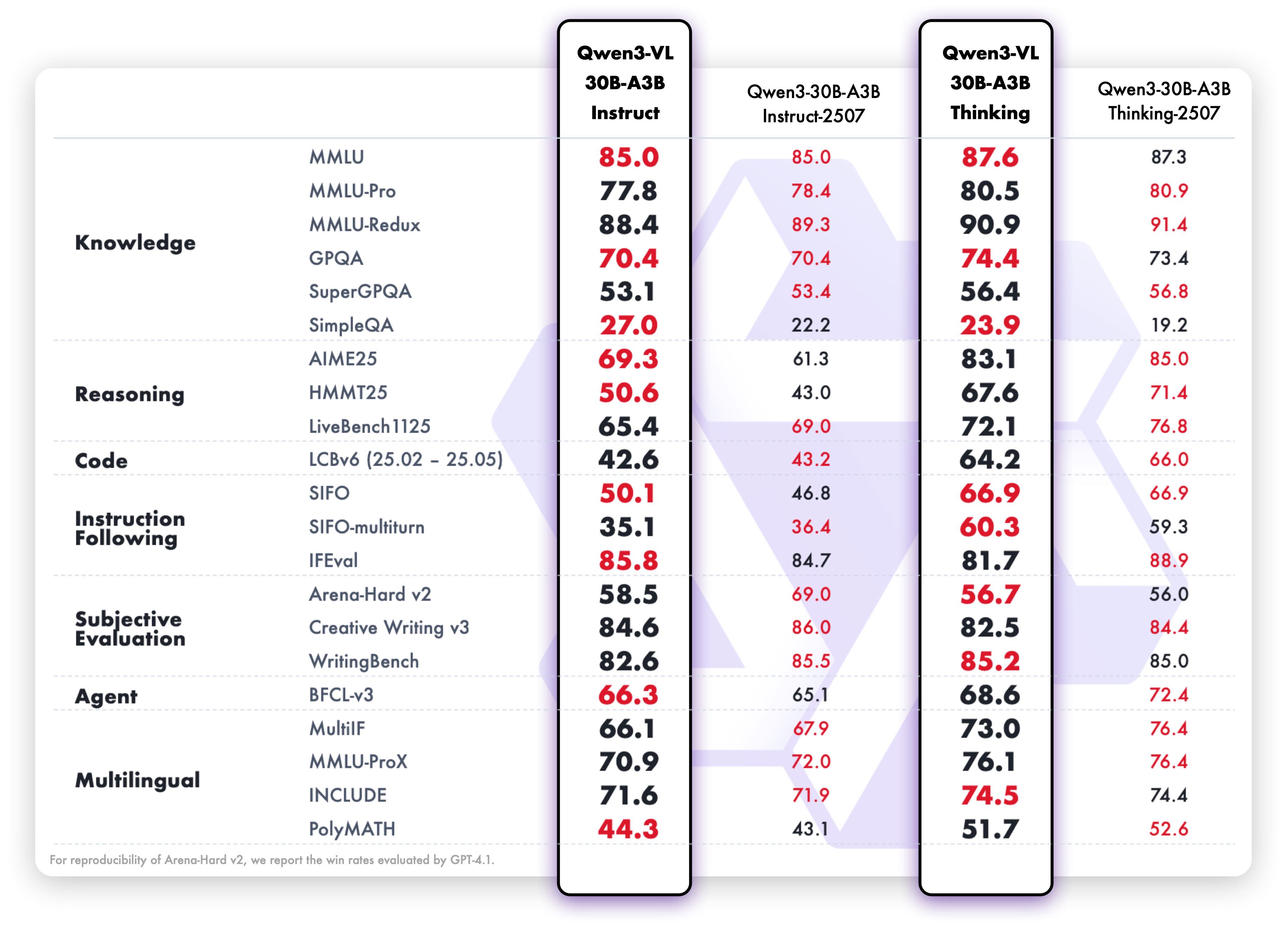
- 2025.10.4: We have released the Qwen3-VL-30B-A3B-Instruct and Qwen3-VL-30B-A3B-Thinking. We have also released the FP8 version of the Qwen3-VL models — available in our HuggingFace collection and ModelScope collection.
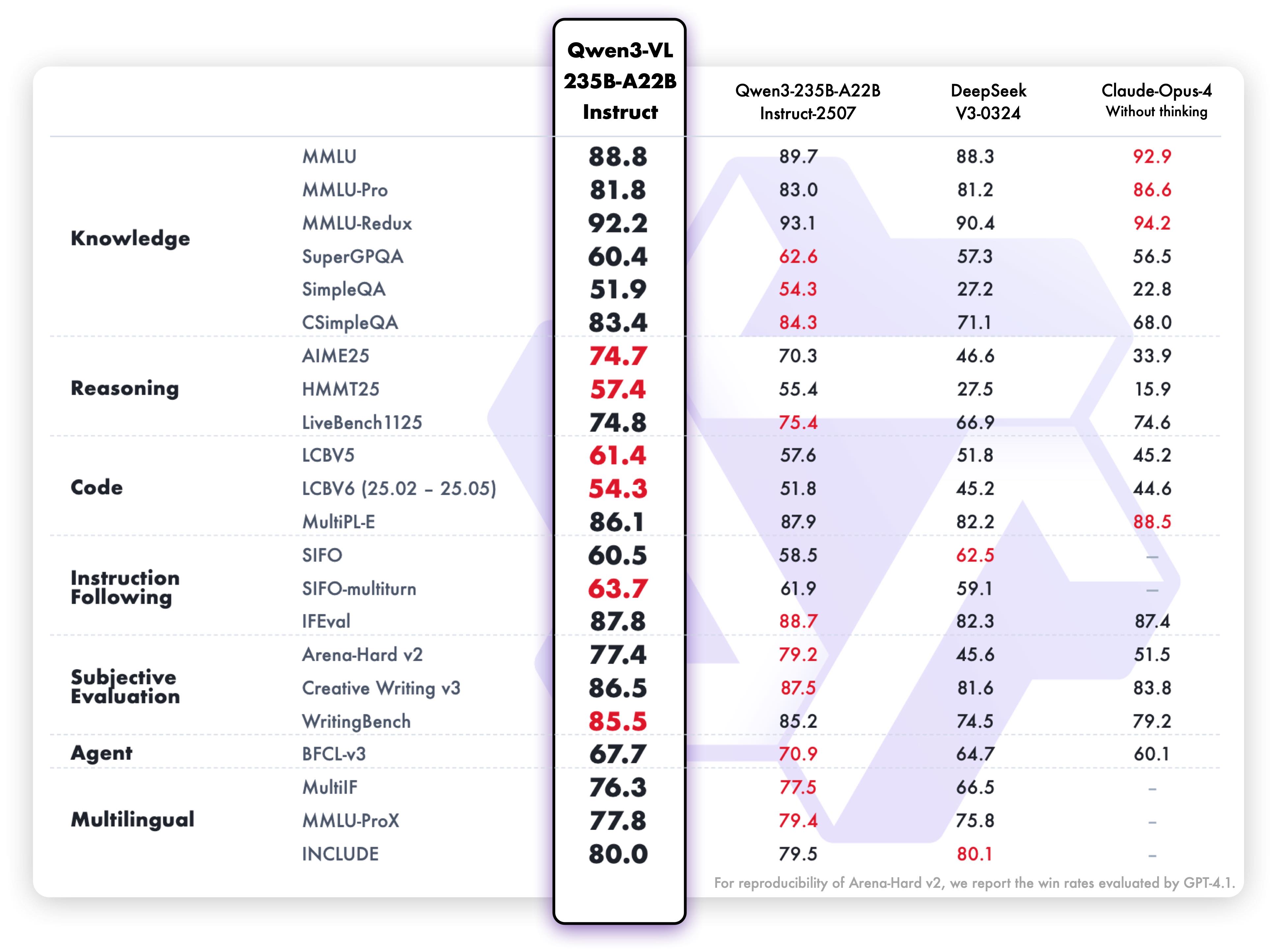
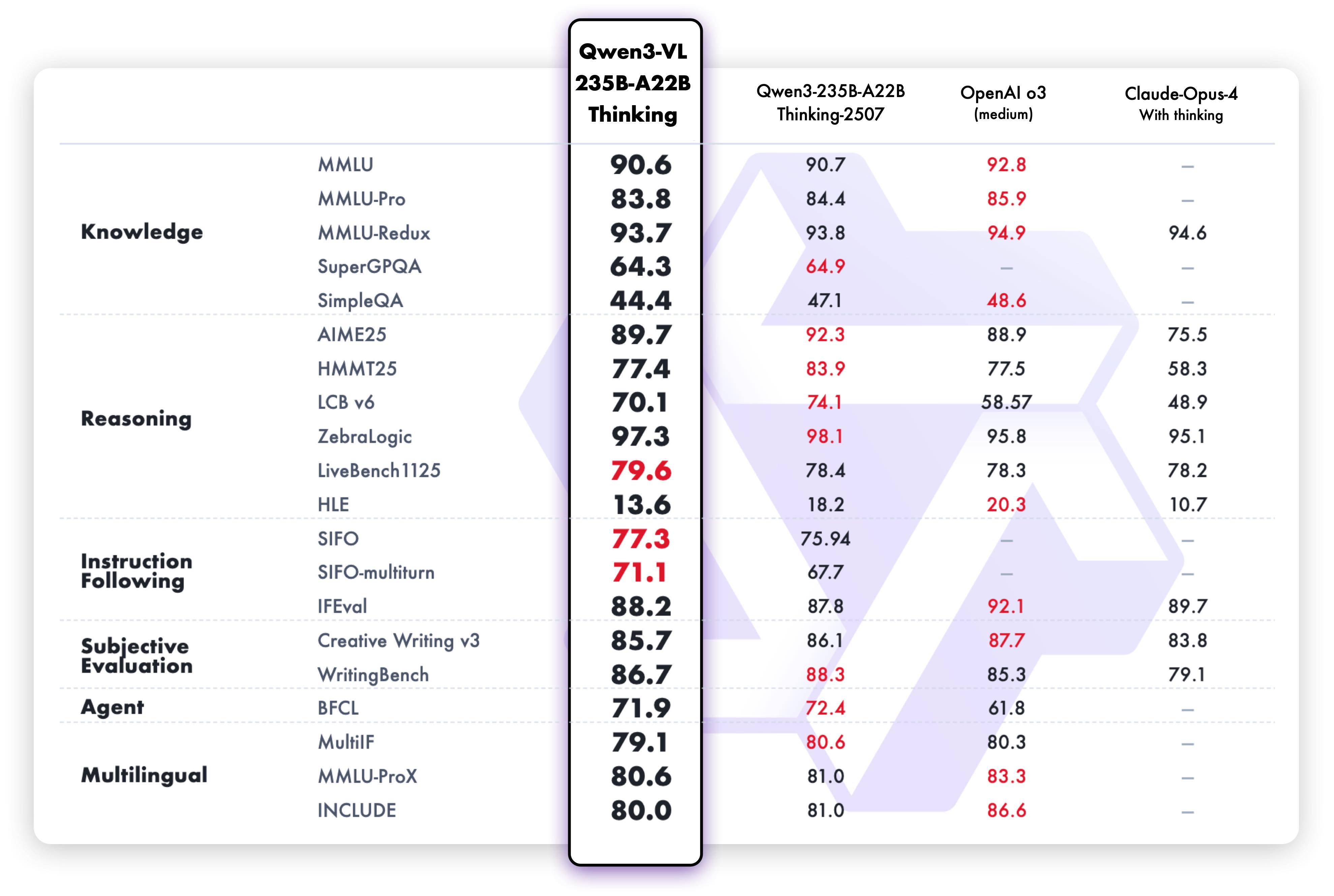
- 2025.09.23: We have released the Qwen3-VL-235B-A22B-Instruct and Qwen3-VL-235B-A22B-Thinking. For more details, please check our blog!
- 2025.04.08: We provide the code for fine-tuning Qwen2-VL and Qwen2.5-VL.
- 2025.03.25: We have released the Qwen2.5-VL-32B. It is smarter and its responses align more closely with human preferences. For more details, please check our blog!
- 2025.02.20: we have released the Qwen2.5-VL Technical Report. Alongside the report, we have also released AWQ-quantized models for Qwen2.5-VL in three different sizes: 3B, 7B , and 72B parameters.
- 2025.01.28: We have released the Qwen2.5-VL series. For more details, please check our blog!
- 2024.12.25: We have released the QvQ-72B-Preview. QvQ-72B-Preview is an experimental research model, focusing on enhancing visual reasoning capabilities. For more details, please check our blog!
- 2024.09.19: The instruction-tuned Qwen2-VL-72B model and its quantized version [AWQ, GPTQ-Int4, GPTQ-Int8] are now available. We have also released the Qwen2-VL paper simultaneously.
- 2024.08.30: We have released the Qwen2-VL series. The 2B and 7B models are now available, and the 72B model for open source is coming soon. For more details, please check our blog!
Visual Tasks
Text-Centric Tasks
Cookbooks
We are preparing cookbooks for many capabilities, including recognition, localization, document parsing, video understanding, key information extraction, and more. Welcome to learn more!
| Cookbook |
Description |
Open |
| Omni Recognition |
Not only identify animals, plants, people, and scenic spots but also recognize various objects such as cars and merchandise. |
 |
| Powerful Document Parsing Capabilities |
The parsing of documents has reached a higher level, including not only text but also layout position information and our Qwen HTML format. |
|
| Precise Object Grounding Across Formats |
Using relative position coordinates, it supports both boxes and points, allowing for diverse combinations of positioning and labeling tasks. |
|
| General OCR and Key Information Extraction |
Stronger text recognition capabilities in natural scenes and multiple languages, supporting diverse key information extraction needs. |
|
| Video Understanding |
Better video OCR, long video understanding, and video grounding. |
|
| Mobile Agent |
Locate and think for mobile phone control. |
|
| Computer-Use Agent |
Locate and think for controlling computers and Web. |
|
| 3D Grounding |
Provide accurate 3D bounding boxes for both indoor and outdoor objects. |
|
| Thinking with Images |
Utilize image_zoom_in_tool and search_tool to facilitate the model’s precise comprehension of fine-grained visual details within images. |
|
| MultiModal Coding |
Generate accurate code based on rigorous comprehension of multimodal information. |
|
| Long Document Understanding |
Achieve rigorous semantic comprehension of ultra-long documents. |
|
| Spatial Understanding |
See, understand and reason about the spatial information |
|
Quickstart
Below, we provide simple examples to show how to use Qwen3-VL with 🤖 ModelScope and 🤗 Transformers.
# The Qwen3-VL model requires transformers >= 4.57.0
pip install "transformers>=4.57.0"
🤖 ModelScope
We strongly advise users especially those in mainland China to use ModelScope. snapshot_download can help you solve issues concerning downloading checkpoints.
Here we show a code snippet to show you how to use the chat model with transformers:
from transformers import AutoModelForImageTextToText, AutoProcessor

# default: Load the model on the available device(s)
model = AutoModelForImageTextToText.from_pretrained(
    "Qwen/Qwen3-VL-235B-A22B-Instruct", dtype="auto", device_map="auto"
)

# We recommend enabling flash_attention_2 for better acceleration and memory saving, especially in multi-image and video scenarios.
# model = AutoModelForImageTextToText.from_pretrained(
#     "Qwen/Qwen3-VL-235B-A22B-Instruct",
#     dtype=torch.bfloat16,
#     attn_implementation="flash_attention_2",
#     device_map="auto",
# )

processor = AutoProcessor.from_pretrained("Qwen/Qwen3-VL-235B-A22B-Instruct")

messages = [
    {
        "role": "user",
        "content": [
            {
                "type": "image",
                "image": "https://qianwen-res.oss-cn-beijing.aliyuncs.com/Qwen-VL/assets/demo.jpeg",
            },
            {"type": "text", "text": "Describe this image."},
        ],
    }
]

# Preparation for inference
inputs = processor.apply_chat_template(
    messages,
    tokenize=True,
    add_generation_prompt=True,
    return_dict=True,
    return_tensors="pt"
)
inputs = inputs.to(model.device)

# Inference: Generation of the output
generated_ids = model.generate(**inputs, max_new_tokens=128)
generated_ids_trimmed = [
    out_ids[len(in_ids) :] for in_ids, out_ids in zip(inputs.input_ids, generated_ids)
]
output_text = processor.batch_decode(
    generated_ids_trimmed, skip_special_tokens=True, clean_up_tokenization_spaces=False
)
print(output_text)
Multi image inference
# Messages containing multiple images and a text query
messages = [
    {
        "role": "user",
        "content": [
            {"type": "image", "image": "file:///path/to/image1.jpg"},
            {"type": "image", "image": "file:///path/to/image2.jpg"},
            {"type": "text", "text": "Identify the similarities between these images."},
        ],
    }
]

# Preparation for inference
inputs = processor.apply_chat_template(
    messages,
    tokenize=True,
    add_generation_prompt=True,
    return_dict=True,
    return_tensors="pt"
)
inputs = inputs.to(model.device)

# Inference: Generation of the output
generated_ids = model.generate(**inputs, max_new_tokens=128)
generated_ids_trimmed = [
    out_ids[len(in_ids) :] for in_ids, out_ids in zip(inputs.input_ids, generated_ids)
]
output_text = processor.batch_decode(
    generated_ids_trimmed, skip_special_tokens=True, clean_up_tokenization_spaces=False
)
print(output_text)
Video inference
# Messages containing a video url(or a local path) and a text query
messages = [
    {
        "role": "user",
        "content": [
            {
                "type": "video",
                "video": "https://qianwen-res.oss-cn-beijing.aliyuncs.com/Qwen2-VL/space_woaudio.mp4",
            },
            {"type": "text", "text": "Describe this video."},
        ],
    }
]

# Preparation for inference
inputs = processor.apply_chat_template(
    messages,
    tokenize=True,
    add_generation_prompt=True,
    return_dict=True,
    return_tensors="pt"
)
inputs = inputs.to(model.device)

# Inference: Generation of the output
generated_ids = model.generate(**inputs, max_new_tokens=128)
generated_ids_trimmed = [
    out_ids[len(in_ids) :] for in_ids, out_ids in zip(inputs.input_ids, generated_ids)
]
output_text = processor.batch_decode(
    generated_ids_trimmed, skip_special_tokens=True, clean_up_tokenization_spaces=False
)
print(output_text)
Batch inference
# for batch generation, padding_side should be set to left!
processor.tokenizer.padding_side = 'left'

# Sample messages for batch inference
messages1 = [
    {
        "role": "user",
        "content": [
            {"type": "image", "image": "file:///path/to/image1.jpg"},
            {"type": "image", "image": "file:///path/to/image2.jpg"},
            {"type": "text", "text": "What are the common elements in these pictures?"},
        ],
    }
]
messages2 = [
    {"role": "system", "content": [{"type": "text", "text": "You are a helpful assistant."}]},
    {"role": "user", "content": [{"type": "text", "text": "Who are you?"}]},
]
# Combine messages for batch processing
messages = [messages1, messages2]

# Preparation for inference
inputs = processor.apply_chat_template(
    messages,
    tokenize=True,
    add_generation_prompt=True,
    return_dict=True,
    return_tensors="pt",
    padding=True # padding should be set for batch generation!
)
inputs = inputs.to(model.device)

# Inference: Generation of the output
generated_ids = model.generate(**inputs, max_new_tokens=128)
generated_ids_trimmed = [
    out_ids[len(in_ids) :] for in_ids, out_ids in zip(inputs.input_ids, generated_ids)
]
output

 Qwen3-VL — это семейство мультимодальных моделей «зрение + язык», созданных командой Qwen из Alibaba Cloud. Они сочетают сильное понимание текста с глубоким визуальным восприятием, рассуждением и возможностями агента.