

MiniCPM-V README

The project's README from github.com/OpenBMB/MiniCPM-V. As one markdown file: README.md.

A Pocket-Sized MLLM for Ultra-Efficient Image and Video Understanding on Your Phone

中文 | English

feishu Feishu (Lark)  |   Discord Discord  |   📚 MiniCPM Wiki

MiniCPM-V 4.6 🤗 🤖 📱 | MiniCPM-o 4.5 🤗 📞 🤖 | 📄 Technical Report | 🍳 Cookbook | 🌐 API

MiniCPM-V and MiniCPM-o are multimodal LLM series designed for strong performance and efficient deployment on devices. MiniCPM-V focuses on efficient vision-language understanding across image, video and text inputs. MiniCPM-o extends the family toward real-time end-to-end omnimodal interaction with streaming video and audio inputs plus text and speech outputs. The most notable models in the series currently include:

News


Click to view more news.
  • [2026.05.07] 📢📢📢 We release the MiniCPM-o 4.5 technical report, introducing the key techniques behind its real-time full-duplex omni-modal interaction. Read it here.

  • [2026.02.05] 📢📢📢 We note the web demo may experience latency issues due to network conditions. We are working actively to provide a Docker image for local deployment of the real-time interactive Demo as soon as possible. Please stay tuned!

  • [2025.09.18] 📢📢📢 MiniCPM-V 4.5 technical report is now released! See here.

  • [2025.09.01] ⭐️⭐️⭐️ MiniCPM-V 4.5 has been officially supported by llama.cpp, vLLM, and LLaMA-Factory. You are welcome to use it directly through these official channels! Support for additional frameworks such as Ollama and SGLang is actively in progress.

  • [2025.08.02] 🚀🚀🚀 We open-source MiniCPM-V 4.0, which outperforms GPT-4.1-mini-20250414 in image understanding. It advances popular features of MiniCPM-V 2.6, and largely improves the efficiency. We also open-source the iOS App on iPhone and iPad. Try it now!

  • [2025.06.20] ⭐️⭐️⭐️ Our official Ollama repository is released. Try our latest models with one click!

  • [2025.01.24] 📢📢📢 MiniCPM-o 2.6 technical report is released! See here.

  • [2025.01.23] 💡💡💡 MiniCPM-o 2.6 is now supported by Align-Anything, a framework by PKU-Alignment Team for aligning any-to-any modality large models with human intentions. It supports DPO and SFT fine-tuning on both vision and audio. Try it now!

  • [2025.01.19] 📢 ATTENTION! We are currently working on merging MiniCPM-o 2.6 into the official repositories of llama.cpp, Ollama, and vllm. Until the merge is complete, please USE OUR LOCAL FORKS of llama.cpp, Ollama, and vllm. Using the official repositories before the merge may lead to unexpected issues.

  • [2025.01.17] We have updated the usage of MiniCPM-o 2.6 int4 quantization version and resolved the model initialization error. Click here and try it now!

  • [2025.01.13] 🔥🔥🔥 We open-source MiniCPM-o 2.6, which matches GPT-4o-202405 on vision, speech and multimodal live streaming. It advances popular capabilities of MiniCPM-V 2.6, and supports various new fun features. Try it now!

  • [2024.08.15] We now also support multi-image SFT. For more details, please refer to the document.

  • [2024.08.14] MiniCPM-V 2.6 now also supports fine-tuning with the SWIFT framework!

  • [2024.08.17] 🚀🚀🚀 MiniCPM-V 2.6 is now fully supported by official llama.cpp! GGUF models of various sizes are available here.

  • [2024.08.10] 🚀🚀🚀 MiniCPM-Llama3-V 2.5 is now fully supported by official llama.cpp! GGUF models of various sizes are available here.

  • [2024.08.06] 🔥🔥🔥 We open-source MiniCPM-V 2.6, which outperforms GPT-4V on single image, multi-image and video understanding. It advances popular features of MiniCPM-Llama3-V 2.5, and can support real-time video understanding on iPad. Try it now!

  • [2024.08.03] MiniCPM-Llama3-V 2.5 technical report is released! See here.

  • [2024.07.19] MiniCPM-Llama3-V 2.5 supports vLLM now! See here.

  • [2024.06.03] Now, you can run MiniCPM-Llama3-V 2.5 on multiple low VRAM GPUs(12 GB or 16 GB) by distributing the model's layers across multiple GPUs. For more details, check this link.

  • [2024.05.28] 🚀🚀🚀 MiniCPM-Llama3-V 2.5 now fully supports its feature in llama.cpp and Ollama! Please pull the latest code of our provided forks (llama.cpp, Ollama). GGUF models in various sizes are available here. MiniCPM-Llama3-V 2.5 series is not supported by the official repositories yet, and we are working hard to merge PRs. Please stay tuned!

  • [2024.05.28] 💫 We now support LoRA fine-tuning for MiniCPM-Llama3-V 2.5, using only 2 V100 GPUs! See more statistics here.

  • [2024.05.25] MiniCPM-Llama3-V 2.5 now supports streaming outputs and customized system prompts. Try it here!

  • [2024.05.24] We release the MiniCPM-Llama3-V 2.5 gguf, which supports llama.cpp inference and provides a 6~8 token/s smooth decoding on mobile phones. Try it now!

  • [2024.05.23] 🔍 We've released a comprehensive comparison between Phi-3-vision-128k-instruct and MiniCPM-Llama3-V 2.5, including benchmark evaluations, multilingual capabilities, and inference efficiency 🌟📊🌍🚀. Click here to view more details.

  • [2024.05.20] We open-soure MiniCPM-Llama3-V 2.5, it has improved OCR capability and supports 30+ languages, representing the first end-side MLLM achieving GPT-4V level performance! We provide efficient inference and simple fine-tuning. Try it now!

  • [2024.04.23] MiniCPM-V-2.0 supports vLLM now! Click here to view more details.

  • [2024.04.18] We create a HuggingFace Space to host the demo of MiniCPM-V 2.0 at here!

  • [2024.04.17] MiniCPM-V-2.0 supports deploying WebUI Demo now!

  • [2024.04.15] MiniCPM-V-2.0 now also supports fine-tuning with the SWIFT framework, with streaming inference enabled!

  • [2024.04.12] We open-source MiniCPM-V 2.0, which achieves comparable performance with Gemini Pro in understanding scene text and outperforms strong Qwen-VL-Chat 9.6B and Yi-VL 34B on OpenCompass, a comprehensive evaluation over 11 popular benchmarks. Click here to view the MiniCPM-V 2.0 technical blog.

  • [2024.03.14] MiniCPM-V now supports fine-tuning with the SWIFT framework. Thanks to Jintao for the contribution!

  • [2024.03.01] MiniCPM-V can now be deployed on Mac!

  • [2024.02.01] We open-source MiniCPM-V and OmniLMM-12B, which support efficient end-side deployment and powerful multimodal capabilities correspondingly.

Contents

MiniCPM-V 4.6

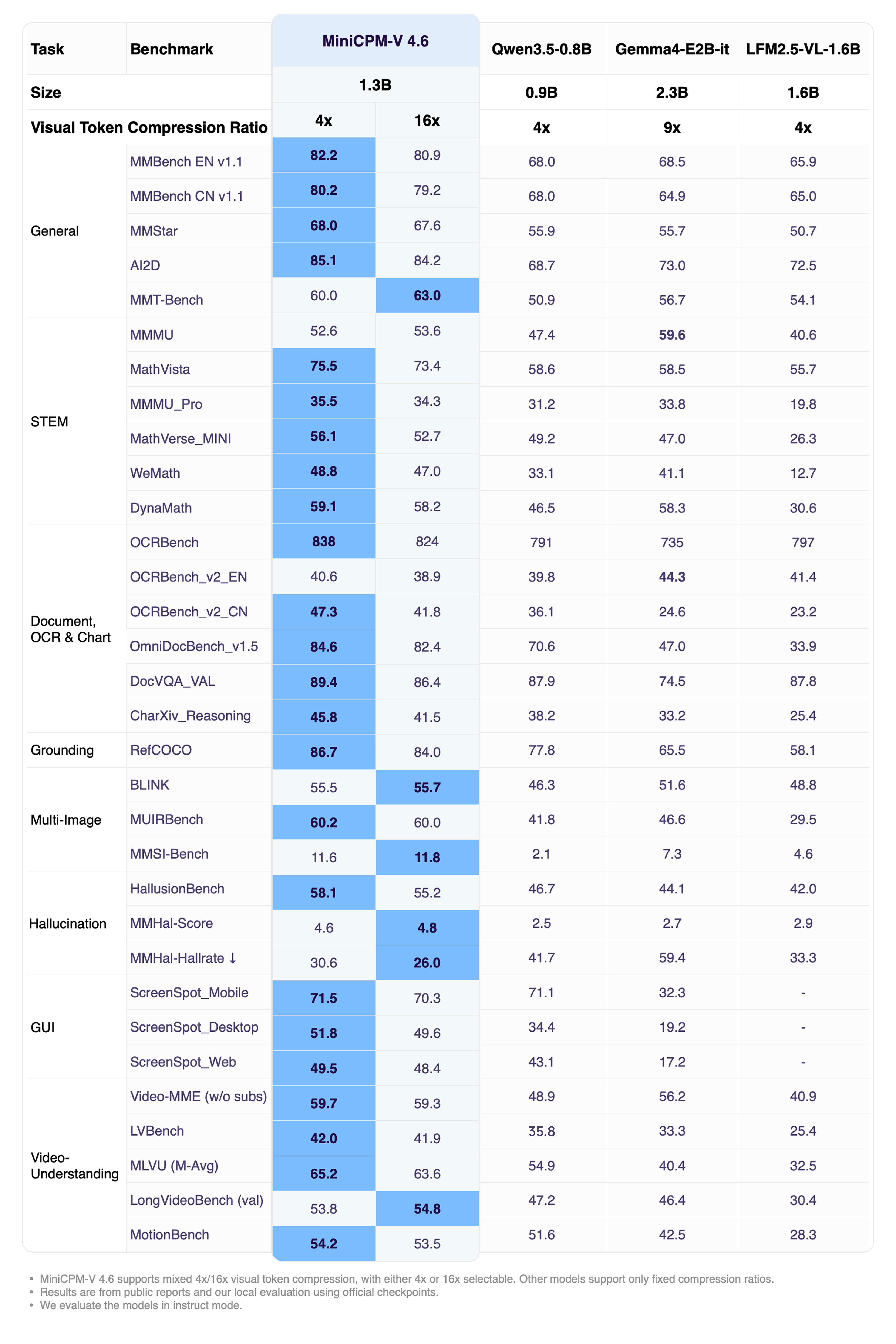
MiniCPM-V 4.6 is our most edge-deployment-friendly model to date. The model is built based on SigLIP2-400M and the Qwen3.5-0.8B LLM. It inherits the strong single-image, multi-image, and video understanding capabilities of MiniCPM-V family, while significantly improving computation efficiency. It also introduces mixed 4x/16x visual token compression. Notable features of MiniCPM-V 4.6 include:

Evaluation

Overall Performance (Instruct)

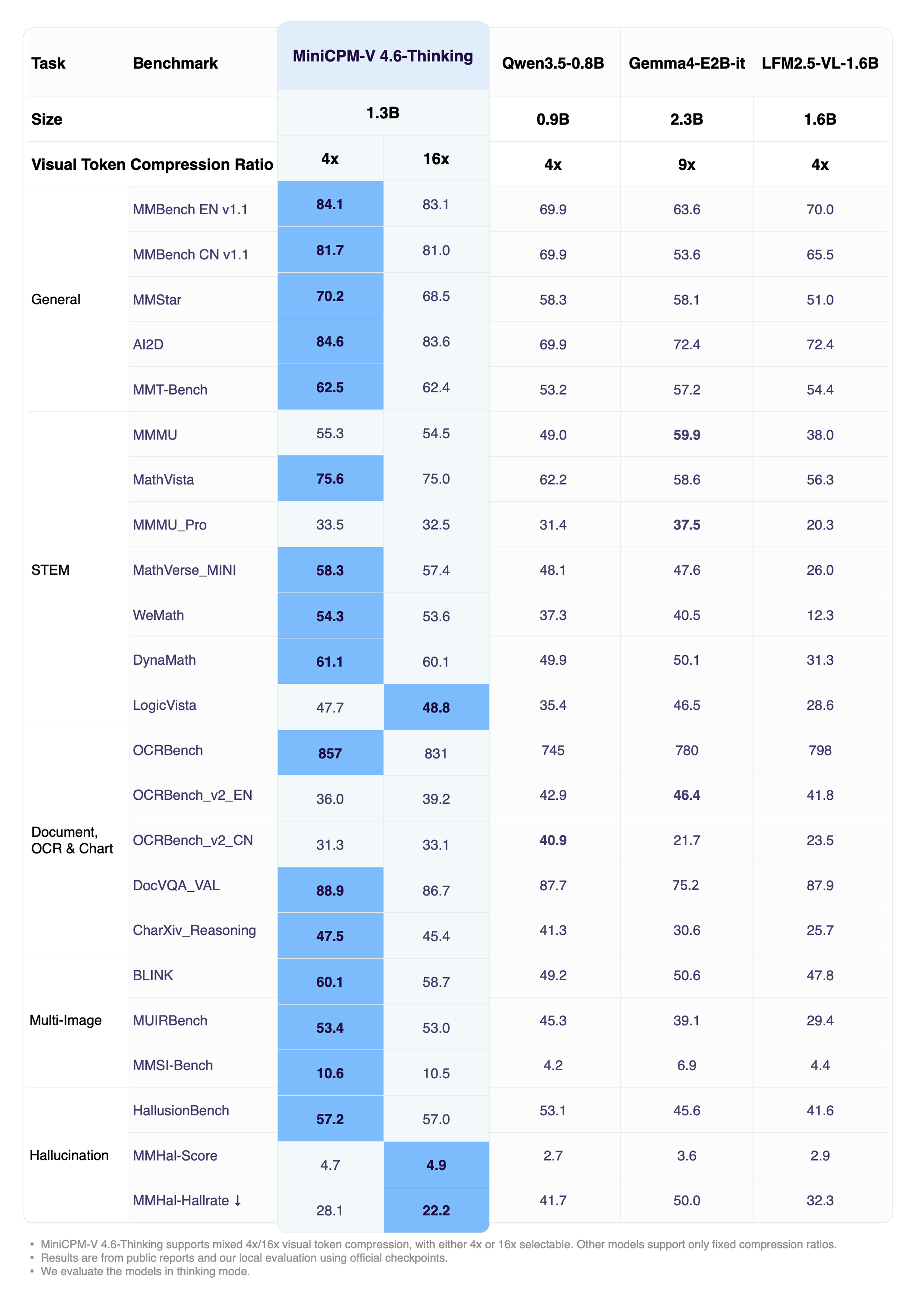
Click to view MiniCPM-V 4.6-Thinking performance.


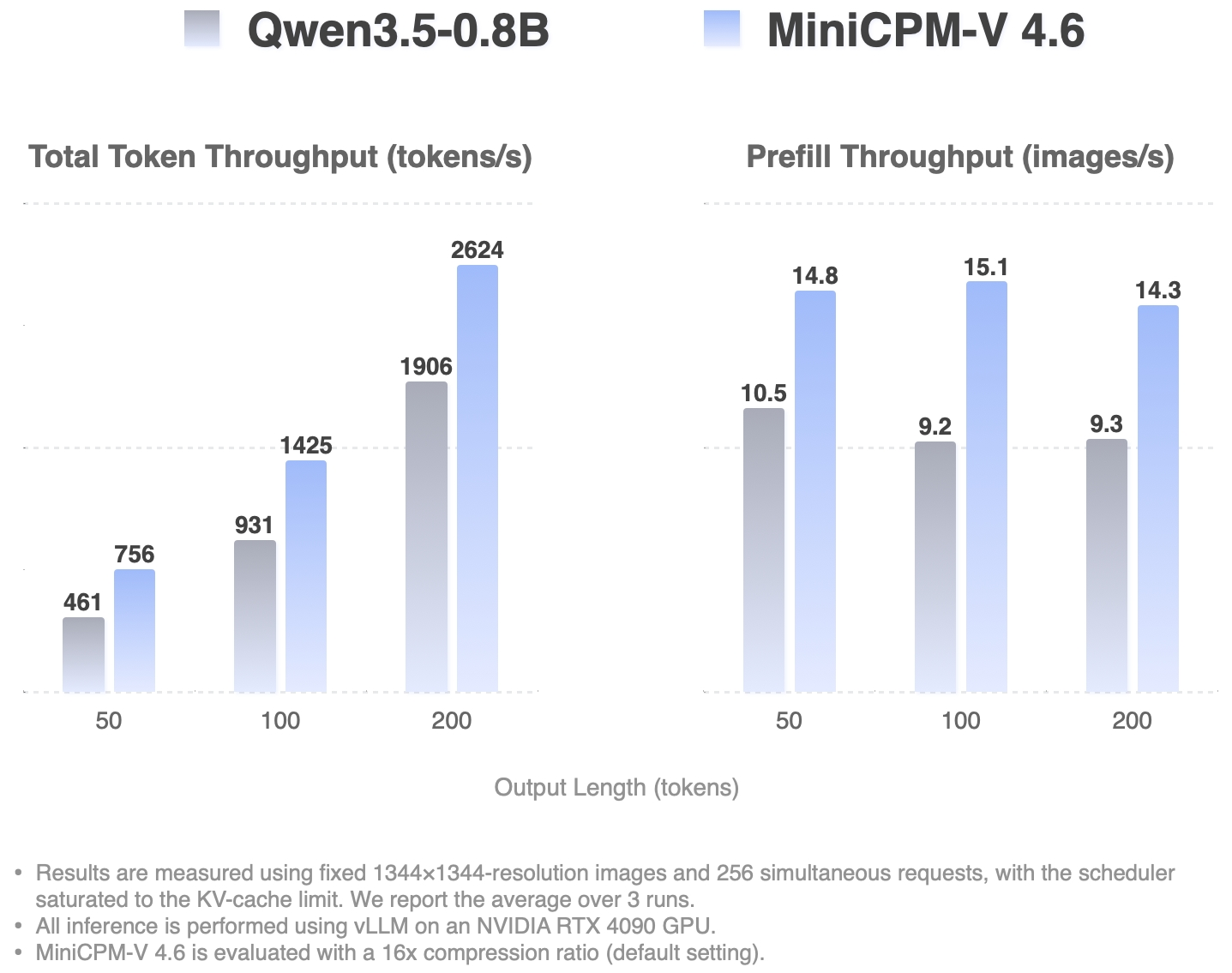
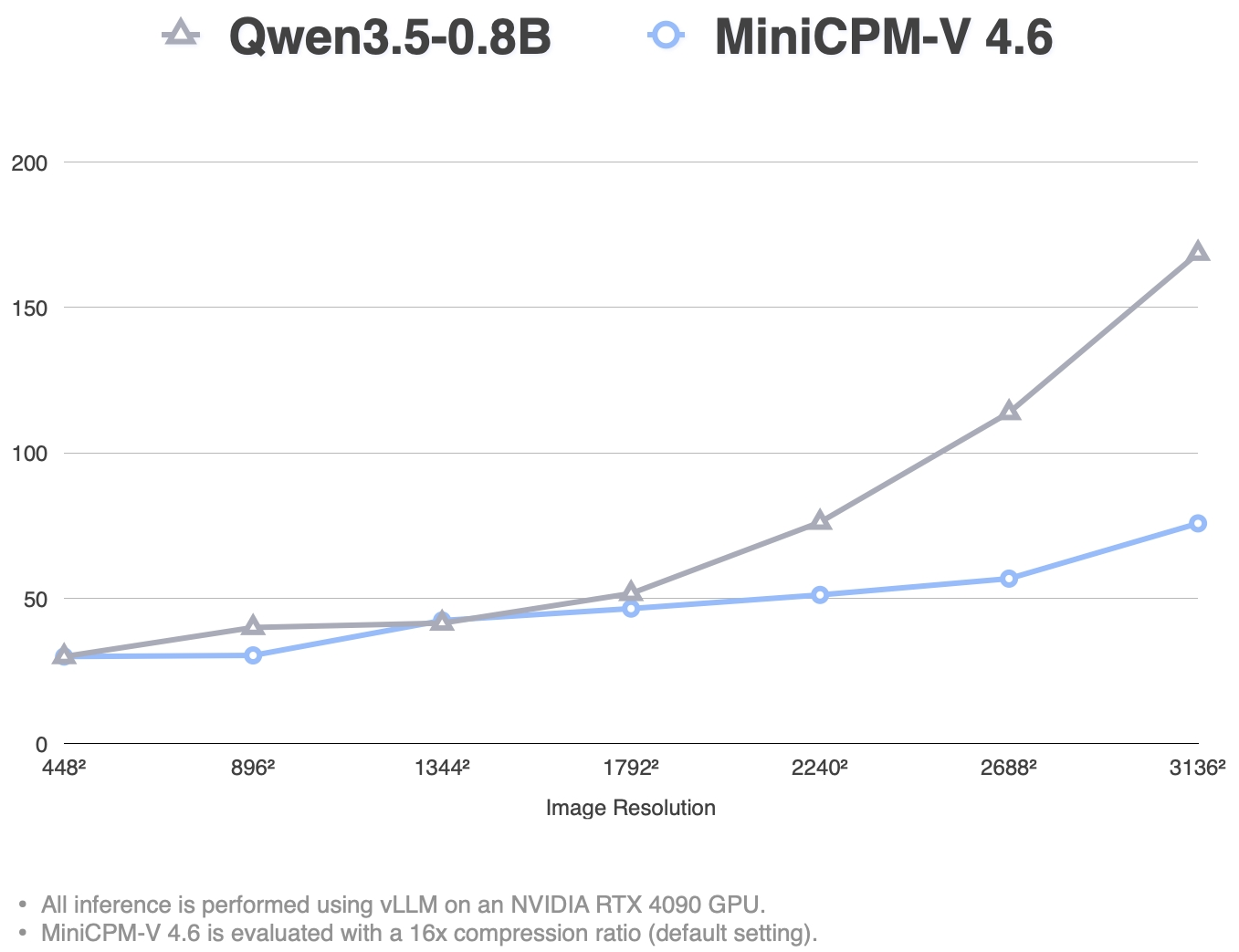
MiniCPM-V 4.6 Inference Efficiency

High-Concurrency Throughput Single Request TTFT (ms)

Examples

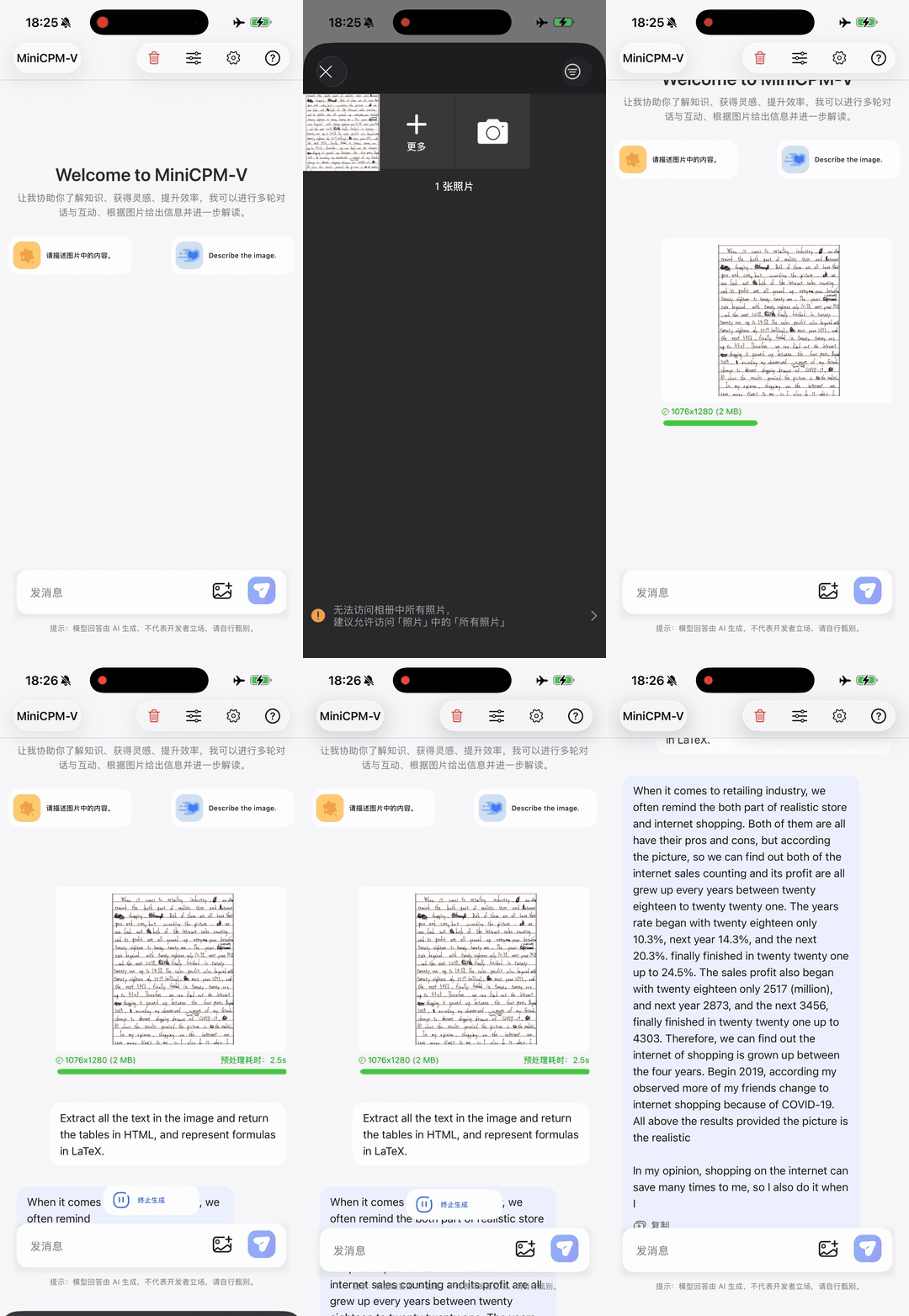
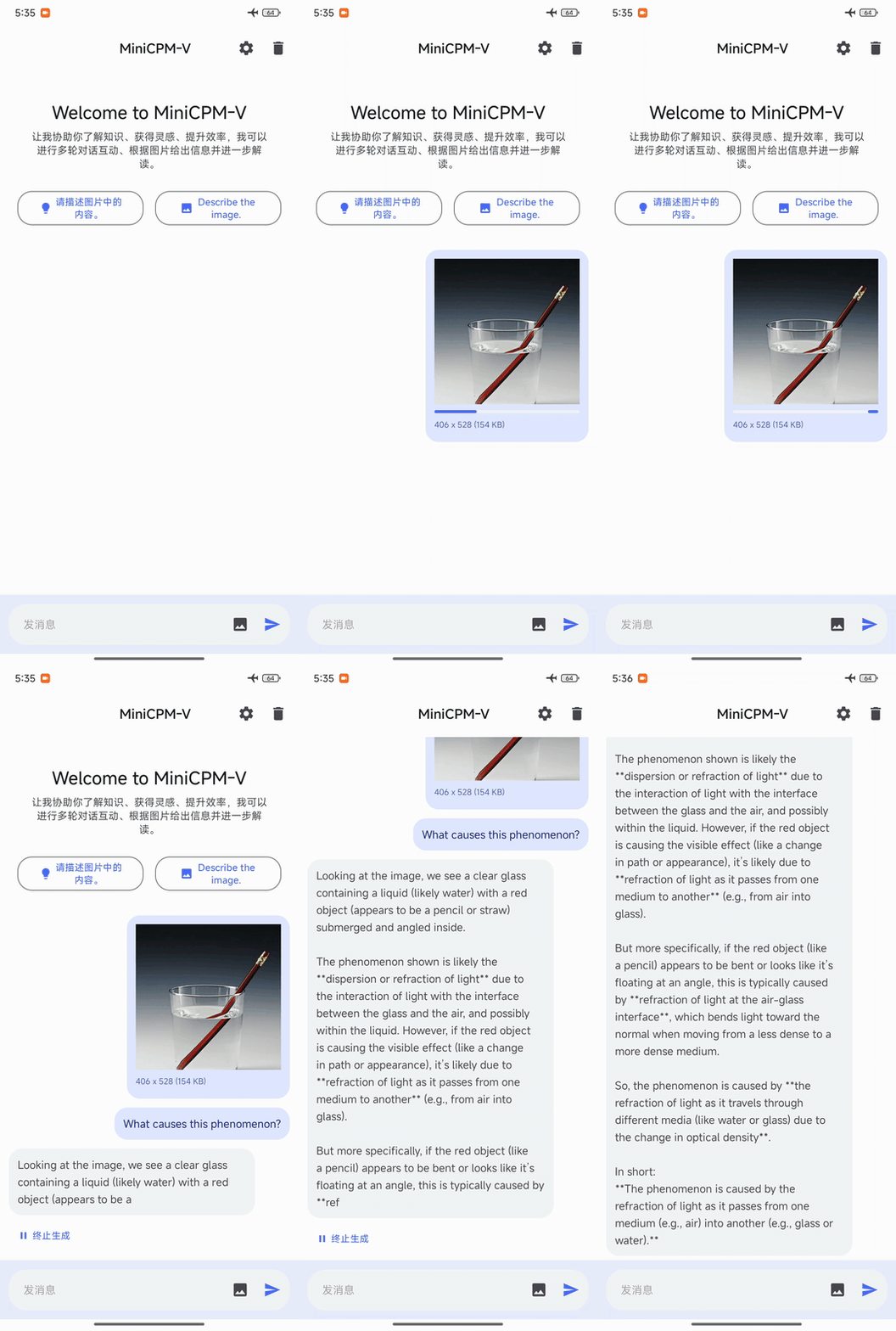
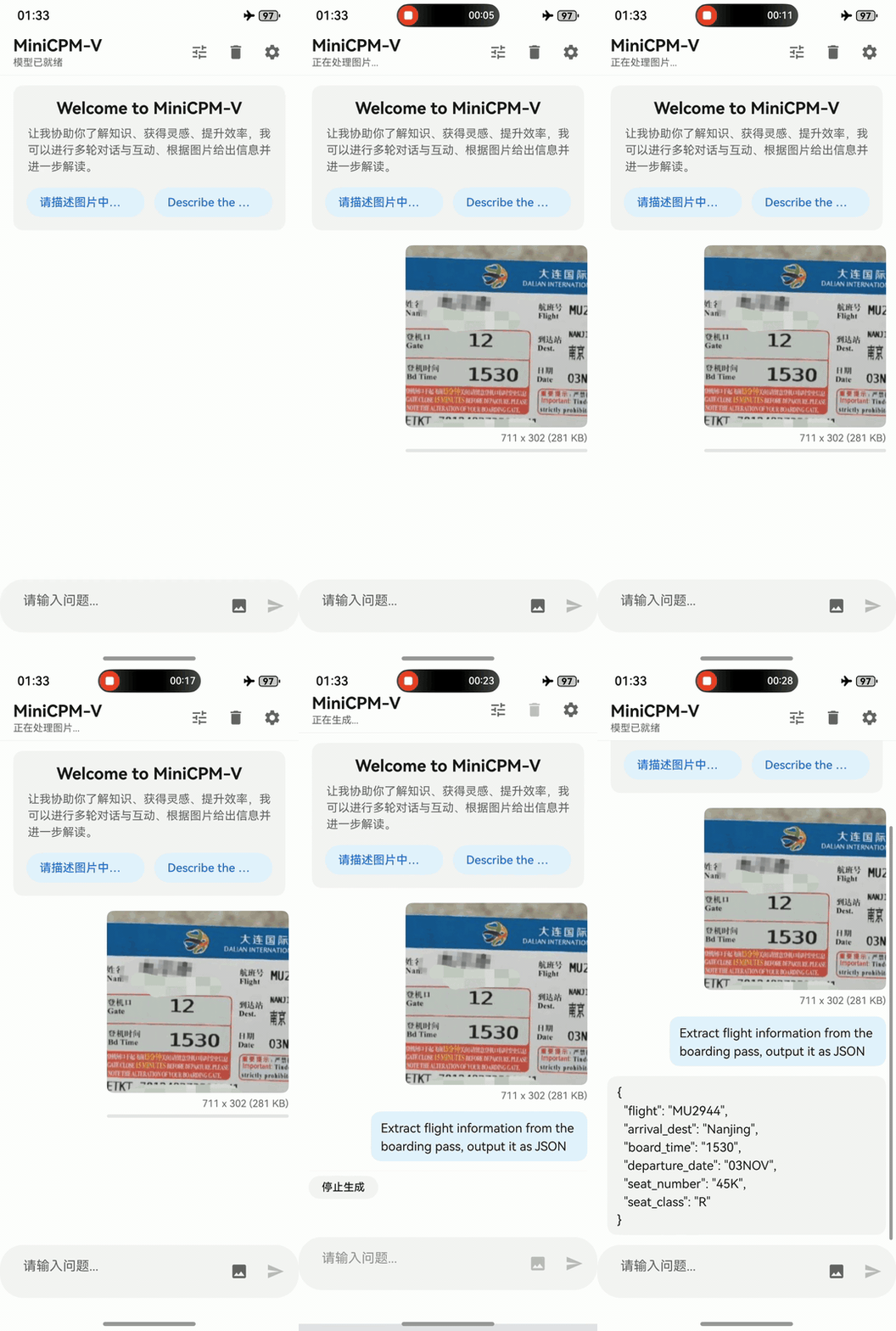
MiniCPM-V 4.6 can be deployed across three mainstream end-side platforms — iOS, Android and HarmonyOS. The clips below are raw screen recordings on phone devices without edition.

iPhone
iPhone 17 Pro Max
Android
Redmi K70
HarmonyOS
HUAWEI nova 14

Usages

Inference with Transformers

Click to show inference examples with Transformers.
Installation
pip install "transformers[torch]>=5.7.0" torchvision torchcodec

Note on CUDA compatibility: torchcodec (used for video decoding) may have compatibility issues with certain CUDA versions. For example, torch>=2.11 bundles CUDA 13.1 by default, while environments with CUDA 12.x may encounter errors such as RuntimeError: Could not load libtorchcodec. Two workarounds:

  1. Replace torchcodec with PyAV — supports both image and video inference without CUDA version constraints:
    pip install "transformers[torch]>=5.7.0" torchvision av
    
  2. Pin the CUDA version when installing torch to match your environment (e.g. CUDA 12.8):
    pip install "transformers>=5.7.0" torchvision torchcodec --index-url https://download.pytorch.org/whl/cu128
    
Load Model
from transformers import AutoModelForImageTextToText, AutoProcessor

model_id = "openbmb/MiniCPM-V-4.6"

processor = AutoProcessor.from_pretrained(model_id)
model = AutoModelForImageTextToText.from_pretrained(
    model_id, torch_dtype="auto", device_map="auto"
)

# Flash Attention 2 is recommended for better acceleration and memory saving,
# especially in multi-image and video scenarios.
# model = AutoModelForImageTextToText.from_pretrained(
#     model_id,
#     torch_dtype=torch.bfloat16,
#     attn_implementation="flash_attention_2",
#     device_map="auto",
# )
Image Inference
messages = [
    {
        "role": "user",
        "content": [
            {"type": "image", "url": "https://huggingface.co/datasets/openbmb/DemoCase/resolve/main/refract.png"},
            {"type": "text

MiniCPM-V (OpenBMB/MiniCPM-V)

Searching Database…

26.8K ·GitHub
What is this?A family of pocket-sized multimodal AI models from OpenBMB (MiniCPM-V and MiniCPM-o) built to run on local devices, even phones — understanding images, video and text, and in the o-series also speech.
Is it an app, a model, or a service?Open-weight models plus Python inference code rather than a consumer app: you run them via Ollama, llama.cpp, vLLM or Transformers, or call the hosted API. An open-sourced iOS app and a realtime web demo also exist.
How do I get it running?Quickest: pull MiniCPM-V 4.6 from Ollama's official model library. Otherwise load it with Transformers, run GGUF builds in llama.cpp, or use the API; the Cookbook and Docs Site cover common scenarios.
Are there any setup gotchas I should know about?Video decoding via torchcodec conflicts with some CUDA versions (torch>=2.11 bundles CUDA 13.1); swap in PyAV or pin your CUDA version. The realtime web demo can also lag on poor networks.
Which devices and systems does it actually run on?All three mainstream mobile OSes — iOS, Android and HarmonyOS — with the edge adaptation code open-sourced, plus an open-sourced iOS app for iPhone and iPad. On desktops it runs through Ollama or llama.cpp.
If it runs on my device, does my data stay there?Yes — deployment is on-device, so the images, video and audio you feed it stay on your phone or computer. A hosted API service exists as the alternative if you don't want to run anything locally.
Can my laptop or phone handle this, or do I need a big GPU?Not a big one for MiniCPM-V 4.6: at 1.3B parameters it targets phones and edge devices, and fine-tuning works on consumer-grade GPUs. The 9B MiniCPM-o 4.5 is heavier, and the realtime demo needs a Mac or a GPU.
How is MiniCPM-o different from MiniCPM-V?MiniCPM-V handles efficient image, video and text understanding. MiniCPM-o goes further: real-time streaming of video and audio in, text and speech out, with full-duplex live conversation — it can see, listen and speak at the same time.
How good can a 1.3B model actually be?MiniCPM-V 4.6 scores 13 on the Artificial Analysis Intelligence Index vs Qwen3.5-0.8B's 10, with far fewer tokens per answer, and it surpasses the larger Ministral 3 3B. MiniCPM-o 4.5 approaches Gemini 2.5 Flash in vision and speech.
What does full-duplex mean in practice?Output streams (speech and text) and real-time input streams (video and audio) do not block each other, so the model can watch, listen and talk simultaneously and act proactively, for example by reminding you of something unprompted.
Can I fine-tune it on my own data?Yes — it plugs into fine-tuning ecosystems like SWIFT and LLaMA-Factory, and Align-Anything supports DPO and SFT on both vision and audio. Quantized variants ship in GGUF, BNB, AWQ and GPTQ formats.
What are similar projects?VoxCPM, InternVL, MiniCPM, Qwen3-VL, unsloth, MOSS-TTS, decider, Qwen3
Creator
OpenBMB
Size
796.2 MB
Stars
26.8K
Age
2y
Commits · 90 Days