
What is this?
 Strata runs Qwen3.8-Flash-Next, a 125-billion-parameter AI model, on a normal gaming PC with one NVIDIA GPU (12-24GB VRAM) and 64GB of RAM, with a one-click installer for Windows and Linux.
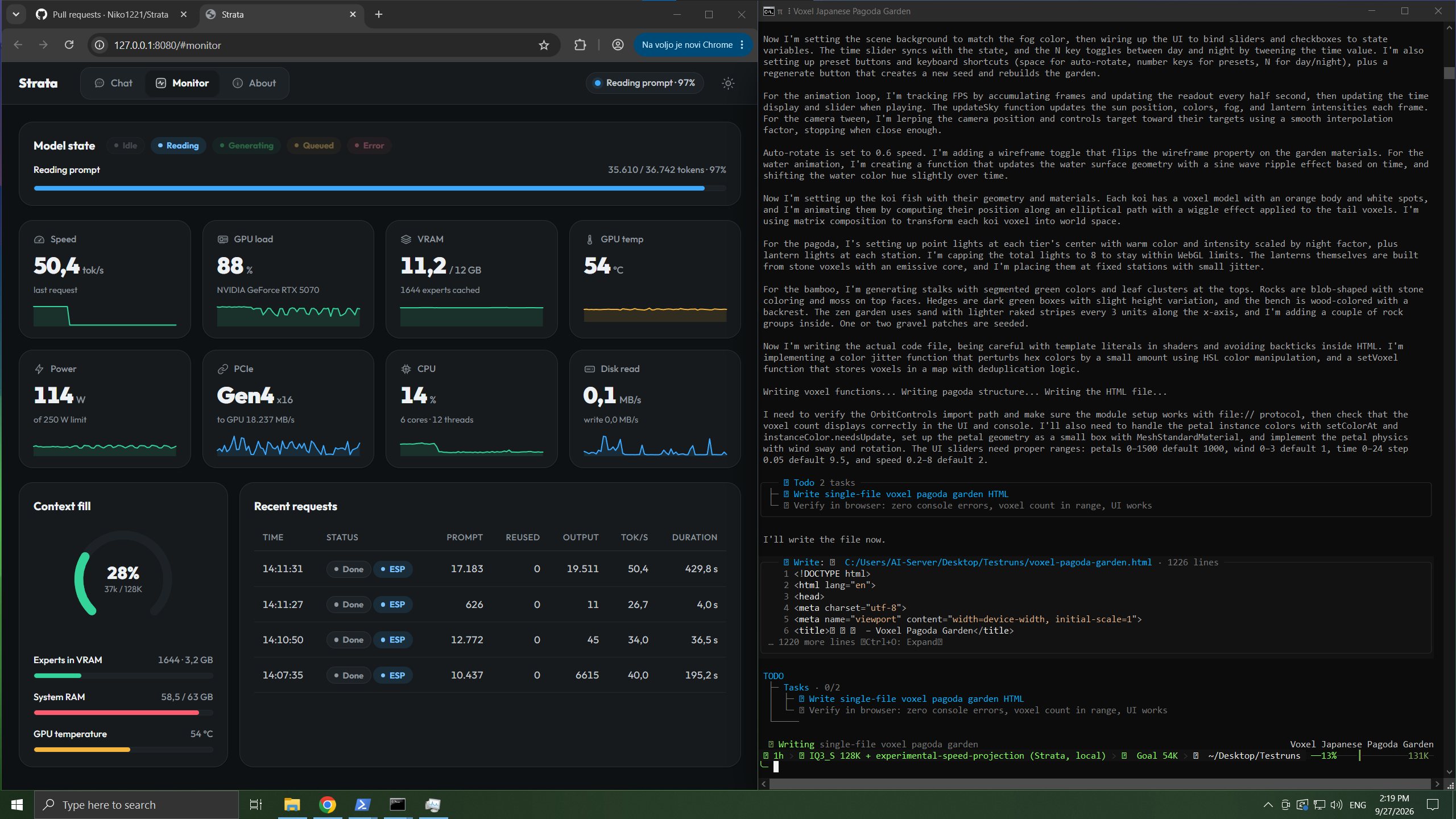
Strata runs Qwen3.8-Flash-Next, a 125-billion-parameter AI model, on a normal gaming PC with one NVIDIA GPU (12-24GB VRAM) and 64GB of RAM, with a one-click installer for Windows and Linux.Is this an app or just an inference engine?It is both: a local inference engine built on llama.cpp/ggml, plus a browser-based Strata app with chat, a GPU/CPU/RAM monitor, a terminal client (chat.py), and an OpenAI/Anthropic-compatible API server.
It is both: a local inference engine built on llama.cpp/ggml, plus a browser-based Strata app with chat, a GPU/CPU/RAM monitor, a terminal client (chat.py), and an OpenAI/Anthropic-compatible API server.How do I install and run it?On Windows, download and unzip the project, then double-click START-HERE.bat; on Linux run ./setup.sh. It asks a few setup questions (model, size, context length, image support) then downloads everything and opens the Strata app in your browser automatically.
On Windows, download and unzip the project, then double-click START-HERE.bat; on Linux run ./setup.sh. It asks a few setup questions (model, size, context length, image support) then downloads everything and opens the Strata app in your browser automatically.What hardware do I need?An NVIDIA RTX 30/40/50 GPU with 12GB+ VRAM, enough RAM for the model size you pick (up to 64GB for the biggest), about 80GB of free disk space, and Windows 10/11 or Linux; you only need to install the NVIDIA driver yourself.
An NVIDIA RTX 30/40/50 GPU with 12GB+ VRAM, enough RAM for the model size you pick (up to 64GB for the biggest), about 80GB of free disk space, and Windows 10/11 or Linux; you only need to install the NVIDIA driver yourself.Does it run smoothly right out of the box?The first start can freeze or slow your PC for 1-3 minutes while 35-55GB loads into RAM, the first model download is around 70GB, and if your PC runs low on RAM the engine can stop mid-answer (you just resend the message and it restarts).
The first start can freeze or slow your PC for 1-3 minutes while 35-55GB loads into RAM, the first model download is around 70GB, and if your PC runs low on RAM the engine can stop mid-answer (you just resend the message and it restarts).Is an NVIDIA card required, or will AMD/Intel GPUs work?Only NVIDIA RTX 30, 40 or 50 series cards with at least 12GB of VRAM are supported; there is no mention of AMD or Intel GPU support.
Only NVIDIA RTX 30, 40 or 50 series cards with at least 12GB of VRAM are supported; there is no mention of AMD or Intel GPU support.What's the difference between the base model, Coder, and Swift 1.5 versions?The base Qwen3.8-Flash-Next is the full model; Coder removes half the experts to focus on coding/tool-use/images with a smaller RAM footprint; Swift 1.5 is a fine-tune that thinks for less time before answering at the same speed and RAM as the original.
The base Qwen3.8-Flash-Next is the full model; Coder removes half the experts to focus on coding/tool-use/images with a smaller RAM footprint; Swift 1.5 is a fine-tune that thinks for less time before answering at the same speed and RAM as the original.Can it see images, not just text?Yes, image input is an optional setting chosen during setup, and you can attach pictures in the chat page or with the /image command in chat.py.
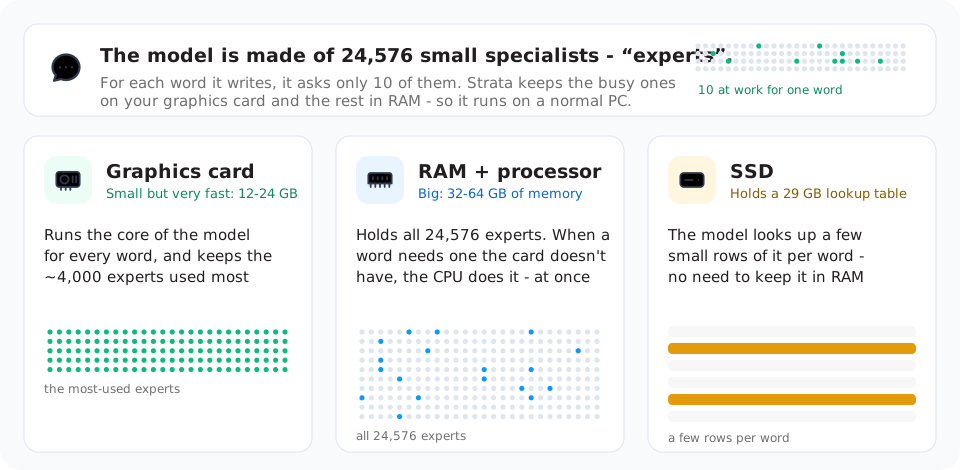
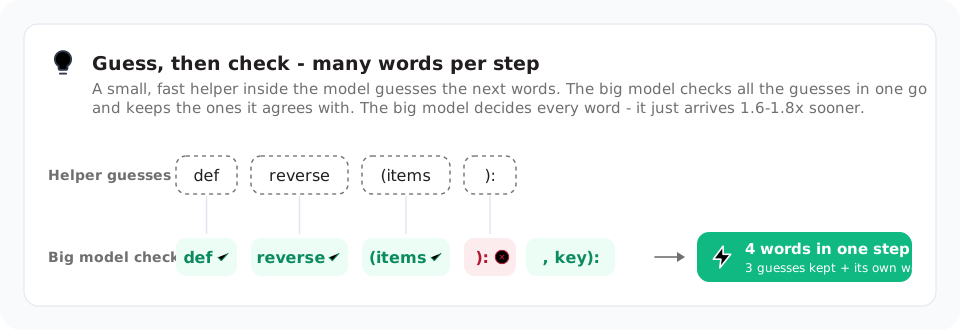
Yes, image input is an optional setting chosen during setup, and you can attach pictures in the chat page or with the /image command in chat.py.Why is it so fast for such a huge model?It only activates 10 of 24,576 experts per word, splits work across GPU, RAM and SSD, and uses speculative decoding where a small helper guesses several words ahead for the big model to verify at once, giving a 1.6-1.8x speedup.
It only activates 10 of 24,576 experts per word, splits work across GPU, RAM and SSD, and uses speculative decoding where a small helper guesses several words ahead for the big model to verify at once, giving a 1.6-1.8x speedup.Can I use Strata from my phone or another PC?Yes, running START-HERE.bat with --setup --host 0.0.0.0 and an API key exposes the server on your network so other devices can connect to it.
Yes, running START-HERE.bat with --setup --host 0.0.0.0 and an API key exposes the server on your network so other devices can connect to it.What are similar projects?project-maya, deltafin, StartLux-Decision, vllm, decider, slotstream, qwen3.8-Flash-DGX, Qwen3.8-Flash-Next
project-maya, deltafin, StartLux-Decision, vllm, decider, slotstream, qwen3.8-Flash-DGX, Qwen3.8-Flash-NextWhich topics is it in?llama-cpp, speculative-decoding, inference-engine, mixture-of-experts, moe, gguf, local-ai, llm-inference, qwen, quantization, multimodal, openai-compatible
llama-cpp, speculative-decoding, inference-engine, mixture-of-experts, moe, gguf, local-ai, llm-inference, qwen, quantization, multimodal, openai-compatible