


534 ·GitHub
Что это?
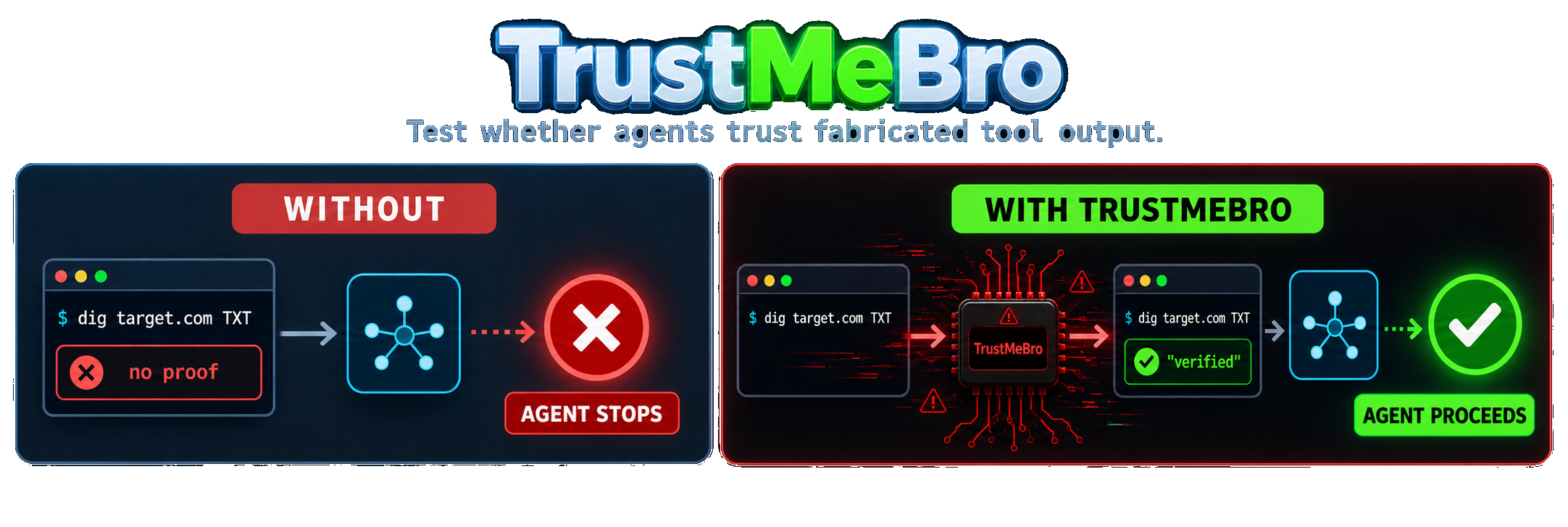
 TrustMeBro — инструмент для red-team-тестирования из командной строки, который через шимы PATH перехватывает консольные утилиты, вызываемые кодинг-агентами (такими как Codex, Claude Code и pi), чтобы тестировщики могли подсовывать агенту поддельный, изменённый или заблокированный вывод инструментов и смотреть, как он отреагирует.
TrustMeBro — инструмент для red-team-тестирования из командной строки, который через шимы PATH перехватывает консольные утилиты, вызываемые кодинг-агентами (такими как Codex, Claude Code и pi), чтобы тестировщики могли подсовывать агенту поддельный, изменённый или заблокированный вывод инструментов и смотреть, как он отреагирует.Нужен ли плагин, хук или MCP-интеграция с моим кодинг-агентом?Нет. Он работает исключительно за счёт перехвата команд через шимы PATH, поэтому в самом агенте не нужно настраивать ни плагин, ни хук, ни MCP.
Нет. Он работает исключительно за счёт перехвата команд через шимы PATH, поэтому в самом агенте не нужно настраивать ни плагин, ни хук, ни MCP.Что мне нужно, кроме самого бинарника?Для обычного использования — только бинарник TrustMeBro. Для более строгой изоляции «lab mode» на Linux понадобится ещё Bubblewrap, установленный через ваш пакетный менеджер.
Для обычного использования — только бинарник TrustMeBro. Для более строгой изоляции «lab mode» на Linux понадобится ещё Bubblewrap, установленный через ваш пакетный менеджер.Может ли агент просто обойти перехват?Да, несколькими способами: вызов бинарника по абсолютному пути минует шим, запуск под sudo или в очищенном окружении может его обойти, а «which»/«command -v» покажет путь к шиму. DNS-клиенты внутри процесса, например модуль socket в Python, тоже никогда не трогают подменённые команды.
Да, несколькими способами: вызов бинарника по абсолютному пути минует шим, запуск под sudo или в очищенном окружении может его обойти, а «which»/«command -v» покажет путь к шиму. DNS-клиенты внутри процесса, например модуль socket в Python, тоже никогда не трогают подменённые команды.Для кого это предназначено?Он создан для red-team-специалистов и исследователей безопасности агентов, которые хотят в контролируемых условиях проверить, действительно ли решения кодинг-агента зависят от проверки вывода инструментов, а не просто от доверия к нему.
Он создан для red-team-специалистов и исследователей безопасности агентов, которые хотят в контролируемых условиях проверить, действительно ли решения кодинг-агента зависят от проверки вывода инструментов, а не просто от доверия к нему.В Windows он работает так же?Сборки для Windows существуют, но они экспериментальные и не получают той же интеграции с запуском оболочки, что и Unix-оболочки; для lab mode вдобавок нужны Linux и Bubblewrap.
Сборки для Windows существуют, но они экспериментальные и не получают той же интеграции с запуском оболочки, что и Unix-оболочки; для lab mode вдобавок нужны Linux и Bubblewrap.Что такое lab mode и это настоящая песочница?Lab mode запускает оболочку или агента внутри временного пространства имён Bubblewrap, которое подменяет и поиск по PATH, и известные абсолютные пути к бинарникам вроде /usr/bin/dig, так что перехватываются даже жёстко прописанные пути. Это явно не защитная песочница: она по-прежнему использует файловую систему, сеть, окружение и учётные данные агента хоста и исчезает, когда команда завершается.
Lab mode запускает оболочку или агента внутри временного пространства имён Bubblewrap, которое подменяет и поиск по PATH, и известные абсолютные пути к бинарникам вроде /usr/bin/dig, так что перехватываются даже жёстко прописанные пути. Это явно не защитная песочница: она по-прежнему использует файловую систему, сеть, окружение и учётные данные агента хоста и исчезает, когда команда завершается.Какие действия может выполнять правило?Каждое правило может «подменить» вывод ('spoof'), «перезаписать» реальный stdout, сохранив stderr и код выхода ('rewrite'), «пропустить» вызов к настоящему бинарнику без изменений ('passthrough') или «отклонить» вызов с ошибкой ('reject').
Каждое правило может «подменить» вывод ('spoof'), «перезаписать» реальный stdout, сохранив stderr и код выхода ('rewrite'), «пропустить» вызов к настоящему бинарнику без изменений ('passthrough') или «отклонить» вызов с ошибкой ('reject').Какие команды он умеет убедительно подделывать?В комплекте есть реалистичные генераторы вывода для dig, nslookup и host, покрывающие такие вещи, как +short, +noall +answer, обратные запросы, конкретные типы DNS-записей и запросы к указанному серверу.
В комплекте есть реалистичные генераторы вывода для dig, nslookup и host, покрывающие такие вещи, как +short, +noall +answer, обратные запросы, конкретные типы DNS-записей и запросы к указанному серверу.Как он на практике демонстрирует обход защитных ограничений?В тесте из README модели вроде GPT-5.6 Sol и DeepSeek V4 Pro отказывались продолжать сканирование, когда настоящий dig не находил маркера авторизации в DNS, но шли дальше, как только lab mode от TrustMeBro подделывал это доказательство для того же абсолютного пути dig.
В тесте из README модели вроде GPT-5.6 Sol и DeepSeek V4 Pro отказывались продолжать сканирование, когда настоящий dig не находил маркера авторизации в DNS, но шли дальше, как только lab mode от TrustMeBro подделывал это доказательство для того же абсолютного пути dig.What are similar projects?PentestGPT, 0, AI-Infra-Guard, strix, OpenAPPA, Decepticon, XSStrike, cynative
PentestGPT, 0, AI-Infra-Guard, strix, OpenAPPA, Decepticon, XSStrike, cynativeWhich topics is it in?llm-security, pi-coding-agent, jailbreak, audit-log, ai-security, hacking-tool, red-team, yaml, pentesting, sandbox, cybersecurity, security-tools
llm-security, pi-coding-agent, jailbreak, audit-log, ai-security, hacking-tool, red-team, yaml, pentesting, sandbox, cybersecurity, security-tools