
DALL-E 2 - Pytorch
Implementation of DALL-E 2, OpenAI's updated text-to-image synthesis neural network, in Pytorch.
Yannic Kilcher summary | AssemblyAI explainer
The main novelty seems to be an extra layer of indirection with the prior network (whether it is an autoregressive transformer or a diffusion network), which predicts an image embedding based on the text embedding from CLIP. Specifically, this repository will only build out the diffusion prior network, as it is the best performing variant (but which incidentally involves a causal transformer as the denoising network 😂)
This model is SOTA for text-to-image for now.
Please join  if you are interested in helping out with the replication with the LAION community | Yannic Interview
As of 5/23/22, it is no longer SOTA. SOTA will be here. Jax versions as well as text-to-video project will be shifted towards the Imagen architecture, as it is way simpler.
Status
A research group has used the code in this repository to train a functional diffusion prior for their CLIP generations. Will share their work once they release their preprint. This, and Katherine's own experiments, validate OpenAI's finding that the extra prior increases variety of generations.
Decoder is now verified working for unconditional generation on my experimental setup for Oxford flowers. 2 researchers have also confirmed Decoder is working for them.
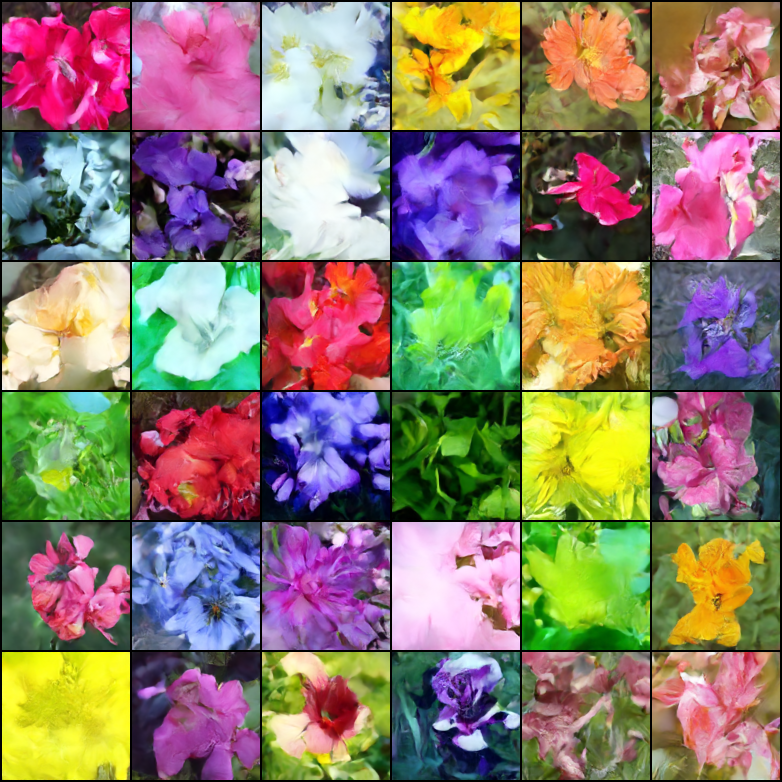
ongoing at 21k steps
Justin Pinkney successfully trained the diffusion prior in the repository for his CLIP to Stylegan2 text-to-image application
Romain has scaled up training to 800 GPUs with the available scripts without any issues
Pre-Trained Models
Appreciation
This library would not have gotten to this working state without the help of
- Zion for the distributed training code for the diffusion prior
- Aidan for the distributed training code for the decoder as well as the dataloaders
- Kumar for working on the initial diffusion training script
- Romain for the pull request reviews and project management
- He Cao and xiankgx for the Q&A and for identifying of critical bugs
- Marunine for identifying issues with resizing of the low resolution conditioner, when training the upsampler, in addition to various other bug fixes
- MalumaDev for proposing the use of pixel shuffle upsampler for fixing checkboard artifacts
- Katherine for her advice
- Stability AI for the generous sponsorship
- 🤗 Huggingface and in particular Sylvain for the Accelerate library
- Alex for einops, indispensable tool for tensor manipulation
... and many others. Thank you! 🙏
Install
$ pip install dalle2-pytorch
Usage
To train DALLE-2 is a 3 step process, with the training of CLIP being the most important
To train CLIP, you can either use x-clip package, or join the LAION discord, where a lot of replication efforts are already underway.
This repository will demonstrate integration with x-clip for starters
import torch
from dalle2_pytorch import CLIP

clip = CLIP(
    dim_text = 512,
    dim_image = 512,
    dim_latent = 512,
    num_text_tokens = 49408,
    text_enc_depth = 1,
    text_seq_len = 256,
    text_heads = 8,
    visual_enc_depth = 1,
    visual_image_size = 256,
    visual_patch_size = 32,
    visual_heads = 8,
    use_all_token_embeds = True,            # whether to use fine-grained contrastive learning (FILIP)
    decoupled_contrastive_learning = True,  # use decoupled contrastive learning (DCL) objective function, removing positive pairs from the denominator of the InfoNCE loss (CLOOB + DCL)
    extra_latent_projection = True,         # whether to use separate projections for text-to-image vs image-to-text comparisons (CLOOB)
    use_visual_ssl = True,                  # whether to do self supervised learning on images
    visual_ssl_type = 'simclr',             # can be either 'simclr' or 'simsiam', depending on using DeCLIP or SLIP
    use_mlm = False,                        # use masked language learning (MLM) on text (DeCLIP)
    text_ssl_loss_weight = 0.05,            # weight for text MLM loss
    image_ssl_loss_weight = 0.05            # weight for image self-supervised learning loss
).cuda()

# mock data

text = torch.randint(0, 49408, (4, 256)).cuda()
images = torch.randn(4, 3, 256, 256).cuda()

# train

loss = clip(
    text,
    images,
    return_loss = True              # needs to be set to True to return contrastive loss
)

loss.backward()

# do the above with as many texts and images as possible in a loop
Then, you will need to train the decoder, which learns to generate images based on the image embedding coming from the trained CLIP above
import torch
from dalle2_pytorch import Unet, Decoder, CLIP

# trained clip from step 1

clip = CLIP(
    dim_text = 512,
    dim_image = 512,
    dim_latent = 512,
    num_text_tokens = 49408,
    text_enc_depth = 1,
    text_seq_len = 256,
    text_heads = 8,
    visual_enc_depth = 1,
    visual_image_size = 256,
    visual_patch_size = 32,
    visual_heads = 8
).cuda()

# unet for the decoder

unet = Unet(
    dim = 128,
    image_embed_dim = 512,
    cond_dim = 128,
    channels = 3,
    dim_mults=(1, 2, 4, 8)
).cuda()

# decoder, which contains the unet and clip

decoder = Decoder(
    unet = unet,
    clip = clip,
    timesteps = 100,
    image_cond_drop_prob = 0.1,
    text_cond_drop_prob = 0.5
).cuda()

# mock images (get a lot of this)

images = torch.randn(4, 3, 256, 256).cuda()

# feed images into decoder

loss = decoder(images)
loss.backward()

# do the above for many many many many steps
# then it will learn to generate images based on the CLIP image embeddings
Finally, the main contribution of the paper. The repository offers the diffusion prior network. It takes the CLIP text embeddings and tries to generate the CLIP image embeddings. Again, you will need the trained CLIP from the first step
import torch
from dalle2_pytorch import DiffusionPriorNetwork, DiffusionPrior, CLIP

# get trained CLIP from step one

clip = CLIP(
    dim_text = 512,
    dim_image = 512,
    dim_latent = 512,
    num_text_tokens = 49408,
    text_enc_depth = 6,
    text_seq_len = 256,
    text_heads = 8,
    visual_enc_depth = 6,
    visual_image_size = 256,
    visual_patch_size = 32,
    visual_heads = 8,
).cuda()

# setup prior network, which contains an autoregressive transformer

prior_network = DiffusionPriorNetwork(
    dim = 512,
    depth = 6,
    dim_head = 64,
    heads = 8
).cuda()

# diffusion prior network, which contains the CLIP and network (with transformer) above

diffusion_prior = DiffusionPrior(
    net = prior_network,
    clip = clip,
    timesteps = 100,
    cond_drop_prob = 0.2
).cuda()

# mock data

text = torch.randint(0, 49408, (4, 256)).cuda()
images = torch.randn(4, 3, 256, 256).cuda()

# feed text and images into diffusion prior network

loss = diffusion_prior(text, images)
loss.backward()

# do the above for many many many steps
# now the diffusion prior can generate image embeddings from the text embeddings
In the paper, they actually used a recently discovered technique, from Jonathan Ho himself (original author of DDPMs, the core technique used in DALL-E v2) for high resolution image synthesis.
This can easily be used within this framework as so
import torch
from dalle2_pytorch import Unet, Decoder, CLIP

# trained clip from step 1

clip = CLIP(
    dim_text = 512,
    dim_image = 512,
    dim_latent = 512,
    num_text_tokens = 49408,
    text_enc_depth = 6,
    text_seq_len = 256,
    text_heads = 8,
    visual_enc_depth = 6,
    visual_image_size = 256,
    visual_patch_size = 32,
    visual_heads = 8
).cuda()

# 2 unets for the decoder (a la cascading DDPM)

unet1 = Unet(
    dim = 32,
    image_embed_dim = 512,
    cond_dim = 128,
    channels = 3,
    dim_mults = (1, 2, 4, 8)
).cuda()

unet2 = Unet(
    dim = 32,
    image_embed_dim = 512,
    cond_dim = 128,
    channels = 3,
    dim_mults = (1, 2, 4, 8, 16)
).cuda()

# decoder, which contains the unet(s) and clip

decoder = Decoder(
    clip = clip,
    unet = (unet1, unet2),            # insert both unets in order of low resolution to highest resolution (you can have as many stages as you want here)
    image_sizes = (256, 512),         # resolutions, 256 for first unet, 512 for second. these must be unique and in ascending order (matches with the unets passed in)
    timesteps = 1000,
    image_cond_drop_prob = 0.1,
    text_cond_drop_prob = 0.5
).cuda()

# mock images (get a lot of this)

images = torch.randn(4, 3, 512, 512).cuda()

# feed images into decoder, specifying which unet you want to train
# each unet can be trained separately, which is one of the benefits of the cascading DDPM scheme

loss = decoder(images, unet_number = 1)
loss.backward()

loss = decoder(images, unet_number = 2)
loss.backward()

# do the above for many steps for both unets
Finally, to generate the DALL-E2 images from text. Insert the trained DiffusionPrior as well as the Decoder (which wraps CLIP, the causal transformer, and unet(s))
from dalle2_pytorch import DALLE2

dalle2 = DALLE2(
    prior = diffusion_prior,
    decoder = decoder
)

# send the text as a string if you want to use the simple tokenizer from DALLE v1
# or you can do it as token ids, if you have your own tokenizer

texts = ['glistening morning dew on a flower petal']
images = dalle2(texts) # (1, 3, 256, 256)
That's it!
Let's see the whole script below
import torch
from dalle2_pytorch import DALLE2, DiffusionPriorNetwork, DiffusionPrior, Unet, Decoder, CLIP

clip = CLIP(
    dim_text = 512,
    dim_image = 512,
    dim_latent = 512,
    num_text_tokens = 49408,
    text_enc_depth = 6,
    text_seq_len = 256,
    text_heads = 8,
    visual_enc_depth = 6,
    visual_image_size = 256,
    visual_patch_size = 32,
    visual_heads = 8
).cuda()

# mock data

text = torch.randint(0, 49408, (4, 256)).cuda()
images = torch.randn(4, 3, 256, 256).cuda()

# train

loss = clip(
    text,
    images,
    return_loss = True
)

loss.backward()

# do above for many steps ...

# prior networks (with transformer)

prior_network = DiffusionPriorNetwork(
    dim = 512,
    depth = 6,
    dim_head = 64,
    heads = 8
).cuda()

diffusion_prior = DiffusionPrior(
    net = prior_network,
    clip = clip,
    timesteps = 1000,
    sample_timesteps = 64,
    cond_drop_prob = 0.2
).cuda()

loss = diffusion_prior(text, images)
loss.backward()

# do above for many steps ...

# decoder (with unet)

unet1 = Unet(
    dim = 128,
    image_embed_dim = 512,
    text_embed_dim = 512,
    cond_dim = 128,
    channels = 3,
    dim_mults=(1, 2, 4, 8),
    cond_on_text_encodings = True    # set to True for any unets that need to be conditioned on text encodings
).cuda()

unet2 = Unet(
    dim = 16,
    image_embed_dim = 512,
    cond_dim = 128,
    channels = 3,
    dim_mults = (1, 2, 4, 8, 16)
).cuda()

decoder = Decoder(
    unet = (unet1, unet2),
    image_sizes = (128, 256),
    clip = clip,
    timesteps = 100,
    image_cond_drop_prob = 0.1,
    text_cond_drop_prob = 0.5
).cuda()

for unet_number in (1, 2):
    loss = decoder(images, text = text, unet_number = unet_number) # this can optionally be decoder(images, text) if you wish to condition on the text encodings as well, though it was hinted in the paper it didn't do much
    loss.backward()

# do above for many steps

dalle2 = DALLE2(
    prior = diffusion_prior,
    decoder = decoder
)

images = dalle2(
    ['cute puppy chasing after a squirrel'],
    cond_scale = 2. # classifier free guidance strength (> 1 would strengthen the condition)
)

# save your image (in this example, of size 256x256)
Everything in this readme should run without error
You can also train the decoder on images of greater than the size (say 512x512) at which CLIP was trained (256x256). The images will be resized to CLIP image resolution for the image embeddings
For the layperson, no worries, training will all be automated into a CLI tool, at least for small scale training.
Training on Preprocessed CLIP Embeddings
It is likely, when scaling up, that you would first preprocess your images and text into corresponding embeddings before training the prior network. You can do so easily by simply passing in image_embed, text_embed, and optionally text_encodings
Working example below
import torch
from dalle2_pytorch import DiffusionPriorNetwork, DiffusionPrior, CLIP

# get trained CLIP from step one

clip = CLIP(
    dim_text = 512,
    dim_image = 512,
    dim_latent = 512,
    num_text_tokens = 49408,
    text_enc_depth = 6,
    text_seq_len = 256,
    text_heads = 8,
    visual_enc_depth = 6,
    visual_image_size = 256,
    visual_patch_size = 32,
    visual_heads = 8,
).cuda()

# setup prior network, which contains an autoregressive transformer

prior_network = DiffusionPriorNetwork(
    dim = 512,
    depth = 6,
    dim_head = 64,
    heads = 8
).cuda()

# diffusion prior network, which contains the CLIP and network (with transformer) above

diffusion_prior = DiffusionPrior(
    net = prior_network,
    clip = clip,
    timesteps = 100,
    cond_drop_prob = 0.2,
    condition_on_text_encodings = False  # this probably should be true, but just to get Laion started
).cuda()

# mock data

text = torch.randint(0, 49408, (4, 256)).cuda()
images = torch.randn(4, 3, 256, 256).cuda()

# precompute the text and image embeddings
# here using the diffusion prior class, but could be done with CLIP alone

clip_image_embeds = diffusion_prior.clip.embed_image(images).image_embed
clip_text_embeds = diffusion_prior.clip.embed_text(text).text_embed

# feed text and images into diffusion prior network

loss = diffusion_prior(
    text_embed = clip_text_embeds,
    image_embed = clip_image_embeds
)

loss.backward()

# do the above for many many many steps
# now the diffusion prior can generate image embeddings from the text embeddings
You can also completely go CLIP-less, in which case you will need to pass in the image_embed_dim into the DiffusionPrior on initialization
import torch
from dalle2_pytorch import DiffusionPriorNetwork, DiffusionPrior

# setup prior network, which contains an autoregressive transformer

prior_network = DiffusionPriorNetwork(
    dim = 512,
    depth = 6,
    dim_head = 64,
    heads = 8
).cuda()

# diffusion prior network, which contains the CLIP and network (with transformer) above

diffusion_prior = DiffusionPrior(
    net = prior_network,
    image_embed_dim = 512,               # this needs to be set
    timesteps = 100,
    cond_drop_prob = 0.2,
    condition_on_text_encodings = False  # this probably should be true, but just to get Laion started
).cuda()

# mock data

text = torch.randint(0, 49408, (4, 256)).cuda()
images = torch.randn(4, 3, 256, 256).cuda()

# precompute the text and image embeddings
# here using the diffusion prior class, but could be done with CLIP alone

clip_image_embeds = torch.randn(4, 512).cuda()
clip_text_embeds = torch.randn(4, 512).cuda()

# feed text and images into diffusion prior network

loss = diffusion_prior(
    text_embed = clip_text_embeds,
    image_embed = clip_image_embeds
)

loss.backward()

# do the above for many many many steps
# now the diffusion prior can generate image embeddings from the text embeddings
OpenAI CLIP
Although there is the possibility they are using an unreleased, more powerful CLIP, you can use one of the released ones, if you do not wish to train your own CLIP from scratch. This will also allow the community to more quickly validate the conclusions of the paper.
To use a pretrained OpenAI CLIP, simply import OpenAIClipAdapter and pass it into the DiffusionPrior or Decoder like so
import torch
from dalle2_pytorch import DALLE2, DiffusionPriorNetwork, DiffusionPrior, Unet, Decoder, OpenAIClipAdapter

# openai pretrained clip - defaults to ViT-B/32

clip = OpenAIClipAdapter()

# mock data

text = torch.randint(0, 49408, (4, 256)).cuda()
images = torch.randn(4, 3, 256, 256).cuda()

# prior networks (with transformer)

prior_network = DiffusionPriorNetwork(
    dim = 512,
    depth = 6,
    dim_head = 64,
    heads = 8
).cuda()

diffusion_prior = DiffusionPrior(
    net = prior_network,
    clip = clip,
    timesteps = 100,
    cond_drop_prob = 0.2
).cuda()

loss = diffusion_prior(text, images)
loss.backward()

# do above for many steps ...

# decoder (with unet)

unet1 = Unet(
    dim = 128,
    image_embed_dim = 512,
    cond_dim = 128,
    channels = 3,
    dim_mults=(1, 2, 4, 8),
    text_embed_dim = 512,
    cond_on_text_encodings = True  # set to True for any unets that need to be conditioned on text encodings (ex. first unet in cascade)
).cuda()

unet2 = Unet(
    dim = 16,
    image_embed_dim = 512,
    cond_dim = 128,
    channels = 3,
    dim_mults = (1, 2, 4, 8, 16)
).cuda()

decoder = Decoder(
    unet = (unet1, unet2),
    image_sizes = (128, 256),
    clip = clip,
    timesteps = 1000,
    sample_timesteps = (250, 27),
    image_cond_drop_prob = 0.1,
    text_cond_drop_prob = 0.5
).cuda()

for unet_number in (1, 2):
    loss = decoder(images, text = text, unet_number = unet_number) # this can optionally be decoder(images, text) if you wish to condition on the text encodings as well, though it was hinted in the paper it didn't do much
    loss.backward()

# do above for many steps

dalle2 = DALLE2(
    prior = diffusion_prior,
    decoder = decoder
)

images = dalle2(
    ['a butterfly trying to escape a tornado'],
    cond_scale = 2. # classifier free guidance strength (> 1 would strengthen the condition)
)

# save your image

 Это реализация DALL-E 2 на PyTorch — модели OpenAI для синтеза изображений по текстовому описанию, созданная сторонним автором сообщества (lucidrains).