
CLIP README

The project's README from github.com/openai/CLIP. As one markdown file: README.md.

CLIP

[Blog] [Paper] [Model Card] [Colab]

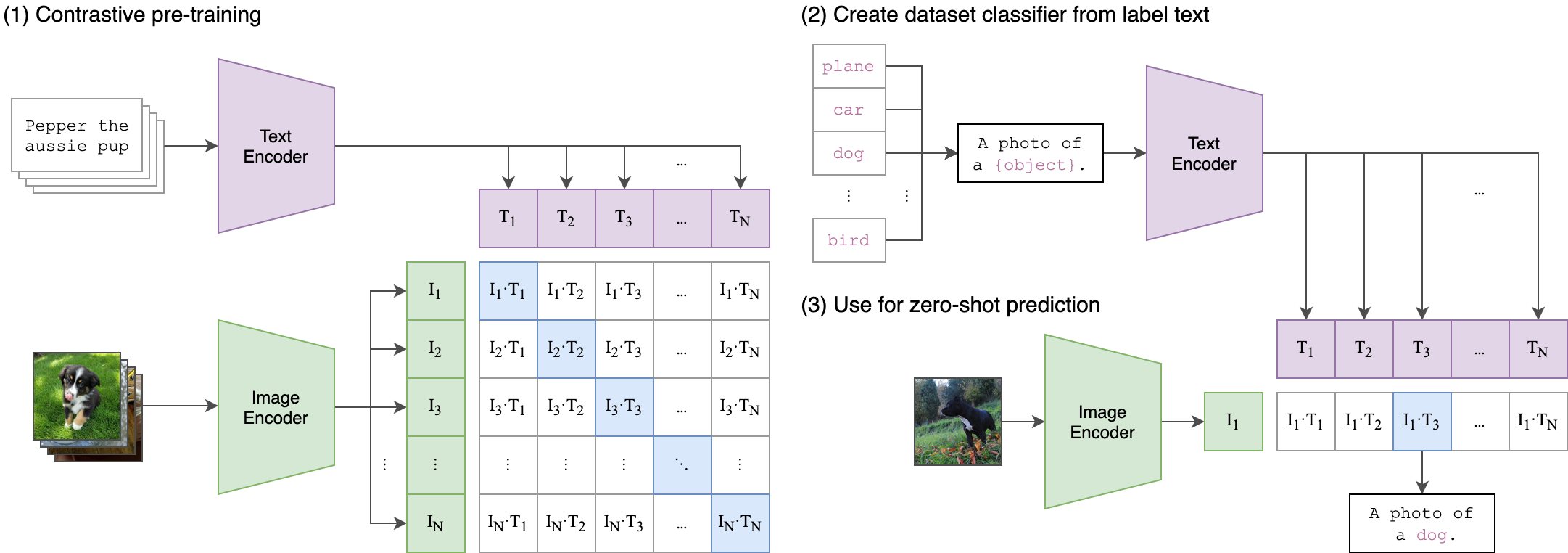
CLIP (Contrastive Language-Image Pre-Training) is a neural network trained on a variety of (image, text) pairs. It can be instructed in natural language to predict the most relevant text snippet, given an image, without directly optimizing for the task, similarly to the zero-shot capabilities of GPT-2 and 3. We found CLIP matches the performance of the original ResNet50 on ImageNet “zero-shot” without using any of the original 1.28M labeled examples, overcoming several major challenges in computer vision.

Approach

CLIP

Usage

First, install PyTorch 1.7.1 (or later) and torchvision, as well as small additional dependencies, and then install this repo as a Python package. On a CUDA GPU machine, the following will do the trick:

$ conda install --yes -c pytorch pytorch=1.7.1 torchvision cudatoolkit=11.0
$ pip install ftfy regex tqdm
$ pip install git+https://github.com/openai/CLIP.git

Replace cudatoolkit=11.0 above with the appropriate CUDA version on your machine or cpuonly when installing on a machine without a GPU.

import torch
import clip
from PIL import Image

device = "cuda" if torch.cuda.is_available() else "cpu"
model, preprocess = clip.load("ViT-B/32", device=device)

image = preprocess(Image.open("CLIP.png")).unsqueeze(0).to(device)
text = clip.tokenize(["a diagram", "a dog", "a cat"]).to(device)

with torch.no_grad():
    image_features = model.encode_image(image)
    text_features = model.encode_text(text)
    
    logits_per_image, logits_per_text = model(image, text)
    probs = logits_per_image.softmax(dim=-1).cpu().numpy()

print("Label probs:", probs)  # prints: [[0.9927937  0.00421068 0.00299572]]

API

The CLIP module clip provides the following methods:

clip.available_models()

Returns the names of the available CLIP models.

clip.load(name, device=..., jit=False)

Returns the model and the TorchVision transform needed by the model, specified by the model name returned by clip.available_models(). It will download the model as necessary. The name argument can also be a path to a local checkpoint.

The device to run the model can be optionally specified, and the default is to use the first CUDA device if there is any, otherwise the CPU. When jit is False, a non-JIT version of the model will be loaded.

clip.tokenize(text: Union[str, List[str]], context_length=77)

Returns a LongTensor containing tokenized sequences of given text input(s). This can be used as the input to the model


The model returned by clip.load() supports the following methods:

model.encode_image(image: Tensor)

Given a batch of images, returns the image features encoded by the vision portion of the CLIP model.

model.encode_text(text: Tensor)

Given a batch of text tokens, returns the text features encoded by the language portion of the CLIP model.

model(image: Tensor, text: Tensor)

Given a batch of images and a batch of text tokens, returns two Tensors, containing the logit scores corresponding to each image and text input. The values are cosine similarities between the corresponding image and text features, times 100.

More Examples

Zero-Shot Prediction

The code below performs zero-shot prediction using CLIP, as shown in Appendix B in the paper. This example takes an image from the CIFAR-100 dataset, and predicts the most likely labels among the 100 textual labels from the dataset.

import os
import clip
import torch
from torchvision.datasets import CIFAR100

# Load the model
device = "cuda" if torch.cuda.is_available() else "cpu"
model, preprocess = clip.load('ViT-B/32', device)

# Download the dataset
cifar100 = CIFAR100(root=os.path.expanduser("~/.cache"), download=True, train=False)

# Prepare the inputs
image, class_id = cifar100[3637]
image_input = preprocess(image).unsqueeze(0).to(device)
text_inputs = torch.cat([clip.tokenize(f"a photo of a {c}") for c in cifar100.classes]).to(device)

# Calculate features
with torch.no_grad():
    image_features = model.encode_image(image_input)
    text_features = model.encode_text(text_inputs)

# Pick the top 5 most similar labels for the image
image_features /= image_features.norm(dim=-1, keepdim=True)
text_features /= text_features.norm(dim=-1, keepdim=True)
similarity = (100.0 * image_features @ text_features.T).softmax(dim=-1)
values, indices = similarity[0].topk(5)

# Print the result
print("\nTop predictions:\n")
for value, index in zip(values, indices):
    print(f"{cifar100.classes[index]:>16s}: {100 * value.item():.2f}%")

The output will look like the following (the exact numbers may be slightly different depending on the compute device):

Top predictions:

           snake: 65.31%
          turtle: 12.29%
    sweet_pepper: 3.83%
          lizard: 1.88%
       crocodile: 1.75%

Note that this example uses the encode_image() and encode_text() methods that return the encoded features of given inputs.

Linear-probe evaluation

The example below uses scikit-learn to perform logistic regression on image features.

import os
import clip
import torch

import numpy as np
from sklearn.linear_model import LogisticRegression
from torch.utils.data import DataLoader
from torchvision.datasets import CIFAR100
from tqdm import tqdm

# Load the model
device = "cuda" if torch.cuda.is_available() else "cpu"
model, preprocess = clip.load('ViT-B/32', device)

# Load the dataset
root = os.path.expanduser("~/.cache")
train = CIFAR100(root, download=True, train=True, transform=preprocess)
test = CIFAR100(root, download=True, train=False, transform=preprocess)


def get_features(dataset):
    all_features = []
    all_labels = []
    
    with torch.no_grad():
        for images, labels in tqdm(DataLoader(dataset, batch_size=100)):
            features = model.encode_image(images.to(device))

            all_features.append(features)
            all_labels.append(labels)

    return torch.cat(all_features).cpu().numpy(), torch.cat(all_labels).cpu().numpy()

# Calculate the image features
train_features, train_labels = get_features(train)
test_features, test_labels = get_features(test)

# Perform logistic regression
classifier = LogisticRegression(random_state=0, C=0.316, max_iter=1000, verbose=1)
classifier.fit(train_features, train_labels)

# Evaluate using the logistic regression classifier
predictions = classifier.predict(test_features)
accuracy = np.mean((test_labels == predictions).astype(float)) * 100.
print(f"Accuracy = {accuracy:.3f}")

Note that the C value should be determined via a hyperparameter sweep using a validation split.

See Also

CLIP (openai/CLIP)

Searching Database…

34.5K ·GitHub
What is this?CLIP is a neural network trained on many (image, text) pairs: given an image, it predicts the most relevant text snippet in natural language, zero-shot, without directly optimizing for the task.
Is this a standalone app, or a library I import into my own code?It's a Python library: you install the repo as a package and import the clip module inside your own PyTorch code to load models, tokenize text and encode images.
Is there a limit on how long my text prompts can be?Yes — text goes through clip.tokenize, which produces tokenized sequences with a default context length of 77 tokens, so prompts need to fit that budget.
Which CLIP models can I choose from?clip.availablemodels() lists all variants; clip.load(name) returns the model plus its TorchVision transform, downloading the checkpoint automatically — you can also pass a path to a local checkpoint.
How do I turn images and text into comparable vectors?model.encode_image(image) and model.encode_text(text) return the two feature tensors; calling model(image, text) directly gives logit scores — cosine similarities between the features, times 100.
Is there something runnable I can start from?Yes — the README walks through zero-shot prediction on a CIFAR-100 image and a linear-probe evaluation with scikit-learn, and a Colab notebook is linked from the top of the README.
Are there bigger or easier-to-integrate CLIP variants?OpenCLIP offers larger, independently trained CLIP models up to ViT-G/14, and a Hugging Face implementation exists for easier integration with the HF ecosystem.
Creator
openai
Size
8.9 MB
Stars
34.5K
Updated
CommitMar 25
Age
5y
Commits · 90 Days