📖 Overview
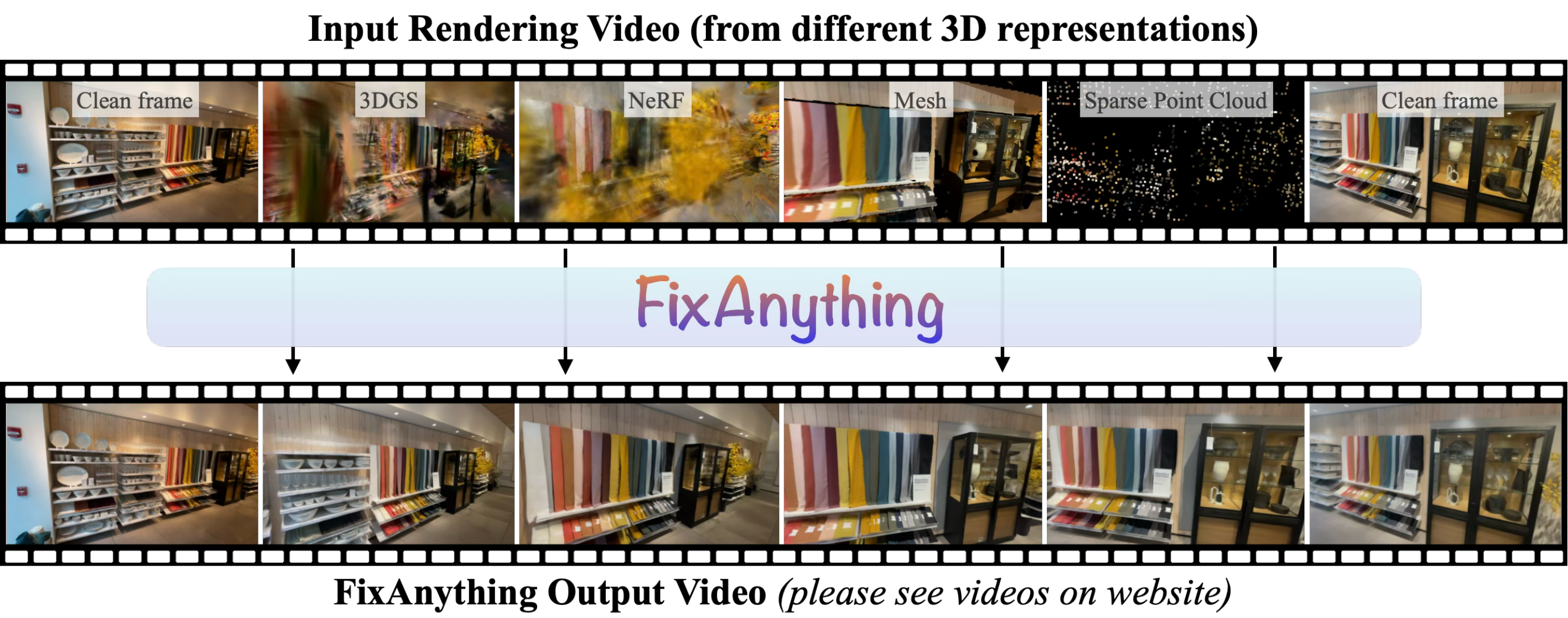
FixAnything is a single generalist video model that repairs rendering artifacts from any 3D representation — 3DGS, NeRF, meshes, or sparse point clouds — by repurposing a pretrained video diffusion model with minimal modification and finetuning.
This repository contains the inference code.
Table of Contents
🔧 Installation
git clone https://github.com/kvuong2711/fix-anything.git
cd fix-anything

conda create -n fixanything python=3.10 -y
conda activate fixanything

# PyTorch for your CUDA version
pip install torch==2.6.0 torchvision==0.21.0 --index-url https://download.pytorch.org/whl/cu126

# FixAnything + the pinned DiffSynth-Studio commit it builds on
# (DiffSynth's setup.py needs pkg_resources, hence setuptools<82 and --no-build-isolation)
pip install "setuptools<82" wheel
pip install --no-build-isolation -e .

# Optional: MapAnything + pyrender, to reconstruct and render your own captures (see below)
pip install --no-build-isolation -e ".[mapanything]"

# Optional but recommended: FlashAttention-2 (used automatically when installed; prebuilt wheel for torch 2.6 / CUDA 12 / Python 3.10)
pip install https://github.com/Dao-AILab/flash-attention/releases/download/v2.7.4.post1/flash_attn-2.7.4.post1+cu12torch2.6cxx11abiTRUE-cp310-cp310-linux_x86_64.whl
📦 Checkpoints
scripts/download_models.py downloads everything into checkpoints/: the Wan2.1-I2V-14B-480P base model (~60 GB, from Hugging Face or --source modelscope) and the FixAnything LoRA from kvuong2711/fix-anything:
python scripts/download_models.py --model_dir checkpoints
The expected layout is:
checkpoints/
├── Wan-AI/Wan2.1-I2V-14B-480P/
│   ├── diffusion_pytorch_model-0000?-of-00007.safetensors
│   ├── models_t5_umt5-xxl-enc-bf16.pth
│   ├── Wan2.1_VAE.pth
│   ├── models_clip_open-clip-xlm-roberta-large-vit-huge-14.pth
│   └── google/umt5-xxl/
└── fixanything_lora.safetensors
If you already have the Wan2.1 files elsewhere, point --model_dir to the folder that contains Wan-AI/.
🚀 Run Inference on a Rendered Video
run_inference.py refines a rendered video (a video file, or a folder of frames). examples/ contains one DL3DV clip rendered by 3D Gaussian Splatting and by a sparse point-track renderer:
# 3DGS rendering
python scripts/run_inference.py --input examples/dl3dv_3dgs/input.mp4   --output_dir outputs/dl3dv_3dgs

# sparse point-track rendering
python scripts/run_inference.py --input examples/dl3dv_tracks/input.mp4 --output_dir outputs/dl3dv_tracks
Each run writes generated.mp4 (refined video), input.mp4 (the resized input) and side_by_side.mp4 (input | refined) to the output folder.
To run on your own rendering (any 3D representation), pass a video of 61 frames rendered along a camera path, ideally starting and ending at views used to build the representation. Frames are resized to 832×480.
- Caveat on the number of frames. Internally the last frame is repeated 4 times (65 frames): the Wan VAE encodes the first frame on its own but compresses the rest temporally, so this (hopefully) gives the last frame more influence to the generation. The output is cropped back to 61 frames.
--clean_frame_indices lists the frames to keep as-is; by default the first and last frames ("0 60").
📷 Run on Your Own Captures
If you only have a few photos of a scene, scripts/run_mapanything.py reconstructs them with MapAnything, renders the reconstruction along a camera path from the first to the last image, and FixAnything turns that rendering into a clean video. examples/microkitchen_2views and examples/chair_2views each contain two photos of a scene (credit: thanks to Peter Hedman for the photos!):
# 1) MapAnything reconstruction + rendering (61 frames; first/last frame = the input photos)
python scripts/run_mapanything.py --images examples/microkitchen_2views/images --output_dir outputs/microkitchen_2views

# 2) FixAnything
python scripts/run_inference.py --input outputs/microkitchen_2views/rendered.mp4 --output_dir outputs/microkitchen_2views
Step 1 writes rendered.mp4 and reconstruction.glb; step 2 adds generated.mp4 (the result) and side_by_side.mp4.
--trajectory: interpolate (default) moves the camera on a straight path between the two input views; push_in additionally dollies toward the scene mid-path and back.--render: render the reconstruction as a triangle mesh (default) or as a point cloud (pcd).
Example on examples/microkitchen_2views with --trajectory push_in:
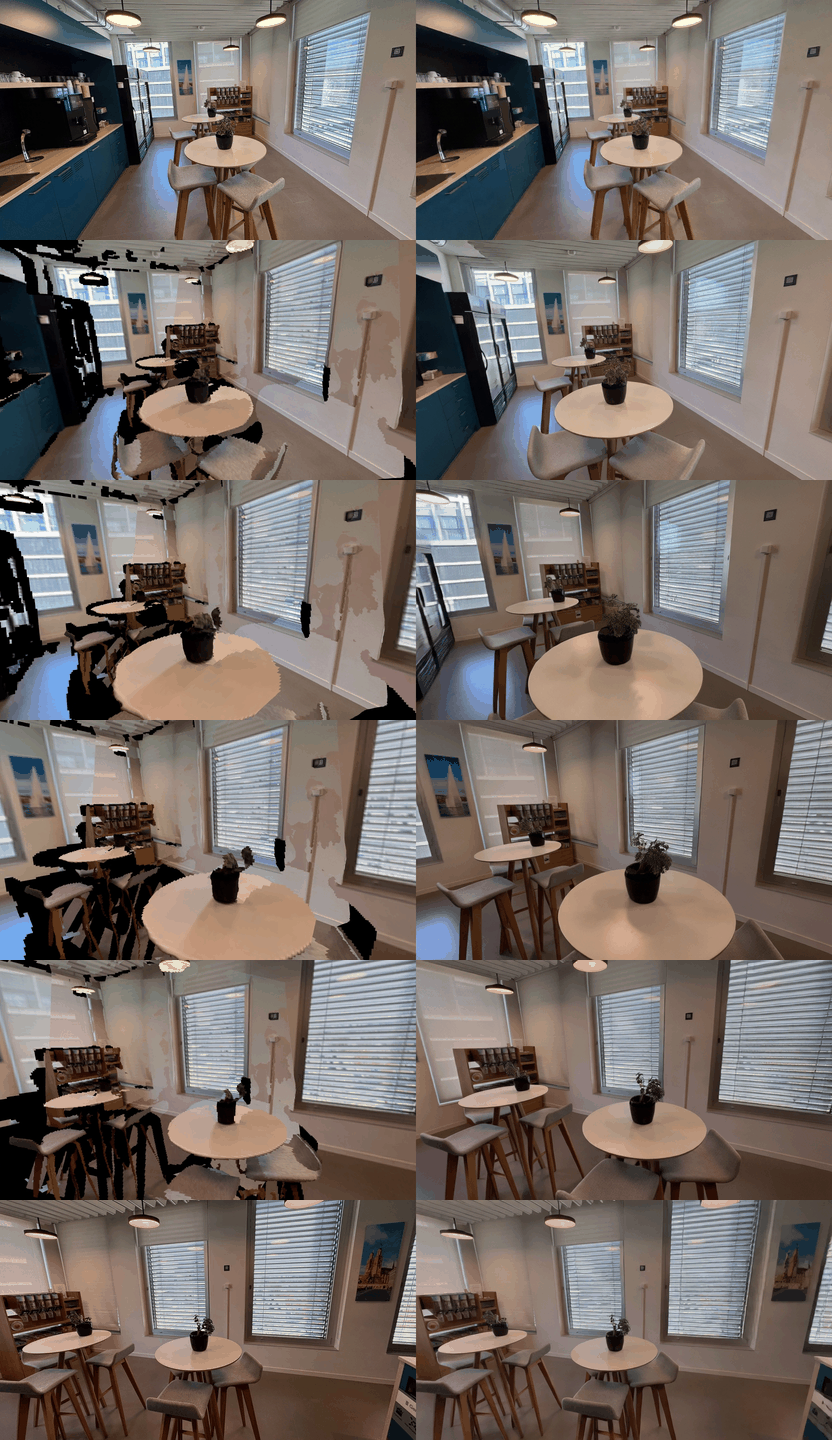
MapAnything rendering (left), FixAnything output (right).
📄 License
The code and the FixAnything weights are released under the Apache 2.0 License, the license of the underlying Wan2.1 model.
🙏 Acknowledgments
This codebase builds upon many excellent open-source projects, such as DiffSynth-Studio, Wan2.1, MapAnything, gsplat, DL3DV, etc. We thank the respective authors for making their work publicly available.
🐛 Issues
If you have any problem/question/suggestion, feel free to create an issue or reach out directly to me via email.
📝 Citation
@inproceedings{vuong2026fixanything,
  title     = {FixAnything: 3D-Consistent Rendering Refinement via Video Generative Priors},
  author    = {Vuong, Khiem and Ramanan, Deva and Narasimhan, Srinivasa},
  booktitle = {European Conference on Computer Vision},
  year      = {2026}
}

 一个来自 ECCV 2026 论文的研究工具:一个经过微调的视频扩散模型,用来修复各种 3D 表示方式(3DGS、NeRF、网格模型或稀疏点云)生成的渲染瑕疵。这个仓库里放的是推理代码。