



nerfstudio README

The project's README from github.com/nerfstudio-project/nerfstudio. As one markdown file: README.md.

Documentation Status PyPI version Test Status License

nerfstudio

A collaboration friendly studio for NeRFs

documentation viewer colab

About

It’s as simple as plug and play with nerfstudio!

Nerfstudio provides a simple API that allows for a simplified end-to-end process of creating, training, and testing NeRFs. The library supports a more interpretable implementation of NeRFs by modularizing each component. With more modular NeRFs, we hope to create a more user-friendly experience in exploring the technology.

This is a contributor-friendly repo with the goal of building a community where users can more easily build upon each other's contributions. Nerfstudio initially launched as an opensource project by Berkeley students in KAIR lab at Berkeley AI Research (BAIR) in October 2022 as a part of a research project (paper). It is currently developed by Berkeley students and community contributors.

We are committed to providing learning resources to help you understand the basics of (if you're just getting started), and keep up-to-date with (if you're a seasoned veteran) all things NeRF. As researchers, we know just how hard it is to get onboarded with this next-gen technology. So we're here to help with tutorials, documentation, and more!

Have feature requests? Want to add your brand-spankin'-new NeRF model? Have a new dataset? We welcome contributions! Please do not hesitate to reach out to the nerfstudio team with any questions via Discord.

Have feedback? We'd love for you to fill out our Nerfstudio Feedback Form if you want to let us know who you are, why you are interested in Nerfstudio, or provide any feedback!

We hope nerfstudio enables you to build faster :hammer: learn together :books: and contribute to our NeRF community :sparkling_heart:.

Sponsors

Sponsors of this work includes Luma AI and the BAIR commons.

Luma AI BAIR

Quickstart

The quickstart will help you get started with the default vanilla NeRF trained on the classic Blender Lego scene. For more complex changes (e.g., running with your own data/setting up a new NeRF graph), please refer to our references.

1. Installation: Setup the environment

Prerequisites

You must have an NVIDIA video card with CUDA installed on the system. This library has been tested with version 11.8 of CUDA. You can find more information about installing CUDA here

Create environment

Nerfstudio requires python >= 3.8. We recommend using conda to manage dependencies. Make sure to install Conda before proceeding.

conda create --name nerfstudio -y python=3.8
conda activate nerfstudio
pip install --upgrade pip

Dependencies

Install PyTorch with CUDA (this repo has been tested with CUDA 11.7 and CUDA 11.8) and tiny-cuda-nn. cuda-toolkit is required for building tiny-cuda-nn.

For CUDA 11.8:

pip install torch==2.1.2+cu118 torchvision==0.16.2+cu118 --extra-index-url https://download.pytorch.org/whl/cu118

conda install -c "nvidia/label/cuda-11.8.0" cuda-toolkit
pip install ninja git+https://github.com/NVlabs/tiny-cuda-nn/#subdirectory=bindings/torch

See Dependencies in the Installation documentation for more.

Installing nerfstudio

Easy option:

pip install nerfstudio

OR if you want the latest and greatest:

git clone https://github.com/nerfstudio-project/nerfstudio.git
cd nerfstudio
pip install --upgrade pip setuptools
pip install -e .

OR if you want to skip all installation steps and directly start using nerfstudio, use the docker image:

See Installation - Use docker image.

2. Training your first model!

The following will train a nerfacto model, our recommended model for real world scenes.

# Download some test data:
ns-download-data nerfstudio --capture-name=poster
# Train model
ns-train nerfacto --data data/nerfstudio/poster

If everything works, you should see training progress like the following:

image

Navigating to the link at the end of the terminal will load the webviewer. If you are running on a remote machine, you will need to port forward the websocket port (defaults to 7007).

image

Resume from checkpoint / visualize existing run

It is possible to load a pretrained model by running

ns-train nerfacto --data data/nerfstudio/poster --load-dir {outputs/.../nerfstudio_models}

Visualize existing run

Given a pretrained model checkpoint, you can start the viewer by running

ns-viewer --load-config {outputs/.../config.yml}

3. Exporting Results

Once you have a NeRF model you can either render out a video or export a point cloud.

Render Video

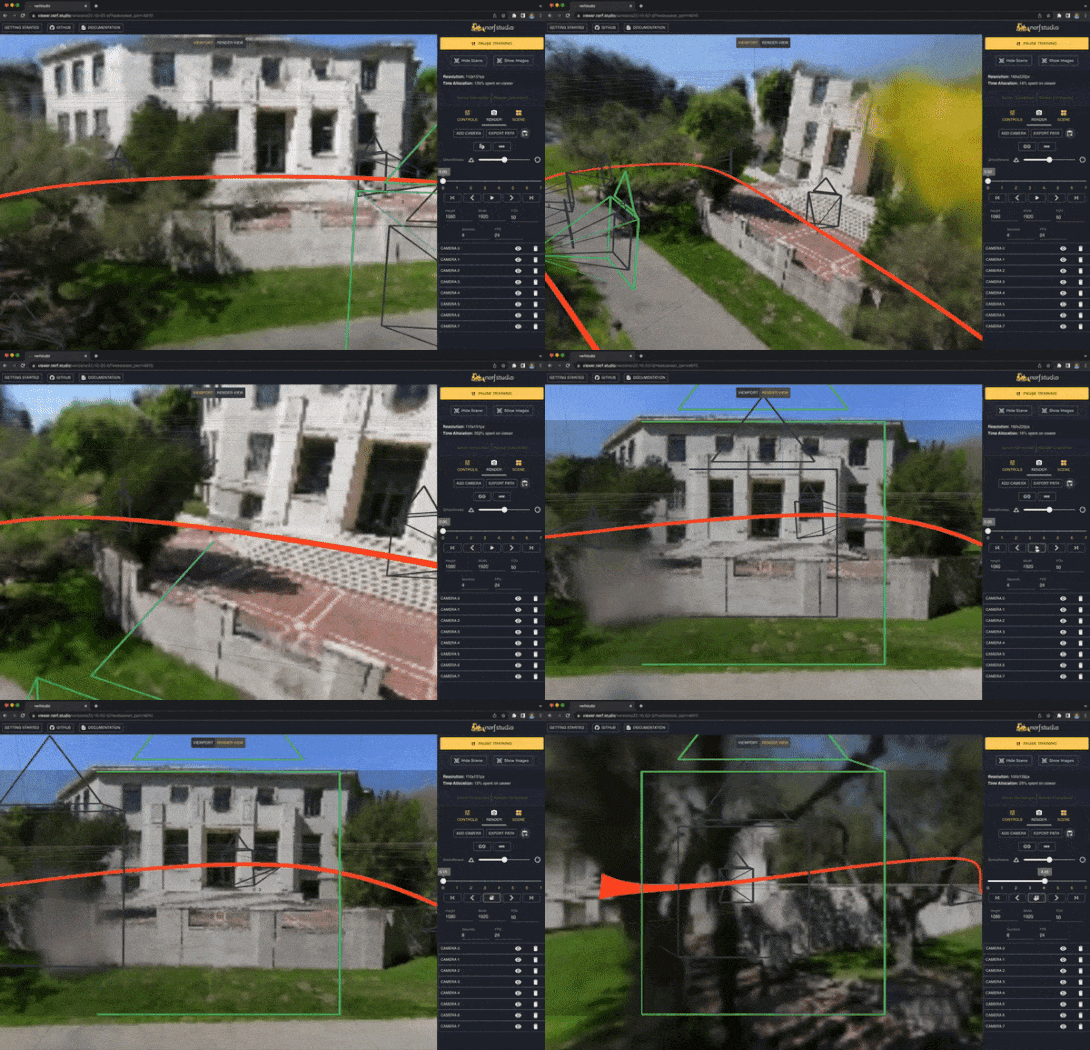
First we must create a path for the camera to follow. This can be done in the viewer under the "RENDER" tab. Orient your 3D view to the location where you wish the video to start, then press "ADD CAMERA". This will set the first camera key frame. Continue to new viewpoints adding additional cameras to create the camera path. We provide other parameters to further refine your camera path. Once satisfied, press "RENDER" which will display a modal that contains the command needed to render the video. Kill the training job (or create a new terminal if you have lots of compute) and run the command to generate the video.

Other video export options are available, learn more by running

ns-render --help

Generate Point Cloud

While NeRF models are not designed to generate point clouds, it is still possible. Navigate to the "EXPORT" tab in the 3D viewer and select "POINT CLOUD". If the crop option is selected, everything in the yellow square will be exported into a point cloud. Modify the settings as desired then run the command at the bottom of the panel in your command line.

Alternatively you can use the CLI without the viewer. Learn about the export options by running

ns-export pointcloud --help

4. Using Custom Data

Using an existing dataset is great, but likely you want to use your own data! We support various methods for using your own data. Before it can be used in nerfstudio, the camera location and orientations must be determined and then converted into our format using ns-process-data. We rely on external tools for this, instructions and information can be found in the documentation.

Data Capture Device Requirements ns-process-data Speed
📷 Images Any COLMAP 🐢
📹 Video Any COLMAP 🐢
🌎 360 Data Any COLMAP 🐢
📱 Polycam IOS with LiDAR Polycam App 🐇
📱 KIRI Engine IOS or Android KIRI Engine App 🐇
📱 Record3D IOS with LiDAR Record3D app 🐇
📱 Spectacular AI IOS, OAK, others App / sai-cli 🐇
🖥 Metashape Any Metashape 🐇
🖥 RealityCapture Any RealityCapture 🐇
🖥 ODM Any ODM 🐇
👓 Aria Aria glasses Project Aria 🐇
🛠 Custom Any Camera Poses 🐇

5. Advanced Options

Training models other than nerfacto

We provide other models than nerfacto, for example if you want to train the original nerf model, use the following command

ns-train vanilla-nerf --data DATA_PATH

For a full list of included models run ns-train --help.

Modify Configuration

Each model contains many parameters that can be changed, too many to list here. Use the --help command to see the full list of configuration options.

ns-train nerfacto --help

Tensorboard / WandB / Viewer

We support four different methods to track training progress, using the viewertensorboard, Weights and Biases, and ,Comet. You can specify which visualizer to use by appending --vis {viewer, tensorboard, wandb, comet viewer+wandb, viewer+tensorboard, viewer+comet} to the training command. Simultaneously utilizing the viewer alongside wandb or tensorboard may cause stuttering issues during evaluation steps. The viewer only works for methods that are fast (ie. nerfacto, instant-ngp), for slower methods like NeRF, use the other loggers.

Learn More

And that's it for getting started with the basics of nerfstudio.

If you're interested in learning more on how to create your own pipelines, develop with the viewer, run benchmarks, and more, please check out some of the quicklinks below or visit our documentation directly.

Section Description
Documentation Full API documentation and tutorials
Viewer Home page for our web viewer
🎒 Educational
Model Descriptions Description of all the models supported by nerfstudio and explanations of component parts.
Component Descriptions Interactive notebooks that explain notable/commonly used modules in various models.
🏃 Tutorials
Getting Started A more in-depth guide on how to get started with nerfstudio from installation to contributing.
Using the Viewer A quick demo video on how to navigate the viewer.
Using Record3D Demo video on how to run nerfstudio without using COLMAP.
💻 For Developers
Creating pipelines Learn how to easily build new neural rendering pipelines by using and/or implementing new modules.
Creating datasets Have a new dataset? Learn how to run it with nerfstudio.
Contributing Walk-through for how you can start contributing now.
💖 Community
Discord Join our community to discuss more. We would love to hear from you!
Twitter Follow us on Twitter @nerfstudioteam to see cool updates and announcements
Feedback Form We welcome any feedback! This is our chance to learn what you all are using Nerfstudio for.

Supported Features

We provide the following support structures to make life easier for getting started with NeRFs.

If you are looking for a feature that is not currently supported, please do not hesitate to contact the Nerfstudio Team on Discord!

Built On

tyro logo

nerfstudio (nerfstudio-project/nerfstudio)

Searching Database…

What is this?Nerfstudio is an open-source toolkit for creating, training, and testing Neural Radiance Fields (NeRFs), with a simple API that breaks each NeRF component into modular, swappable pieces.
Is this a library I import or a standalone framework with its own commands?It is a Python framework driven through CLI commands like 'ns-train' and 'ns-process-data', with results viewed through a built-in browser-based viewer rather than a GUI app.
How do I get it running and train my first model?Create a conda environment with Python 3.8+, install PyTorch with CUDA plus tiny-cuda-nn, install nerfstudio (or use the provided Docker image), then run the training command to fit a nerfacto model on the sample Blender Lego scene and open the printed link to watch it in the webviewer.
Does the built-in viewer work with every model?The real-time viewer only works smoothly with fast methods like nerfacto or instant-ngp; for slower models like vanilla NeRF you should track progress with Tensorboard or WandB instead, and running the viewer together with those loggers can cause stuttering during evaluation.
Can I run this without a dedicated NVIDIA machine, or only on specific hardware?Since training depends on an NVIDIA CUDA GPU, nerfstudio is meant for Linux/Windows machines with NVIDIA cards (a Docker image is also provided) — it is not built for CUDA-less setups like Apple Silicon Macs.
Do I need an NVIDIA GPU with CUDA to use this?Yes — nerfstudio requires an NVIDIA video card with CUDA installed; it has been tested with CUDA 11.7 and 11.8, and cuda-toolkit is needed to build the tiny-cuda-nn dependency.
What models can I train besides nerfacto?Nerfstudio ships with several NeRF variants including the original vanilla NeRF alongside nerfacto; running 'ns-train --help' lists the full set of supported models.
What can I actually do in the web viewer?The browser-based viewer lets you watch training update live, interact with the 3D scene, build custom camera paths to render videos, and export point clouds from the reconstructed scene.
Can I use my own photos or video instead of sample data?Yes — the 'ns-process-data' command converts your own images, video, 360 captures, or scans from apps like Polycam, KIRI Engine, and Record3D into the camera poses nerfstudio needs, typically via COLMAP.
Size
119.1 MB
Stars
12.1K
Age
4y
Commits · 90 Days
