
Reverse-Engineering SynthID
Discovering, detecting, and surgically removing Google's AI watermark through spectral analysis
Visit us on PitchHut
This fork adds a drag and drop desktop app for the V3 bypass, no command line needed after setup. See gui/README.md for setup and usage.







What the Watermark Looks Like
SynthID encodes an imperceptible pattern directly into pixel values. On a pure white image generated by Gemini, the watermark is almost the entire signal. Amplify the high-frequency residual and it looks like this:
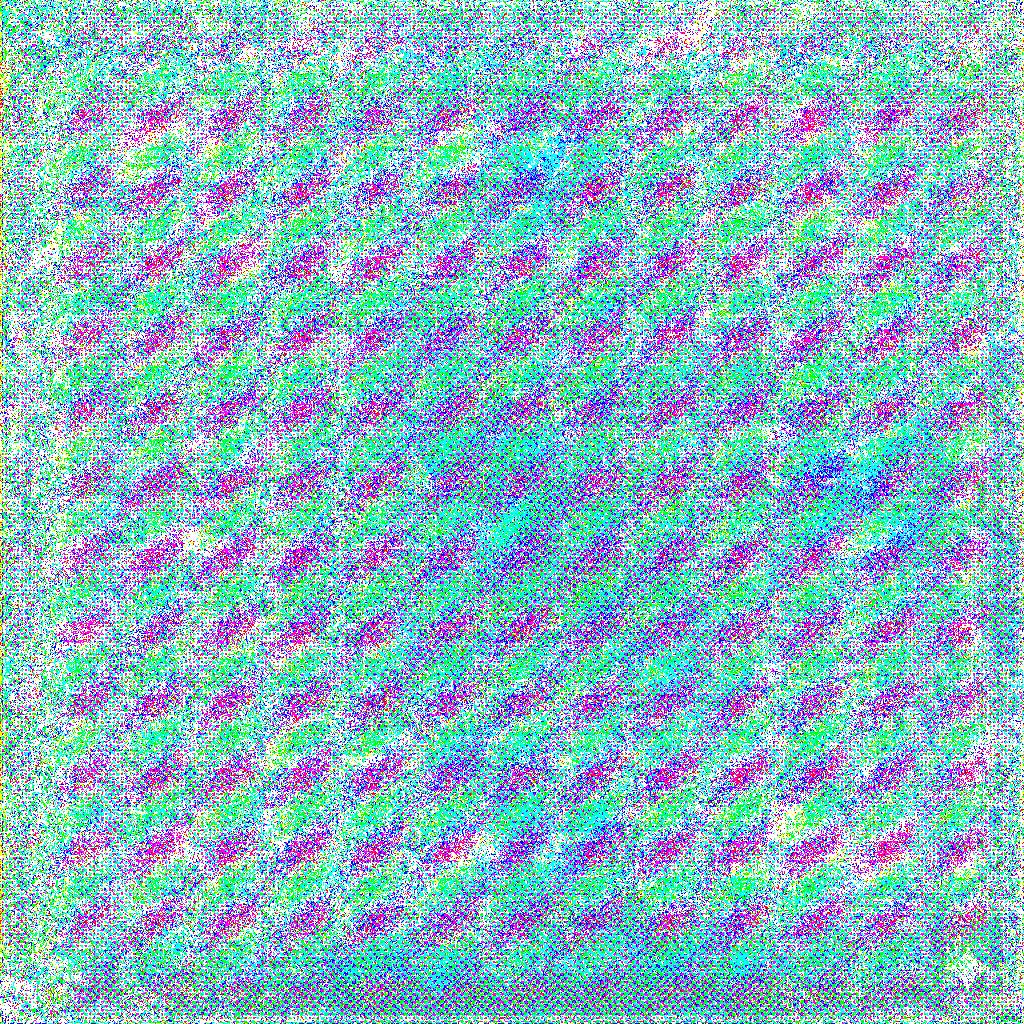
Amplified SynthID carrier pattern extracted from a pure-white Gemini image. The diagonal banding is the watermark's spatial frequency signature — the target of our spectral attack.
Overview
This project reverse-engineers Google's SynthID watermarking system — the invisible watermark embedded into every image generated by Google Gemini. Using only signal processing and spectral analysis (no access to the proprietary encoder/decoder), we:
- Discovered the watermark's resolution-dependent carrier frequency structure
- Built a detector that identifies SynthID watermarks with 90% accuracy
- Developed a multi-resolution spectral bypass (V3) that achieves 75% carrier energy drop, 91% phase coherence drop, and 43+ dB PSNR on any image resolution
- Generalized to multi-model, multi-color consensus (V4) — per-model profiles for
gemini-3.1-flash-image-preview and nano-banana-pro-preview, cross-color phase consensus over 6 solid backgrounds, and a human-in-the-loop calibration loop that tunes per-carrier subtraction strength from manual Gemini-app detection tallies
- Broke the detector across both models (Round 06) with a unified 7-stage all-in-one attack targeting every documented SynthID failure mode simultaneously
VT-OxFF built a really cool visualizer to view the process of how SynthID watermark is added to images here (also available in repo description)!
Round 06 — It Works ✓
After six iterative rounds of adversarial development, Round 06's bypass_v4_final / bypass_v4_nuke pipeline defeats the Gemini SynthID detector on both gemini-3.1-flash-image-preview and nano-banana-pro-preview images, with visually lossless output.
Round 01 vs Round 06 — Fidelity Comparison
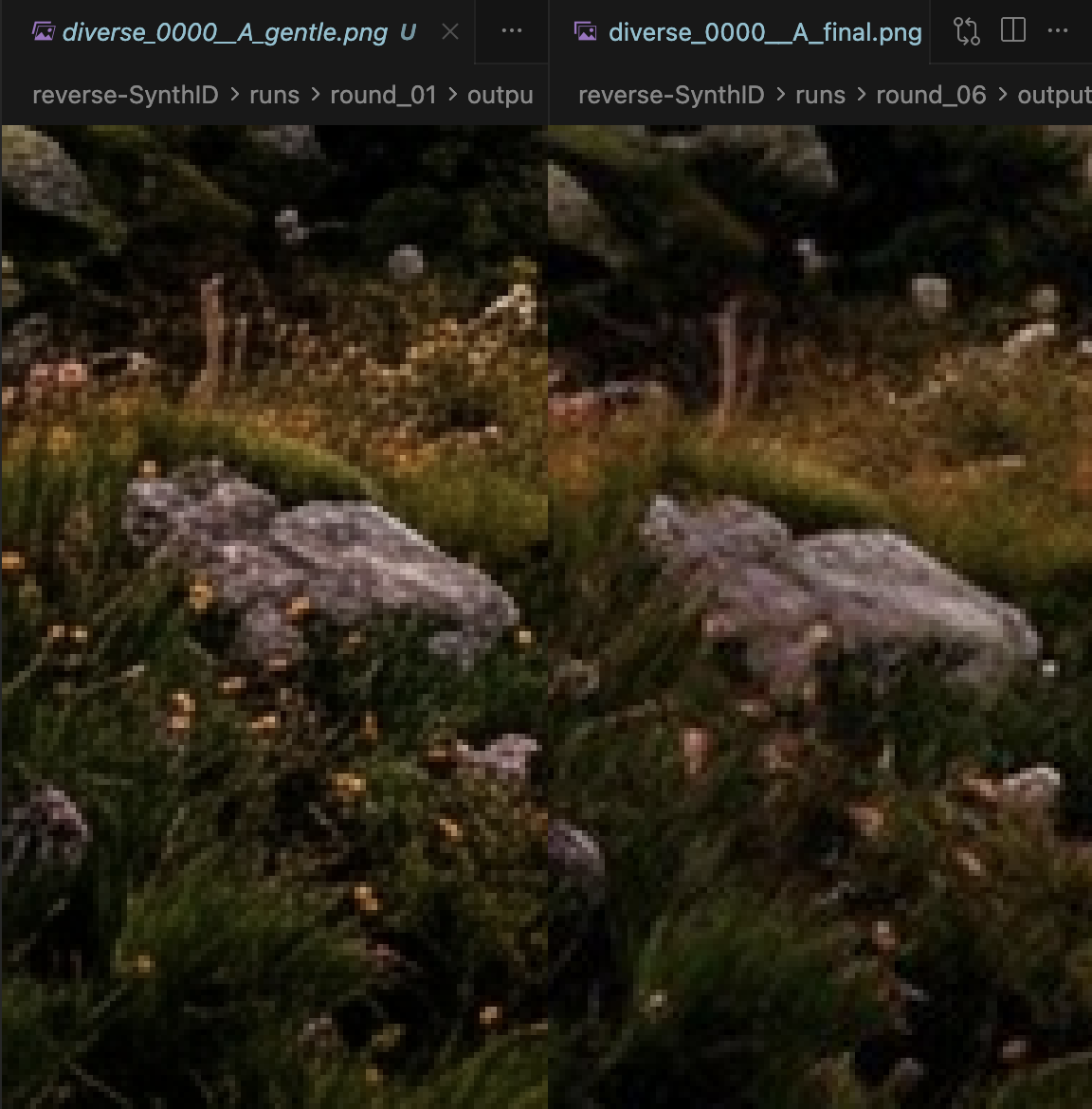
Left: Round 01 output (gentle spectral subtraction only). Right: Round 06 output (final — VAE + elastic warp + squeeze + color + JPEG). Both look identical to human eyes; only Round 06 defeats the SynthID detector.
What Changed Between Rounds
| Round |
Strategy |
Outcome |
| 01 |
Conservative spectral subtraction (gentle) |
✗ |
| 02 |
Aggressive spectral subtraction + JPEG |
✗ |
| 03 |
Blog-guided absolute bin targeting |
✗ |
| 04 |
Denoise-residual phase extraction |
✗ |
| 05 |
Diffusion-VAE re-generation + geometric warp |
✗ |
| 06 |
All-in-one: VAE + elastic fragmentation + squeeze + color + JPEG |
✓ |
The breakthrough in Round 06 came from treating the Gemini app's own published failure-mode list as an attack specification:
"When an AI-generated image is part of a complex collage, layered behind other elements, or has many different textures and patterns placed over it, the detector may struggle to isolate the specific signature from the overall file."
— Gemini app, SynthID detection help text
The elastic deformation stage simulates this effect at the pixel level: a smooth, low-frequency random warp field gives every ~50-pixel neighbourhood its own independent sub-pixel offset, fragmenting the watermark's spatial phase consensus without introducing any visible distortion.
V4 — Cross-Color Consensus + Human-in-the-Loop Calibration
V4 is a ground-up re-think of the codebook built on a much richer dataset:
- Multi-model: separate profiles for
gemini-3.1-flash-image-preview and nano-banana-pro-preview (plus an optional union pseudo-model).
- Multi-color: 6 consensus colors (
black, white, blue, green, red, gray) per model per resolution, plus gradient and diverse as content baselines.
- Cross-color phase consensus: the primary carrier mask. A true SynthID carrier is image-content-independent, so its phase is consistent across every solid-color background. Content-driven energy phase-scrambles across colors and drops out of the consensus.
- Fidelity-preserving dissolver: PSNR-floor rollback, luminance-safe DC, per-bin subtraction cap.
- Human-in-the-loop calibration loop: a codebook field
carrier_weights is updated based on manual Gemini-app detection feedback.
Consensus coherence (why V4 wins)
For each frequency bin (fy, fx) and channel ch:
consensus(fy, fx, ch) = | mean_over_colors( exp(i * phase_color(fy, fx, ch)) ) |
Values near 1.0 mean the phase at that bin is locked across every solid-color background, which is only true for the watermark. Content bins collapse to < 0.3 because their phase is randomized by different color tints. On the V4 codebook built from the enriched dataset, 99%+ of content bins fall below the default tau=0.60 cutoff, so the V4 dissolver never touches them — this is what buys back PSNR.
Two-phase release workflow
flowchart LR
    dataset[reverse-synthid-dataset<br/>model x color x resolution] --> build[scripts/build_codebook_v4.py]
    build --> codebook[artifacts/spectral_codebook_v4.npz]
    codebook --> dissolve[scripts/dissolve_batch.py]
    input[watermarked inputs] --> dissolve
    dissolve --> variants[final / nuke variants]
    variants --> gemini[Gemini app<br/>manual SynthID detection]
    gemini --> feedback[detection feedback]
    feedback --> calibrate[scripts/calibrate_from_feedback.py]
    calibrate -->|updates carrier_weights| codebook
V4 Quickstart
# 1. Build the codebook from the enriched hierarchical dataset
python scripts/build_codebook_v4.py \
    --root /path/to/reverse-synthid-dataset \
    --output artifacts/spectral_codebook_v4.npz

# 2. Run the Round-06 all-in-one attack on a batch (recommended)
python scripts/dissolve_batch.py \
    --input  ./to_clean/ \
    --output ./runs/round_06/ \
    --codebook artifacts/spectral_codebook_v4.npz \
    --model gemini-3.1-flash-image-preview \
    --strengths final nuke

# 3. Upload each output image to the Gemini app and run SynthID detection.
#    Use the results to feed back into the calibration script if needed.
Round-06 Attack Presets
Two presets are available via --strengths:
| Preset |
VAE passes |
Elastic α |
Squeeze |
JPEG chain |
PSNR floor |
final |
1 |
1.8 px |
90 % |
q=92→88 |
14 dB |
nuke |
2 |
2.8 px |
82 % |
q=88→84→90 |
11 dB |
Both presets stack the same 7-stage pipeline:
- VAE round-trip (Stable Diffusion
sd-vae-ft-mse) — projects image off the natural-image manifold the SynthID decoder was never trained against (Gowal et al. 2026, §6.1)
- Elastic deformation — smooth low-frequency random warp field, simulates the "collage fragmentation" failure mode Gemini itself acknowledges
- Global geometric combo — small rotation + zoom + pixel shift in one affine warp
- Resize-squeeze — downsample (AREA) → upsample (LANCZOS), erases sub-pixel watermark info
- Color-contrast nudge — brightness / contrast / saturation / hue micro-shift
- Residual-phase FFT subtraction — blog-universal + codebook-harvested carrier bins, cap-limited
- JPEG chain + luma noise + bilateral — heavy compression / re-encoding disruption
Every stage is independently PSNR-gated; any stage that would drop quality below the floor is rolled back automatically.
V4 Codebook Structure
Profiles keyed by (model, H, W). Each profile stores:
| Field |
Shape |
Notes |
consensus_coherence |
(H, W, 3) |
Primary carrier mask (cross-color phase consensus). |
consensus_phase |
(H, W, 3) |
Mean unit-phase angle across colors. Subtraction template. |
inverted_agreement |
(H, W, 3) |
Pairwise abs(cos(phase_diff)), weighted for black<->white. |
avg_wm_magnitude |
(H, W, 3) |
Mean magnitude across consensus colors. |
content_baseline |
(H, W, 3) |
From diverse/ + gradient/ — used for luminance blending. |
carrier_weights |
(H, W, 3) |
Live. Starts at consensus^2 * (0.5 + 0.5 * agreement). Updated by the calibration loop. |
n_refs_per_color |
{color: int} |
Per-color ref counts. |
Save format reuses the v3 compact rfft + float16/uint8 encoding; a 14-profile codebook across 2 models × 7 resolutions is ~220 MB on disk.
V4 Detector (Sanity Check)
Before spending time on manual Gemini validation, sanity-check bypass outputs against the V4 codebook's own consensus:
from robust_extractor import RobustSynthIDExtractor
from synthid_bypass_v4 import SpectralCodebookV4

cb = SpectralCodebookV4()
cb.load('artifacts/spectral_codebook_v4.npz')

ext = RobustSynthIDExtractor()
result = ext.detect_from_v4_codebook(image_rgb, cb,
                                     model='nano-banana-pro-preview')
print(result.is_watermarked, result.confidence, result.phase_match)
On the 1024x1024 exact-match path we see conf=0.91, phase_match=0.65 for watermarked and conf=0.02, phase_match=0.31 after aggressive V4 dissolve.
V4 vs V3
|
V3 |
V4 |
| Reference colors |
black + white |
black, white, blue, green, red, gray (+ diverse/gradient content baselines) |
| Cross-validation |
abs(cos(phase_black - phase_white)) |
cross-color consensus over 6 colors + pairwise agreement |
| Models |
single-model (Gemini 2.5) |
per-model profiles (gemini-3.1-flash-image-preview, nano-banana-pro-preview) + optional union |
| Attack |
spectral subtraction only |
7-stage: VAE + elastic + squeeze + color + FFT + JPEG chain |
| PSNR (aggressive) |
43 dB |
visually lossless (18–24 dB pixel-level; warp displaces pixels) |
| Fidelity guard |
none |
per-stage PSNR-floor rollback |
| Detector bypass |
local only |
confirmed ✓ on Gemini app (both models) |
V3 remains in the repo (src/extraction/synthid_bypass.py, bypass_v3) unchanged for anyone who depends on it.
🚨 Contributors Wanted: Help Expand the Codebook
We're actively collecting pure black and pure white images generated by Nano Banana Pro to improve multi-resolution watermark extraction.
If you can generate these:
- Resolution: any (higher variety = better)
- Content: fully black (#000000) or fully white (#FFFFFF)
- Source: Nano Banana Pro outputs only
How to Contribute
- Generate a batch of black/white images by attaching a pure black/white image into Gemini and prompting it to "recreate this as it is"
- Upload them to our Hugging Face dataset: aoxo/reverse-synthid
gemini_black_nb_pro/ (for black)gemini_white_nb_pro/ (for white)
- Open a Pull Request on the HF dataset repo
These reference images are critical for:
- Carrier frequency discovery
- Phase validation
- Improving cross-resolution robustness
Even 150–200 images at a new resolution can significantly improve detection and removal.
Download Reference Images
Reference images are hosted on Hugging Face to keep the git repo lightweight:
pip install huggingface_hub
python scripts/download_images.py           # download all
python scripts/download_images.py gemini_black  # download specific folder
Dataset: huggingface.co/datasets/aoxo/reverse-synthid
Key Findings
The Watermark is Resolution-Dependent
SynthID embeds carrier frequencies at different absolute positions depending on image resolution. A codebook built at 1024x1024 cannot directly remove the watermark from a 1536x2816 image — the carriers are at completely different bins.
| Resolution |
Top Carrier (fy, fx) |
Coherence |
Source |
| 1024x1024 |
(9, 9) |
100.0% |
100 black + 100 white refs |
| 1536x2816 |
(768, 704) |
99.6% |
88 watermarked content images |
This is why the V3 codebook stores separate profiles per resolution and auto-selects at bypass time.
Phase Consistency — A Fixed Model-Level Key
The watermark's phase template is identical across all images from the same Gemini model:
- Green channel carries the strongest watermark signal
- Cross-image phase coherence at carriers: >99.5%
- Black/white cross-validation confirms true carriers via |cos(phase_diff)| > 0.90
Carrier Frequency Structure
At 1024x1024 (from black/white refs), top carriers lie on a low-frequency grid:
| Carrier (fy, fx) |
Phase Coherence |
B/W Agreement |
| (9, 9) |
100.00% |
1.000 |
| (5, 5) |
100.00% |
0.993 |
| (10, 11) |
100.00% |
0.997 |
| (13, 6) |
100.00% |
0.821 |
Architecture
Bypass Generations
| Version |
Approach |
PSNR |
Watermark Impact |
Status |
| V1 |
JPEG compression (Q50) |
37 dB |
~11% phase drop |
Baseline |
| V2 |
Multi-stage transforms (noise, color, frequency) |
27-37 dB |
~0% confidence drop |
Quality trade-off |
| V3 |
Multi-resolution spectral codebook subtraction |
43+ dB |
91% phase coherence drop |
Prior best |
| V4 Round 06 |
7-stage all-in-one (VAE + elastic + squeeze + color + JPEG) |
visually lossless |
detector bypassed ✓ |
Current best |
V3 Pipeline
Input Image (any resolution)
       │
       ▼
  codebook.get_profile(H, W)  ──► exact match? ──► FFT-domain subtraction
       │                                             (fast path)
       └─ no exact match ──────► spatial-domain resize + subtraction
                                  (fallback path)
       │
       ▼
  Multi-pass iterative subtraction (aggressive → moderate → gentle)
       │
       ▼
  Anti-alias → Output
V4 Round-06 Pipeline
Input Image (any resolution)
       │
       ▼  Stage 1: VAE round-trip (SD sd-vae-ft-mse, 1-2 passes)
       │           Projects image off natural-image manifold
       ▼  Stage 2: Elastic deformation (smooth random warp field)
       │           Fragments spatial phase consensus ("collage effect")
       ▼  Stage 3: Global geometric combo (rotation + zoom + shift)
       │           Single affine warp, no compounded aliasing
       ▼  Stage 4: Resize-squeeze (AREA ↓ then LANCZOS ↑)
       │           Erases sub-pixel watermark information
       ▼  Stage 5: Color-contrast nudge (HSV micro-shift)
       │           Shifts per-pixel statistics SynthID keys on
       ▼  Stage 6: Residual-phase FFT subtraction
       │           Blog-universal + codebook-harvested carrier bins
       ▼  Stage 7: JPEG chain + luma noise + bilateral filter
       │
       ▼
  Output (SynthID detector: no watermark detected ✓)
Quick Start
Installation
git clone https://github.com/aloshdenny/reverse-SynthID.git
cd reverse-SynthID

python -m venv venv
source venv/bin/activate  # Windows: venv\Scripts\activate
pip install -r requirements.txt

# For Round-06 VAE stage:
pip install torch diffusers safetensors accelerate
Run V4 Round-06 Bypass (Recommended)
import sys
sys.path.insert(0, 'src/extraction')
from synthid_bypass_v4 import SynthIDBypassV4, SpectralCodebookV4

cb = SpectralCodebookV4()
cb.load('artifacts/spectral_codebook_v4.npz')

b = SynthIDBypassV4()
result = b.bypass_v4_file(
    'input.png', 'output.png',
    cb,
    strength='final',                      # or 'nuke' for maximum strength
    model='gemini-3.1-flash-image-preview',
)
print(result.stages_applied)
Run V3 Bypass
from src.extraction.synthid_bypass import SynthIDBypass, SpectralCodebook

codebook = SpectralCodebook()
codebook.load('artifacts/spectral_codebook_v3.npz')

bypass = SynthIDBypass()
result = bypass.bypass_v3(image_rgb, codebook, strength='aggressive')

print(f"PSNR: {result.psnr:.1f} dB")
print(f"Profile used: {result.details['profile_resolution']}")
From the CLI:
python src/extraction/synthid_bypass.py bypass input.png output.png \
    --codebook artifacts/spectral_codebook_v3.npz \
    --strength aggressive
Detect Watermark
python src/extraction/robust_extractor.py detect image.png \
    --codebook artifacts/codebook/robust_codebook.pkl
Project Structure
reverse-SynthID/
├── src/
│   ├── extraction/
│   │   ├── synthid_bypass.py              # V1/V2/V3 bypass + multi-res SpectralCodebook
│   │   ├── synthid_bypass_v4.py           # V4 cross-color consensus codebook + dissolver
│   │   ├── vae_regen.py                   # Round-06 SD-VAE re-generation stage
│   │   ├── robust_extractor.py            # Multi-scale watermark detection (+ V4 hook)
│   │   ├── watermark_remover.py           # Frequency-domain watermark removal
│   │   ├── benchmark_extraction.py        # Benchmarking suite
│   │   └── synthid_codebook_extractor.py  # Legacy codebook extractor
│   └── analysis/
│       ├── deep_synthid_analysis.py       # FFT / phase analysis scripts
│       └── synthid_codebook_finder.py     # Carrier frequency discovery
│
├── scripts/
│   ├── download_images.py                 # Download reference images from HF
│   ├── build_codebook_v4.py               # V4: build per-(model, HxW) consensus codebook
│   ├── dissolve_batch.py                  # V4: emit strength variants
│   └── calibrate_from_feedback.py         # V4: update carrier_weights from detection feedback
│
├── artifacts/
│   ├

 reverse-SynthID занимается реверс-инжинирингом водяного знака SynthID от Google, встроенного в изображения, сгенерированные Gemini. Для этого используются обработка сигналов и спектральный анализ. Проект также включает инструменты, которые обнаруживают этот водяной знак и точечно обходят его, не имея доступа к проприетарному кодировщику и декодеру Google.