Backburner
Plug your iPhone into your MacBook with a 10 Gb/s USB-C cable and it helps run Qwen3.8-27B locally:
- Faster prefill (up to 64k context). For every batch of prompt tokens the Mac runs layers 1-40 and the iPhone runs 41-64
on its GPU, pipelined. Your agent waits less every time it reads a file or a tool result of more than ~512 tokens: 29-44% faster prefill at 16k-48k.
- More context. A 24 GB Mac fits 64k tokens of 8-bit context next to the model. The iPhone holds the oldest part past that
and computes attention over it: its GPU during prefill, its GPU and Neural Engine while writing. The server sizes the total
from the phone's free memory at startup (196k-229k tokens at 8-bit on an iPhone 17 Pro Max). Tested end to end to 128k at
8-bit and 140k at 4-bit.
- Same answers. Greedy output is token-identical with and without the phone (256/256 tokens at 8k and 32k; 32/32 at 140k).
The engine is a llama.cpp fork (llama.cpp/, StayLameBro/backburner-llama.cpp)
with its own Mac kernels (SME2, Metal fusions, DFlash2 speculative decoding). Those speed things up on the Mac alone too; the
numbers below keep the two apart.
Tested on a MacBook Pro M4 Pro (24 GB) with iPhone 17 Pro Max (A19 Pro) and iPhone 16 Pro Max (A18 Pro) phones. The app also
installs on iPads with an M-series chip since v0.0.2; that is untested so far, so please post your results.
Results
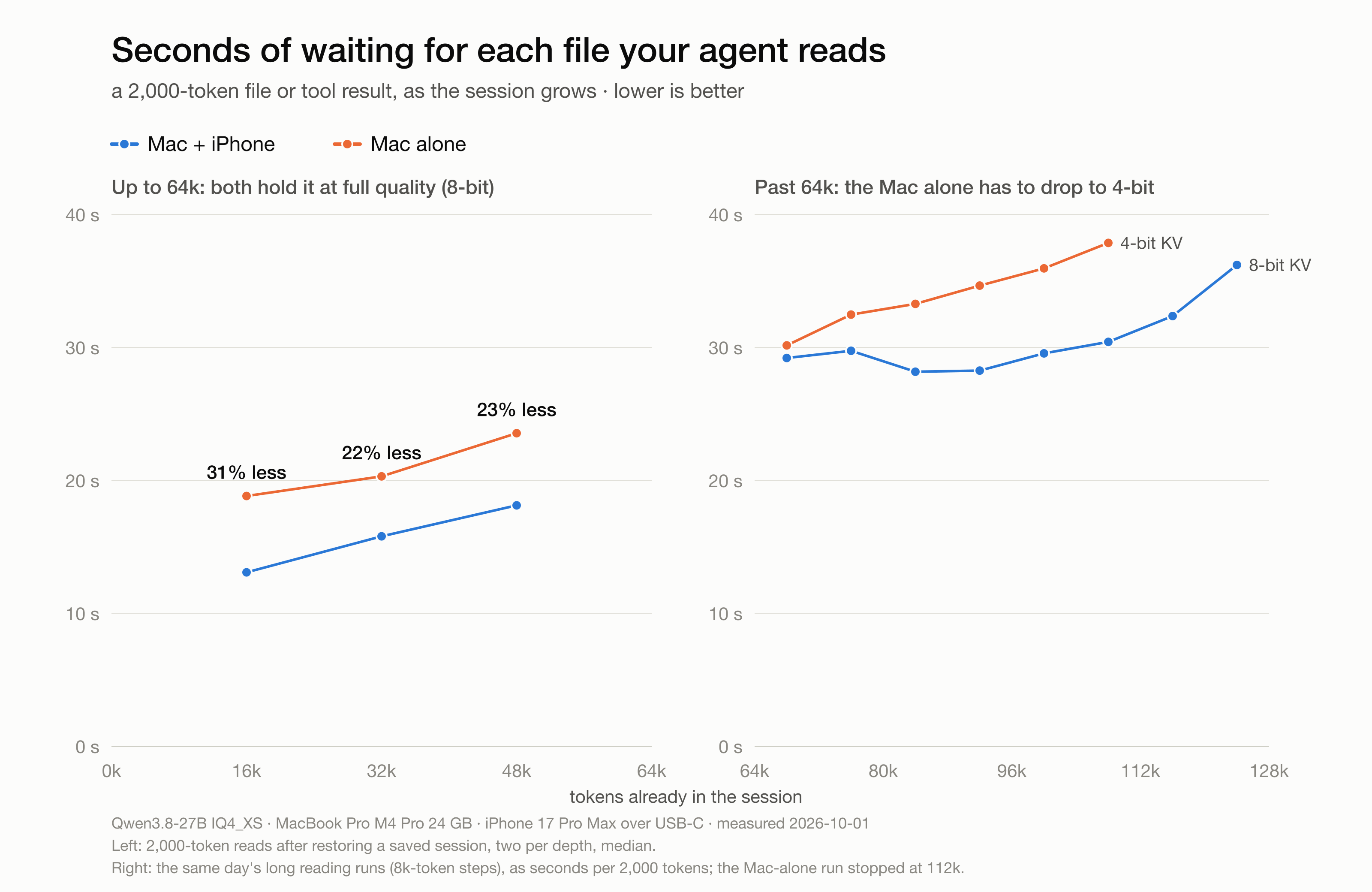
Measured on 2026-10-01: Qwen3.8-27B IQ4_XS, MacBook Pro M4 Pro 24 GB, iPhone 17 Pro Max over USB-C. Raw rows are in
bench/results/*.jsonl; the scripts that produced them are in bench/.
Reading (prefill): Mac alone vs Mac + iPhone, same build
A 2,000-token file or tool result read into a saved agent session (bench/turn-bench.py, two reads per depth):
| Context already in the session |
Mac alone |
Mac + iPhone |
|
| 16k |
109 tok/s (18.8 s) |
157 tok/s (13.1 s) |
+44%, 31% less waiting |
| 32k |
101 tok/s (20.3 s) |
130 tok/s (15.8 s) |
+29%, 22% less waiting |
| 48k |
87 tok/s (23.5 s) |
113 tok/s (18.1 s) |
+30%, 23% less waiting |
A new omp session (omp's system prompt, project notes and 12 tools, 26,849 tokens, read cold; bench/session-bench.py):
|
stock llama.cpp |
this fork, Mac alone |
this fork + iPhone |
| first answer |
245 s |
228 s |
168 s |
| later turns (1.3-1.9k-token tool results) |
17.9 s |
19.2 s |
14.5 s |
After the first time, the SSD prompt cache (scripts/proxy.py) restores that 27k-token start in 0.3-5 s.
Past 64k the Mac-alone config switches to 4-bit context: 128k at 8-bit measured ~0.3 GB over the GPU's 20 GB memory limit
with the draft model loaded (2026-09-23); 8-bit between 64k and 128k was not tested. With the iPhone it stays 8-bit. There the
phone changes jobs: instead of running layers 41-64 it computes attention over the old keys it holds, while the Mac runs all
64 layers (see "Who does what"). Prefill past 64k is a little faster with the phone and at higher precision: 67-73 tok/s with
the iPhone at 8-bit vs 59-68 tok/s Mac alone at 4-bit (64k-96k). At 128k with the iPhone: 3 of 3 planted facts recalled
(positions 1.5k, 40k, 100k), phone thermal state nominal.
Writing (decode)
The phone does not change writing speed below 64k; the fork's kernels and draft model do. Past 64k the phone's GPU and
Neural Engine compute attention over the old keys for every generated token:
|
context |
tok/s |
| stock llama.cpp (Homebrew), Mac |
27-33k |
11.3 |
| this fork, Mac alone |
27-33k |
25.0 |
| this fork + iPhone |
27-33k |
25.1 |
| this fork + iPhone, a real omp session (36 requests) |
under 16k / 16-32k / 32-49k |
29.8 / 27.5 / 24.3 (medians) |
| this fork + iPhone |
128k |
12.6 (greedy, 256 tokens) |
Medium thinking, omp's request fields, the server's default sampling. Mac-alone writing speed at 128k (4-bit) was not
measured on the same day, so there is no head-to-head number for it here.
Context you can hold
|
8-bit context |
| Mac alone (24 GB) |
64k measured (128k only fits with 4-bit) |
| Mac + iPhone 17 Pro Max |
196k-229k by the phone's free memory (sized at startup); tested to 128k (140k at 4-bit) |
How it works
Who does what
With the defaults and one iPhone 17 Pro Max:
|
Mac GPU |
Mac CPU (SME2) |
iPhone GPU (matrix units) |
iPhone Neural Engine |
| Prefill, context up to 64k |
layers 1-40 |
~30% of each big matmul |
layers 41-64 (split prefill) |
- |
| Prefill past 64k |
all 64 layers |
~30% of each big matmul |
attention over the old keys it holds |
- (builds its pages in the background) |
| Writing, up to 64k |
everything, plus the draft model |
oldest keys of each attention layer past 40k |
- |
- |
| Writing past 64k |
everything else |
same |
attention over the old keys |
part of that attention |
The Mac's own Neural Engine is not used: it shares the Mac's memory bandwidth and slowed decode by 26% when running
(docs/ANE.md).
The pieces
- Split prefill (
llama.cpp/src/llama-split.cpp; the phone's tail server is in ios/Backburner). The Mac runs layers
1-40 of each 256-token ubatch and streams the residual to the phone, which runs layers 41-64 on its GPU while the Mac starts
the next ubatch. The phone keeps a mirror of its layers' KV rows and recurrent state; only new rows cross the cable. The last
ubatch of each batch runs on the Mac so outputs stay local. On the A19 Pro the phone's layers use the GPU's matrix units
(Metal 4 tensor ops): 2.4x faster than the same phone with them off.
- Phone-held context (
phone-attn/, protocol in phone-attn/phone-attn.h). Past the Mac's 64k cells, the oldest KV pages
(4,096 keys each) move to the phone. Each attention step sends Q to the phone and merges its partial result (O, max, sum)
with the Mac's. The phone computes it with a matrix-unit kernel on its GPU (phone-attn/pa-metal.mm). While the phone
holds keys, 512-token ubatches run as two staggered halves so Mac and phone overlap (140k: 58 -> 68 tok/s prefill). Two
phones can share the old pages (docs/TWO-PHONES.md).
- The iPhone's Neural Engine for old keys (
phone-attn/pa-ane.mm). Old keys never change, so each 16,384-key page of a
layer is compiled into a Neural Engine model with the keys and values as its weights. While writing, the Neural Engine
takes part of each old-key attention call and the GPU the rest: at 140k, 279 -> 176 ms per generated token. scripts/serve.sh
puts the page template on the phone the first time it sees it (scripts/phone-ane.sh) and prints "ANE pages on".
- SME2 on the Mac CPU. The M4's SME units take ~30% of the rows of each big prefill matmul while the GPU does the rest
(Mac-only pp2048: 121.6 -> 157.1 tok/s; 51k: 79.5 -> 92.1). Past 40k keys they also take the oldest keys of each attention
layer while decoding (SME co-attention). Prior art: FusionML (arXiv 2607.22785) also splits matmuls across Apple compute
units.
- DFlash2 speculative decoding with recurrent-state replay for the hybrid (GDN + attention) model, lossless speculative
sampling for sampled requests, and block verification (Sun et al., ICLR 2025).
- SSD prompt cache (
scripts/proxy.py): a known system prompt is restored from disk instead of re-read.
- Memory. The model is loaded wired (
--load-mode none) so macOS can't page it out; the token-embedding table is read
from the mapped file, the scheduler's worst-case buffer is mapped on demand, and freed heap goes back to macOS. Server
footprint after a read: 19.7 -> 18.7 GB (2026-10-01).
- Neural Engine results, including the two uses we measured and set aside (the Mac's ANE, and the iPhone's ANE for
prefill), are in
docs/ANE.md.
Limits
- Small reads stay on the Mac. The phone joins a read of more than ~512 tokens (three 256-token ubatches; the last one
always runs on the Mac). Most agent steps are smaller: in a real omp session 7 of 36 requests were big enough, and they
carried ~83% of the tokens read.
- Past 64k the phone does one job, not two. Its half of the model (layers 41-64) can't see the old keys it holds yet, so
past the Mac's 64k cells the Mac runs all 64 layers and the phone only computes the old-key attention. Doing both is the
next step. It helps most at 64k-100k; deeper, the phone's GPU is already busy about two thirds of each step with old keys
(140k), so a second phone is the bigger win there.
- Writing speed is the Mac's below 64k. The phone only joins decoding past 64k (attention over the old keys).
- During a read, a phone failure turns the phone off for 60 s; the batch reruns on the Mac and the server log says so.
- Past 64k, keep Backburner open and in front on the phone. The phone then holds the oldest part of the conversation, and
the Mac no longer has it. If the phone stops answering for 15 s (the app sent to the background, the screen locked, the cable
pulled), the server stops with a message saying so; reopen the app and restart the server. The server log warns after 5 s.
iOS doesn't let an iPhone app use its GPU in the background, so to keep the screen from being locked by accident, use
Guided Access (docs/INSTALL-IPHONE.md).
- Saving a session while the phone holds keys (past 64k) needs app 0.0.4 or later (the rows come back from the phone).
Tested with the Mac's loopback phone, not yet on a real phone.
- One request at a time (
-np 1).
Security
Over the USB cable, the phone app answers the Mac and nothing else. Over Wi-Fi it answers only a Mac you paired over the
cable, through an encrypted, authenticated tunnel (docs/WIFI.md). Nothing is advertised on the network.
Before 0.0.3 the app accepted connections over Wi-Fi too: update the app, or keep the phone's Wi-Fi off while Backburner is
open. Report problems privately (Security → Report a vulnerability): SECURITY.md.
Setup
You need an Apple Silicon Mac (tested: M4 Pro, 24 GB), an iPhone 15 Pro or newer (tested: 17 Pro Max, 16 Pro Max) or an
M-series iPad (untested), and a 10 Gb/s USB-C cable (the cable in the iPhone box is USB 2 and too slow). The app installs
with a free Apple ID through AltStore, no developer account needed
(docs/INSTALL-IPHONE.md), or builds with Xcode.
One command downloads the Mac engine and the models (~24 GB) and makes the phone's half. Safe to re-run:
curl -fsSL https://raw.githubusercontent.com/StayLameBro/backburner/main/install.sh | bash
backburner phone   # once per phone: plug it in, open Backburner, copies the phone's half over the cable
backburner         # OpenAI-compatible server at http://127.0.0.1:8080/v1
Or step by step:
git clone --recursive https://github.com/StayLameBro/backburner && cd backburner

# 1. the Mac engine
cmake -S llama.cpp -B llama.cpp/build-metal -DCMAKE_BUILD_TYPE=Release
cmake --build llama.cpp/build-metal --target llama-server llama-quantize -j

# 2. the models: a Qwen3.8-27B IQ4_XS GGUF at ~/Models/Qwen3.8-27B-IQ4_XS.gguf, then the draft model
huggingface-cli download z-lab/Qwen3.8-27B-DFlash2 --local-dir ~/Models/qwen38-27b-dflash2
scripts/make-drafter.sh ~/Models/qwen38-27b-dflash2 ~/Models/dflash2-v2-q4km-self16.gguf

# 3. the iPhone app: Backburner.ipa from the latest release via AltStore (docs/INSTALL-IPHONE.md), or build it with Xcode:
#      DEVELOPMENT_TEAM=<your team id> UDID=<your iPhone's UDID> scripts/build-iphone.sh
pip3 install coremltools      # serve.sh builds the phone's Neural Engine page model with it, once

# 4. the phone's half of the model (layers 41-64, ~5.1 GB; the Mac computes the logits, so no head), copied over the cable
python3 scripts/split-gguf.py ~/Models/Qwen3.8-27B-IQ4_XS.gguf ~/Models/tail-iq4xs-L40-nohead.gguf -L 40 --no-head
scripts/phone-tail.sh L40

# 5. after every reboot: let the GPU keep the model wired (macOS resets this limit)
sudo sysctl iogpu.wired_limit_mb=20480

# 6. run: OpenAI-compatible on :8080, uses the iPhone when it's plugged in with Backburner open
scripts/serve.sh
PHONE=0 scripts/serve.sh      # the Mac alone
The first serve.sh with the phone pushes the Neural Engine page model to it and relaunches the app (about a minute). After
that the startup line should read split prefill on, remote KV on and ANE pages on.
scripts/serve.sh documents each setting next to the measurement that chose it.
Reproducing the numbers
bench/turn-bench.py --build            # once: a saved session at 16k / 32k / 48k (Mac alone)
bench/turn-bench.py --config mac       # read 2,000-token files into each saved session
bench/turn-bench.py --config phone
bench/session-bench.py --config stock|fork-mac|fork-phone   # an omp-shaped session, ~5 min each
bench/long-bench.py                    # past 64k (long: cold reads to 128k)
Post your results
Tried it? Post your results: your Mac, your
phone(s) and the turn-bench.py output. Other Macs, other phones, iPads and two-device setups are the numbers this README
doesn't have yet.
Contributing
Pull requests are welcome: new devices, fixes, kernels, docs. CONTRIBUTING.md has what every
change needs: same answers, measured speed, and the Mac alone still working.
Status
Pre-release. Next: the phone's layers seeing the keys it holds (split prefill past 64k), a second phone in the prefill chain,
an App Store build, and upstreaming what makes sense to llama.cpp.
Built with a lot of help from Claude Opus 5.5.
MIT license (llama.cpp keeps its own MIT license). Created by StayLameBro. Forks are
welcome; if you start a separate project from it, please give it a different name and link back here.

 Backburner lets a nearby iPhone act as a coprocessor for your Mac so a locally-run 27B LLM (Qwen3.8-27B) reads prompts faster and holds far more context. The phone connects over a 10 Gb/s USB-C cable and offloads part of the model's layers plus storage/attention for old context.