
S-Space
Exploring Spatial Workspace in Multimodal Models
To understand space is to construct it within,
to reason is to manipulate what we construct.




Overview
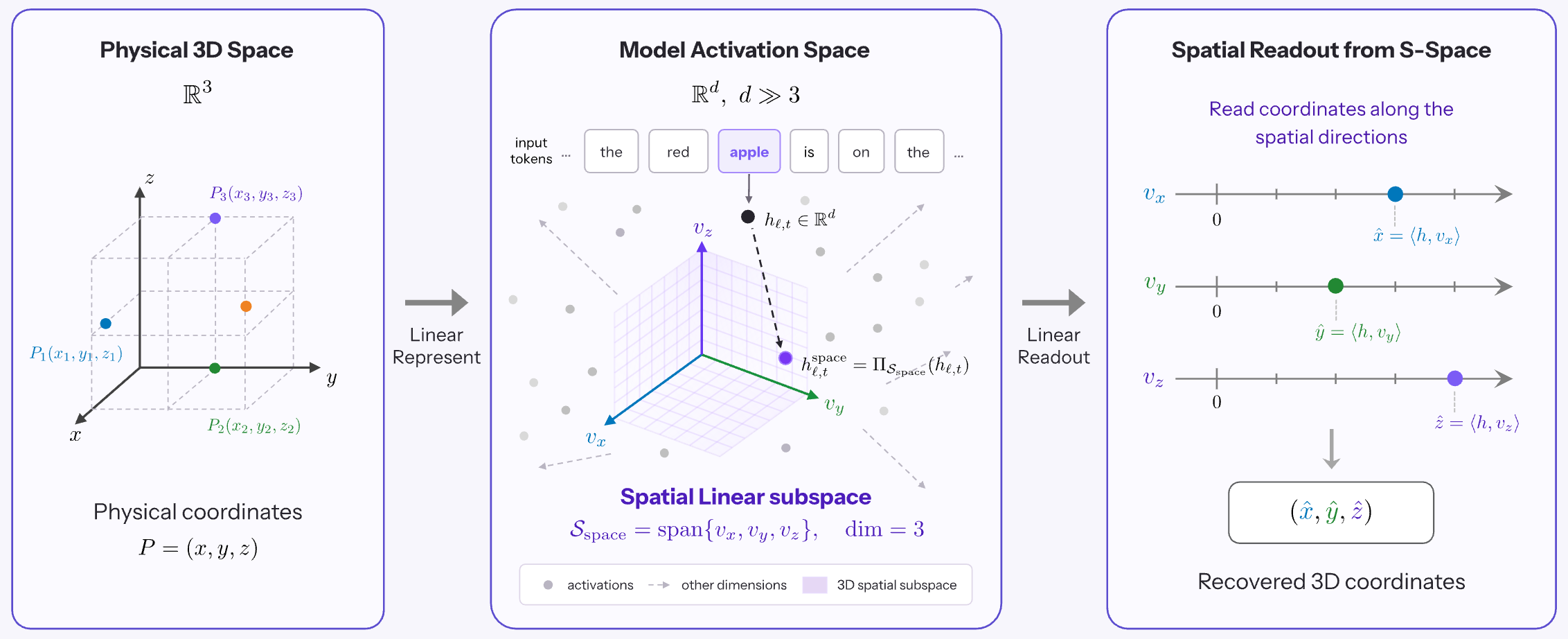
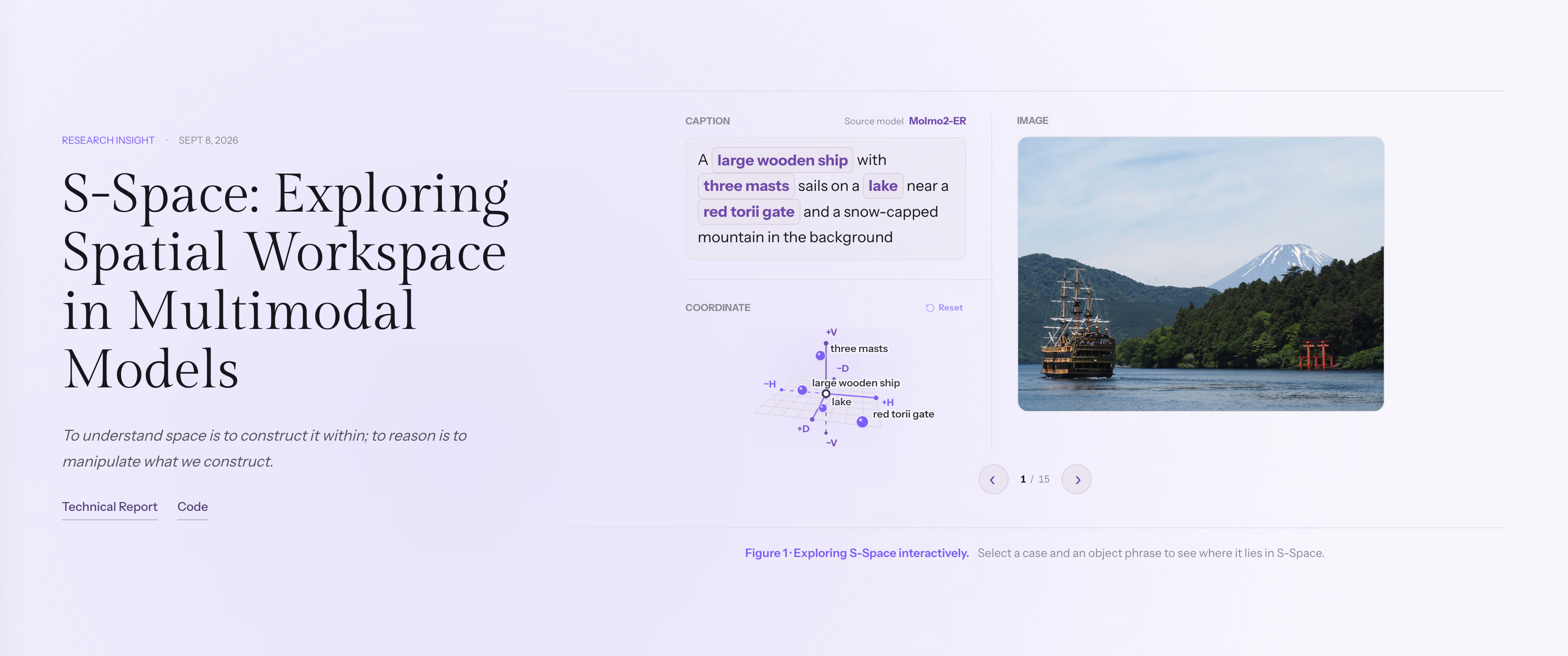
S-Space is an internal spatial workspace in multimodal models. We identify a three-dimensional linear subspace in intermediate activations that encodes continuous object positions along horizontal, vertical, and distance axes. This representation persists across prompts and multi-view contexts, integrates visual and linguistic information beyond visible objects, and can be causally manipulated to change spatial judgments.
Although models possess rich spatial representations, they do not always use them reliably: explicit computation over S-Space can outperform native reasoning. By examining how this workspace is shaped by supervision, transformed through reasoning, and refined by additional context, we provide a mechanistic perspective on spatial intelligence and a path toward more reliable spatial reasoning and action.
Code lives in sspace/; experiment settings live in configs/.
News
Get Started
The release includes pretrained S-Space axes and experiment commands for
Molmo2-ER, MolmoAct2-Pretrain, MolmoAct2, Qwen3.5-4B and Qwen3.6-27B.
Installation
Use a CUDA host with uv installed; the installation command creates the three
model environments and downloads the main models and InstructPart auxiliary models.
git clone https://github.com/Manchery/s-space.git
cd s-space

./scripts/install.sh
Run the remaining commands from this directory. Launchers select the right
environment automatically; no manual activation is needed. Environments are
stored under .envs/ and model weights under .cache/assets/models/.
Prepare Datasets
Download and prepare COCO, SpatialTunnel, EmbSpatial, CV-Bench, SpinBench and
HStar:
./scripts/prepare_data.sh
Downloads are stored under .cache/assets/ and benchmark-ready data under
data/processed/. Preparation reuses existing valid files.
The MMSI and InstructPart experiment commands below prepare their own data.
Experiment results are written under outputs/.
Experiments
After setup, choose an experiment below and copy its command. The repository
already includes the required configurations; you do not need to write your own.
Evaluations reuse the released axes in sspace/core/artifacts/pretrained/;
rebuilding axes is optional.
Construct S-Space
Learn S-Space axes on COCO-6000 and select readout layers on COCO-1800.
./scripts/run_experiment.sh --experiment sspace-construction
Object Coordinates
Plot the relationship between S-Space coordinates and physical positions using saved COCO projections.
./scripts/plot_object_coordinates.sh
Spatial QA
Compare native answers with S-Space readout on CV-Bench, EmbSpatial and SpatialTunnel.
./scripts/run_experiment.sh --suite benchmarks-generalization \
  --output-root outputs/reproduction/benchmarks
Prompt Generalization
Test whether S-Space readout generalizes across pairwise, single-object and non-spatial prompts.
./scripts/run_experiment.sh --suite prompt-generalization \
  --output-root outputs/reproduction/prompts
Multi-View Reasoning
Test whether S-Space follows the viewpoint specified by the prompt on HStar.
./scripts/run_experiment.sh --suite hstar \
  --output-root outputs/reproduction/multiview
Spatial Interventions
Test whether editing S-Space changes spatial answers while preserving non-spatial judgments on EmbSpatial.
./scripts/run_experiment.sh --experiment spatial-causality
Direction Coupling
Generate Qwen3.6-27B reasoning on MMSI and plot where its direction words lie in S-Space.
./scripts/run_experiment.sh --experiment direction-coupling
Action Supervision
Compare part–whole spatial judgments across Molmo2-ER, MolmoAct2-Pretrain and MolmoAct2 on InstructPart.
./scripts/run_experiment.sh --experiment action_supervision
Perspective Taking
Compare direct and chain-of-thought answers with S-Space readout and rotation on SpinBench, with and without the premise.
./scripts/run_experiment.sh --suite spinbench-direct \
  --output-root outputs/reproduction/spinbench-native

./scripts/run_experiment.sh --suite spinbench-projection \
  --output-root outputs/reproduction/spinbench-sspace
CoT Evolution
Track how Qwen3.6-27B's spatial representations change across a supplied, gold-conditioned reasoning template on SpinBench.
./scripts/run_experiment.sh --experiment cot-evolution
Context Scaling
Measure how adding the premise changes layerwise S-Space readout accuracy on SpinBench.
./scripts/run_experiment.sh --experiment context-scaling
License
This project is licensed under the Apache License 2.0.
Acknowledgements
Citation
If you find S-Space useful, please cite:
@misc{mirros2026sspace,
    title  = {S-Space: Exploring Spatial Workspace in Multimodal Models},
    author = {{MirroS Team}},
    year   = {2026},
    month  = {September},
    url    = {https://mirros.ai/blog/s-space},
    note   = {Blog post}
}

 S-Space 是一个研究项目,它在多模态模型的激活值内部找到了一个三维线性子空间,编码物体沿水平、垂直和距离轴的位置,并证明这个子空间可以被读取出来,甚至可以通过因果干预来改变模型的空间判断。