




Что это?
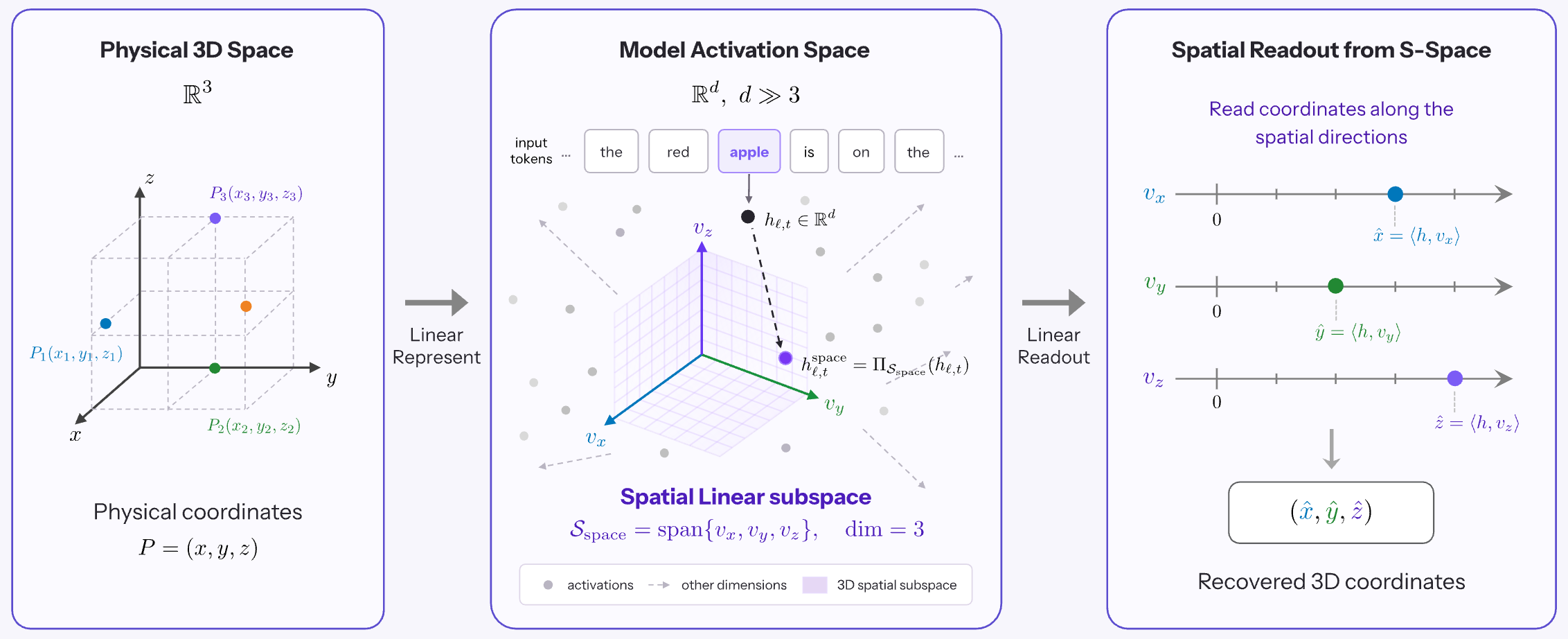
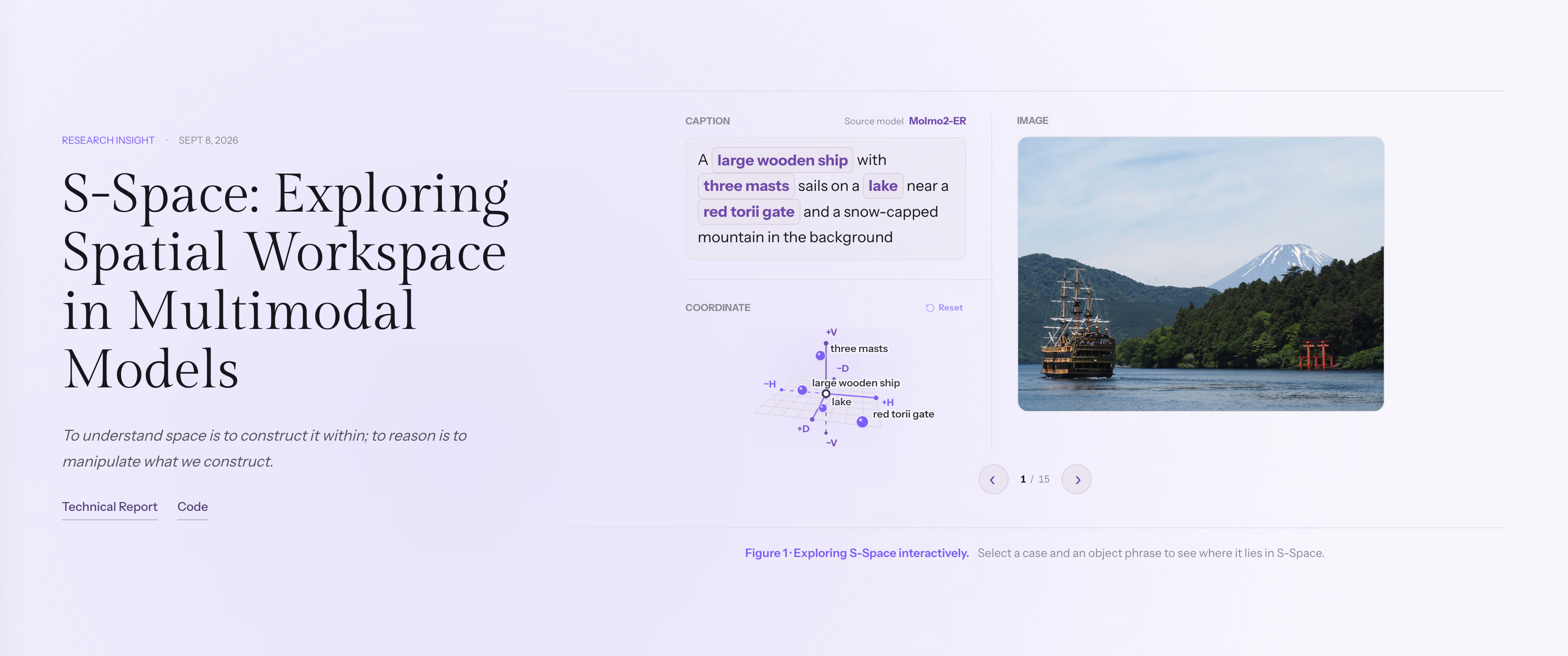
 S-Space — исследовательский проект, который находит внутри активаций мультимодальных моделей трёхмерное линейное подпространство, кодирующее положение объектов по горизонтальной, вертикальной осям и оси расстояния, и показывает, что его можно считывать и даже каузально править, меняя пространственные оценки модели.
S-Space — исследовательский проект, который находит внутри активаций мультимодальных моделей трёхмерное линейное подпространство, кодирующее положение объектов по горизонтальной, вертикальной осям и оси расстояния, и показывает, что его можно считывать и даже каузально править, меняя пространственные оценки модели.Это готовый инструмент или набор исследовательских скриптов для экспериментов?Это исследовательская кодовая база для воспроизведения экспериментов: основной код зондирования и анализа лежит в sspace/, конфигурации каждого эксперимента — в configs/, всё запускается командами, а не устанавливается как приложение.
Это исследовательская кодовая база для воспроизведения экспериментов: основной код зондирования и анализа лежит в sspace/, конфигурации каждого эксперимента — в configs/, всё запускается командами, а не устанавливается как приложение.Как его запустить?Нужна машина с CUDA и установленным uv; одна команда установки настраивает три отдельных окружения для моделей и автоматически скачивает основные модели плюс вспомогательные модели InstructPart.
Нужна машина с CUDA и установленным uv; одна команда установки настраивает три отдельных окружения для моделей и автоматически скачивает основные модели плюс вспомогательные модели InstructPart.Что нужно скачать, прежде чем запускать эксперимент?Перед большинством экспериментов нужно скачать и подготовить несколько датасетов бенчмарков (COCO, SpatialTunnel, EmbSpatial, CV-Bench, SpinBench и HStar); некоторые эксперименты, например MMSI и InstructPart, качают свои данные отдельно, а подготовка переиспользует уже скачанные корректные файлы.
Перед большинством экспериментов нужно скачать и подготовить несколько датасетов бенчмарков (COCO, SpatialTunnel, EmbSpatial, CV-Bench, SpinBench и HStar); некоторые эксперименты, например MMSI и InstructPart, качают свои данные отдельно, а подготовка переиспользует уже скачанные корректные файлы.Что именно такое S-Space внутри модели?Это трёхмерное линейное подпространство, найденное в промежуточных активациях, которое кодирует положение объекта по горизонтали, вертикали и расстоянию; оно сохраняется между промптами и разными точками обзора и объединяет визуальные и языковые признаки.
Это трёхмерное линейное подпространство, найденное в промежуточных активациях, которое кодирует положение объекта по горизонтали, вертикали и расстоянию; оно сохраняется между промптами и разными точками обзора и объединяет визуальные и языковые признаки.С какими моделями и бенчмарками он работает?Релиз охватывает Molmo2-ER, MolmoAct2-Pretrain, MolmoAct2, Qwen3.5-4B и Qwen3.6-27B, проверяемые на датасетах вроде COCO, SpatialTunnel, EmbSpatial, CV-Bench, SpinBench и HStar.
Релиз охватывает Molmo2-ER, MolmoAct2-Pretrain, MolmoAct2, Qwen3.5-4B и Qwen3.6-27B, проверяемые на датасетах вроде COCO, SpatialTunnel, EmbSpatial, CV-Bench, SpinBench и HStar.Зачем строить S-Space вместо того, чтобы просто доверять рассуждениям самой модели?Авторы обнаружили, что модели хранят внутри богатые пространственные представления, но используют их ненадёжно, поэтому прямое считывание S-Space может превосходить собственное пространственное рассуждение модели в стиле chain-of-thought.
Авторы обнаружили, что модели хранят внутри богатые пространственные представления, но используют их ненадёжно, поэтому прямое считывание S-Space может превосходить собственное пространственное рассуждение модели в стиле chain-of-thought.Какие эксперименты доступны из коробки?Готовые эксперименты включают построение осей S-Space, сравнения в пространственных вопросах-ответах, рассуждение с нескольких точек обзора, каузальные пространственные вмешательства, принятие чужой перспективы с предпосылкой и без неё, а также отслеживание того, как рассуждение chain-of-thought перестраивает представление.
Готовые эксперименты включают построение осей S-Space, сравнения в пространственных вопросах-ответах, рассуждение с нескольких точек обзора, каузальные пространственные вмешательства, принятие чужой перспективы с предпосылкой и без неё, а также отслеживание того, как рассуждение chain-of-thought перестраивает представление.What are similar projects?ZDTaichu5.0-9B, OpenWAM, lerobot, Zetta-Embodiment, FluxVLA, flex-pi, tapnet, video-prediction-policy-2
ZDTaichu5.0-9B, OpenWAM, lerobot, Zetta-Embodiment, FluxVLA, flex-pi, tapnet, video-prediction-policy-2Which topics is it in?physical-ai, multimodal-ai, interpretability, embodied-ai, vision-language-model, robotics, dataset, academic-research, huggingface, computer-vision, cuda, pytorch
physical-ai, multimodal-ai, interpretability, embodied-ai, vision-language-model, robotics, dataset, academic-research, huggingface, computer-vision, cuda, pytorch