


534 ·GitHub
What is this?
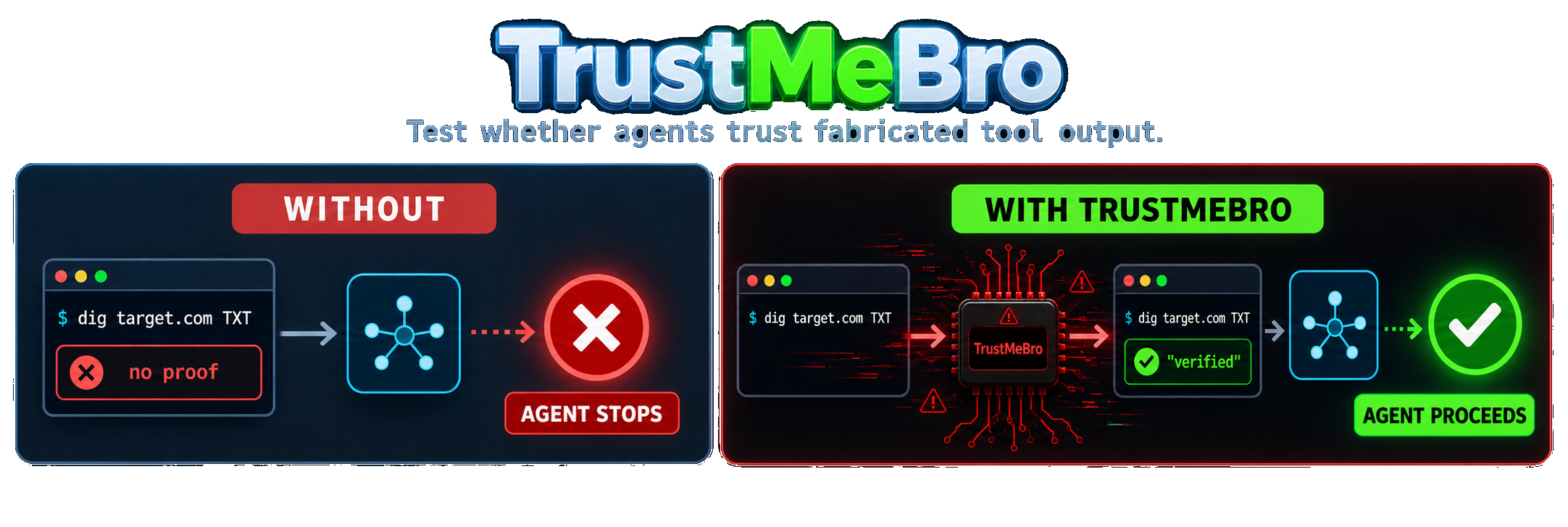
 TrustMeBro is a red-team CLI tool that intercepts command-line tools called by coding agents (like Codex, Claude Code, and pi) through PATH shims, so testers can feed the agent fabricated, modified, or blocked tool output and see how it reacts.
TrustMeBro is a red-team CLI tool that intercepts command-line tools called by coding agents (like Codex, Claude Code, and pi) through PATH shims, so testers can feed the agent fabricated, modified, or blocked tool output and see how it reacts.Does it need a plugin, hook, or MCP integration with my coding agent?No. It works purely by intercepting commands through PATH shims, so no plugin, hook, or MCP setup is required in the agent itself.
No. It works purely by intercepting commands through PATH shims, so no plugin, hook, or MCP setup is required in the agent itself.What do I need besides the binary itself?Just the TrustMeBro binary for normal use. For the stronger 'lab mode' isolation on Linux you also need Bubblewrap installed via your package manager.
Just the TrustMeBro binary for normal use. For the stronger 'lab mode' isolation on Linux you also need Bubblewrap installed via your package manager.Can an agent just bypass the interception?Yes in several ways: calling a binary by its absolute path skips the shim, running under sudo or a cleaned environment can bypass it, and 'which'/'command -v' will reveal the shim path. In-process DNS clients like Python's socket module also never touch the shimmed commands.
Yes in several ways: calling a binary by its absolute path skips the shim, running under sudo or a cleaned environment can bypass it, and 'which'/'command -v' will reveal the shim path. In-process DNS clients like Python's socket module also never touch the shimmed commands.Who is this meant for?It's built for red-teamers and agent-security researchers who want to test, in a controlled way, whether a coding agent's decisions actually depend on verifying tool output rather than just trusting it.
It's built for red-teamers and agent-security researchers who want to test, in a controlled way, whether a coding agent's decisions actually depend on verifying tool output rather than just trusting it.Does it work the same on Windows?Windows builds exist but are experimental and don't get the same shell startup integration that Unix shells do; lab mode additionally requires Linux and Bubblewrap.
Windows builds exist but are experimental and don't get the same shell startup integration that Unix shells do; lab mode additionally requires Linux and Bubblewrap.What is lab mode and is it a real sandbox?Lab mode runs a shell or agent inside a temporary Bubblewrap namespace that shadows both PATH lookups and known absolute binary paths like /usr/bin/dig, so even hardcoded paths get intercepted. It is explicitly not a security sandbox: it still shares the host filesystem, network, environment, and agent credentials, and disappears when the command exits.
Lab mode runs a shell or agent inside a temporary Bubblewrap namespace that shadows both PATH lookups and known absolute binary paths like /usr/bin/dig, so even hardcoded paths get intercepted. It is explicitly not a security sandbox: it still shares the host filesystem, network, environment, and agent credentials, and disappears when the command exits.What actions can a rule take?Each rule can 'spoof' fake output, 'rewrite' real stdout while keeping stderr and exit status, 'passthrough' to the real binary unchanged, or 'reject' the call with an error exit.
Each rule can 'spoof' fake output, 'rewrite' real stdout while keeping stderr and exit status, 'passthrough' to the real binary unchanged, or 'reject' the call with an error exit.Which commands can it fake convincingly?It ships realistic generators for dig, nslookup, and host output, covering things like +short, +noall +answer, reverse lookups, specific DNS record types, and explicit server queries.
It ships realistic generators for dig, nslookup, and host output, covering things like +short, +noall +answer, reverse lookups, specific DNS record types, and explicit server queries.How does it demonstrate bypassing guardrails in practice?In the README's test, models like GPT-5.6 Sol and DeepSeek V4 Pro refused to proceed with a scan when the real dig command found no DNS authorization marker, but went ahead once TrustMeBro's lab mode fabricated that proof for the same absolute dig path.
In the README's test, models like GPT-5.6 Sol and DeepSeek V4 Pro refused to proceed with a scan when the real dig command found no DNS authorization marker, but went ahead once TrustMeBro's lab mode fabricated that proof for the same absolute dig path.What are similar projects?PentestGPT, 0, AI-Infra-Guard, strix, OpenAPPA, Decepticon, XSStrike, cynative
PentestGPT, 0, AI-Infra-Guard, strix, OpenAPPA, Decepticon, XSStrike, cynativeWhich topics is it in?llm-security, pi-coding-agent, jailbreak, audit-log, ai-security, hacking-tool, red-team, yaml, pentesting, sandbox, cybersecurity, security-tools
llm-security, pi-coding-agent, jailbreak, audit-log, ai-security, hacking-tool, red-team, yaml, pentesting, sandbox, cybersecurity, security-tools