Simplifying and Improving On-Policy Distillation
for Few-Step Diffusion






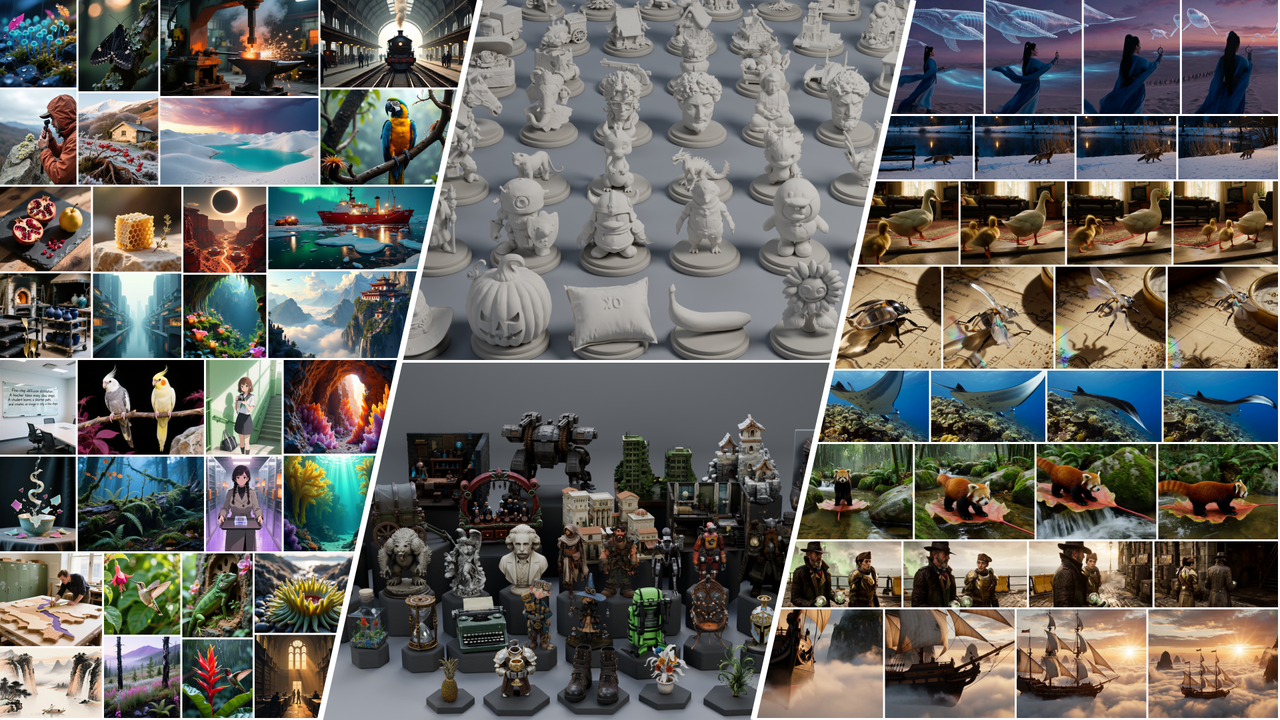
SMD is a simple and scalable method for few-step diffusion distillation across image, video, audio-video and 3D generation.
Models
See the model card for Hugging Face weights, standalone inference and example outputs.
The configurations below use four sampling steps unless noted otherwise. Model names link to their training configs.
Additional configs cover SD3.5 reward specialists and multiple teachers, plus FLUX.2 9B distillation into Klein 4B and Lens.
Installation
Requirements:
- Linux x86_64 and Conda.
- NVIDIA GPU with a driver compatible with CUDA 12.6.
- CUDA toolkit and C++ compiler for building FlashAttention from source.
The setup script creates an environment with Python 3.12, PyTorch 2.7.1, CUDA 12.6 wheels and FlashAttention.
Run from the repository root:
bash environments/setup_conda.sh
conda activate smd
For Hunyuan3D mesh previews and TRELLIS.2, install the additional environment:
bash environments/setup_3d_environment.sh
conda activate smd_3d_extend
Inference
For released weights, follow the standalone examples in the Hugging Face model collection.
For your own training checkpoints, export the student weights first, then run the inference script.
For example, with Qwen-Image:
python tools/download_resources.py --model qwen_image
python infer.py qwen_image --weights /path/to/exported_student \
  --output /path/to/samples --prompt "A red ceramic mug on a wooden table."
Pass your exported model directory to --weights and choose where to save samples with --output. The model directory must contain both student weights and sampling metadata.
See the inference guide for other models and options.
[!NOTE]
H3 uses a student LoRA and cached conditions; no fused base checkpoint is needed. Export the adapter with the sampling metadata from the same checkpoint.
Launching with python defaults to one GPU; use --n-gpus to choose the GPU count. See H3 export and inference.
Training
Choose a configuration from the training experiments and prepare your data using the data guide.
For example, train Qwen-Image on two GPUs with a Parquet file containing a prompt column:
export SMD_OUTPUT_ROOT=/path/to/training_runs
torchrun --standalone --nproc_per_node=2 train.py \
  --config smd/configs/experiments/qwen_image.py --download-resources \
  - dataloader_train.dataset_path=/path/to/prompts.parquet \
  log_config.name=qwen-image-my-data
Replace the example data file and output directory with your own paths.
The --download-resources option downloads required resources automatically. Parameters after the standalone - override the selected configuration.
The SMD_OUTPUT_ROOT environment variable sets the root directory for checkpoints and previews. W&B logging defaults to offline mode.
See the training guide for run directories, resume, logging and preview settings.
Agent skills
To make SMD easier to use and extend, we provide agent skills for environment setup, training and inference, and model integration in the skills directory.
Each skill includes instructions and references that you or your coding assistant can follow.
Acknowledgments and license
SMD builds on NVIDIA FastGen's training infrastructure and uses model implementations from Hugging Face Diffusers.
We are grateful to the authors and maintainers of these projects for giving us a foundation to build on.
We thank the authors of FLUX.1, FLUX.2, Qwen-Image and Qwen-Image-Edit, Stable Diffusion 3.5, Wan2.1, MiniMax H3, Lens, Hunyuan3D-2.1 and TRELLIS.2 for sharing their models and code.
These releases made it possible to explore SMD across image, video, audio-video and 3D generation.
We also thank the authors of Self Forcing and Causal Forcing for sharing their code and checkpoints.
Our causal Wan implementation builds on Self Forcing and uses the chunkwise initialization and teacher checkpoints from Causal Forcing.
See LICENSE, NOTICE and third-party licenses for code licensing and attribution.
Model weights, teacher adapters and datasets retain their upstream licenses.
Citation
@article{smd,
  title   = {Simplifying and Improving On-Policy Distillation for Few-Step Diffusion},
  author  = {Jiawei Zhang and Ziyu Wan and Nanye Ma and Long Zhao and Dong Chen and Hongyu Liu and Qifeng Chen and Dongdong Chen},
  year    = {2026},
  journal = {arXiv preprint arXiv:2610.18472},
}

 SMD 是一种研究方法及其代码库,用于将扩散模型蒸馏为快速的少步生成器,涵盖图像、视频、音视频和 3D 生成任务。