



About
Wifiphisher is a rogue Access Point framework for conducting red team engagements or Wi-Fi security testing. Using Wifiphisher, penetration testers can easily achieve a man-in-the-middle position against wireless clients by performing targeted Wi-Fi association attacks. Wifiphisher can be further used to mount victim-customized web phishing attacks against the connected clients in order to capture credentials (e.g. from third party login pages or WPA/WPA2 Pre-Shared Keys) or infect the victim stations with malwares.
Wifiphisher is...
...powerful. Wifiphisher can run for hours inside a Raspberry Pi device
executing all modern Wi-Fi association techniques (including "Evil Twin", "KARMA" and "Known Beacons").
...flexible. Supports dozens of arguments and comes with a set of
community-driven phishing templates for different deployment scenarios.
...modular. Users can write simple or complicated modules in Python to expand the functionality of the tool or create custom phishing scenarios in order to conduct specific target-oriented attacks.
...easy to use. Advanced users can utilize the rich set of features that Wifiphisher offers but beginners may start out as simply as "./bin/wifiphisher". The interactive Textual User Interface guides the tester through the build process of the attack.
...the result of an extensive research. Attacks like "Known Beacons" and "Lure10" as well as state-of-the-art phishing techniques, were disclosed by our developers, and Wifiphisher was the first tool to incorporate them.
...supported by an awesome community of developers and users.
...free. Wifiphisher is available for free download, and also comes with full
source code that you may study, change, or distribute under the terms of the
GPLv3 license.
How it works
Wi-Fi phishing consists of two steps:
The first step involves the process of associating with Wi-Fi clients
unknowingly, or in other words, obtaining a man-in-the-middle (MITM) position. Wifiphisher uses a number of different techniques to achieve this including:
- Evil Twin, where Wifiphisher creates a fake wireless network that looks similar to a legitimate network.
- KARMA, where Wifiphisher masquerades as a public network searched for by nearby Wi-Fi clients.
- Known Beacons, where Wifiphisher broadcasts a dictionary of common ESSIDs, that the around wireless stations have likely connected to in the past.
At the same time, Wifiphisher keeps forging “Deauthenticate” or “Disassociate” packets to disrupt existing associations and eventually lure victims using the above techniques.
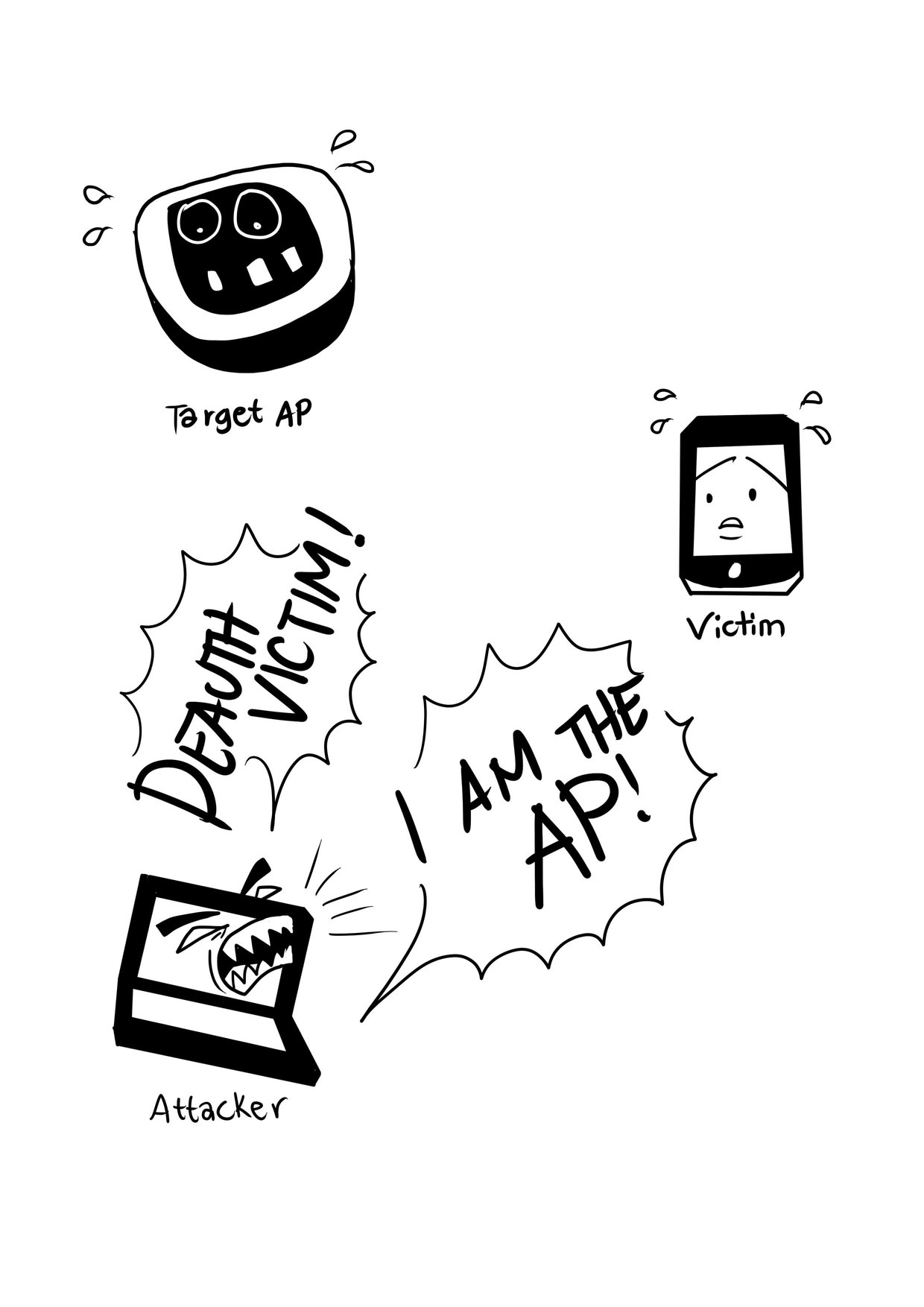
Performing MiTM attack
(Optionally) There are a number of different attacks that can be carried out
once Wifiphisher grants the penetration tester with a man-in-the-middle
position. For example, the tester may perform data sniffing or scan the victim stations for vulnerabilities.
Using Wifiphisher, advanced web phishing techniques are possible by gathering
information from the target environment and victim user. For example, in one of
our scenarios, Wifiphisher will extract information from the broadcasted beacon
frames and the HTTP User-Agent header to display a web-based imitation of
Windows network manager in order to capture the Pre-Shared Key.
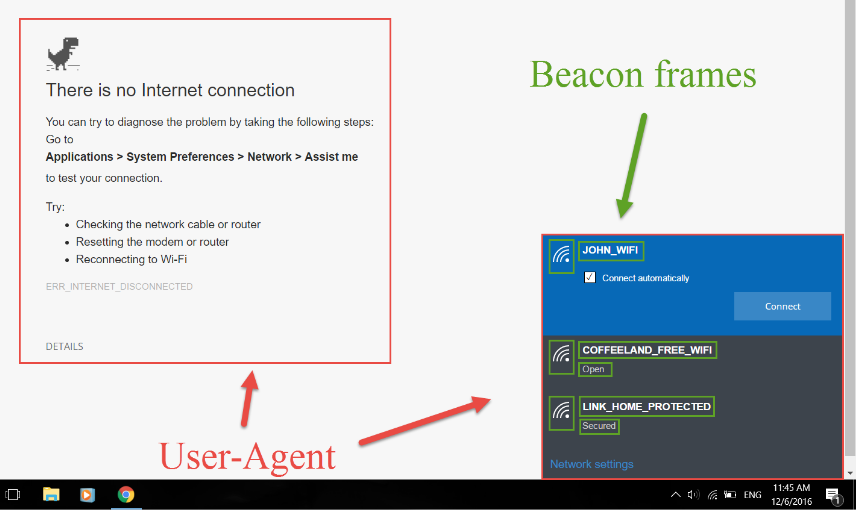
Fake web-based network manager
Requirements
Following are the requirements for getting the most out of Wifiphisher:
- A working Linux system. People have made Wifiphisher work on many distros, but Kali Linux is the officially supported distribution, thus all new features are primarily tested on this platform.
- One wireless network adapter that supports AP & Monitor mode and is capable of injection. Drivers should support netlink.
Installation
To install the latest development version type the following commands:
git clone https://github.com/wifiphisher/wifiphisher.git # Download the latest revision
cd wifiphisher # Switch to tool's directory
sudo python setup.py install # Install any dependencies
Alternatively, you can download the latest stable version from the Releases page.
Usage
Run the tool by typing wifiphisher or python bin/wifiphisher (from inside the tool's directory).
By running the tool without any options, it will find the right interfaces and interactively ask the user to pick the ESSID of the target network (out of a list with all the ESSIDs in the around area) as well as a phishing scenario to perform. By default, the tool will perform both Evil Twin and KARMA attacks.
wifiphisher -aI wlan0 -jI wlan4 -p firmware-upgrade --handshake-capture handshake.pcap
Use wlan0 for spawning the rogue Access Point and wlan4 for DoS attacks. Select the target network manually from the list and perform the "Firmware Upgrade" scenario. Verify that the captured Pre-Shared Key is correct by checking it against the handshake in the handshake.pcap file.
Useful for manually selecting the wireless adapters. The "Firmware Upgrade" scenario is an easy way for obtaining the PSK from a password-protected network.
wifiphisher --essid CONFERENCE_WIFI -p plugin_update -pK s3cr3tp4ssw0rd
Automatically pick the right interfaces. Target the Wi-Fi with ESSID "CONFERENCE_WIFI" and perform the "Plugin Update" scenario. The Evil Twin will be password-protected with PSK "s3cr3tp4ssw0rd".
Useful against networks with disclosed PSKs (e.g. in conferences). The "Plugin Update" scenario provides an easy way for getting the victims to download malicious executables (e.g. malwares containing a reverse shell payload).
wifiphisher --essid "FREE WI-FI" -p oauth-login -kB
Simply spawn an open Wi-Fi network with ESSID "FREE WI-FI" and perform the "OAuth Login" scenario. Furthermore, mount the "Known Beacons" Wi-Fi automatic association technique.
Useful against victims in public areas. The "OAuth Login" scenario provides a simple way for capturing credentials from social networks, like Facebook.
Following are all the options along with their descriptions (also available with wifiphisher -h):
| Short form |
Long form |
Explanation |
| -h |
--help |
show this help message and exit |
| -i INTERFACE |
--interface INTERFACE |
Manually choose an interface that supports both AP and monitor modes for spawning the rogue AP as well as mounting additional Wi-Fi attacks from Extensions (i.e. deauth). Example: -i wlan1 |
| -eI EXTENSIONSINTERFACE |
--extensionsinterface EXTENSIONSINTERFACE |
Manually choose an interface that supports monitor mode for running the extensions. Example: -eI wlan1 |
| -aI APINTERFACE |
--apinterface APINTERFACE |
Manually choose an interface that supports AP mode for spawning an AP. Example: -aI wlan0 |
| -pI INTERFACE |
--protectinterface INTERFACE |
Specify one or more interfaces that will have their connection protected from being managed by NetworkManager. |
| -kN |
--keepnetworkmanager |
Do not kill NetworkManager. |
| -nE |
--noextensions |
Do not load any extensions. |
| -e ESSID |
--essid ESSID |
Enter the ESSID of the rogue Access Point. This option will skip Access Point selection phase. Example: --essid 'Free WiFi' |
| -pPD PHISHING_PAGES_DIRECTORY |
--phishing-pages-directory PHISHING_PAGES_DIRECTORY |
Search for phishing pages in this location |
| -p PHISHINGSCENARIO |
--phishingscenario PHISHINGSCENARIO |
Choose the phishing scenario to run.This option will skip the scenario selection phase. Example: -p firmware_upgrade |
| -pK PRESHAREDKEY |
--presharedkey PRESHAREDKEY |
Add WPA/WPA2 protection on the rogue Access Point. Example: -pK s3cr3tp4ssw0rd |
| -qS |
--quitonsuccess |
Stop the script after successfully retrieving one pair of credentials. |
| -lC |
--lure10-capture |
Capture the BSSIDs of the APs that are discovered during AP selection phase. This option is part of Lure10 attack. |
| -lE LURE10_EXPLOIT |
--lure10-exploit LURE10_EXPLOIT |
Fool the Windows Location Service of nearby Windows users to believe it is within an area that was previously captured with --lure10-capture. Part of the Lure10 attack. |
| -iAM |
--mac-ap-interface |
Specify the MAC address of the AP interface. Example: -iAM 38:EC:11:00:00:00 |
| -iEM |
--mac-extensions-interface |
Specify the MAC address of the extensions interface. Example: -iEM E8:2A:EA:00:00:00 |
| -iNM |
--no-mac-randomization |
Do not change any MAC address. |
| -hC |
--handshake-capture |
Capture of the WPA/WPA2 handshakes for verifying passphrase. Requires cowpatty. Example: -hC capture.pcap |
| -dE ESSID |
--deauth-essid ESSID |
Deauth all the BSSIDs in the WLAN with that ESSID. |
| -dC CHANNELS |
--deauth-channels CHANNELS |
Channels to deauth. Example: --deauth-channels 1,3,7 |
|
--logging |
Enable logging. Output will be saved to wifiphisher.log file. |
| -lP LOGPATH |
--logpath LOGPATH |
Determine the full path of the logfile. |
| -cP CREDENTIAL_LOG_PATH |
--credential-log-path CREDENTIAL_LOG_PATH |
Determine the full path of the file that will store any captured credentials |
| -cM |
--channel-monitor |
Monitor if the target access point changes the channel. |
|
--payload-path |
Enable the payload path. Intended for use with scenarios that serve payloads. |
| -wP |
--wps-pbc |
Monitor if the button on a WPS-PBC Registrar side is pressed. |
| -wAI |
--wpspbc-assoc-interface |
The WLAN interface used for associating to the WPS AccessPoint. |
| -kB |
--known-beacons |
Perform the known beacons Wi-Fi automatic association technique. |
| -fH |
--force-hostapd |
Force the usage of hostapd installed in the system. |
|
--dnsmasq-conf DNSMASQ_CONF |
Determine the full path of dnmasq.conf file. |
| -dK |
--disable-karma |
Disables KARMA attack. |
| -pE |
--phishing-essid |
Determine the ESSID you want to use for the phishing page. |
Screenshots
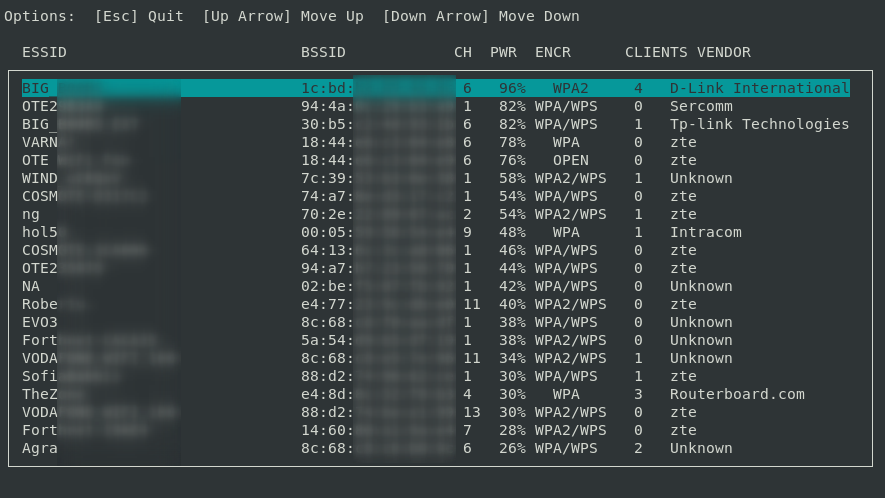
Targeting an access point

A successful attack
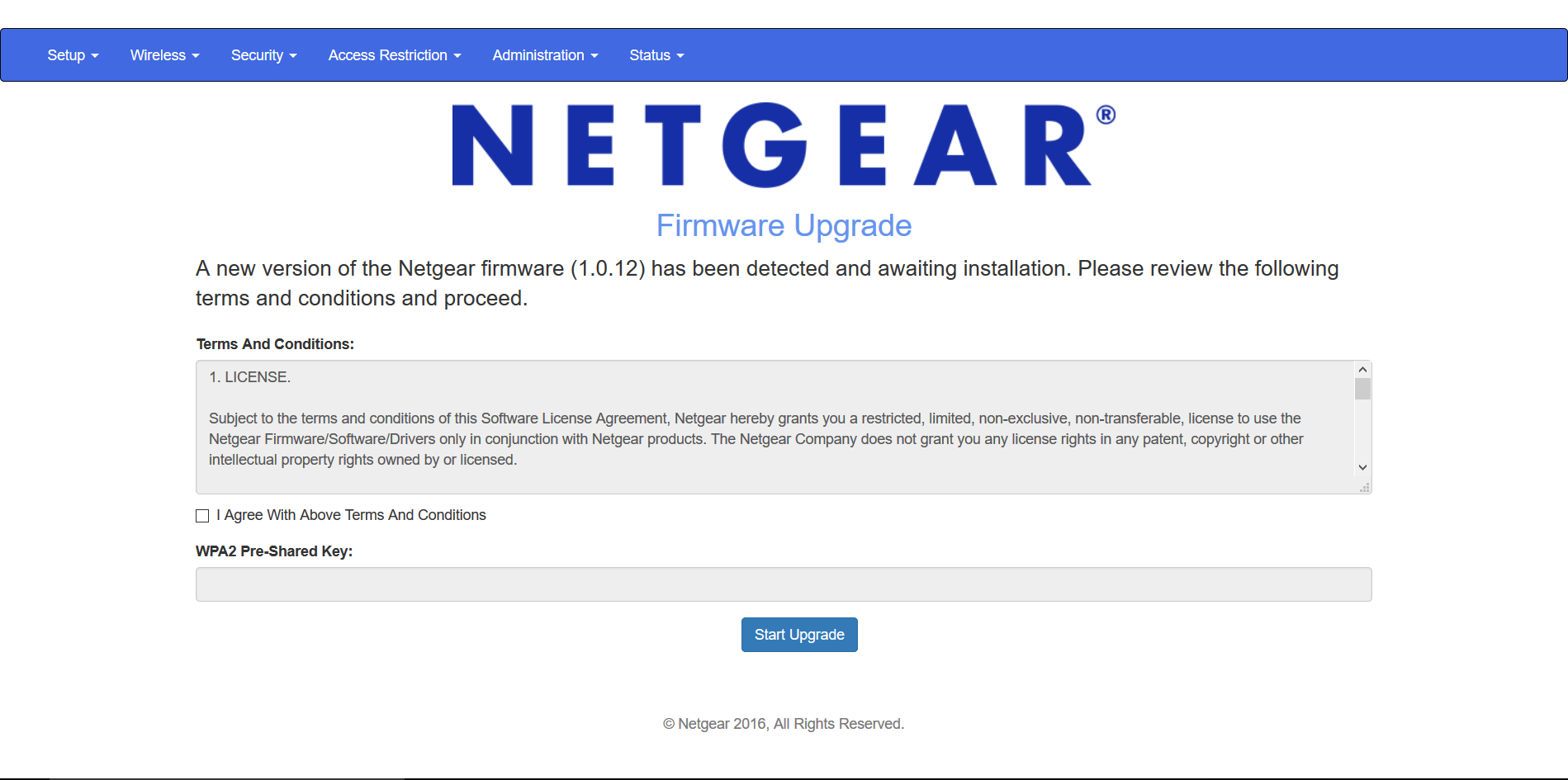
Fake router configuration page
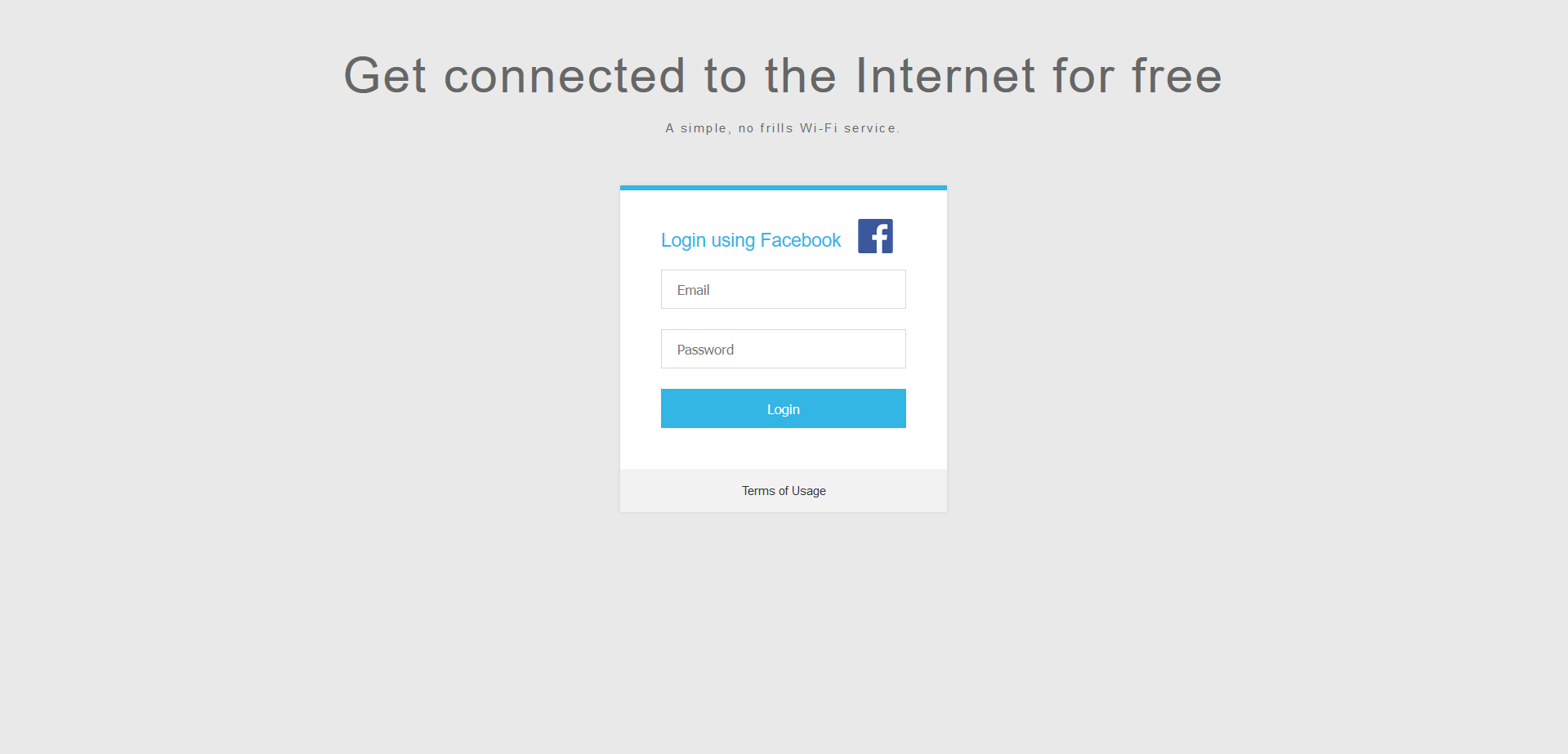
Fake OAuth Login Page
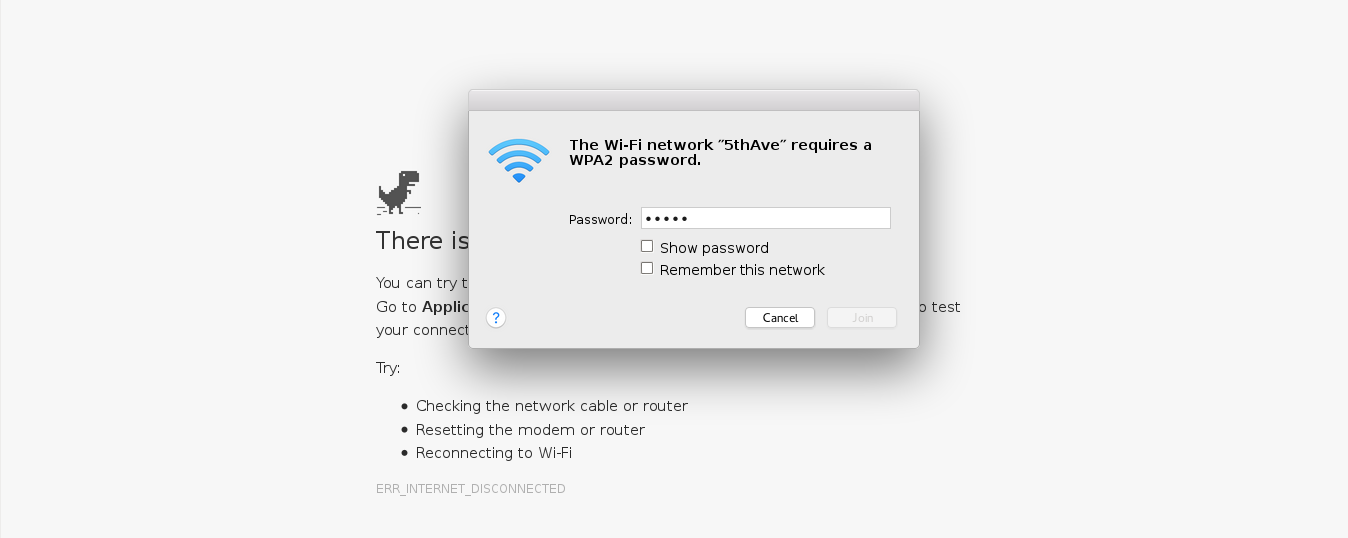
Fake web-based network manager
Help needed
If you are a Python developer or a web designer you can help us improve Wifiphisher. Feel free to take a look at the bug tracker for some tasks to do.
If you don't know how to code, you can help us by proposing improvements or reporting bugs. Please have a look at the Bug Reporting Guidelines and the FAQ document beforehand. Note that the tool does not aim to be script-kiddie friendly. Make sure you do understand how the tool works before opening an issue.
Credits
The script is based on an idea from Dan McInerney back in 2015.
A full list of contributors lies here.
License
Wifiphisher is licensed under the GPLv3 license. See LICENSE for more information.
Project Status
Wifiphisher's current version is 1.4. You can download the latest release from here. Otherwise you can get the latest development version by cloning this repository.
Disclaimer
- Usage of Wifiphisher for attacking infrastructures without prior mutual consistency can be considered as an illegal activity. It is the final user's responsibility to obey all applicable local, state and federal laws. Authors assume no liability and are not responsible for any misuse or damage caused by this program.
Note: Be aware of sites pretending to be related with the Wifiphisher Project. They may be delivering malware.
For Wifiphisher news, follow us on Twitter or like us on Facebook.

 Wifiphisher 是一个恶意接入点框架,用于对无线客户端发起 Wi-Fi 钓鱼和中间人攻击,常用于红队和渗透测试任务中。