




Что это такое?
 OpenLake — это движок хранения для инфраструктуры ИИ. Он обеспечивает непрерывную работу GPU во время обучения и инференса: высокая пропускная способность при мелких операциях ввода-вывода и скорость, близкая к кэшу, при полностью постоянном и надёжном хранении данных.
Это кэш или сервер хранения?Это сервер хранения. Он предоставляет хранилище объектов, совместимое с S3, и может служить пулом для KV cache у LLM, но в отличие от обычного кэша данные остаются постоянными и надёжно сохраняются.
Это сервер хранения. Он предоставляет хранилище объектов, совместимое с S3, и может служить пулом для KV cache у LLM, но в отличие от обычного кэша данные остаются постоянными и надёжно сохраняются.Как это запустить?Клонируйте репозиторий, соберите бинарный файл OpenLake из исходников и запустите хранилище с конфигурацией по умолчанию для одного узла. После этого с ним сможет работать любой клиент S3. Для vLLM установите коннектор, запустите хранилище, а затем запустите vLLM с включённым OpenLake.
Клонируйте репозиторий, соберите бинарный файл OpenLake из исходников и запустите хранилище с конфигурацией по умолчанию для одного узла. После этого с ним сможет работать любой клиент S3. Для vLLM установите коннектор, запустите хранилище, а затем запустите vLLM с включённым OpenLake.Что нужно установить перед сборкой?Установите зависимости для сборки, перечисленные в инструкции для вашей платформы: для Ubuntu или Debian, для macOS (для разработки) или для Windows через WSL2. Основной путь ввода-вывода опирается на Linux io_uring.
Установите зависимости для сборки, перечисленные в инструкции для вашей платформы: для Ubuntu или Debian, для macOS (для разработки) или для Windows через WSL2. Основной путь ввода-вывода опирается на Linux io_uring.Есть ли подводные камни при кластерной настройке?По умолчанию OpenLake выгружает данные на тот же хост, поэтому для совместного использования на всём парке GPU нужно запустить openlaked с параметром --config. В Kubernetes используйте инструкцию по развёртыванию Helm KV, чтобы разместить по одному экземпляру на каждом выбранном узле.
По умолчанию OpenLake выгружает данные на тот же хост, поэтому для совместного использования на всём парке GPU нужно запустить openlaked с параметром --config. В Kubernetes используйте инструкцию по развёртыванию Helm KV, чтобы разместить по одному экземпляру на каждом выбранном узле.На каких операционных системах это собирается?Для Ubuntu и Debian есть отдельная инструкция по сборке, macOS поддерживается для разработки, а Windows работает через WSL2. Сборка под Windows без WSL в README не упоминается.
Для Ubuntu и Debian есть отдельная инструкция по сборке, macOS поддерживается для разработки, а Windows работает через WSL2. Сборка под Windows без WSL в README не упоминается.Нужны ли GPU, чтобы этим пользоваться?Для S3-хранилища нет: оно работает на одном узле с конфигурацией по умолчанию. Выгрузка KV cache для vLLM и функции для кластеров GPU рассчитаны на хосты и парки GPU.
Для S3-хранилища нет: оно работает на одном узле с конфигурацией по умолчанию. Выгрузка KV cache для vLLM и функции для кластеров GPU рассчитаны на хосты и парки GPU.Почему это быстрее обычного хранилища S3?На Linux с io_uring для каждого ядра CPU запускается отдельная закреплённая асинхронная среда выполнения, и ядра не перераспределяют работу между собой. В README также приводятся более миллиона IOPS при задержке до 1 мс и передача данных в память GPU без копирования.
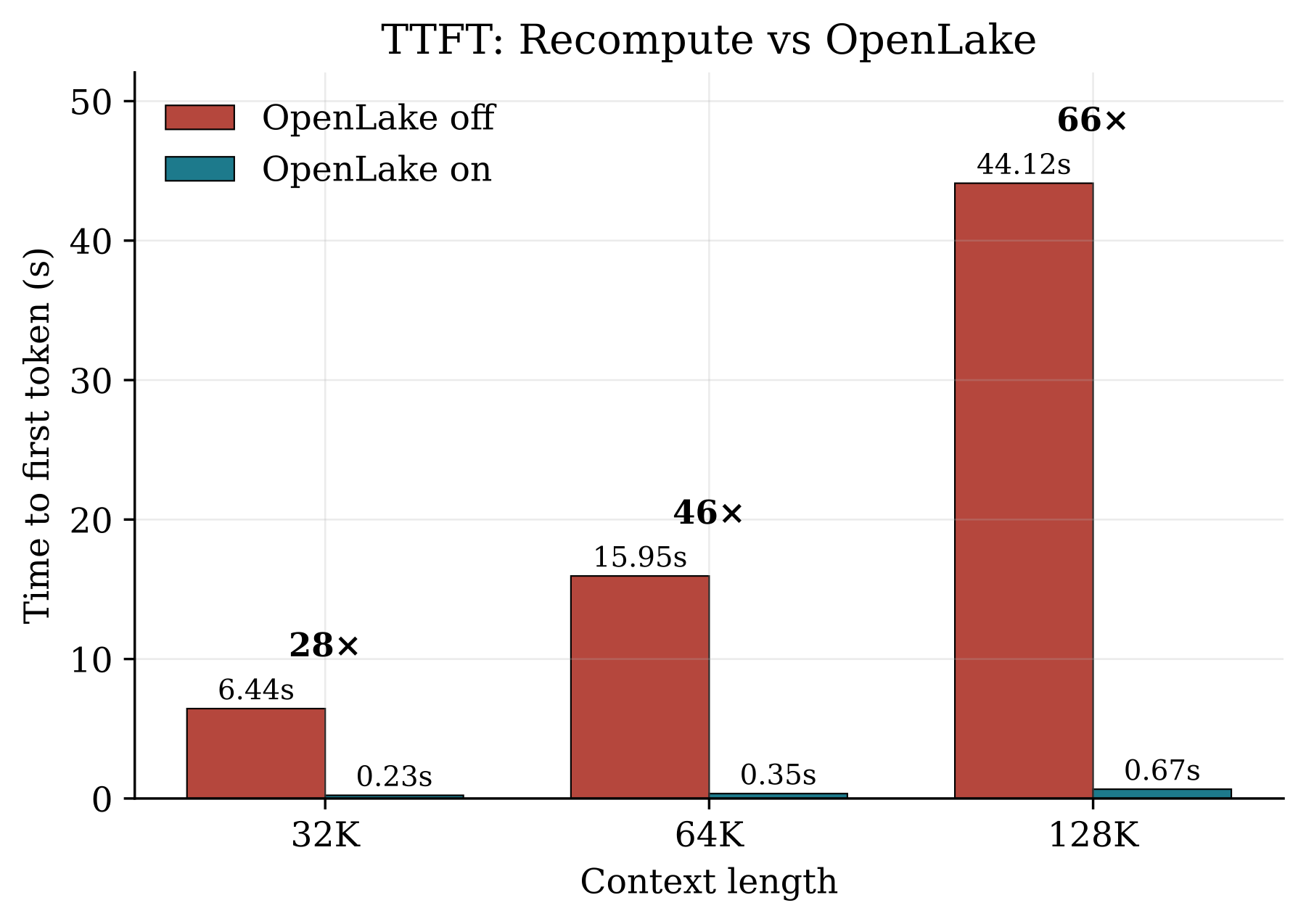
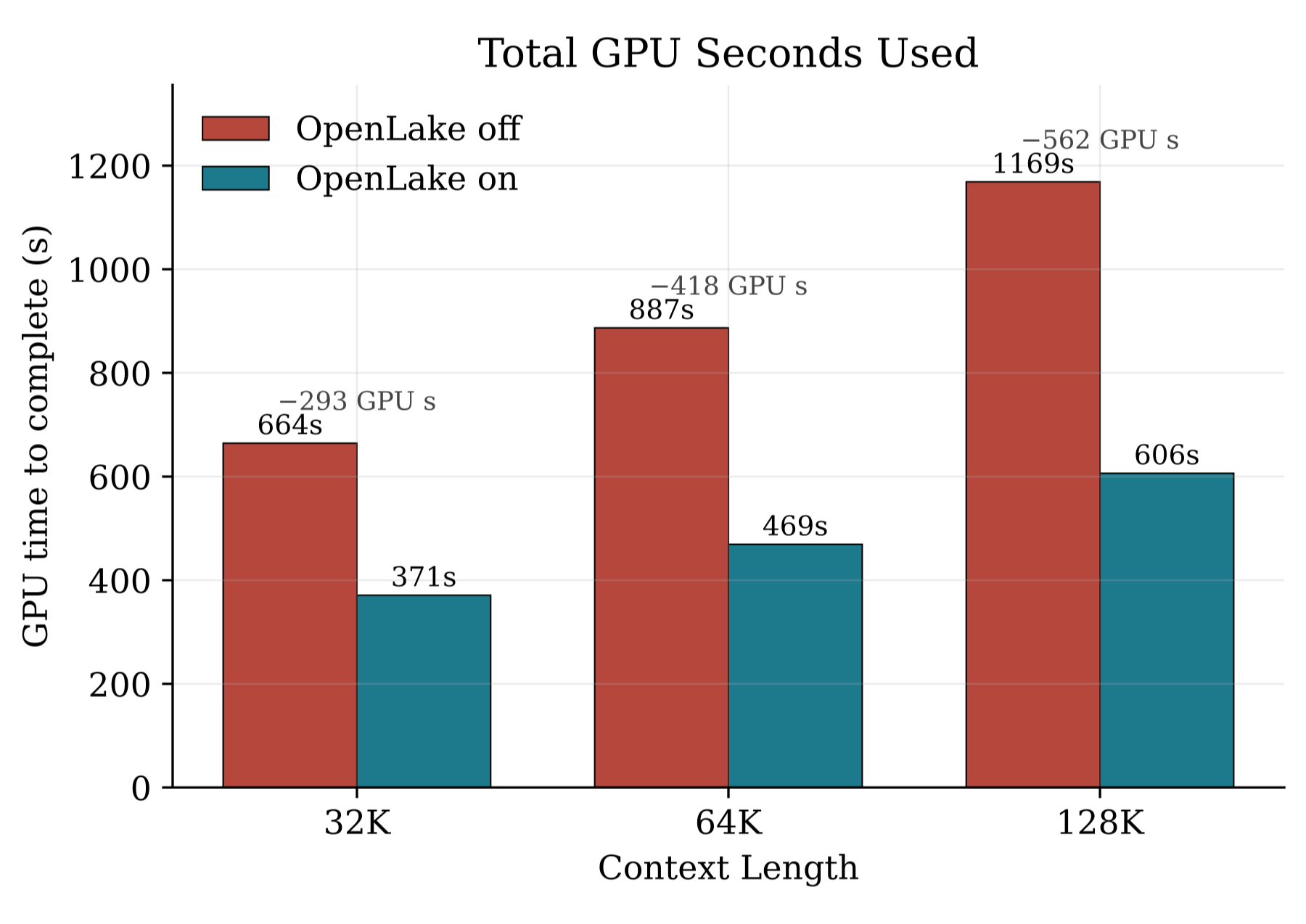
На Linux с io_uring для каждого ядра CPU запускается отдельная закреплённая асинхронная среда выполнения, и ядра не перераспределяют работу между собой. В README также приводятся более миллиона IOPS при задержке до 1 мс и передача данных в память GPU без копирования.Насколько выгрузка KV cache ускоряет инференс?В README указано ускорение в 66 раз по времени до первого токена, если префикс закэширован, при окне контекста 128K. Выигрыш достигается за счёт повторного использования KV cache вместо пересчёта этапа prefill для повторяющихся запросов.
В README указано ускорение в 66 раз по времени до первого токена, если префикс закэширован, при окне контекста 128K. Выигрыш достигается за счёт повторного использования KV cache вместо пересчёта этапа prefill для повторяющихся запросов.Сравнивали ли его с чем-то на тестах?В README сказано, что OpenLake занимает первое место в бенчмарке MLPerf Storage v3.0 2026 по сохранению контрольных точек объектов, опережая NVIDIA и Nebius. Относитесь к этим цифрам как к заявлениям автора.
В README сказано, что OpenLake занимает первое место в бенчмарке MLPerf Storage v3.0 2026 по сохранению контрольных точек объектов, опережая NVIDIA и Nebius. Относитесь к этим цифрам как к заявлениям автора.Какие есть похожие проекты?LMCache, tokenspeed, ai-infra-book, vllm, hyperflare-inference, GLM-5.3-Flash-NVFP4-DFlash2-2x-DGX-Spark, TensorFold, llm-action
LMCache, tokenspeed, ai-infra-book, vllm, hyperflare-inference, GLM-5.3-Flash-NVFP4-DFlash2-2x-DGX-Spark, TensorFold, llm-actionВ каких он темах?zero-copy, blackwell, ai-infrastructure, kv-cache, llm-training, object-storage, model-serving, storage, gpt, llm-inference, vllm, high-performance
zero-copy, blackwell, ai-infrastructure, kv-cache, llm-training, object-storage, model-serving, storage, gpt, llm-inference, vllm, high-performance- Автор
- openlake-project
- Размер
- 4.7 MB
- Звёзды
- 3.1K
- Обновлён
- КоммитNov 11Релизv0.11.0Nov 04
- Возраст
- 6 мес
- Коммиты · 90 дней