Device Activity Tracker
WhatsApp & Signal Activity Tracker via RTT Analysis




⚠️ DISCLAIMER: Proof-of-concept for educational and security research purposes only. Demonstrates privacy vulnerabilities in WhatsApp and Signal.
Overview
This project implements the research from the paper "Careless Whisper: Exploiting Silent Delivery Receipts to Monitor Users on Mobile Instant Messengers" by Gabriel K. Gegenhuber, Maximilian Günther, Markus Maier, Aljosha Judmayer, Florian Holzbauer, Philipp É. Frenzel, and Johanna Ullrich (University of Vienna & SBA Research).
What it does: By measuring Round-Trip Time (RTT) of WhatsApp message delivery receipts, this tool can detect:
- When a user is actively using their device (low RTT)
- When the device is in standby/idle mode (higher RTT)
- Potential location changes (mobile data vs. WiFi)
- Activity patterns over time
Security implications: This demonstrates a significant privacy vulnerability in messaging apps that can be exploited for surveillance.
Example
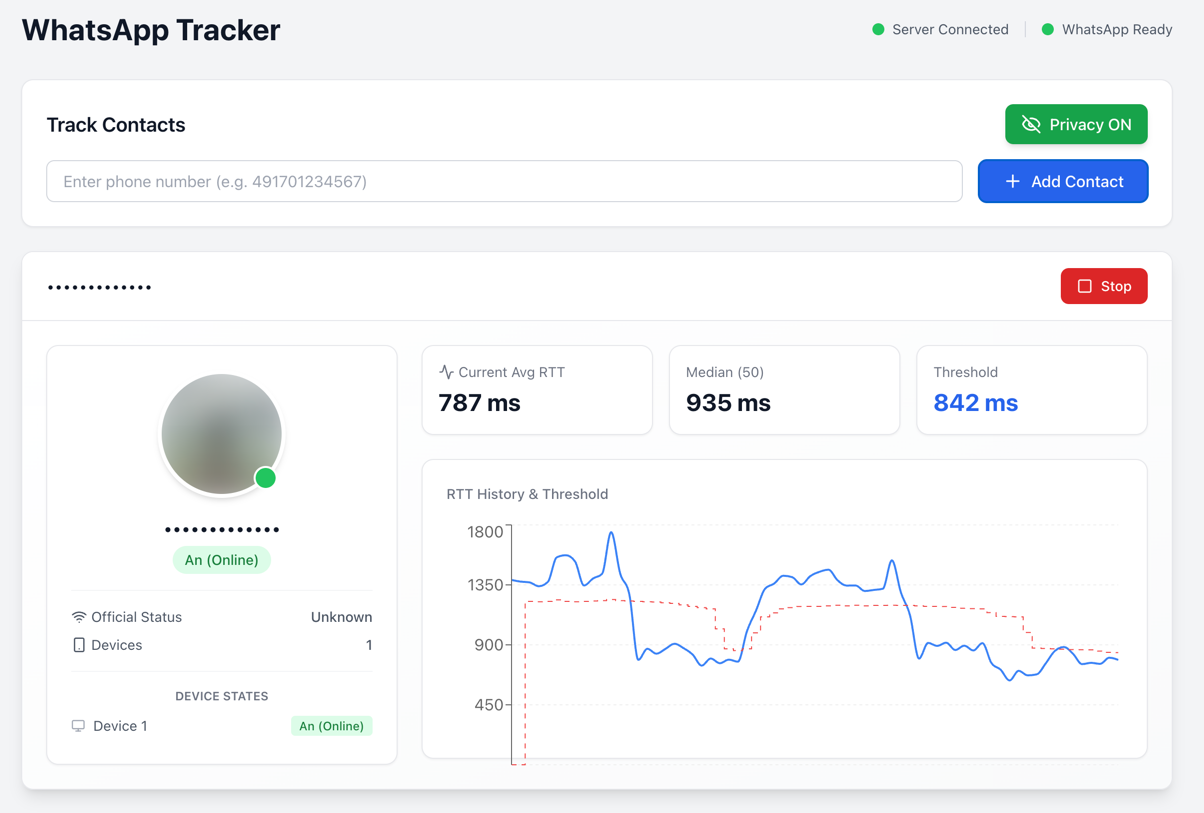
The web interface shows real-time RTT measurements, device state detection, and activity patterns.
Installation
# Clone repository
git clone https://github.com/gommzystudio/device-activity-tracker.git
cd device-activity-tracker

# Install dependencies
npm install
cd client && npm install && cd ..
Requirements: Node.js 20+, npm, WhatsApp account
Usage
Docker (Recommended)
The easiest way to run the application is using Docker:
# Copy environment template
cp .env.example .env

# (Optional) Customize ports in .env file
# BACKEND_PORT=3001
# CLIENT_PORT=3000

# Build and start containers
docker compose up --build
The application will be available at:
To stop the containers:
docker compose down
Manual Setup
Web Interface
# Terminal 1: Start backend
npm run start:server

# Terminal 2: Start frontend
npm run start:client
Open http://localhost:3000, scan QR code with WhatsApp, then enter phone number to track (e.g., 491701234567).
CLI Interface (only WhatsApp)
npm start
Follow prompts to authenticate and enter target number.
Example Output:
╔════════════════════════════════════════════════════════════════╗
║ 🟡 Device Status Update - 09:41:51                             ║
╠════════════════════════════════════════════════════════════════╣
║ JID:        ***********@lid                                    ║
║ Status:     Standby                                            ║
║ RTT:        1104ms                                             ║
║ Avg (3):    1161ms                                             ║
║ Median:     1195ms                                             ║
║ Threshold:  1075ms                                             ║
╚════════════════════════════════════════════════════════════════╝
- 🟢 Online: Device is actively being used (RTT below threshold)
- 🟡 Standby: Device is idle/locked (RTT above threshold)
- 🔴 Offline: Device is offline or unreachable (no CLIENT ACK received)
How It Works
The tracker sends probe messages and measures the Round-Trip Time (RTT) to detect device activity. Two probe methods are available:
Probe Methods
| Method |
Description |
| Delete (Default) |
Sends a "delete" request for a non-existent message ID. |
| Reaction |
Sends a reaction emoji to a non-existent message ID. |
Detection Logic
The time between sending the probe message and receiving the CLIENT ACK (Status 3) is measured as RTT. Device state is detected using a dynamic threshold calculated as 90% of the median RTT: values below the threshold indicate active usage, values above indicate standby mode. Measurements are stored in a history and the median is continuously updated to adapt to different network conditions.
Switching Probe Methods
In the web interface, you can switch between probe methods using the dropdown in the control panel. In CLI mode, the delete method is used by default.
Common Issues
- Not Connecting to WhatsApp: Delete the
auth_info_baileys/ folder and re-scan the QR code.
Project Structure
device-activity-tracker/
├── src/
│   ├── tracker.ts         # WhatsApp RTT analysis logic
│   ├── signal-tracker.ts  # Signal RTT analysis logic
│   ├── server.ts          # Backend API server (both platforms)
│   └── index.ts           # CLI interface
├── client/                # React web interface
└── package.json
How to Protect Yourself
The most effective mitigation is to enable “Block unknown account messages” in WhatsApp under
Settings → Privacy → Advanced.
This setting may reduce an attacker’s ability to spam probe reactions from unknown numbers, because WhatsApp blocks high-volume messages from unknown accounts.
However, WhatsApp does not disclose what “high volume” means, so this does not fully prevent an attacker from sending a significant number of probe reactions before rate-limiting kicks in.
Disabling read receipts helps with regular messages but does not protect against this specific attack. As of December 2025, this vulnerability remains exploitable in WhatsApp and Signal.
Ethical & Legal Considerations
⚠️ For research and educational purposes only. Never track people without explicit consent - this may violate privacy laws. Authentication data (auth_info_baileys/) is stored locally and must never be committed to version control.
Citation
Based on research by Gegenhuber et al., University of Vienna & SBA Research:
@inproceedings{gegenhuber2024careless,
  title={Careless Whisper: Exploiting Silent Delivery Receipts to Monitor Users on Mobile Instant Messengers},
  author={Gegenhuber, Gabriel K. and G{\"u}nther, Maximilian and Maier, Markus and Judmayer, Aljosha and Holzbauer, Florian and Frenzel, Philipp {\'E}. and Ullrich, Johanna},
  year={2024},
  organization={University of Vienna, SBA Research}
}
License
MIT License - See LICENSE file.
Built with @whiskeysockets/baileys
Use responsibly. This tool demonstrates real security vulnerabilities that affect millions of users.
Star History
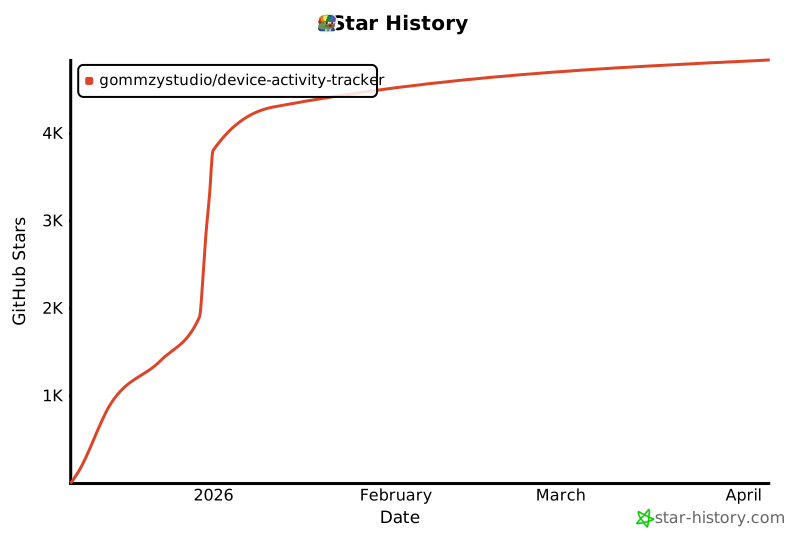

 这是一个概念验证性质的安全研究工具,通过测量消息送达回执的往返时间(RTT),监测 WhatsApp 和 Signal 用户,从而判断目标设备是正在使用、处于待机,还是离线。