



What is this?
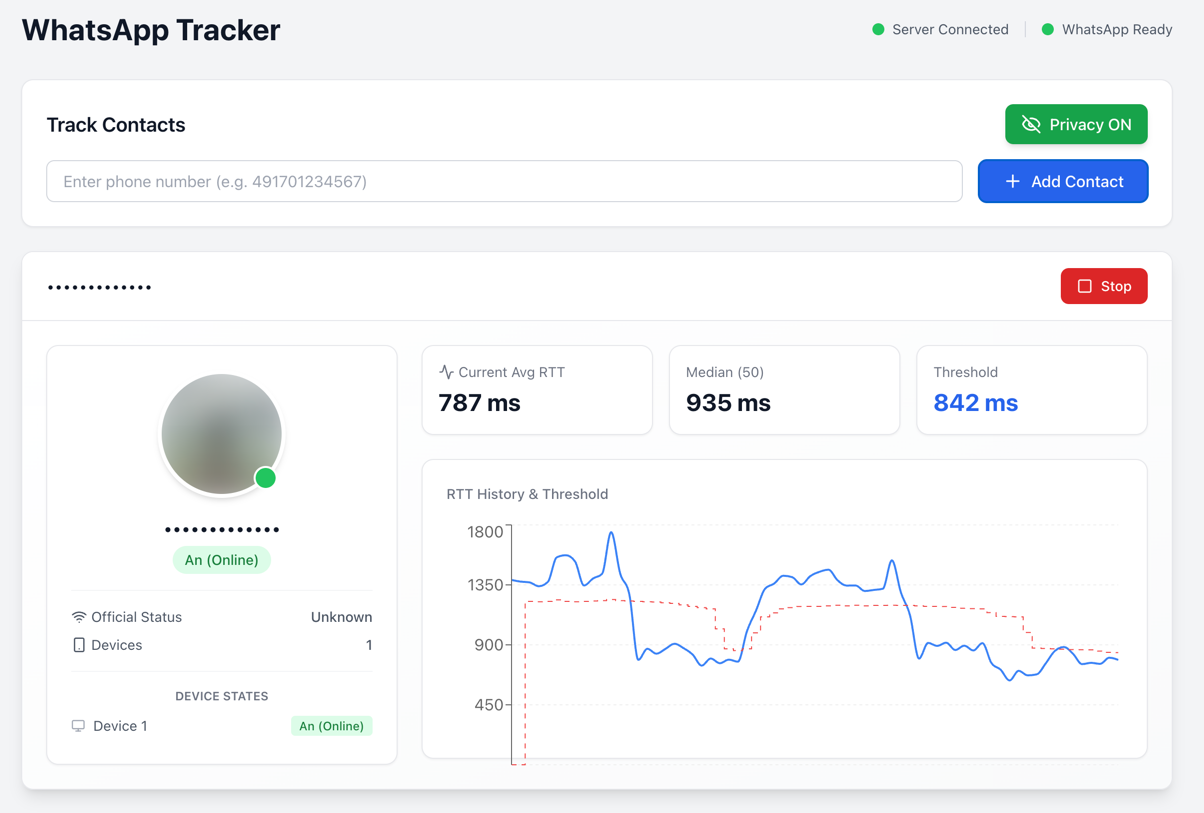
 This is a proof-of-concept security research tool that monitors WhatsApp and Signal users by measuring the Round-Trip Time (RTT) of message delivery receipts, revealing whether a target's device is actively in use, idle, or offline.
This is a proof-of-concept security research tool that monitors WhatsApp and Signal users by measuring the Round-Trip Time (RTT) of message delivery receipts, revealing whether a target's device is actively in use, idle, or offline.How do I get it running?The quickest way is Docker: run 'docker compose up' to launch both the frontend and backend. For a manual setup you need Node.js 20+ and npm, then open the web interface or CLI, scan a WhatsApp QR code, and enter the target phone number.
The quickest way is Docker: run 'docker compose up' to launch both the frontend and backend. For a manual setup you need Node.js 20+ and npm, then open the web interface or CLI, scan a WhatsApp QR code, and enter the target phone number.Do I need my own WhatsApp account to run this?Yes — you authenticate your own WhatsApp account by scanning a QR code via the @whiskeysockets/baileys library, then enter the target's phone number to start probing. Node.js 20+ and npm are also required.
Yes — you authenticate your own WhatsApp account by scanning a QR code via the @whiskeysockets/baileys library, then enter the target's phone number to start probing. Node.js 20+ and npm are also required.Does this work on Signal too, or is it WhatsApp-only?The research and disclaimer cover both WhatsApp and Signal, but the shipped CLI interface only supports WhatsApp; Signal probing is driven by a separate 'start:signal-api' script and isn't part of the main CLI flow.
The research and disclaimer cover both WhatsApp and Signal, but the shipped CLI interface only supports WhatsApp; Signal probing is driven by a separate 'start:signal-api' script and isn't part of the main CLI flow.Is it legal to track someone's WhatsApp activity with this?No — the authors explicitly warn this is for research and educational purposes only, that tracking people without explicit consent may violate privacy laws, and that authentication data must never be committed to version control.
No — the authors explicitly warn this is for research and educational purposes only, that tracking people without explicit consent may violate privacy laws, and that authentication data must never be committed to version control.How does it actually detect if someone is online or offline?It sends a probe message (by default a delete request for a non-existent message ID) and times how long it takes to get the CLIENT ACK. If the RTT is below a dynamic threshold (90% of the median RTT) the device shows 'Online', above it shows 'Standby', and no ACK at all means 'Offline'.
It sends a probe message (by default a delete request for a non-existent message ID) and times how long it takes to get the CLIENT ACK. If the RTT is below a dynamic threshold (90% of the median RTT) the device shows 'Online', above it shows 'Standby', and no ACK at all means 'Offline'.What's the difference between the Delete and Reaction probe methods?Both ping a non-existent message ID to trigger a delivery receipt without the target noticing: 'Delete' sends a delete request (the default), while 'Reaction' sends an emoji reaction instead; you can switch between them from the web UI's control panel.
Both ping a non-existent message ID to trigger a delivery receipt without the target noticing: 'Delete' sends a delete request (the default), while 'Reaction' sends an emoji reaction instead; you can switch between them from the web UI's control panel.Can I protect myself from this kind of tracking?Enabling 'Block unknown account messages' under WhatsApp's Privacy settings can reduce an attacker's ability to spam probe messages from unknown numbers, though WhatsApp doesn't disclose the exact rate-limit threshold, so it's not a complete fix. Turning off read receipts does not protect against this specific attack.
Enabling 'Block unknown account messages' under WhatsApp's Privacy settings can reduce an attacker's ability to spam probe messages from unknown numbers, though WhatsApp doesn't disclose the exact rate-limit threshold, so it's not a complete fix. Turning off read receipts does not protect against this specific attack.Where does this research come from?It implements the findings of the paper 'Careless Whisper: Exploiting Silent Delivery Receipts to Monitor Users on Mobile Instant Messengers' by Gegenhuber et al. from the University of Vienna and SBA Research.
It implements the findings of the paper 'Careless Whisper: Exploiting Silent Delivery Receipts to Monitor Users on Mobile Instant Messengers' by Gegenhuber et al. from the University of Vienna and SBA Research.What are similar projects?vulhub, dirtyfrag, CVE-2026-62911, Shadowbroker, bad_query, FilzaSlop, openclaw, Relapse-Exploit
vulhub, dirtyfrag, CVE-2026-62911, Shadowbroker, bad_query, FilzaSlop, openclaw, Relapse-ExploitWhich topics is it in?messenger, phone-number, poc, surveillance, tracking, whatsapp, security-research, vulnerability, exploit, hacking, academic-research, cybersecurity
messenger, phone-number, poc, surveillance, tracking, whatsapp, security-research, vulnerability, exploit, hacking, academic-research, cybersecurity