
Datalab
State of the Art models for Document Intelligence






lift
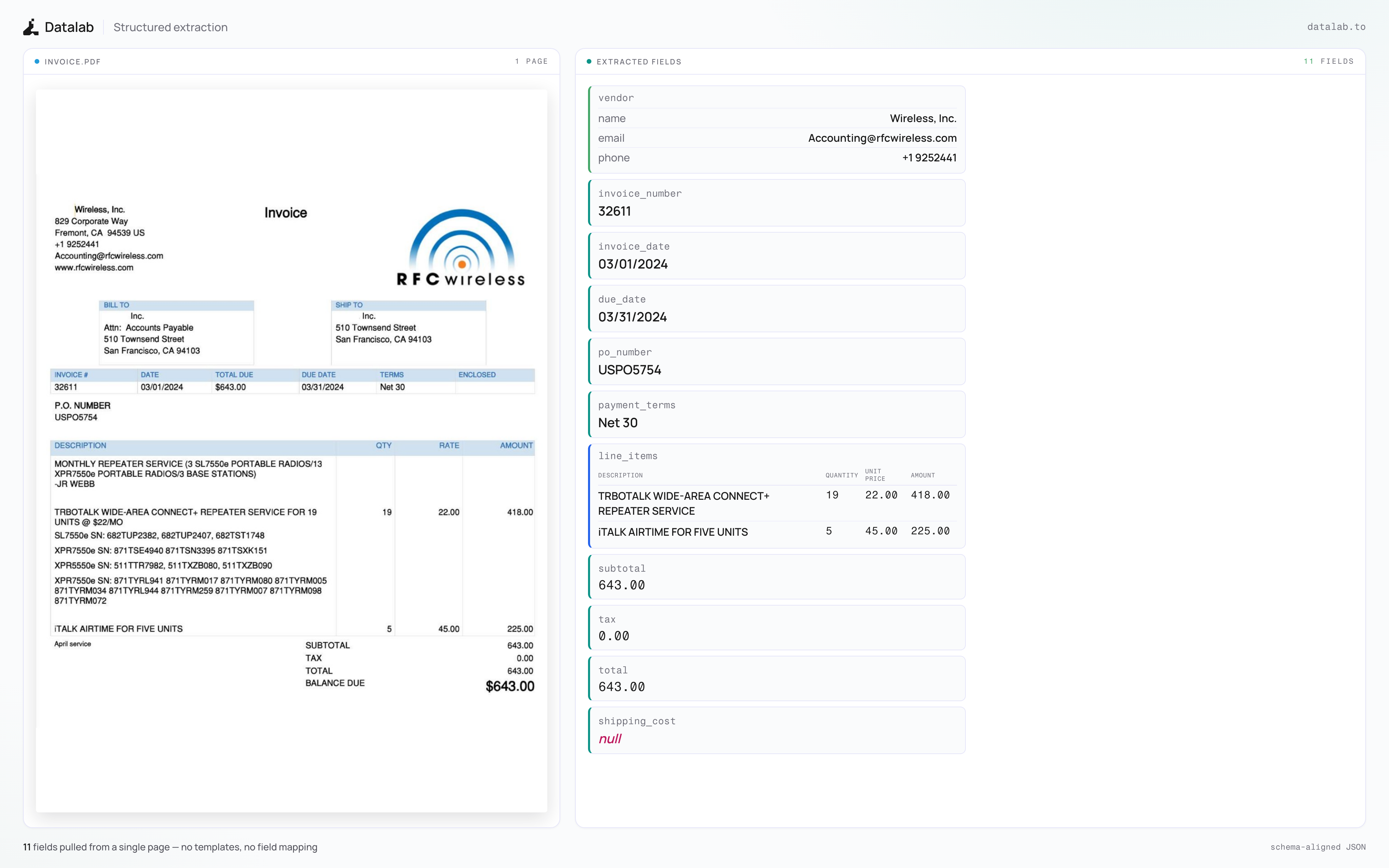
lift extracts structured JSON from PDFs and images by passing a schema. It's a 9B vision model that returns a JSON object matching your schema, with schema-constrained decoding guaranteeing valid output.
Try lift on Datalab
Our managed platform runs improved extraction with higher accuracy than the open weights, plus per-field verification, citations, and confidence scores.
If you have high volume workloads, we offer a batch processing service that has processed 1B+ pages per week.
Get started with $20 in free credits per month — sign up - takes under 30 seconds - or try lift in our public playground.
Commercial self-hosting requires a license — see Commercial usage. For on-prem licensing, contact us.
Features
- Extract structured data from documents
- Pass any JSON schema
- Handles multi-page documents in a single pass, including values that span pages
- Two inference modes: local (HuggingFace) and remote (vLLM server)
- CLI for single files, inline schemas, or whole directories
- Schema Studio: a Streamlit app to build, save, and test schemas against your documents
Quickstart
The easiest way to start is with the CLI tools:
pip install lift-pdf

# With vLLM (recommended, lightweight install)
lift_vllm
lift_extract input.pdf ./output --schema schema.json

# With HuggingFace (requires torch)
pip install lift-pdf[hf]
lift_extract input.pdf ./output --schema schema.json --method hf
Benchmarks
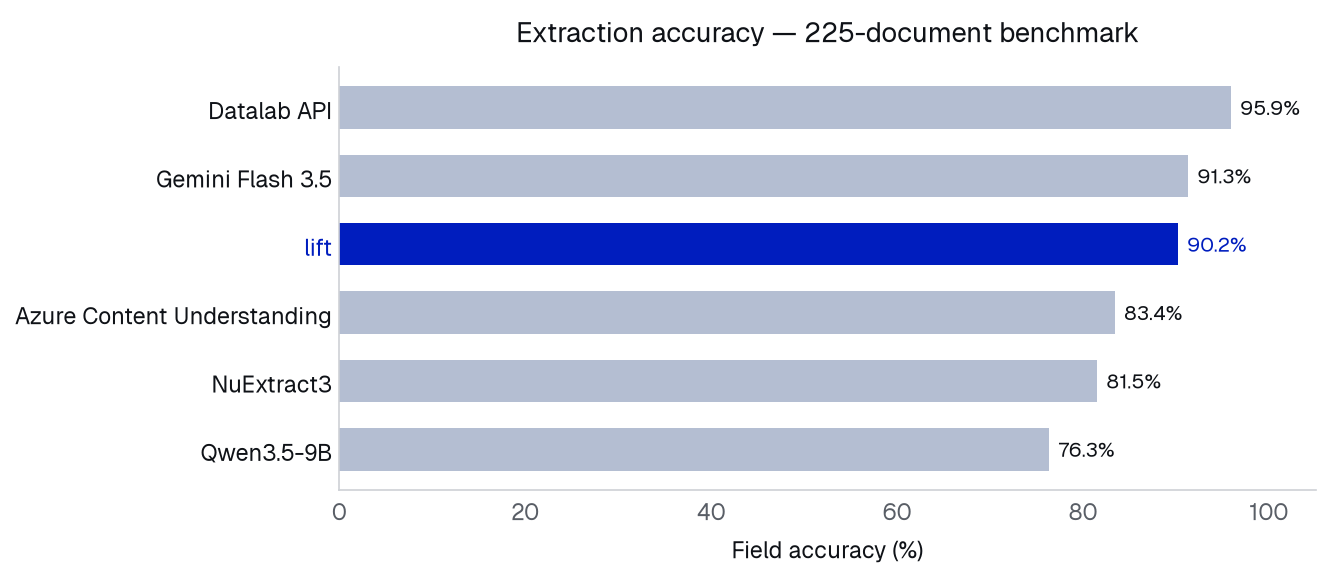
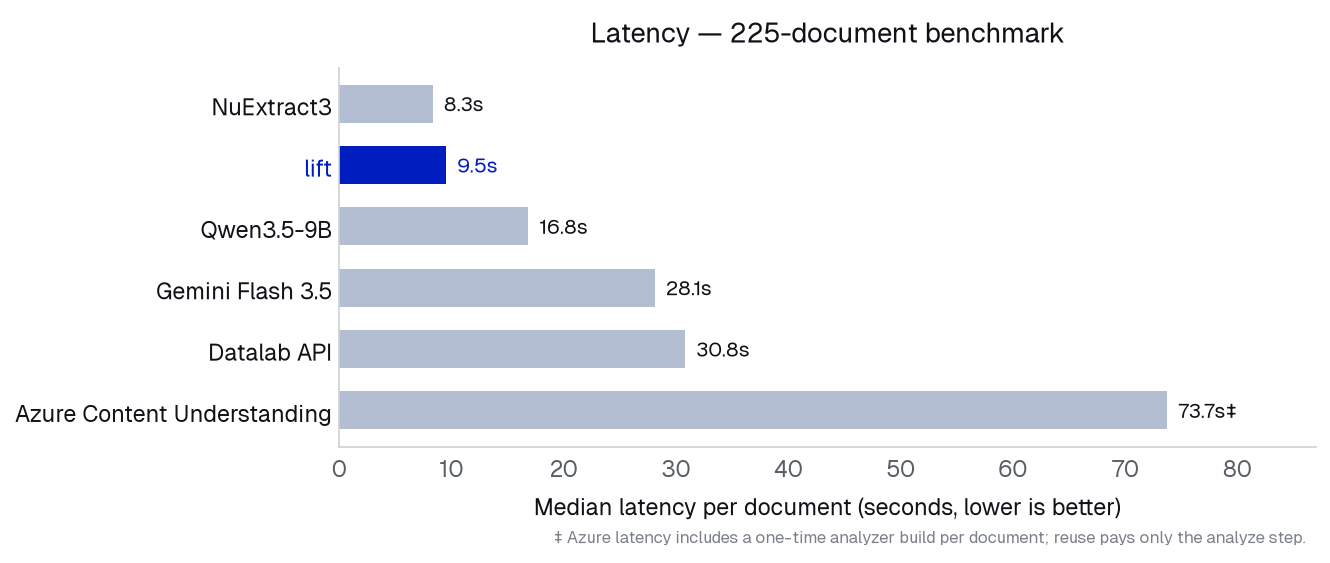
Evaluated on a 225-document extraction benchmark (6–64 pages per document, ~11,000 scored fields) with adversarial cases planted throughout: cross-page values, exhaustive lists, fields that must be left null, near-miss distractors, multi-source aggregation. Scoring is deterministic exact-match against ground truth (numeric tolerance, normalized strings).
All models receive the same rendered page images, and extract each document in a single pass.
| Model |
Size |
Field accuracy |
Full-document accuracy |
Median latency* |
Features |
| Datalab API |
— |
95.9% |
44.4% |
30.8s |
Citations + Verification |
| Gemini Flash 3.5 |
— |
91.3% |
40.0% |
28.1s |
|
| lift |
9B |
90.2% |
20.9% |
9.5s |
|
| Azure Content Understanding |
— |
83.4% |
22.2% |
73.7s |
Citations |
| NuExtract3 |
4B |
81.5% |
8.4% |
8.3s |
|
| Qwen3.5-9B |
9B |
76.32% |
24.0% |
16.8s |
|
* Per document, 8 concurrent requests. Local models (lift, Qwen3.5-9B, NuExtract3) served with vLLM on a single GPU; Gemini, Datalab, and Azure via API. Latency varies with hardware and load - treat as relative, not absolute.
- Field accuracy — fraction of individual schema fields extracted correctly.
- Full-document accuracy — fraction of documents where every field is correct.
- All models served with default/recommended settings from Github or Huggingface.
Hosted models with verification, citations, and confidence scores are available via the Datalab API - test in the playground.
Installation
Package
# Base install (for vLLM backend)
pip install lift-pdf

# With HuggingFace backend (includes torch, transformers)
pip install lift-pdf[hf]

# With the Schema Studio app
pip install lift-pdf[app]

# With all extras
pip install lift-pdf[all]
If you're using the HuggingFace method, we also recommend installing flash attention for better performance.
From Source
git clone https://github.com/datalab-to/lift.git
cd lift
uv sync
source .venv/bin/activate
Usage
Schemas
A schema is standard JSON Schema. Keep it simple — string, number, integer, boolean, arrays of those, arrays of objects, and nested objects are all supported. Avoid enum, anyOf/oneOf, $ref, and additionalProperties; the schema-constrained decoder skips schemas it can't compile, which weakens the output guarantee.
{
  "type": "object",
  "properties": {
    "invoice_number": {"type": "string", "description": "Invoice identifier"},
    "total": {"type": "number", "description": "Total amount due"},
    "line_items": {
      "type": "array",
      "items": {
        "type": "object",
        "properties": {
          "description": {"type": "string"},
          "amount": {"type": "number"}
        }
      }
    }
  },
  "required": ["invoice_number", "total"]
}
Write a description for any field whose name isn't self-explanatory. Mark a field required only when it must appear; fields genuinely absent from a document come back null.
CLI
Process single files or entire directories:
# Single file, with the vLLM server (see below for how to launch it)
lift_extract input.pdf ./output --schema schema.json

# Inline JSON schema
lift_extract scans/ ./output --schema '{"type": "object", "properties": {...}}'

# A schema saved by name in the schemas/ directory, limited to some pages
lift_extract input.pdf ./output --schema invoice --page-range 0-5,8

# Process a whole directory with the local HuggingFace model
lift_extract ./documents ./output --schema schema.json --method hf
CLI Options:
--schema TEXT (required): a path to a JSON schema file, an inline JSON string, or the name of a saved schema in the schema library.--method [hf|vllm]: inference method (default: vllm).--page-range TEXT: page range for PDFs, e.g. "0-5,7,9-12" (PDFs only).--max-output-tokens INTEGER: maximum number of output tokens.
Output Structure:
For each processed file, lift_extract writes to the output directory:
<filename>.json — the extraction matching your schema<filename>_metadata.json — page count, token count, and error info (with the raw model output when extraction fails, for debugging)
Python
from lift import extract

# schema: a dict, a path to a .json file, an inline JSON string, or a library name
result = extract("document.pdf", "schema.json")
if result.extraction is not None:
    data = result.extraction  # dict matching the schema
Pass a reused model - from lift.model import InferenceManager; model=InferenceManager(method="hf") - to load weights in-process and reuse them across calls, and page_range="0-5" to limit PDF pages. Set VLLM_API_BASE to target a remote server.
Schema Studio
Launch the interactive app to build, save, and test extraction schemas against your documents (requires pip install lift-pdf[app]):
lift_app
vLLM Server
For production deployments or batch processing, launch the vLLM server:
lift_vllm                # defaults to H100 settings
lift_vllm --gpu a100-80  # tune batch settings for your GPU
This launches a Docker container with optimized inference settings, automatically scaling batch size to your GPU's VRAM. Supported GPUs: h100, a100-80, a100/a100-40, l40s, a10, l4, 4090, 3090, t4.
You can also start your own vLLM server with the datalab-to/lift model.
Configuration
Settings can be configured via environment variables or a local.env file:
# Model settings
MODEL_CHECKPOINT=datalab-to/lift
MAX_OUTPUT_TOKENS=12384
TORCH_DEVICE=cuda:0     # pin the HF backend to a device

# vLLM settings
VLLM_API_BASE=http://localhost:8000/v1
VLLM_MODEL_NAME=lift
VLLM_GPUS=0
Commercial usage
This code is Apache 2.0, and our model weights use a modified OpenRAIL-M license (free for research, personal use, and startups under $5M funding/revenue, cannot be used competitively with our API). To remove the OpenRAIL license requirements, or for broader commercial licensing, visit our pricing page here.
Credits
Thank you to the following open source projects:

 lift 是一个开源的 9B 视觉语言模型及工具包,通过匹配你提供的 schema 从 PDF 和图片中提取结构化 JSON 数据,并使用 schema 约束解码来保证输出有效。