







chandra README

The project's README from github.com/datalab-to/chandra. As one markdown file: README.md.

Datalab Logo

Datalab

State of the Art models for Document Intelligence

Code License Model License Discord

Homepage Docs Public Playground


Chandra OCR 2

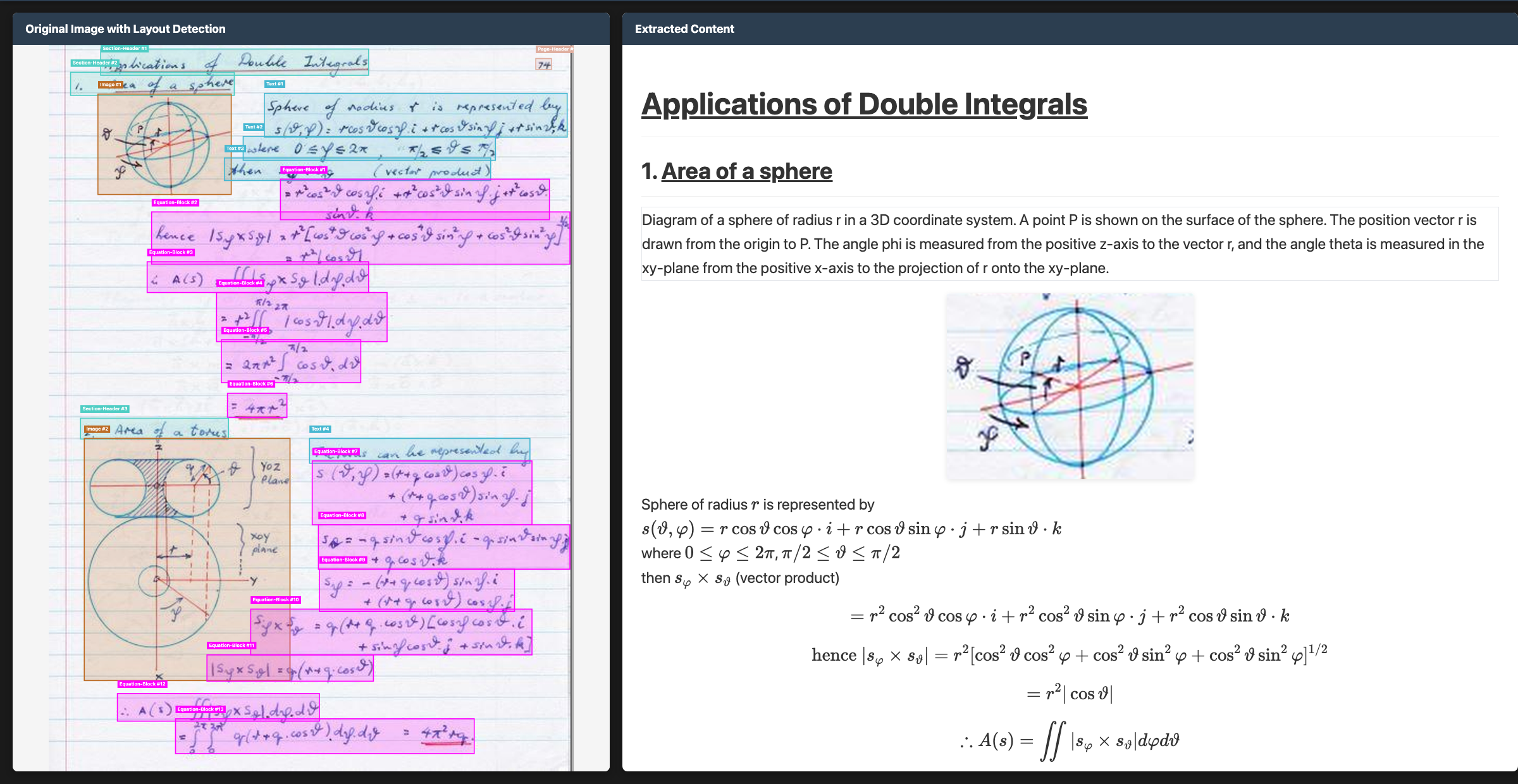
Chandra OCR 2 is a state of the art OCR model that converts images and PDFs into structured HTML/Markdown/JSON while preserving layout information.

Try Chandra on Datalab

Our managed platform runs an improved Chandra with higher accuracy than the open weights, zero data retention by default, SOC 2 Type 2, and custom BAAs.

If you have high volume workloads, we offer a batch processing service that has processed 200M+ pages per week — we manage the infrastructure so your workloads finish on time.

Get started with $5 in free credits — sign up — takes under 30 seconds — or try Chandra in our public playground.

Commercial self-hosting requires a license — see Commercial usage. For on-prem licensing, contact us.

News

Features

Quickstart

The easiest way to start is with the CLI tools:

pip install chandra-ocr

# With vLLM (recommended, lightweight install)
chandra_vllm
chandra input.pdf ./output

# With HuggingFace (requires torch)
pip install chandra-ocr[hf]
chandra input.pdf ./output --method hf

# Interactive streamlit app
pip install chandra-ocr[app]
chandra_app

Benchmarks

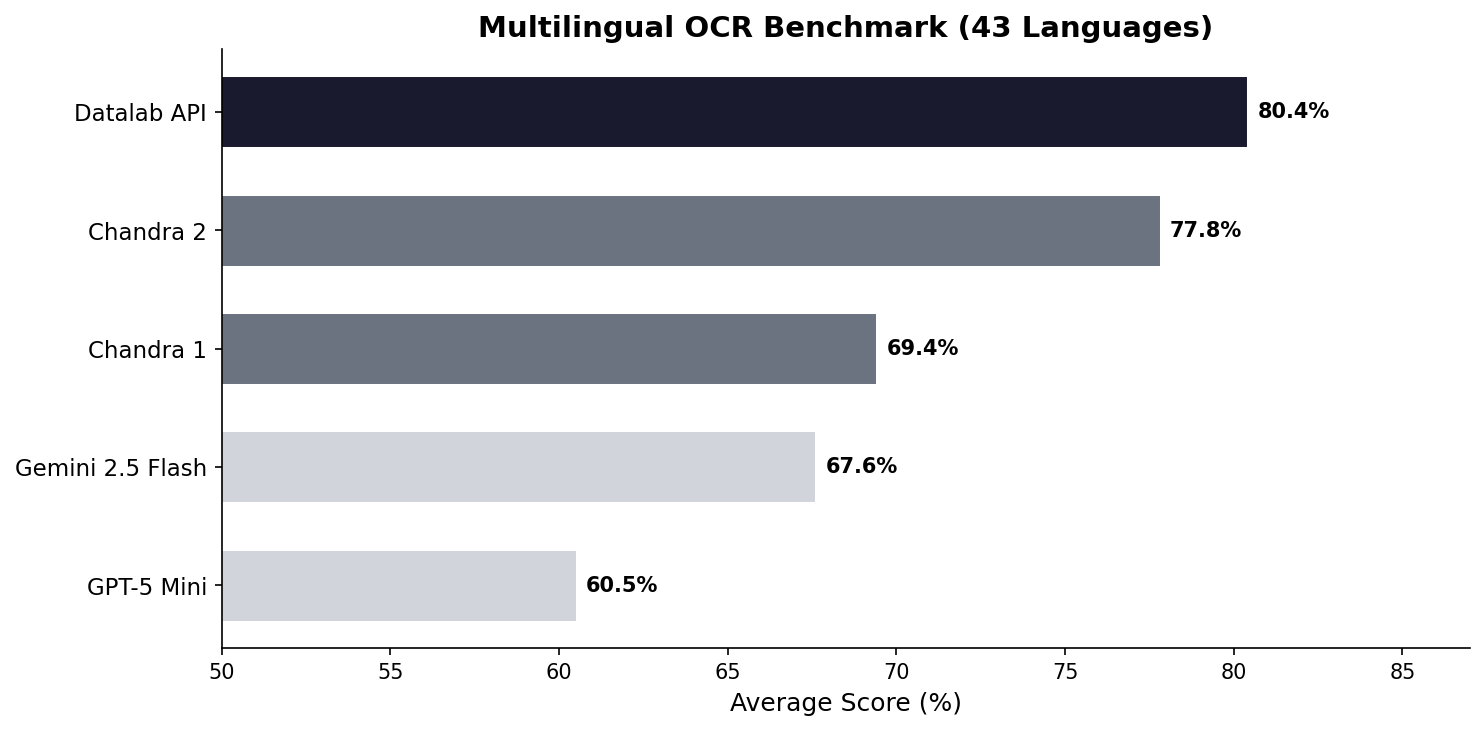
Multilingual performance was a focus for us with Chandra 2. There isn't a good public multilingual OCR benchmark, so we made our own. This tests tables, math, ordering, layout, and text accuracy.

See full scores below. We also have a full 90-language benchmark.

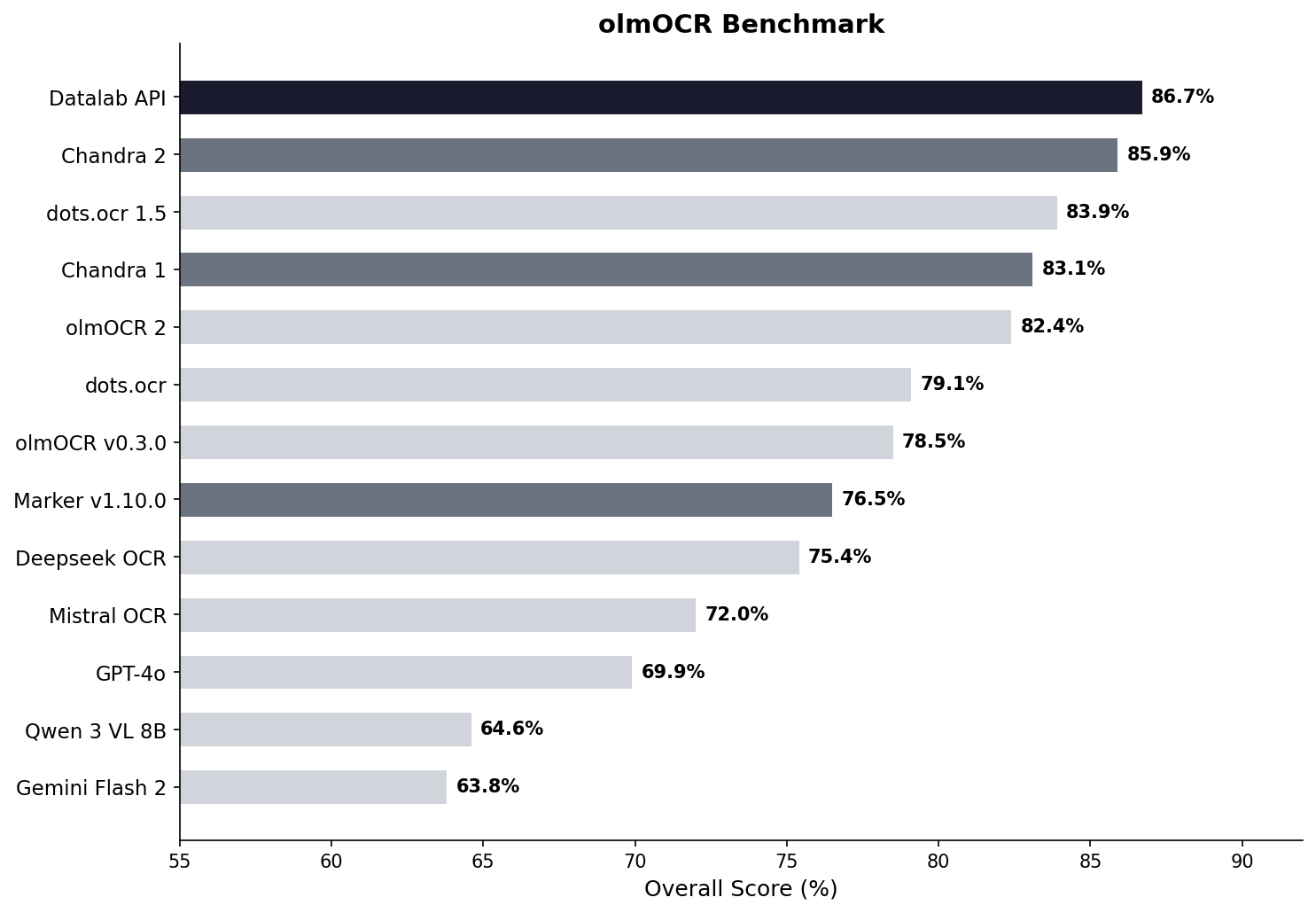
We also benchmarked Chandra 2 with the widely accepted olmocr benchmark:

See full scores below.

Examples

Type Name Link
Math CS229 Textbook View
Math Handwritten Math View
Math Chinese Math View
Tables Statistical Distribution View
Tables Financial Table View
Forms Registration Form View
Forms Lease Form View
Handwriting Cursive Writing View
Handwriting Handwritten Notes View
Languages Arabic View
Languages Japanese View
Languages Hindi View
Languages Russian View
Other Charts View
Other Chemistry View

Installation

Package

# Base install (for vLLM backend)
pip install chandra-ocr

# With HuggingFace backend (includes torch, transformers)
pip install chandra-ocr[hf]

# With all extras
pip install chandra-ocr[all]

If you're using the HuggingFace method, we also recommend installing flash attention for better performance.

From Source

git clone https://github.com/datalab-to/chandra.git
cd chandra
uv sync
source .venv/bin/activate

Usage

CLI

Process single files or entire directories:

# Single file, with vllm server (see below for how to launch vllm)
chandra input.pdf ./output --method vllm

# Process all files in a directory with local model
chandra ./documents ./output --method hf

CLI Options:

Output Structure:

Each processed file creates a subdirectory with:

Streamlit Web App

Launch the interactive demo for single-page processing:

chandra_app

vLLM Server (Optional)

For production deployments or batch processing, use the vLLM server:

chandra_vllm

This launches a Docker container with optimized inference settings. Configure via environment variables:

You can also start your own vllm server with the datalab-to/chandra-ocr-2 model.

Configuration

Settings can be configured via environment variables or a local.env file:

# Model settings
MODEL_CHECKPOINT=datalab-to/chandra-ocr-2
MAX_OUTPUT_TOKENS=12384

# vLLM settings
VLLM_API_BASE=http://localhost:8000/v1
VLLM_MODEL_NAME=chandra
VLLM_GPUS=0

Commercial usage

This code is Apache 2.0, and our model weights use a modified OpenRAIL-M license (free for research, personal use, and startups under $2M funding/revenue, cannot be used competitively with our API). To remove the OpenRAIL license requirements, or for broader commercial licensing, visit our pricing page here.

Benchmark table

Model ArXiv Old Scans Math Tables Old Scans Headers and Footers Multi column Long tiny text Base Overall Source
Datalab API 90.4 90.2 90.7 54.6 91.6 83.7 92.3 99.9 86.7 ± 0.8 Own benchmarks
Chandra 2 86.9 89.1 92.1 51.1 91.4 82.1 93.7 99.9 85.8 ± 0.8 Own benchmarks
dots.ocr 1.5 85.9 85.5 90.7 48.2 94.0 85.3 81.6 99.7 83.9 dots.ocr repo
Chandra 1 82.2 80.3 88.0 50.4 90.8 81.2 92.3 99.9 83.1 ± 0.9 Own benchmarks
olmOCR 2 83.0 82.3 84.9 47.7 96.1 83.7 81.9 99.6 82.4 olmocr repo
dots.ocr 82.1 64.2 88.3 40.9 94.1 82.4 81.2 99.5 79.1 ± 1.0 dots.ocr repo
olmOCR v0.3.0 78.6 79.9 72.9 43.9 95.1 77.3 81.2 98.9 78.5 ± 1.1 olmocr repo
Datalab Marker v1.10.0 83.8 69.7 74.8 32.3 86.6 79.4 85.7 99.6 76.5 ± 1.0 Own benchmarks
Deepseek OCR 75.2 72.3 79.7 33.3 96.1 66.7 80.1 99.7 75.4 ± 1.0 Own benchmarks
Mistral OCR API 77.2 67.5 60.6 29.3 93.6 71.3 77.1 99.4 72.0 ± 1.1 olmocr repo
GPT-4o (Anchored) 53.5 74.5 70.0 40.7 93.8 69.3 60.6 96.8 69.9 ± 1.1 olmocr repo
Qwen 3 VL 8B 70.2 75.1 45.6 37.5 89.1 62.1 43.0 94.3 64.6 ± 1.1 Own benchmarks
Gemini Flash 2 (Anchored) 54.5 56.1 72.1 34.2 64.7 61.5 71.5 95.6 63.8 ± 1.2 olmocr repo

Multilingual benchmark table

The table below covers the 43 most common languages, benchmarked across multiple models. For a comprehensive evaluation across 90 languages (Chandra 2 vs Gemini 2.5 Flash only), see the full 90-language benchmark.

Language Datalab API Chandra 2 Chandra 1 Gemini 2.5 Flash GPT-5 Mini
ar 67.6% 68.4% 34.0% 84.4% 55.6%
bn 85.1% 72.8% 45.6% 55.3% 23.3%
ca 88.7% 85.1% 84.2% 88.0% 78.5%
cs 88.2% 85.3% 84.7% 79.1% 78.8%
da 90.1% 91.1% 88.4% 86.0% 87.7%
de 93.8% 94.8% 83.0% 88.3% 93.8%
el 89.9% 85.6% 85.5% 83.5% 82.4%
es 91.8% 89.3% 88.7% 86.8% 97.1%
fa 82.2% 75.1% 69.6% 61.8% 56.4%
fi 85.7% 83.4% 78.4% 86.0% 84.7%
fr 93.3% 93.7% 89.6% 86.1% 91.1%
gu 73.8% 70.8% 44.6% 47.6% 11.5%
he 76.4% 70.4% 38.9% 50.9% 22.3%
hi 80.5% 78.4% 70.2% 82.7% 41.0%
hr 93.4% 90.1% 85.9% 88.2% 81.3%
hu 88.1% 82.1% 82.5% 84.5% 84.8%
id 91.3% 91.6% 86.7% 88.3% 89.7%
it 94.4% 94.1% 89.1% 85.7% 91.6%
ja 87.3% 86.9% 85.4% 80.0% 76.1%
jv 87.5% 73.2% 85.1% 80.4% 69.6%
kn 70.0% 63.2% 20.6% 24.5% 10.1%
ko 89.1% 81.5% 82.3% 84.8% 78.4%
la 78.0% 73.8% 55.9% 70.5% 54.6%
ml 72.4% 64.3% 18.1% 23.8% 11.9%
mr 80.8% 75.0% 57.0% 69.7% 20.9%
nl 90.0% 88.6% 85.3% 87.5% 83.8%
no 89.2% 90.3% 85.5% 87.8% 87.4%
pl 93.8% 91.5% 83.9% 89.7% 90.4%
pt 97.0% 95.2% 84.3% 89.4% 90.8%
ro 86.2% 84.5% 82.1% 76.1% 77.3%
ru 88.8% 85.5% 88.7% 82.8% 72.2%
sa 57.5% 51.1% 33.6% 44.6% 12.5%
sr 95.3% 90.3% 82.3% 89.7% 83.0%
sv 91.9% 92.8% 82.1% 91.1% 92.1%
ta 82.9% 77.7% 50.8% 53.9% 8.1%
te 69.4% 58.6% 19.5% 33.3% 9.9%
th 71.6% 62.6% 47.0% 66.7% 53.8%
tr 88.9% 84.1% 68.1% 84.1% 78.2%
uk 93.1% 91.0% 88.5% 87.9% 81.9%
ur 54.1% 43.2% 28.1% 57.6% 16.9%
vi 85.0% 80.4% 81.6% 89.5% 83.6%
zh 87.8% 88.7% 88.3% 70.0% 70.4%
Average 80.4% 77.8% 69.4% 67.6% 60.5%

Full 90-language benchmark table

We also have a more comprehensive evaluation covering 90 languages, comparing Chandra 2 against Gemini 2.5 Flash. The average scores are lower than the 43-language table above because this includes many lower-resource languages. Chandra 2 averages 72.7% vs Gemini 2.5 Flash at 60.8%.

See the full 90-language results.

Throughput

Benchmarked with vLLM on a single NVIDIA H100 80GB GPU using a diverse mix of documents (math, tables, scans, multi-column layouts) from the olmOCR benchmark set. This set is significantly slower than real-world usage - we estimate 2 pages/s in real-world usage.

Configuration Pages/sec Avg Latency P95 Latency Failure Rate
vLLM, 96 concurrent sequences 1.44 60s 156s 0%

Credits

Thank you to the following open source projects:

chandra (datalab-to/chandra)

Searching Database…

12.5K ·GitHub
What is this?Chandra OCR 2 is a state-of-the-art OCR model that converts images and PDFs into structured HTML, Markdown, or JSON while preserving the original layout. It handles complex tables, forms, handwriting, and math, and supports over 90 languages.
Do I have to run this myself, or is it only a hosted API?You can run it yourself locally via HuggingFace or by connecting to a vLLM server, or use Datalab's managed hosted version with a public playground and batch processing.
How do I process documents with it?Install the package, then use the CLI to process single files or whole directories, choosing between the 'hf' or 'vllm' inference method; output is saved per file as .md, .html and metadata.json. A Streamlit web app is also available for interactive single-page processing.
Can I use Chandra for free in my product?The code is Apache 2.0, but the model weights use a modified OpenRAIL-M license that's free only for research, personal use, and startups under $2M in funding/revenue, and it can't be used competitively with Datalab's own API; broader commercial self-hosting requires a paid license.
Does the hosted version retain my data?The managed Datalab platform offers zero data retention by default, is SOC 2 Type 2 compliant, and supports custom BAAs for sensitive workloads.
How does Chandra compare to other OCR models?On Datalab's own benchmarks, Chandra 2 scores 85.8% overall, ahead of dots.ocr 1.5, olmOCR 2, and Deepseek OCR, and it leads in multilingual accuracy at 77.8% average versus Gemini 2.5 Flash's 67.6%.
What languages does it support?Chandra 2 supports over 90 languages, with published benchmarks for 43 common languages and a dedicated 90-language evaluation against Gemini 2.5 Flash.
What output formats can I export to?Documents convert to Markdown, HTML, or JSON, preserving tables, math, forms with checkboxes, and extracting images/diagrams with captions and structured data.
How fast is it?With vLLM running 96 concurrent sequences on an H100 GPU it processes about 1.44 pages/sec in the benchmark set, though Datalab estimates real-world throughput closer to 2 pages/sec.
Creator
datalab-to
Size
22.9 MB
Stars
12.5K
Age
1y
Commits · 90 Days