

needle README

The project's README from github.com/cactus-compute/needle. As one markdown file: README.md.

Needle

Needle 2

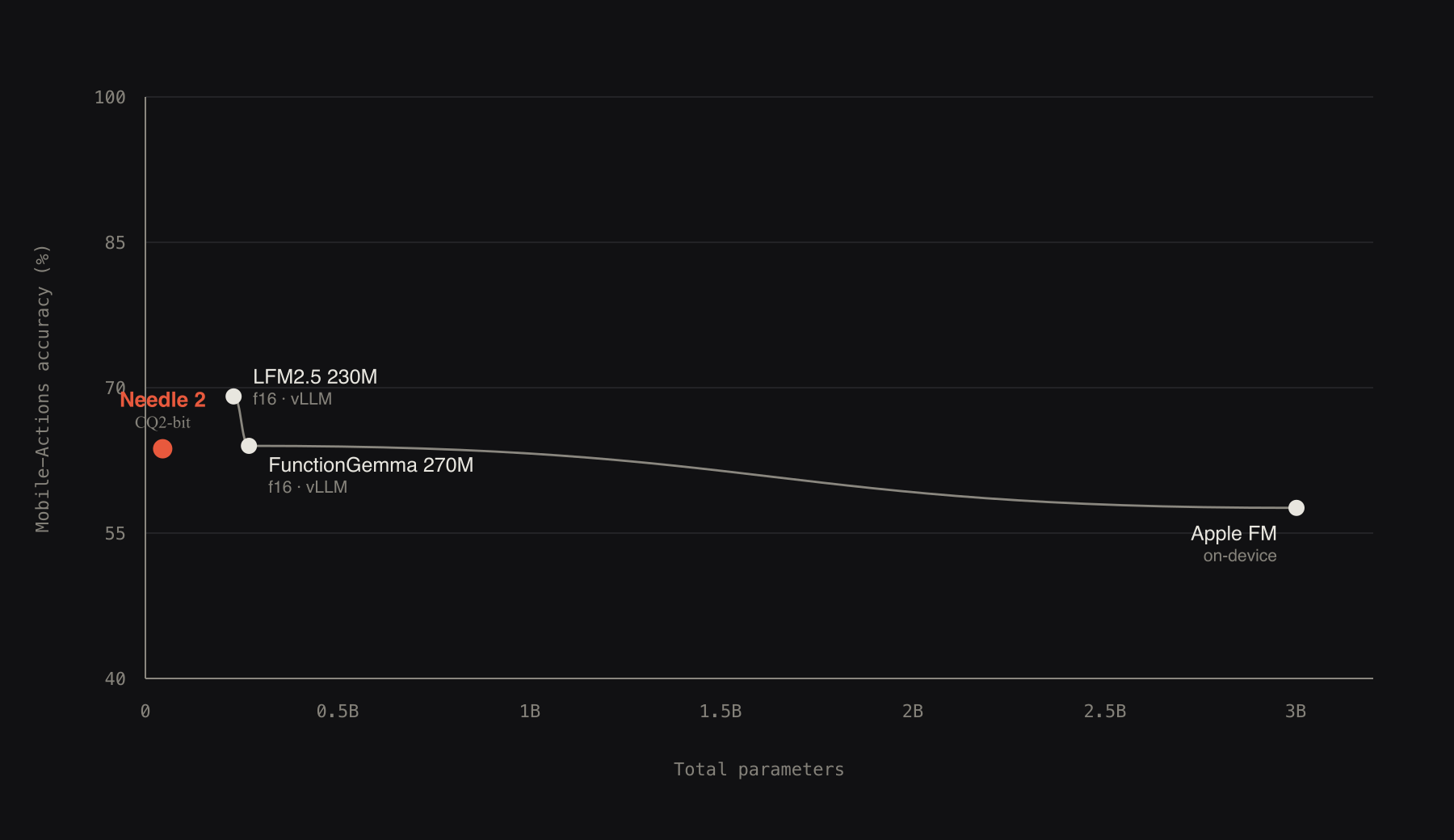
Needle 2 is an open 45M-parameter model for tool calling, device use and structured extraction. The whole model is a single 14MB binary that runs a full session in about 28MB of RAM. It is built on our Simple Attention Network findings, compressed to CQ2-bit with Cactus Quants, and baked into its own engine. On the benchmarks below, Needle 2 trades wins with other small models like FunctionGemma 270M, LFM2.5 230M and Apple FM, at 5x to 70x smaller, and 2 bits against their f16.

This repository is the Python package: inference, LoRA fine-tuning, and export. pip install cactus-needle, describe your tools, and call them from Python. The inference engine is fetched once from Hugging Face and cached; there is nothing else to build, and offline setup for air gapped devices is covered in doc/apis.md.

Weights: huggingface.co/Cactus-Compute/needle2 · source: github.com/cactus-compute/needle.

Size-quality frontier: mobile-class and below

Simple Attention Network

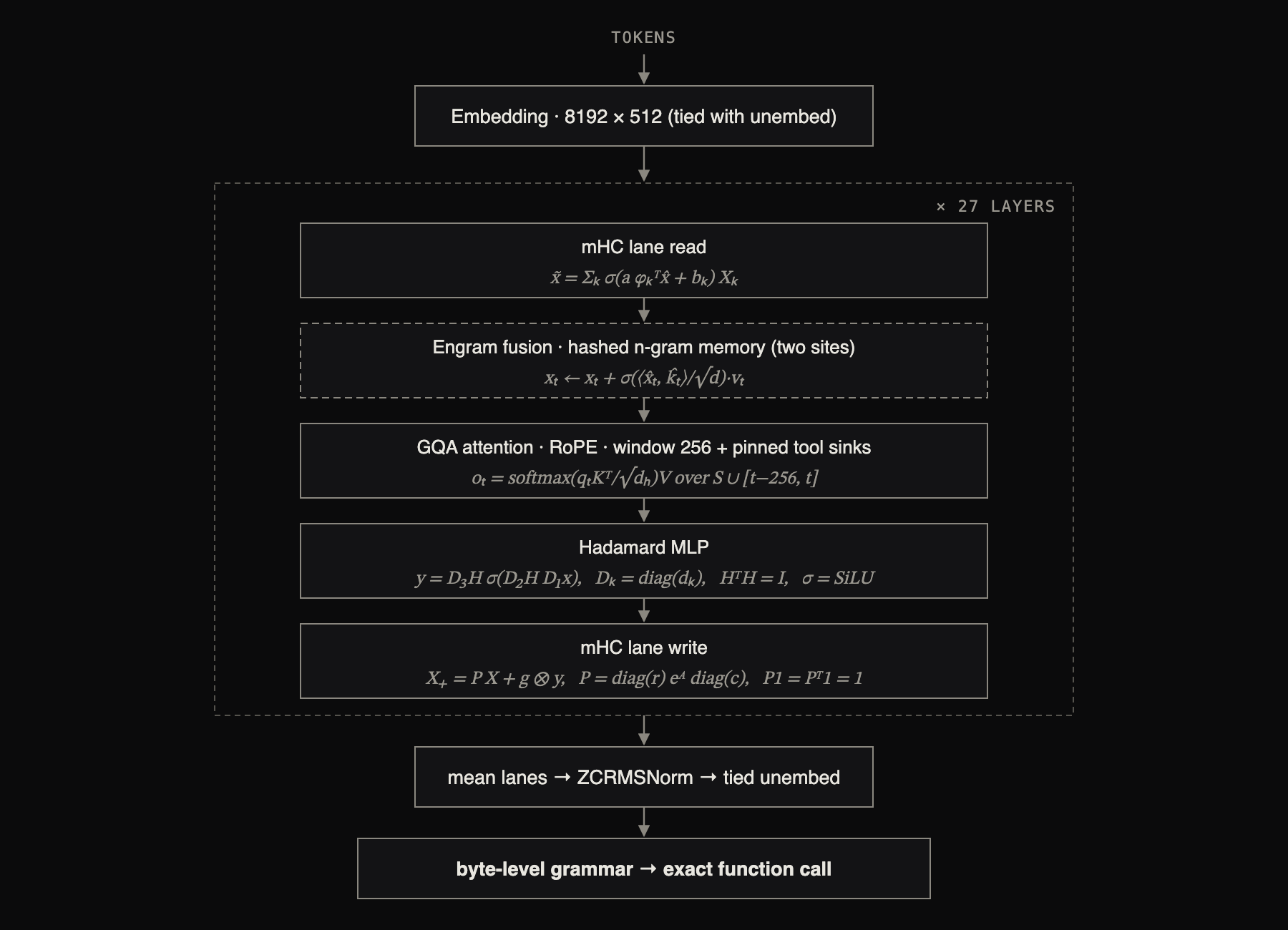
Needle 2 is a Simple Attention Network, our dense small-model recipe: a Hadamard MLP in place of the FFN, GQA attention, engram key-value memory, and multi-lane hyper-connections. See the paper for the design and ablations: arXiv:2607.18363.

Simple Attention Network architecture

Each block carries its update rule. Here x̂ is the RMS-normalised flattening of the four residual streams, H the orthonormal Walsh-Hadamard transform (a fixed matrix, applied in n log n time with no weights to read), (kₜ, vₜ) rows gathered from hashed n-gram tables, and P the doubly-stochastic normalisation of the routing logits A, computed by Sinkhorn iteration; a, b, g and all σ-gates are learned and input-dependent. Both attention and MLP residuals are sandwich-normed and gated, the engram sites fire at two layers, and decoding is constrained by a byte-level grammar compiled from the declared schemas.

Quickstart

pip install cactus-needle

The runtime package does not install the training stack. Add the train extra when using fine-tuning or checkpoint export:

pip install "cactus-needle[train]"

Needle reads your tool descriptions to decide what to call and how to fill arguments, so describing them well is the whole game.

Simple: decorate a function. The signature gives the argument types, the docstring is the tool description, and run() completes the loop: model picks the call, Needle executes your function, feeds the result back, and returns the final response with the executed tool results attached as results.

import needle

@needle.tool
def get_weather(city: str):
    "Get the current weather for a city."
    return {"city": city, "temp_c": 27, "sky": "clear"}

agent = needle.Needle(tools=[get_weather])
print(agent.run("what's it like in Lagos right now?")["results"])
# [{'city': 'Lagos', 'temp_c': 27, 'sky': 'clear'}]

Extraction: to pull structured data out of text, declare the shape and call extract(). Pass a Pydantic model and you get a typed object back.

from pydantic import BaseModel

class Invoice(BaseModel):
    vendor: str
    total: float
    due_date: str

invoice = needle.extract("Invoice from Acme Corp, $1,200.00, due 2026-09-01", Invoice)
print(invoice.vendor, invoice.total)   # -> Acme Corp 1200.0

Per argument descriptions and choices, value constraints compiled into the decode grammar, raw JSON schemas, driving the loop with complete(), the response contract, system facts, tool retrieval, and confidence gating are all covered in doc/apis.md.

Playground

Try any model in the browser: pick a preset, edit the tools or prompt, and Run. Follow-up queries continue the same conversation.

needle playground                      # base model, http://127.0.0.1:7860
needle playground --weights my.cact    # a tuned model

The server downloads and initializes the model before serving, so the first query is instant. The Finetune on these tools button runs the fine-tuning pipeline below from the UI and hands back a downloadable .cact.

Environments

Ready-made tool surfaces in needle.environments: smart_home, media_player, productivity, wearable, kitchen_appliance, and data_capture. Each is a hand-curated set of tools whose enums, bounds, and descriptions map cleanly onto Needle's constrained decoding, with a ready agent and a frozen acceptance suite.

from needle.environments import smart_home

smart_home.agent.complete("dim the study lights to 30 percent")
smart_home.run_tests()

python -m needle.environments.smart_home runs a suite from the shell. To adapt an environment to your product, swap the Literal values (rooms, contacts, categories) for your own and keep the shapes: closed sets as enums, bounded numbers, verbatim copy for free text, five tools or fewer. The full tool surfaces and the suite contract are in doc/environments.md.

Fine-tuning

Needle fine-tunes with LoRA on the frozen base and merges the adapter at export, so a run is cheap and the tuned model is still a single .cact that runs on the same engine. The workflow is: (optionally) synthesize data, LoRA fine-tune, then build a tuned .cact. See doc/finetuning.md for dataset sizing, reading the loss curve, and troubleshooting.

Data format. A JSONL file, one example per line. reasoning is optional; an off-topic example has answers: [].

{"query": "dim the kitchen to 10", "tools": [{"name": "set_lights", "parameters": {"type": "object", "properties": {"room": {"type": "string"}, "brightness": {"type": "integer"}}, "required": ["room"]}}], "answers": [{"name": "set_lights", "arguments": {"room": "kitchen", "brightness": 10}}], "reasoning": "'kitchen' -> room; 'dim to 10' -> brightness 10"}

1. Synthesize data (optional). Needs OPENROUTER_API_KEY. Seed from a tool schema file, or expand an existing set:

export OPENROUTER_API_KEY=sk-or-...
needle generate-data --tools my_tools.json --num-samples 500 --output data.jsonl
needle generate-data --augment data.jsonl --num-samples 500      # expand an existing JSONL

Set OPENROUTER_URL to use an OpenAI-compatible gateway instead of the default OpenRouter endpoint.

2. LoRA fine-tune. The base checkpoint auto-downloads from Hugging Face if you do not pass --checkpoint. --generate N first synthesizes N more examples from the tools in your data (also needs OPENROUTER_API_KEY).

needle finetune data.jsonl --epochs 10
needle finetune data.jsonl --epochs 10 --generate 300 --lora-rank 16 --lora-alpha 32

Key options: --epochs (default 3), --lora-rank (16), --lora-alpha (32), --lr (1e-4), --batch-size (16), --max-len (1024), --val-split (0.1), --checkpoint <base.pkl>, --checkpoint-dir <dir> (default checkpoints), --out <adapter.pkl>, --generate <n>, --model <id> (default deepseek/deepseek-v4-flash), and --workers <n> (default 8). --generate uses the configured OpenRouter endpoint to synthesize extra examples before training. The adapter is written to checkpoints/needle_lora.pkl by default. A validation loss prints each epoch from the held out split.

Training is plain JAX and runs on any accelerator jax supports. On an NVIDIA machine install the CUDA build and the same command trains on the GPU:

pip install "cactus-needle[train,gpu]"

On Apple Silicon the metal extra trains on the GPU:

pip install "cactus-needle[train,metal]"

3. Build a tuned .cact. Merge the adapter into the base and quantize. The base auto-downloads if absent.

needle build checkpoints/needle2.pkl --lora checkpoints/needle_lora.pkl --out my_needle.cact

Add --bits 2 for a smaller model (by default the export follows the checkpoint's declared per-layer bit map, falling back to 4 when the checkpoint declares none), or set NEEDLE_HF_REPO=<you>/<model> and pass --upload to publish the .cact. The counterpart needle download <you>/<model>/my_needle.cact pulls a published archive on any machine, and needle download <platform> (e.g. macos-arm64) fetches that platform's engine runner.

4. Run it. The engine is weights-agnostic, so a tuned .cact runs on it directly - no recompilation:

import needle
agent = needle.Needle(weights="my_needle.cact", tools=[...])
agent.run("...")

Telemetry

Cactus Compute collects strictly anonymous usage telemetry (function name, package version, OS — never your prompts, outputs, or data); opt out with NEEDLE_TELEMETRY=0 or DO_NOT_TRACK=1.

Citation

Needle 2 is built by the Cactus Compute team. If you use it in your work, please cite:

@misc{needle2_2026,
  title        = {Needle 2: A 45M-Parameter Foundation Tool-Calling Model for Tiny Devices},
  author       = {Ndubuaku, Henry and Mosoyan, Karen and Mroz, Jakub and Cylich, Noah and
                  Kumar, Satyajit and Sandhu, Parkirat and Shemet, Roman and Lee, Justin H.},
  year         = {2026},
  organization = {Cactus Compute, Inc.},
  howpublished = {\url{https://github.com/cactus-compute/needle}}
}

Reach out on [email protected] for partnerships, collaborations, synergies and deploying Needle2 in your product.

needle (cactus-compute/needle)

Searching Database…

14.1K ·GitHub
What is this?Needle 2 is an open 45M-parameter model for tool calling, device use and structured extraction that ships as a single 14MB binary and runs a full session in about 28MB of RAM. This repo is its Python package for inference, LoRA fine-tuning and export.
Is it a Python library or a model that runs on devices?Both stages: this repo is a pip-installable Python package, and what it produces is a self-contained .cact model for on-device engines. The project targets phones, wearables, smart homes, robots, cars and microcontrollers.
How do I get it running?pip install cactus-needle, describe your tools, and call them from Python — the inference engine is fetched once from Hugging Face and cached, with nothing else to build. Offline setup for air-gapped devices is covered in doc/apis.md.
How long can a conversation get before it runs out of memory?It keeps a 256-token sliding window with the tools pinned as KV sinks, so RAM stays near 28MB however long the session runs — but the window itself is small. For large tool catalogues a built-in retrieval head renders only the top five tools per turn.
Does it send any of my data anywhere?Inference does no network at all. Cactus collects strictly anonymous usage telemetry — function name, package version and OS, never your prompts, outputs or data — and you can opt out with NEEDLE_TELEMETRY=0 or DO_NOT_TRACK=1.
How does it compare to other small models?On the README's benchmarks it trades wins with FunctionGemma 270M, LFM2.5 230M and Apple FM while being 5x to 70x smaller and running at 2 bits against their f16.
Can I try it in the browser before installing anything?Yes — the Playground lets you pick a preset, edit the tools or prompt and run, with follow-up queries continuing the same conversation. Its Finetune button runs the fine-tuning pipeline and hands back a downloadable .cact file.
What architecture is under the hood?It's a Simple Attention Network: a Hadamard MLP replaces the FFN, plus GQA attention, engram key-value memory and multi-lane hyper-connections. The design and ablations are in the paper at arXiv:2607.18363.
Can it extract structured data from plain text, not just call tools?Yes — declare the shape as a Pydantic model and call extract(); you get a typed object back. Raw JSON schemas and driving the loop manually with complete() are covered in doc/apis.md.
Size
4.7 MB
Stars
14.1K
Updated
CommitOct 16
Age
7mo
Commits · 90 Days