198 ·GitHub
What is this?
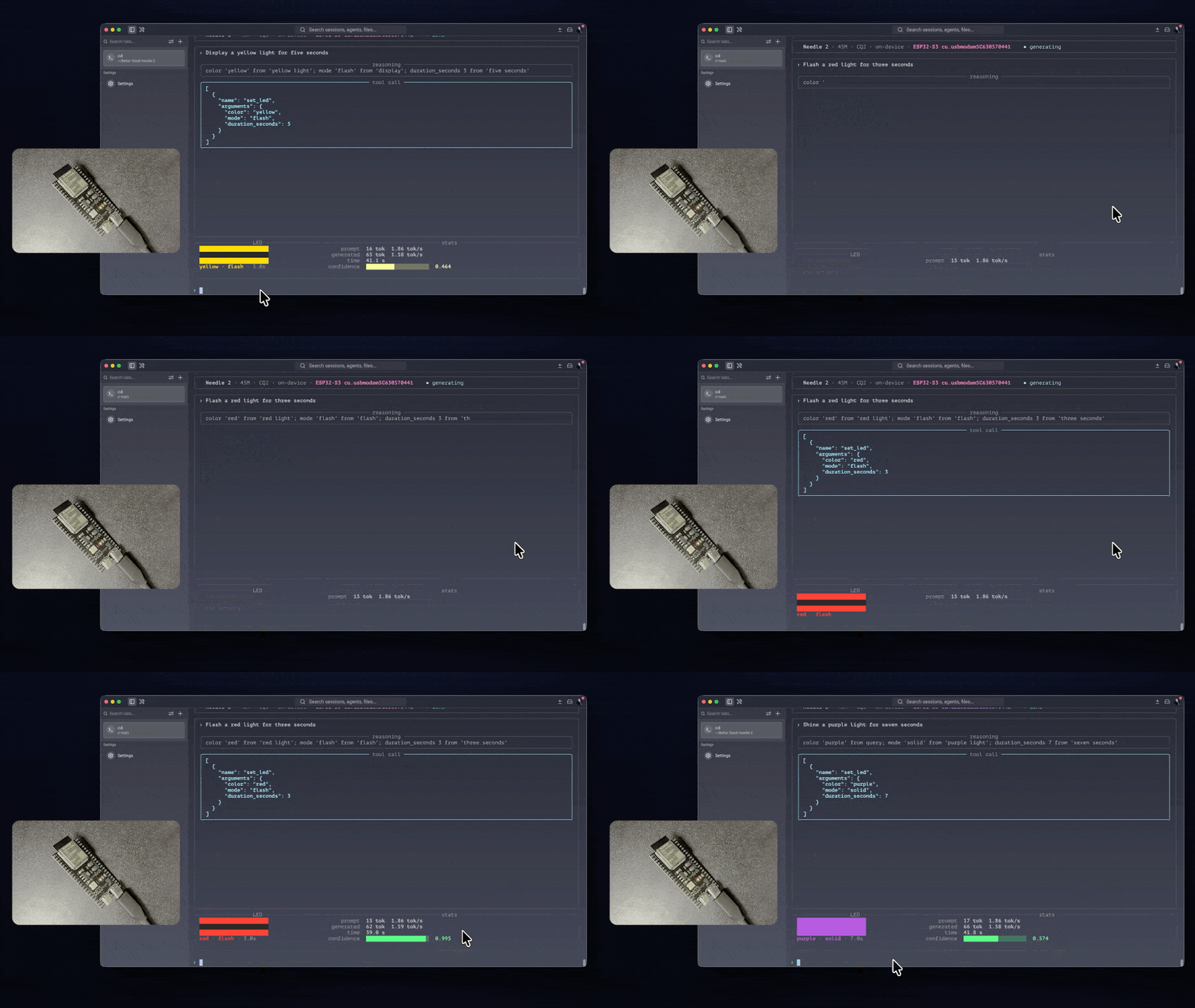
 It is a C firmware that runs Cactus's Needle 2, a 45-million-parameter language model, entirely offline on an ESP32-S3 microcontroller, turning plain-English requests into guaranteed-valid JSON tool calls.
It is a C firmware that runs Cactus's Needle 2, a 45-million-parameter language model, entirely offline on an ESP32-S3 microcontroller, turning plain-English requests into guaranteed-valid JSON tool calls.Is this a portable ESP32 library or built for one exact board?It targets one specific board configuration only (ESP32-S3 with 16MB flash and 8MB octal PSRAM) and makes no attempt to support other ESP32 variants; it is also an independent ~3,700-line C99 reimplementation of the .cact inference format, not derived from Cactus's existing C++ engine.
It targets one specific board configuration only (ESP32-S3 with 16MB flash and 8MB octal PSRAM) and makes no attempt to support other ESP32 variants; it is also an independent ~3,700-line C99 reimplementation of the .cact inference format, not derived from Cactus's existing C++ engine.How do I get it running?Install ESP-IDF v5.5+ and Python 3, find your serial port (ls /dev/cu.usb on macOS or ls /dev/ttyUSB on Linux), then build and flash the firmware; the board primes its prompt once and pulses the LED green three times before it accepts input over the console.
Install ESP-IDF v5.5+ and Python 3, find your serial port (ls /dev/cu.usb on macOS or ls /dev/ttyUSB on Linux), then build and flash the firmware; the board primes its prompt once and pulses the LED green three times before it accepts input over the console.What exact hardware does this need?An ESP32-S3 (dual-core Xtensa LX7) with 16MB flash and an 8MB octal PSRAM module ('N16R8'-class); a board with 2MB flash or quad-mode PSRAM will not work because the model alone needs 13.1MB and the KV cache needs 3.5MB.
An ESP32-S3 (dual-core Xtensa LX7) with 16MB flash and an 8MB octal PSRAM module ('N16R8'-class); a board with 2MB flash or quad-mode PSRAM will not work because the model alone needs 13.1MB and the KV cache needs 3.5MB.What can and can't the model actually do?It is a pure dispatcher, not a chatbot: every reply is either a tool call or an empty call, with no free text or world knowledge, and its 256-token context window realistically fits only 2-3 tool schemas before accuracy degrades.
It is a pure dispatcher, not a chatbot: every reply is either a tool call or an empty call, with no free text or world knowledge, and its 256-token context window realistically fits only 2-3 tool schemas before accuracy degrades.Does any data leave the board?No. The model weights are memory-mapped from flash and inference runs entirely on-device with no network connection at all.
No. The model weights are memory-mapped from flash and inference runs entirely on-device with no network connection at all.How do I add a custom tool for the board to call?Describe the tool's schema in tools/led.json (the single source of truth), write a handler in main.c between marked comment blocks using argstr/argnum/argbool to read fields, register it, then rebuild and flash.
Describe the tool's schema in tools/led.json (the single source of truth), write a handler in main.c between marked comment blocks using argstr/argnum/argbool to read fields, register it, then rebuild and flash.Why does the wording of a tool's description matter so much?Descriptions directly shape the model's behavior — the README notes that the phrase 'solid or blink' on a mode field correctly triggers 'blink', while a more verbose rewording of the same field caused the model to get it wrong.
Descriptions directly shape the model's behavior — the README notes that the phrase 'solid or blink' on a mode field correctly triggers 'blink', while a more verbose rewording of the same field caused the model to get it wrong.How is the custom inference engine checked for correctness?It's validated against independent references: dequantization and GEMV are checked against NumPy (under 3e-07 error), the tokenizer matches SentencePiece exactly, a full forward pass matches a NumPy reimplementation, and grammar constraints pass 18/18 tests.
It's validated against independent references: dequantization and GEMV are checked against NumPy (under 3e-07 error), the tokenizer matches SentencePiece exactly, a full forward pass matches a NumPy reimplementation, and grammar constraints pass 18/18 tests.What's the most common reason the board seems broken but isn't?Three silent-failure settings account for most issues: using the wrong console UART setting, running PSRAM in quad instead of octal mode, and leaving the CPU at its default 160MHz instead of the documented 240MHz maximum.
Three silent-failure settings account for most issues: using the wrong console UART setting, running PSRAM in quad instead of octal mode, and leaving the CPU at its default 160MHz instead of the documented 240MHz maximum.What are similar projects?cardputer-ai, esp32-ai, ESP32s3-LLM-Cluster, needle, mimiclaw, coyopedal, muse-gadget-sdk, openTPU
cardputer-ai, esp32-ai, ESP32s3-LLM-Cluster, needle, mimiclaw, coyopedal, muse-gadget-sdk, openTPUWhich topics is it in?esp32-s3, function-calling, on-device-ai, microcontroller, esp32, tool-calling, edge-ai, embedded-systems, firmware, iot, llm-inference, embedded
esp32-s3, function-calling, on-device-ai, microcontroller, esp32, tool-calling, edge-ai, embedded-systems, firmware, iot, llm-inference, embedded