
Что это такое?
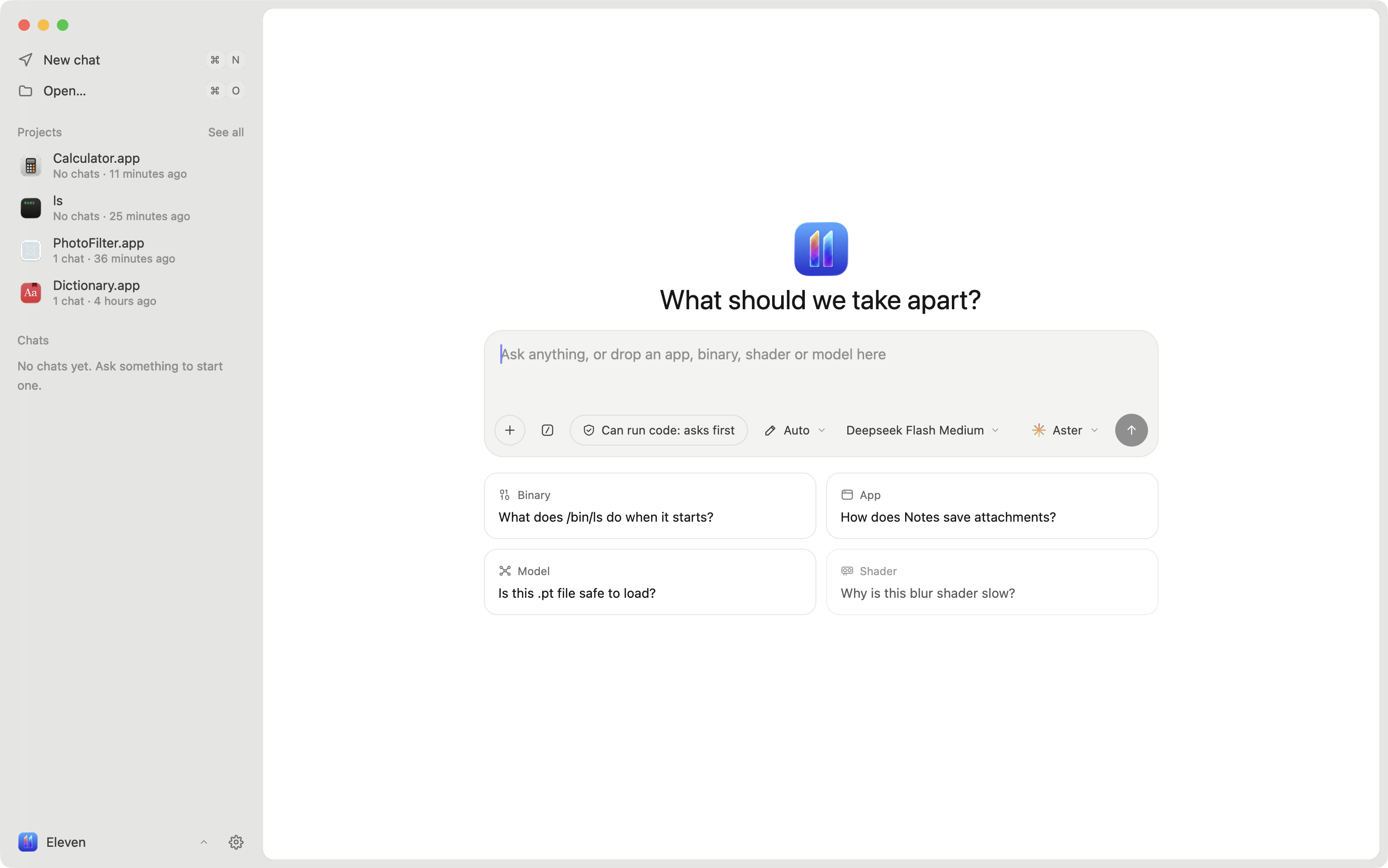
 Eleven — это настольное приложение для реверс-инжиниринга на macOS, Windows и Linux, построенное вокруг ИИ-агентов: вы открываете бинарник, Android APK, GPU-ядро, шейдер или модель, и любой агент, говорящий на Agent Client Protocol (ACP), читает код, переименовывает функции, оставляет заметки и предлагает патчи, пока вы наблюдаете и подтверждаете каждое изменение.
Eleven — это настольное приложение для реверс-инжиниринга на macOS, Windows и Linux, построенное вокруг ИИ-агентов: вы открываете бинарник, Android APK, GPU-ядро, шейдер или модель, и любой агент, говорящий на Agent Client Protocol (ACP), читает код, переименовывает функции, оставляет заметки и предлагает патчи, пока вы наблюдаете и подтверждаете каждое изменение.Eleven — это собственный декомпилятор или обёртка над инструментами вроде Ghidra?Eleven — это слой интерфейса и оркестрации агентов, а не декомпилятор сам по себе: нативный код (Mach-O, ELF, PE) декомпилируется через Ghidra посредством REA или через Rizin для быстрой загрузки, а Android APK читается с помощью jadx; собственный интерфейс приложения — это React, отрисовываемый нативно на GPUI через GPUIX.
Eleven — это слой интерфейса и оркестрации агентов, а не декомпилятор сам по себе: нативный код (Mach-O, ELF, PE) декомпилируется через Ghidra посредством REA или через Rizin для быстрой загрузки, а Android APK читается с помощью jadx; собственный интерфейс приложения — это React, отрисовываемый нативно на GPUI через GPUIX.Как запустить Eleven?На macOS 14+ (Apple Silicon) запустите установщик, чтобы положить Eleven.app в /Applications, на Windows x64 запустите прилагаемый установщик PowerShell, а на Linux x64 скачайте AppImage или .tar.gz из последнего релиза; при первом запуске вас проведут через выбор движка декомпиляции и агента.
На macOS 14+ (Apple Silicon) запустите установщик, чтобы положить Eleven.app в /Applications, на Windows x64 запустите прилагаемый установщик PowerShell, а на Linux x64 скачайте AppImage или .tar.gz из последнего релиза; при первом запуске вас проведут через выбор движка декомпиляции и агента.Какие агенты и движки декомпиляции ему нужны?Подходит любой агент с поддержкой ACP — Aster, Claude, Codex, Gemini, Cursor, Copilot, OpenCode и другие — а для декомпиляции нужны Ghidra 12.x с Java 21 или Rizin (оба устанавливаются автоматически при первом запуске); для Android-приложений дополнительно нужен jadx, а apktool опционален для smali.
Подходит любой агент с поддержкой ACP — Aster, Claude, Codex, Gemini, Cursor, Copilot, OpenCode и другие — а для декомпиляции нужны Ghidra 12.x с Java 21 или Rizin (оба устанавливаются автоматически при первом запуске); для Android-приложений дополнительно нужен jadx, а apktool опционален для smali.Есть ли подводные камни при установке?Сборка для macOS ещё не нотаризована, поэтому флаг карантина на скачивание придётся снять вручную; поддержка macOS ограничена Apple Silicon на macOS 14+, а Linux поставляется только как AppImage или .tar.gz, а не в виде пакетов дистрибутива.
Сборка для macOS ещё не нотаризована, поэтому флаг карантина на скачивание придётся снять вручную; поддержка macOS ограничена Apple Silicon на macOS 14+, а Linux поставляется только как AppImage или .tar.gz, а не в виде пакетов дистрибутива.Какие файлы Eleven вообще умеет открывать?Бинарники Mach-O, ELF и PE, Android APK и split-бандлы (.xapk, .apks), GPU-ядра CUDA/HIP, шейдеры Metal, а также файлы ML-моделей вроде GGUF, safetensors, PyTorch и ONNX.
Бинарники Mach-O, ELF и PE, Android APK и split-бандлы (.xapk, .apks), GPU-ядра CUDA/HIP, шейдеры Metal, а также файлы ML-моделей вроде GGUF, safetensors, PyTorch и ONNX.Могу ли я отменить изменения, которые агент вносит в бинарник?Да — каждое изменение, сделанное вами или агентом, логируется с указанием автора и может быть отменено, а байт-патчи от агентов приходят как предложения, которые вы явно принимаете или отклоняете.
Да — каждое изменение, сделанное вами или агентом, логируется с указанием автора и может быть отменено, а байт-патчи от агентов приходят как предложения, которые вы явно принимаете или отклоняете.Есть ли в Eleven отладчик?Да, вы можете запустить программу под LLDB прямо из Eleven, поставить точку останова на просматриваемую функцию, выполнять код по шагам и смотреть локальные переменные.
Да, вы можете запустить программу под LLDB прямо из Eleven, поставить точку останова на просматриваемую функцию, выполнять код по шагам и смотреть локальные переменные.Что такое встроенные Playbooks?Playbooks — это встроенные навыки вроде «первый осмотр», «переименовать функции», «проследить фичу» и «карта сети», которые дают любому подключённому агенту структурированный порядок действий для типовых задач реверс-инжиниринга.
Playbooks — это встроенные навыки вроде «первый осмотр», «переименовать функции», «проследить фичу» и «карта сети», которые дают любому подключённому агенту структурированный порядок действий для типовых задач реверс-инжиниринга.What are similar projects?rea, rea, awesome-reverse-engineering, dnSpy, jadx, ghidra, GhidraMCP, radare2
rea, rea, awesome-reverse-engineering, dnSpy, jadx, ghidra, GhidraMCP, radare2Which topics is it in?acp, patcher, disassembler, debugger, decompiler, binary-analysis, gguf, metal, onnx, model-context-protocol, reverse-engineering, security-tools
acp, patcher, disassembler, debugger, decompiler, binary-analysis, gguf, metal, onnx, model-context-protocol, reverse-engineering, security-tools