Most tools tell you what's wrong. CVE Lite CLI tells you what to run.





CVE Lite CLI
🏆 Officially recognized as an OWASP Lab Project
Vulnerability scanning that starts in your terminal and fits cleanly into CI.
Scan your lockfile, get copy-and-run fix commands, and ship clean code.
Scan. Understand. Fix.
| 🏆 |
🎯 |
🔒 |
OWASP Lab Project
Peer-reviewed by the org behind the OWASP Top 10:
the security standard followed by millions of developers |
Remediation-first
Validated fix commands + parent-aware
transitive guidance: not just CVE IDs |
Runs locally
Package names and versions are checked online, or fully offline with --offline. |
🏆 Featured on GitHub Open Source Friday ·
Ranked #5 in Help Net Security's 20 open-source security tools ·
OpenSSF Best Practices
Covered by
The Register ·
CSO Online ·
SecurityWeek ·
SD Times ·
DevOps.com ·
ReversingLabs
Used by
SolidJS,
Valibot,
the Government of British Columbia as a required merge gate, and
the Government of France.
In public repositories in France, Canada, Germany, Thailand and China. See who uses it.
⚡ One command. No account, no API key, no source code uploaded.
npx cve-lite-cli .
→ Quick Start
Quick Start •
Usage •
Screenshots •
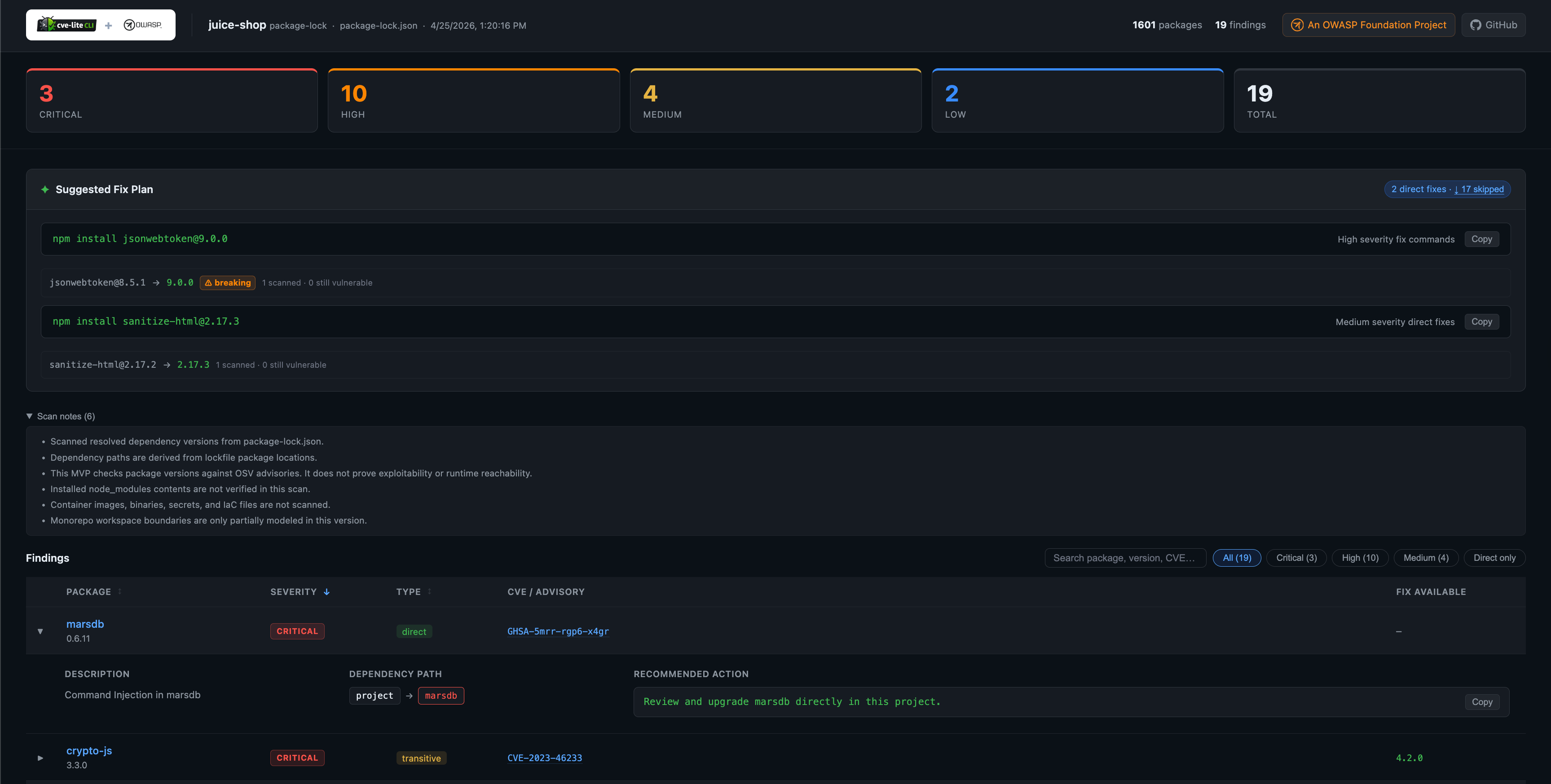
HTML Report •
Compare •
Roadmap •
Contributing •
Join Slack
Quick start
npm install -g cve-lite-cli
cve-lite /path/to/project
Or one-off with npx:
npx cve-lite-cli /path/to/project
No account. No configuration. No source code leaves your machine.
CVE Lite CLI never uploads source code or lockfiles. In online mode, it sends package names and versions to advisory services, including OSV and the public npm registry advisory API. OSV and npm advisory APIs are not the only destinations receiving data during online scans: fix validation looks up package names (not versions) on the configured package registry, which is public npm by default, and EPSS enrichment sends the CVE IDs of findings to FIRST's API. Configuring an internal OSV endpoint only redirects OSV requests; npm advisory requests still use the public npm registry. Use --offline to scan against a local advisory database when dependency metadata must not leave your machine.
Note: CVE Lite CLI includes better-sqlite3, a native SQLite binding used for the local advisory database. During installation, npm may download a prebuilt binary or compile one from source. This can produce extra console output: it is expected and is not CVE Lite CLI itself running an install script. See Dependency footprint for details.
Usage
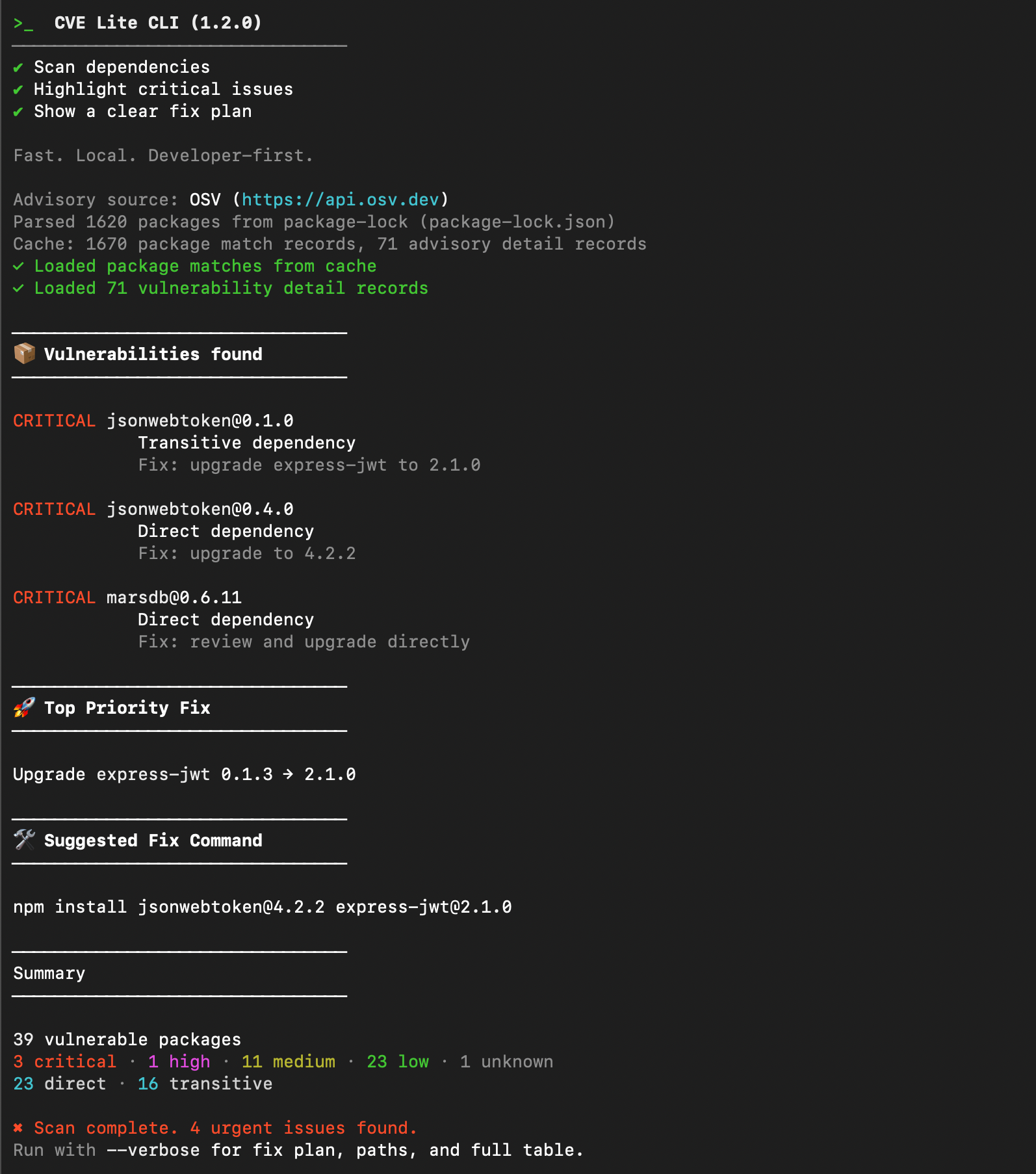
cve-lite /path/to/project                   # basic scan
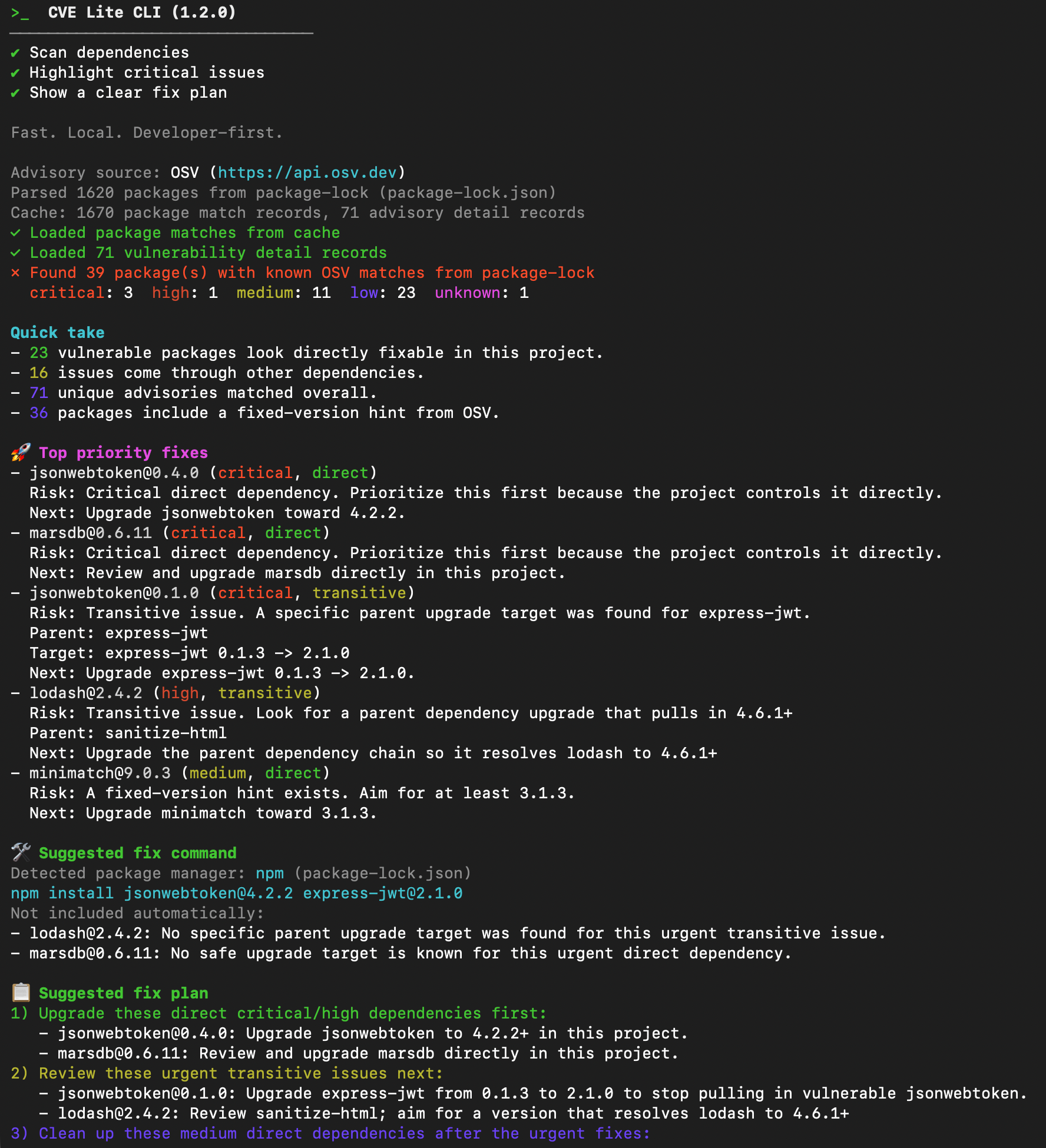
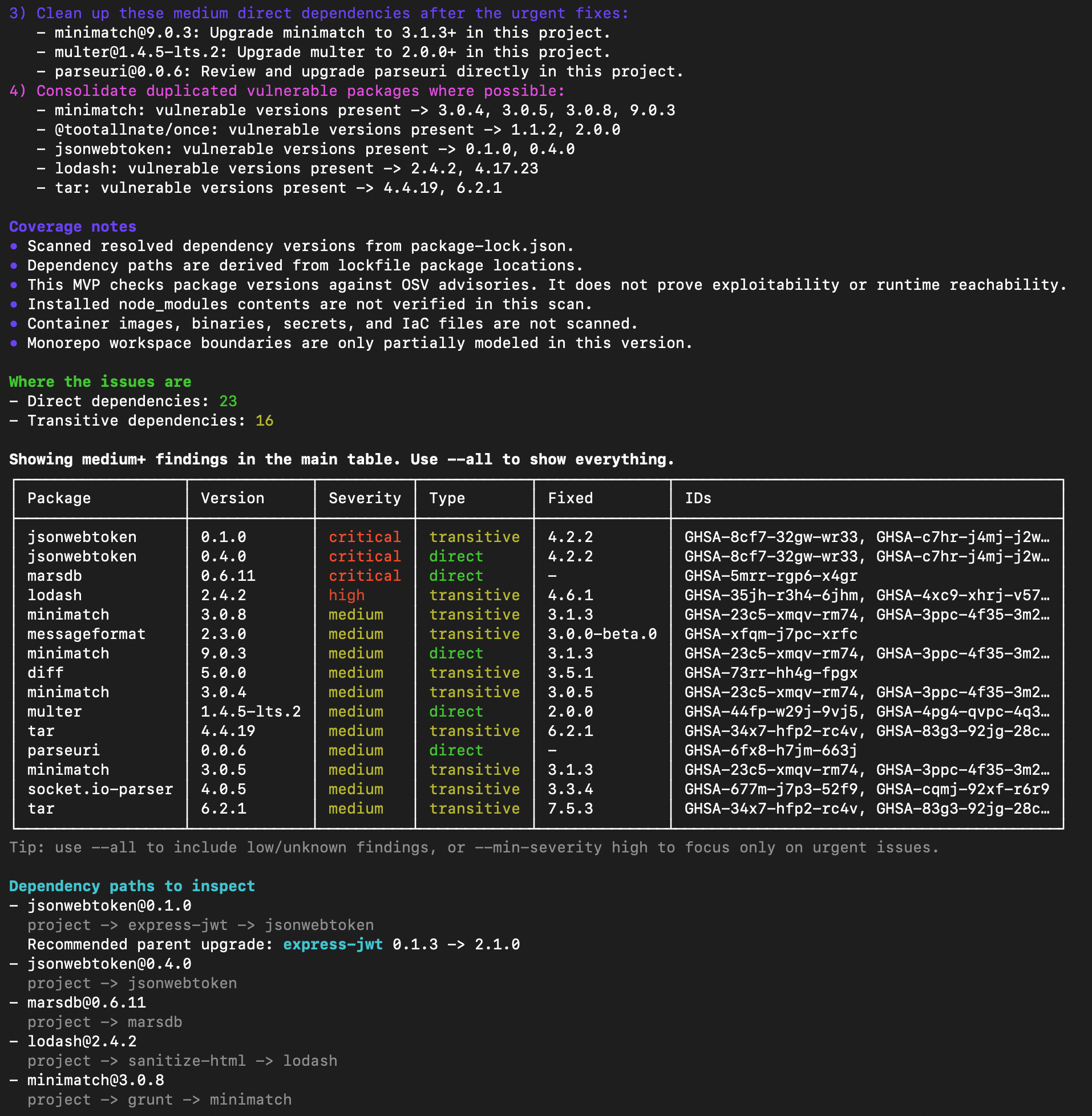
cve-lite /path/to/project --verbose         # full fix plan with dependency paths
cve-lite /path/to/project --fix             # apply validated direct fixes and rescan
cve-lite /path/to/project --fail-on high    # exit non-zero on high severity and above
cve-lite /path/to/project --json            # JSON output
cve-lite /path/to/project --sarif           # SARIF output for GitHub Code Scanning
cve-lite /path/to/project --sbom spdx       # SPDX 2.3 SBOM (also: --sbom cyclonedx)
cve-lite /path/to/project --sarif --output reports # write output files into ./reports
cve-lite /path/to/project --report          # interactive HTML dashboard
cve-lite /path/to/project --check-overrides # audit override hygiene alongside the CVE scan
cve-lite /path/to/project --check-maintenance # flag CVE-blocking version drag and npm-deprecated direct deps
cve-lite /path/to/project --check-licenses  # detect copyleft and unknown licenses alongside the CVE scan
cve-lite /path/to/project --python          # scan pinned Python requirements.txt (experimental)
cve-lite advisories sync                    # sync advisory DB for offline use
cve-lite advisories init                    # create an empty advisory DB to populate yourself
cve-lite /path/to/project --offline         # scan with no runtime API calls
For the full flag reference and exit codes see the CLI Reference guide and Fix mode guide.
Override hygiene (overrides)
overrides and resolutions are powerful, but they rot. CVE Lite CLI audits them across npm, pnpm, yarn, and bun, catching thirteen classes of problem:
| Rule |
What it catches |
OA001 |
Orphaned target: override for a package no longer in the tree |
OA002 |
Floating tag: override pinned to a moving tag (latest, next) |
OA003 |
Wrong section: override placed in the wrong container |
OA004 |
Surpassed pin: the rest of the tree has moved past the pin |
OA005 |
Nested ineffective override that never applies |
OA006 |
Coupled platform binary: override fights a parent's exact pin |
OA007 |
Frozen latest: registry has drifted past the pinned version (needs --check-network) |
OA008 |
Materialized vulnerable copy still on disk despite the override |
OA009 |
Stale floor: override range floor already met by all parent declarations |
OA010 |
Vulnerable floor: override range admits a known-vulnerable version (needs --check-network) |
OA011 |
Exceeds declared range: override floor can resolve into a major version no parent permits |
PD001 |
Override-only phantom: package imported in source but only present via an override pin |
PD002 |
Transitive-only phantom: package imported in source but only present as a transitive dependency |
Use the overrides subcommand for a hygiene-only run (no CVE scan, faster, fully offline-capable) with auto-fix support. Use --check-overrides to append hygiene results to a regular CVE scan in one pass.
cve-lite /path/to/project overrides           # hygiene only - no CVE scan
cve-lite /path/to/project overrides --fix     # hygiene only, auto-fix where possible
cve-lite /path/to/project --check-overrides   # CVE scan + hygiene in one pass
For the full guide with per-rule examples and CI patterns, see the Override Hygiene Auditing guide.
Maintenance risk (--check-maintenance)
A CVE scanner tells you a transitive package is vulnerable. It does not tell you why you can't fix it - often a direct dependency of yours pins it below the fix, and clearing it needs a breaking major upgrade the scanner never mentions. The DM001 rule surfaces exactly that, plus direct dependencies npm has marked deprecated.
| Signal |
Severity |
What it means |
| Constraint drag |
high |
A direct dependency blocks a transitive CVE fix behind a major-version upgrade |
| Deprecated on npm |
medium |
A direct dependency is deprecated - no fix is coming through a normal update |
Packages that have not published in years get a Last release context line; release age is informational, not a severity signal on its own.
cve-lite /path/to/project --check-maintenance              # CVE scan + maintenance risk
cve-lite /path/to/project --check-maintenance --fail-on high
For the full guide, see the Maintenance Risk Detection guide.
Release cooldown awareness
Package managers added a release cooldown to skip the danger window right after a version is published, when a hijacked release is live but not yet caught (the chalk/debug compromise sat live for about two hours). CVE Lite CLI reads the cooldown your project already configures and warns when a recommended fix is newer than that window, so it never quietly pushes you onto a version your own package manager would refuse to install.
High severity fix commands
  ⚠ Published 2026-07-01, newer than your configured 365 day release cooldown (.npmrc); your package manager would hold this version - validate before overriding.
> npm install [email protected]   (published 2026-07-01)
The warning is advisory and on by default (no flag, no exit-code change). It reads min-release-age (npm), minimumReleaseAge (pnpm), or npmMinimalAgeGate (Yarn); it never invents a window.
For the full guide, see the Release Cooldown Awareness guide.
What it looks like
Verbose terminal output: includes the full fix plan

Why CVE Lite CLI
Most security tooling is built around pipelines, not developers. Dependabot opens PRs you'll get to eventually. CI scanners block merges after the fact. Dashboards surface lists of CVE IDs with no clear path to fixing them. Developers learn to ignore it.
CVE Lite CLI is built for the moment before you push. It reads your lockfile locally, queries OSV and the npm registry advisory API, and produces copy-and-run npm install, pnpm add, yarn add, or bun add commands, not a list of identifiers. You see which packages are direct versus transitive, get parent-aware upgrade guidance, and can scan offline in restricted environments.
The closer a security tool is to a developer's natural workflow, the more likely it is to be used.
How it compares
No other free tool combines all of the following: lockfile scanning across npm, pnpm, Yarn, and Bun; parent-aware transitive remediation that tells you which package to upgrade (not just which one is vulnerable); fix version validation before suggesting an upgrade; a fully offline advisory DB for restricted environments; CVE + license compliance scanning in a single pass; SBOM output in both CycloneDX and SPDX with the vulnerability findings attached rather than as a separate inventory step; and an EPSS priority signal that combines CVSS severity with exploitation likelihood into four actionable tiers.
✅ = built-in strength · ⚠️ = partial or workflow-dependent · ❌ = not a core strength
The transitive parent guidance is a key difference: CVE Lite CLI avoids recommending direct installs for packages that are only present transitively. For npm lockfiles, it can identify when npm update <child> is enough to refresh a known non-vulnerable child within the current parent range, and when the parent package itself needs an upgrade.
For detailed per-tool analysis, see Comparison with other tools.
Replace Dependabot with one batched PR
CVE Lite CLI v1.26.0 ships a GitHub Action fix mode that runs on a schedule and opens a single batched pull request with all validated dependency upgrades - advisory IDs, before/after finding counts, and OSV-confirmed fix versions included.
Add this file to your repo:
# .github/workflows/cve-lite-fix.yml
name: CVE Lite security fixes
on:
  schedule:
    - cron: '0 6 * * 1'  # every Monday at 6am
  workflow_dispatch:
permissions:
  contents: write
  pull-requests: write
jobs:
  fix:
    runs-on: ubuntu-latest
    steps:
      - uses: actions/checkout@3d3c42e5aac5ba805825da76410c181273ba90b1 # v7.0.1
        with:
          ref: ${{ github.event.repository.default_branch }}
      - uses: OWASP/cve-lite-cli@v1
        with:
          fix: 'true'
          create-pr: 'true'
|
Dependabot |
CVE Lite fix mode |
| PRs per run |
One per package |
One batched PR |
| Advisory IDs in PR body |
No |
Yes (GHSA-xxxx, CVE-xxxx) |
| Fix version validated against OSV |
No |
Yes |
| Before/after finding counts |
No |
Yes |
| pnpm / Yarn Berry / Bun |
Limited |
Full native support |
| OWASP recognition |
No |
OWASP Lab Project |
Full Action documentation -> - for scan-only CI gating see the CI and Workflow Integration guide.
Real-world validation
CVE Lite CLI has been evaluated against real open-source projects to verify that it surfaces meaningful issues - including non-obvious transitive vulnerabilities and complex upgrade paths - not just low-signal advisory matches.
- OWASP Juice Shop - scanning a deliberately vulnerable application with known dependency issues
- NestJS - working through a real transitive dependency remediation sequence across a widely-used Node.js framework
- Visual Studio Code - two direct Anthropic SDK advisories and a high-severity gulp toolchain chain in the VS Code root lockfile
- Gatsby - Yarn Classic monorepo with 128 findings, five direct CVEs, and CVE Lite vs
yarn audit deduplication
- Analog - modern pnpm Angular monorepo with unexpected toolchain vulnerabilities
20+ case studies across npm, pnpm, Yarn, and Bun projects ->
In-repo lockfile fixtures for most projects live under examples/ - clone and scan immediately without downloading full upstream checkouts.
These are not demos. They are documented scans against real codebases with real findings, recorded before and after applying fix commands.
If you maintain an open-source JavaScript or TypeScript project and want CVE Lite CLI evaluated on it, open an issue and share the repository.
Press
Full press coverage ->
Recognized by OWASP
OWASP (Open Web Application Security Project) is the globally recognized nonprofit behind the security standards followed by millions of developers worldwide - most notably the OWASP Top 10, the most widely cited web application security reference in the industry. Organizations from startups to Fortune 500 companies use OWASP guidelines as the foundation of their security programs.
CVE Lite CLI is an OWASP Lab Project - reviewed and accepted by the OWASP community as a vendor-neutral, open source security tool.
Where it fits in the OWASP ecosystem:
CVE Lite CLI fills a specific gap - fast, local-first JS/TS dependency scanning close to release time - that broader OWASP tools are not optimized for:
| Tool |
Focus |
| CVE Lite CLI |
Lockfile-first, local developer CLI, remediation-focused, JS/TS |
| OWASP Dependency-Check |
Multi-language, SAST-style, broader ecosystem |
| OWASP dep-scan |
Multi-language and environment, SBOM and cloud-native |
| OWASP Dependency-Track |
Platform and SBOM management, not a local CLI |
CVE Lite CLI complements these tools. It is not a replacement for continuous monitoring or full SBOM management - it is the fast local check you run before pushing.
Community and adoption
CVE Lite CLI runs in public repositories across governments, open-source libraries, companies, and independent developers. The Who uses CVE Lite CLI? page links every adopter to the public file that proves it.
Notable adopters include:
- SolidJS - the framework's creator, Ryan Carniato, added CVE Lite CLI to its CI in his own commit. It scans every push and pull request to the main branch and reports results to GitHub Code Scanning
- Valibot and Formisch - security workflows that run the scan and publish results to GitHub Code Scanning, merged by their creator, Fabian Hiller. Valibot has about 14 million npm downloads a week
- Government of British Columbia (Canada) - a required check on every push and pull request in its Waste Plus natural resources application, alongside Trivy and npm audit
- Government of France - pre-push scans that block high and critical vulnerabilities in Réfugiés.info, the government's information portal for refugees, and in IA dans l'État, the state's interministerial AI programme
Teaching and learning
Teach dependency security with CVE Lite Classroom: free, open-source, hands-on exercises covering vulnerability remediation, critical review of AI-assisted fixes, and CI security gates. Includes runnable applications, instructor guides, worked solutions, and grading rubrics, with tracks for npm, pnpm, Yarn, and Bun.
Explore the classroom exercises
CVE Lite Classroom is a companion project maintained by the author of CVE Lite CLI, separate from the OWASP project.
Current limitations
- does not detect malicious packages before they appear in advisory data
- does not perform behavioral malware detection or package content analysis
- does not prove exploitability or verify runtime reachability
- does not scan container images, binaries, secrets, or IaC
- does not replace a full application security program
- currently focused on JS/TS dependency scanning
- local advisory sync performance will need continued optimization as the advisory dataset grows
Runtime: yaml · yarn-lockfile · better-sqlite3 · fflate · semver
Dev only: @types/node · tsx · typescript
This is intentional. Because CVE Lite CLI is a security-oriented tool, runtime dependencies are kept minimal and reviewable.
Native dependency: better-sqlite3
better-sqlite3 is a native Node.js addon that provides the SQLite binding for CVE Lite CLI's local advisory database. This database powers offline scanning (--offline, --offline-db), advisory sync (cve-lite advisories sync), and air-gapped workflows (cve-lite advisories init).
Because it includes compiled C/C++ code, npm must run an install script when installing better-sqlite3. During installation:
- Prebuilt binary available:
prebuild-install downloads a prebuilt binary for your platform: fast, though npm may still print a deprecation warning for prebuild-install itself (#519).
- No prebuilt available: the package falls back to compiling from source using
node-gyp, which requires a C/C++ toolchain and produces more console output.
This install step belongs to better-sqlite3, not to CVE Lite CLI: the project itself does not define any preinstall, install, or postinstall hooks.
npm install-script permissions: Depending on your npm version and configuration, npm may prompt you to approve the install script before it runs. This is an npm security feature. Online scanning works even when the install script is blocked: the native binding is loaded lazily and only used by --offline, --offline-db, cve-lite advisories sync, and cve-lite advisories init. If you use any of those features, the better-sqlite3 install script must be allowed to complete.
npx behavior: When using npx cve-lite-cli, a quiet run does not necessarily mean the install script was skipped. If npm's cache already contains the required prebuilt binary, installation is silent. On a cold cache, the same native install step runs.
More documentation
- Troubleshooting guide - no lockfile found, zero results, slow advisory sync, offline DB errors,
--fix skipping findings, CI failures
- Parser Coverage guide - supported lockfile formats, selection priority,
package.json fallback, monorepos, private registries
- Remediation Strategy guide - how CVE Lite CLI chooses upgrade targets and parent update paths
- Release Cooldown Awareness guide - how CVE Lite CLI reads your package manager's cooldown and warns on fix versions newer than the window you trust
- SPDX SBOM guide - SPDX 2.3 output, how findings are attached, NTIA minimum elements, and inventory-only mode
- CycloneDX SBOM guide - CycloneDX 1.6 output and Dependency-Track integration
Security and verification
Every release is signed - GPG-signed git tags for source, Sigstore Artifact Attestations for the release tarball, and ECDSA signatures via the npm registry. Verify with:
gh attestation verify cve-lite-cli-X.Y.Z.tgz --repo OWASP/cve-lite-cli
npm audit signatures
For full details, fingerprints, and the project's threat model, see SECURITY.md and the Security Assurance Case.
For governance details - roles, decision-making, and dispute resolution - see CONTRIBUTING.md.
Contributing
Feedback on output clarity, remediation guidance, ecosystem coverage, and CI usage is especially valuable.
See CONTRIBUTING.md to get started.
Add a badge to your project
If you use CVE Lite CLI in your project, add this badge to your README:
[](https://github.com/OWASP/cve-lite-cli)
Community and support
For bug reports and feature requests: GitHub Issues
Helpful feedback includes reproducible bug reports, real-world lockfile edge cases, ideas for clearer output and remediation guidance, and CI or JSON workflow examples.
Using CVE Lite CLI at your company or in your projects? Share your use case in the community thread.
For security-related reporting: SECURITY.md
This project follows a Code of Conduct. Please review it before participating.
If CVE Lite CLI helps your release workflow, a GitHub star helps more developers find it.
Contributors
Thanks to everyone who helps improve CVE Lite CLI - issues, pull requests, documentation, case studies, and real-world lockfile feedback all count.

Avatar grid generated from the GitHub contributors graph via contrib.rocks.
New here? See CONTRIBUTING.md to get started, and review the Code of Conduct before participating.
Thank you to those who sponsor CVE Lite CLI and help keep it maintained:
Maintainer note: CVE Lite CLI is an OWASP Lab Project maintained by Sonu Kapoor. The goal is to build a tool the security and developer community trusts and returns to - not a product that requires vendor lock-in or a dashboard to be useful. If you find a real-world lockfile edge case, a remediation gap, or a workflow that doesn't fit, open an issue. Real-world feedback from real projects is the most valuable input this project gets. See CONTRIBUTING.md for how to get involved.
License
MIT - built in public and maintained as an OWASP Foundation Project by Sonu Kapoor.



 CVE Lite CLI 是一个快速、对开发者友好的命令行扫描工具,用于检查 JavaScript/TypeScript 依赖。它会在本地扫描你的锁文件,并比对 OSV 和 npm 安全公告数据,然后给出可直接复制运行的修复命令,而不只是一串 CVE 编号。