 OpenClaw-RL














5.7K ·GitHub
Что это такое?
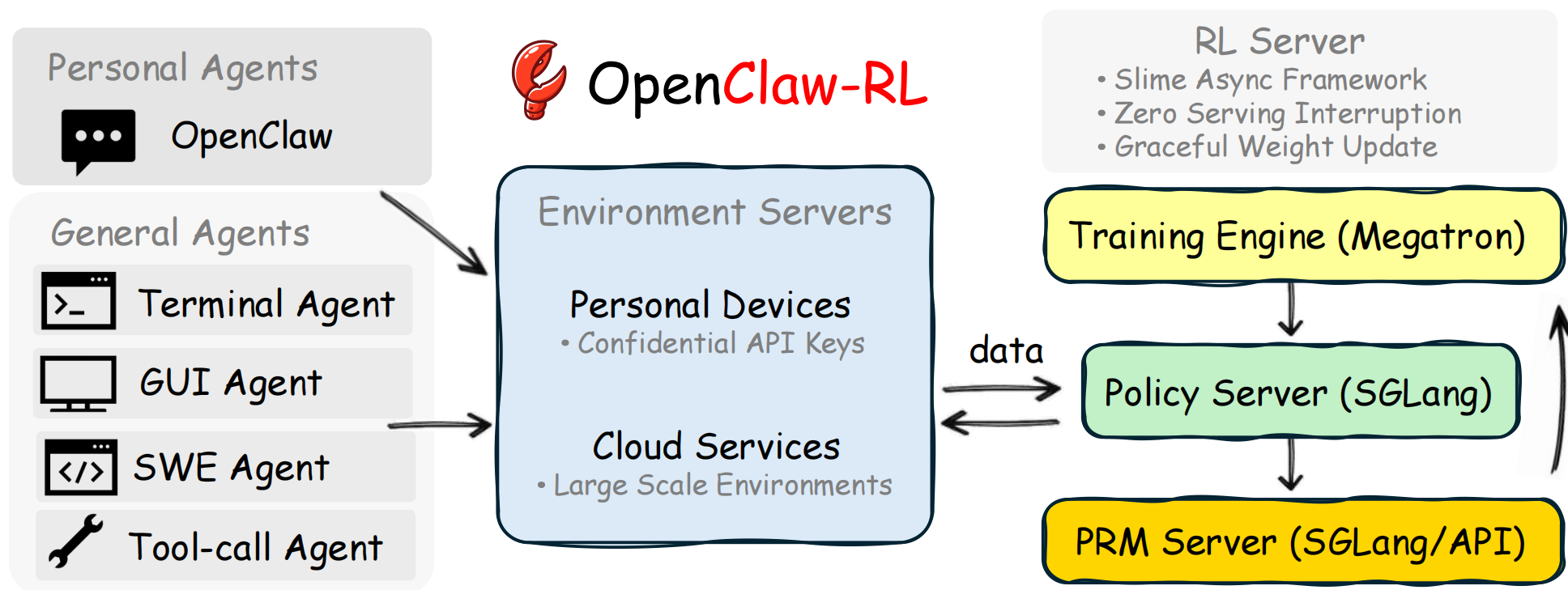
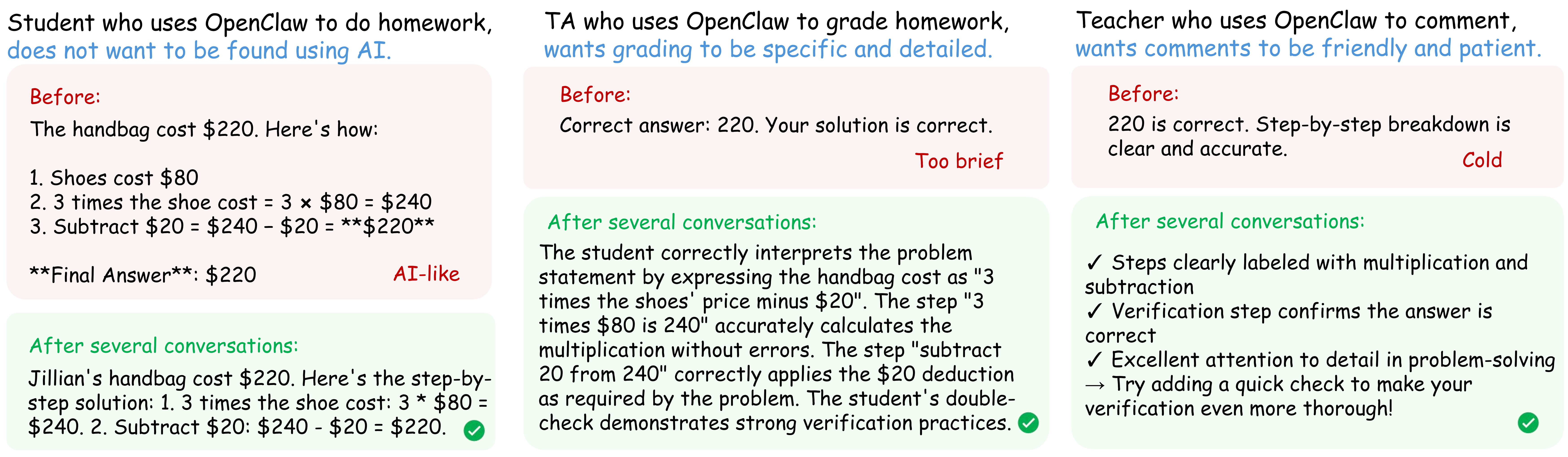
 OpenClaw-RL — полностью асинхронный фреймворк обучения с подкреплением, который превращает повседневные разговоры с агентом в сигналы для обучения. Так можно обучить персонализированного агента OpenClaw, просто общаясь с ним, или обучить универсальных агентов для задач в терминале, GUI, SWE и вызовов инструментов.
OpenClaw-RL — полностью асинхронный фреймворк обучения с подкреплением, который превращает повседневные разговоры с агентом в сигналы для обучения. Так можно обучить персонализированного агента OpenClaw, просто общаясь с ним, или обучить универсальных агентов для задач в терминале, GUI, SWE и вызовов инструментов.Это готовый агент или фреймворк, к которому я подключаю свой агент?Это фреймворк для обучения, а не самостоятельный агент: он оборачивает вашу собственную модель в API, совместимый с OpenAI, и запускает четыре независимых асинхронных цикла (раздача запросов, сбор траекторий, оценка, обучение политики) поверх базового RL-фреймворка Slime.
Это фреймворк для обучения, а не самостоятельный агент: он оборачивает вашу собственную модель в API, совместимый с OpenAI, и запускает четыре независимых асинхронных цикла (раздача запросов, сбор траекторий, оценка, обучение политики) поверх базового RL-фреймворка Slime.Как заставить это обучать моего агента?Настройте окружение по инструкции ./instructions/README.md (CUDA 12.9, Python 3.12, Slime), запустите RL-сервер, чтобы ваша модель была доступна как API, совместимый с OpenAI, затем добавьте этот эндпоинт как провайдера в openclaw.json вашего OpenClaw. Сервер собирает ваши разговоры и обучается в фоне, пока вы общаетесь с агентом.
Настройте окружение по инструкции ./instructions/README.md (CUDA 12.9, Python 3.12, Slime), запустите RL-сервер, чтобы ваша модель была доступна как API, совместимый с OpenAI, затем добавьте этот эндпоинт как провайдера в openclaw.json вашего OpenClaw. Сервер собирает ваши разговоры и обучается в фоне, пока вы общаетесь с агентом.Нужен ли мне полноценный кластер GPU, чтобы это запустить?По умолчанию да: 8 GPU (настраивается через NUM_GPUS, ACTOR_GPUS, ROLLOUT_GPUS, PRM_GPUS), а также CUDA 12.9, Python 3.12 и фреймворк Slime RL. Либо можно обойтись без локальных GPU и запускать через облачные бэкенды, например Tinker или Fireworks AI.
По умолчанию да: 8 GPU (настраивается через NUM_GPUS, ACTOR_GPUS, ROLLOUT_GPUS, PRM_GPUS), а также CUDA 12.9, Python 3.12 и фреймворк Slime RL. Либо можно обойтись без локальных GPU и запускать через облачные бэкенды, например Tinker или Fireworks AI.В чём подвох у настройки в одну строку?Базовая настройка личного агента требует серьёзного железа (8 GPU) или платного облачного бэкенда. Кроме того, это проект на стадии исследований (v1 вышла в феврале 2026), построенный на конкретной базе, Slime, поэтому для обучения вы привязаны к этому стеку.
Базовая настройка личного агента требует серьёзного железа (8 GPU) или платного облачного бэкенда. Кроме того, это проект на стадии исследований (v1 вышла в феврале 2026), построенный на конкретной базе, Slime, поэтому для обучения вы привязаны к этому стеку.Покидают ли данные моих разговоров мой компьютер во время обучения?Нет — модель политики, судья/PRM и обучающий модуль работают на вашей собственной инфраструктуре, и API сторонней модели не требуется.
Нет — модель политики, судья/PRM и обучающий модуль работают на вашей собственной инфраструктуре, и API сторонней модели не требуется.Чем отличаются Binary RL, OPD и гибридный метод?Binary RL (GRPO) оценивает каждый ход с помощью модели вознаграждения и применяет обновления GRPO в духе PPO. OPD — модель-судья формирует подсказку задним числом, которая порождает улучшенный ответ учителя, и разница на уровне токенов между учителем и учеником становится сигналом для обучения. Гибридный метод объединяет оба сигнала и даёт более сильную оптимизацию, чем каждый из них по отдельности.
Binary RL (GRPO) оценивает каждый ход с помощью модели вознаграждения и применяет обновления GRPO в духе PPO. OPD — модель-судья формирует подсказку задним числом, которая порождает улучшенный ответ учителя, и разница на уровне токенов между учителем и учеником становится сигналом для обучения. Гибридный метод объединяет оба сигнала и даёт более сильную оптимизацию, чем каждый из них по отдельности.Что такое OpenClaw в этом контексте?OpenClaw — это самостоятельно развёрнутый ИИ-агент, которого обучают. Вы устанавливаете расширение, чтобы ваш OpenClaw направлял свой трафик через RL-сервер, и тот учится на каждом разговоре.
OpenClaw — это самостоятельно развёрнутый ИИ-агент, которого обучают. Вы устанавливаете расширение, чтобы ваш OpenClaw направлял свой трафик через RL-сервер, и тот учится на каждом разговоре.Какие типы агентов, кроме личного чата, поддерживаются?Track 2 расширяет ту же асинхронную RL-основу на терминальных агентов (песочницы оболочки), GUI-агентов (состояние экрана и дерево доступности), SWE-агентов (репозитории кода с наборами тестов) и агентов вызова инструментов (выполнение API и функций).
Track 2 расширяет ту же асинхронную RL-основу на терминальных агентов (песочницы оболочки), GUI-агентов (состояние экрана и дерево доступности), SWE-агентов (репозитории кода с наборами тестов) и агентов вызова инструментов (выполнение API и функций).Проверено ли это за пределами самого репозитория?Да: команда опубликовала технический отчёт, который занял первое место в Daily Papers на Hugging Face. Кроме того, фреймворк теперь поддерживает модели Qwen3.5 (4B/9B/27B, как текстовые, так и мультимодальные).
Да: команда опубликовала технический отчёт, который занял первое место в Daily Papers на Hugging Face. Кроме того, фреймворк теперь поддерживает модели Qwen3.5 (4B/9B/27B, как текстовые, так и мультимодальные).Which topics is it in?openclaw-skills, grpo, llm-training, rlhf, sglang, coding, lora, async, openclaw, agent-framework, reinforcement-learning, agent-memory
openclaw-skills, grpo, llm-training, rlhf, sglang, coding, lora, async, openclaw, agent-framework, reinforcement-learning, agent-memory