Two commands. That's it.
metaclaw setup              # one-time config wizard
metaclaw start              # default: auto mode — skills + scheduled RL training
metaclaw start --mode rl    # RL without scheduler (trains immediately on full batch)
metaclaw start --mode skills_only  # skills only, no RL (no Tinker needed)
🔥 News
- [04/11/2026] v0.4.1 — Incremental memory ingestion: the memory layer now extracts and persists turns every N turns (default 5) instead of only at session end, shrinking the mid-session memory blackout window.
- [03/25/2026] v0.4.0 — Contexture layer: MetaClaw now persists cross-session memory for users and projects. Relevant facts, preferences, and project history are automatically retrieved and injected into prompts. Includes adaptive memory policy, background consolidation, and an optional memory sidecar service.
- [03/24/2026] v0.3.3 — One-click OpenClaw plugin: MetaClaw now ships as a native OpenClaw extension — drop the folder into OpenClaw's extensions, run one command, and everything is set up automatically.
- [03/18/2026] Our technical report "MetaClaw: Just Talk -- An Agent That Meta-Learns and Evolves in the Wild" is out! 🏆 Ranked No. 1 on HuggingFace Daily Papers! Check it out!
- [03/16/2026] v0.3.2 — Multi-claw support: IronClaw, PicoClaw, ZeroClaw, CoPaw, NanoClaw, and NemoClaw now supported alongside OpenClaw. NanoClaw connected via new
/v1/messages Anthropic-compatible endpoint; NemoClaw via OpenShell inference routing. Added OpenRouter as a supported LLM platform.
- [03/13/2026] v0.3.1 — MinT backend support: RL training now works with both Tinker and MinT. Configurable via
rl.backend (auto/tinker/mint).
- [03/13/2026] v0.3 — Continual meta-learning support: slow RL updates now only run during sleep hours, idle time, or Google Calendar meetings. Added support/query set separation to prevent stale reward signals from polluting model updates.
- [03/11/2026] v0.2 — One-click deployment via
metaclaw CLI. Skills enabled by default, RL is now opt-in.
- [03/09/2026] We release MetaClaw — Just talk to your agent and let it evolve automatically. NO GPU deployment required; just plug into the API.
🎥 Demo
https://github.com/user-attachments/assets/d86a41a8-4181-4e3a-af0e-dc453a6b8594
📖 Overview
MetaClaw is an agent that meta-learns and evolves in the wild.
Just talk to your agent as you normally would — MetaClaw turns every live conversation into a learning signal, enabling the agent to continuously improve through real-world deployment rather than offline training alone.
Under the hood, it places your model behind a proxy that intercepts interactions from your personal agent (OpenClaw, CoPaw, IronClaw, PicoClaw, ZeroClaw, NanoClaw, NemoClaw, or any OpenAI-compatible client), injects relevant skills at each turn, and meta-learns from accumulated experience. For Anthropic-native agents like NanoClaw, MetaClaw also exposes a /v1/messages Anthropic-compatible endpoint so the full pipeline works without any agent-side changes. Skills are summarized automatically after each session; with RL enabled, a meta-learning scheduler defers weight updates to idle windows so the agent is never interrupted during active use.
No GPU cluster required. MetaClaw works with any OpenAI-compatible LLM API out of the box, and uses a Tinker-compatible backend for cloud-based LoRA training. Tinker is the default reference path; MinT and Weaver can be enabled through separate compatibility packages when needed.
🤖 Key Features
One-click deployment
Configure once with metaclaw setup, then metaclaw start brings up the proxy, injects skills, and wires your chosen personal agent (OpenClaw, CoPaw, or IronClaw) automatically. No manual shell scripts needed.
Three operating modes
| Mode |
Default |
What it does |
skills_only |
|
Proxy your LLM API. Skills injected and auto-summarized after each session. No GPU/Tinker required. |
rl |
|
Skills + RL training (GRPO). Trains immediately when a batch is full. Optional OPD for teacher distillation. |
auto |
✅ |
Skills + RL + smart scheduler. RL weight updates only run during sleep/idle/meeting windows. |
Long-term memory
MetaClaw can persist facts, preferences, and project history across sessions and inject relevant context at each turn — so your agent remembers what you've told it, even weeks later.
Asynchronous by design
Serving, reward modeling, and training are fully decoupled. The agent continues responding while scoring and optimization run in parallel.
🚀 Quick Start
1. Install
OpenClaw (one-click): use the v0.4.0 release—run the snippet below, then metaclaw setup and metaclaw start. More detail (Windows, mirrors, config, troubleshooting): extensions/metaclaw-openclaw/README.md.
curl -LO https://github.com/aiming-lab/MetaClaw/releases/download/v0.4.0/metaclaw-plugin.zip
unzip metaclaw-plugin.zip -d ~/.openclaw/extensions
openclaw plugins enable metaclaw-openclaw && openclaw gateway restart
pip (PyPI or this repo):
pip install -e .                        # skills_only mode (lightweight)
pip install -e ".[rl]"                  # + RL training support (torch, transformers, tinker)
pip install -e ".[evolve]"              # + skill evolution via OpenAI-compatible LLM
pip install -e ".[scheduler]"           # + Google Calendar integration for scheduler
pip install -e ".[rl,evolve,scheduler]" # recommended for full RL + scheduler setup
(Optional) WeChat integration uses the official @tencent-weixin/openclaw-weixin plugin. MetaClaw auto-installs it when WeChat is enabled:
metaclaw config wechat.enabled true
metaclaw start
The plugin is installed automatically on metaclaw start. You can also install it manually:
npx -y @tencent-weixin/openclaw-weixin-cli@latest install
To switch WeChat accounts (re-login with a new QR code):
metaclaw start --wechat-relogin
If you want to run rl.backend=mint, install the MinT compatibility package separately in the same environment, for example mindlab-toolkit. Similarly, for rl.backend=weaver, install nex-weaver separately. MetaClaw keeps these dependencies out of the default package so RL users can choose Tinker, MinT, or Weaver explicitly.
metaclaw setup
The interactive wizard will ask you to:
- Choose your personal agent —
openclaw, copaw, ironclaw, picoclaw, zeroclaw, nanoclaw, nemoclaw, or none (MetaClaw will auto-configure it on start)
- Choose your auth method —
api_key (direct API) or oauth_token (CLI subprocess)
- Choose your LLM provider:
- api_key: Kimi, Qwen, OpenAI, Volcano Engine, or custom → enter API base + API key
- oauth_token: Anthropic (Claude Code), OpenAI Codex, or Gemini CLI → paste OAuth token
- Enter your model ID and optionally enable RL training
MetaClaw's RL path can switch explicitly between tinker, mint, and weaver. auto is the recommended default and will infer the backend from credentials, base URLs, or environment variables when the corresponding package is installed.
Tinker:
metaclaw config rl.backend tinker
metaclaw config rl.api_key sk-...
metaclaw config rl.model moonshotai/Kimi-K2.5
MinT:
metaclaw config rl.backend mint
metaclaw config rl.api_key sk-mint-...
metaclaw config rl.base_url https://mint.macaron.xin/
metaclaw config rl.model Qwen/Qwen3-4B-Instruct-2507
Weaver:
metaclaw config rl.backend weaver
metaclaw config rl.api_key sk-...
metaclaw config rl.base_url https://weaver-console.nex-agi.cn
metaclaw config rl.model Qwen/Qwen3-8B
Legacy aliases rl.tinker_api_key and rl.tinker_base_url are still accepted for backward compatibility.
3. Start
metaclaw start
That's it. MetaClaw starts the proxy, automatically configures your chosen personal agent to use it, and restarts the gateway. Open your agent and start chatting — skills are injected at every turn, and the session is automatically summarized into new skills when you're done.
🦞 Multi-Claw Support
MetaClaw works as a transparent proxy in front of any personal agent that supports an OpenAI-compatible LLM backend. The claw_type setting tells MetaClaw which agent to auto-configure when it starts.
claw_type |
Agent |
What MetaClaw does on start |
openclaw |
OpenClaw |
Runs openclaw config set models.providers.metaclaw … + gateway restart. Uses the anthropic-messages API format so memory plugins (Hindsight, mem0, memory-lancedb) receive event.rawMessage correctly. |
copaw |
CoPaw |
Patches ~/.copaw/config.json → models.default → openai_compatible pointing at the proxy port. CoPaw's ConfigWatcher hot-reloads automatically. |
ironclaw |
IronClaw |
Patches ~/.ironclaw/.env → LLM_BACKEND=openai_compatible + LLM_BASE_URL/MODEL/API_KEY. Runs ironclaw service restart. |
picoclaw |
PicoClaw |
Injects a metaclaw entry into ~/.picoclaw/config.json model_list and sets it as the default model. Runs picoclaw gateway restart. |
zeroclaw |
ZeroClaw |
Patches ~/.zeroclaw/config.toml → provider = "openai-compatible" + base_url/model/api_key. Runs zeroclaw service restart. |
nanoclaw |
NanoClaw |
Patches nanoclaw's .env → ANTHROPIC_BASE_URL pointing at the proxy's /v1/messages Anthropic-compatible endpoint. Restarts via launchctl (macOS) or systemctl --user (Linux). |
nemoclaw |
NemoClaw |
Registers a metaclaw provider in OpenShell via openshell provider create and sets it as the active inference route via openshell inference set. Persists config to ~/.nemoclaw/config.json. |
hermes |
Hermes Agent |
Injects a metaclaw entry into ~/.hermes/config.yaml custom_providers and sets model.provider: custom:metaclaw. Runs hermes gateway restart. |
none |
— |
Skips auto-configuration. Point your agent at the proxy manually. |
Setup
Pick your agent during metaclaw setup (the first question in the wizard):
Personal agent to configure (openclaw/copaw/ironclaw/picoclaw/zeroclaw/nanoclaw/nemoclaw/hermes/none) [openclaw]:
Or set it directly at any time:
metaclaw config claw_type copaw      # switch to CoPaw
metaclaw config claw_type ironclaw   # switch to IronClaw
metaclaw config claw_type picoclaw   # switch to PicoClaw
metaclaw config claw_type zeroclaw   # switch to ZeroClaw
metaclaw config claw_type nanoclaw   # switch to NanoClaw
metaclaw config claw_type nemoclaw   # switch to NemoClaw
metaclaw config claw_type hermes     # switch to Hermes Agent
metaclaw config claw_type none       # manual / custom agent
Then run metaclaw start as usual — the proxy comes up and the chosen agent is wired automatically.
Manual wiring (claw_type=none)
Point any OpenAI-compatible client at the MetaClaw proxy:
base_url: http://127.0.0.1:30000/v1
api_key:  metaclaw          # or whatever proxy.api_key is set to
model:    <your model id>
For Anthropic-native clients (e.g. the Claude SDK or NanoClaw's credential proxy), use the Anthropic-compatible endpoint instead:
ANTHROPIC_BASE_URL: http://127.0.0.1:30000
ANTHROPIC_API_KEY:  metaclaw
⚙️ Configuration
Configuration lives in ~/.metaclaw/config.yaml, created by metaclaw setup.
CLI commands:
metaclaw setup                  # Interactive first-time configuration wizard
metaclaw start                  # Start MetaClaw (default: auto mode)
metaclaw start --mode rl        # Force RL mode (no scheduler) for this session
metaclaw start --mode skills_only  # Force skills-only mode for this session
metaclaw stop                   # Stop a running MetaClaw instance
metaclaw status                 # Check proxy health, running mode, and scheduler state
metaclaw config show            # View current configuration
metaclaw config KEY VALUE       # Set a config value
metaclaw config llm.oauth_token TOKEN        # Store OAuth token for current CLI provider
metaclaw auth paste-token --provider anthropic      # Store OAuth token (anthropic | openai-codex | gemini)
metaclaw auth status                                # Show all stored auth profiles
metaclaw uninstall              # Remove all MetaClaw data, OpenClaw extension, and pip package
When you start MetaClaw, the command waits until the local proxy becomes healthy before returning. Use metaclaw status to verify readiness and metaclaw stop to stop the background process.
Full config reference (click to expand)
mode: auto                 # "auto" | "rl" | "skills_only"
claw_type: openclaw        # "openclaw" | "copaw" | "ironclaw" | "picoclaw" | "zeroclaw" | "nanoclaw" | "nemoclaw" | "hermes" | "none"

llm:
  auth_method: api_key      # "api_key" | "oauth_token"
  provider: kimi            # kimi | qwen | openai | minimax | novita | openrouter | volcengine | custom
  model_id: moonshotai/Kimi-K2.5
  api_base: https://api.moonshot.cn/v1
  api_key: sk-...
  # oauth_token example (token stored via `metaclaw auth paste-token`):
  # auth_method: oauth_token
  # provider: anthropic     # anthropic | openai-codex | gemini
  # model_id: claude-sonnet-4-6

proxy:
  port: 30000
  api_key: ""              # optional bearer token for the local MetaClaw proxy

skills:
  enabled: true
  dir: ~/.metaclaw/skills   # your skill library
  retrieval_mode: template  # template | embedding
  top_k: 6
  task_specific_top_k: 10   # cap task-specific skills (default 10)
  auto_evolve: true         # auto-summarize skills after each session

rl:
  enabled: false            # set to true to enable RL training
  backend: auto             # "auto" | "tinker" | "mint" | "weaver"
  model: moonshotai/Kimi-K2.5
  api_key: ""
  base_url: ""              # optional backend endpoint, e.g. https://mint.macaron.xin/ for MinT or https://weaver-console.nex-agi.cn for Weaver
  tinker_api_key: ""        # legacy alias for api_key
  tinker_base_url: ""       # legacy alias for base_url
  prm_url: https://api.openai.com/v1
  prm_model: gpt-5.2
  prm_api_key: ""
  lora_rank: 32
  batch_size: 4
  resume_from_ckpt: ""      # optional checkpoint path to resume training
  evolver_api_base: ""      # leave empty to reuse llm.api_base
  evolver_api_key: ""
  evolver_model: gpt-5.2

opd:
  enabled: false            # set to true to enable OPD (teacher distillation)
  teacher_url: ""           # teacher model base URL (OpenAI-compatible /v1/completions)
  teacher_model: ""         # teacher model name (e.g., Qwen/Qwen3-32B)
  teacher_api_key: ""       # teacher model API key
  kl_penalty_coef: 1.0      # KL penalty coefficient for OPD

max_context_tokens: 20000   # prompt token cap before truncation; 0 = no truncation (recommended
                            # for skills_only mode with large-context cloud models)
context_window: 0           # context window advertised to the agent (e.g. OpenClaw compaction
                            # threshold); 0 = auto (200 000 in skills_only, 32 768 in rl/auto)

scheduler:                  # v0.3: meta-learning scheduler (auto-enabled in auto mode)
  enabled: false            # auto mode enables this automatically; set manually for rl mode
  sleep_start: "23:00"
  sleep_end: "07:00"
  idle_threshold_minutes: 30
  min_window_minutes: 15
  calendar:
    enabled: false
    credentials_path: ""
    token_path: ""
💪 Skills Mode
metaclaw start --mode skills_only
The lightest mode. No GPU, no RL backend needed. MetaClaw places your LLM behind a proxy that injects relevant skills at every turn, then auto-summarizes new skills after each conversation.
For OpenAI-compatible custom providers, set llm.api_base to the full chat API base (usually ending in /v1, for example https://your-gateway.example/v1). In skills_only mode, MetaClaw reuses that same endpoint for prompt compression and related helper LLM calls unless you configure a separate evolver endpoint.
Skills are short Markdown instructions stored in ~/.metaclaw/skills/ as individual SKILL.md files. The library grows automatically with your usage.
To pre-load the built-in skill bank (40+ skills across coding, security, agentic tasks, etc.):
cp -r memory_data/skills/* ~/.metaclaw/skills/
🔬 RL Mode
metaclaw start --mode rl
Everything in Skills Mode, plus continuous RL fine-tuning from live conversations. Each conversation turn is tokenized and submitted as a training sample. A judge LLM (PRM) scores responses asynchronously, and a Tinker-compatible backend (Tinker cloud, MinT, or Weaver

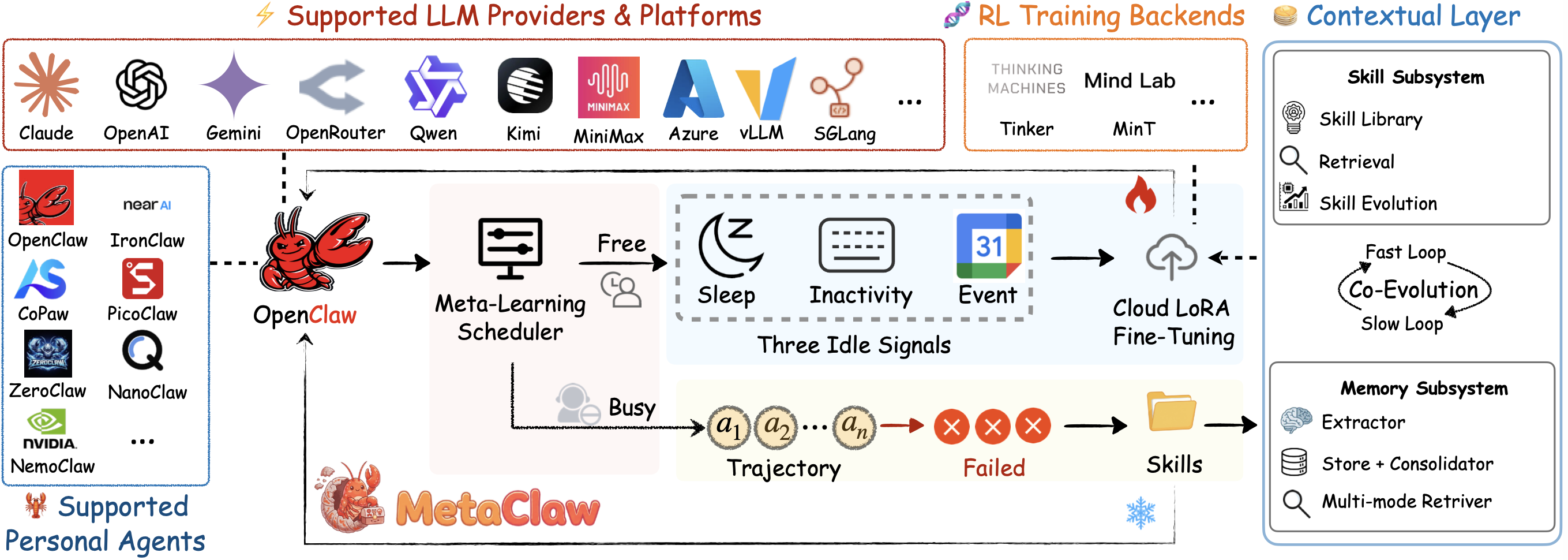








 MetaClaw sits between your personal AI agent and its LLM, turning every conversation into a learning signal: it injects relevant skills on each turn and can optionally run RL fine-tuning so the agent keeps improving from real use, with no GPU needed for the basic mode.