OpenClaw-RL README

The project's README from github.com/Gen-Verse/OpenClaw-RL. As one markdown file: README.md.

OpenClaw-RL Claw-RL logo

Empowering OpenClaw with RL — Train a personalized agent simply by talking to it.

Scalable RL in real-world settings — Agentic RL for terminal, GUI, SWE, and tool-call settings.

Fully Async Zero API or Zero GPU Personalized Auto Language Feedback Hybrid RL General Agentic RL

Tech Report OpenClaw-RL Blog OpenClaw Plugin Slime Based Tinker Supported License Apache 2.0

📰 News


💡 TL;DR

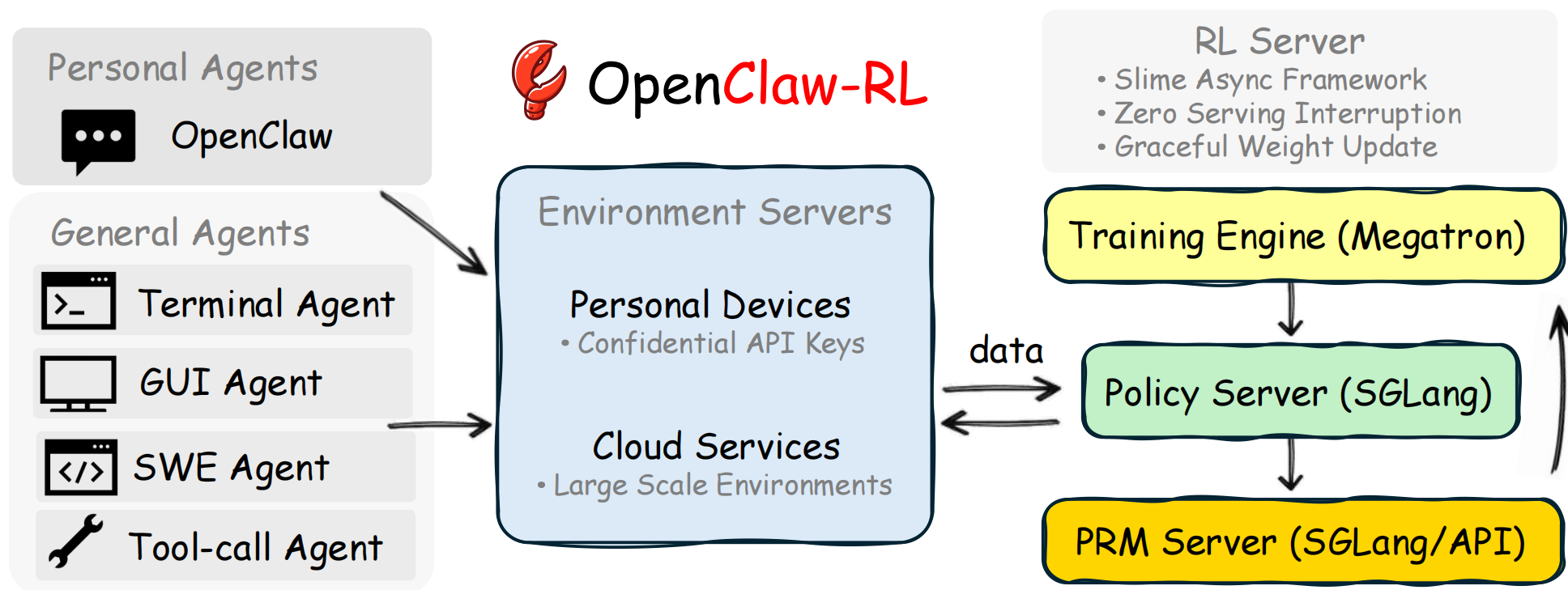
OpenClaw-RL is a fully asynchronous reinforcement learning framework that turns everyday conversations into training signals for personalized AI agents, and supports training general agents with large-scale environment parallelization.

Most RL-for-LLM systems assume centralized, batch-mode training with pre-collected datasets. OpenClaw-RL takes a fundamentally different approach: it wraps your self-hosted model in OpenClaw as an OpenAI-compatible API, intercepts live multi-turn conversations, and continuously optimizes the policy in the background — all without interrupting your usage.

Overview

Highlights: Fully async 4-component loop · Self-hosted & private · Zero manual labeling · Three learning paradigms (Binary RL / OPD / Combine) · Personal + General agent support

🌈 Features

Fully Asynchronous 4-Component Architecture

OpenClaw-RL decouples agent serving, rollout collection, PRM/judge evaluation, and policy training into independent async loops. None of them block one another: the model continues serving requests while training runs in the background, and judging happens concurrently with new interactions.

Self-Hosted & Private by Design

The entire stack, including the policy model, judge/PRM, and trainer, runs on your own infrastructure. Conversation data stays within your system, and no third-party model API is required.

From Feedback to Gradient — Automatically

You do not need to manually label data. The system automatically:

  • Organizes multi-turn interactions into session-aware training trajectories
  • Classifies API messages into main-line (trainable) vs. side (non-trainable) turns
  • Uses the next user, environment, or tool feedback as a natural "next-state" signal
  • Runs PRM/judge evaluation asynchronously, with majority voting when needed for more robust scoring
  • Submits ready samples to the trainer as they become available

Three Optimization Methods in One Framework

Binary RL (GRPO): A Process Reward Model scores each turn based on next-state feedback. The scalar reward is then used with GRPO advantage estimation and a PPO-style clipped surrogate loss.

On-Policy Distillation (OPD): When the next state reveals useful hindsight, a judge model extracts a textual hint. This hint augments the original prompt to create an enhanced teacher, whose token-level log-probability gap with the student becomes a directional advantage signal richer than any scalar reward.

Hybrid Method: OpenClaw-RL further combines Binary RL and OPD in a unified training recipe, leveraging the dense scalar supervision of Binary RL together with the richer token-level directional signal from OPD. This combination achieves stronger and more robust optimization than either method alone.

From Personal Agents to Real-World Agentic RL

The same framework supports both personalized OpenClaw optimization and scalable RL for terminal, GUI, SWE, and tool-call agents in real-world settings.


🎯 Roadmap

Our long-term goal is to advance personalized, practically useful agents with reinforcement learning. The roadmap has two tracks:

Track 1 — Personal Agent Optimization (Small-Scale but Personal)

✅ Release Track 1: Fully async OpenClaw-RL framework with Binary RL + OPD
✅ Best recipe discovery via demonstration experiments
✅ Support LoRA Training
✅ Deploy training on Tinker
✅ Deploy training on Fireworks AI

Track 2 — General Agents Optimization (Scalable Infra)

✅ Release Track 2: Scalable agentic RL infra for general agents
✅ Support Qwen3.5
⬜ Support more cloud services

📝 Contents


🔧 Personal Agent Optimization Quick Start

1. Deployment Requirements

For detailed environment setup, see Slime or ./instructions/README.md.

2. Start the RL Server

cd slime
bash ../openclaw-combine/run_qwen3_4b_openclaw_topk_select.sh

This method combines binary RL and OPD to achieve the best optimization.

See ./openclaw-combine/README.md for algorithm details.

Once running, the model is served as an OpenAI-compatible API at:

http://<HOST_IP>:30000/v1

where <HOST_IP> is the IP address of the machine running the RL server (e.g. 115.190.98.251). The port 30000 is the default and can be changed via the PORT environment variable.

Take note of this endpoint — you will need it when configuring OpenClaw in the next step.

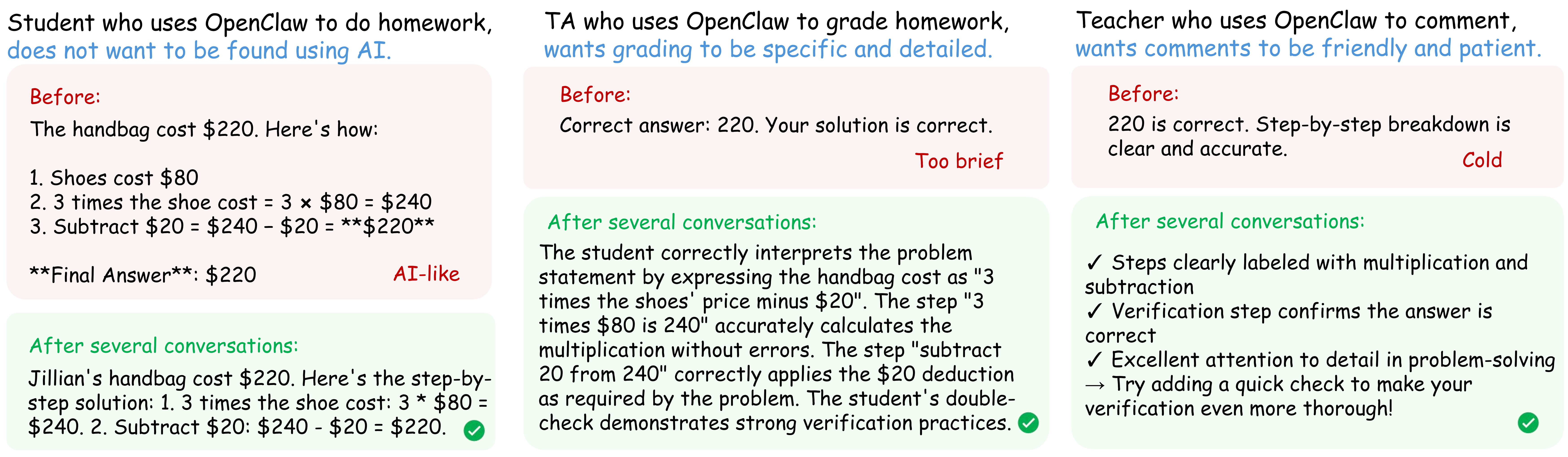
We also provide an interesting case for evaluation. A student who uses OpenClaw to do homework, does not want to be found using AI. A teacher who also uses OpenClaw to grade student's homework, wants the comments to be specific and friendly.

Evaluation Setting — Both student, TA and teacher use AI! Overview

See ./openclaw-test/README.md for setup and algorithm details. Example of evaluation results.

3. OpenClaw Setup

You can use your own openclaw, just install this extension.

Then configure OpenClaw to route requests to your RL server.

Open your openclaw.json (or the equivalent settings file) and add a provider entry under "models" → "providers":

Example of Slime-based RL server:

{
  "models": {
    "providers": {
      "qwen": {
        "baseUrl": "http://<HOST_IP>:30000/v1",
        "apiKey": "apiKey",
        "api": "openai-completions",
        "models": [
          {
            "id": "qwen3-4b",
            "name": "Qwen3 4B",
            "reasoning": true,
            "input": ["text"],
            "cost": {
              "input": 0,
              "output": 0,
              "cacheRead": 0,
              "cacheWrite": 0
            },
            "contextWindow": 32768,
            "maxTokens": 8192
          }
        ]
      }
    }
  }
}

Replace <HOST_IP> with the IP address of your RL server machine. The apiKey should match the SGLANG_API_KEY you set when starting the server.

Example of Tinker-based RL server:

{
  "models": {
    "providers": {
      "openclaw-rl": {
        "baseUrl": "http://localhost:30000/v1",
        "apiKey": "no-auth-needed",
        "api": "openai-completions",
        "models": [
          {
            "id": "qwen3-4b-lora",
            "name": "Qwen3 4B (OpenClaw-RL LoRA)",
            "reasoning": true,
            "input": ["text"],
            "cost": {
              "input": 0,
              "output": 0,
              "cacheRead": 0,
              "cacheWrite": 0
            },
            "contextWindow": 32768,
            "maxTokens": 8192
          }
        ]
      }
    }
  }
}

That's it — start chatting with your OpenClaw agent. The RL server will automatically collect conversation trajectories, compute rewards, and train the model. Your agent gets better the more you use it.


🔧 Agentic RL in Real-world Settings

The same asynchronous RL backbone that powers our personal-agent setting can also support large-scale optimization for these broader real-world environments.

Setting Environment Next-state signal Horizon
Terminal Shell execution sandbox stdout/stderr, exit code Long
GUI Screen state + accessibility tree Visual state diff, task progress Long
SWE Code repository + test suite Test verdicts, diff, lint output Long
Tool-call API/function execution Return values, error traces Medium

🖥️ Terminal Agent — the most widely used computer-use agent

cd slime
bash ../terminal-rl/terminal_qwen3_8b_rl.sh

See ./terminal-rl/README.md for setup details.

📟 GUI Agent — the most general computer-use agent

cd slime
bash ../gui-rl/gui_qwen3vl_8b_rl.sh

See ./gui-rl/README.md for setup details.

👨‍💻 SWE Agent — software engineering agent

cd slime
bash ../swe-rl/run_swe_rl_32b_remote_8nodes.sh

See ./swe-rl/README.md for setup details.

🛠️ Tool-call Agent — the most practical agent

cd slime
bash ../toolcall-rl/retool_qwen3_4b_rl.sh

See ./toolcall-rl/README.md for setup details.

📖 Citation

@article{wang2026openclawrl,
  title={OpenClaw-RL: Train Any Agent Simply by Talking},
  author={Wang, Yinjie and Chen, Xuyang and Jin, Xiaolong and Wang, Mengdi and Yang, Ling},
  journal={arXiv preprint arXiv:2603.10165},
  year={2026}
}

@article{wang2026rlanything,
  title={RLAnything: Forge Environment, Policy, and Reward Model in Completely Dynamic RL System},
  author={Wang, Yinjie and Xie

OpenClaw-RL (Gen-Verse/OpenClaw-RL)

Searching Database…

What is this?OpenClaw-RL is a fully asynchronous reinforcement learning framework that turns everyday conversations with an agent into training signals, letting you train a personalized OpenClaw agent just by talking to it, or train general agents for terminal, GUI, SWE, and tool-call tasks.
Is this a ready-made agent or a framework I plug my own agent into?It is a training framework, not a standalone agent: it wraps your self-hosted model behind an OpenAI-compatible API and runs four independent async loops (serving, rollout collection, judging, policy training) on top of the Slime base RL framework.
How do I get it training my agent?Set up the environment per ./instructions/README.md (CUDA 12.9, Python 3.12, Slime), start the RL server so your model is served as an OpenAI-compatible API, then add that endpoint as a provider in your OpenClaw's openclaw.json — the server collects your conversations and trains in the background as you chat.
Do I need a full GPU cluster to run this?By default yes — 8 GPUs (configurable via NUM_GPUS, ACTOR_GPUS, ROLLOUT_GPUS, PRM_GPUS), plus CUDA 12.9, Python 3.12, and the Slime RL framework; alternatively you can skip local GPUs and run via cloud backends like Tinker or Fireworks AI.
What's the catch with the one-line setup?The default personal-agent setup assumes serious hardware (8 GPUs) or a paid cloud backend; it's also a research-stage project (v1 released Feb 2026) built around a specific base framework (Slime), so you're tied to that stack for training.
Does my conversation data leave my machine during training?No — the policy model, judge/PRM, and trainer all run on your own infrastructure, and no third-party model API is required.
What's the difference between Binary RL, OPD, and the Hybrid method?Binary RL (GRPO) scores each turn with a reward model and applies PPO-style GRPO updates; OPD has a judge model craft a hindsight hint that creates an improved teacher response, and the token-level gap between teacher and student becomes the training signal; the Hybrid method combines both signals for stronger optimization than either alone.
What is OpenClaw in this context?OpenClaw is the self-hosted AI agent being trained — you install an extension so your own OpenClaw routes its traffic through the RL server, which then learns from every conversation.
Which agent settings beyond personal chat does it support?Track 2 extends the same async RL backbone to terminal agents (shell sandboxes), GUI agents (screen state/accessibility tree), SWE agents (code repos plus test suites), and tool-call agents (API/function execution).
Has this been validated beyond the repo itself?Yes — the team published a technical report that ranked #1 on Hugging Face's Daily Papers, and the framework now supports Qwen3.5 models (4B/9B/27B, both text and multi-modal).
What are similar projects?MetaClaw, halo, reef, ms-swift, agent-lightning, verl, ART, minimind
Creator
Gen-Verse
Size
50.8 MB
Stars
5.7K
Updated
CommitMay 23
Age
7mo
Commits · 90 Days