Overview
FireRedTTS3 is a unified speech generation and editing system built on semantically enriched continuous speech representations. It comes in two variants:
- FireRedTTS3-Base — zero-shot voice cloning across 24 languages and 21 Chinese dialects
- FireRedTTS3-Instruct — natural-language voice design and speech editing (semantic + acoustic) in one unified model
Highlights ✨
- 🌍 Multilingual — 24 Languages — Best average WER/CER (avg 3.754%) and best average speaker similarity on MiniMax-MLS-Test (avg 84.8%), plus best-in-class cloning WER/CER (avg 3.04%) and similarity on Seed-TTS-eval (avg 78.8%). Supported languages:
Arabic · Cantonese · Chinese · Czech · Dutch · English · Finnish · French · German · Greek · Hindi · Indonesian · Italian · Japanese · Korean · Polish · Portuguese · Romanian · Russian · Spanish · Thai · Turkish · Ukrainian · Vietnamese
- 🗣️ Multi-Dialect — 21 Chinese Dialects — Zero-shot voice cloning across major Chinese dialect groups. Supported dialects:
Anhui · Fujian · Gansu · Guizhou · Hebei · Henan · Hubei · Hunan · Jiangxi · Liaoning · Minnan · Ningxia · Shaanxi · Shandong · Shanghai · Shanxi · Sichuan · Tianjin · Wenzhou · Wu · Yunnan
- 🎨 Instruction-Controlled Voice Design — Generate a brand-new voice from a natural-language description (gender, age, timbre, emotion, pace, accent…) with no reference audio, guided by an explicit textual plainning step before synthesis.
- ✂️ Free-Form Speech Editing — Semantic editing (insertion / deletion / substitution) and acoustic editing (speed / pitch / volume) driven by free-form instructions.
News
- [2026.08.13] We release the Gradio demo for both FireRedTTS3 Base & Instruct.
- [2026.08.13] We release the FireRedTTS3
Roadmap
- Release the FireRedTTS3-Base model
- Release the FireRedTTS3-Instruct model
- Release the technical report
Contents
Quick Start 🚀
Installation with pip
pip install -r requirements.txt
Model Download
Download the pretrained model from Hugging Face with the hf CLI:
pip install "huggingface_hub[cli]"
hf download FireRedTeam/FireRedTTS3 --local-dir pretrained_models/
Alternatively, you can download model from ModelScope
pip install modelscope
modelscope download --model FireRedTeam/FireRedTTS3 --local_dir pretrained_models/
Configure Text Frontend
Language Recognition (Optional)
FireRedTTS3-Base relies on explicit language tags for best performance. However, if you don't know the exact language of the text, you can download Meta's FastText language-id model and let it detect the language automatically.
# Download FastText language-id model (lid.176) with:
curl -L -o fireredtts3/utils/llm_tn/models/lid.176.ftz https://dl.fbaipublicfiles.com/fasttext/supervised-models/lid.176.ftz
Text Normalization (TN)
TN converts written numbers, dates, units, currencies, acronyms, etc. into their spoken form (e.g. 19:30 → nineteen thirty). By default, FireRedTTS3 uses the wetext TN tool, which supports Chinese and English, other languages (e.g. Japanese, Russian) undergo only basic cleaning. For full language TN support, enable the LLM-based TN by passing use_llm_tn=True when initializing FireRedTTS3. It reads its config from a .env file:
cp .env.example .env

# Then fill in your values
LLM_TN_API_URL=https://api.deepseek.com/chat/completions   # any OpenAI-compatible endpoint
LLM_TN_API_KEY=sk-xxxxxxxxxxxxxxxxxxxxxxxxxxxxxxxx
LLM_TN_MODEL=deepseek-v4-flash                             # or any model >= 30B
Python API
For the best voice cloning performance, use a prompt in the desired language or dialect, since the output inherits the speaking style of the reference. For example, provide a Japanese prompt when synthesizing Japanese and a Sichuanese prompt when synthesizing Sichuanese.
import torch
import torchaudio
from fireredtts3.core import FireRedTTS3

# Init model: choose the text-normalization frontend here.
#   use_wetext=True  -> local weText TN (zh/en only)
#   use_llm_tn=True  -> LLM-based TN (all languages, needs .env / API creds)
#   both False       -> no TN frontend built
tts = FireRedTTS3(
    "pretrained_models",
    use_wetext=True,
    use_llm_tn=False,
)

language = None     # Automatic detection if pass None
prompt_text = "<prompt audio text>"
prompt_audio, prompt_audio_sr = torchaudio.load('prompt.wav')
text = "今天天气很好,我们一起去公园散步吧。"

gen_audio, gen_audio_sr = tts.generate(
    language=language,
    prompt_text=prompt_text,
    prompt_audio=prompt_audio,
    prompt_audio_sr=prompt_audio_sr,
    text=text,
    do_tn=True,       # whether to run the frontend TN on this call
)
torchaudio.save("gen.wav", gen_audio.cpu(), gen_audio_sr)

# Supported languages and dialects

# Multilingual languages:
# Arabic, Cantonese, Chinese, Czech, Dutch, English, Finnish,
# French, German, Greek, Hindi, Indonesian, Italian, Japanese,
# Korean, Polish, Portuguese, Romanian, Russian, Spanish, Thai,
# Turkish, Ukrainian, Vietnamese

# Multi-dialect:
# ZH_Anhui, ZH_Fujian, ZH_Gansu, ZH_Guizhou, ZH_Hebei, ZH_Henan,
# ZH_Hubei, ZH_Hunan, ZH_Jiangxi, ZH_Liaoning, ZH_Minnan, ZH_Ningxia,
# ZH_Shaanxi, ZH_Shandong, ZH_Shanghai, ZH_Shanxi, ZH_Sichuan,
# ZH_Tianjin, ZH_Wenzhou, ZH_Wu, ZH_Yunnan
Instruct API — Voice Design & Speech Editing
FireRedTTS3-Instruct is a unified instruction-driven model. On top of
zero-shot voice cloning, it also supports Voice Design, Semantic Edit
and Acoustic Edit through a single entry point:
fireredtts3.core.FireRedTTS3Instruct.
import torch
import torchaudio
from fireredtts3.core import FireRedTTS3Instruct

# Init the Instruct model (same text-frontend options as FireRedTTS3)
instruct = FireRedTTS3Instruct(
    "pretrained_models",
    use_wetext=True,
    use_llm_tn=False,   # set True to enable LLM-based TN (all languages)
)

# ---- 1) Voice Design Inference ---------------
# Generate a brand-new voice from a natural-language description only;
# no reference audio is needed. The model first writes a voice-attribute
# plan (returned as gen_text), then renders the audio.
instruction = "一个年轻女性的温柔嗓音,语速稍慢,带一点俏皮。"
text = "今天天气很好,我们一起去公园散步吧。"
gen_audio, gen_audio_sr, gen_text = instruct.generate_voice_design(
    instruction=instruction,
    text=text,
)
torchaudio.save("design.wav", gen_audio.cpu(), gen_audio_sr)
print("Voice plan:", gen_text)

# ---- 2) Semantic Edit ------------------------
# Content-level editing: insertion / deletion / substitution by instruction.
# Returns the edited audio and the model's rewritten text with edit mask.
audio_in, audio_in_sr = torchaudio.load("input.wav")
gen_audio, gen_audio_sr, gen_text = instruct.generate_semantic_edit(
    instruction="Replace 'cats' with 'dogs'.",
    audio_in=audio_in,
    audio_in_sr=audio_in_sr,
)
torchaudio.save("edit_semantic.wav", gen_audio.cpu(), gen_audio_sr)
print("Edited text:", gen_text)

# ---- 3) Acoustic Edit ------------------------
# Acoustic-attribute editing: speed / pitch / volume. The instruction must
# follow the trained templates below (free-form phrasing is not supported):
#   speed   ->  "adjust the speed to X"       X in [0.5, 2.0], step 0.1
#   pitch   ->  "shift the pitch by N step(s)"  N in {-6,...,-1,1,...,+6}
#   volume  ->  "adjust the volume to X"      X in [0.3, 2.0], step 0.1
gen_audio, gen_audio_sr = instruct.generate_acoustic_edit(
    instruction="adjust the speed to 0.5x",
    audio_in=audio_in,
    audio_in_sr=audio_in_sr,
)
torchaudio.save("edit_acoustic.wav", gen_audio.cpu(), gen_audio_sr)

# ---- 4) ICL zero-shot voice cloning using the Instruct model ----
gen_audio, gen_audio_sr = instruct.generate_tts(
    prompt_text="<prompt audio text>",
    prompt_audio=prompt_audio,
    prompt_audio_sr=prompt_audio_sr,
    text="<text to be synthesized>",
)
torchaudio.save("gen_instruct.wav", gen_audio.cpu(), gen_audio_sr)
Gradio Demo
# Install gradio
pip install gradio

# Run FireRedTTS3-Base:
python gradio_base.py --host "0.0.0.0" --port 7860

# Run FireRedTTS3-Instruct:
python gradio_instruct.py --host "0.0.0.0" --port 7860

# The Gradio app will be available at http://0.0.0.0:7860.
# If you are serving it behind a proxy, such as Remote VS Code, add the `--root-path` option, for example: `--root-path https://somewebsite/proxy/7860/`
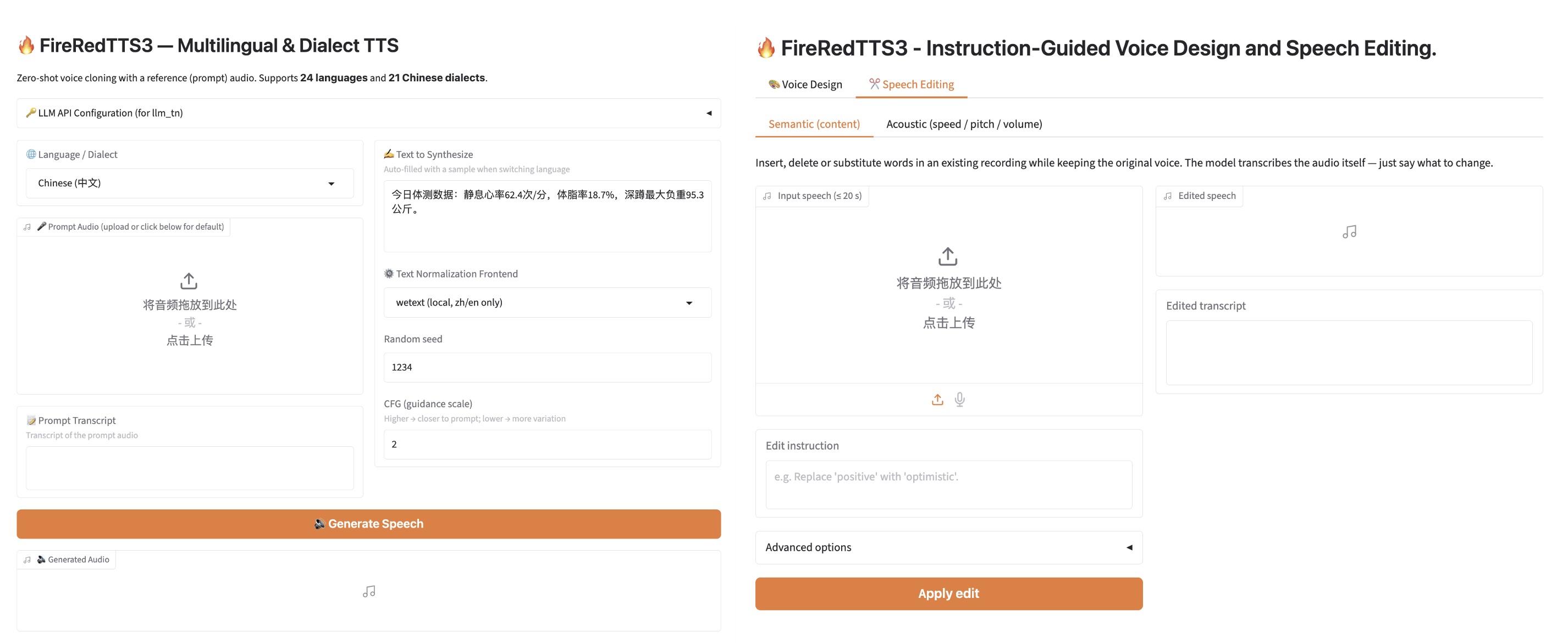
Gradio interface for FireRedTTS3-Base(left) and Instruct(right).
Zero-Shot Voice Cloning — Seed-TTS-eval
Best in bold, second best in underline. Evaluation scripts: Seed-TTS-eval.
| Model |
Test-EN
WER/SIM |
Test-ZH
CER/SIM |
Test-Hard
CER/SIM |
Avg
WER/SIM |
| CosyVoice3-1.5B |
2.22 / 72.0 |
1.12 / 78.1 |
5.83 / 75.8 |
3.06 / 75.3 |
| DiTAR |
1.69 / 73.5 |
1.02 / 75.3 |
– / – |
– / – |
| F5-TTS |
2.00 / 67.0 |
1.53 / 76.0 |
8.67 / 71.3 |
4.10 / 71.4 |
| FireRedTTS-2 |
1.95 / 66.5 |
1.14 / 73.6 |
8.98 / 70.3 |
4.02 / 70.1 |
| IndexTTS2 |
2.23 / 70.6 |
1.03 / 76.5 |
7.12 / 75.5 |
3.46 / 74.2 |
| MegaTTS3 |
2.79 / 77.1 |
1.52 / 79.0 |
– / – |
– / – |
| MiniMax-Speech |
1.65 / 69.2 |
0.83 / 78.3 |
– / – |
– / – |
| Qwen3-TTS |
1.23 / 71.7 |
1.22 / 77.0 |
6.76 / 74.8 |
3.07 / 74.5 |
| Seed-TTS |
2.25 / 76.2 |
1.12 / 79.6 |
7.59 / 77.6 |
3.65 / 77.8 |
| VibeVoice |
3.04 / 68.9 |
1.16 / 74.4 |
– / – |
– / – |
| VoxCPM2 |
1.84 / 75.3 |
0.97 / 79.5 |
8.13 / 75.3 |
3.65 / 76.7 |
| dots.tts (Pretrain) |
1.80 / 77.0 |
0.97 / 80.4 |
6.65 / 78.8 |
3.14 / 78.7 |
| FireRedTTS3-Base |
1.64 / 77.2 |
1.01 / 80.9 |
6.50 / 78.4 |
3.04 / 78.8 |
Multilingual Zero-Shot Cloning — MiniMax-MLS-Test
Best in bold, second best in underline. CER reported for Chinese, Cantonese, Japanese, Korean, Arabic, Vietnamese, Hindi, Thai, and Greek; WER for the rest.
WER / CER (↓) (click to expand)
| Language |
Minimax |
ElevenLabs |
VoxCPM2 |
FishAudio S2 |
dots.tts (Pretrain) |
FireRedTTS3 |
| Arabic |
1.67 |
1.67 |
13.05 |
3.50 |
37.91 |
1.75 |
| Cantonese |
34.11 |
51.51 |
38.58 |
30.67 |
37.91 |
40.32 |
| Chinese |
2.25 |
16.03 |
1.14 |
0.73 |
1.08 |
0.91 |
| Czech |
3.88 |
2.11 |
24.13 |
2.84 |
5.05 |
3.17 |
| Dutch |
1.14 |
0.80 |
0.91 |
0.99 |
1.20 |
1.15 |
| English |
2.16 |
2.34 |
2.29 |
1.62 |
1.06 |
2.12 |
| Finnish |
4.67 |
2.96 |
2.63 |
3.33 |
3.44 |
3.10 |
| French |
4.10 |
5.22 |
4.53 |
3.05 |
3.82 |
5.28 |
| German |
1.91 |
0.57 |
0.68 |
0.55 |
1.03 |
0.69 |
| Greek |
2.02 |
0.99 |
2.84 |
5.74 |
2.97 |
1.24 |
| Hindi |
6.96 |
5.83 |
19.70 |
14.64 |
14.32 |
7.02 |
| Indonesian |
1.24 |
1.06 |
1.08 |
1.46 |
2.71 |
1.42 |
| Italian |
1.54 |
1.74 |
1.56 |
1.27 |
3.16 |
2.28 |
| Japanese |
3.52 |
10.65 |
4.63 |
2.76 |
7.16 |
3.60 |
| Korean |
1.75 |
1.87 |
1.96 |
1.18 |
5.30 |
2.42 |
| Polish |
1.42 |
0.77 |
1.14 |
1.26 |
2.72 |
1.22 |
| Portuguese |
1.88 |
1.33 |
1.94 |
1.14 |
1.64 |
1.79 |
| Romanian |
2.88 |
1.35 |
21.58 |
10.74 |
3.36 |
1.93 |
| Russian |
4.28 |
3.88 |
3.63 |
2.40 |
3.64 |
3.28 |
| Spanish |
1.03 |
1.08 |
1.44 |
0.91 |
0.96 |
1.21 |
| Thai |
2.70 |
73.94 |
2.96 |
4.23 |
7.45 |
1.87 |
| Turkish |
1.52 |
0.70 |
0.82 |
0.87 |
5.45 |
0.92 |
| Ukrainian |
1.08 |
1.00 |
6.32 |
2.30 |
1.61 |
0.55 |
| Vietnamese |
0.88 |
73.42 |
3.31 |
7.41 |
3.85 |
0.86 |
| Average |
3.77 |
10.95 |
6.79 |
4.40 |
6.60 |
3.75 |
SIM (↑) (click to expand)
| Language |
Minimax |
ElevenLabs |
VoxCPM2 |
FishAudio S2 |
dots.tts (Pretrain) |
FireRedTTS3 |
| Arabic |
73.6 |
70.6 |
79.1 |
75.0 |
77.5 |
78.9 |
| Cantonese |
77.8 |
67.0 |
83.5 |
80.5 |
84.7 |
83.9 |
| Chinese |
78.0 |
67.7 |
82.5 |
81.6 |
82.3 |
84.2 |
| Czech |
79.6 |
68.5 |
78.3 |
79.8 |
83.8 |
86.1 |
| Dutch |
73.8 |
68.0 |
80.8 |
73.0 |
81.4 |
84.3 |
| English |
75.6 |
61.3 |
85.4 |
79.7 |
86.9 |
86.8 |
| Finnish |
83.5 |
75.9 |
89.0 |
81.9 |
88.0 |
89.9 |
| French |
62.8 |
53.5 |
73.5 |
69.8 |
78.2 |
81.0 |
| German |
73.3 |
61.4 |
80.3 |
76.7 |
79.5 |
83.3 |
| Greek |
82.6 |
73.3 |
86.0 |
79.5 |
87.6 |
89.3 |
| Hindi |
81.8 |
73.0 |
85.6 |
82.1 |
84.5 |
87.2 |
| Indonesian |
72.9 |
66.0 |
80.0 |
76.3 |
80.8 |
83.3 |
| Italian |
69.9 |
57.9 |
78.0 |
74.7 |
84.5 |
83.6 |
| Japanese |
77.6 |
73.8 |
82.8 |
79.6 |
83.1 |
82.8 |
| Korean |
77.6 |
70.0 |
83.3 |
81.7 |
84.3 |
86.6 |
| Polish |
80.2 |
72.9 |
88.4 |
81.9 |
87.3 |
89.8 |
| Portuguese |
80.5 |
71.1 |
83.7 |
78.1 |
83.1 |
86.3 |
| Romanian |
80.9 |
69.9 |
79.7 |
73.3 |
86.2 |
86.2 |
| Russian |
76.1 |
67.6 |
81.1 |
79.0 |
83.0 |
84.7 |
| Spanish |
76.2 |
61.5 |
83.1 |
77.6 |
83.9 |
86.3 |
| Thai |
80.0 |
58.8 |
84.0 |
78.6 |
83.8 |
83.3 |
| Turkish |
77.9 |
59.6 |
87.1 |
83.5 |
87.4 |
86.6 |
| Ukrainian |
73.0 |
64.7 |
79.8 |
74.7 |
80.5 |
79.8 |
| Vietnamese |
74.3 |
36.9 |
80.6 |
74.0 |
80.7 |
81.3 |
| Average |
76.6 |
65.5 |
82.3 |
78.0 |
83.5 |
84.8 |
Instruct TTS
Since Gemini-2.5-pro-preview is inaccessible, Gemini-2.5-pro is used to score all systems.
| Model |
ZH
APS↑ | DSD↑ | RP↑ |
EN
APS↑ | DSD↑ | RP↑ |
| MOSS-VoiceGenerator | 71.6 | 72.5 | 61.3 | 58.8 | 71.8 | 61.6 |
| VoiceSculptor-VD | 74.6 | 63.5 | 62.0 | – | – | – |
| Ming-Omni-TTS-16B-A3B | 84.6 | 70.7 | 56.0 | – | – | – |
| Qwen3-TTS-VD | 83.7 | 81.7 | 65.8 | 76.4 | 81.4 | 64.2 |
| FireRedTTS3-Instruct | 85.8 | 82.0 | 69.7 | 80.7 | 82.3 | 72.0 |
Speech Editing
Semantic Editing (click to expand)
| Task |
Setting |
Metric |
Ming-UniAudio-Edit
zh | en |
FireRedTTS3-Instruct
zh | en |
| Deletion |
basic |
WER (%)↓ |
11.89 | 14.85 |
10.51 | 14.46 |
| SIM↑ |







 FireRedTTS3 是一个统一的语音生成与编辑模型:它可以跨 24 种语言和 21 种汉语方言克隆声音,能够根据文字描述设计全新的声音,还能用自然语言指令编辑已有的语音(语义和声学层面)。