This project is a Windows port of the whisper.cpp implementation.
Which in turn is a C++ port of OpenAI's Whisper automatic speech recognition (ASR) model.
Identity Hijacking Warning
The website whisperdesktop.com is impersonating this project and should not be trusted.
It presents itself as an official resource.
Whilst it currently links to GitHub for downloads,
the site operator may substitute these links with malware at any time and without warning.
Quick Start Guide
Download WhisperDesktop.zip from the “Releases” section of this repository, unpack the ZIP, and run WhisperDesktop.exe.
On the first screen it will ask you to download a model.
I recommend ggml-medium.bin (1.42GB in size), because I’ve mostly tested the software with that model.
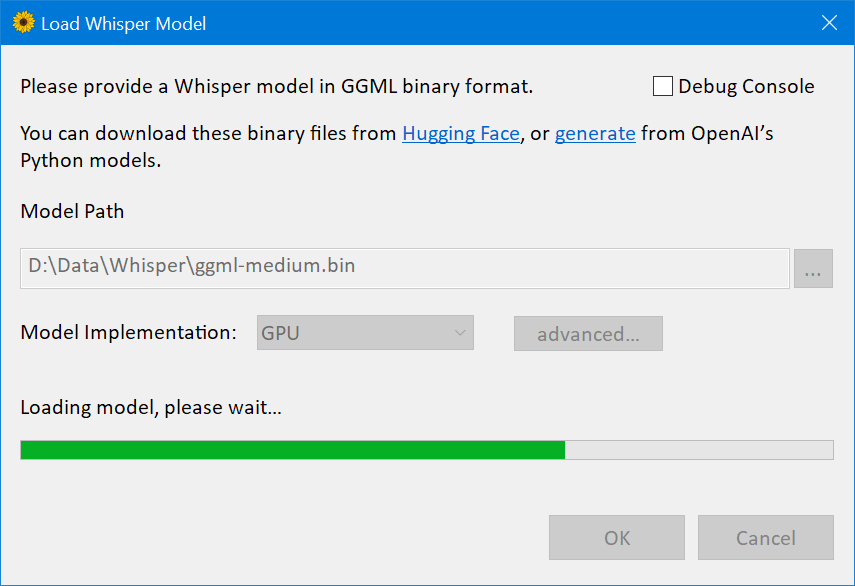
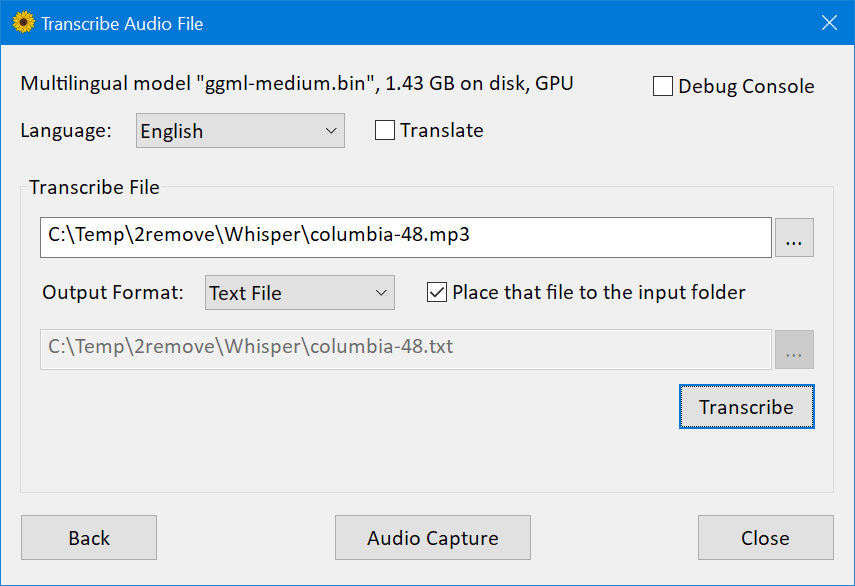
The next screen allows to transcribe an audio file.
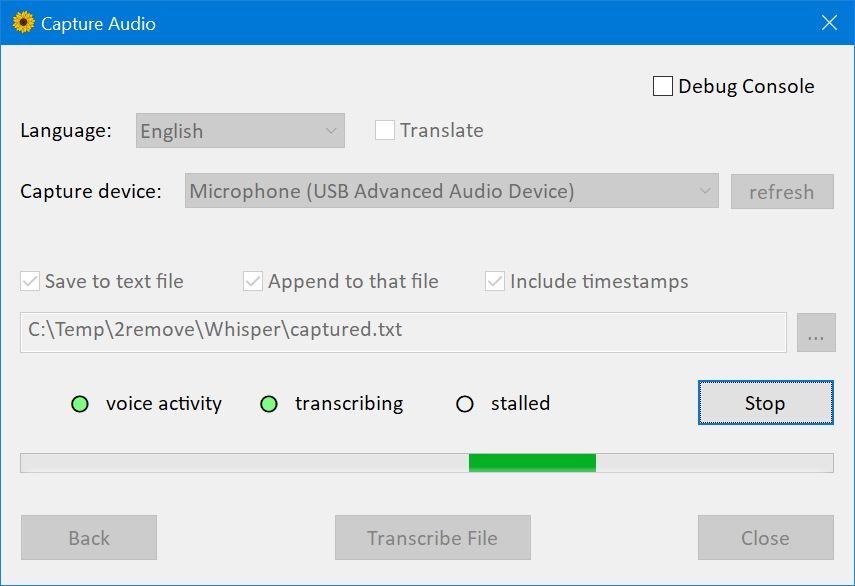
There’s another screen which allows to capture and transcribe or translate live audio from a microphone.
Features
Vendor-agnostic GPGPU based on DirectCompute; another name for that technology is “compute shaders in Direct3D 11”
Plain C++ implementation, no runtime dependencies except essential OS components
Much faster than OpenAI’s implementation.
On my desktop computer with GeForce 1080Ti GPU,
medium model, 3:24 min speech
took 45 seconds to transcribe with PyTorch and CUDA, but only 19 seconds with my implementation and DirectCompute.
Funfact: that’s 9.63 gigabytes runtime dependencies, versus 431 kilobytes Whisper.dll
Mixed F16 / F32 precision: Windows
requires support
of R16_FLOAT buffers since D3D version 10.0
Built-in performance profiler which measures execution time of individual compute shaders
Low memory usage
Media Foundation for audio handling, supports most audio and video formats (with the notable exception of Ogg Vorbis),
and most audio capture devices which work on Windows (except some professional ones, which only implementing ASIO API).
Voice activity detection for audio capture.
The implementation is based on the 2009 article
“A simple but efficient real-time voice activity detection algorithm” by Mohammad Moattar and Mahdi Homayoonpoor.
Easy to use COM-style API. Idiomatic C# wrapper available on nuget.
Version 1.10 introduced
scripting support for PowerShell 5.1, that’s the older “Windows PowerShell” version which comes pre-installed on Windows.
Pre-built binaries available
The only supported platform is 64-bit Windows.
Should work on Windows 8.1 or newer, but I have only tested on Windows 10.
The library requires a Direct3D 11.0 capable GPU, which in 2023 simply means “any hardware GPU”.
The most recent GPU without D3D 11.0 support was Intel Sandy Bridge from 2011.
On the CPU side, the library requires AVX1 and F16C support.
Developer Guide
Build Instructions
Clone this repository
Open WhisperCpp.sln in Visual Studio 2022. I’m using the freeware community edition, version 17.4.4.
Switch to Release configuration
Build and run CompressShaders C# project, in the Tools subfolder of the solution.
To run that project, right click in visual studio, “Set as startup project”, then in the main menu of VS “Debug / Start Without Debugging”.
When completed successfully, you should see a console window with a line like that:
Compressed 46 compute shaders, 123.5 kb -> 18.0 kb
Build Whisper project to get the native DLL, or WhisperNet for the C# wrapper and nuget package, or the examples.
Other Notes
If you gonna consume the library in a software built with Visual C++ 2022 or newer, you probably redistribute Visual C++ runtime DLLs in the form of the .msm merge module,
or vc_redist.x64.exe binary.
If you do that, right click on the Whisper project, Properties, C/C++, Code Generation,
switch “Runtime Library” setting from Multi-threaded (/MT) to Multi-threaded DLL (/MD),
and rebuild: the binary will become smaller.
The library includes RenderDoc GPU debugger integration.
When launched your program from RenderDoc, hold F12 key to capture the compute calls.
If you gonna debug HLSL shaders, use the debug build of the DLL, it includes debug build of the shaders and you’ll get better UX in the debugger.
The repository includes a lot of code which was only used for development:
couple alternative model implementations, compatible FP64 versions of some compute shaders, debug tracing and the tool to compare the traces, etc.
That stuff is disabled by preprocessor macros or constexpr flags, I hope it’s fine to keep here.
I have a limited selection of GPUs in this house.
Specifically, I have optimized for nVidia 1080Ti, Radeon Vega 8 inside Ryzen 7 5700G, and Radeon Vega 7 inside Ryzen 5 5600U.
Here’s the summary.
The nVidia delivers relative speed 5.8 for the large model, 10.6 for the medium model.
The AMD Ryzen 5 5600U APU delivers relative speed about 2.2 for the medium model. Not great, but still, much faster than realtime.
I have also tested on nVidia 1650: slower than 1080Ti but pretty good, much faster than realtime.
I have also tested on Intel HD Graphics 4000 inside Core i7-3612QM, the relative speed was 0.14 for medium model, 0.44 for small model.
That’s much slower than realtime, but I was happy to find my software works even on the integrated mobile GPU launched in 2012.
I’m not sure the performance is ideal on discrete AMD GPUs, or integrated Intel GPUs, have not specifically optimized for them.
Ideally, they might need slightly different builds of a couple of the most expensive compute shaders, mulMatTiled.hlsl and mulMatByRowTiled.hlsl
And maybe other adjustments, like the useReshapedMatMul() value in Whisper/D3D/device.h header file.
I don’t know how to measure that, but I have a feeling the bottleneck is memory, not compute.
Someone on Hacker News has tested on 3060Ti,
the version with GDDR6 memory.
Compared to 1080Ti, that GPU has 1.3x FP32 FLOPS, but 0.92x VRAM bandwidth.
The app was about 10% slower on the 3060Ti.
Further Optimisations
I have only spent a few days optimizing performance of these shaders.
It might be possible to do much better, here’s a few ideas.
Newer GPUs like Radeon Vega or nVidia 1650 have higher FP16 performance compared to FP32, yet my compute shaders are only using FP32 data type.
Half The Precision, Twice The Fun
In the current version, FP16 tensors are using shader resource views to upcast loaded values, and unordered access views to downcast stored ones.
Might be a good idea to switch to byte address buffers,
load/store complete 4-bytes values, and upcast / downcast in HLSL with f16tof32 / f32tof16 intrinsics.
In the current version all shaders are compiled offline, and Whisper.dll includes DXBC byte codes.
The HLSL compiler D3DCompiler_47.dll is an OS component, and is pretty fast.
For the expensive compute shaders, it’s probably a good idea to ship HLSL instead of DXBC,
and compile on startup
with environment-specific values for the macros.
It might be a good idea to upgrade the whole thing from D3D11 to D3D12.
The newer API is harder to use, but includes potentially useful features not exposed to D3D11:
wave intrinsics,
and explicit FP16.
Missing Features
Automatic language detection is not implemented.
In the current version there’s high latency for realtime audio capture.
Specifically, depending on voice detection the figure is about 5-10 seconds.
At least in my tests, the model wasn’t happy when I supplied too short pieces of the audio.
I have increased the latency and called it a day, but ideally this needs a better fix for optimal UX.
Final Words
From my perspective, this is an unpaid hobby project, which I completed over the 2022-23 winter holydays.
The code probably has bugs.
The software is provided “as is”, without warranty of any kind.
Thanks to Georgi Gerganov for whisper.cpp implementation,
and the models in GGML binary format.
I don’t program Python, and I don’t know anything about the ML ecosystem.
I wouldn’t even start this project without a good C++ reference implementation, to test my version against.
That whisper.cpp project has an example which uses
the same GGML implementation to run another OpenAI’s model, GPT-2.
It shouldn’t be hard to support that ML model with the compute shaders and relevant infrastructure already implemented in this project.
If you find this useful, I’ll be very grateful if you consider a donation to “Come Back Alive” foundation.

 这是 OpenAI Whisper 语音识别模型的 Windows 移植版,用 DirectCompute 而不是 CUDA 在 GPU 上做推理,转写速度远快于官方 PyTorch 实现。