
What is this?
 Phorminx is a local-first Windows desktop app that turns speech into text for dictation and meeting transcription, with searchable notes and optional local AI formatting instead of a paid cloud AI service.
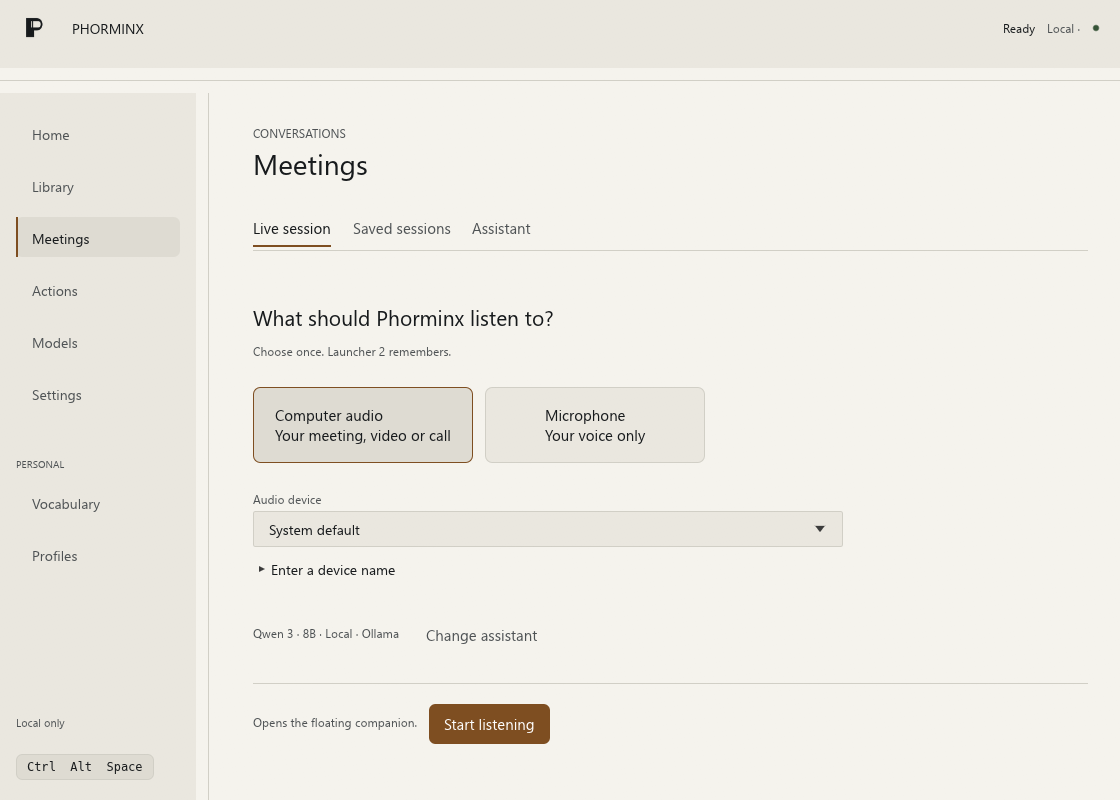
Phorminx is a local-first Windows desktop app that turns speech into text for dictation and meeting transcription, with searchable notes and optional local AI formatting instead of a paid cloud AI service.Is this just a background speech-to-text tool or a full app with its own UI?It is a full desktop app with its own launcher, a Meetings workspace with a floating companion, a searchable Library, and an Actions workspace for triggering HTTP requests from transcripts.
It is a full desktop app with its own launcher, a Meetings workspace with a floating companion, a searchable Library, and an Actions workspace for triggering HTTP requests from transcripts.How do I get it running?You build Phorminx from source using the development guide; speech models and Vosk runtime assets are separate downloads that you configure through the app's setup and model screens.
You build Phorminx from source using the development guide; speech models and Vosk runtime assets are separate downloads that you configure through the app's setup and model screens.Do I need Ollama or a GPU for this to work?No, dictation works without any AI service: Instant mode uses the local Vosk recognizer, and Accurate mode uses Whisper with optional Vulkan GPU acceleration. A local Ollama model is only needed for the optional AI formatting step.
No, dictation works without any AI service: Instant mode uses the local Vosk recognizer, and Accurate mode uses Whisper with optional Vulkan GPU acceleration. A local Ollama model is only needed for the optional AI formatting step.Is this ready for everyday use yet?Not fully, it's labeled alpha software, and recognition accuracy, latency, and compatibility depend on your device, audio source, and chosen model.
Not fully, it's labeled alpha software, and recognition accuracy, latency, and compatibility depend on your device, audio source, and chosen model.Does it run on Mac or Linux too?No, Phorminx targets Windows 10/11 x64 only.
No, Phorminx targets Windows 10/11 x64 only.Where does my audio and transcript data go?Speech recognition runs locally and audio is kept in memory rather than saved to disk in production; retained text and settings live under %LOCALAPPDATA%\Phorminx, though enabling optional remote assistant providers or HTTP actions sends your text to those external destinations.
Speech recognition runs locally and audio is kept in memory rather than saved to disk in production; retained text and settings live under %LOCALAPPDATA%\Phorminx, though enabling optional remote assistant providers or HTTP actions sends your text to those external destinations.What's the difference between Instant and Accurate dictation modes?Instant mode uses the resident Vosk recognizer for fast speech-to-text, while Accurate mode uses Whisper, optionally accelerated with Vulkan, for higher-quality transcription.
Instant mode uses the resident Vosk recognizer for fast speech-to-text, while Accurate mode uses Whisper, optionally accelerated with Vulkan, for higher-quality transcription.How do I actually start dictating?Press the default Ctrl+Alt+Space shortcut to open the P launcher, choose Dictate, speak, then press the shortcut again to finish.
Press the default Ctrl+Alt+Space shortcut to open the P launcher, choose Dictate, speak, then press the shortcut again to finish.Can I trigger automated actions from my speech?Yes, the Actions workspace lets you save HTTP requests that use transcript substitution or optional model-generated JSON, launched from the same launcher.
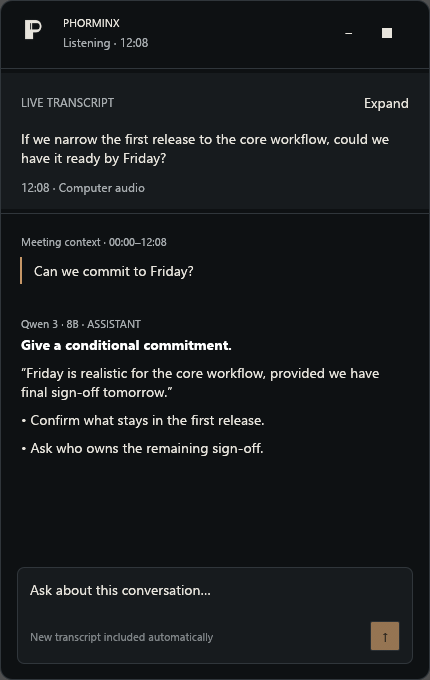
Yes, the Actions workspace lets you save HTTP requests that use transcript substitution or optional model-generated JSON, launched from the same launcher.Does asking the floating companion a question interrupt the meeting recording?No, sending an assistant question includes the newly captured transcript context without stopping capture.
No, sending an assistant question includes the newly captured transcript context without stopping capture.What are similar projects?meetily, no-tipe-releases, parrot, lipflow, VideoHighlighter, screenpipe, openwhispr, omarchy-meeting-recorder
meetily, no-tipe-releases, parrot, lipflow, VideoHighlighter, screenpipe, openwhispr, omarchy-meeting-recorderWhich topics is it in?dictation, http-client, transcription, local-ai, whisper, vulkan, speech-to-text, speech-recognition, note-taking, semantic-search, windows-app, local-llm
dictation, http-client, transcription, local-ai, whisper, vulkan, speech-to-text, speech-recognition, note-taking, semantic-search, windows-app, local-llm