Bud Decision Studio
Run open decision models on your own computer.
Give a model a situation and a few questions; get a calibrated probability for every answer, in milliseconds.
The LM Studio of Jev-like "System One" models, from Bud Ecosystem.




Documentation: the user manual, installation, guides, API reference and developer docs are in
site/docs/, built from the Markdown in site/docs-src/. Open
site/docs/index.html in a browser, or serve the site/ folder.
Install
One line, and the app opens when it is done:
| System |
Command |
| macOS (Apple Silicon) and Linux |
curl -fsSL https://raw.githubusercontent.com/BudEcosystem/Bud-Decision-Engine/main/get.sh | sh |
| Windows (PowerShell) |
irm https://raw.githubusercontent.com/BudEcosystem/Bud-Decision-Engine/main/get.ps1 | iex |
Or download from the latest release:
| Your computer |
Download |
Then |
| Mac with Apple Silicon (M1 or newer) |
…_aarch64.dmg |
Open it and drag the app to Applications |
| Windows 10 or 11 |
…_x64-setup.exe (or .msi) |
Run it; the app is added to the Start menu |
| Ubuntu or Debian |
…_amd64.deb / …_arm64.deb |
sudo apt install ./Bud*.deb |
| Fedora or openSUSE |
…x86_64.rpm / …aarch64.rpm |
sudo dnf install ./Bud*.rpm |
| Any other Linux |
…AppImage |
chmod +x Bud*.AppImage and open it; it adds itself to your applications menu |
NVIDIA GB10 (DGX Spark) and other ARM64 Linux computers use the arm64 / aarch64 files.
What happens the first time
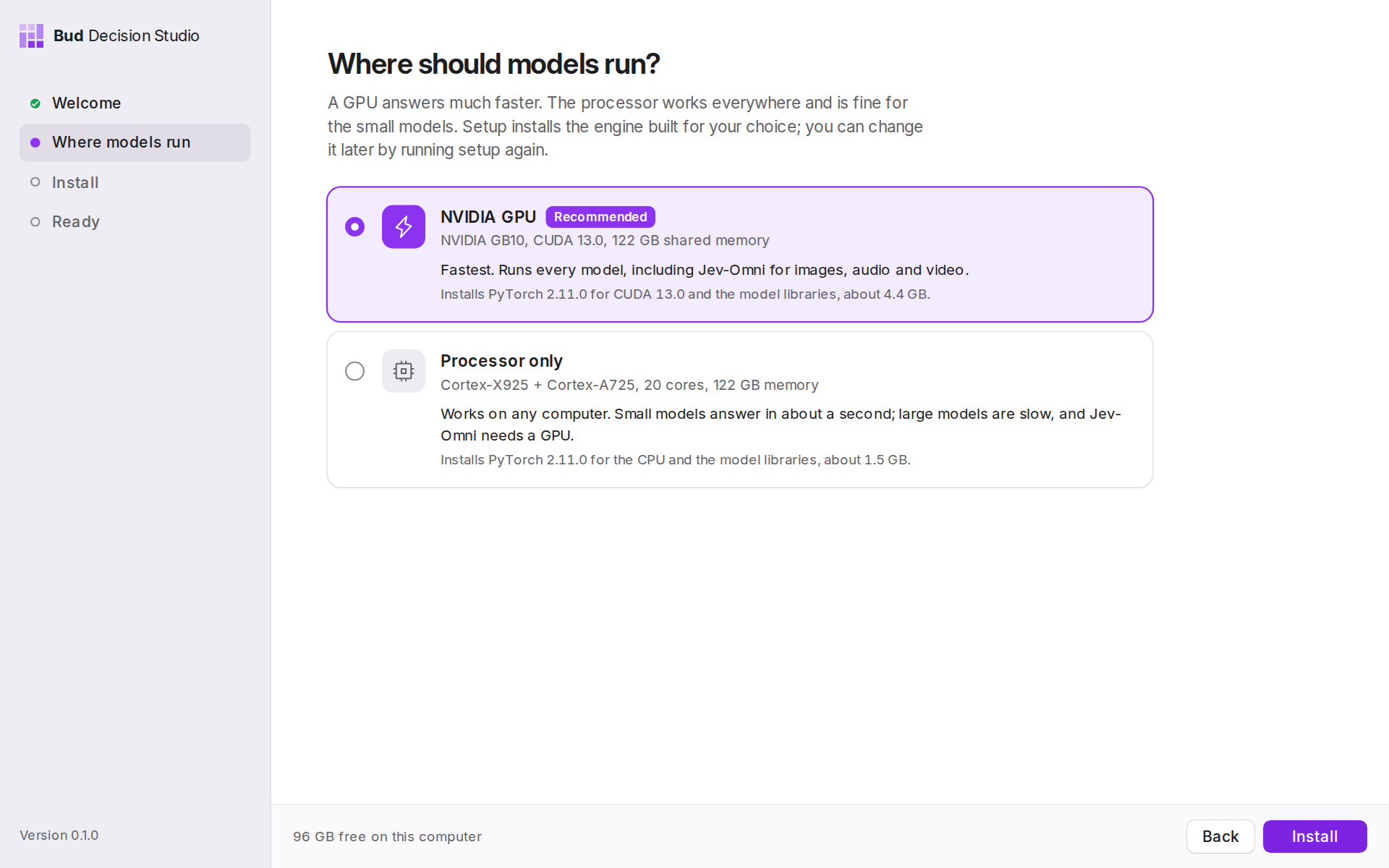
- It checks your computer: graphics, processor, memory and free disk.
- It asks where models should run: the GPU (recommended when there is one) or the processor. Each choice says what it installs and how big it is.
- It installs the engine by itself: a private Python with the PyTorch build that matches your hardware, and every model library. There is nothing else to set up, and nothing is installed outside the app's own folder.
- You choose which models to download. Nothing downloads until you pick; two models suited to your computer are ticked for you. They download one at a time in the background.
| Your hardware |
Models run on |
| NVIDIA GPU (GeForce, RTX, GB10 / DGX Spark, data-centre cards) |
CUDA 12.6, 12.8 or 13.0, chosen from your driver |
| Mac with Apple Silicon |
the Apple GPU, through Metal |
| Intel Core Ultra or Arc graphics |
the Intel GPU (XPU) |
| AMD GPU on Linux |
ROCm (experimental) |
| Anything else |
the processor; small models answer in about a second |
You can switch between the GPU and the processor later on the System page.
What it does
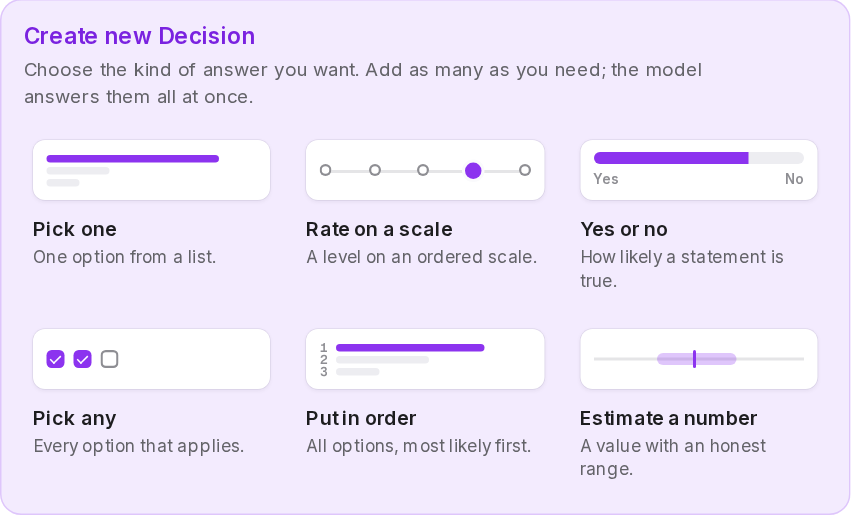
A decision model does not write text. You give it a situation (an email, a support ticket, a log line, a JSON object) and typed questions, and it returns the probability of every answer you allowed, in one fast pass. There are six kinds of question:
| Question |
You define |
You get back |
| Pick one |
a list of named options |
a probability per option, and the winner |
| Rate on a scale |
2 to 10 ordered levels |
a probability per level, plus an average position |
| Yes or no |
a statement |
the probability it is true |
| Pick any |
options and a cut-off |
every option above the cut-off |
| Put in order |
a list of options |
the options from most to least likely |
| Estimate a number |
the values it could take |
a best estimate and an 80% range |
Pages
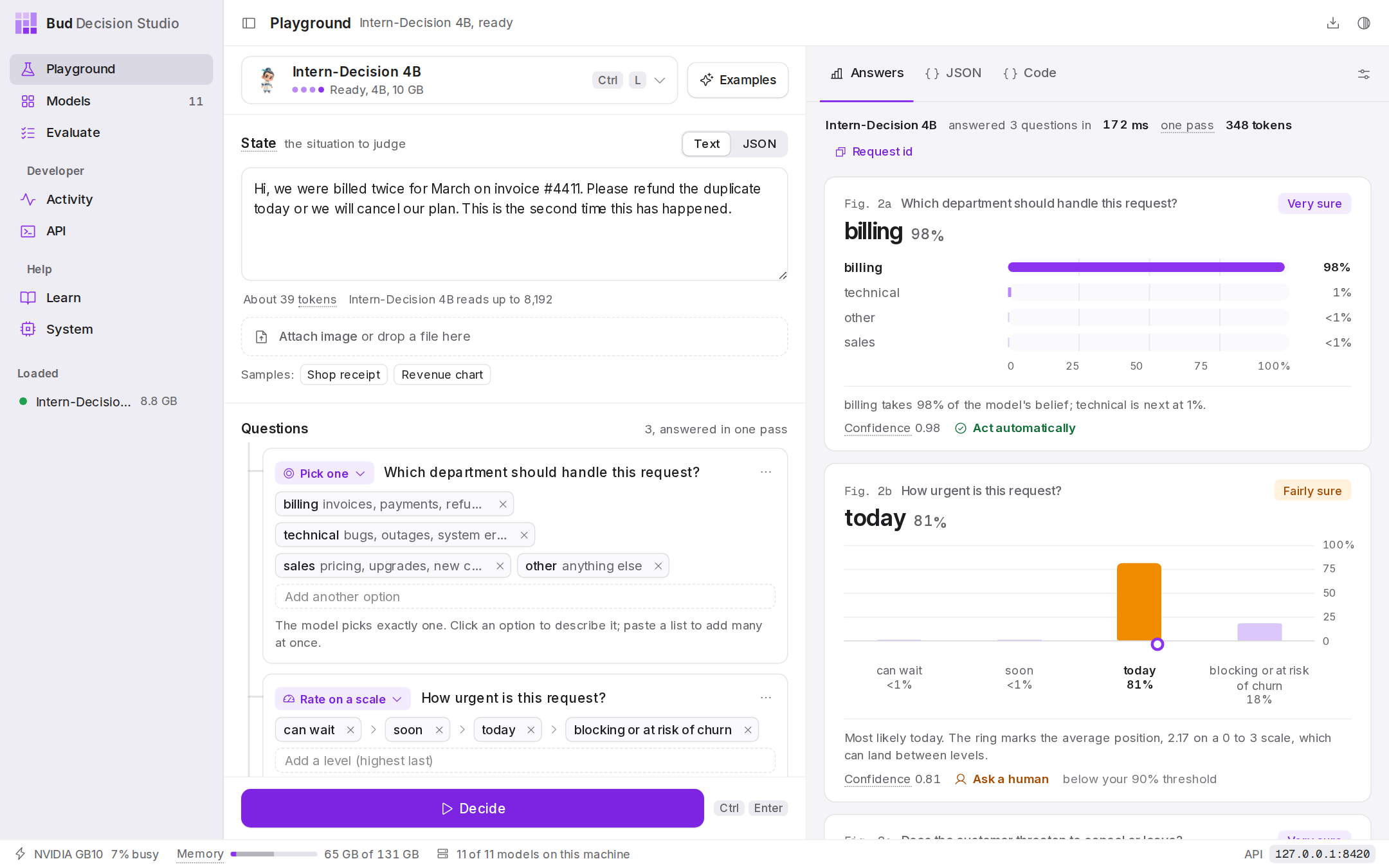
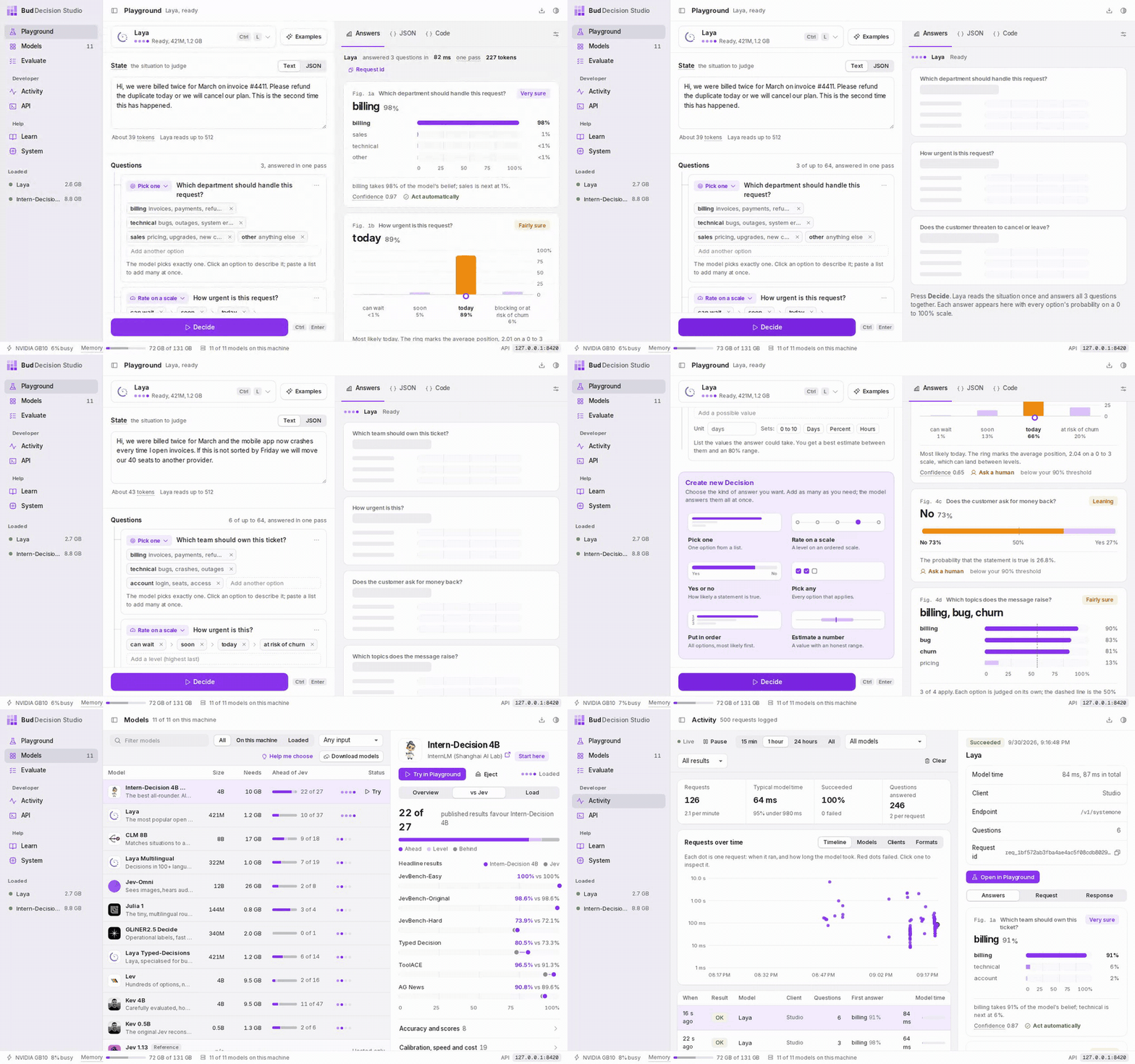
Playground. Write a situation and questions (start blank with New, or from an example), press Decide, and read each answer as a chart. The model button (Ctrl+L) loads any model; the JSON and Code tabs show the exact request. |
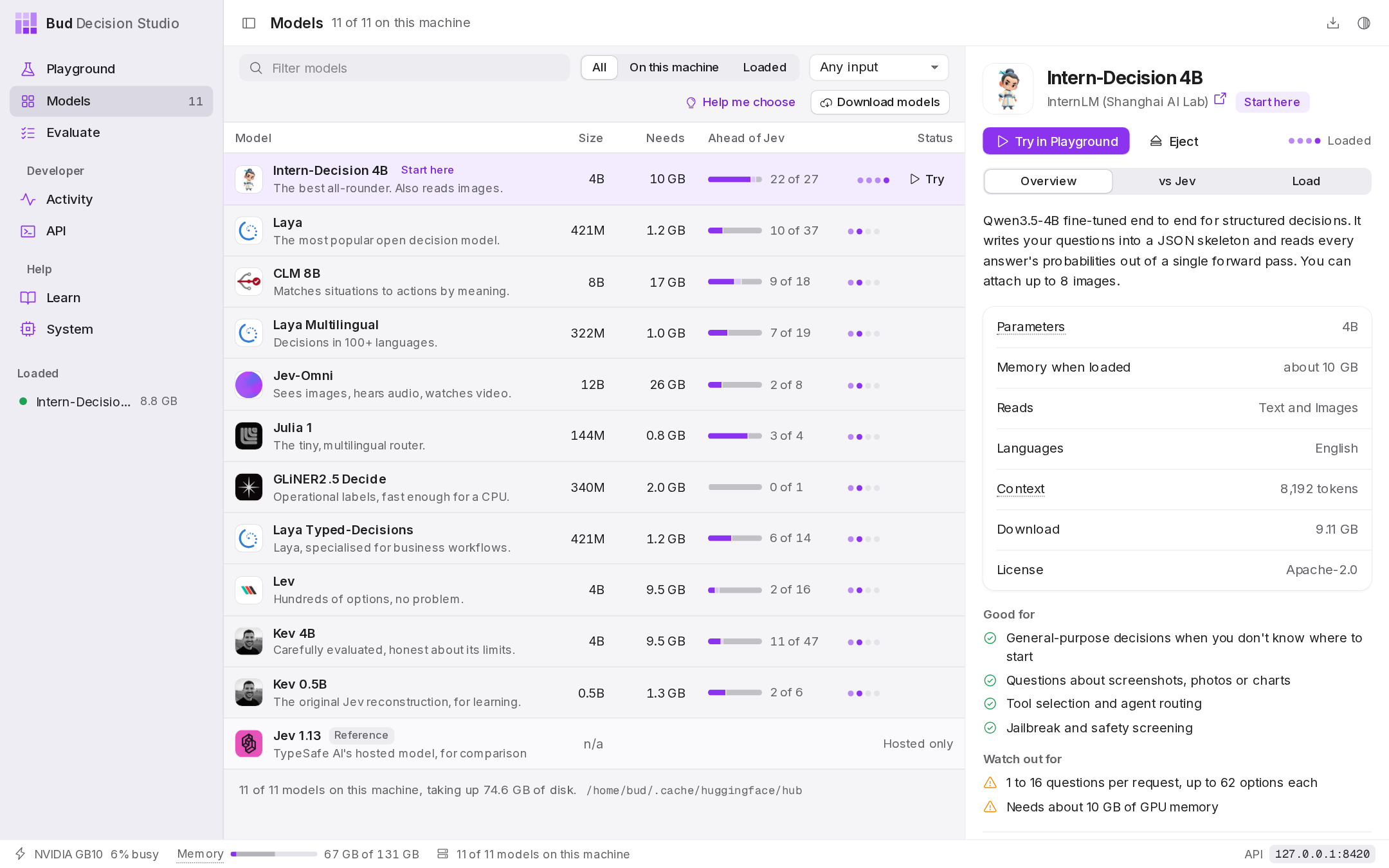
Models. Eleven open models in one table: what each is good at, its size, what it reads and its published results next to Jev. Download, load and eject with one click. |
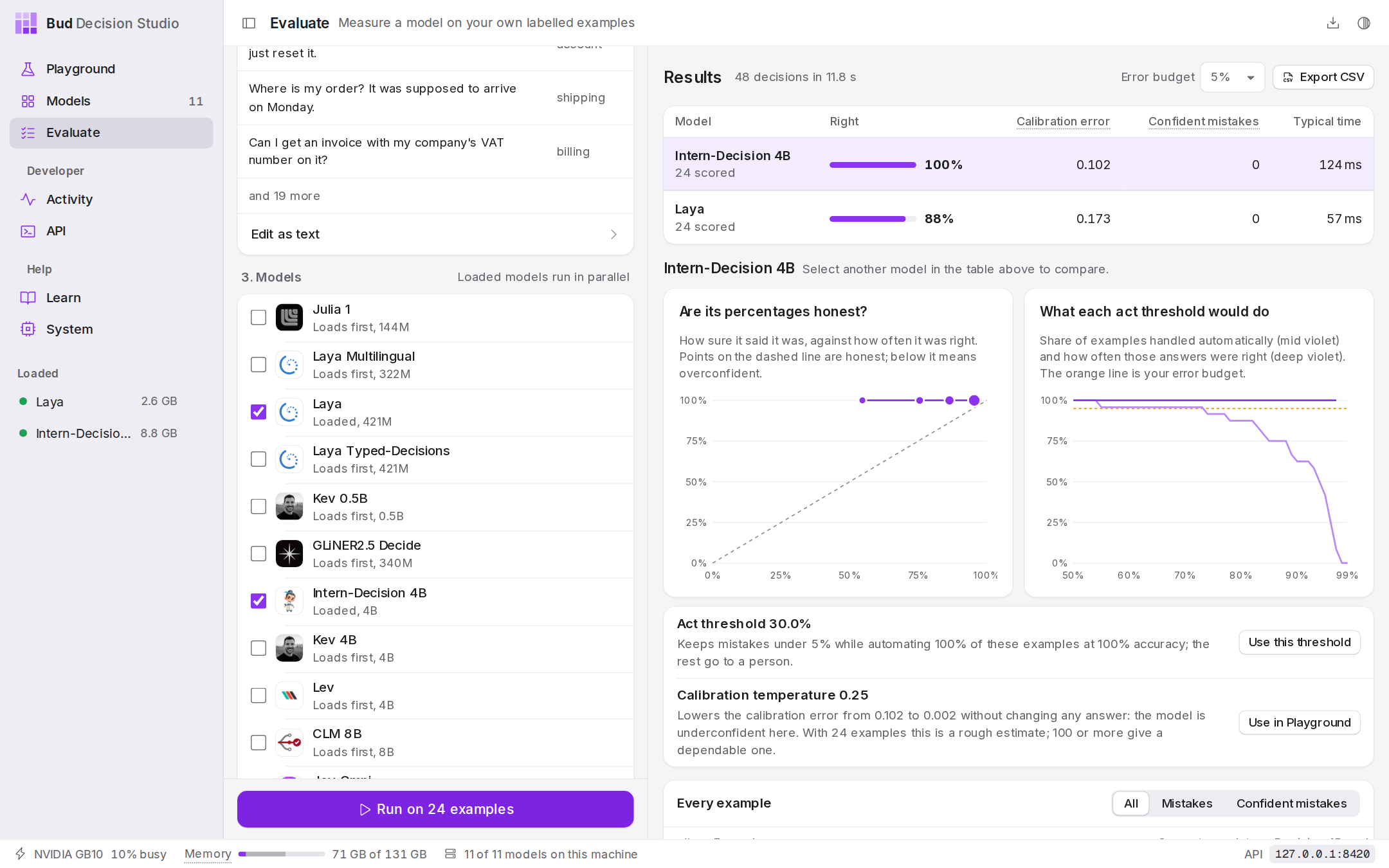
Evaluate. Run one question over many labelled examples on several models: a leaderboard, calibration and threshold charts, and a recommendation. |
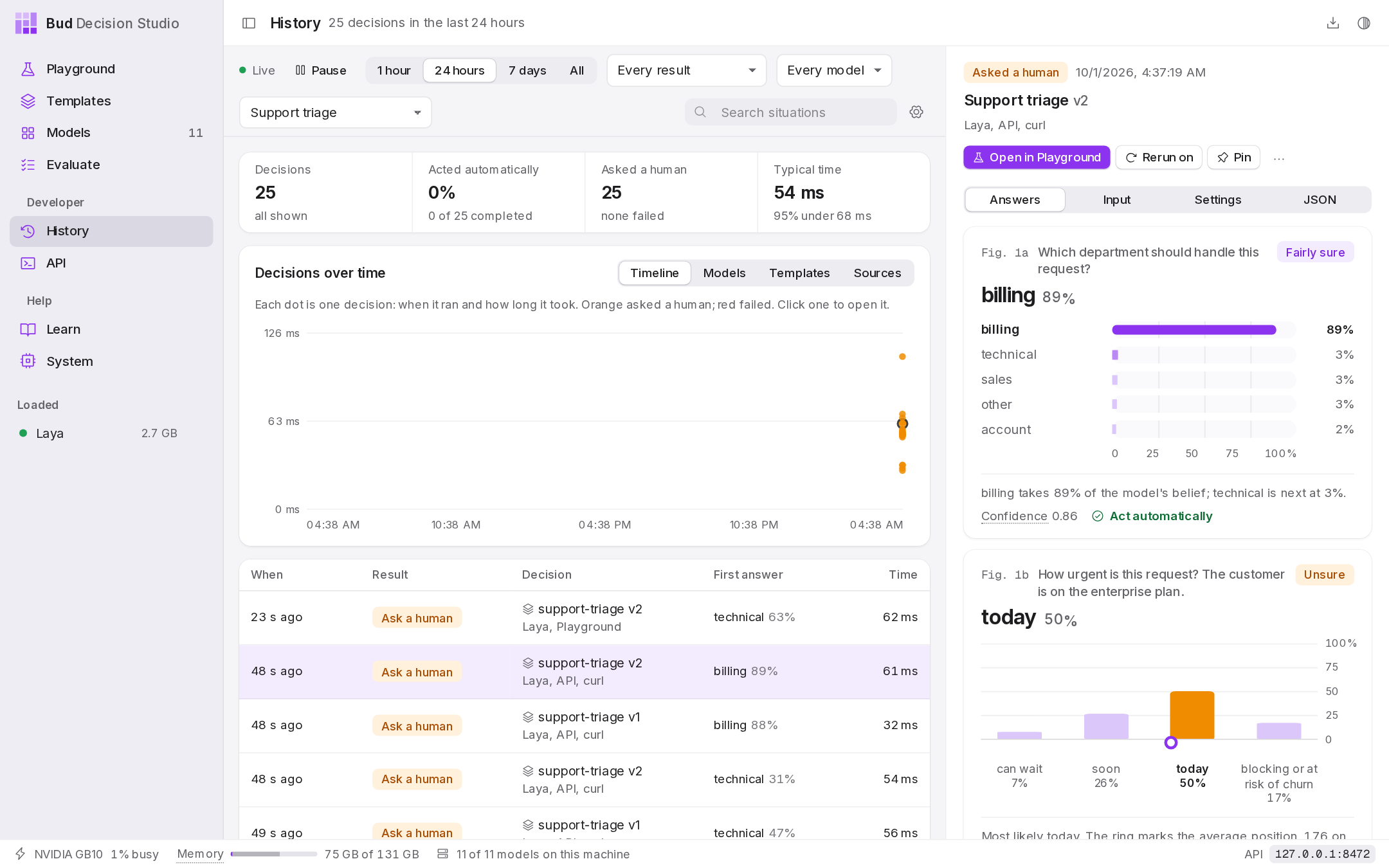
History. Every decision, from the Playground or any program, kept on this computer: filter by template, model, answer or time, see what needs a human, label the right answers, rerun on another model. |
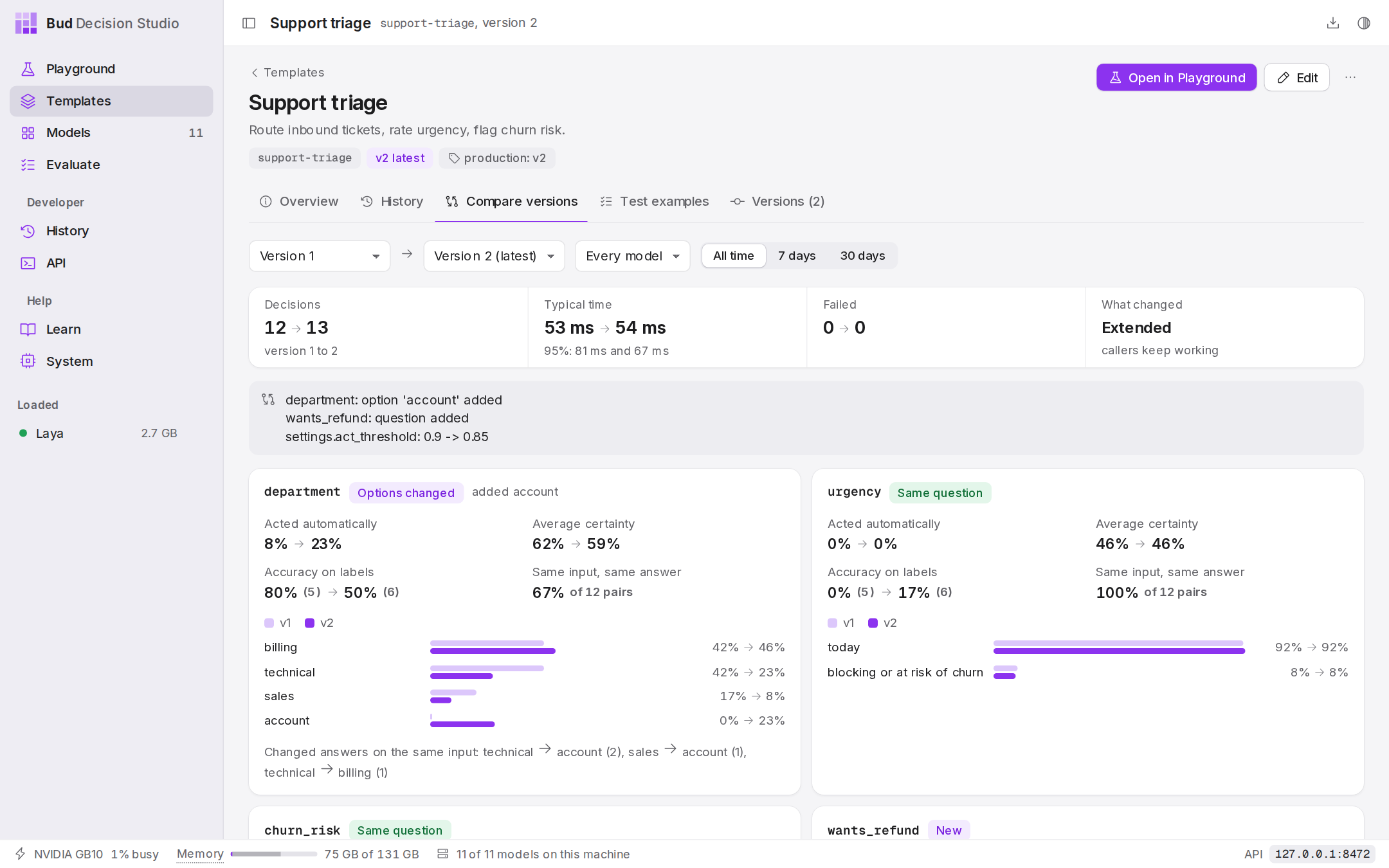
Templates. Reusable decisions with variables, a default model and settings. Every save is a version; compare two versions on real traffic before you switch. |
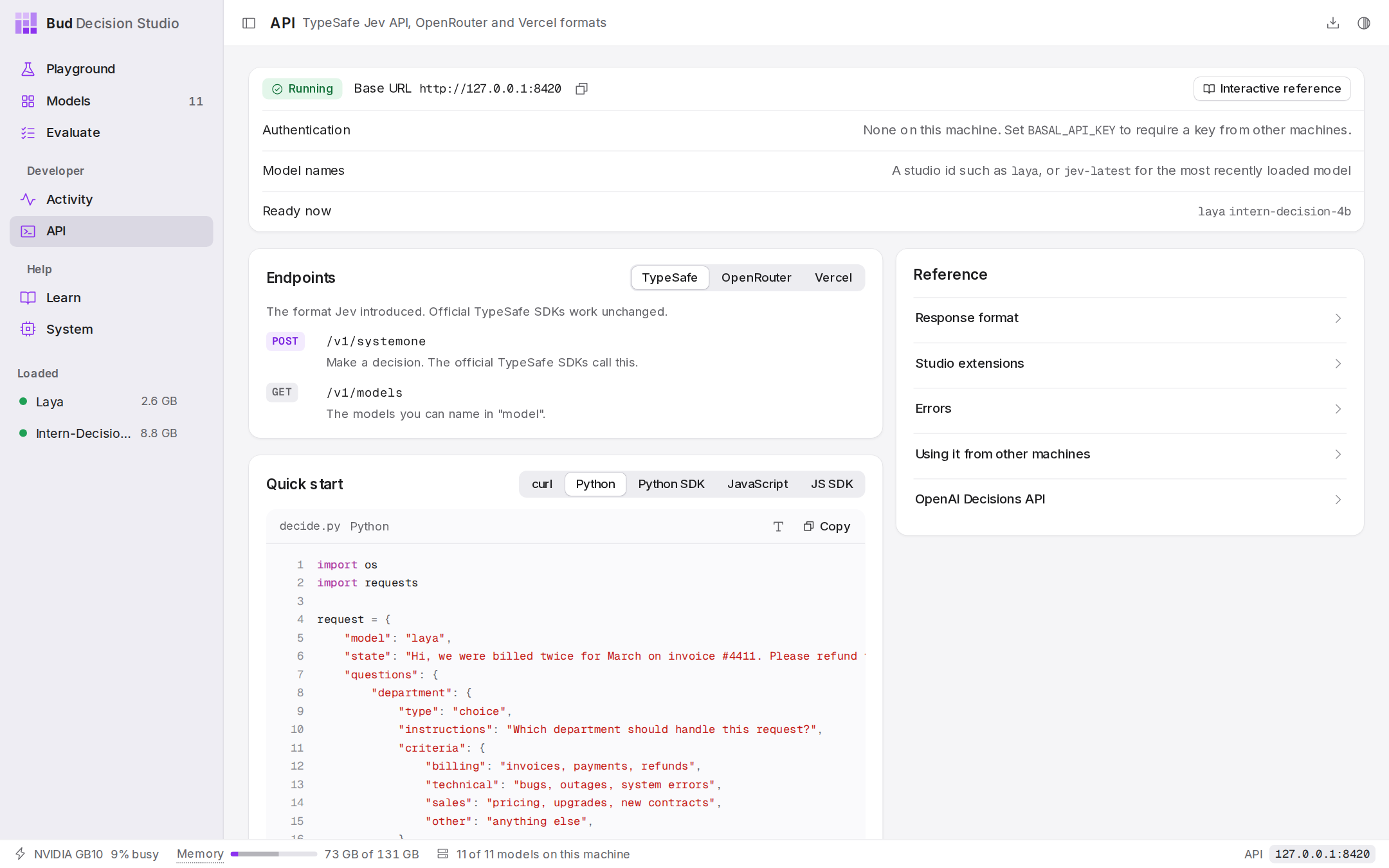
API. The server address and ready-to-run examples in curl, Python, JavaScript and the official TypeSafe SDKs. |
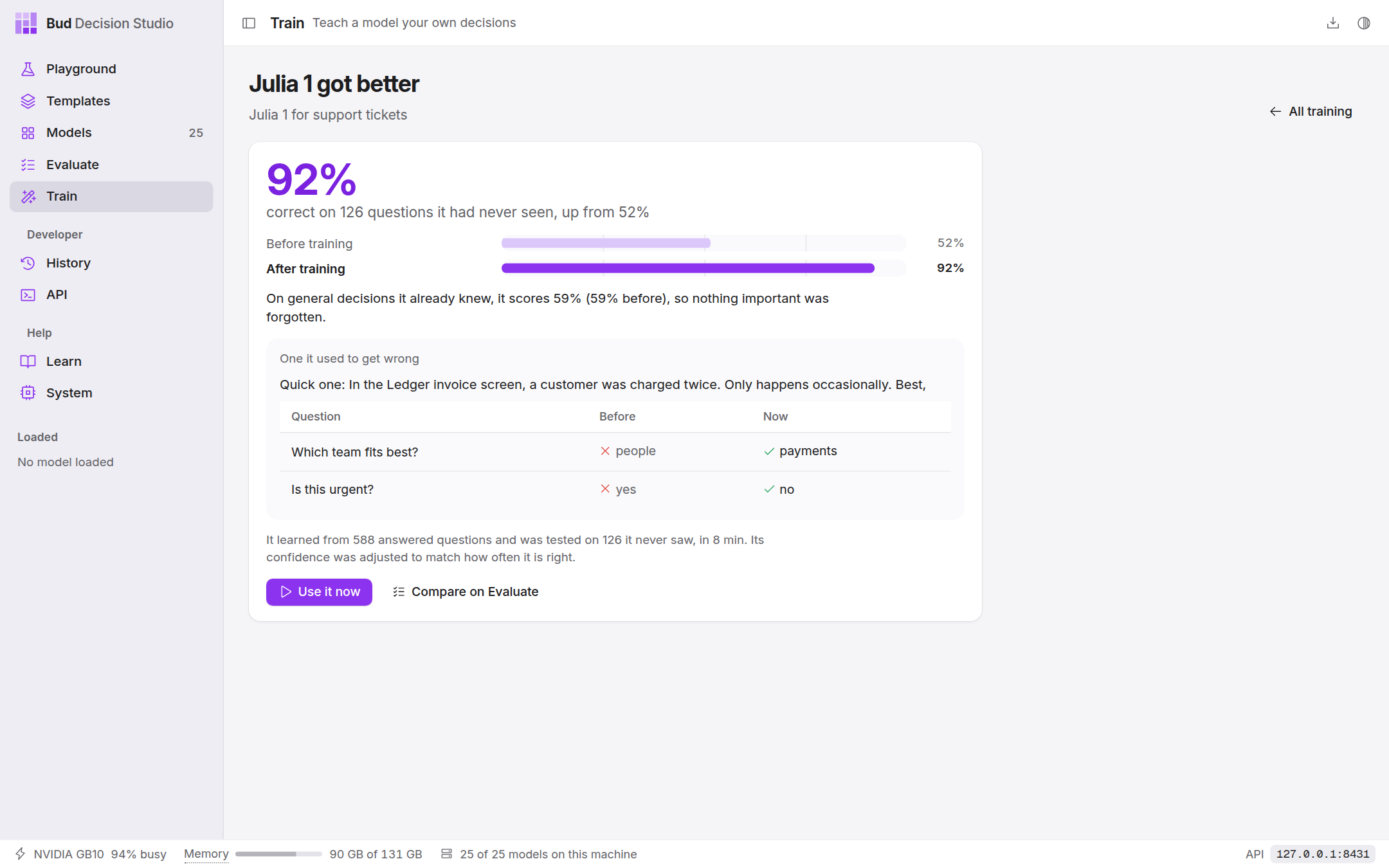
Train. Teach a model your own decisions from a spreadsheet of examples, on this computer's GPU. It keeps some examples aside, and the new model is added only if it is better on those without getting worse at general decisions. How it works. |
|
A short video of the whole flow: docs/media/demo.mp4.
Templates and history
A template is a decision you reuse: its questions, the variables that fill in the situation (a message, a plan tier, a screenshot), a default model and settings. It runs on any model. Every save is a new version, so code can pin support-triage@3, follow support-triage@production, or take the latest. Starter templates for every Playground scenario are included.
History keeps every decision on this computer, whichever way it came in: the situation, the questions, the answers, the model, the version and the timing. From there you can label the right answers, turn a decision into a test example, rerun it on another model, or see how version 3 answers compared with version 2 on the same inputs.
# Once: a template with two variables (PUT again with changes and it becomes version 2)
curl -s -X PUT http://127.0.0.1:8420/v1/studio/templates/support-triage -H 'content-type: application/json' -d '{
  "name": "Support triage",
  "variables": {"customer_message": {"type": "string"},
                "account_tier": {"type": "string", "enum": ["free", "pro", "enterprise"], "default": "free"}},
  "state": {"tier": "{{account_tier}}", "message": "{{customer_message}}"},
  "questions": {"department": {"type": "choice", "instructions": "Which department should handle this?",
                               "criteria": ["billing", "technical", "sales"]},
                "urgent": {"type": "noul", "instructions": "Does it need an answer today?"}},
  "model": "laya", "settings": {"act_threshold": 0.85}
}'

# Every time: fill in the variables
curl -s http://127.0.0.1:8420/v1/studio/decisions -H 'content-type: application/json' -d '{
  "template": "support-triage",
  "variables": {"customer_message": "We were billed twice. Refund it today.", "account_tier": "pro"}
}'
# -> {"id": "dec_...", "act": false, "needs_review": ["urgent"], "answers": {...}, "template": {"id": "support-triage", "version": 1}, ...}
Each answer says whether it is sure enough to act on (its certainty against the template's threshold), so your code can act automatically or ask a person. The full reference, with every field, rule and error: docs/studio-api.md.
Teach a model your own decisions
When a model doesn't decide the way your team would, show it. The Train page takes a spreadsheet of past decisions (a column of text, a column per answer), recommends a model, and trains it on this computer's GPU with LoRA, a small file of changes beside the original weights. It keeps the new model only if it is better on examples it never saw, has not got worse at general decisions it never trained on, and answers exactly the same once saved and reloaded. The trained model then appears beside the others in the Playground, Evaluate and your code, and Export and Import a trained model move it between computers.
Every model, trained by the studio itself on an NVIDIA GB10, measured on examples set aside before training:
| Model |
Task |
Before → after |
General decisions |
| Julia 1 |
support tickets (the built-in example file) |
52% → 91% |
−0.4 |
| Laya |
policy topics (16 areas) |
59% → 80% |
+0.2 |
| Laya Multilingual |
business workflows (typed decisions) |
34% → 62% |
+12.7 |
| Laya Typed-Decisions |
policy topics |
61% → 81% |
+0.2 |
| GLiNER2.5 Decide |
policy topics |
66% → 75% |
+0.7 |
| Kev 0.5B |
policy topics |
65% → 79% |
+0.6 |
| Kev 4B |
policy topics |
77% → 82% |
+0.2 |
| Intern-Decision 4B |
emotions in conversations (16) |
61% → 76% |
+0.2 |
| Lev |
policy topics |
75% → 82% |
+2.5 |
| CLM 8B |
business workflows |
39% → 68% |
+11.2 |
| Jev-Omni |
business workflows |
62% → 77% |
0.0 |
Training needs an NVIDIA RTX 30 series or newer (including the GB10) or an Apple M2 or newer; Intel Arc and Core Ultra, AMD on Linux and older NVIDIA cards are experimental. How it works, what it checks, and every run: docs/trainer/README.md and docs/trainer/RESULTS.md.
The eleven models
| Model |
Size |
Good at |
Reads |
| Julia 1 |
144M |
fast multilingual routing |
text |
| Laya Multilingual |
322M |
decisions in 100+ languages |
text |
| Laya |
421M |
English triage, guardrails |
text |
| Laya Typed-Decisions |
421M |
invoices, security, support workflows |
text |
| Kev 0.5B |
0.5B |
learning how the architecture works |
text |
| GLiNER2.5 Decide |
340M |
operational labels; fast on a processor |
text |
| Intern-Decision 4B |
4B |
best all-rounder |
text, images |
| Kev 4B |
4B |
careful and well calibrated; long policies |
text |
| Lev |
4B |
hundreds of options per question |
text |
| CLM 8B |
8B |
agent actions, ranking many candidates |
text |
| Jev-Omni |
12B |
the hardest questions; images, audio and video (needs an NVIDIA GPU) |
text, images, audio, video |
Every model comes with examples made for it, checked to give the right answers: CLM 8B opens on a web agent choosing its next action, Lev on a question with 77 options, Kev 4B on a refund policy with exceptions, Laya Multilingual on a Japanese message, Jev-Omni on a receipt photo. Choosing a model in the Playground shows its own example (unless you have written your own), and the Models page lists them under Try it. scripts/model-examples.py checks that each model still answers its examples as intended.
Weights come from each publisher's Hugging Face repository and stay in the standard Hugging Face cache, shared with your other tools. Each model keeps its own license; its page in the app links to it.
Use it from code
The studio speaks TypeSafe's Jev API and the gateway formats built on it, so code written for Jev works by changing only the base URL. While the app is open, the server is at http://127.0.0.1:8420 (the API page shows the exact address).
curl -s http://127.0.0.1:8420/v1/systemone -H 'content-type: application/json' -d '{
  "model": "laya",
  "state": "The package arrived crushed and the screen is cracked.",
  "questions": {
    "damaged": {"type": "noul", "instructions": "Was the item damaged?"},
    "team": {"type": "choice", "instructions": "Who should handle this?",
             "criteria": {"returns": "refunds and replacements", "shipping": "carriers and delivery", "sales": null}}
  }
}'
# pip install typesafe-sdk
from typesafe_sdk import TypeSafeClient, Noul

client = TypeSafeClient(api_key="local", base_url="http://127.0.0.1:8420", model="laya")
res = client.system_one(state="My card was charged twice for the same order.",
                        questions={"billing": Noul(instructions="Is this a billing problem?")})
print(res.answers["billing"].noul)   # probability of yes
| Endpoint |
Format |
POST /v1/systemone, GET /v1/models |
TypeSafe Jev API; the official typesafe-sdk (Python) and @typesafe-ai/sdk (JavaScript) work unchanged |
POST /api/alpha/decisions, POST /api/v1/systemone |
OpenRouter's Decisions API |
POST /typesafe/v1/systemone, GET /typesafe/v1/models |
Vercel AI Gateway's TypeSafe route |
POST /v1/evaluate |
Vercel AI Gateway's evaluation API |
/v1/studio/... |
The studio's own API: templates, decisions with history, feedback, test examples, settings (reference) |
Extensions, accepted on every endpoint: the multi, rank and number question types; "media" for images, audio and video; "settings": {"temperature": 2.0} for calibration; and the header X-Basal-Extensions: 1 to also receive decision, top_probability, probabilities and latency_ms. Without the header, responses are exactly TypeSafe's shape. Interactive API docs are at /docs.
Decisions are kept in History, from every endpoint, for 30 days by default (change it on the History page). Responses name the stored decision in the x-basal-decision-id header. To keep nothing for a call, send "store": false in the body (TypeSafe's own servers ignore it, so the same code runs against both) or the header X-Basal-Store: 0; "answers_only" keeps the answers without the situation. Variables marked sensitive are used for the decision and never written to disk.
Safe by default. The studio listens on this computer only; other websites open in your browser cannot send it requests, and changes (load, download, delete) need the header X-Basal-Client: 1. To serve other machines, start it with --host 0.0.0.0 and set BASAL_API_KEY; clients then send Authorization: Bearer <key>.
Tested
| What |
How |
Result |
| API conformance |
tests/test_conformance.py: TypeSafe's published OpenAPI schema, both official SDKs, OpenRouter's schema |
14 of 14 pass |
| Templates, history and the studio API |
tests/test_studio_api.py (a live studio with a deterministic test model), tests/test_templates.py, tests/test_history_store.py, tests/test_contract.py |
89 of 89 pass |
| Every model, end to end through the interface |
scripts/e2e.py drives the app in a browser: all six question types on all eleven models, images on the two that read them, Evaluate, History, the API page's example, download, and switching between GPU and processor |
21 of 21 pass (details and timings) |
| Teaching models (the trainer) |
tests/training/ (data format, release gate, device policy, job queue; a contract test per model family) and scripts/e2e_train.py through the interface; real fine-tunes in docs/trainer/RESULTS.md |
34 of 34 core tests pass; Train page end to end passes (details) |
| Desktop app |
first-run setup (hardware check, install, device check), the launcher entry, starting and stopping the engine, recovery after a force quit |
Linux ARM64 on an NVIDIA GB10 |
Run from source
git clone https://github.com/BudEcosystem/Bud-Decision-Engine.git && cd Bud-Decision-Engine
./install.sh          # detects your hardware, asks where models run, installs everything into .venv (Windows: install.ps1)
./run.sh              # then open http://127.0.0.1:8420
Build the desktop app: cd desktop && npm install && npx tauri build (details in desktop/README.md). Run the tests: pip install -r requirements-dev.txt, then pytest tests/test_conformance.py and python scripts/e2e.py.
How it is built
desktop app (desktop/, Tauri)   first run: installer/engine.py detects the hardware and installs PyTorch + libraries
      |                          later runs: starts the studio server and shows it in the window
      v
app window or browser (ui/) --HTTP--> studio server (basal/server.py, FastAPI; never touches the GPU)
                                         +- API formats (basal/api_compat.py): TypeSafe, OpenRouter, Vercel
                                         +- download queue (basal/hub.py): one at a time, smallest first
                                         +- where models run (basal/config.py): the device chosen in setup
                                         +- worker manager (basal/workers.py)
                                         v
                              one process per loaded model (basal/worker.py) --> GPU or processor
                                         +- an adapter per model family (basal/adapters/)
- One process per loaded model. Ejecting a model ends its process, which is the only way to return every byte of memory; a crash in one model cannot take down the studio.
- Adapters translate one common request format (
basal/contract.py) to each model's own library and return raw probabilities; contract.build_answers turns them into answers, so confidence means the same thing for every model.
- The interface is plain HTML, CSS and JavaScript with no build step.
DESIGN.md describes its design system.
| Path |
What it is |
desktop/ |
the desktop app: setup screens and the Rust shell that installs, starts and stops the engine |
installer/engine.py |
hardware detection and the one-step engine install, shared by the app and install.sh |
basal/ |
the runtime: server, API formats, model catalog, workers, adapters |
ui/ |
the interface; ui/registry.json holds each model's details and published results |
tests/, scripts/e2e.py, scripts/smoke.py |
conformance, end-to-end and smoke tests |
get.sh, get.ps1 |
the one-line installers |
Troubleshooting
- macOS says the app is from an unidentified developer. Right-click the app and choose Open once, or install with the one-line command, which avoids the warning.
- Windows SmartScreen warns about the installer. Choose More info, then Run anyway. The one-line command avoids the warning.
- A model does not load. It usually needs more memory: eject other models from the sidebar or the System page. Each model's log is on its Models page (View log).
- Downloads are slow. Hugging Face limits anonymous downloads; run
hf auth login once and restart the app.
- Setup did not finish. Press Try again; the Details log says which step failed. Setup changes nothing outside the app's own folder.
- Move models to another processor. System page, then Run setup again.

 Bud Decision Studio 是一个面向「决策模型」(类似 Jev 的「系统一」模型)的跨平台桌面应用和本地服务系统:你给它一个情境和若干类型化的问题,它为每个允许的答案返回校准过的概率,而不是生成文本。