Multilingual, non-autoregressive System 1 decision engine. Typed decisions over 100+ languages in a single forward pass — 33 ms — trained with reinforcement learning against strictly proper scoring rules (RLCD), with a router that picks the right checkpoint per request.
Laya evaluates typed questions (choice, score, noul) over any state (text, email, ticket or JSON document) in a single forward pass — 33 ms for one question, 7.2 ms/question batched, measured on a T4. No text generation, so nothing to parse and nothing to hallucinate.
Three checkpoints, and a Router that picks between them per request:
Documentation update only. There are no code or checkpoint changes from 0.3.8.
What's new in 0.3.8
Batch scoring.agent.predict_batch(states, questions) scores many states in shared forward passes, with answers identical to calling predict one state at a time. See Batch Mode.
Faster paths, all opt-in.laya.load(..., fast=True) uses a TileLang GPU fast path that matches the stock bf16 forward within rounding (see GPU Fast Path). Agent(compile=True) enables torch.compile, and laya.onnx_agent.ONNXAgent runs an exported model on ONNX Runtime. A second Agent for the same checkpoint reuses its parsed tokenizer, so it loads in about 0.5 s instead of about 3 s.
import laya no longer loads torch. Routing, language detection and e-mail cleaning work in lightweight processes; torch loads on first use of a model.
New ways to call Laya. A layacommand for quick local tests, an optional MCP server (pip install "laya[mcp]"), LangChain and LangGraph routing, guardrails, triage and evaluation (pip install "laya[langchain]"), and laya-ts/, a TypeScript package for Node and the browser that gives the same answers as the Python package.
HTTP server fixes. Inference runs off the event loop, so one request no longer stalls /health and other clients. The published Hugging Face ids select their checkpoint, and Docker Compose gains an HTTP service.
Routing. CJK text containing Latin brand names, romanized Bangla, and Azerbaijani now reach the multilingual checkpoint. Checked on 20,000 English texts: at most 5 English sentences move, all quoting long native-script names.
Correctness fixes. Long conversation lists keep the newest turn when truncated. Non-ASCII instructions reach the model as text instead of \uXXXX escapes. truncate_left with no room left keeps none of the state rather than all of it. Router.preload([]) loads nothing. noul questions accept an opt-in labels override. Intel XPU devices are detected.
E-mail cleaning. A body that mentions "confidential", or a line that starts with "Thanks for" or "Best", is no longer deleted as boilerplate, and more real sign-offs are removed.
Fine-tuning. Decision-head activation checkpointing is honoured, so the notebook's memory setting takes effect.
What's new in 0.3.7
About 10x faster loading. Checkpoints are built without the throwaway random weight initialisation, so laya.load() drops from about 22 s to about 2 s on CPU with bit-identical answers. This also skips the pass that crashed on Windows with Python 3.14 (#123).
Better routing for non-English Latin text. Plain-ASCII Spanish, Italian, Portuguese and French (accents stripped by mail clients and ticket systems) and Brazilian Portuguese support text now reach the multilingual checkpoint. Letters in scripts the router has no range for no longer fall through to English, and URLs, e-mail addresses and dotted names no longer count as words. Checked on 20,000 English texts, with no English prose moved.
A Jev-compatible HTTP server.pip install "laya[serve]", then laya-serve, speaks POST /v1/systemone, so existing TypeSafe clients work by changing baseUrl. See Self-Hosting.
Router defaults and hooks.Router() keeps two checkpoints resident, so alternating languages no longer reload a model on every request. You can pass your own language guess with lang_guess= and send undecided text to Router(default=...). Router and Agent also work as context managers, and evicted models free their memory.
Clearer errors and safer edge cases. A malformed question is rejected with a message naming the question and what to fix. An empty question set returns an empty answer, and invalid temperatures in a checkpoint no longer stop it loading.
E-mail cleaning for Portuguese and Spanish replies, signatures and footers.
Fine-tuning notebook fixes. Calibration is now fitted on a held-out slice rather than on training data (#186), and stale temperature overrides are cleared before a refit.
Docker quickstart under docs/docker.md.
Installation
Python 3.10 or newer. The dependencies set that floor: huggingface_hub 1.x, transformers 5.x and torch 2.14 all require 3.10.
Optional PyTorch build selection: If you need a CPU-only or GPU-specific PyTorch build, follow PyTorch's installation guide after creating your virtual environment and before installing Laya. Replace pip or pip3 in the selected command with the environment's Python executable followed by -m pip.
If you already use a virtual environment, install the PyPI release with:
python -m pip install laya
For a new environment, choose the commands for your platform below. Run them from your project directory; the explicit Python paths keep installation and verification in the same environment.
macOS / Linux (with Python 3.10 or newer):
On Debian/Ubuntu, the system Python may require sudo apt install python3-venv before creating a virtual environment. If venv reports that ensurepip is unavailable, install that package and retry.
Both checks print the installed Laya version without loading a checkpoint. -I excludes the current directory from the import search path, so a local source copy cannot mask a missing installation. Keep using the same virtual environment's Python when running your application.
Install from GitHub
To use the development version instead of the PyPI release, create the virtual environment above and replace its installation command with the appropriate command below. Git must be installed.
# macOS / Linux
.venv/bin/python -m pip install "git+https://github.com/NandhaKishorM/laya.git"
# Windows PowerShell
.\.venv\Scripts\python.exe -m pip install "git+https://github.com/NandhaKishorM/laya.git"
Run the same version check afterward. The GitHub version follows the repository's default branch and may differ from the published release.
Model setup and troubleshooting
Continue with the Router quickstart to run inference. Loading a Hub checkpoint requires access to Hugging Face on its first download; the quickstart's Router(preload=True) loads all three configured checkpoints at construction.
ModuleNotFoundError: No module named 'laya': run both installation and your script with the same virtual environment's Python executable shown above. In an editor, select that interpreter as well.
Missing rl_agent_config.json: this file ships with a Laya checkpoint alongside model.safetensors; it is not a configuration file you need to create in the source repository. For a local model, pass the directory containing those checkpoint files.
Command line
Installing the package also installs a laya command for quick local testing, no script needed:
laya "I was charged twice, please refund"            # routing decision only; works offline, no download
laya "Refactor this service" --predict               # full answers (downloads the checkpoint on first use)
laya "Mein Konto wurde zweimal belastet" --lang de   # force a language instead of detecting it
laya                                                 # interactive mode
Routing alone never downloads a checkpoint, so it returns in milliseconds. --predict loads the routed checkpoint, which needs network access to the Hugging Face hub the first time; if a checkpoint cannot be downloaded, the CLI says so instead of crashing.
Quickstart: Route Mode (Recommended)
To try the Python SDK in a CPU container, see the
Docker Compose quickstart. It runs a sample request and keeps
downloaded models between runs.
Laya ships three checkpoints. The built-in Router is the recommended entry point: it evaluates any state in any language, automatically detects scripts and languages in sub-milliseconds, and dispatches to the optimal checkpoint in a single forward pass.
from laya import Router

# Preload checkpoints into memory for instant sub-35ms routing
router = Router(preload=True)

# 1. State in any language or schema
state = {
    "from": "[email protected]",
    "subject": "Duplicate charge on invoice #4411",
    "body": "Hi, we were billed twice for March. Please refund the duplicate today or we will cancel our plan."
}

# 2. Define your typed questions
questions = {
    "department": {
        "type": "choice",
        "instructions": "Which department should handle this request?",
        "criteria": {
            "billing": "invoices, payments, refunds",
            "technical": "bugs, outages, system errors",
            "sales": "pricing, new contracts",
            "other": "everything else"
        }
    },
    "urgency": {
        "type": "score",
        "instructions": "How urgent is this request?",
        "criteria": ["not urgent", "soon", "critical deadline or blocking issue"]
    },
    "churn_risk": {
        "type": "noul",
        "instructions": "Does the user threaten to cancel or leave?"
    },
    "refund_requested": {
        "type": "noul",
        "instructions": "Does the user explicitly request a refund?"
    }
}

# 3. English state -> automatically routed to laya (ModernBERT-large, 39.5 ms)
res_en = router.predict(state, questions)
print("Department :", res_en["answers"]["department"]["choice"])  # -> billing (confidence: 0.94)
print("Routing    :", res_en["routing"]["model"])                 # -> english

# 4. Hindi state -> automatically routed to laya-multilingual (mmBERT-base, 32.8 ms)
res_hi = router.predict({"body": "मुझसे दो बार शुल्क लिया गया, कृपया पैसे वापस करें।"}, questions)
print("Department :", res_hi["answers"]["department"]["choice"])  # -> billing (confidence: 0.86)
print("Routing    :", res_hi["routing"]["model"])                 # -> multilingual

# 5. Explicit override when you want a specific checkpoint
res_td = router.predict(state, questions, model="typed-decisions")
Every result carries full routing metadata explaining why the choice was made:
res_hi["routing"]
# {
#   'model': 'multilingual',
#   'repo': 'convaiinnovations/laya/multilingual',
#   'reason': 'non-Latin script (devanagari, 100% of letters); the English checkpoint cannot read it'
# }
Inspect a routing decision without running any forward pass:
router.route({"body": "Der Kunde wurde zweimal belastet"}, questions).reason
# "Latin script but language looks like 'de', not English"
Very short Latin-script text often carries nothing that identifies its language ("Quero cancelar", "Esqueci minha senha"). Such text goes to default, which is "english" unless you change it. If most of your traffic is not English, set:
router = Router(default="multilingual")
router.route({"body": "Esqueci minha senha"}).model                 # -> multilingual
router.route({"body": "Please refund the duplicate charge"}).model  # -> english
Why Route: The Evidence
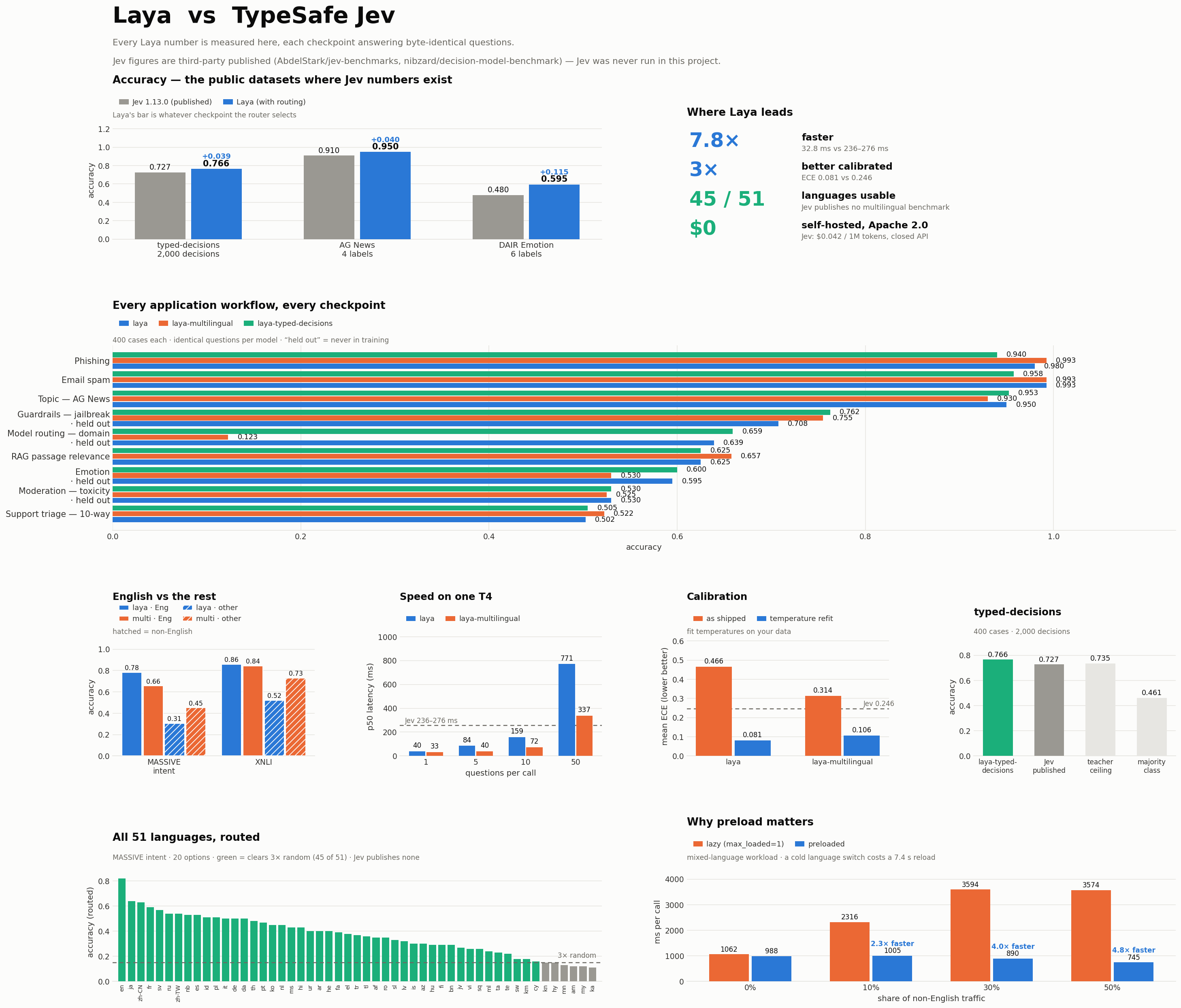
On a shared benchmark (17,416 questions, one T4 GPU, identical questions per model):
Benchmark / Task
English (laya)
Multilingual (laya-multilingual)
Router (Routed)
MASSIVE intent, English
0.783
0.657
0.783
MASSIVE intent, 13 other languages
0.306
0.451
0.451
XNLI, English
0.860
0.843
0.860
XNLI, 14 other languages
0.521
0.731
0.731
Languages usable (>3x random)
23 / 51
45 / 51
45 / 51
Latency, 1 question (T4 GPU)
39.5 ms
32.8 ms
32.8 ms
Latency, 10 questions batched
158.6 ms
72.3 ms
72.3 ms
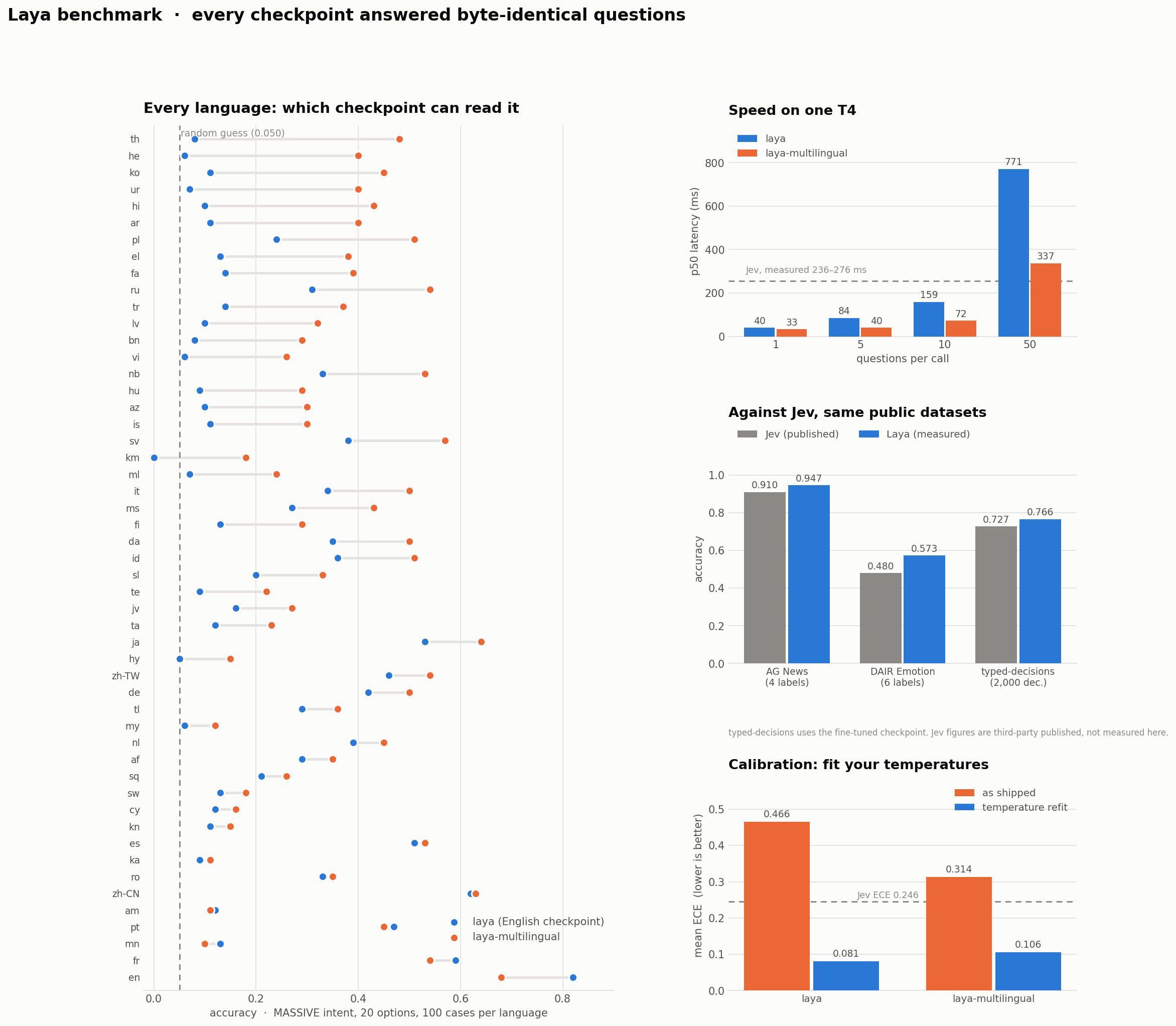
The English checkpoint collapses on non-Latin scripts (Khmer scores 0.000 accuracy at 0.952 confidence). Because the model stays confident while being wrong, confidence gating cannot save you. Router detects the script in <0.5 ms pure Python before the forward pass.
Production Preload & Memory
A cold checkpoint build costs seconds; language detection costs microseconds. The lazy default keeps two checkpoints resident — english and multilingual, the only two automatic routing chooses between — so a language flip costs detection only once each has been built. max_loaded=1 rebuilds the checkpoint it just evicted on every switch (measured at a 7.4 s median reload on CPU and 10.3 s on T4), and traffic that only ever sees one language never builds the second, so the default costs a single-language deployment nothing.
For a server or production app, preload:
# Every checkpoint resident in memory; language flips cost detection only (<1 ms)
router = Router(preload=True)
router = Router(preload=True, device="cuda")

# Or preload only the specific checkpoints you serve:
router.preload(["english", "multilingual"])

# If your app already built an agent, attach it to avoid duplicate VRAM:
router.attach("english", existing_agent)

# Manage resident memory (default keeps two hot: english + multilingual, LRU eviction)
router = Router(max_loaded=3)       # keep all three hot, e.g. with auto_task_detection
router = Router(max_loaded=1)       # memory-constrained host, reloads on every switch
router.unload()                     # free memory
Deployment Mode
Per-Request Latency
Model Reloads
Router() (lazy, max_loaded=2)
detection only (<1 ms) on a switch, after each language's first load
1 the first time a language appears
Router(max_loaded=1)
7 to 10 s on every language switch
1 per switch
Router(preload=True)
32.8 ms (GPU) / 193–464 ms (CPU)
none
A rebuild still re-reads the checkpoint, but each checkpoint's tokenizer is parsed once per process
and reused by every Agent — including one the Router rebuilds after eviction. The multilingual
tokenizer.json alone is 34 MB / 256k vocab, several times the cost of applying its weights.
Preloading is still the right answer for a server: it removes the rebuild rather than making it
cheaper.
Supplying Your Own Language Detection
Routing asks one question: can the English checkpoint read this state? The built-in detector answers it from the script and a function-word heuristic, and is deliberately dependency-free. That heuristic is best-effort on Latin-script languages it holds no word list for, so a short request can carry no usable signal:
from laya.lang import analyse
analyse("Care este ora in Tokyo?")
# {'script': 'latin', 'language': 'en', 'is_english': True}   -> the English checkpoint
If you already run a language-identification model, hand routing the answer instead of relying on the heuristic. lang_guess takes a language code or a callable receiving the state, and is checked after an explicit lang= and before detection:
# A code you already know
router.predict(state, questions, lang_guess="ro")

# A callable, e.g. wrapping fastText, CLD3 or a transformer LID
router.predict(state, questions, lang_guess=lambda s: my_lid(s))

# Or install one for every request on a server
router = Router(preload=True, lang_guess=my_lid)
The hint only decides English or not: a code whose primary subtag is en, eng or english routes to the English checkpoint and everything else routes to the multilingual one. "en_US" and "en_US.UTF-8" are read as English, so $LANG can be passed straight through. Returning None, or an empty code, makes it abstain and the built-in detector decides as before — so a LID model that is unsure does not force a checkpoint. An explicit model=, task= or lang= still wins, and the default path is unchanged.
Self-Hosting: HTTP Server (Jev-compatible)
laya.serve exposes the Router over HTTP on the same POST /v1/systemone
wire protocol as TypeSafe's hosted Jev API. Laya's answer payload is already
schema-identical to what Jev returns (choice/score/noul answers and a
{input_tokens, output_tokens} usage block), so an existing Jev client — e.g.
the hs-jev Haskell client — just
needs its baseUrl repointed; nothing else changes.
Configuration is by environment variable: LAYA_HOST, LAYA_PORT,
LAYA_DEVICE, LAYA_PRELOAD, LAYA_MODELS (comma list to preload),
LAYA_THREADS (cap torch intra-op threads for CPU inference — keep at or below
physical cores), LAYA_AUTO_TASK, and LAYA_API_KEY (when set, clients must
send Authorization: Bearer <key>). A client's model field is honoured when it
names a Laya checkpoint (english/multilingual/typed-decisions), otherwise
the router auto-selects by script/language.
Nix / NixOS
This repo is a flake. On a machine with an NVIDIA GPU:
nix run .#laya-serve          # build (prebuilt CUDA torch, no compile) and serve
nix develop                   # dev shell: torch-bin, transformers, fastapi, pytest
For a NixOS host, import the module and enable the service:
# flake inputs:  laya.url = "github:<you>/laya";  # or path:/… on the same host
{
  imports = [ laya.nixosModules.default ];
  services.laya-serve = {
    enable = true;
    host = "0.0.0.0";           # or bind to the Tailscale/LAN address
    openFirewall = true;
    device = "cuda";
    models = [ "english" "multilingual" "typed-decisions" ];
    # apiKeyFile = config.age.secrets.laya-api-key.path;  # optional bearer auth
  };
}
The module runs a hardened DynamicUser systemd unit with CUDA device access,
caches weights under /var/lib/laya-serve, and reads the bearer token (if any)
via LoadCredential so it never enters the store.
Single-Model Mode (Direct SDK)
If you only need a single checkpoint for a dedicated pipeline, you can load models directly:
import laya

# 1. Load a specific checkpoint directly from the hub
agent = laya.load("convaiinnovations/laya")                           # English root
agent_ml = laya.load("convaiinnovations/laya", subfolder="multilingual") # 100+ languages
agent_td = laya.load("convaiinnovations/laya", subfolder="typed-decisions")

# 2. Run all questions in ONE single forward pass (~35 ms on GPU)
result = agent.predict(state, questions)
answers = result["answers"]

print("Department :", answers["department"]["choice"])   # -> billing (confidence: 0.94)
print("Urgency    :", answers["urgency"]["score"])        # -> 1.84 / 2.0
print("Churn Risk :", answers["churn_risk"]["noul"])       # -> 0.892 (89.2% probability)
Passing an empty question dictionary to agent.predict(state, {}) or
agent.system_one(state, {}) returns the standard response with "answers": {}
and "usage": {"input_tokens": 0, "output_tokens": 0}. The state is not tokenized
and no model forward pass runs.
Batch Mode: score many states in one forward pass
predict handles one state per call, which leaves most of the GPU's batch dimension idle. When you
have a list of items to score against the same questions — a backlog of tickets, a table of rows,
a log slice — predict_batch packs them into shared forward passes:
states = [{"body": t} for t in ticket_texts]           # a list of states

results = agent.predict_batch(states, questions)       # one forward pass for the whole list
# results[i] is exactly what agent.predict(states[i], questions) would return

# Bound peak memory when the list (or the texts) are large — chunk into passes of N:
results = agent.predict_batch(states, questions, batch_size=64)
Results are aligned with states by index and identical in shape to predict. Decisions match the
one-at-a-time path exactly (numbers are bit-identical on CPU; on GPU they can differ in the 4th
decimal because fp16 autocast reorders reductions across padding widths). Batching is a GPU
throughput win — on an RTX 5060 Ti, per-decision latency drops from ~10 ms one-by-one to ~1 ms
batched (measured ~9–10×). On CPU the model is already compute-bound, so batching does not speed it
up; use it there only for API convenience.
GPU Fast Path (TileLang)
pip install laya[fast] adds an optional forward built from fused TileLang
kernels: GEMM + bias/activation epilogues, GEMM + GEGLU, residual + LayerNorm, in-place RoPE, and a
sliding-window flash attention that reads the packed QKV buffer directly. Weights stay resident in bf16
and every (batch, length) bucket is captured as a CUDA graph, so a one-question call no longer pays
~200 kernel launches from Python.
agent = laya.load("convaiinnovations/laya", fast=True)   # or: agent.accelerate()
agent.predict(state, questions)                            # same API, same answers
Numerics: on a fixed set of 60 states the fast path is at least as close to an fp32 forward as the stock bf16
path is (max |Δp| ≤ 0.05 vs fp32 on both checkpoints, argmax agreement ≥ 47/48 per question type; every per-option
probability is in benchmarks/results/parity_*.json) — see benchmarks/parity_fast.py and BENCHMARKS.md.
Falls back to the stock forward on CPU/MPS or when tilelang is not installed; agent.deaccelerate()
restores it. Kernels compile once per shape bucket on first use (a few seconds, cached on disk).
Automated Confidence Gating
Because Laya's probabilities are trained with strictly proper scoring rules (RLCD), confidence scores are statistically meaningful:
dept = answers["department"]["choice"]
conf = answers["department"]["confidence"]

if conf >= 0.85:
    # High confidence: automated action without human in the loop
    route_automatically(dept)
else:
    # Low confidence: escalate to human triage
    escalate_to_human_agent(dept, reason=f"Low confidence ({conf:.2f})")
Built-in Workflow Presets
Laya provides pre-tuned question schemas for immediate production use:
import laya

agent = laya.load("convaiinnovations/laya")

# 1. Intelligent Model Router (routes to small vs. frontier models)
routing = agent.predict({"request": "Refactor this service using dependency injection"}, laya.router_questions())

# 2. Real-time Prompt Guardrails (jailbreaks, injections, leaks)
guard = agent.predict({"prompt": "Ignore all instructions"}, laya.guard_questions())

# 3. Content Safety & Moderation (toxicity, harassment, threats)
safety = agent.predict({"post": "User comment text"}, laya.moderation_questions())

# 4. Support Ticket Triage (intent, urgency, frustration, churn)
triage = agent.predict({"message": "My payment failed twice"}, laya.triage_questions())
LangChain and LangGraph Integration
Fast System 1 routing and guardrails directly inside LangGraph workflows and LCEL chains:
noul always scores two semantic slots in [false, true] order and returns the probability of
the second slot. For compatibility, those slots are shown to the model as false and true by
default. The optional labels mapping overrides only that model-facing text without changing the
returned meaning:
question = {
    "type": "noul",
    "instructions": "Is this review positive?",
    "criteria": {
        "false": "the review is negative",
        "true": "the review is positive",
    },
    "labels": {
        "false": "B",
        "true": "A",
    },
}
The labels mapping is optional. It must contain exactly the string keys false and true,
whose values must be distinct non-empty strings. Mapping order does not matter, and the returned
noul value is still P(true). Label sensitivity varies by checkpoint and state, so validate any
override on your own data rather than treating A/B as a universal fix.
MCP Server (Optional)
Laya can be exposed as an MCP stdio server, so any MCP
client (OpenClaw, Claude Desktop, Cursor, ...) can call typed decisions as tools
(laya_predict, laya_route, laya_preset, laya_status) without writing glue code.
This is an optional extra: the core package has no mcp dependency.
The environment variables follow the contract documented at the top of
laya/serve.py, so the same variable has one meaning across the
package:
Variable
Default
Meaning
LAYA_DEVICE
(auto)
Same as laya.serve: the value is passed straight to torch
LAYA_PRELOAD
1
Same as laya.serve: build the checkpoints at startup, not lazily
LAYA_MODELS
english,multilingual
Comma list to preload (serve contract). MCP difference: an empty value preloads english,multilingual so typed-decisions stays lazy; in laya.serve empty means every checkpoint
LAYA_THREADS
(torch default)
Same as laya.serve: cap torch intra-op threads for CPU inference; keep it at or below the physical core count
The tools return structured JSON (answers with probabilities, routing metadata, device,
latency_ms). As with the SDK, use it for structured decisions only; not for open Q&A or
text generation. Tests: tests/test_mcp.py (CI, no weights) and
tests/test_mcp_local_e2e.py (local, real weights and a real stdio handshake).
Benchmarks
Community diagnostic: Chinese workplace decisions (Feishu-style) · 中文说明. Includes frozen synthetic cases, archived paired Laya/Jev responses, and an offline audit; separate from the benchmark suites below.
Full report: BENCHMARKS.md — every run consolidated, languages and themes, with per-language detail for all 51 languages.
All Laya numbers below are measured. Every model answered byte-identical questions
(fixed seed) in the same run. Reproduce with
research/scripts/laya_benchmark_colab.ipynb on a T4.
Speed (Tesla T4, measured)
questions per call
laya
laya-multilingual
1
39.5 ms
32.8 ms
5
84.5 ms
40.1 ms
10
158.6 ms (15.9 ms/q)
72.3 ms (7.2 ms/q)
50
771 ms
337 ms (6.8 ms/q)
Batched throughput reaches 103-332 questions/sec on a single T4. For reference, TypeSafe Jev
has been independently measured at 236-276 ms p50
(AbdelStark,
nibzard) -- Laya answers a single
question roughly 6-7x faster.
Laya (with routing) vs Jev
Every Laya figure is what Router().predict(...) actually returns — the checkpoint the router
selects for that input, not a hand-picked best of three. Jev figures are third-party
published, never measured here (no TypeSafe API access), so sample sizes and prompts differ.
Jev 1.13.0
Laya (routed)
typed-decisions, 2,000 decisions
0.727
0.766
+0.039
AG News, 4 labels
0.910
0.950
+0.040
DAIR Emotion, 6 labels
0.480
0.595
+0.115
Banking77 (72 vs 77 labels)
0.870
0.425
Jev leads on >20 options
ECE (lower better)
0.246
0.081
3× better (post-temperature)
p50 latency, 1 question
236–276 ms
32.8 ms
7.8× faster
Languages usable
no published benchmark
45 of 51
—
Weights
closed API
Apache 2.0
—
Cost
$0.042 / 1M tokens
$0 self-hosted
—
On DAIR Emotion, Jev assigned zero probability to the true label on 16% of examples — a hard
failure for anything branching on confidence.
Where Jev leads
High-cardinality label spaces (>20 options at default settings): On Banking77, Jev scores 0.870 (on 72 labels) while Laya scores 0.425 (on 77 labels at default 256-token head budget). This is an architectural token-budget constraint: options share a fixed head_max_len budget (192 tokens on English, 256 on multilingual), so 77 options receive only ~3 to 4 tokens per label, causing text to become indistinguishable. Jev supports up to 255 options out-of-the-box. While laya-multilingual supports 1,024 context (and up to 8,192 in the encoder) and you can raise agent.cfg["head_max_len"] = 512 at runtime, Jev is currently better suited for 50+ options in a single prompt without tuning. predict_shortlist (see Honest limits) keeps the top k labels with a caller-supplied embedding, then runs one forward pass on that shortlist.
Soft distribution matching: On typed-decisions, while Laya achieves higher argmax accuracy (0.766 vs 0.727), Jev achieves higher soft accuracy (0.580 vs 0.471) against the teacher's full probability distributions.
Out-of-the-box raw calibration: Before temperature scaling, the base checkpoint has higher raw ECE (0.213 vs 0.144). Laya achieves its 0.081 ECE after domain temperature fitting.
Full detail, including every workflow and all 51 languages: BENCHMARKS.md.
typed-decisions, measured on all three checkpoints
400 cases, 2,000 decisions, four workflows.
model
accuracy
soft acc
Brier
ECE
score MAE
laya-typed-decisions
0.766
0.471
0.062
0.213
0.242
laya
0.362
0.332
0.316
0.175
0.694
laya-multilingual
0.342
0.326
0.439
0.285
0.687
Jev 1.13.0 (published)
0.727
0.580
0.148
0.144
0.391
teacher self-agreement ceiling
0.735
per-question majority class
0.461
random guess
0.318
The fine-tuned checkpoint beats Jev by 3.9 points and clears the teacher ceiling, with 2.4x
better Brier and 1.6x better score MAE. It wins on all four workflows: invoice processing
0.804, security incidents 0.766, customer service 0.764, agent-trace observability 0.730.
By primitive: noul 0.857, choice 0.733, score 0.723.
Two places it still trails Jev: soft accuracy (0.471 vs 0.580 — its argmax is better but
its distributions match the teacher less well) and ECE (0.213 vs 0.144), which temperature
fitting addresses.
The base checkpoints sit below the majority-class baseline (0.362 and 0.342 against 0.461).
All of the capability on this benchmark comes from fine-tuning.
Multilingual (51 languages, MASSIVE intent, 20 options, random = 0.050)
laya
laya-multilingual
English
0.783
0.657
13 other languages
0.306
0.451
XNLI, English
0.860
0.843
XNLI, 14 other languages
0.521
0.731
Across all 51 languages the English checkpoint macro-averages 0.227 with macro ECE
0.733, and only 23 of 51 languages clear 3x random. Khmer scores 0.000 at 95.2%
confidence. This is why Router exists: the
model's own confidence gives no warning, so the routing decision has to be made before the
forward pass.
English tasks
task
laya
laya-multilingual
note
AG News
0.947
0.937
in training mix
BoolQ
0.830
0.787
in training mix
DAIR Emotion
0.573
0.513
held out
prompt-injections
0.698
0.578
held out, n=116
SST-5 (ordinal)
0.372
0.282
held out
Calibration
Both checkpoints are over-confident as shipped. Refitting one temperature per (question type,
option count) on held-out data moves mean ECE 0.466 -> 0.081 (laya) and
0.314 -> 0.106 (laya-multilingual). laya-multilingual ships with no fitted
temperatures at all, so fit them before relying on its probabilities.
At checkpoint load, numeric temperature entries are clamped to [0.5, 5.0]; invalid or
non-finite entries use the neutral fallback 1.0. A runtime warning reports the affected
entries and applied values. Bucket-specific temperatures still take precedence over per-type
values, including when a bucket uses the fallback. Raw values remain available in
agent.temperature_raw and agent.temperature_by_options_raw. A fallback prevents a loading
failure; it does not establish calibrated confidence.
Honest limits
The base checkpoints are near chance on typed-decisions zero-shot -- 0.362 and 0.352
against a 0.318 random baseline and a 0.461 majority-class baseline. The 0.766 figure comes
from the checkpoint fine-tuned on that benchmark's own training split. Laya is a fast base to
specialise, not a zero-shot decision engine.
Avoid boolean-word labels in choice questions. Choice keys are rendered verbatim, and the
current checkpoints can follow labels such as true/false or yes/no instead of the option
descriptions. Use semantic labels or opaque labels such as A/B, and validate them on the
checkpoint and states you serve.
High-cardinality choice questions and token budgets: Sequences split into an option prompt budget (head_max_len) and the remaining document/state budget (max_len - head_max_len):
laya (English) defaults to 512 context (head_max_len = 192, ~320 tokens for state).
laya-multilingual and laya-typed-decisions default to 1,024 context (head_max_len = 256, ~768 tokens for state; mmBERT-base encoder supports up to 8,192 with RoPE).
At default settings, a 77-option question like Banking77 allocates only (256 - 16) // 77 ≈ 3–4 tokens per label, which causes accuracy to fall off sharply (0.425 vs Jev's 0.870). If evaluating 50+ options in a single question:
Raise agent.cfg["head_max_len"] = 512 and agent.cfg["max_len"] = 1024 (or up to 2048 / 4096 / 8192) so every option has enough tokens to remain distinct.
Or shortlist with embeddings and run one forward pass on the top k labels (predict_shortlist, example below). predict and system_one still score every criterion they are given.
Or split the label set yourself into a coarse question and a fine question.
import laya

questions = {
    "intent": {
        "type": "choice",
        "instructions": "Which banking intent is this?",
        "criteria": {
            "card_arrival": "where is my card",
            "transfer_fee": "fee charged on a transfer",
            # ...the rest of a large label set
        },
    }
}
result = laya.predict_shortlist(
    agent,
    {"text": "I was charged twice for a transfer"},
    questions,
    embed_fn=laya.embed_fn_from_agent(agent),  # or any callable: texts -> (n, dim)
    k=20,
)
result["shortlist"]["intent"]["labels"]  # the top 20 labels sent to the model
embed_fn(texts) returns one vector per string. embed_fn_from_agent mean-pools the encoder already loaded on the agent; the decision head runs in the following predict / system_one call. Probabilities on a shortlisted choice are over those k labels. When k is at least the number of labels, the original question is passed through and embed_fn is not called.
Issue #102 reports that a top-20 zero-shot shortlist moved a BANKING77 run from 54.3% to 60.8% on the reporter's setup. Those figures are the reporter's; this repository has not remeasured them.
Ordinal score questions are the weakest primitive (SST-5 0.372).
noul can follow its option labels instead of the state, most strongly on laya (English).noul renders its two options as false: / true: by default, and on the English checkpoint that label pair can dominate the answer, returning a confident "no" for clearly positive input (#156). Until a retrained checkpoint lands, check noul answers on your own data. You can override the model-facing pair while keeping the noul result as P(true):
{"type": "noul", "instructions": "Is this review positive?",
 "criteria": {"true": "yes, the review is positive", "false": "no, the review is negative"},
 "labels": {"true": "A", "false": "B"}}
Label sensitivity varies by checkpoint and state, so validate the override on your own data. A
two-option choice with neutral keys remains another workaround:
{"type": "choice", "instructions": "Is this review positive?",
 "criteria": {"A": "yes, the review is positive", "B": "no, the review is negative"}}
laya-multilingual has a position bias on score questions (#131): it rarely picks the first-listed level, in any language. For English score questions, route to model="english", and for other languages validate score outputs on your own data before relying on them.
action.act_probability carries no usable signal yet (#185). It reads 1.0 for almost every input, and its raw logits run against correctness (AUROC 0.30 on 396 labelled decisions). Gate on confidence instead, which reaches an AUROC of 0.77 on the same items.
laya collapses outside English; laya-multilingual is weaker on English. Route, or pick
deliberately.
Community Tools
omp-laya-judge: an oh-my-pi plugin with a local System-1 judge MCP server and skill (choice/bool/score, 0 tokens, about 0.3 s on CPU), confidence-gated escalation, and reproducible quiz and Snake demos.
laya-adk-toolkit: Google ADK tools that let an agent call Laya's classify/score/detect typed decisions directly as tools, instead of asking an LLM to guess at structured output.
laya-Ascend: Laya on Huawei Ascend NPUs through torch-npu, with a CPU vs NPU benchmark (34x to 71x faster at batch size 1), a setup guide, and Snake and Tetris demos.
Fine-tune Laya on your own domain data. The notebook runs on Kaggle's free 2xT4 GPUs and does
the whole loop: build the dataset, train with RLCD (proper-scoring-rule rewards, GRPO-style
policy gradient), fit calibration temperatures, evaluate, and push the result to the Hub.
The notebook enables gradient checkpointing on both the encoder and the decision head.
For custom training loops, model.head_checkpointing = True enables activation
checkpointing for the decision-head layers; enable the encoder's gradient checkpointing
separately. During gradient-enabled training, this reduces stored intermediate activations
by recomputing them during backward, trading extra computation for lower activation memory.
The head flag defaults to False and is bypassed in evaluation and under torch.no_grad().
The notebook fits one temperature per type (choice, score, noul) and removes inherited
temperature_by_options from the exported config. Otherwise those old bucket values take
precedence at inference and silently mask the new fit. Existing checkpoints still honor
intentional bucket-specific temperatures, falling back to the corresponding per-type value
when a bucket is absent; the runtime's temperature clamp is unchanged.
This fixes configuration persistence, not measured model accuracy or calibration quality.
The notebook's calibration samples come from its training items; evaluate on separate held-out
data before claiming an improvement. Already published checkpoints are not rewritten.
Run the CPU-only regression checks with python tests/test_calibration_persistence.py
(synthetic configs and tiny local fixtures; no pretrained downloads or training).
Fine-tuning is where most of the value is. On the typed-decisions benchmark the base
checkpoints score near chance zero-shot (0.36 and 0.35 against a 0.318 random baseline),
while the fine-tuned checkpoint reaches 0.766 on the same 2,000 decisions -- above
TypeSafe Jev's published 0.727 and above the 0.735 teacher self-agreement ceiling. Treat Laya
as a fast base to specialise, not as a zero-shot decision engine.
Runtime on 2xT4 is roughly 4-5 hours for 4 epochs over ~30k questions.
Worked example: a browser-agent decision head
docs/finetune_browser_agent.md records a complete specialisation
on a single 16 GB GPU with no paid API: Laya as the operation/target decider for
browser-use/jev-ultrafast (same request format as
TypeSafe Jev). Element top-1 among ~45 candidates goes from 0.10 zero-shot to 0.66, real-task
success from 0 % to 62 % at 17-23 ms per step; weights, pipeline code and per-run results are on
the Hub at cklxx/laya-browser. The write-up covers the
data recipe (reverse-generated goals, executed DONE states, Mind2Web, on-policy corrections), the
input-format change that mattered most, and the things that did not work.
Support the Project
If Laya helps your research or products, consider supporting independent research:
License
Apache 2.0. Developed by Convai Innovations.
laya (NandhaKishorM/laya)
Choose a tag and it will appear here. With no tags selected, all catalog projects are shown.
Searching Database…
Choose a tag and it will appear here. With no tags selected, all catalog projects are shown.
What is this?Laya is a non-autoregressive decision engine: instead of generating text, it answers typed questions — multiple choice, a numeric score, or yes/no — about any text in a single forward pass, across 100+ languages. A built-in router detects the language and picks the right checkpoint per request.
How is that different from just asking an LLM?There is no text generation: the typed answer comes straight out of one forward pass — 33 ms per question on a T4 GPU, 7.2 ms per question when batched — so there is nothing to parse and nothing to hallucinate.
How do I install and try it?Install the PyPI release into a virtual environment on Python 3.10 or newer (pip install laya) and start with the Router quickstart; the package also gives you a laya command for quick local tests. Optional extras: laya[mcp], laya[langchain], laya[serve], laya[fast].
How do I plug it into my existing stack?Through the Python SDK (predict and predictbatch), the laya CLI, an optional MCP server, LangChain/LangGraph integration, or a Jev-compatible HTTP server (laya-serve on POST /v1/systemone). A laya-ts TypeScript package gives Node and the browser the same answers as the Python package.
What should I watch out for?The first checkpoint download needs Hugging Face access (routing alone stays offline and returns in milliseconds). The English checkpoint collapses on non-Latin scripts — Khmer scored 0.000 accuracy at 0.952 confidence — and very short ambiguous Latin text falls through to the default English checkpoint unless you change Router's default.
Why does it call itself a System 1 decision engine?System 1 is the fast, instinctive mode of deciding: Laya makes routine typed calls — route a ticket, approve, score — in one ~33 ms forward pass instead of generating reasoning text. That is what keeps it cheap, deterministic and hallucination-free.
What is Jev, and why does Laya keep mentioning it?Jev is a client ecosystem Laya stays wire-compatible with: laya-serve speaks the POST /v1/systemone endpoint, so existing TypeSafe Jev clients work by just changing their baseUrl. jev is also one of the repo's own topics.
Can I fine-tune it on my own decision tasks?Yes — the repo ships a fine-tuning notebook. Recent fixes make decision-head activation checkpointing actually take effect for memory, and calibration is refitted on a held-out slice rather than on training data.










 Laya is a non-autoregressive decision engine: instead of generating text, it answers typed questions — multiple choice, a numeric score, or yes/no — about any text in a single forward pass, across 100+ languages. A built-in router detects the language and picks the right checkpoint per request.