
SCSKiller
Shader Compilation Stutter Killer. SCSKiller compiles your games' shaders into your GPU driver's
cache before you play, so the game doesn't stop to compile them mid-game. Free and open source, for Windows.





Website
·
Download
·
Patreon
·
Discord
·
X
·
Report a bug
·
Request a game
[!WARNING]
The only official downloads are this repository's Releases.
See official links for the accounts and sites that belong to SCSKiller.
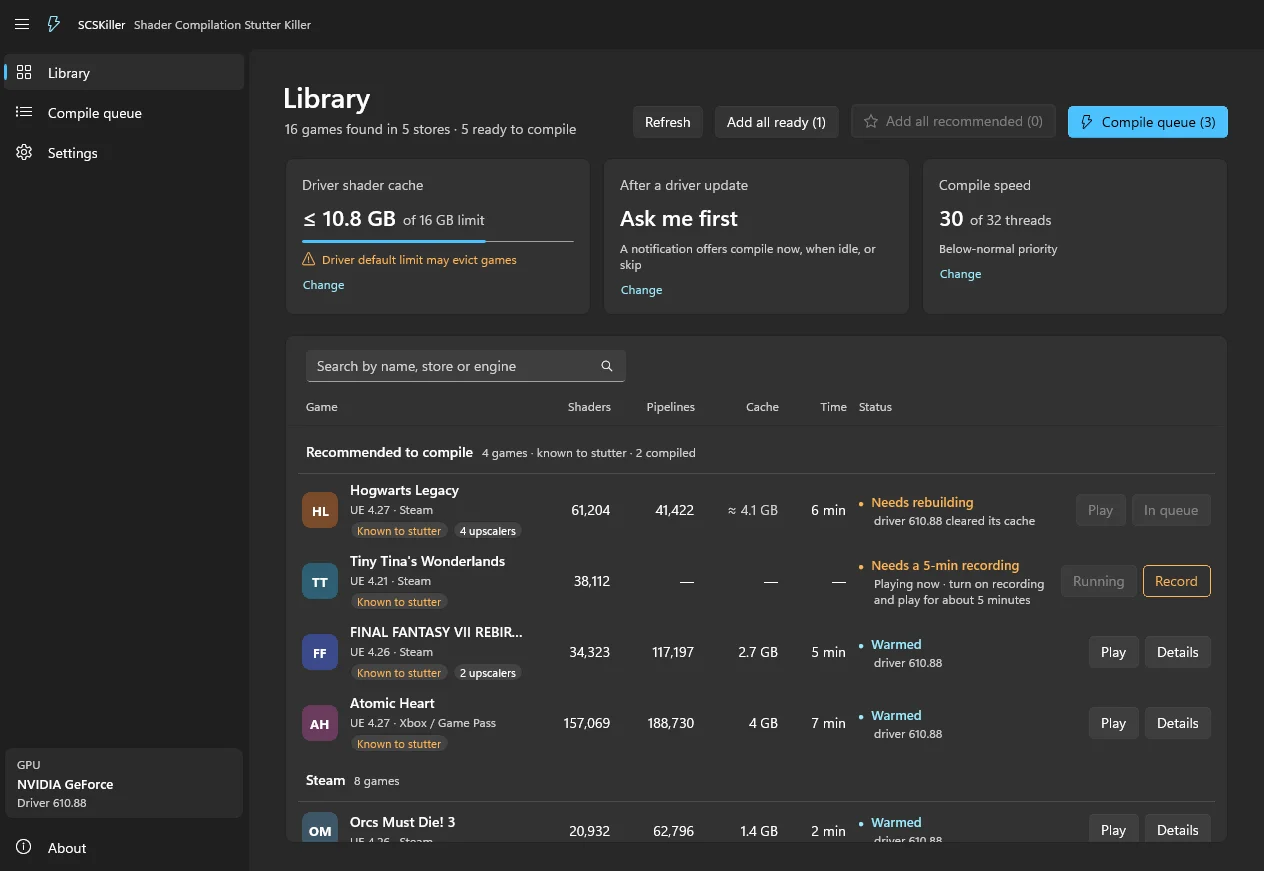
Why
When a game meets a new effect, your GPU driver has to compile its shader right then, and the frame waits for it.
That's the hitch you feel as shader compilation stutter.
SCSKiller reads the shaders a game ships with, works out the pipelines it will build, and compiles them into your
driver's shader cache ahead of time, from its own process and with the game closed. When you launch the game, they're
already there.
Results
About 5 minutes of play per game, cold driver cache → compiled with SCSKiller. A stutter is a shader compile the game had to wait 20 ms or more for.
| Game | GPU | Measurement | Cold | With SCSKiller |
|---|
| Final Fantasy VII Rebirth | NVIDIA
RTX 5090 | Stutters (≥ 20 ms) | 19 | 0 |
| Worst stall | 76 ms | 5 ms |
AMD
Ryzen AI Max+ 395 (Strix Halo) | Stutters (≥ 20 ms) | 162 | 0 |
| Worst stall | 291 ms | 7 ms |
| Silent Hill: Townfall | NVIDIA
RTX 5090 | Stutters (≥ 20 ms) | 24 | 0 |
| Worst stall | 347 ms | 8 ms |
| Hogwarts Legacy | NVIDIA
RTX 5090 | Stutters (≥ 20 ms) | 1,014 | 87 |
| Worst stall | 2,400 ms | 100 ms |
AMD
Ryzen AI Max+ 395 (Strix Halo) | Stutters (≥ 20 ms) | 27,743 | 206 |
| Worst stall | 2,146 ms | 104 ms |
| Tiny Tina's Wonderlands | NVIDIA
RTX 5090 | Stutters (≥ 20 ms) | 583 | 0 |
| Worst stall | 315 ms | 13 ms |
| Star Wars Jedi: Survivor | NVIDIA
RTX 5090 | Stutters (≥ 20 ms) | 9,038 | 11 |
Measured with SCSKiller's pipeline recorder. Your numbers will vary by game, GPU and driver.
- Fixes: shader compilation stutter.
- Can't fix: traversal and streaming stutter, or hitches with other causes.
- Now and then: a shader it couldn't find or record can still compile in game.
Features
- NVIDIA and AMD. DirectX 12 games, and DirectX 11 games on NVIDIA.
- Finds your games in Steam, Epic Games, EA app, GOG, Ubisoft Connect, Xbox (PC), Battle.net, PURPLE, HoYoPlay and Gaijin.
- Knows which games stutter: the library puts known offenders on top, with the reason.
- Recompiles after driver updates. A driver update clears the shader cache; SCSKiller notices and compiles again,
on its own if you let it.
- Optional recorder for games whose pipelines can't be worked out from their files: play a few minutes with it on,
then compile. It can also record alongside a mod that replaces shaders.
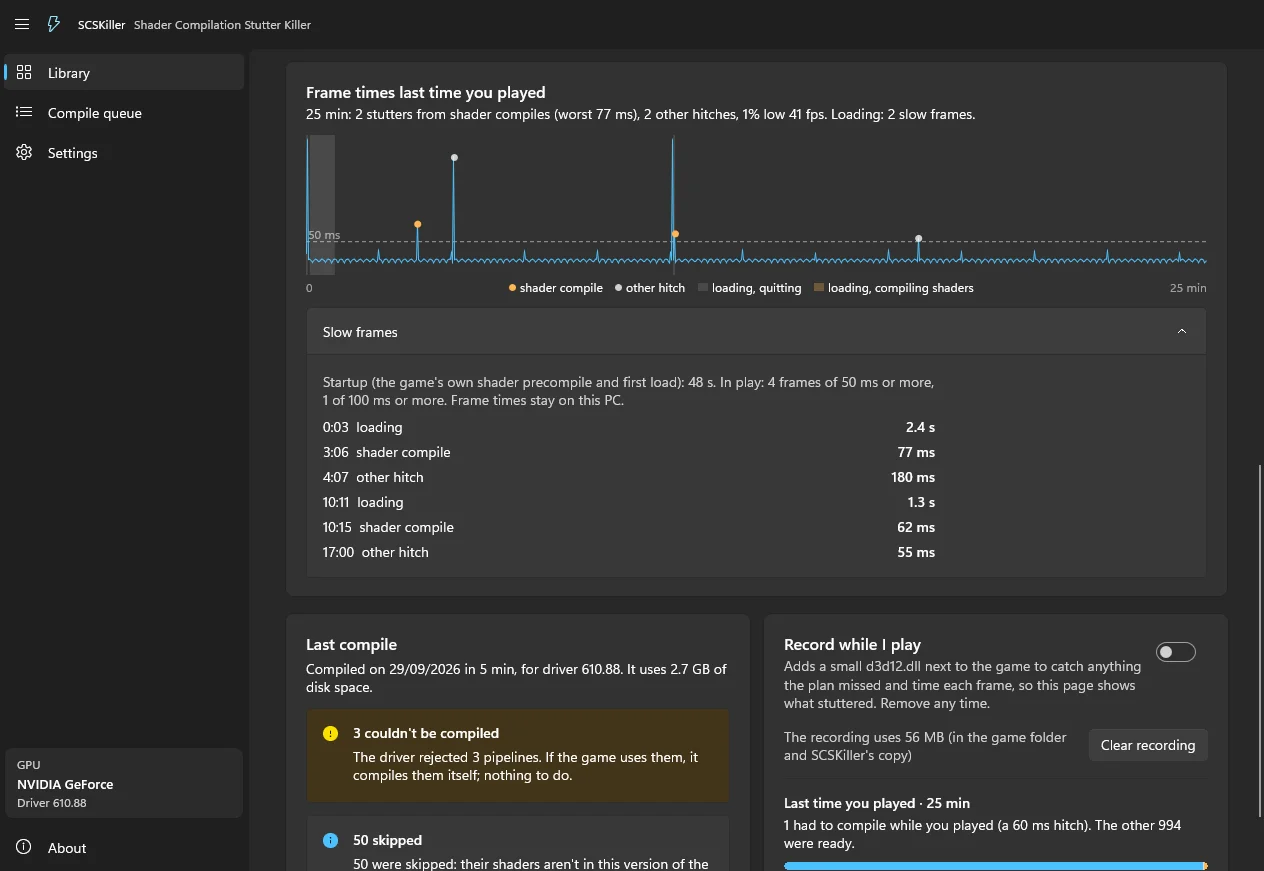
- Frame times per session. With the recorder on, a game's page graphs your last session and tells the shader
stutters apart from other hitches. Frame times stay on your PC.
- Play button in the Library and on a game's page: starts the game through its store.
- Community shader hash database for Patreon supporters: other players' recordings, so your games are covered
without recording them first. Sharing your own is opt-in and anonymous: shader hashes only.
- Never touches anti-cheat games beyond reading their files: no launching, no injecting, no recorder. The one
exception is opt-in, per game and confirmed every time: an offline session without EasyAntiCheat for ELDEN RING and
ARMORED CORE VI, at your own risk.
Install
| Requirement |
|
| OS |
Windows 10 (version 2004) or 11, 64-bit |
| GPU |
NVIDIA or AMD |
| Games |
DirectX 12; DirectX 11 on NVIDIA |
Intel GPUs aren't supported yet: I don't have one to test on. If you'd like to sponsor an Intel Arc GPU, get in touch at
[email protected].
Download SCSKiller-Setup.exe from Releases
and run it. It installs for your user only, needs no admin rights, and keeps itself up to date.
Or take SCSKiller-<version>-Portable.zip, unzip it to any folder you can write to and run SCSKiller.exe: it updates
itself the same way. Before deleting a portable folder, turn recording off for your games, so the recorder leaves the
game folders.
[!IMPORTANT]
Releases aren't code-signed yet, so Windows SmartScreen will probably show "Windows protected your PC" the first
time you run it. Click More info, then Run anyway. You see it once per install: updates are downloaded by
SCSKiller itself and never trigger it.
Code signing through the SignPath Foundation is in progress. To check a download, compare its SHA-256 with the one in
the release notes (PowerShell: Get-FileHash <file>). Smart App Control (Windows 11) blocks unsigned apps outright;
if it's on, wait for a signed release.
How to use it
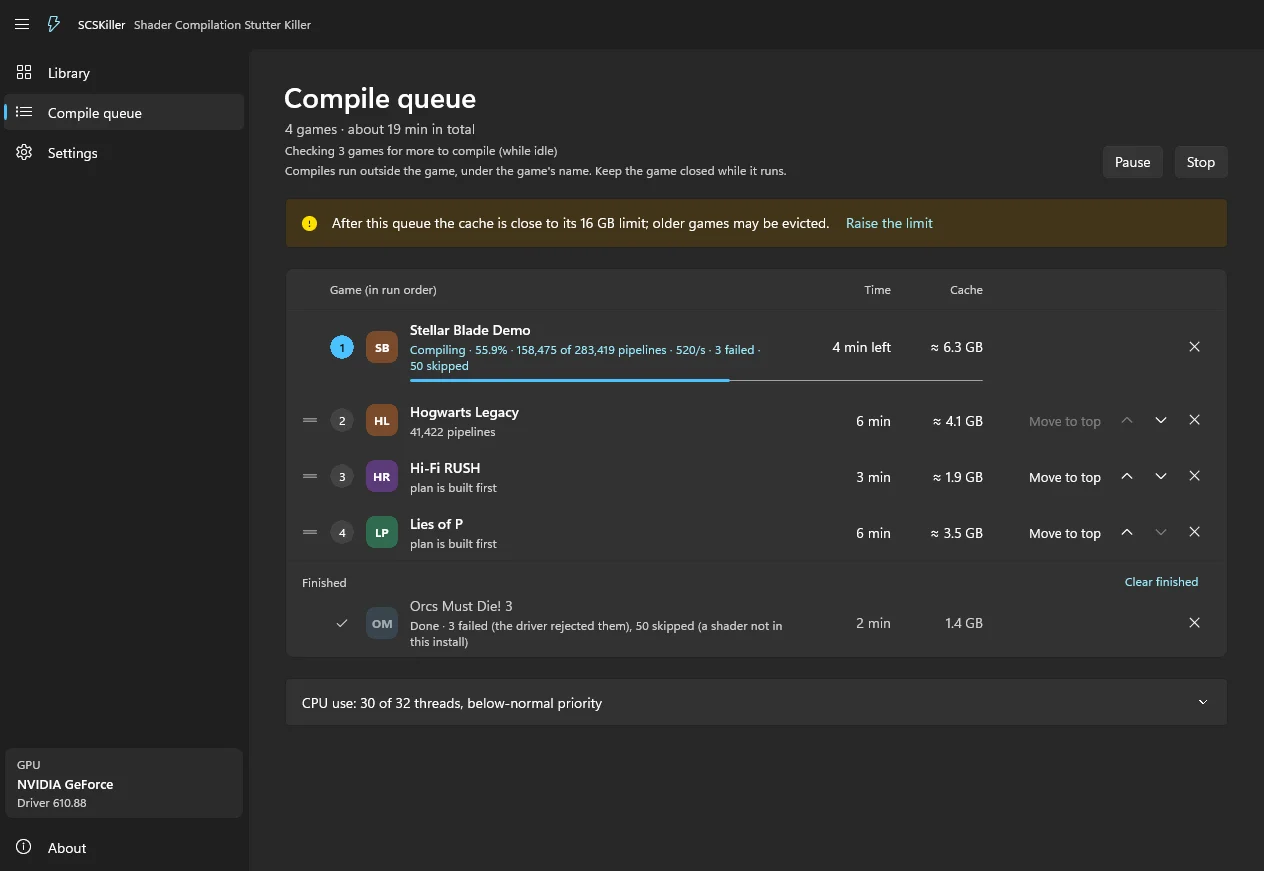
- Open SCSKiller. It finds your games and the shaders they ship with.
- Queue games and press Compile. "Add all recommended" is a good start. Keep the game closed while it compiles.
- Play, from your store or with the game's Play button, which starts it through its store. You can close
SCSKiller: the game reads the driver's cache on its own. Or leave it open while you play:
it then checks that the compile reached the cache the game really uses, and with the recorder on, the game's page
shows afterwards the frame times of your session and whether anything still compiled during it.
If a game says it needs a recording, turn on Record, play it for a few minutes, then compile it.
FAQ
Is it safe with anti-cheat games? SCSKiller never launches them, injects into them or gives them the recorder. It
only reads their files. The one exception is an offline session, for games that run offline without EasyAntiCheat when
their exe is started directly (ELDEN RING, ARMORED CORE VI): allowed per game on its page, confirmed before every launch,
and at your own risk. SCSKiller adds d3d12.dll, scskiller.ini, scskiller.armed and steam_appid.txt to the game's
folder, starts the game's exe itself (offline, no EasyAntiCheat), and the recorder records only that process: started any
other way, through Steam with EasyAntiCheat too, it records nothing. Steam must be running (offline mode is fine). The
moment the game exits, SCSKiller takes those files out again, keeps the recording and the session's frame times, and
checks the folder is as it was, also when SCSKiller itself was closed meanwhile; after a crash or power loss it does so
at the next logon or start. If its files are still there when you start the game online, you could be banned.
What does it write, and where? Its settings and per-game plans go in %LOCALAPPDATA%\SCSKiller\, and the compiled
pipelines go in your driver's own shader cache. Game files are never modified. The one exception is the optional
recorder: it adds d3d12.dll, scskiller.ini and scskiller.armed to the folder of the game you turn it on for, and
turning it off removes exactly those files. scskiller.armed says the game's install was checked for anti-cheat; SCSKiller
deletes it as soon as anything in the install changes. The recorder decides when the game starts: it records that session
only if the file is there then, and a session already running keeps recording until the game exits. Uninstalling SCSKiller
removes these files, and the recording it wrote there, from every game folder.
Does it touch my drivers or their settings? No. It compiles through DirectX, the way the game would.
Do I need an account? No. Everything the app does on your PC is free. Signing in with Patreon only adds the
supporter features.
My game isn't detected, or something broke. Open an issue
with the bug or game request template.
Support the project
The app is free, and stays free. Patreon pays for the servers behind the community
database:
| Tier |
You get |
| Patreon supporter |
The community shader hash database, and beta builds |
| Patreon backer |
All of that, plus alpha builds and priority on game requests |
Sign in with Patreon in the app (Settings) to unlock your tier.
Build from source
Visual Studio 2022 (C++ desktop workload with CMake) and the .NET 10 SDK:
cmake -S proxy -B proxy/build -A x64
cmake --build proxy/build --config Release
dotnet build SCSKiller.slnx -c Release
build/publish.ps1 builds the whole distribution into dist\. How it works in depth: ARCHITECTURE.md.
How to contribute: CONTRIBUTING.md. Changes: CHANGELOG.md. Security issues:
SECURITY.md, never a public issue.
Official links
Anything else claiming to be SCSKiller isn't us. Please
let us know if you find one.
Licence
GPL-3.0-or-later (LICENSE), with an additional permission for Oodle, the Windows App SDK and graphics driver
libraries (LICENSE-EXCEPTION.txt). Third-party components:
THIRD-PARTY-NOTICES.md. Code signing policy: CODE_SIGNING_POLICY.md.
Not affiliated with any GPU maker, engine maker or game publisher. All product names are trademarks of their owners.
Forks
Forks are welcome under the licence. Please give yours its own name, say it's unofficial and based on SCSKiller, and
keep the SCSKiller copyright notices. The measurements and screenshots in this README are SCSKiller's own, so please
don't present them as a fork's.
Official builds come only from this repository's Releases page.
A fork's builds, bugs and anti-cheat behaviour are its author's: SCSKiller keeps its recorder out of anti-cheat games,
and can't vouch for a fork that changes that.
Improvements are always welcome back here as pull requests. Fixes, games and ideas from forks make SCSKiller better
for everyone.

 SCSKiller 是一款免费开源的 Windows 工具,在你开始游戏前把游戏的着色器预编译到 NVIDIA 或 AMD 驱动的缓存中,这样游戏就不必在游玩过程中编译着色器而卡顿。