




21.1K ·GitHub
What is this?
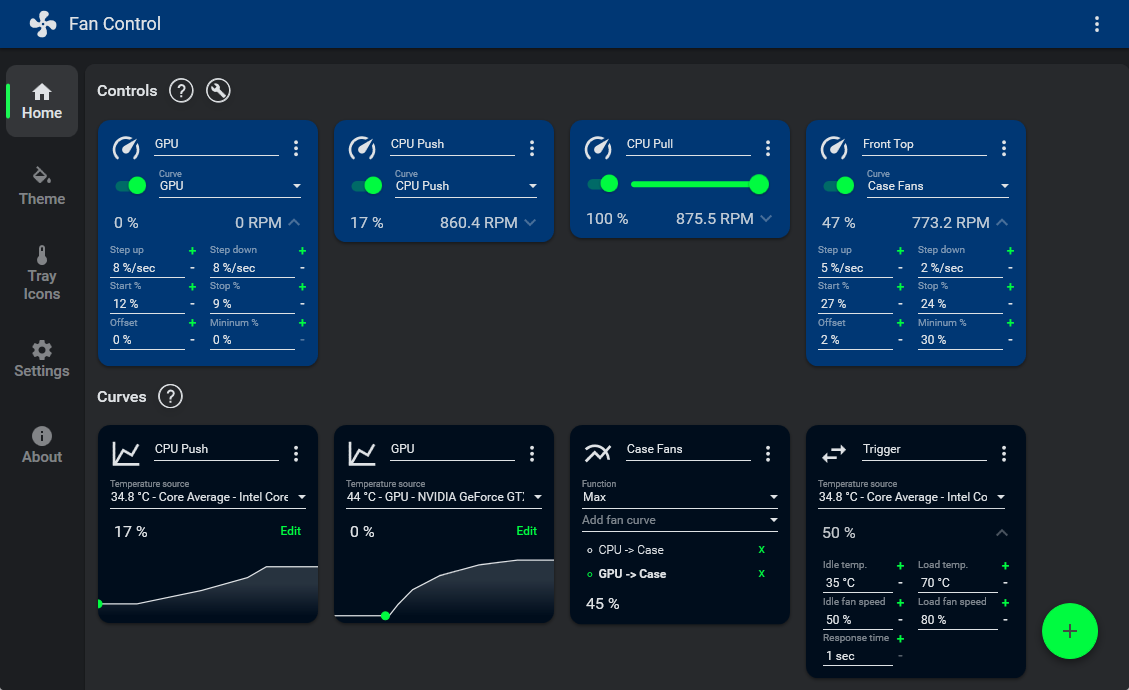
 Fan Control is a highly customizable fan-controlling app for Windows: it drives your PC's CPU, GPU and case fans from temperature-based curves you design in a GUI.
Fan Control is a highly customizable fan-controlling app for Windows: it drives your PC's CPU, GPU and case fans from temperature-based curves you design in a GUI.Do I still need to set fan curves in the BIOS?It is a Windows app that acts as a UI layer over hardware libraries, so in practice it replaces BIOS curves — the FAQ advises setting a fixed default speed (e.g. 50%) in the BIOS and letting Fan Control do the adjusting.
It is a Windows app that acts as a UI layer over hardware libraries, so in practice it replaces BIOS curves — the FAQ advises setting a fixed default speed (e.g. 50%) in the BIOS and letting Fan Control do the adjusting.Will it work with my motherboard and other hardware?Fan and sensor access goes through LibreHardwareMonitor as the main backend, so hardware compatibility largely depends on that upstream project. Plugins add support for AIO coolers, Corsair, NZXT and Aquacomputer controllers, and some laptops.
Fan and sensor access goes through LibreHardwareMonitor as the main backend, so hardware compatibility largely depends on that upstream project. Plugins add support for AIO coolers, Corsair, NZXT and Aquacomputer controllers, and some laptops.Does it work on laptops?Mostly no — laptop fans usually are not interfaced the way desktop motherboards are, so it may install but find no fans or throw errors. Some laptops are covered by plugins (Dell, Lenovo, GPD, Acer Predator).
Mostly no — laptop fans usually are not interfaced the way desktop motherboards are, so it may install but find no fans or throw errors. Some laptops are covered by plugins (Dell, Lenovo, GPD, Acer Predator).Which Windows versions does it run on?Windows 10 and Windows 11 — there is no macOS or Linux version.
Windows 10 and Windows 11 — there is no macOS or Linux version.Is it open source?No — the sources are closed, though the app is free to use. The GitHub Sponsor button only supports the surrounding open-source work (LibreHardwareMonitor, plugins); Fan Control itself is supported via PayPal.
No — the sources are closed, though the app is free to use. The GitHub Sponsor button only supports the surrounding open-source work (LibreHardwareMonitor, plugins); Fan Control itself is supported via PayPal.Can it control my GPU fans too?Yes — Nvidia and AMD GPU fan control are built in (via NvAPIWrapper and ADLXWrapper), and a community plugin adds Intel ARC support.
Yes — Nvidia and AMD GPU fan control are built in (via NvAPIWrapper and ADLXWrapper), and a community plugin adds Intel ARC support.My antivirus flags Fan Control — is it safe?Older releases (V237 and below) shipped WinRing0, which Windows Defender flags as a Trojan and which stops sensors from being detected. V238 and above replaced it with a PawnIO build, and the app, installer and updater are now signed — so just update to the latest release.
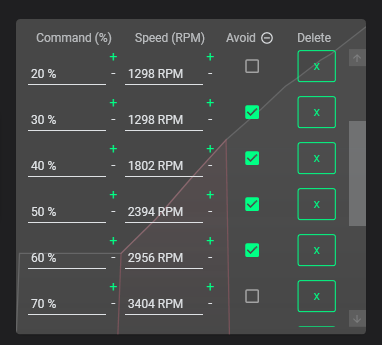
Older releases (V237 and below) shipped WinRing0, which Windows Defender flags as a Trojan and which stops sensors from being detected. V238 and above replaced it with a PawnIO build, and the app, installer and updater are now signed — so just update to the latest release.What can the fan curves actually do?You get multiple curve types including a custom graph, mixing of curves or sensors (max, min, average), advanced tuning with steps, start %, stop %, response time and hysteresis, multiple saveable profiles, calibration 'avoid points' to skip speeds that rattle, and it can start on boot as a service without a user session.
You get multiple curve types including a custom graph, mixing of curves or sensors (max, min, average), advanced tuning with steps, start %, stop %, response time and hysteresis, multiple saveable profiles, calibration 'avoid points' to skip speeds that rattle, and it can start on boot as a service without a user session.What temperature sources can curves follow?CPU, GPU, motherboard and hard drives out of the box, plus any sensor injected by plugins — HWiNFO, AIDA64, GPU-Z, Home Assistant, Aquacomputer and NZXT devices, Nvidia hot spot and memory junction temps, and more.
CPU, GPU, motherboard and hard drives out of the box, plus any sensor injected by plugins — HWiNFO, AIDA64, GPU-Z, Home Assistant, Aquacomputer and NZXT devices, Nvidia hot spot and memory junction temps, and more.What are similar projects?BibaYanji, g-helper, SCSKiller, tubatools, Playnite, Winhance, stats, DeskBox
BibaYanji, g-helper, SCSKiller, tubatools, Playnite, Winhance, stats, DeskBoxWhich topics is it in?speed, wpf, cpu, amd, windows-10, windows-11, dotnet, csharp, hardware, windows-app, nvidia, monitoring
speed, wpf, cpu, amd, windows-10, windows-11, dotnet, csharp, hardware, windows-app, nvidia, monitoring