





g-helper README

The project's README from github.com/seerge/g-helper. As one markdown file: README.md.

G-Helper - Lightweight control tool for Asus laptops

Small and lightweight Armoury Crate alternative for Asus laptops offering almost same functionality with a much smaller footprint. Works with all popular models, such as ROG Zephyrus G14, G15, G16, M16, X13, X16, Z13, DUO, TUF Series, Strix or Scar Series, ProArt, Vivobook, Zenbook, Expertbook, ROG Ally or Ally X and many more!

GitHub release Downloads SLSA3 中文 日本語 Čeština Español 한국어 G-Helper - Lightweight control tool for Asus laptops

Download   Donate

⭐ Like the app? Help spread the word.

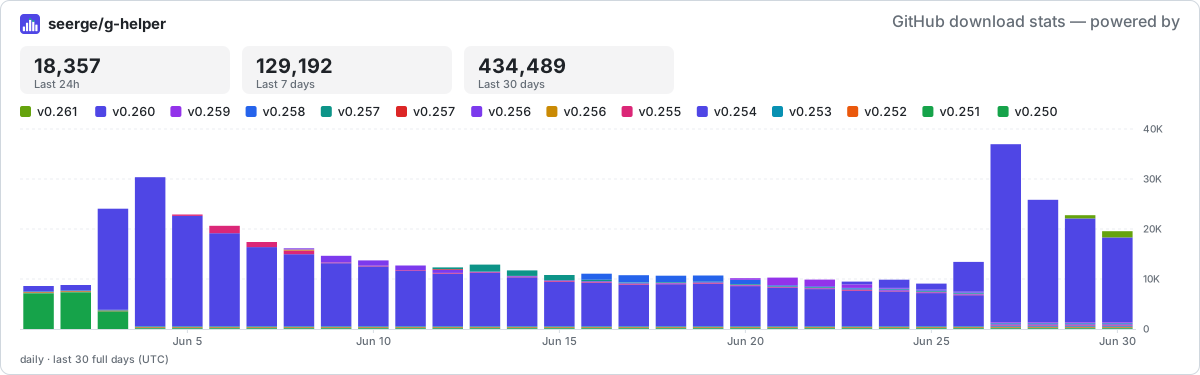
seerge/g-helper downloads

United24

:loudspeaker: YouTube Reviews and Guides

Youtube review Josh Cravey Youtube review Crimson Tech Youtube review cbutters Tech
Josh Cravey Crimson Tech cbutters Tech

📰 Articles

  1. Digital Trends
  2. BinaryFork
  3. Ultrabookreview
  4. Notebookcheck
  5. Les Numériques

:gift: Advantages

  1. Seamless and automatic GPU switching
  2. All performance modes can be fully customized with power limits and fan curves
  3. Lightweight. Just a single exe to run. Doesn't install anything in your system.
  4. Simple and clean native UI with easy access to all settings
  5. FN-Lock and custom hotkeys
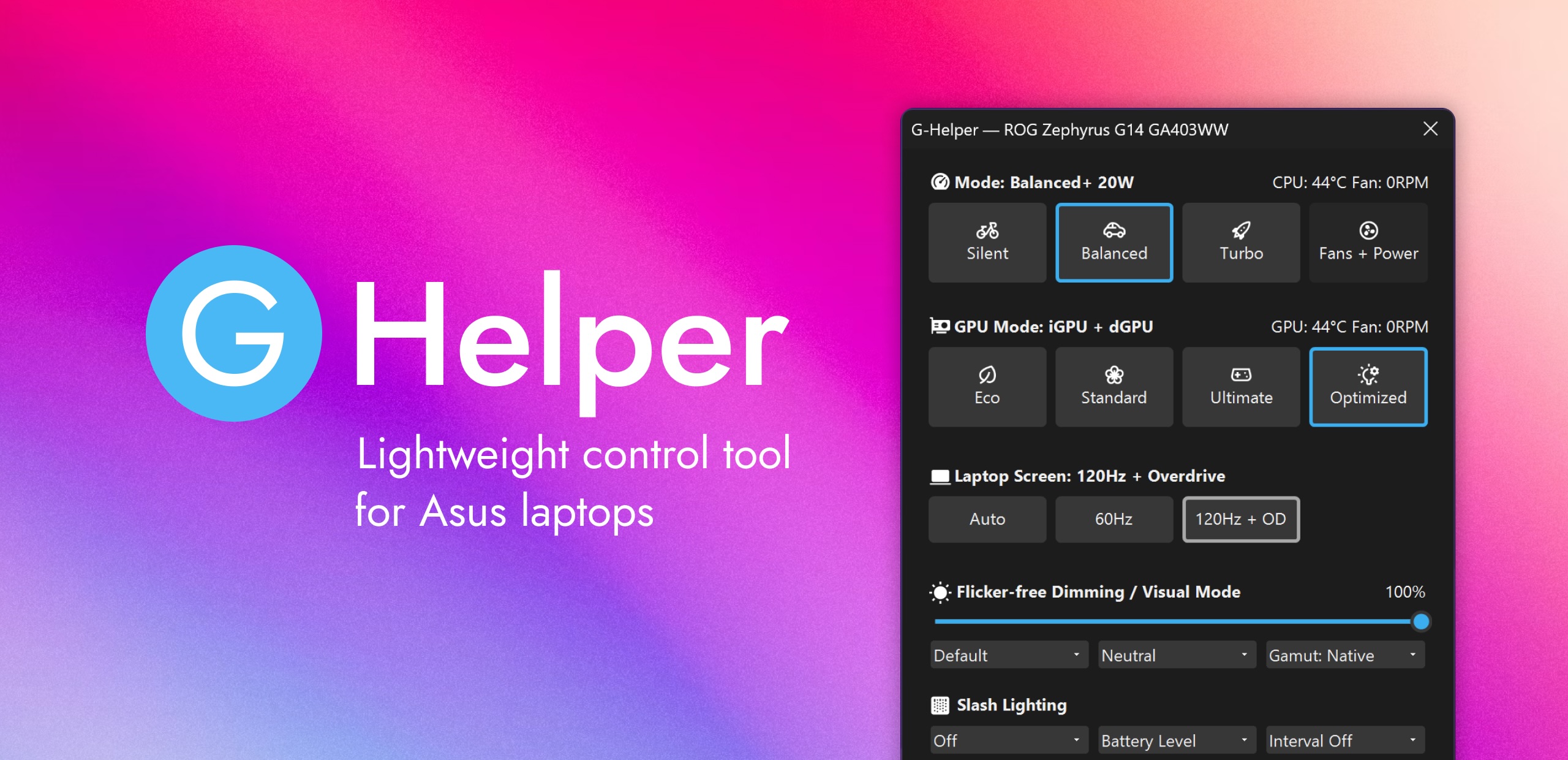
G-Helper Screenshot

:zap: Features

  1. Performance modes: Silent - Balanced - Turbo (built-in, with default fan curves)
  2. GPU modes: Eco - Standard - Ultimate - Optimized
  3. Screen refresh rate control with display overdrive
  4. Custom fan curve editor, power limits and turbo boost selection for every performance mode
  5. Anime Matrix or Slash Lighting control including animated GIFs, clock and Audio visualizer
  6. RGB Backlight animation modes and colors
  7. Hotkey handling
  8. Monitor CPU and GPU temperature, fan speeds and battery status
  9. Battery charge limit to preserve battery health
  10. NVidia GPU overclocking and undervolting
  11. XG Mobile Control
  12. AMD CPU Undervolting and temp limits
  13. BIOS and Driver Updates
  14. Asus Mice controls
  15. Mini-led multi-zone switch
  16. Flicker-free dimming and Visual Modes

:gear: Automation

:rocket: Performance Modes

[!NOTE] All Modes are baked into BIOS along with default fan curves and power limits. And and they are the same thing as in the Armoury Crate.

Each default BIOS mode is paired with matching Windows Power Mode. You can adjust this setting under Fans + Power

  1. Silent in BIOS + Best power efficiency power mode
  2. Balanced (Performance in AC) in BIOS + Balanced power mode
  3. Turbo in BIOS + Best performance power mode
Performance Modes

:video_game: GPU Tweaking

In each mode dedicated GPU can be tweaked to specific needs, including Core and Memory Clock offsets, GPU power, Dynamic Boost, Temperature Limit etc GPU Tweaking

💻 GPU Modes

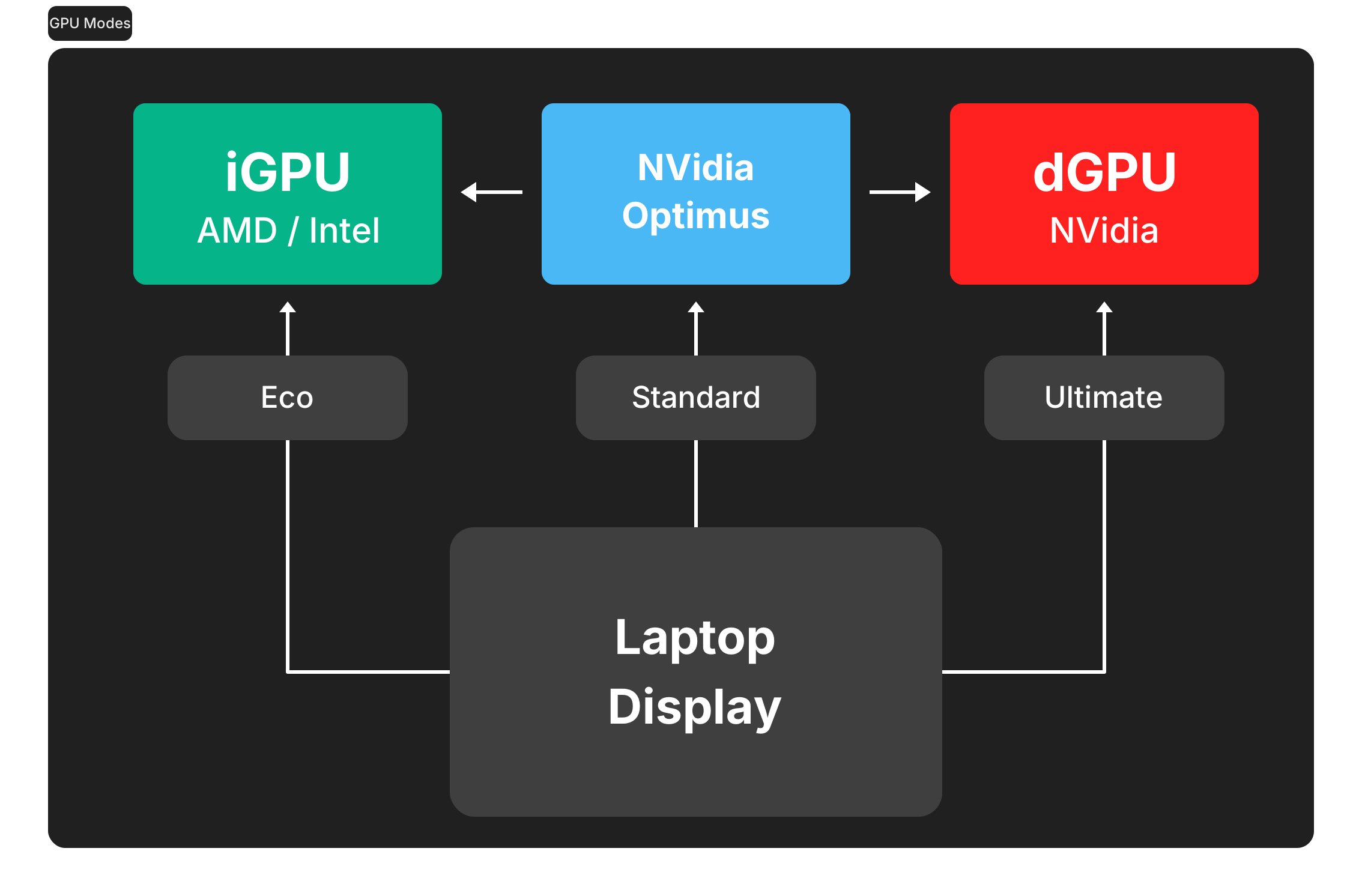
  1. Eco : only low power integrated GPU enabled, iGPU drives built in display
  2. Standard (MS Hybrid) : iGPU and dGPU enabled, iGPU drives built in display
  3. Ultimate: iGPU and dGPU enabled, but dGPU drives built in display (supported on 2022+ models)
  4. Optimized: disables dGPU on battery (Eco) and enables when plugged in (Standard)
GPU Modes

💿Driver Updates

The app includes an automatic BIOS and driver update checker that pulls directly from the official Asus website for your specific model, highlighting new downloads as they become available. All links in the Updates section point to official Asus downloads. Driver Updates

🎮 Metrics Overlay

A built-in in-game overlay (OSD) that shows live FPS, CPU / GPU temperatures, usage and power right on top of your game - no extra tools needed. Works in DX10+ games. May not be visible over old titles that use exclusive full-screen mode, so set the game to windowed / borderless full-screen mode.

Metrics Overlay Metrics Overlay in a game

:mouse: Asus Mouse and other peripherals support

Currently supported models (click to expand)
  • ROG Chakram
  • ROG Chakram X
  • ROG Chakram Core
  • ROG Gladius II and Gladius II Origin (+ PNK LTD / COD editions)
  • ROG Gladius II Wireless
  • ROG Gladius III
  • ROG Gladius III Wireless
  • ROG Gladius III Aimpoint Wireless (+ EVA-02 Edition)
  • ROG Harpe Ace Extreme
  • ROG Harpe Ace Aim Lab Edition
  • ROG Harpe Ace Mini
  • ROG Harpe II Ace
  • ROG Harpe II Extreme Edition 20
  • ROG Keris and Keris Wireless (+ EVA Edition)
  • ROG Keris Wireless Aimpoint
  • ROG Keris II Ace
  • ROG Keris II Origin (+ KJP edition)
  • ROG Pugio
  • ROG Pugio II
  • ROG Spatha X
  • ROG Strix Carry
  • ROG Strix Evolve
  • ROG Strix Impact
  • ROG Strix Impact II (+ Electro Punk / Moonlight White editions)
  • ROG Strix Impact II Wireless
  • ROG Strix Impact III
  • ROG Strix Impact III Wireless
  • TUF Gaming M3
  • TUF Gaming M3 Gen II
  • TUF Gaming M4 Wireless
  • TUF Gaming M4 AIR
  • TUF Gaming M5
  • TUF Gaming Mini Miku Edition
  • TX Gaming Mouse
  • TX Gaming Mouse Mini
  • ASUS MD200

Huge thanks to @IceStormNG 👑 for contribution and research (!).

Mouse and other peripherals

:keyboard: Asus Keyboards support

Currently supported models (click to expand)
  • ROG Azoth
  • ROG Azoth Extreme
  • ROG Azoth Extreme SE
  • ROG Azoth X
  • ROG Claymore II
  • ROG Falchion
  • ROG Falchion Ace
  • ROG Falchion Ace HFX
  • ROG Falchion RX
  • ROG Falchion RX Low Profile
  • ROG Strix Flare
  • ROG Strix Flare COD
  • ROG Strix Flare II
  • ROG Strix Flare II Animate
  • ROG Strix Flare PNK LTD
  • ROG Strix Scope II
  • ROG Strix Scope II RX
  • ROG Strix Scope II 96
  • ROG Strix Scope II 96 RX
  • ROG Strix Scope RX
  • ROG Strix Scope RX EVA Edition
  • ROG Strix Scope RX EVA-02 Edition
  • ROG Strix Scope RX TKL
  • TUF Gaming K1
  • TUF Gaming K3
  • TUF Gaming K3 Gen II
Keyboards

⌨️ Keybindings

🎮ROG Ally Bindings


[!NOTE]

🔖 Important Notice

G-Helper is NOT an operating system, firmware, or driver. It DOES NOT "run" your hardware in real-time anyhow.

It's an app that lets you select one of the predefined operating modes created by manufacturer (and stored in BIOS) and optionally(!) set some settings that already exist on your device same as Armoury Crate can. It does it by using the Asus System Control Interface "driver" that Armoury uses for it.

If you use equivalent mode/settings as in Armoury Crate - the performance or the behavior of your device won't be different.

The role of G-Helper for your laptop is similar to the role of a remote control for your TV.

Libraries and projects used

Code Signing Policy

Free code signing provided by SignPath.io, certificate by SignPath Foundation

Privacy Policy

This program will not transfer any information to other networked systems

Disclaimers

"Asus", "ROG", "TUF", and "Armoury Crate" are trademarked by and belong to AsusTek Computer, Inc. I make no claims to these or any assets belonging to AsusTek Computer and use them purely for informational purposes only.

THE SOFTWARE IS PROVIDED “AS IS” AND WITHOUT WARRANTY OF ANY KIND, EXPRESS OR IMPLIED, INCLUDING BUT NOT LIMITED TO THE WARRANTIES OF MERCHANTABILITY, FITNESS FOR A PARTICULAR PURPOSE AND NONINFRINGEMENT. MISUSE OF THIS SOFTWARE COULD CAUSE SYSTEM INSTABILITY OR MALFUNCTION.

g-helper (seerge/g-helper)

Searching Database…

15.6K ·GitHub
What is this?G-Helper is a lightweight, free alternative to Asus Armoury Crate for controlling performance modes, fan curves, GPU switching, lighting and other hardware settings on Asus laptops.
Is this a driver, or just a control panel app?It's a user-space control panel, not a driver or firmware - it lets you pick predefined BIOS modes and existing settings, the same way Armoury Crate does, but doesn't control hardware in real time itself.
How do I get it running?Download the single .exe and run it - it doesn't install anything on your system.
Do I need Armoury Crate or its drivers installed first?G-Helper works through the same Asus System Control Interface driver that Armoury Crate relies on, so that underlying ASUS driver needs to be present on your laptop for it to function.
Does switching modes in G-Helper actually change performance differently than Armoury Crate?No - all performance modes are baked into the laptop's BIOS with the same fan curves and power limits as Armoury Crate, so using equivalent settings gives identical behavior.
Which Asus laptops and devices does it support?It covers most modern Asus/ROG gaming laptops including Zephyrus, Flow, TUF, Strix, Scar, ProArt, Vivobook, Zenbook, Expertbook and the ROG Ally handheld, plus many ROG/TUF mice and keyboards.
Does the app send any of my data anywhere?No, the developer explicitly states it does not transmit information to other networked systems.
What does the in-game Metrics Overlay show?It's a built-in OSD that displays live FPS, CPU/GPU temperatures, usage and power draw over DX10+ games, toggled with Ctrl+Shift+Alt+O.
Can I tweak GPU overclocking and undervolting?Yes - each performance mode lets you adjust NVIDIA core/memory clock offsets, power and temperature limits, plus AMD CPU undervolting and temp limits.
Does it add special controls for the ROG Ally?Yes, the ROG Ally gets dedicated M-button bindings for things like brightness, touch keyboard, screenshots and switching controller mode.
Does it support RGB on third-party Asus peripherals?It adds backlight/RGB control for a long list of ROG and TUF mice and keyboards, alongside Anime Matrix and Slash Lighting control on supported laptops.
Creator
seerge
Size
43.6 MB
Stars
15.6K
Age
3y
Commits · 90 Days