

194 ·GitHub
Что это такое?
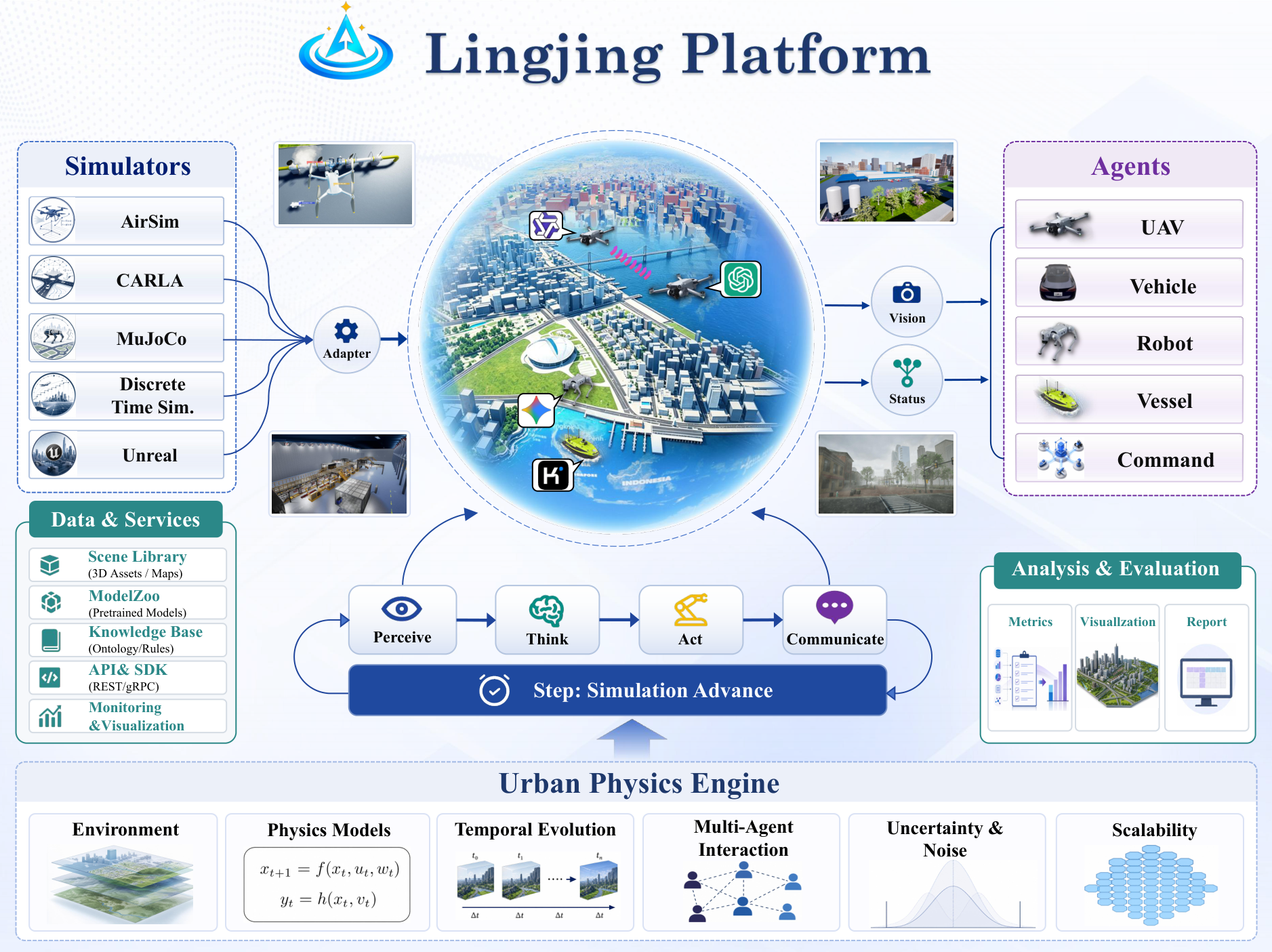
 LingJing — открытый стек симуляции для embodied-агентов, управляемых LLM, в больших 3D-средах: бэкенд на FastAPI/LangGraph плюс плагин для Unreal Engine 5.5 на основе Cesium, с готовыми примерами, которые можно запустить.
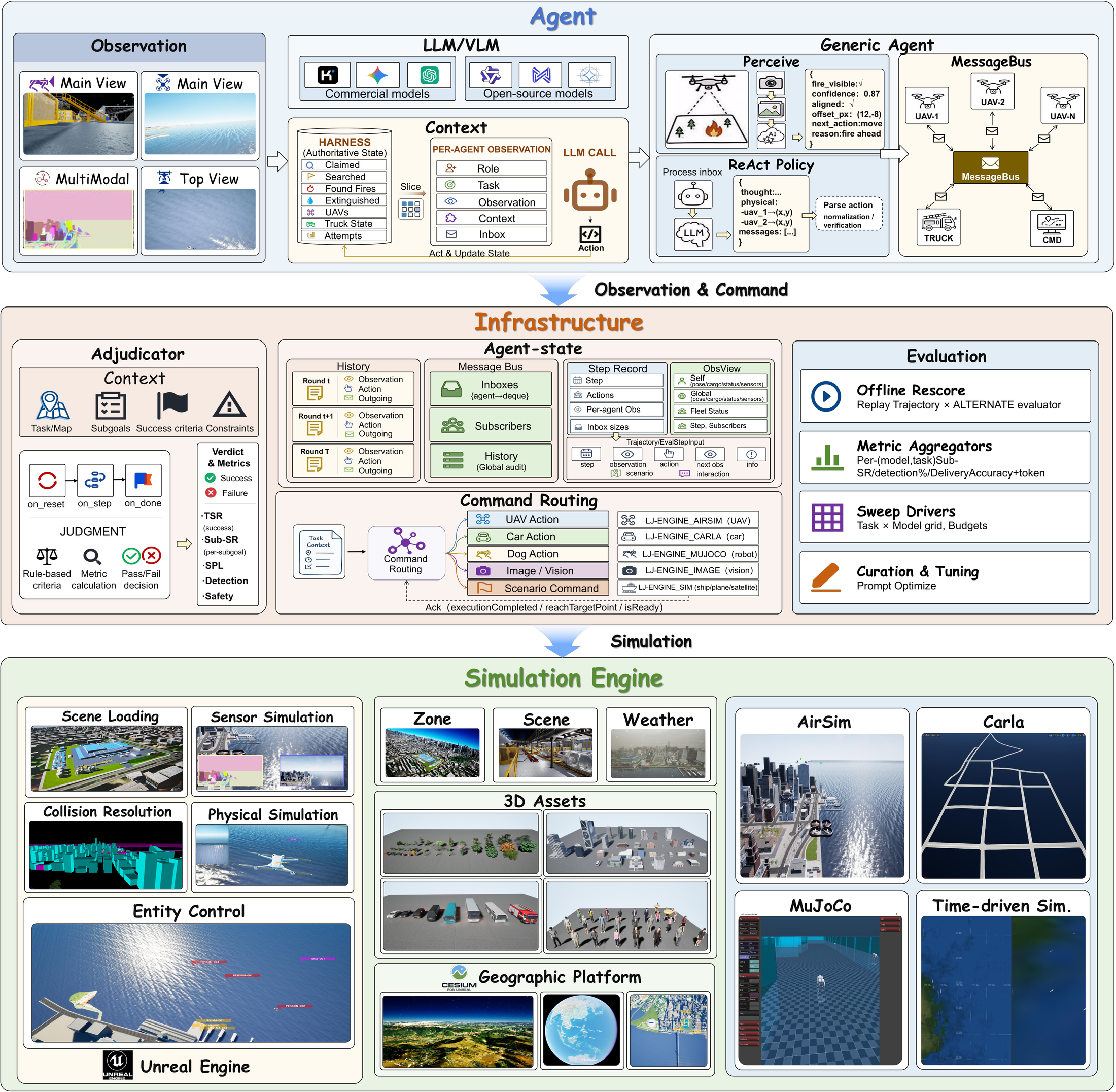
LingJing — открытый стек симуляции для embodied-агентов, управляемых LLM, в больших 3D-средах: бэкенд на FastAPI/LangGraph плюс плагин для Unreal Engine 5.5 на основе Cesium, с готовыми примерами, которые можно запустить.Это одно приложение или из чего оно состоит?Две части в одном репозитории: бэкенд, который отвечает за оркестрацию задач, вызовы LLM/VLM, циклы окружения в стиле Gym, связь с движком и запись данных, и плагин для Unreal, который даёт 3D-мир, акторов, камеры и телеметрию. Тяжёлые ассеты поставляются отдельно через Hugging Face.
Две части в одном репозитории: бэкенд, который отвечает за оркестрацию задач, вызовы LLM/VLM, циклы окружения в стиле Gym, связь с движком и запись данных, и плагин для Unreal, который даёт 3D-мир, акторов, камеры и телеметрию. Тяжёлые ассеты поставляются отдельно через Hugging Face.Как его запустить?Бэкенду нужен Python 3.10+: укажите значения для своего провайдера в .env, запустите сервис и проверьте его в Swagger UI. Для полного 3D-стека нужно ещё установить плагин в Unreal Engine 5.5.4 с Cesium и подходящий пакет ассетов с Hugging Face.
Бэкенду нужен Python 3.10+: укажите значения для своего провайдера в .env, запустите сервис и проверьте его в Swagger UI. Для полного 3D-стека нужно ещё установить плагин в Unreal Engine 5.5.4 с Cesium и подходящий пакет ассетов с Hugging Face.Нужен ли API-ключ или Unreal Engine, чтобы попробовать?Для начала ни то, ни другое: сквозное mock-демо работает без Unreal Engine и без API-ключа. Для реальных моделей провайдеры совместимы с OpenAI и с Anthropic и настраиваются в .env.
Для начала ни то, ни другое: сквозное mock-демо работает без Unreal Engine и без API-ключа. Для реальных моделей провайдеры совместимы с OpenAI и с Anthropic и настраиваются в .env.В чём подвох со стороны Unreal?Плагин компилируется только в Unreal Engine 5.5.4 со включённым Cesium. Ассеты подключаются в двух местах (программа — в /EmbodyIntelligence/..., сцены — в /Game/ArtRes/...), а для удалённого бэкенда нужно отредактировать WEBSOCKETURL в DataManager.cpp перед сборкой.
Плагин компилируется только в Unreal Engine 5.5.4 со включённым Cesium. Ассеты подключаются в двух местах (программа — в /EmbodyIntelligence/..., сцены — в /Game/ArtRes/...), а для удалённого бэкенда нужно отредактировать WEBSOCKETURL в DataManager.cpp перед сборкой.Могу ли я использовать это в своём проекте?Учтите, что в этом релизном пакете лицензия не выбрана, поэтому условия распространения не определены. В README сказано добавлять LICENSE только после согласования условий для исходного кода и всех ассетов Unreal/Hugging Face.
Учтите, что в этом релизном пакете лицензия не выбрана, поэтому условия распространения не определены. В README сказано добавлять LICENSE только после согласования условий для исходного кода и всех ассетов Unreal/Hugging Face.Какие сценарии можно запустить сразу, из коробки?Десять готовых примеров в backend/examples/: доставка по городу несколькими дронами, разведка с помощью БПЛА и тушение пожаров наземным роботом, замкнутый визуальный поиск огня, визуальная навигация робота-собаки, доставка и объезд маршрута разнотипной техникой, осмотр моста, диспетчеризация нескольких машин, навигация робота-собаки с помощью БПЛА, смешанная диспетчеризация техники и эталонный клиент движка на Python.
Десять готовых примеров в backend/examples/: доставка по городу несколькими дронами, разведка с помощью БПЛА и тушение пожаров наземным роботом, замкнутый визуальный поиск огня, визуальная навигация робота-собаки, доставка и объезд маршрута разнотипной техникой, осмотр моста, диспетчеризация нескольких машин, навигация робота-собаки с помощью БПЛА, смешанная диспетчеризация техники и эталонный клиент движка на Python.Какие агенты живут в симулируемом мире?Городская среда на основе Cesium с дронами, машинами, роботами-собаками, кораблями и задачными акторами. На каждом шаге симуляции замыкается цикл воспринять-подумать-действовать-сообщить, а результаты записываются для оценки и визуализации.
Городская среда на основе Cesium с дронами, машинами, роботами-собаками, кораблями и задачными акторами. На каждом шаге симуляции замыкается цикл воспринять-подумать-действовать-сообщить, а результаты записываются для оценки и визуализации.Как агенты согласуют действия между собой?Через паттерны координации: централизованный, «звезда» и широковещательный. Рантайм хранит наблюдения каждого агента, историю сообщений и подтверждения, а также формирует повторяемые траектории для оценки.
Через паттерны координации: централизованный, «звезда» и широковещательный. Рантайм хранит наблюдения каждого агента, историю сообщений и подтверждения, а также формирует повторяемые траектории для оценки.Как бэкенд общается с Unreal Engine?По HTTP, WebSocket и UDP. Сессии движка доступны через сервис бэкенда, так что можно проверить связь перед запуском полноценного клиента Unreal.
По HTTP, WebSocket и UDP. Сессии движка доступны через сервис бэкенда, так что можно проверить связь перед запуском полноценного клиента Unreal.What are similar projects?FluxVLA, RoboICL, ZDTaichu5.0-9B, project_superdex, LoongForge, carla, AirSim, Embodied-AI-Guide
FluxVLA, RoboICL, ZDTaichu5.0-9B, project_superdex, LoongForge, carla, AirSim, Embodied-AI-GuideWhich topics is it in?unreal-engine, udp, telemetry, geospatial, langgraph, embodied-ai, vlm, robotics, simulation, fastapi, 3d, websocket
unreal-engine, udp, telemetry, geospatial, langgraph, embodied-ai, vlm, robotics, simulation, fastapi, 3d, websocket