

DeepAnalyze: Agentic Large Language Models for Autonomous Data Science













Authors: Shaolei Zhang, Ju Fan*, Meihao Fan, Guoliang Li, Xiaoyong Du
Renmin University of China, Tsinghua University
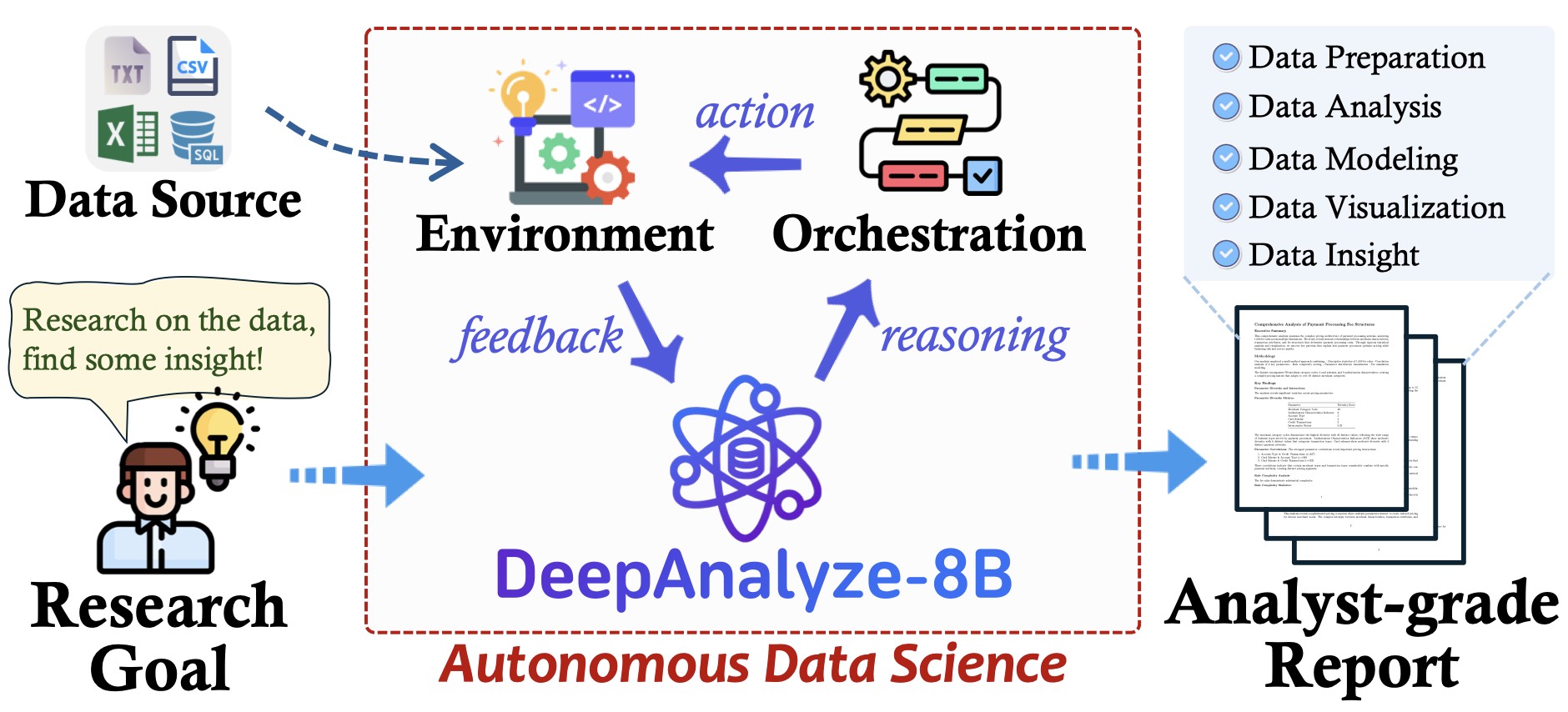
DeepAnalyze is the first agentic LLM for autonomous data science. It can autonomously complete a wide range of data-centric tasks without human intervention, supporting:
- 🛠 Entire data science pipeline: Automatically perform any data science tasks such as data preparation, analysis, modeling, visualization, and report generation.
- 🔍 Open-ended data research: Conduct deep research on diverse data sources, including structured data (Databases, CSV, Excel), semi-structured data (JSON, XML, YAML), and unstructured data (TXT, Markdown), and finally produce analyst-grade research reports.
- 📊 Fully open-source: The model, code, training data, and demo of DeepAnalyze are all open-sourced, allowing you to deploy or extend your own data analysis assistant.
🔥 News
[2026.07]: We look forward to releasing DeepPrep, a data-preparation companion to DeepAnalyze that turns raw tables into analysis-ready data.
More about DeepPrep
DeepPrep is an LLM-powered agentic system for autonomous data preparation. It constructs data-preparation pipelines through execution-grounded interaction with intermediate table states and runtime feedback, helping clean, transform, and standardize raw data before downstream analysis.
▶️ Demo:
https://github.com/user-attachments/assets/6b94927f-5c0c-4cfe-bc33-de56b8e459cd
[2026.06.15]: We release CoDA-Bench, a benchmark for evaluating whether code agents can handle data-intensive analytical tasks, closely aligned with DeepAnalyze's target scenarios.
More about CoDA-Bench
CoDA-Bench evaluates agents in a Linux sandbox with hundreds of data files. Given a natural-language question, an agent must discover relevant data, write executable code, and produce the final answer. It provides a benchmark setting for the same type of data discovery and code-execution challenges targeted by DeepAnalyze.
▶️ Demo:
https://github.com/user-attachments/assets/34e50a62-744b-4079-8988-6a8bbfe166a0
[2026.05.31]: DA-Studio, the system behind DeepAnalyze WebUI v2 (demo/chat_v2), has been accepted to the VLDB 2026 Demonstration Track.
[2026.03.16]: Update DeepAnalyze WebUI v2, featuring a smoother UI, support for the HeyWhale API, and support for Docker-based sandboxed code execution. More details in Readme .
[2026.01.31]: 🎉🎉🎉DeepAnalyze served as the official agent supporting the 2026年(第19届)中国大学生计算机设计大赛大数据主题赛 (2026 (19th) China Collegiate Computer Design Contest – Big Data Track).
[2025.12.28] ANNOUNCEMENT: DeepAnalyze API Keys Are Now Available 🎉🎉🎉 You can now apply for your API key via this Google Form or this Feishu Form. For full details and usage instructions, please refer to the Guide or the Feishu Wiki.
[2025.11.13]: DeepAnalyze now supports OpenAI-style API endpointsis and is accessible through the Command Line Terminal UI. Thanks to the contributor @LIUyizheSDU
[2025.11.08]: DeepAnalyze is now accessible through the JupyterUI, building based on jupyter-mcp-server. Thanks to the contributor @ChengJiale150.
[2025.10.28]: We welcome all contributions, including improving the DeepAnalyze and sharing use cases (see CONTRIBUTION.md). All merged PRs will be listed as contributors.
[2025.10.27]: DeepAnalyze has attracted widespread attention, gaining 1K+ GitHub stars and 200K+ Twitter views within a week.
[2025.10.21]: DeepAnalyze's paper, code, model, training data are released!
🖥 Demo
WebUI
https://github.com/user-attachments/assets/04184975-7ee7-4ae0-8761-7a7550c5c8fe
Upload the data, DeepAnalyze can perform data-oriented deep research 🔍 and any data-centric tasks 🛠
WebUI v2
https://github.com/user-attachments/assets/2dd1d2aa-6fb9-4202-bc8d-cbe874844725
Upload the data, DeepAnalyze can perform data-oriented deep research 🔍 and any data-centric tasks 🛠
A more streamlined UI
Added support for HeyWhale API keys
Added support for a Docker-based sandbox code execution environment.
The usage method is the same as WebUI.
cd demo/chat_v2/frontend
npm install
cd ..
cp .env.example .env
bash start.sh
# stop the api and interface
bash stop.sh

# stop vllm if needed
JupyterUI
https://github.com/user-attachments/assets/a2335f45-be0e-4787-a4c1-e93192891c5f
Familiar with Jupyter Notebook? Try DeepAnalyze through the JupyterUI!
- This Demo runs Jupyter Lab as frontend, creating a new notebook, converting
<Analyze|Understand|Answer> to Markdown cells, converting <Code> to Code cells and executing them as <Execute>.
- Go to demo/jupyter to see more and try!
- 👏Thanks a lot to the contributor @ChengJiale150.
CLI
https://github.com/user-attachments/assets/018acae5-b979-4143-ae1e-5b74da453c1d
Try DeepAnalyze through the command-line interface
Deploy DeepAnalyze-8B via vllm: vllm serve DeepAnalyze-8B
Start the API server and launch the CLI interface:
cd API
python start_server.py  # In one terminal

cd demo/cli
python api_cli.py       # In another terminal (English)
# or
python api_cli_ZH.py    # In another terminal (Chinese)
The CLI provides a Rich-based beautiful interface with file upload support and real-time streaming responses.
Supports both English and Chinese interfaces .
[!TIP]
Clone this repository to deploy DeepAnalyze locally as your data analyst, completing any data science tasks without any workflow or closed-source APIs.
🔥 The UI of the demo is an initial version. Welcome to further develop it, and we will include you as a contributor.
🚀 Quick Start
🔑 Use the DeepAnalyze API
API keys are now available!
To request your key, please fill out one of the following application forms:
📚 For comprehensive usage instructions, please refer to the API guide:
Model Download
Download model in RUC-DataLab/DeepAnalyze-8B · Hugging Face or DeepAnalyze-8B · 模型库
📊 Memory Configuration Recommended Parameters Table
| GPU Memory |
Model Type |
Recommended max-model-len |
Use FP8 KV Cache |
| 16GB |
8-bit Quantized |
8192 |
✓ |
| 16GB |
4-bit Quantized |
49152 |
✓ |
| 24GB |
Original Model |
16384 |
✓ |
| 24GB |
8-bit Quantized |
98304 |
✓ |
| 24GB |
4-bit Quantized |
131072 |
✓ |
| 40GB |
Original Model |
131072 |
✓ |
| 40GB |
8-bit Quantized |
131072 |
|
| 80GB |
Original Model |
131072 |
|
To obtain the quantized model, you can use ./quantize.py .
🚀 vLLM Launch Command Template
General Command Template
python -m vllm.entrypoints.openai.api_server \
  --model <model_path> \
  --served-model-name DeepAnalyze-8B \
  --max-model-len <select_from_table_above> \
  --gpu-memory-utilization 0.95 \
  --port 8000 \
  <add_fp8_if_required> \
  --trust-remote-code
Command Examples by Scenario
Scenario 1: 16GB GPU Memory Users (Recommended: 4-bit Quantized Version)
python -m vllm.entrypoints.openai.api_server \
  --model /path/to/deepanalyze/4bit \
  --served-model-name DeepAnalyze-8B \
  --max-model-len 49152 \
  --gpu-memory-utilization 0.95 \
  --port 8000 \
  --kv-cache-dtype fp8 \
  --trust-remote-code
Scenario 2: 24GB GPU Memory Users (For Maximum Context Length)
python -m vllm.entrypoints.openai.api_server \
  --model /path/to/deepanalyze/4bit \
  --served-model-name DeepAnalyze-8B \
  --max-model-len 131072 \
  --gpu-memory-utilization 0.95 \
  --port 8000 \
  --kv-cache-dtype fp8 \
  --trust-remote-code
Scenario 3: 80GB GPU Memory Users (Best Performance)
python -m vllm.entrypoints.openai.api_server \
  --model /path/to/original/model \
  --served-model-name DeepAnalyze-8B \
  --max-model-len 131072 \
  --gpu-memory-utilization 0.95 \
  --port 8000 \
  --trust-remote-code
Quick Selection Guide
- Limited Memory (<24GB): Use 4-bit Quantized Version + FP8 KV Cache
- Balanced Configuration (24-40GB): Choose model type based on requirements
- Sufficient Memory (≥40GB): Use Original Model for best precision
After launching, the API service can be accessed via http://localhost:8000/v1/completions.
Requirements
Command Interaction
Deploy DeepAnalyze-8B via vllm: vllm serve DeepAnalyze-8B
Run these scripts for any data science tasks:
- You can specify any data science tasks, including specific data tasks and open-ended data research.
- You can specify any number of data sources, and DeepAnalyze will automatically explore them.
- You can specify any type of data sources, e.g., structured data (Databases, CSV, Excel), semi-structured data (JSON, XML, YAML), and unstructured data (TXT, Markdown)
from deepanalyze import DeepAnalyzeVLLM

prompt = """# Instruction
Generate a data science report.

# Data
File 1: {"name": "bool.xlsx", "size": "4.8KB"}
File 2: {"name": "person.csv", "size": "10.6KB"}
File 3: {"name": "disabled.xlsx", "size": "5.6KB"}
File 4: {"name": "enlist.csv", "size": "6.7KB"}
File 5: {"name": "filed_for_bankrupcy.csv", "size": "1.0KB"}
File 6: {"name": "longest_absense_from_school.xlsx", "size": "16.0KB"}
File 7: {"name": "male.xlsx", "size": "8.8KB"}
File 8: {"name": "no_payment_due.xlsx", "size": "15.6KB"}
File 9: {"name": "unemployed.xlsx", "size": "5.6KB"}
File 10: {"name": "enrolled.csv", "size": "20.4KB"}"""

workspace = "/home/u2023000922/zhangshaolei/deepanalyze_public/DeepAnalyze/example/analysis_on_student_loan/"

deepanalyze = DeepAnalyzeVLLM(
    "/fs/fast/u2023000922/zhangshaolei/checkpoints/deepanalyze-8b/"
)
answer = deepanalyze.generate(prompt, workspace=workspace)
print(answer["reasoning"])
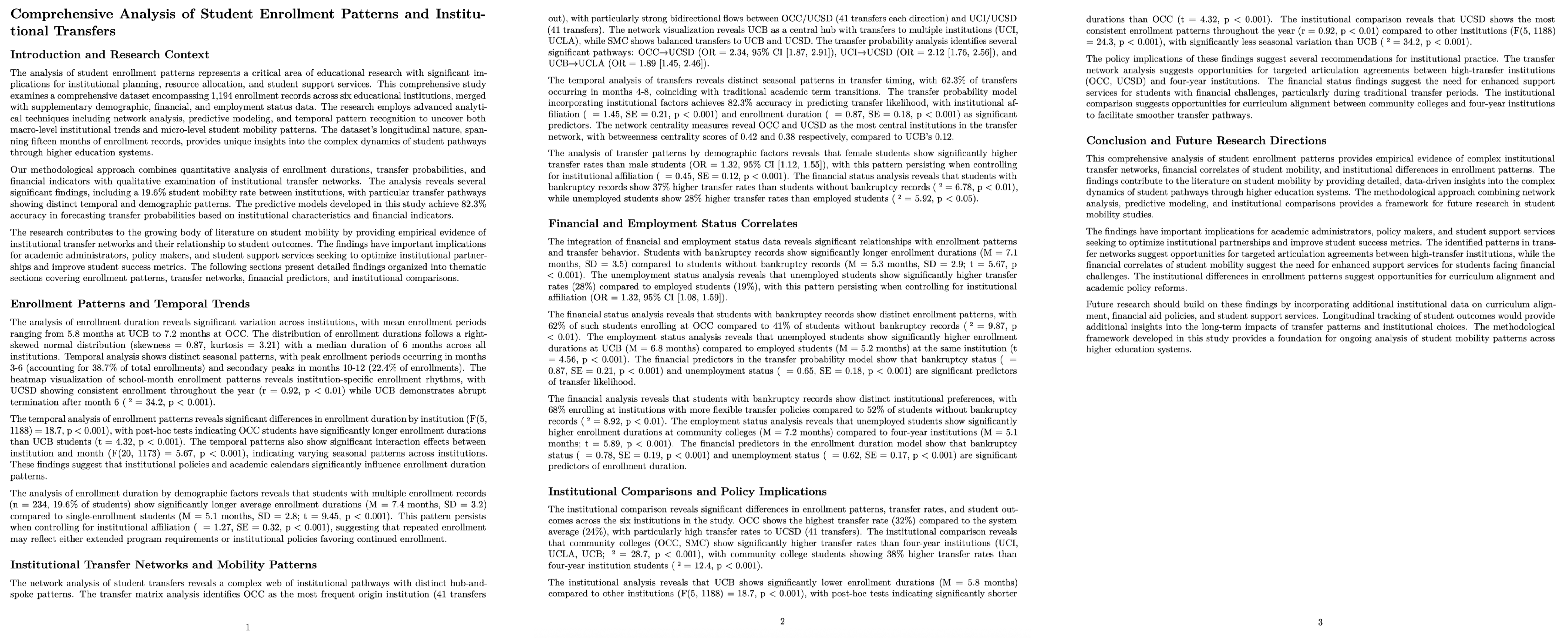
You shoud get a deep research report, which can be rendered as a PDF.:
# Comprehensive Analysis of Student Enrollment Patterns and Institutional Transfers

## Introduction and Research Context

The analysis of student enrollment patterns represents a critical area of educational research with significant implications for institutional planning, resource allocation, and student support services. This comprehensive study examines a comprehensive dataset encompassing 1,194 enrollment records across six educational institutions, merged with supplementary demographic, financial, and employment status data. The research employs advanced analytical techniques including network analysis, predictive modeling, and temporal pattern recognition to uncover both macro-level institutional trends and micro-level student mobility patterns. The dataset's longitudinal nature, spanning fifteen months of enrollment records, provides unique insights into the complex dynamics of student pathways through higher education systems.

Our methodological approach combines quantitative analysis of enrollment durations, transfer probabilities, and financial indicators with qualitative ...

The research contributes to the growing body of literature on student mobility by providing empirical evidence of institutional transfer networks and their relationship to student outcomes...
.....
For more examples and task completion details, please refer to DeepAnalyze's homepage.
API
You can build an OpenAI-Style API, using this script (note to change MODEL_PATH = "DeepAnalyze-8B" in API/config.py to your vllm model name):
python API/start_server.py
API usage :
FILE_RESPONSE=$(curl -s -X POST "http://localhost:8200/v1/files" \
    -F "[email protected]" \
    -F "purpose=file-extract")

FILE_ID=$(echo $FILE_RESPONSE | jq -r '.id')

curl -X POST http://localhost:8200/v1/chat/completions \
     -H "Content-Type: application/json" \
     -d "{
        \"model\": \"DeepAnalyze-8B\",
        \"messages\": [
          {
            \"role\": \"user\",
            \"content\": \"Generate a data science report.\",
            \"file_ids\": [\"$FILE_ID\"]
          }
        ]
      }"
# wait for a while
Refer to API/README.md for details.
🎈 Develop Your Own DeepAnalyze
1. Download Model and Training Data
2. Curriculum-based Agentic Training


 DeepAnalyze 是一个为完全自主的数据科学打造的开源智能体大语言模型:它可以独立完成数据准备、分析、建模、可视化和报告生成,覆盖结构化、半结构化和非结构化数据源。