



这是什么?
 OmniInfer 是一个跨平台推理引擎,用于在设备本地运行大语言模型(LLM)和视觉语言模型(VLM),是 Omni Studio 模型编排平台背后的推理层。
这是图形界面应用还是命令行工具?它是一个命令行工具,内置终端用户界面(TUI):运行 omniinfer 会打开 TUI,选择后端并加载模型用于聊天;运行 omniinfer serve 则会提供兼容 OpenAI 和 Anthropic 的 HTTP API。
它是一个命令行工具,内置终端用户界面(TUI):运行 omniinfer 会打开 TUI,选择后端并加载模型用于聊天;运行 omniinfer serve 则会提供兼容 OpenAI 和 Anthropic 的 HTTP API。怎么安装并开始使用?用对应平台的安装脚本安装(Linux/macOS 用 curl -fsSL ... | bash,Windows 在 PowerShell 中用 irm ... | iex),然后运行 omniinfer,让它选择兼容的后端,挑一个本地模型,就可以开始聊天了。
用对应平台的安装脚本安装(Linux/macOS 用 curl -fsSL ... | bash,Windows 在 PowerShell 中用 irm ... | iex),然后运行 omniinfer,让它选择兼容的后端,挑一个本地模型,就可以开始聊天了。推理后端需要我自己安装吗?通常不需要。TUI 可以为你安装可用的预编译运行时,这些运行时来自 llama.cpp、MNN、MLX 或 TurboQuant 等引擎;非常新的模型在对应的预编译版本发布之前,可能需要手动从源码编译后端。
通常不需要。TUI 可以为你安装可用的预编译运行时,这些运行时来自 llama.cpp、MNN、MLX 或 TurboQuant 等引擎;非常新的模型在对应的预编译版本发布之前,可能需要手动从源码编译后端。所有后端和运行时在每种设备上都能用吗?不能。运行时是否可用取决于设备和加速器,因此需要用 omniinfer backend list 进行检查。另外,在对应的预编译运行时发布之前,首日(day-0)的模型支持有时只能通过源码编译的后端实现。
不能。运行时是否可用取决于设备和加速器,因此需要用 omniinfer backend list 进行检查。另外,在对应的预编译运行时发布之前,首日(day-0)的模型支持有时只能通过源码编译的后端实现。能把它嵌入到手机应用里吗?可以。除了适用于 Linux、macOS 和 Windows 的桌面/服务器 CLI,OmniInfer 还提供 Android Gradle 模块和 iOS Swift 包,便于直接在移动应用中嵌入原生的本地推理能力。
可以。除了适用于 Linux、macOS 和 Windows 的桌面/服务器 CLI,OmniInfer 还提供 Android Gradle 模块和 iOS Swift 包,便于直接在移动应用中嵌入原生的本地推理能力。我的数据会离开设备吗?不会。OmniInfer 专为私密的、完全本地的 LLM 和 VLM 推理而设计,它只在设备本机上提供兼容 OpenAI 和 Anthropic 的 API。
不会。OmniInfer 专为私密的、完全本地的 LLM 和 VLM 推理而设计,它只在设备本机上提供兼容 OpenAI 和 Anthropic 的 API。兼容 OpenAI 和 Anthropic 的 API 有什么用?运行 omniinfer serve 会提供一个模仿 OpenAI 和 Anthropic API 的本地 HTTP 端点,因此为这些服务编写的现有工具和 SDK 可以直接指向你的本地模型。
运行 omniinfer serve 会提供一个模仿 OpenAI 和 Anthropic API 的本地 HTTP 端点,因此为这些服务编写的现有工具和 SDK 可以直接指向你的本地模型。vla-libero 示例是什么?这是一个可选示例:它通过 OmniInfer 的 vla.cpp 运行时,在 LIBERO 模拟器中运行 SmolVLA 视觉-语言-动作策略,并在浏览器仪表板中展示摄像头画面、预测动作和延迟。
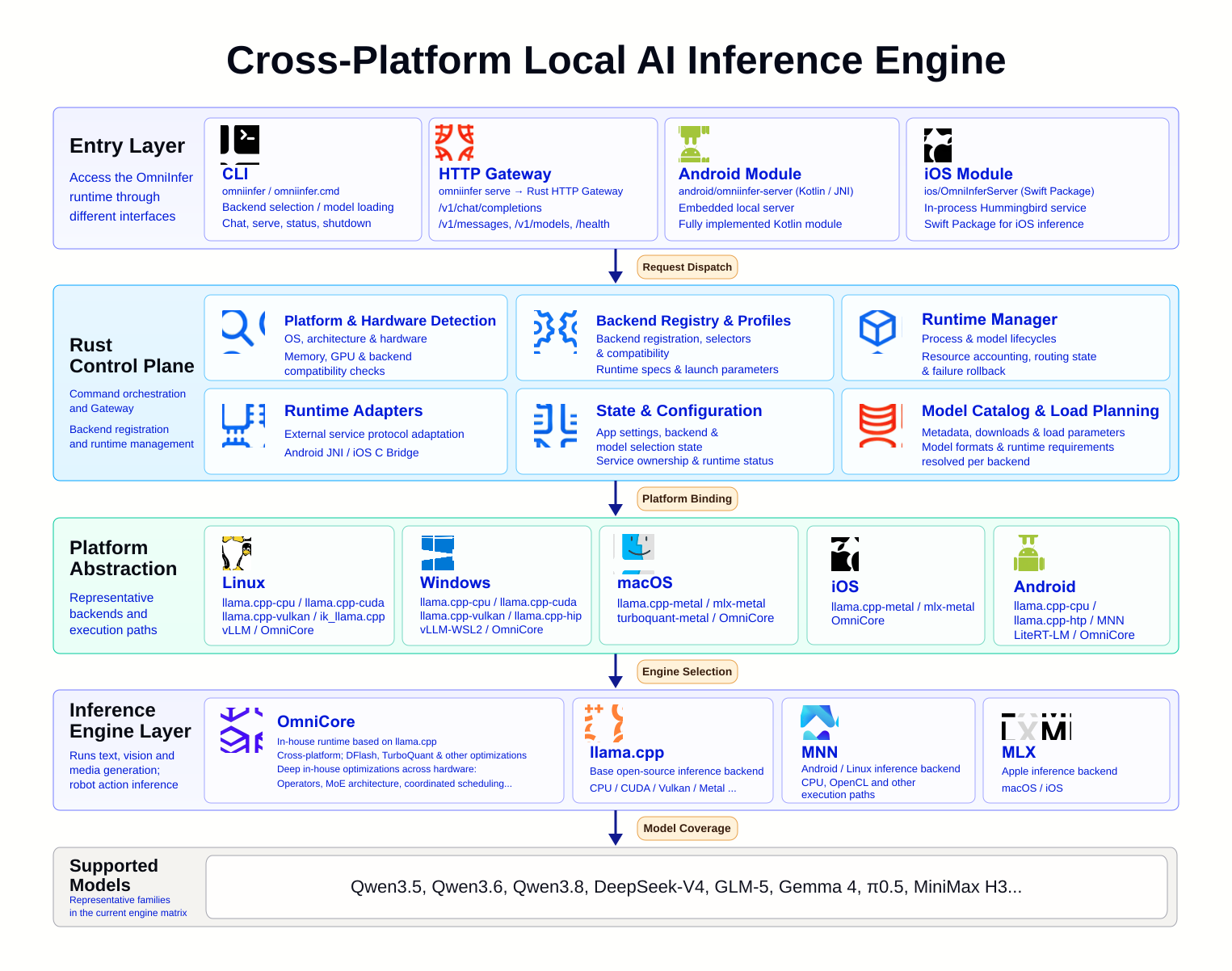
这是一个可选示例:它通过 OmniInfer 的 vla.cpp 运行时,在 LIBERO 模拟器中运行 SmolVLA 视觉-语言-动作策略,并在浏览器仪表板中展示摄像头画面、预测动作和延迟。为什么 OmniInfer 支持这么多后端引擎?不同的硬件和操作系统组合适合不同的运行时(如 llama.cpp、MLX、MNN、TurboQuant 等),因此 OmniInfer 会自动切换到在某台设备上运行效果最好的引擎。
不同的硬件和操作系统组合适合不同的运行时(如 llama.cpp、MLX、MNN、TurboQuant 等),因此 OmniInfer 会自动切换到在某台设备上运行效果最好的引擎。Omni Studio 是什么?它是 README 中提到的一个统一模型编排平台;OmniInfer 是它的底层推理层,负责实际的设备端模型运行。
它是 README 中提到的一个统一模型编排平台;OmniInfer 是它的底层推理层,负责实际的设备端模型运行。有哪些类似的项目?turbo-fieldfare, GLM-5.3-Flash-EXL3-2x-DGX-Sparks-TensorFold, xn-ptts, Strata, project-maya, uzu, nobodywho, Janus
turbo-fieldfare, GLM-5.3-Flash-EXL3-2x-DGX-Sparks-TensorFold, xn-ptts, Strata, project-maya, uzu, nobodywho, Janus它属于哪些主题?vla, vision-language-model, edge-ai, llm-inference, multimodal, tui, local-llm, openai-compatible, inference, offline, mobile, anthropic
vla, vision-language-model, edge-ai, llm-inference, multimodal, tui, local-llm, openai-compatible, inference, offline, mobile, anthropic