LLM Wiki

A personal knowledge base that builds itself.
LLM reads your documents, builds a structured wiki, and keeps it current.
What is this? •
Features •
Tech Stack •
Installation •
Credits •
License
English | 中文 | 日本語 | 한국어
Features
- Two-Step Chain-of-Thought Ingest — LLM analyzes first, then generates wiki pages with source traceability and incremental cache
- Multimodal Image Ingestion — extract embedded images from PDFs, generate factual captions with a vision LLM, surface them in image-aware search results with lightbox preview and jump-to-source
- Multi-format Document Parsing — ingest PDF, Office documents, EPUB/MOBI, Org mode, images, media, web clips, and batches of URLs, with built-in, cloud, or local MinerU PDF processing
- Flexible Model Configuration — configure models per project, route Chat and Ingest independently, and manage custom providers, headers, and streaming output
- Source-grounded Retrieval — use Read Sources Only mode to answer exclusively from original imported material
- Project Management & Migration — export and import complete project archives across devices, and rebuild the Wiki index from existing pages
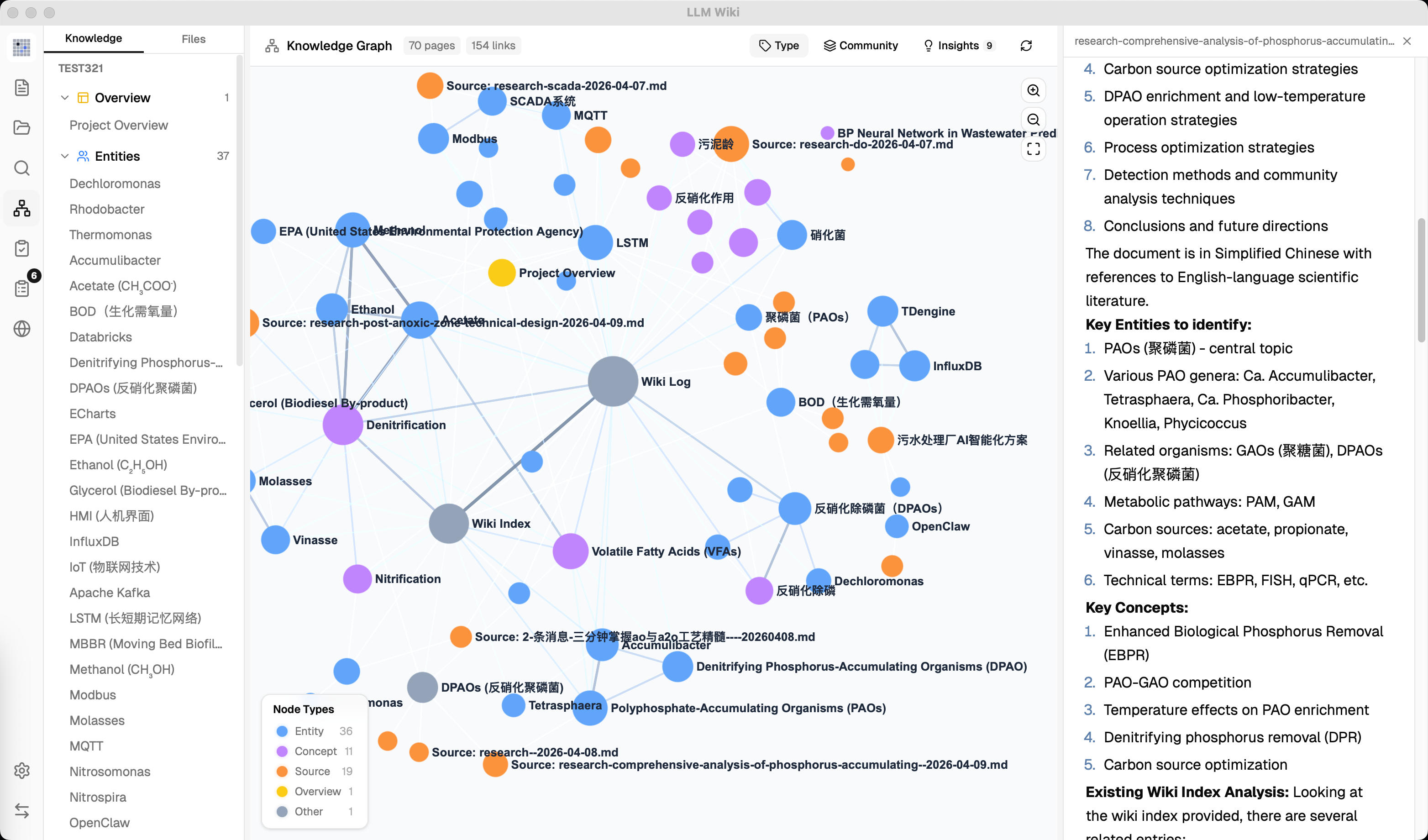
- 4-Signal Knowledge Graph — relevance model with direct links, source overlap, Adamic-Adar, and type affinity
- Louvain Community Detection — automatic knowledge cluster discovery with cohesion scoring
- Graph Insights — surprising connections and knowledge gaps with one-click Deep Research
- Vector Semantic Search — optional embedding-based retrieval via LanceDB, supports any OpenAI-compatible endpoint
- Persistent Ingest Queue — serial processing with crash recovery, cancel, retry, and progress visualization
- Folder Import — recursive folder import preserving directory structure, folder context as LLM classification hint
- Source Folder Auto-Watch — detects external changes in
raw/sources/ and keeps ingest/delete cleanup in sync
- Deep Research — LLM-optimized search topics, multi-query web search via Tavily, SerpApi, or SearXNG, auto-ingest results into wiki
- Rust Backend Chat Agent — tool-using chat runtime with wiki/source/graph/web retrieval, workspace file generation, shell approval, cancellation, and streaming tool events
- Agent Skills — scan and enable local
SKILL.md folders, select skills with /skill, and let the Agent read skill instructions on demand
- Generated Outputs Preview — Agent-created Markdown, HTML, images, and other workspace files appear as outputs with preview and quick folder access
- Mermaid Diagram Rendering — render Mermaid code blocks directly in chat and preview, with compact syntax-error cards instead of raw parser output
- Async Review System — LLM flags items for human judgment, predefined actions, pre-generated search queries
- Chrome Web Clipper — one-click web page capture with auto-ingest into knowledge base
- Local HTTP API + MCP Server + AI Agent Skill — built-in
127.0.0.1:19828 JSON API and bundled MCP server for hybrid search, file read, graph traversal, and source rescan; ready-made agent skill installs into Claude Code / Codex with one command (npx skills add …)
What is this?
LLM Wiki is a cross-platform desktop application that turns your documents into an organized, interlinked knowledge base — automatically. Instead of traditional RAG (retrieve-and-answer from scratch every time), the LLM incrementally builds and maintains a persistent wiki from your sources. Knowledge is compiled once and kept current, not re-derived on every query.
This project is based on Karpathy's LLM Wiki pattern — a methodology for building personal knowledge bases using LLMs. llm_wiki is created and maintained by nash_su, who implemented the core ideas as a full desktop application with significant enhancements.
Credits
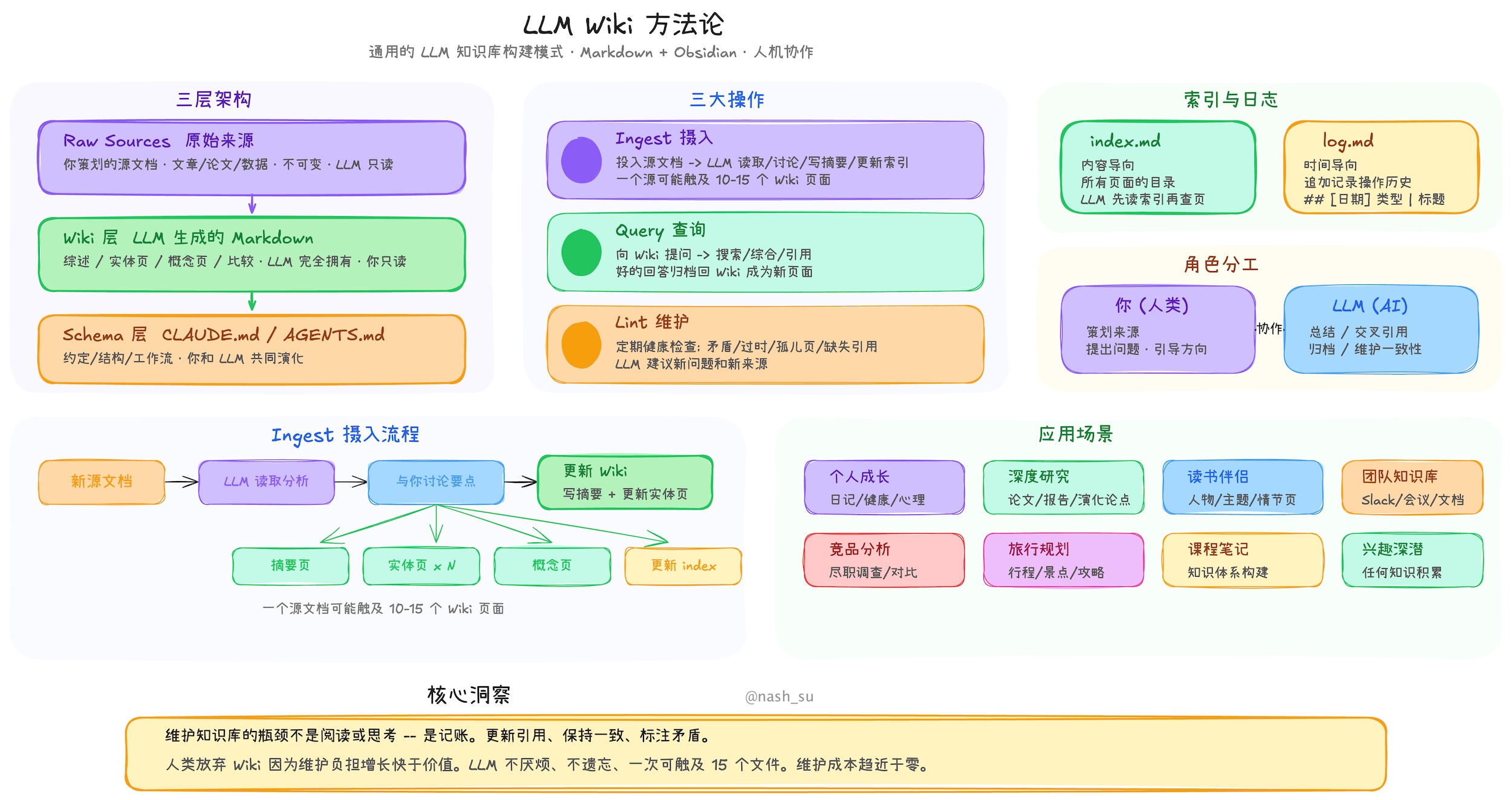
The foundational methodology comes from Andrej Karpathy's llm-wiki.md, which describes the pattern of using LLMs to incrementally build and maintain a personal wiki. The original document is an abstract design pattern; this project is a concrete implementation with substantial extensions.
What We Kept from the Original
The core architecture follows Karpathy's design faithfully:
- Three-layer architecture: Raw Sources (immutable) → Wiki (LLM-generated) → Schema (rules & config)
- Three core operations: Ingest, Query, Lint
- index.md as the content catalog and LLM navigation entry point
- log.md as the chronological operation record with parseable format
- [[wikilink]] syntax for cross-references
- YAML frontmatter on every wiki page
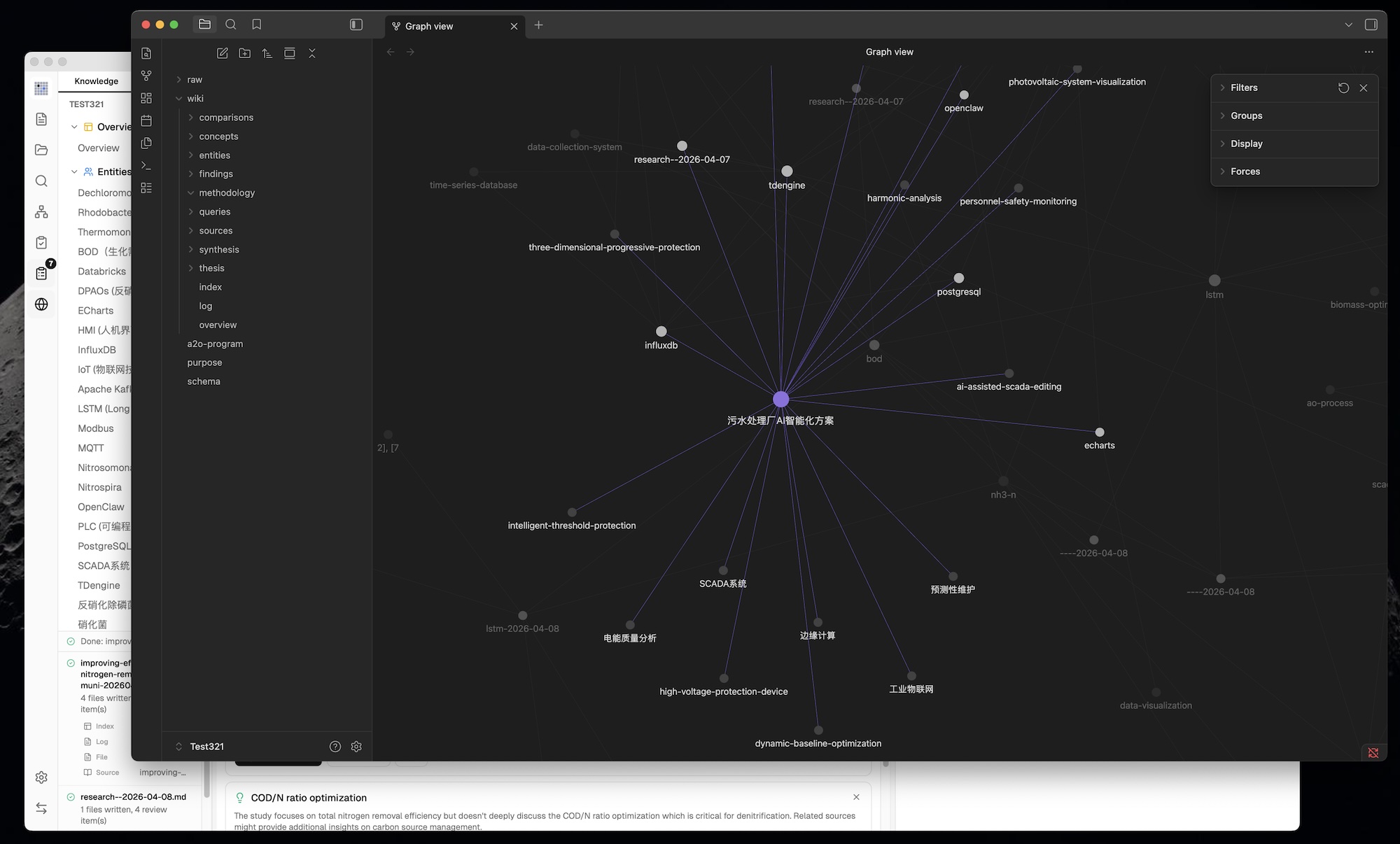
- Obsidian compatibility — the wiki directory works as an Obsidian vault
- Human curates, LLM maintains — the fundamental role division
What We Changed & Added
1. From CLI to Desktop Application
The original is an abstract pattern document designed to be copy-pasted to an LLM agent. We built it into a full cross-platform desktop application with:
- Three-column layout: Knowledge Tree / File Tree (left) + Chat (center) + Preview (right)
- Icon sidebar for switching between Wiki, Sources, Search, Graph, Lint, Review, Deep Research, Settings
- Custom resizable panels — drag-to-resize left and right panels with min/max constraints
- Activity panel — real-time processing status showing file-by-file ingest progress
- All state persisted — conversations, settings, review items, project config survive restarts
- Scenario templates — Research, Reading, Personal Growth, Business, General — each pre-configures purpose.md and schema.md
2. Purpose.md — The Wiki's Soul
The original has Schema (how the wiki works) but no formal place for why the wiki exists. We added purpose.md:
- Defines goals, key questions, research scope, evolving thesis
- LLM reads it during every ingest and query for context
- LLM can suggest updates based on usage patterns
- Different from schema — schema is structural rules, purpose is directional intent
3. Two-Step Chain-of-Thought Ingest
The original describes a single-step ingest where the LLM reads and writes simultaneously. We split it into two sequential LLM calls for significantly better quality:
Step 1 (Analysis): LLM reads source → structured analysis
  - Key entities, concepts, arguments
  - Connections to existing wiki content
  - Contradictions & tensions with existing knowledge
  - Recommendations for wiki structure

Step 2 (Generation): LLM takes analysis → generates wiki files
  - Source summary with frontmatter (type, title, sources[])
  - Entity pages, concept pages with cross-references
  - Updated index.md, log.md, overview.md
  - Review items for human judgment
  - Search queries for Deep Research
Additional ingest enhancements beyond the original:
- SHA256 incremental cache — source file content is hashed before ingest; unchanged files are skipped automatically, saving LLM tokens and time
- Persistent ingest queue — serial processing prevents concurrent LLM calls; queue persisted to disk, survives app restart; failed tasks auto-retry up to 3 times
- Folder import — recursive folder import preserving directory structure; folder path passed to LLM as classification context (e.g., "papers > energy" helps categorize content)
- Source folder auto-watch — files added, edited, or deleted in
raw/sources/ outside the app are picked up automatically and reuse the same ingest/delete lifecycle as in-app actions
- Queue visualization — Activity Panel shows progress bar, pending/processing/failed tasks with cancel and retry buttons
- Auto-embedding — when vector search is enabled, new pages are automatically embedded after ingest
- Source traceability — every generated wiki page includes a
sources: [] field in YAML frontmatter, linking back to the raw source files that contributed to it
- overview.md auto-update — global summary page regenerated on every ingest to reflect the latest state of the wiki
- Guaranteed source summary — fallback ensures a source summary page is always created, even if the LLM omits it
- Language-aware generation — LLM responds in the user's configured language (English or Chinese)
- Progressive Sources view — large source folders render progressively while scrolling, keeping big source collections responsive
4. Knowledge Graph with Relevance Model
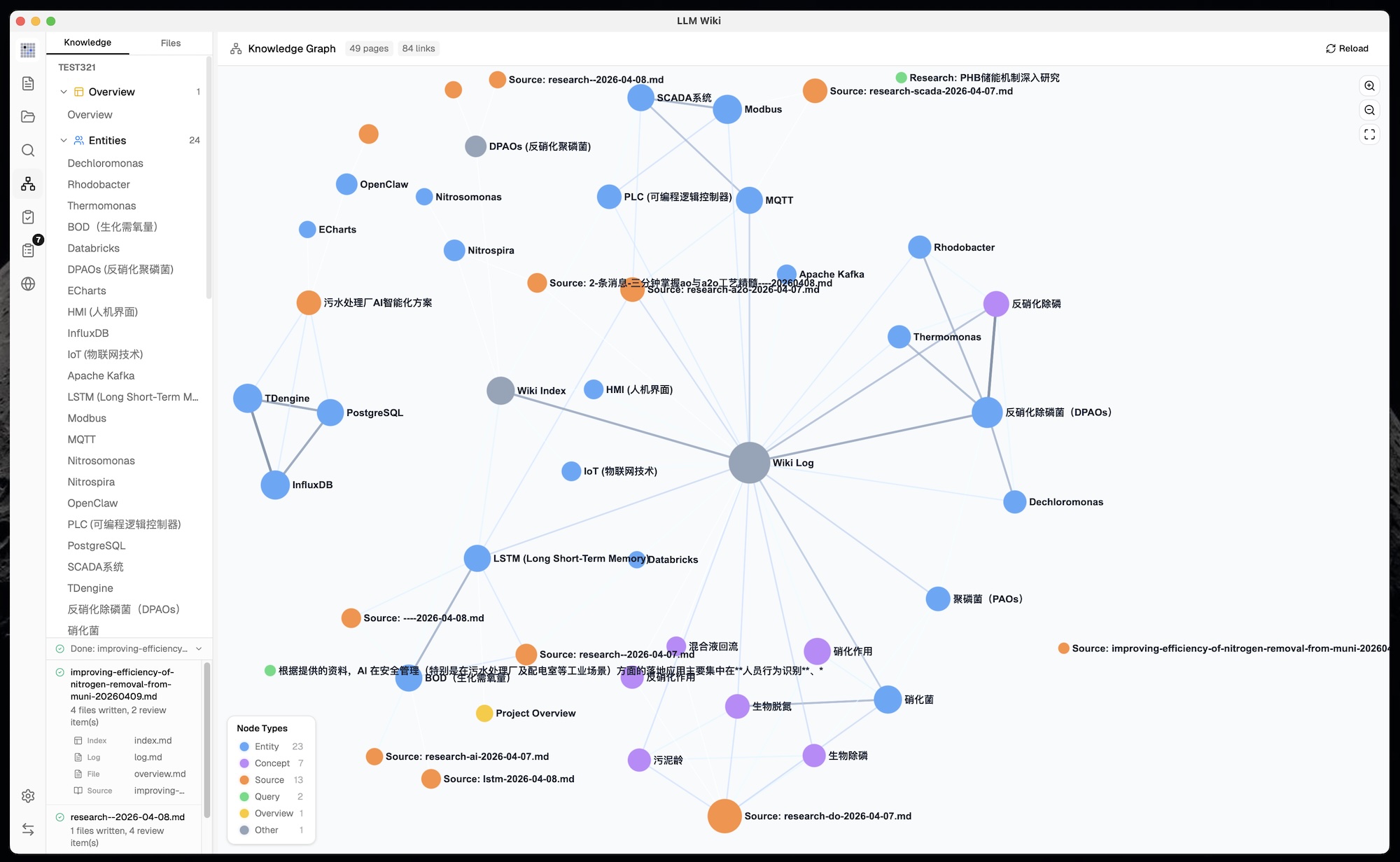
The original mentions [[wikilinks]] for cross-references but has no graph analysis. We built a full knowledge graph visualization and relevance engine:
4-Signal Relevance Model:
| Signal |
Weight |
Description |
| Direct link |
×3.0 |
Pages linked via [[wikilinks]] |
| Source overlap |
×4.0 |
Pages sharing the same raw source (via frontmatter sources[]) |
| Adamic-Adar |
×1.5 |
Pages sharing common neighbors (weighted by neighbor degree) |
| Type affinity |
×1.0 |
Bonus for same page type (entity↔entity, concept↔concept) |
Graph Visualization (sigma.js + graphology + ForceAtlas2):
- Node colors by page type or community, sizes scaled by link count (√ scaling)
- Edge thickness and color by relevance weight (green=strong, gray=weak)
- Hover interaction: neighbors stay visible, non-neighbors dim, edges highlight with relevance score label
- Zoom controls (ZoomIn, ZoomOut, Fit-to-screen)
- Position caching prevents layout jumps when data updates
- Legend switches between type counts and community info based on coloring mode
Not in the original. Automatic discovery of knowledge clusters using the Louvain algorithm (graphology-communities-louvain):
- Auto-clustering — discovers which pages naturally group together based on link topology, independent of predefined page types
- Type / Community toggle — switch between coloring nodes by page type (entity, concept, source...) or by discovered knowledge cluster
- Cohesion scoring — each community scored by intra-edge density (actual edges / possible edges); low-cohesion clusters (< 0.15) flagged with warning
- 12-color palette — distinct visual separation between clusters
- Community legend — shows top node label, member count, and cohesion per cluster
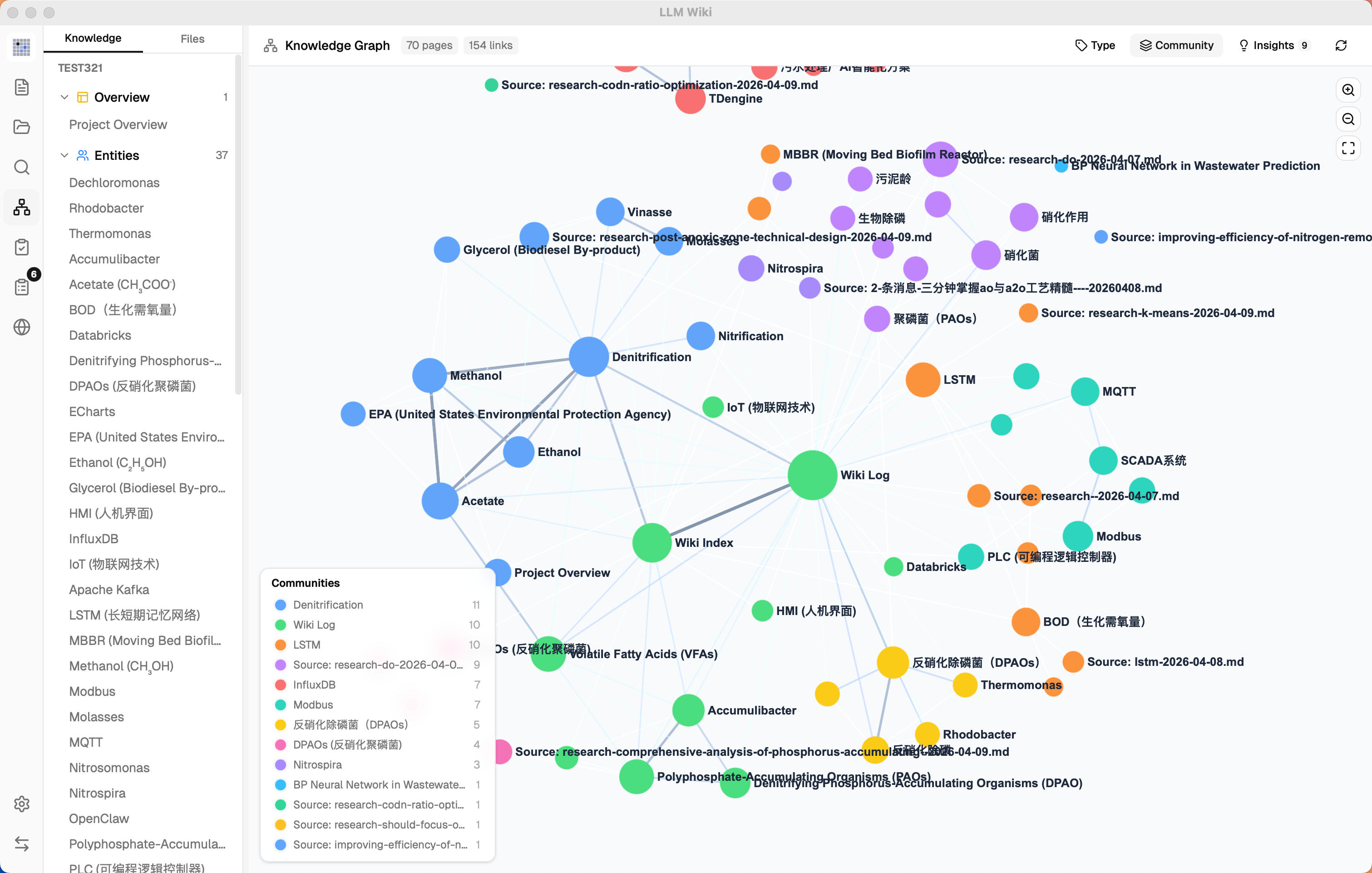
6. Graph Insights — Surprising Connections & Knowledge Gaps
Not in the original. The system automatically analyzes graph structure to surface actionable insights:
Surprising Connections:
- Detects unexpected relationships: cross-community edges, cross-type links, peripheral↔hub couplings
- Composite surprise score ranks the most noteworthy connections
- Dismissable — mark connections as reviewed so they don't reappear
Knowledge Gaps:
- Isolated pages (degree ≤ 1) — pages with few or no connections to the rest of the wiki
- Sparse communities (cohesion < 0.15, ≥ 3 pages) — knowledge areas with weak internal cross-references
- Bridge nodes (connecting 3+ clusters) — critical junction pages that hold multiple knowledge areas together
Interactive:
- Click any insight card to highlight corresponding nodes and edges in the graph; click again to deselect
- Knowledge gaps and bridge nodes have a Deep Research button — triggers LLM-optimized research with domain-aware topics (reads overview.md + purpose.md for context)
- Research topic shown in editable confirmation dialog before starting — user can refine topic and search queries
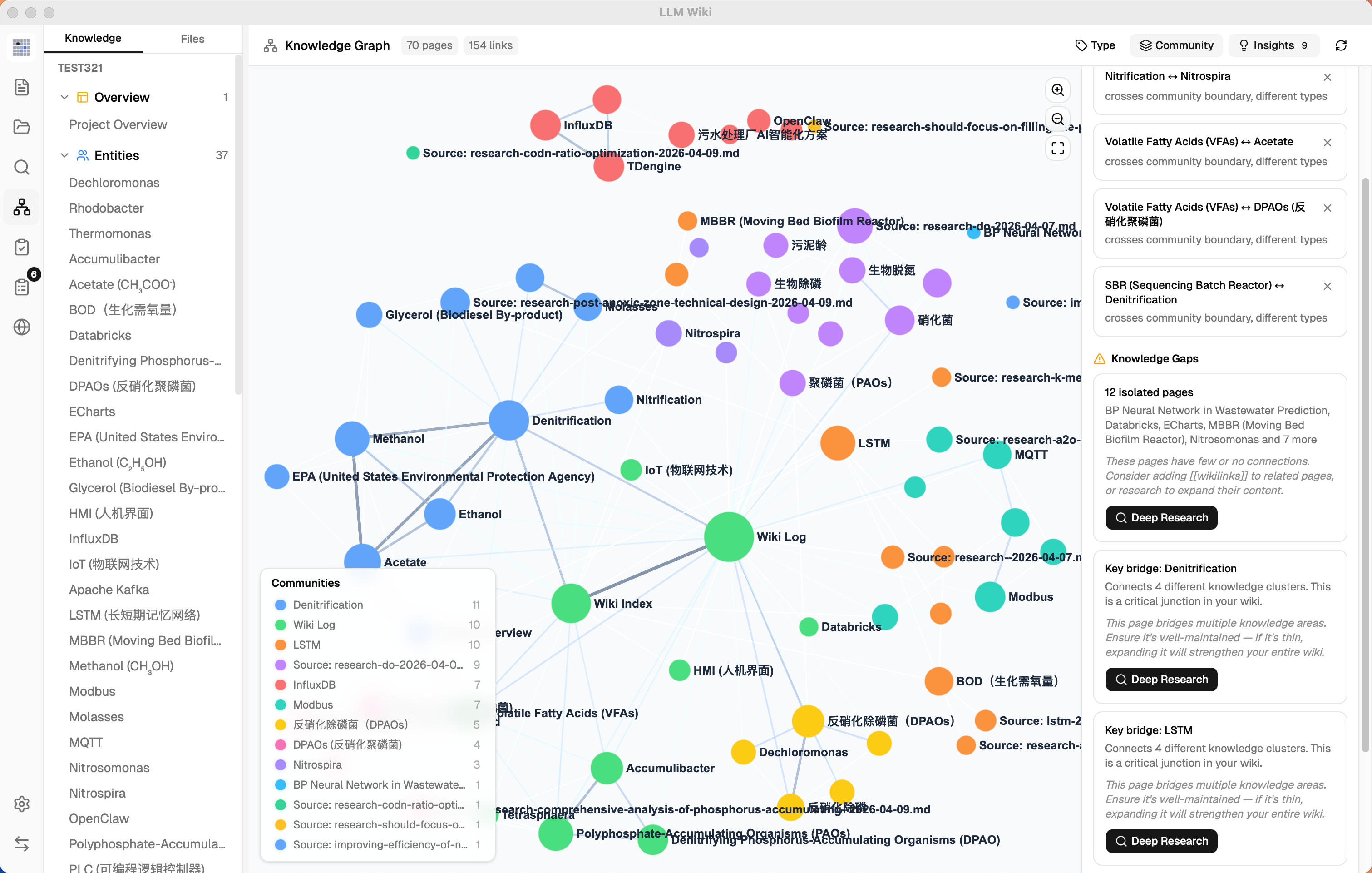
7. Optimized Query Retrieval Pipeline
The original describes a simple query where the LLM reads relevant pages. We built a multi-phase retrieval pipeline with optional vector search and budget control:
Phase 1: Tokenized Search
  - English: word splitting + stop word removal
  - Chinese: CJK bigram tokenization (每个 → [每个, 个…])
  - Title match bonus (+10 score)
  - Searches both wiki/ and raw/sources/

Phase 1.5: Vector Semantic Search (optional)
  - Embedding via any OpenAI-compatible /v1/embeddings endpoint
  - Stored in LanceDB (Rust backend) for fast ANN retrieval
  - Cosine similarity finds semantically related pages even without keyword overlap
  - Results merged into search: boosts existing matches + adds new discoveries

Phase 2: Graph Expansion
  - Top search results used as seed nodes
  - 4-signal relevance model finds related pages
  - 2-hop traversal with decay for deeper connections

Phase 3: Budget Control
  - Configurable context window: 4K → 1M tokens
  - Proportional allocation: 60% wiki pages, 20% chat history, 5% index, 15% system
  - Pages prioritized by combined search + graph relevance score

Phase 4: Context Assembly
  - Numbered pages with full content (not just summaries)
  - System prompt includes: purpose.md, language rules, citation format, index.md
  - LLM instructed to cite pages by number: [1], [2], etc.
Vector Search is fully optional — disabled by default, enabled in Settings with independent endpoint, API key, and model configuration. When disabled, the pipeline falls back to tokenized search + graph expansion. Benchmark: overall recall improved from 58.2% to 71.4% with vector search enabled.
8. Multi-Conversation Chat with Persistence
The original has a single query interface. We built full multi-conversation support:
- Independent chat sessions — create, rename, delete conversations
- Conversation sidebar — quick switching between topics
- Per-conversation persistence — each conversation saved to
.llm-wiki/chats/{id}.json
- Configurable history depth — limit how many messages are sent as context (default: 10)
- Cited references panel — collapsible section on each response showing which wiki pages were used, grouped by type with icons
- Reference persistence — cited pages stored directly in message data, stable across restarts
- Regenerate — re-generate the last response with one click (removes last assistant + user message pair, re-sends)
- Save to Wiki — archive valuable answers to
wiki/queries/, then auto-ingest to extract entities/concepts into the knowledge network
9. Rust Backend Chat Agent & Skills
Not in the original. Chat now runs through a Rust backend Agent runtime rather than a browser-only TypeScript loop:
- Tool-using Agent — can choose wiki search, source search, graph search, web search, AnyTXT, workspace file tools, approved shell commands, and skill file reads
- Skill management — scan project and user skill folders, enable or disable skills, and pick a skill per conversation with
/skill completion
- Generated workspace outputs — files produced by Agent tools are kept under
agent-workspace/, shown as generated outputs, and can be previewed or opened from the chat
- User interaction forms — skills can ask for structured user input such as single choice, multiple choice, or free text without hardcoding skill-specific UI
- Safer execution model — project workspace commands can continue smoothly, while external shell commands still require explicit approval
10. Thinking / Reasoning Display
Not in the original. For LLMs that emit <think> blocks (DeepSeek, QwQ, etc.):
- Streaming thinking — rolling 5-line display with opacity fade during generation
- Collapsed by default — thinking blocks hidden after completion, click to expand
- Visual separation — thinking content shown in distinct style, separate from the main response
11. Markdown Rendering: KaTeX Math & Mermaid Diagrams
Not in the original. Rich Markdown rendering across chat and preview:
- KaTeX rendering — inline
$...$ and block $$...$$ formulas rendered via remark-math + rehype-katex
- Milkdown math plugin — preview editor renders math natively via @milkdown/plugin-math
- Auto-detection — bare
\begin{aligned} and other LaTeX environments automatically wrapped with $$ delimiters
- Unicode fallback — 100+ symbol mappings (α, ∑, →, ≤, etc.) for simple inline notation outside math blocks
- Mermaid code blocks — fenced
mermaid diagrams render directly as flowcharts, sequence diagrams, and other Mermaid-supported visuals
- Compact Mermaid errors — syntax failures are captured inside a small error card instead of spilling raw parser output into the chat
12. Review System (Async Human-in-the-Loop)
The original suggests staying involved during ingest. We added an asynchronous review queue:
- LLM flags items needing human judgment during ingest
- Predefined action types: Create Page, Deep Research, Skip — constrained to prevent LLM hallucination of arbitrary actions
- Search queries generated at ingest time — LLM pre-generates optimized web search queries for each review item
- User handles reviews at their convenience — doesn't block ingest
13. Deep Research
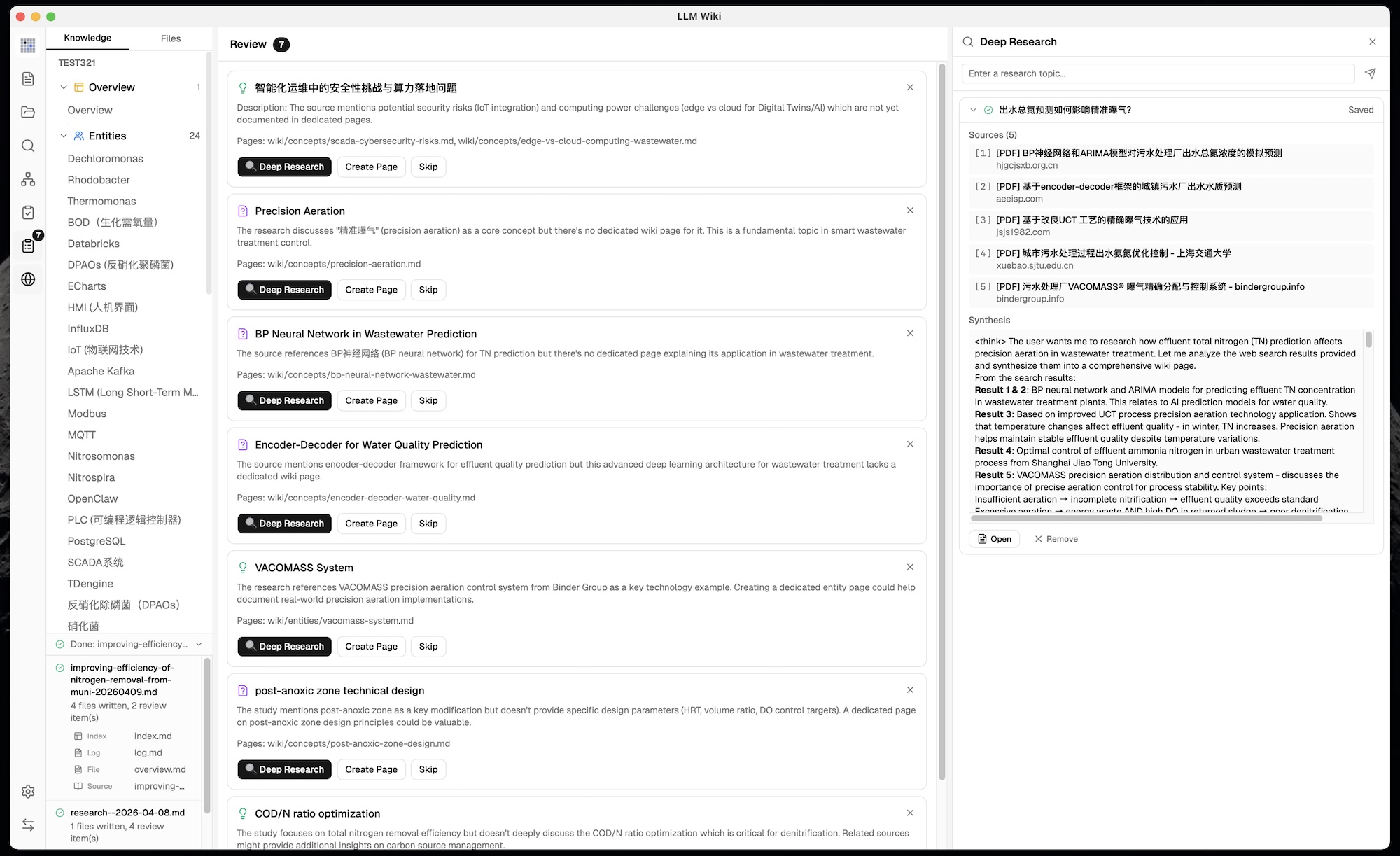
Not in the original. When the LLM identifies knowledge gaps:
- Web search via Tavily, SerpApi, or SearXNG finds relevant sources with full content extraction (no truncation)
- Provider-specific configuration — Tavily and SerpApi use independent API keys; SerpApi supports selectable engines, while SearXNG uses a configured instance URL and search categories
- Multiple search queries per topic — LLM-generated at ingest time, optimized for search engines
- LLM-optimized research topics — when triggered from Graph Insights, LLM reads overview.md + purpose.md to generate domain-specific topics and queries (not generic keywords)
- User confirmation dialog — editable topic and search queries shown for review before research starts
- LLM synthesizes findings into a wiki research page with cross-references to existing wiki
- Thinking display —
<think> blocks shown as collapsible sections during synthesis, auto-scroll to latest content
- Auto-ingest — research results automatically processed to extract entities/concepts into the wiki
- Task queue with 3 concurrent tasks
- Research Panel — dedicated sidebar panel with dynamic height, real-time streaming progress
14. Browser Extension (Web Clipper)
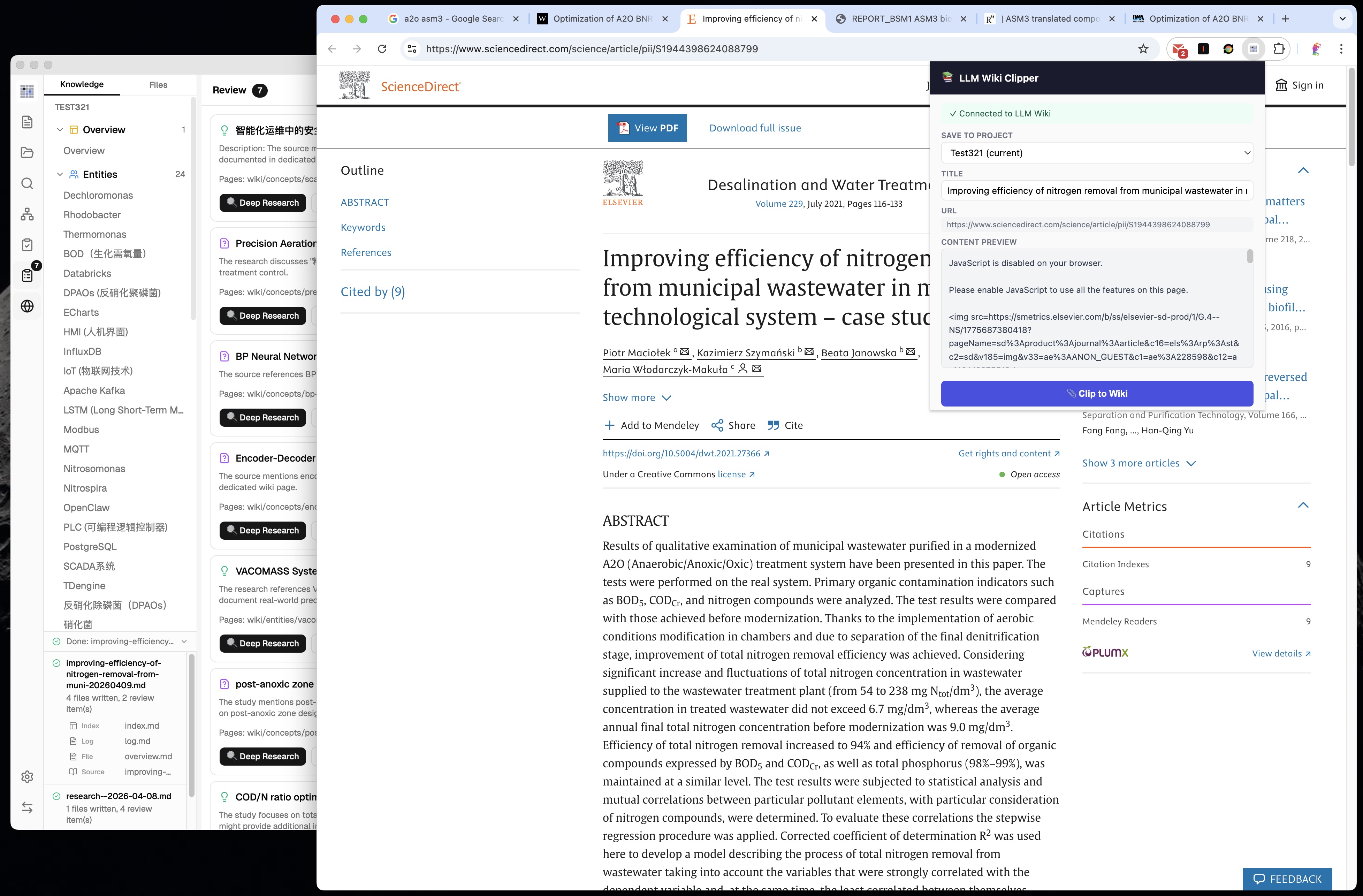
The original mentions Obsidian Web Clipper. We built a dedicated Chrome Extension (Manifest V3):
- Mozilla Readability.js for accurate article extracti

 LLM Wiki 是一款跨平台桌面应用,能把你的文档变成持久保存、相互链接的知识库。它不像传统 RAG 那样每次都从头推导答案,而是由 LLM 增量地构建并持续更新你所有资料的 Wiki。