


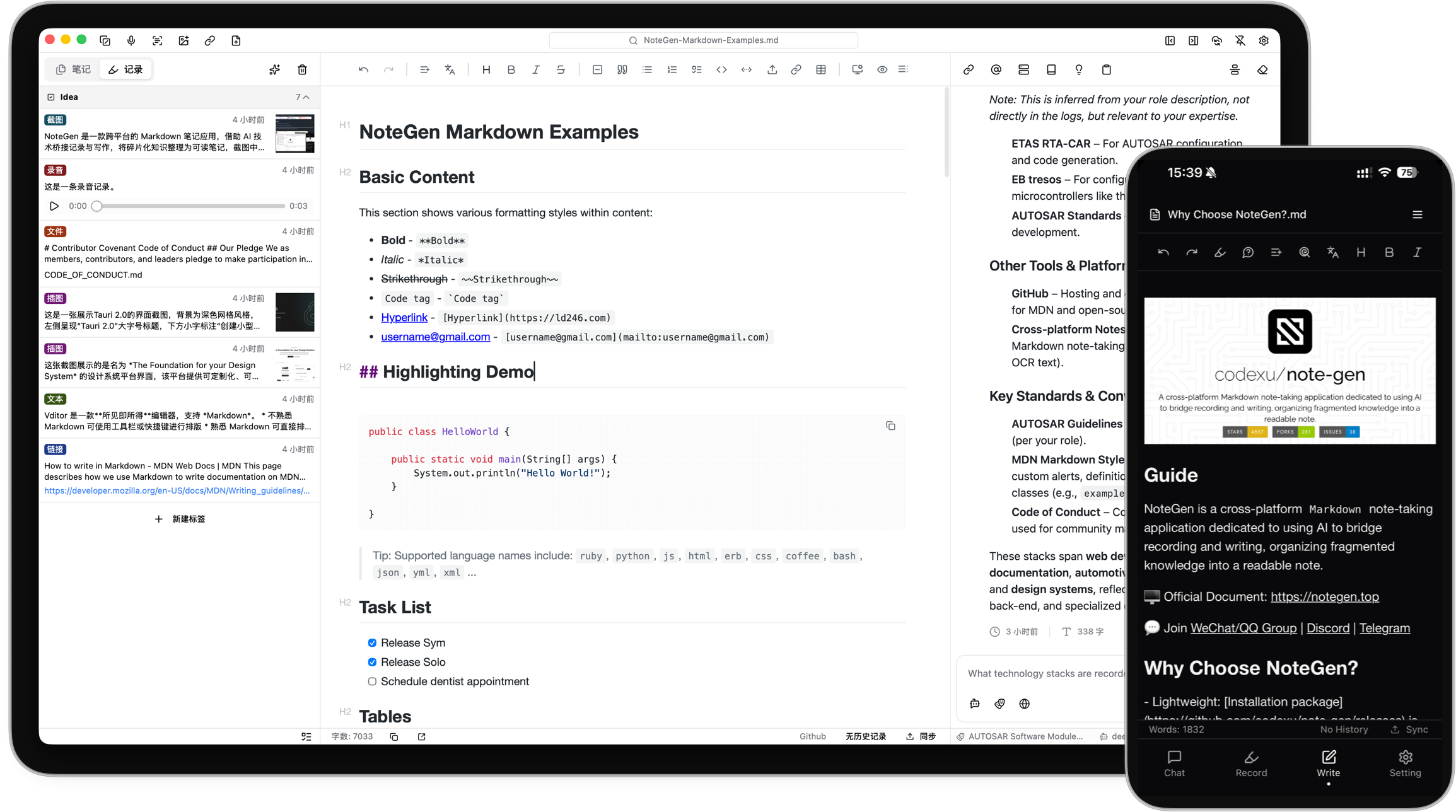



What is this?
 NoteGen is a local-first Markdown note app that lets you quickly capture scattered fragments like text, voice recordings, screenshots, links, or files, then use AI later to organize them into structured notes.
NoteGen is a local-first Markdown note app that lets you quickly capture scattered fragments like text, voice recordings, screenshots, links, or files, then use AI later to organize them into structured notes.Is this a standalone app or a plugin for another editor?It is a standalone cross-platform app built with Tauri (desktop) plus native mobile builds, not a plugin or library. Your notes stay as ordinary Markdown files you can also open in any other editor or keep in Git.
It is a standalone cross-platform app built with Tauri (desktop) plus native mobile builds, not a plugin or library. Your notes stay as ordinary Markdown files you can also open in any other editor or keep in Git.How do I get it running?Download the build for your platform (Windows, macOS Apple Silicon/Intel, Linux AppImage/DEB/RPM, Android APK, or join the iOS TestFlight), then pick a workspace folder where your Markdown files will live.
Download the build for your platform (Windows, macOS Apple Silicon/Intel, Linux AppImage/DEB/RPM, Android APK, or join the iOS TestFlight), then pick a workspace folder where your Markdown files will live.Do I need to configure an AI provider before I can use it?No, you can capture and write notes without any AI setup. AI features like organizing records, chat, embeddings, OCR, or audio require configuring your own AI provider and models.
No, you can capture and write notes without any AI setup. AI features like organizing records, chat, embeddings, OCR, or audio require configuring your own AI provider and models.Are all the platform builds ready for daily use?Windows, macOS, and Linux builds are marked Beta, while Android is Alpha (ARM64 only) and iOS is Alpha via TestFlight only, so mobile support is still early.
Windows, macOS, and Linux builds are marked Beta, while Android is Alpha (ARM64 only) and iOS is Alpha via TestFlight only, so mobile support is still early.Where does my data actually live?Notes are plain Markdown files stored locally on your chosen workspace first. Cloud sync (GitHub, GitLab, Gitee, Gitea, S3-compatible storage, or WebDAV) is optional, and you can keep purely local backups instead.
Notes are plain Markdown files stored locally on your chosen workspace first. Cloud sync (GitHub, GitLab, Gitee, Gitea, S3-compatible storage, or WebDAV) is optional, and you can keep purely local backups instead.What makes the Canvas workspace different from the Markdown editor?Canvas is a separate visual workspace for flowcharts, mind maps, timelines, freehand drawings, and data charts, including diagrams generated from note content; elements stay editable after creation, even AI-suggested ones.
Canvas is a separate visual workspace for flowcharts, mind maps, timelines, freehand drawings, and data charts, including diagrams generated from note content; elements stay editable after creation, even AI-suggested ones.What is the knowledge base feature for?NoteGen can build a searchable knowledge base from your files combining semantic (vector) retrieval with local text search, so you can use a note, group of records, or the whole knowledge base as chat context instead of copy-pasting everything into a prompt.
NoteGen can build a searchable knowledge base from your files combining semantic (vector) retrieval with local text search, so you can use a note, group of records, or the whole knowledge base as chat context instead of copy-pasting everything into a prompt.How does syncing across multiple devices work?Since notes are local-first, syncing is optional: you connect NoteGen to a service you already use (GitHub, GitLab, Gitee, Gitea, S3-compatible storage, or WebDAV) to keep the same Markdown files in sync across devices.
Since notes are local-first, syncing is optional: you connect NoteGen to a service you already use (GitHub, GitLab, Gitee, Gitea, S3-compatible storage, or WebDAV) to keep the same Markdown files in sync across devices.What is MCP and Skills support used for here?NoteGen can connect to MCP servers and install Skills, giving its Agent mode extra tools to work through longer note-organizing tasks beyond simple chat.
NoteGen can connect to MCP servers and install Skills, giving its Agent mode extra tools to work through longer note-organizing tasks beyond simple chat.What are similar projects?solomd, siyuan, tolaria, open-knowledge, logseq, EnvoyMesh, atlas, edgeever
solomd, siyuan, tolaria, open-knowledge, logseq, EnvoyMesh, atlas, edgeeverWhich topics is it in?personal-knowledge-management, webdav, markdown-editor, vector-search, canvas, knowledge-management, note-taking, tauri, embeddings, plugin-system, knowledge-base, nextjs
personal-knowledge-management, webdav, markdown-editor, vector-search, canvas, knowledge-management, note-taking, tauri, embeddings, plugin-system, knowledge-base, nextjs